The Smell of Molten Projects in the Morning

Ed Nisley's Blog: Shop notes, electronics, firmware, machinery, 3D printing, laser cuttery, and curiosities. Contents: 100% human thinking, 0% AI slop.

Category: Machine Shop

Mechanical widgetry

  • Makerbot-style Endstop Power Adapter for Protoneer Arduino CNC Shield

    The Protoneer Arduino CNC shield (*) has a row of 2-pin headers for bare endstop switches. Being a big fan of LED Blinkiness, I have a stock of 3-pin Makerbot-style mechanical endstops that require a +5 V connection in addition to ground and the output.

    A crude-but-effective adapter consists of half a dozen header pins soldered to a length of stout copper wire, with a pigtail to a +5 V pin elsewhere on the board:

    3-pin to 2-pin Endstop Power Adapter
    3-pin to 2-pin Endstop Power Adapter

    A closer look:

    3-pin to 2-pin Endstop Power Adapter - detail
    3-pin to 2-pin Endstop Power Adapter – detail

    The pins get trimmed on the other side of the bus wire, because they don’t go through the PCB.

    Installed on the board, it doesn’t look like much:

    3-pin endstop adapter on Prontoneer board
    3-pin endstop adapter on Prontoneer board

    Looks like it needs either Kapton tape or epoxy, doesn’t it?

    Three more endstops at the far end of the MPCNC rails (for hard limits) will fill the unused header pins.

    (*) It’s significantly more expensive than the Chinese knockoffs, but in this case I cheerfully pay to support the guy: good stuff, direct from the source.

  • Prototype Board Holder: Now With Mounting Holes and Common Board Sizes

    The folks I’ve been coaching through their plotter build project showed it off at the local MiniMakerFaire this past weekend. Next time around, I’ll insist they secure their circuit boards and use good wiring techniques, so as to avoid destroying more stepper drivers.

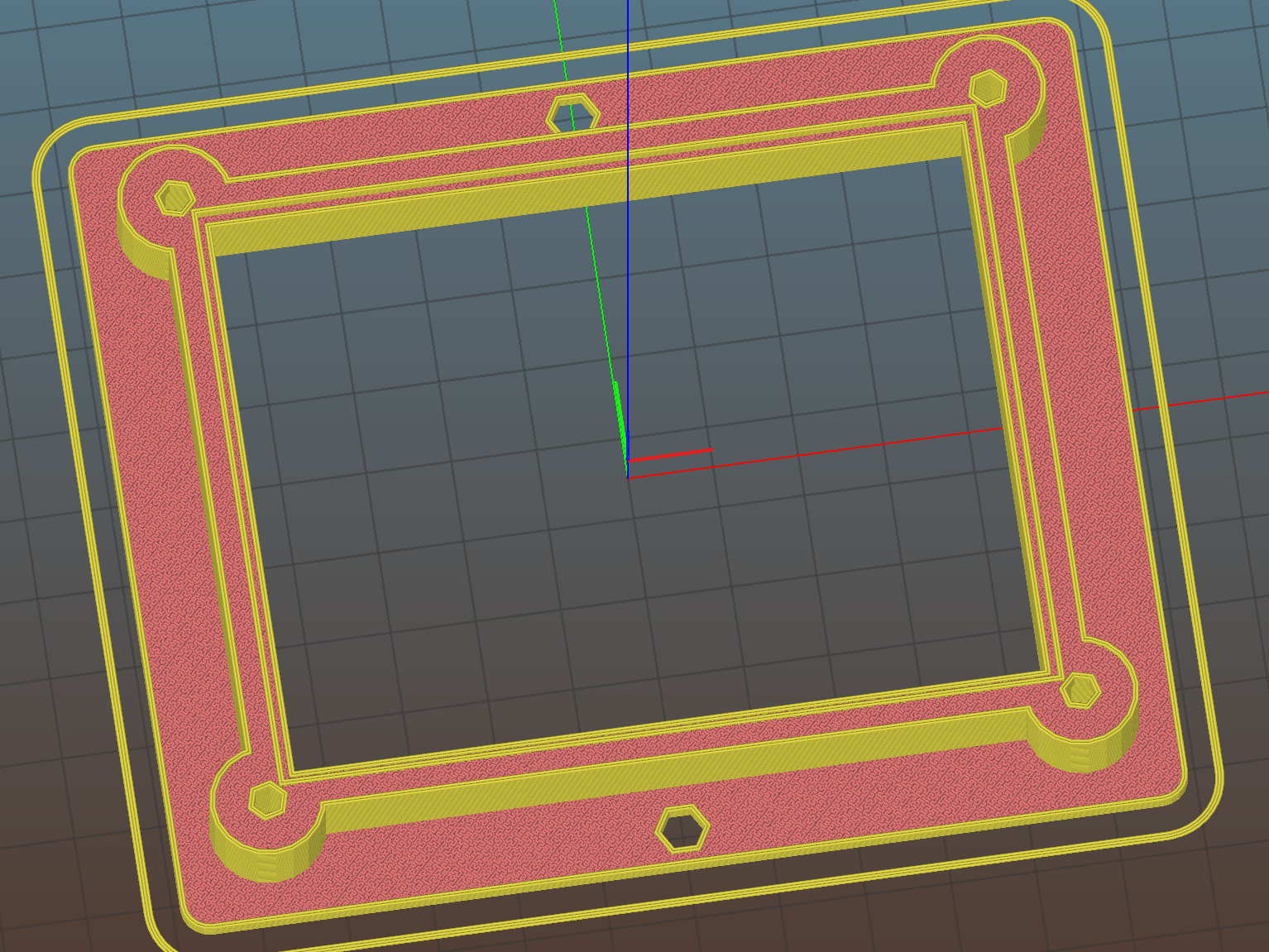
    To that end, adding mounting holes to my proto board holder seems in order:

    Proto Board Holder 90x70 - Flange mounting holes - Slic3r preview
    Proto Board Holder 90×70 – Flange mounting holes – Slic3r preview

    The board dimensions now live in an associative array, so you just pick the board name from a Configurator drop-down list:

    /* [Options] */
    
    PCBSelect = "ArdUno"; // ["20x80","40x60","30x70","50x70","70x90","80x120","ArdDuemil","ArdMega","ArdPro","ArdUno","ProtoneerCNC"]
    
    PCB_NAME = 0;
    PCB_DIMENSION = 1;
    
    PCBSizes = [
      ["40x60",[40,60,1.6]],
      ["30x70",[30,70,1.6]],
      ["50x70",[50,70,1.6]],
      ["20x80",[20,80,1.6]],
      ["70x90",[70,90,1.6]],
      ["80x120",[80,120,1.6]],
      ["ArdDuemil",[69,84,1.6]],
      ["ArdMega",[102,53.5,1.6]],
      ["ArdPro",[53,53.5,1.6]],
      ["ArdUno",[69,53.1,1.6]],
      ["ProtoneerCNC",[69,53.1,1.6]],
    ];
    

    Which seems easier than keeping track of the dimensions in comments.

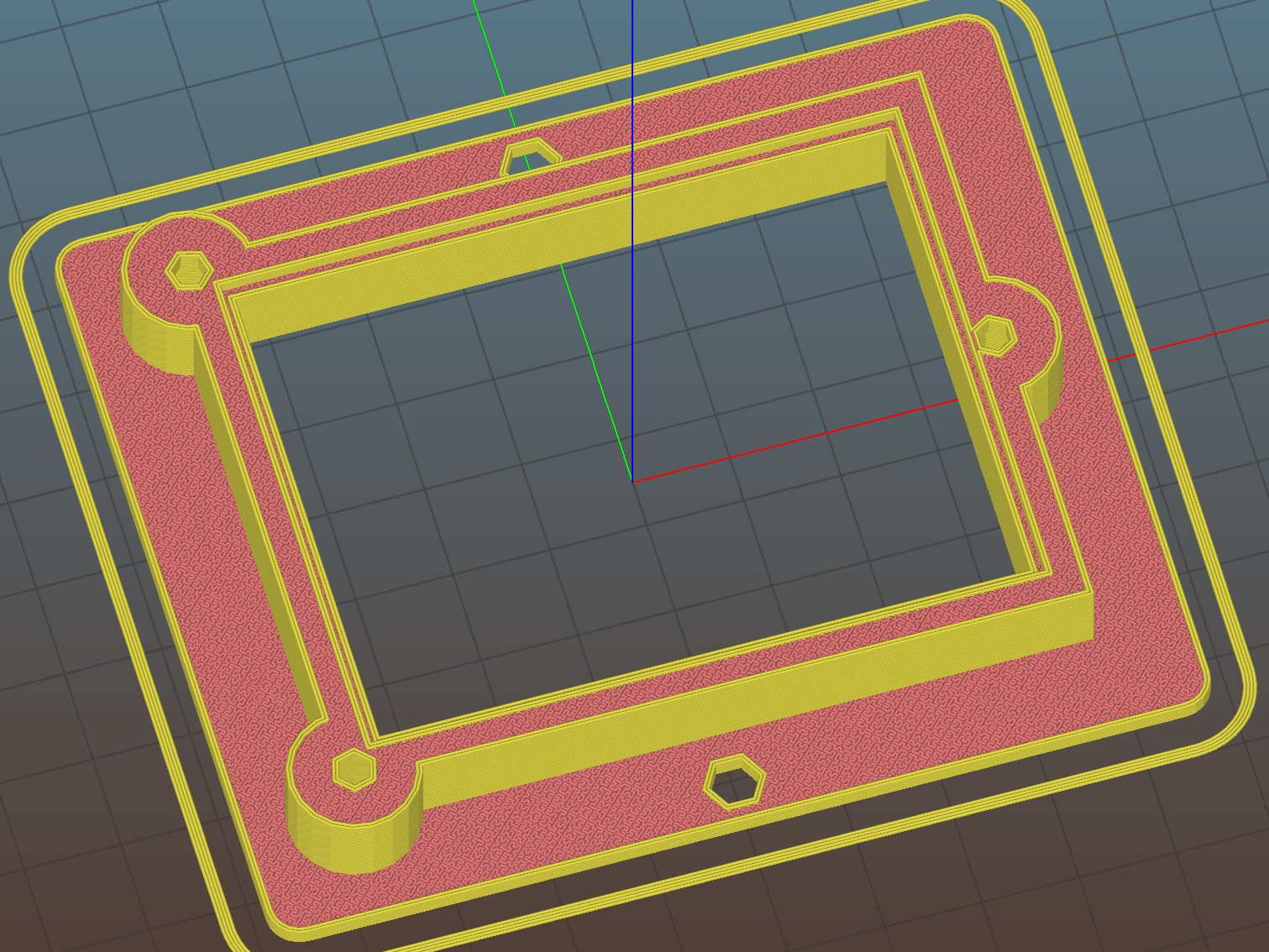
    You can now put the PCB clamp screws and mounting holes on specific corners & sides, allowing oddball locations for Arduino boards with corner cutouts along the right edge:

    Proto Board Holder ArdUno - Slic3r preview
    Proto Board Holder ArdUno – Slic3r preview

    A “selector” notation separates the hole location from the board dimensions & coordinates:

    ScrewSites = [
    //  [-1,1],[1,1],[1,-1],[-1,-1],        // corners
    //  [-1,0],[1,0],[0,1],[0,-1]           // middles
      [-1,1],[-1,-1],[1,0]                  // Arduinos
    ];
    

    Might not be most obvious way, but it works for me. Most of the time, corner clamps seem just fine, so I’m not sure adding the clamp and mounting hole locations to the dimension array makes sense.

    The OpenSCAD source code as a GitHub Gist:

    // Test support frame for proto boards
    // Ed Nisley KE4ZNU – Jan 2017
    // June 2017 – Add side-mount bracket, inserts into bottom
    // 2017-11 – Selectable board sizes, chassis mounting holes
    /* [Options] */
    PCBSelect = "ArdUno"; // ["20×80","40×60","30×70","50×70","70×90","80×120","ArdDuemil","ArdMega","ArdPro","ArdUno","ProtoneerCNC"]
    Layout = "Frame"; // [Frame, Bracket]
    ClampFlange = true; // external flange
    Mounts = true; // frame to chassis screw holes
    Channel = false; // wiring channel cutout
    WasherRecess = false; // cutout around screw head
    /* [Extrusion parameters] */
    ThreadThick = 0.25; // [0.15, 0.20, 0.25]
    ThreadWidth = 0.40;
    function IntegerMultiple(Size,Unit) = Unit * ceil(Size / Unit);
    /* [Hidden] */
    Protrusion = 0.1;
    HoleWindage = 0.2;
    inch = 25.4;
    Tap4_40 = 0.089 * inch;
    Clear4_40 = 0.110 * inch;
    Head4_40 = 0.211 * inch;
    Head4_40Thick = 0.065 * inch;
    Nut4_40Dia = 0.228 * inch;
    Nut4_40Thick = 0.086 * inch;
    Washer4_40OD = 0.270 * inch;
    Washer4_40ID = 0.123 * inch;
    Tap6_32 = 0.106 * inch;
    Clear6_32 = 0.166 * inch;
    Head6_32 = 0.251 * inch;
    Head6_32Thick = 0.097 * inch;
    Nut6_32Dia = 0.312 * inch;
    Nut6_32Thick = 0.109 * inch;
    Washer6_32OD = 0.361 * inch;
    Washer6_32ID = 0.156 * inch;
    ID = 0;
    OD = 1;
    LENGTH = 2;
    //- PCB sizes
    // the list must contain all the selection names as above
    //* [Hidden] */
    PCB_NAME = 0;
    PCB_DIMENSION = 1;
    PCBSizes = [
    ["40×60",[40,60,1.6]],
    ["30×70",[30,70,1.6]],
    ["50×70",[50,70,1.6]],
    ["20×80",[20,80,1.6]],
    ["70×90",[70,90,1.6]],
    ["80×120",[80,120,1.6]],
    ["ArdDuemil",[69,84,1.6]],
    ["ArdMega",[102,53.5,1.6]],
    ["ArdPro",[53,53.5,1.6]],
    ["ArdUno",[69,53.1,1.6]],
    ["ProtoneerCNC",[69,53.1,1.6]],
    ];
    PCBIndex = search([PCBSelect],PCBSizes)[0];
    PCBSize = PCBSizes[PCBIndex][PCB_DIMENSION];
    //echo(str("PCB Size Table: ",PCBSizes));
    //echo(str("PCB Select: ",PCBSelect));
    //echo(str("PCB Index: ",PCBIndex));
    echo(str("PCB Size: ",PCBSize));
    /* [Sizes] */
    WallThick = 4.0; // basic frame structure
    FrameHeight = 10.0;
    /* [Hidden] */
    Insert = [3.9,4.6,5.8];
    PCBShelf = 1.0; // width of support rim under PCB
    Clearance = 1*[ThreadWidth,ThreadWidth,0]; // around PCB on all sides
    ScrewOffset = ThreadWidth + Insert[OD]/2; // beyond PCB edges
    echo(str("Screw offset: ",ScrewOffset));
    /* [Screw Selectors] */
    // ij selectors for PCB clamp screw holes: -1/0/1 = left/center/right , bottom/center/top
    ScrewSites = [
    // [-1,1],[1,1],[1,-1],[-1,-1], // corners
    // [-1,0],[1,0],[0,1],[0,-1] // middles
    [-1,1],[-1,-1],[1,0] // Arduinos
    ];
    // ij selectors for frame mounting holes
    MountSites = [
    [0,-1],[0,1],
    // [-1,0],[1,0]
    ];
    function ScrewAngle(ij) = (ij[0]*ij[1]) ? ij[0]*ij[1]*15 : ((!ij[1]) ? 30 : 0); // align screw sides
    OAHeight = FrameHeight + Clearance[2] + PCBSize[2]; // total frame height
    echo(str("OAH: ",OAHeight));
    BossOD = 2*Washer4_40OD; // make bosses oversized for washers
    FlangeExtension = 4.0 + Washer6_32OD/2 – WallThick; // beyond frame structure
    FlangeThick = IntegerMultiple(2.0,ThreadThick); // plate under frame
    Flange = PCBSize
    + 2*[ScrewOffset,ScrewOffset,0]
    + [BossOD,BossOD,0]
    + [2*FlangeExtension,2*FlangeExtension,(FlangeThick – PCBSize[2])]
    ;
    FlangeRadius = BossOD/4;
    echo(str("Flange: ",Flange));
    NumSides = 4*5;
    WireChannel = [Flange[0],15.0,3.0 + PCBSize[2]]; // ad-hoc wiring cutout
    WireChannelOffset = [
    Flange[0]/2,0,(FrameHeight + PCBSize[2] – WireChannel[2]/2)
    ];
    //- Adjust hole diameter to make the size come out right
    module PolyCyl(Dia,Height,ForceSides=0) { // based on nophead's polyholes
    Sides = (ForceSides != 0) ? ForceSides : (ceil(Dia) + 2);
    FiiDia = Dia / cos(180/Sides);
    cylinder(r=(FiiDia + HoleWindage)/2,h=Height,$fn=Sides);
    }
    //- Build things
    if (Layout == "Frame")
    difference() {
    union() { // body block
    translate([0,0,OAHeight/2])
    cube(PCBSize + Clearance + [2*WallThick,2*WallThick,FrameHeight],center=true);
    for (ij = ScrewSites) // screw bosses
    if (ij[0] != 0 || ij[1] != 0)
    translate([ij[0]*(PCBSize[0]/2 + ScrewOffset),
    ij[1]*(PCBSize[1]/2 + ScrewOffset),
    0])
    cylinder(d=BossOD,h=OAHeight,$fn=NumSides);
    if (ClampFlange) // flange for work holder & mounting screw holes
    linear_extrude(height=Flange[2])
    hull()
    for (i=[-1,1], j=[-1,1]) {
    translate([i*(Flange[0]/2 – FlangeRadius),j*(Flange[1]/2 – FlangeRadius)])
    circle(r=FlangeRadius,$fn=NumSides); // convenient rounding size
    }
    }
    for (ij = ScrewSites) { // screw position indeies
    if (ij[0] != 0 || ij[1] != 0) {
    translate([ij[0]*(PCBSize[0]/2 + ScrewOffset),
    ij[1]*(PCBSize[1]/2 + ScrewOffset),
    -Protrusion])
    rotate(ScrewAngle(ij))
    PolyCyl(Clear4_40,(OAHeight + 2*Protrusion),6); // screw clearance holes
    translate([ij[0]*(PCBSize[0]/2 + ScrewOffset),
    ij[1]*(PCBSize[1]/2 + ScrewOffset),
    -Protrusion])
    rotate(ScrewAngle(ij))
    PolyCyl(Insert[OD],OAHeight – PCBSize[2] – 3*ThreadThick + Protrusion,6); // inserts
    if (WasherRecess)
    translate([ij[0]*(PCBSize[0]/2 + ScrewOffset),
    ij[1]*(PCBSize[1]/2 + ScrewOffset),
    OAHeight – PCBSize[2]])
    PolyCyl(1.2*Washer4_40OD,(PCBSize[2] + Protrusion),NumSides); // optional washer recess
    }
    }
    if (Mounts)
    for (ij = MountSites)
    translate([ij[0]*(Flange[0]/2 – Washer6_32OD/2),ij[1]*(Flange[1]/2 – Washer6_32OD/2),-Protrusion])
    rotate(ScrewAngle(ij))
    PolyCyl(Clear6_32,(Flange[2] + 2*Protrusion),6);
    translate([0,0,OAHeight/2]) // through hole below PCB
    cube(PCBSize – 2*[PCBShelf,PCBShelf,0] + [0,0,2*OAHeight],center=true);
    translate([0,0,(OAHeight – (PCBSize[2] + Clearance[2])/2 + Protrusion/2)]) // PCB pocket on top
    cube(PCBSize + Clearance + [0,0,Protrusion],center=true);
    if (Channel)
    translate(WireChannelOffset) // opening for wires from bottom side
    cube(WireChannel + [0,0,Protrusion],center=true);
    }
    // Add-on bracket to hold smaller PCB upright at edge
    PCB2Insert = [3.0,4.9,4.1];
    PCB2OC = 45.0;
    if (Layout == "Bracket")
    difference() {
    hull() // frame body block
    for (i=[-1,1]) // bosses around screws
    translate([i*(PCBSize[0]/2 + ScrewOffset),0,0])
    cylinder(r=Washer4_40OD,h=OAHeight,$fn=NumSides);
    for (i=[-1,1]) // frame screw holes
    translate([i*(PCBSize[0]/2 + ScrewOffset),0,-Protrusion])
    rotate(i*180/(2*6))
    PolyCyl(Clear4_40,(OAHeight + 2*Protrusion),6);
    for (i=[-1,1]) // PCB insert holes
    translate([i*PCB2OC/2,(Washer4_40OD + Protrusion),OAHeight/2])
    rotate([90,0,0])
    cylinder(d=PCB2Insert[OD],h=2*(Washer4_40OD + Protrusion),$fn=6);
    }
  • Raspberry Pi USB vs. Arduino

    Plugging an Arduino with GRBL into a USB port on a Raspberry Pi 3 with bCNC causes an immediate crash: the Arduino doesn’t power up and the Raspberry Pi stops responding. A hardware reset / power cycle with the Arduino plugged in doesn’t improve the situation, so it seems the Arduino draws more current from the USB port than the default setup will allow.

    Most likely, the Arduino’s 47 μF power supply caps draw too much current while charging, as the steady-state current seems to be around 40 mA:

    RPi vs Arduino - USB current
    RPi vs Arduino – USB current

    The solution / workaround requires a tweak to /boot/config.txt:

    #-- boost USB current for Arduino CNC
    
    max_usb_current=1
    
    # blank line above to reveal underscores
    

    Update: As mentioned in the comments, the max_usb_current option doesn’t apply to the Pi 3 you see in the picture and, thus, shouldn’t have changed anything. Your guess is as good as mine.

    I’d be more comfortable with a separate power supply plugged into the Arduino’s coaxial power jack, but that’s just me.

  • Wouxun KG-UV3D: End of Life

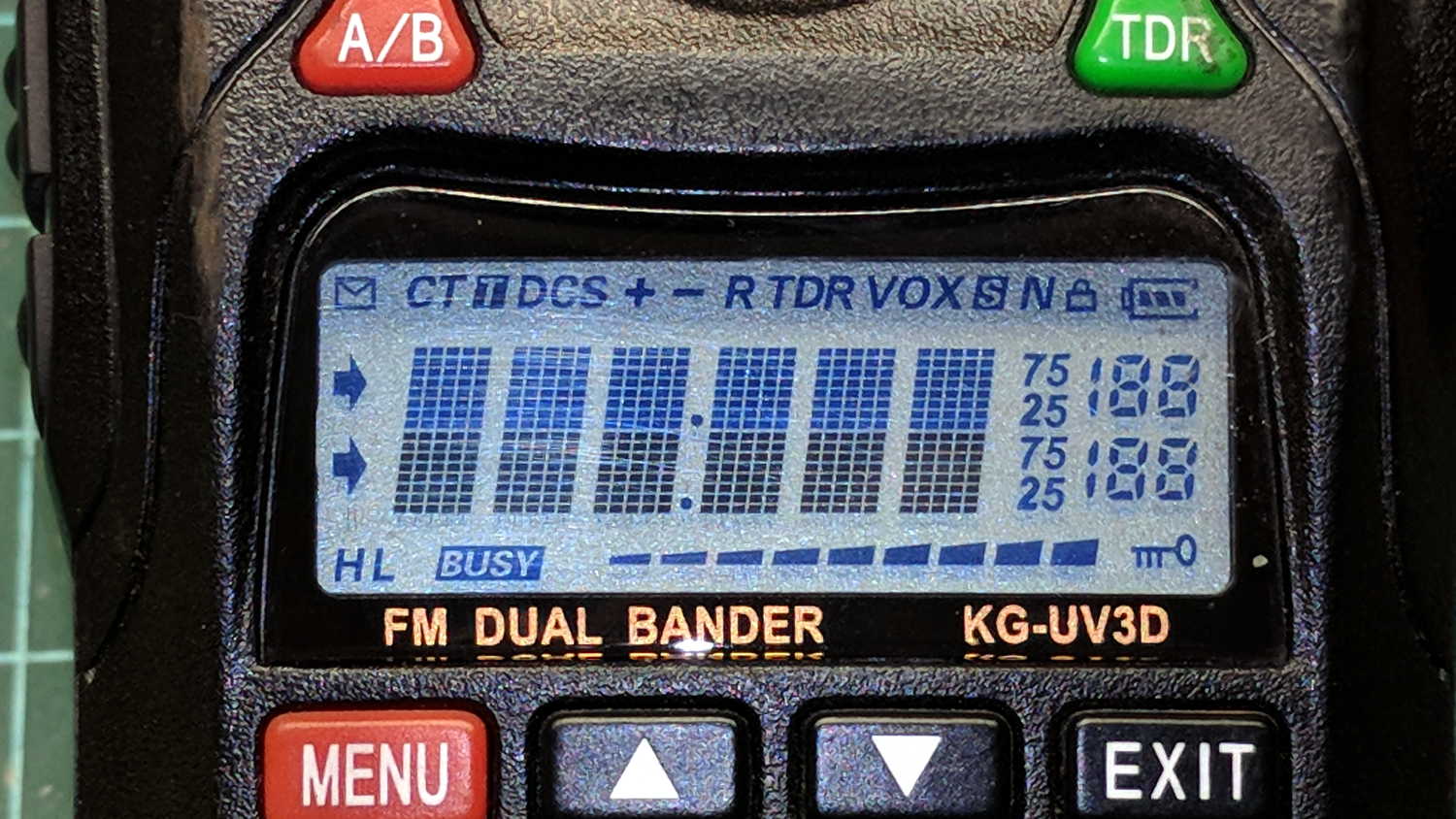
    Radio communication between our bikes failed on the way back from a grocery ride and the problem turned out to be a failed radio:

    Wouxun KG-UV3D - defunct
    Wouxun KG-UV3D – defunct

    The Wouxun KG-UV3D radio seems jammed firmly somewhere in its power-up sequence, doesn’t respond to any buttons, and has no hard-reset switch. On the other paw, it’s been in constant (and rugged!) use for almost exactly five years, so I suppose it doesn’t owe me much of anything.

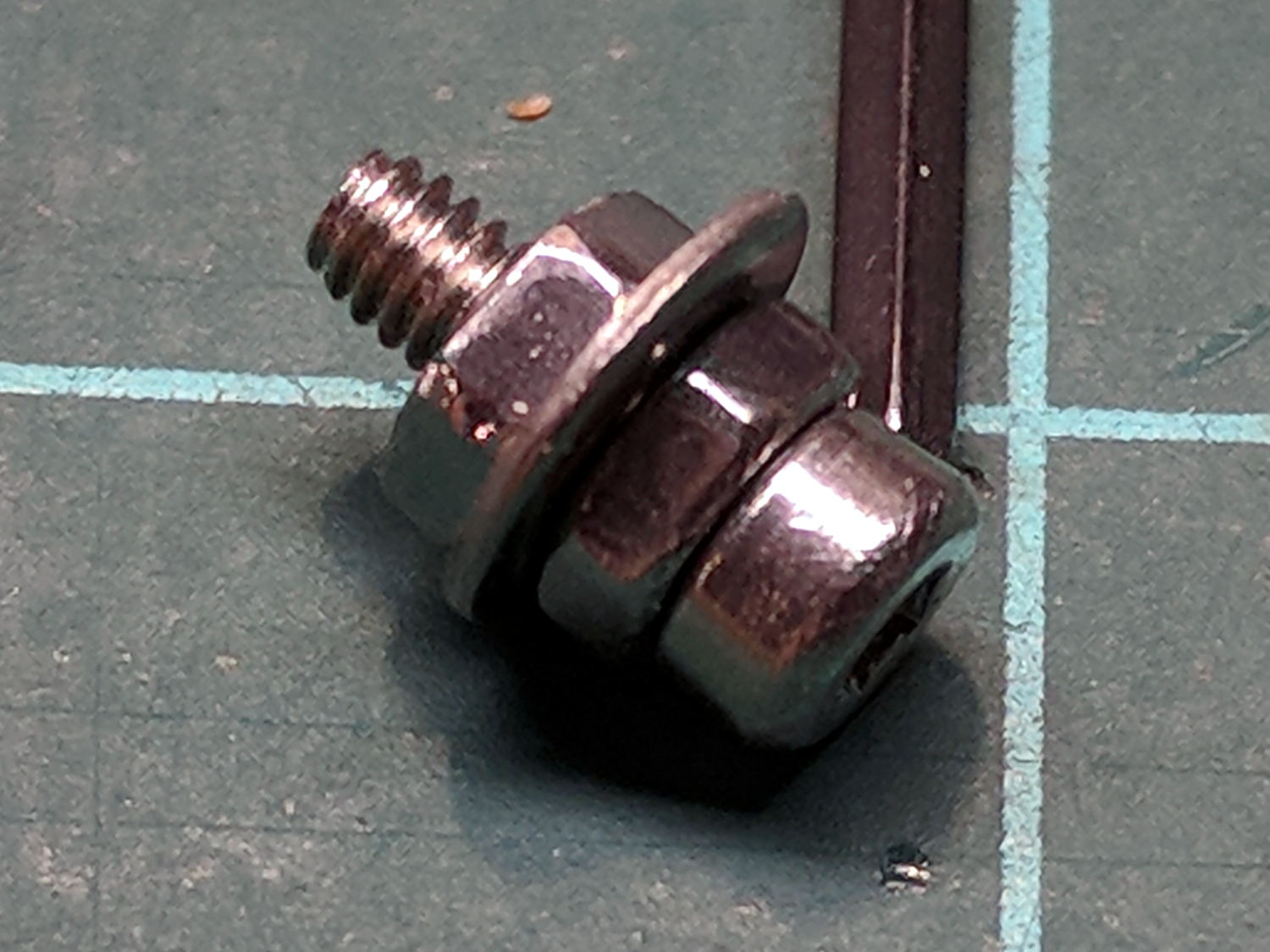
    The new radio, another KG-UV3D from PowerWerx, has marginally different spacing around the screw attaching the plug cover preventing the previous screw from fitting, so I kludged up a screw from a 2 mm socket-head screw, a 2.5 mm (yes) washer, and a pair of 2 mm nuts:

    Wouxun KG-UV3D - APRS plug plate screw
    Wouxun KG-UV3D – APRS plug plate screw

    Which looks a bit odd, but holds the plug adapter plate firmly in place:

    Wouxun KG-UV3D - APRS Voice Plug Block
    Wouxun KG-UV3D – APRS Voice Plug Block

    I suppose when the radio on my bike fails, I must rebuild both APRS + voice interfaces for Yet Another Radio, because the Wouxuns will be completely unobtainable.

    The weather abruptly became too cold for riding, at least for sissies such as we, but maybe we’ll get out later in the month …

  • Nothing Lasts: Cranberry Harvester Corrosion

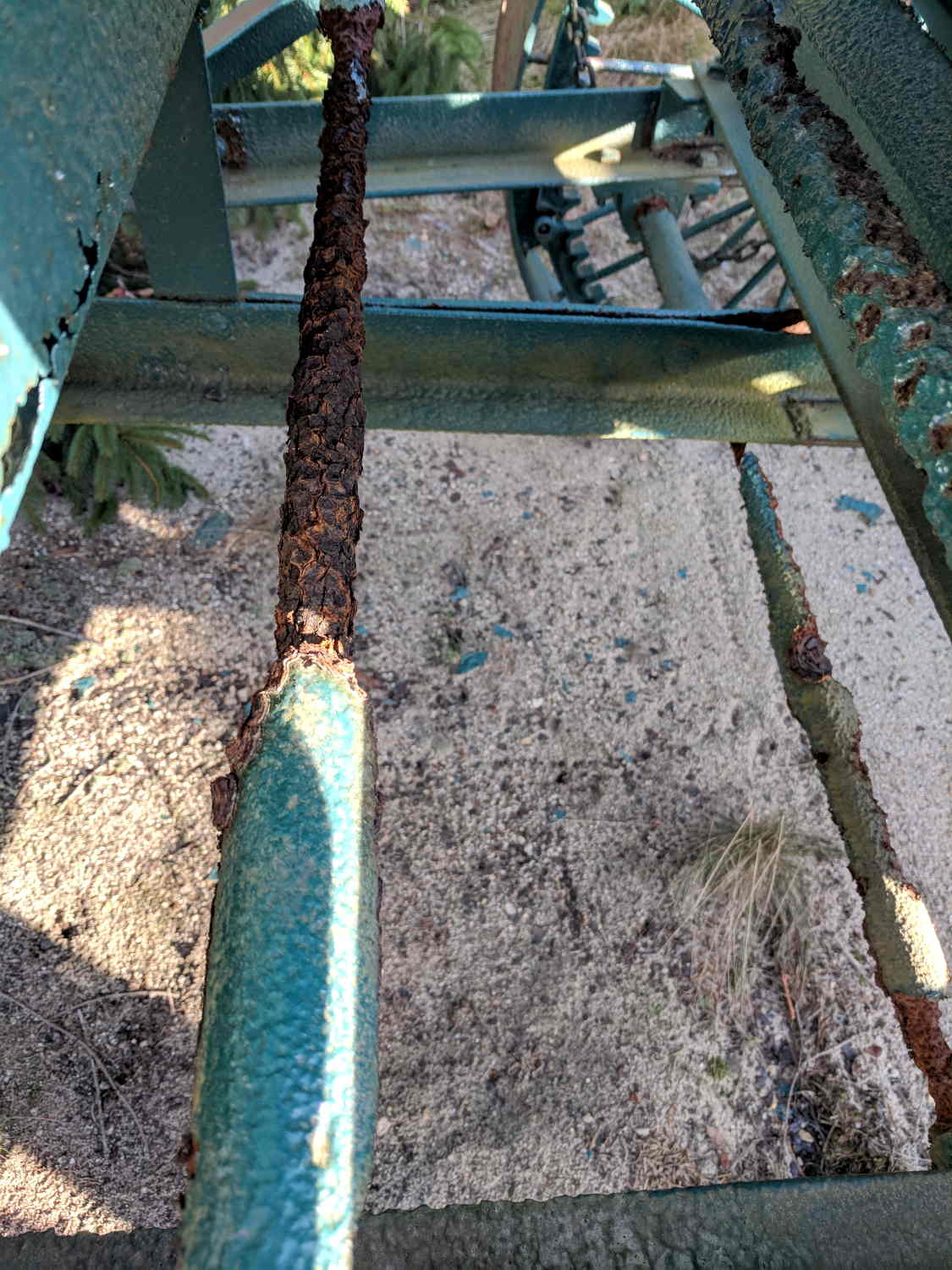
    Cranberries grow best in acidic conditions, as shown by the conditions inside an antique cranberry harvester:

    Cranberry Harvester - shaft corrosion
    Cranberry Harvester – shaft corrosion

    Admittedly, it’s been sitting untended for many years, but the worst corrosion formed along the midline of the machine, eating the conveyor housing, drive shafts, and support struts.

    I managed to go all this time without realizing cranberry plants are evergreens.

  • Mostly Printed CNC: Endstop Mount

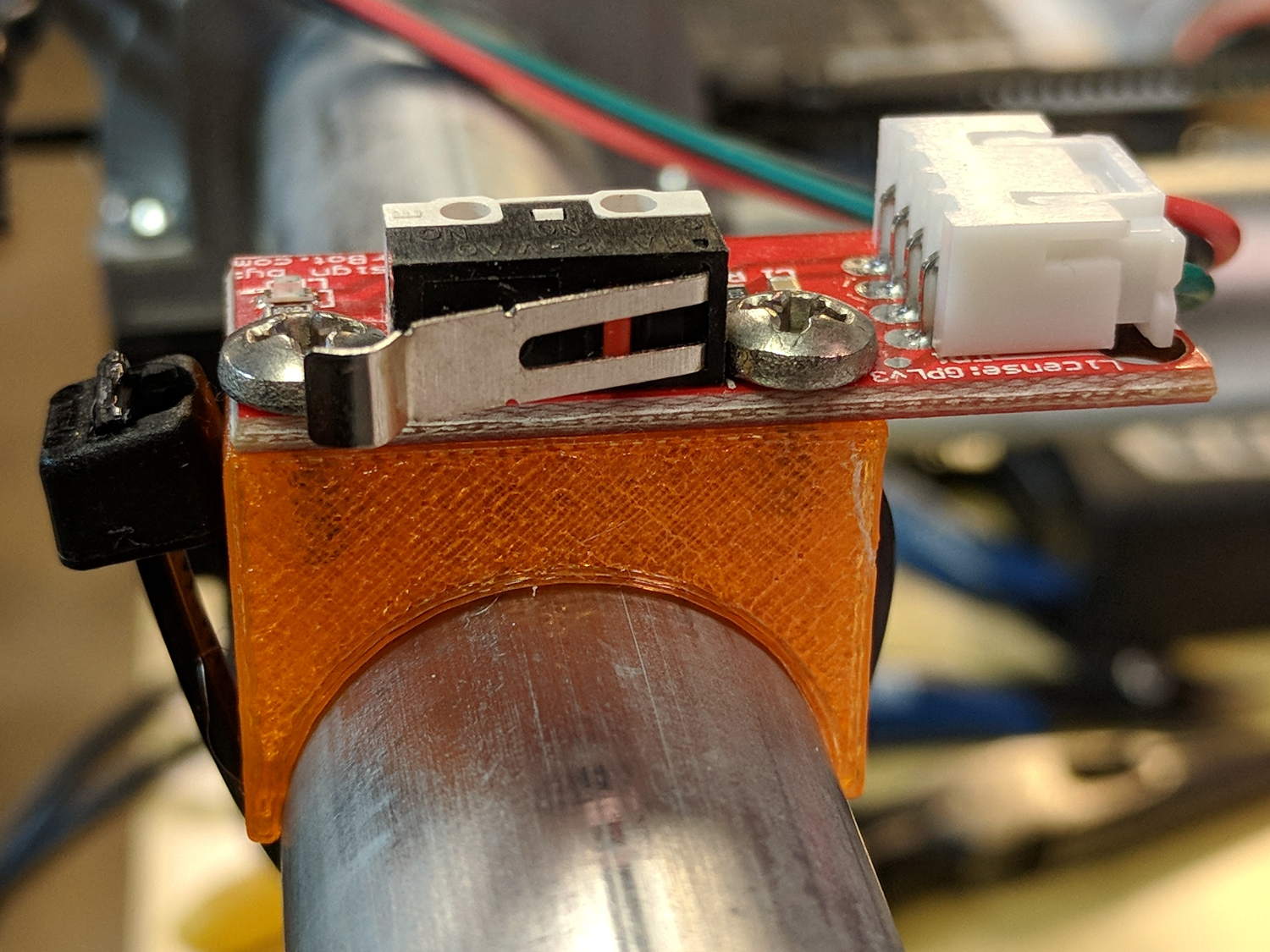
    Being a big fan of having a CNC machine know where it is, adding endstops (pronounded “home switches” in CNC parlance) to the Mostly Printed CNC axes seemed like a good idea:

    MPCNC - X min endstop - actuator view
    MPCNC – X min endstop – actuator view

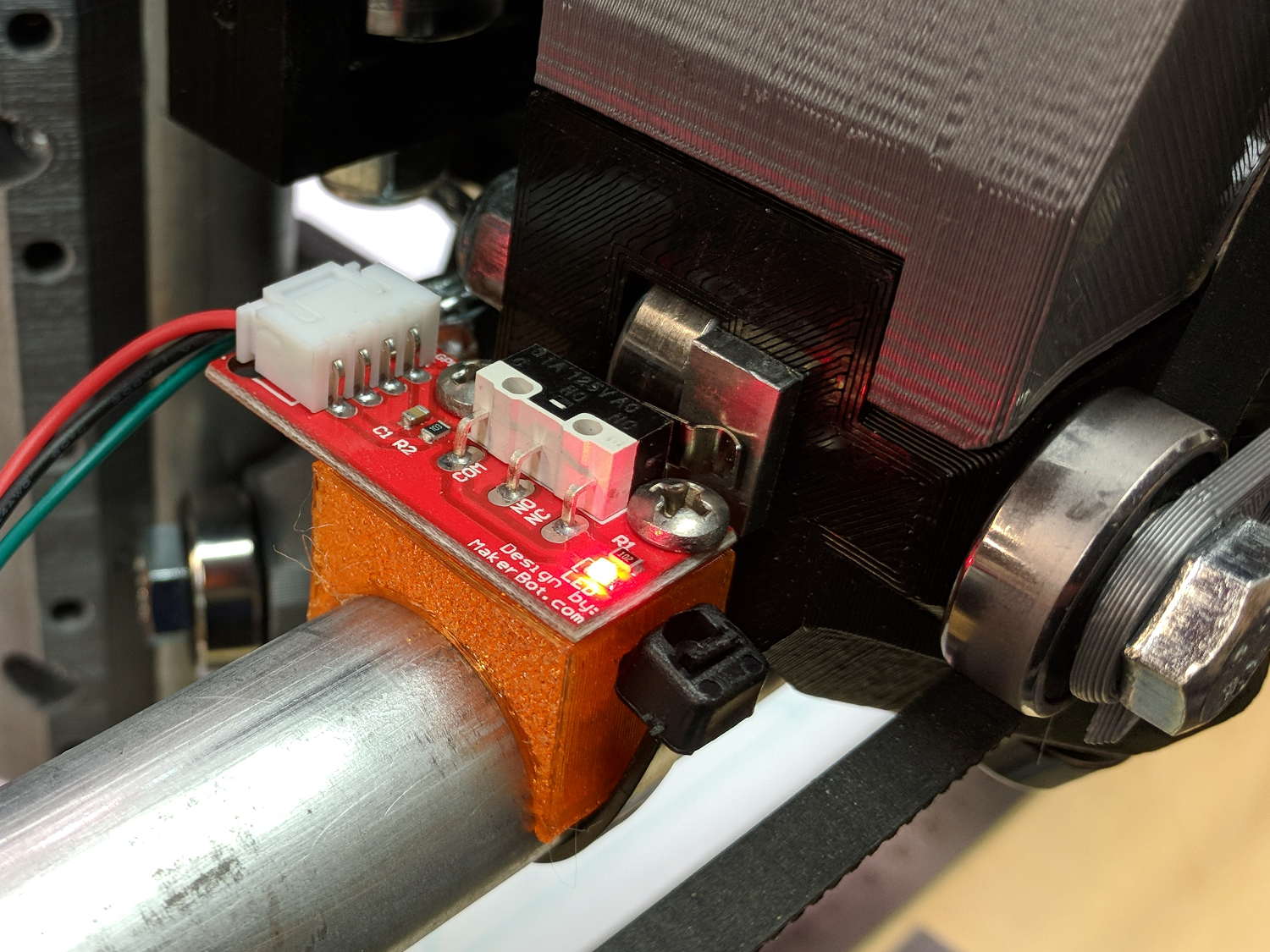
    All the mounts I could find fit bare microswitches of various sizes or seemed overly complex & bulky for what they accomplished. Rather than fiddle with screws and nut traps / inserts, a simple cable tie works just fine and makes the whole affair much smaller. Should you think cable ties aren’t secure enough, a strip of double stick tape will assuage your doubts.

    A snippet of aluminum sheet moves the switch trip point out beyond the roller’s ball bearing:

    MPCNC - X min endstop
    MPCNC – X min endstop

    I’m not convinced homing the Z axis at the bottom of its travel is the right thing to do, but it’s a start:

    MPCNC - Z min endstop
    MPCNC – Z min endstop

    Unlike the stationary X and Y axes, the MPCNC’s Z axis rails move vertically in the middle block assembly; the switch moves downward on the rail until the actuator hits the block.

    Perforce, the tooling mounted on the Z axis must stick out below the bottom of the tool carrier, which means the tool will hit the table before the switch hits the block. There should also be a probe input to support tool height setting.

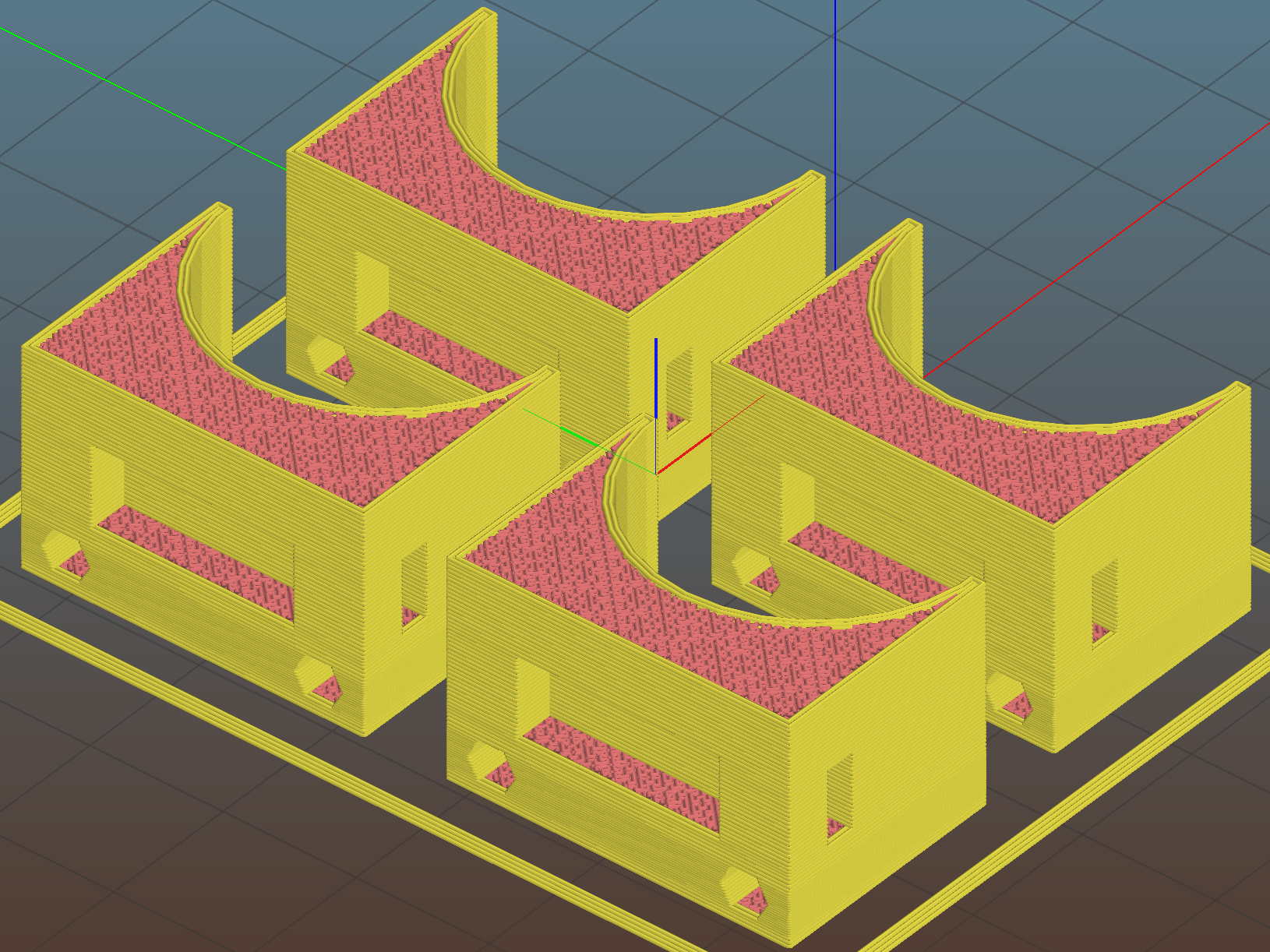
    The first mount fit perfectly, so I printed four more in one pass:

    MPCNC MB Endstop Mounts - Slic3r preview
    MPCNC MB Endstop Mounts – Slic3r preview

    All three endstops plug into the RAMPS board, leaving the maximum endstop connections vacant:

    MPCNC - RAMPS min endstop positions
    MPCNC – RAMPS min endstop positions

    Obviously, bare PCBs attached to the rails in mid-air aren’t compatible with milling metal, which I won’t be doing for quite a while. The electronic parts long to be inside enclosures with ventilation and maybe dust filtering, but …

    The switches operate in normally open mode, closing when tripped. That’s backwards, of course, and defined to be completely irrelevant in the current context.

    Seen from a high level, these switches set the absolute “machine coordinate system” origin, so the firmware travel limits can take effect. Marlin knows nothing about coordinate systems, but GRBL does: it can touch off to a fixture origin and generally do the right thing.

    The OpenSCAD source code as a GitHub Gist:

    // Tour Easy Fairing Endstop Mount for Makerbot PCB
    // Ed Nisley KE4ZNU – 2017-11-07
    /* [Build Options] */
    Layout = "Build"; // [Build, Show, Block]
    Section = false; // show internal details
    /* [Extrusion] */
    ThreadThick = 0.25; // [0.20, 0.25]
    ThreadWidth = 0.40; // [0.40]
    function IntegerMultiple(Size,Unit) = Unit * ceil(Size / Unit);
    /* [Hidden] */
    Protrusion = 0.01; // [0.01, 0.1]
    HoleWindage = 0.2;
    ID = 0;
    OD = 1;
    LENGTH = 2;
    /* [Sizes] */
    RailOD = 23.5;
    Screw = [3.4,6.8,8.0]; // thread dia, head OD, screw length
    HoleOffset = [2.5,19.0/2]; // PCB mounting holes from PCB edge, rail center
    SwitchClear = [6.0,15,3.0]; // clearance around switch pins
    SwitchOffset = [6.0,0]; // center of switch from holes
    Strap = [5.5,50,2.0]; // nylon strap securing block to rail
    Block = [16.4,26.0,RailOD/2 + SwitchClear[2] + Strap[2] + 6*ThreadThick]; // basic block shape
    //- Adjust hole diameter to make the size come out right
    module PolyCyl(Dia,Height,ForceSides=0) { // based on nophead's polyholes
    Sides = (ForceSides != 0) ? ForceSides : (ceil(Dia) + 2);
    FixDia = Dia / cos(180/Sides);
    cylinder(r=(FixDia + HoleWindage)/2,h=Height,$fn=Sides);
    }
    //- Shapes
    module PCBBlock() {
    difference() {
    cube(Block,center=true);
    translate([(SwitchOffset[0] + HoleOffset[0] – Block[0]/2),SwitchOffset[1],(Block[2] – SwitchClear[2] + Protrusion)/2])
    cube(SwitchClear + [0,0,Protrusion],center=true);
    for (j=[-1,1])
    translate([HoleOffset[0] – Block[0]/2,j*HoleOffset[1],(Block[2]/2 – Screw[LENGTH])])
    rotate(180/6)
    if (false) // true = loose fit
    PolyCyl(Screw[ID],Screw[LENGTH] + Protrusion,6);
    else
    cylinder(d=Screw[ID],h=Screw[LENGTH] + Protrusion,$fn=6);
    translate([0,0,Block[2]/2 – SwitchClear[2] – Strap[2]/2 – 3*ThreadThick])
    cube(Strap,center=true);
    if (Section)
    translate([Block[0]/2,0,0])
    cube(Block + [0,2*Protrusion,2*Protrusion],center=true);
    }
    }
    module Mount() {
    difference() {
    translate([0,0,Block[2]/2])
    PCBBlock();
    rotate([0,90,0])
    cylinder(d=RailOD,h=3*Block[0],center=true);
    }
    }
    //- Build things
    if (Layout == "Show") {
    Mount();
    color("Yellow",0.5)
    rotate([0,90,0])
    cylinder(d=RailOD,h=3*Block[0],center=true);
    }
    if (Layout == "Block")
    PCBBlock();
    if (Layout == "Build")
    translate([0,0,Block[2]/2])
    rotate([0,-90,0])
    Mount();
  • Mostly Printed CNC: Stepper Drive

    The MPCNC kit includes five Automation Technology KL17H248-15-4A stepper motors:

    MPCNC Stepper label - KL17H248-15-4A
    MPCNC Stepper label – KL17H248-15-4A

    If link rot should set in, a direct rip from the website:

    NEMA 17 BIPOLAR STEPPER MOTOR, KL17H248-15-4A, 76 oz-in

    Specifications:
    Shaft: 5mm diameter with flat
    Current Per Phase: 1.5A
    Holding Torque: 5.5Kg.cm (76 oz-in)
    Rated Voltage: 4.2V
    NO.of Phase: 2
    Step Angle: 1.8° ± 5%
    Resistance Per Phase: 2.8Ω± 10%
    Inductance Per Phase: 4.8mH± 20%
    Insulation Class: Class B
    Dielectric Strength: 100Mohm
    Operation Temp Range: -20 ~ +40° C
    Lead Wire: 22AWG / 750mm with connector to stepper motor driver

    Red- 1A
    Green- 1B
    Yellow- 2A
    Blue- 2B

    A nice torque curve:

    KL17H248-15-4A - Torque curve
    KL17H248-15-4A – Torque curve

    The present MPCNC design wires the motors on each end of X / Y axes in series. Each motor has 2.8 Ω of DC resistance = 5.6 Ω total and, given the small wire gauge (allegedly 22 AWG on the motors and unspecified for any eBay cables) and six (!) teeny header pins in series along the wires for each winding, a total series resistance of 6 Ω seems reasonable and is, in fact, what I measure with an ohmmeter.

    The stepper drivers arrived preset for 1 A peak:

    MPCNC Stepper Drive - as delivered - 500 mA div
    MPCNC Stepper Drive – as delivered – 500 mA div

    The vertical scale is 500 mA/div. The waveform comes from a 10 mm move at 5000 mm/min = 83 mm/s, which is absurdly fast for such a machine, particularly seeing as how the default firmware limits it to 190 mm/min = 3 mm/s. Cutting speeds will be much lower than either of those.

    The default DRV8825 current-setting pot setting was 600 mV, for a nominal current motor current of 1.2 A peak. That’s reasonably close to the measurement, all things considered.

    However, because the motors run from a 12 V supply at 1 A, the winding and wiring losses mean they operate at a bit over 8 V: much much less than the nominal 24 and 32 V plotted in the torque curve. More voltage = faster response to microstep current changes = higher top speed. At sensible speeds, this surely does not matter.

    The default DRV8825 stepper driver module jumpers select 32 microsteps = 6400 step/rev, a factor of four higher than the chart.

    Part of the tweakage will be to sort that out; a 24 V supply may be in order. Driving each motor separately (as required for automatic de-racking homing) at 1.5 A/phase would require 3  1.5×√2 A/motor × 5 motors = 15 10.5 A, which seems excessive even to me, particularly in light of sending it across a RAMPS board. At 1 A/phase, you need 10 7 A, which falls within the realm of reason and would be kinder to the PLA motor mounts. It’s not clear boosting the motor voltage will produce any real benefit, although giving the drivers more headroom seems reasonable.

    The GT2 drive belts have 2 mm pitch, so the 16 tooth drive pulleys move 32 mm/rev and require 200 step/mm, which seems high to me. At a nice round 100 mm/s, the steppers must tick along at 20 k step/s, half of Marlin’s top speed, which may explain some of the roughness around 80 mm/s.

    The torque curve suggests the motors want to run under 200 RPM = 3.3 rev/s = 100 mm/s with the stock 16 tooth pulley. No problem with those numbers!

    Using 16:1 microstepping would produce 3200 step/rev, 100 step/mm, thus half the step rate at any speed. Reducing the driver step frequency can’t possibly be a Bad Thing for Marlin.