The Smell of Molten Projects in the Morning

Ed Nisley's Blog: Shop notes, electronics, firmware, machinery, 3D printing, laser cuttery, and curiosities. Contents: 100% human thinking, 0% AI slop.

Category: Machine Shop

Mechanical widgetry

  • Gentec ED-200 Optical Joulemeter: Oscilloscope Comparison

    Gentec ED-200 Optical Joulemeter: Oscilloscope Comparison

    The little DSO-150 oscilloscope has a 1 MΩ || 20 pF input with a 200 kHz bandwidth that should be entirely adequate for the OMTech laser’s millisecond-scale modulation signals from the Gentec ED-200 Optical Joulemeter. There is, however, only one way to be sure:

    Gentec ED-200 - scope test setup
    Gentec ED-200 – scope test setup

    The two scope inputs are in parallel, so the joulemeter over on the far right sees a 500 kΩ load, half of the specified 1 MΩ load, with at least twice the capacitance. If the two scopes display pretty much the same result, then it’s good enough.

    A 50 ms pulse at half power looks the same on both scopes:

    • Gentec ED-200 - 50 ms - DSO-150
    • Gentec ED-200 - 50 ms - Siglent

    A 50 ms pulse at full power doesn’t quite top out:

    • Gentec ED-200 - 11V 50ms - DSO-150
    • Gentec ED-200 - 11V 50ms - Siglent

    Given that the pulse duration should be less than the detector’s 1.5 ms risetime, using a 50 ms pulse is absurd. Right now I’m just looking at the overall waveform and detector range, not trying to get useful numbers out of the poor thing.

    All in all, the DSO-150 will do just fine.

  • OMTech 60 W Laser vs. Gentec ED-200 Optical Joulemeter: Long Pulse Duration Power

    OMTech 60 W Laser vs. Gentec ED-200 Optical Joulemeter: Long Pulse Duration Power

    The Gentec ED-200 Joulemeter is severely underqualified to measure the OMTech 60 W laser’s beam power, because the laser’s 1 ms minimum manual pulse width isn’t much shorter than the sensor’s 1.5 ms risetime and the maximum beam power is far too high for the sensor’s health. With that in mind, I set the PWM power to 50% = 30 W (grossly too high) and looked at the peak output voltage for a series of (far too long) pulse widths:

    Rounding the detector sensitivity to 11 V/J says the 1.3 V peak at 5 ms corresponds to 120 mJ and 24 W:

    Gentec ED-200 - 60W 50pct 5ms
    Gentec ED-200 – 60W 50pct 5ms

    The 3.3 V peak at 10 ms is 300 mJ and 30 W:

    Gentec ED-200 - 60W 50pct 10ms
    Gentec ED-200 – 60W 50pct 10ms

    The 3.4 V peak at 15 ms is 310 mJ and 21 W suggests the PWM power output is not nearly as constant as one might expect, although the pulse width looks fine:

    Gentec ED-200 - 60W 50pct 15ms
    Gentec ED-200 – 60W 50pct 15ms

    The 6 V peak at 20 ms is 550 mJ and 27 W, although the on-screen display obscures the top:

    Gentec ED-200 - 60W 50pct 20ms OSD
    Gentec ED-200 – 60W 50pct 20ms OSD

    Another 20 ms pulse without the OSD produces a peak eyballometrically close to 6.4 V for 580 mJ and 29 W:

    Gentec ED-200 - 60W 50pct 20ms
    Gentec ED-200 – 60W 50pct 20ms

    The KT332N controller in the OMTech 60 W laser has a pulse duration setting showing tenths of a millisecond, but (based on some additional measurements) the beam power can vary by 25% for successive pulses in the low millisecond range, so the pulse width resolution doesn’t seem to provide useful control.

    Despite the over-long pulses, the calculated power corresponds surprisingly well with the nominal laser output power.

    The 1 ms pulses used in LightBurn’s Dot Mode are consistent enough to punch essentially identical 0.2(-ish) mm holes in manila paper to mark the graticule:

    OMTech 60W laser - beam alignment - focus detail - 2022-03-22
    OMTech 60W laser – beam alignment – focus detail – 2022-03-22

    They’re on 0.25 mm centers, with slight variations showing the difference between stepper resolution and positioning accuracy. The shorter graticule lines have three holes on one side of the center lines and four on the other, despite the design’s 1 mm length on both sides; I think there’s a missing dot on the side where the head starts the line, perhaps due to a picket-fence error.

    The large beam hole came from two 10 ms pulses, one at the focal point and another 10 mm lower.

  • MTD Snowthrower Friction Drive Rebuild

    MTD Snowthrower Friction Drive Rebuild

    During the last snowstorm of the season, the venerable MTD snowthrower carved a trench out of the garage and across the driveway, then abruptly stopped moving. The motor roared and the auger turned, but the drive clutch handle had no effect, so I dragged its carcass into the garage and we completed the mission by hand.

    Popping the belly plate on the next sunny day revealed the problem: the jam nut (part 34) anchoring the Friction Disk Wheel (part 28) to the Friction Wheel Bracket Assembly (part 32) had gone missing:

    MTD Snowblower - page 26 - friction drive parts
    MTD Snowblower – page 26 – friction drive parts

    Worse, the Wheel’s threaded shaft spent some time rattling around in the Bracket while chewing up its thread:

    MTD Snowthrower - friction disk wheel - damaged thread
    MTD Snowthrower – friction disk wheel – damaged thread

    This would ordinarily be No Big Deal, but what you see of the shaft is all you get: it rotates freely in the bearing embedded in the Wheel with no way to hold it while cleaning up its threads.

    Having already promised to replace the Wheel, I installed the new Wheel using a castle nut secured with a generous dollop of red Loctite, then tapped two of its castellations into the shaft’s slot as a mechanical anchor:

    MTD Snowthrower - friction disk wheel - castle nut
    MTD Snowthrower – friction disk wheel – castle nut

    I really wanted to lay a nice hard roll pin along that slot through the nut, but there’s no convincing way to secure such a thing without a second nut. Maybe next time?

    While I had the drive train apart, the sad state of the Wheel Shift Rod Assembly (part 29) became apparent:

    MTD Snowthrower - wheel shift rod - worn
    MTD Snowthrower – wheel shift rod – worn

    I scuffed up the shiny wear mark, turned a suitable acetal bushing, filled the trench with epoxy, and squished the bushing in place:

    MTD Snowthrower - wheel shift rod - acetal bushing
    MTD Snowthrower – wheel shift rod – acetal bushing

    The flange might hold it in place against the Frame Shift Bracket (part 18), which snugly contains the rest of the bushing against the epoxy, so the whole affair might outlast the next season’s first snowstorm. We shall see.

    A nice new R-clip secures the Friction Wheel Bracket Assembly in place against the old washer:

    MTD Snowthrower - friction bracket R-pin
    MTD Snowthrower – friction bracket R-pin

    You might want to insert it the other way, but the black plastic housing above it extends just far enough to thwart your (well, my) desire.

  • Gentec ED-200 Optical Joulemeter: Specs

    Gentec ED-200 Optical Joulemeter: Specs

    The Gentec ED-200 optical joulemeter from the Box o’ Optical Stuff is so thoroughly obsolete that no datasheet exists for it anywhere online:

    Gentec ED-200 - measurement setup
    Gentec ED-200 – measurement setup

    The best I could come up with, after many dead ends, is a 2001 capture from gentec-eo.com at archive.org with the barest hint of specifications:

    Gentec ED-200 specs
    Gentec ED-200 specs

    The Max Energy Density spec suggests longer pulses are allowed to deposit more energy, probably because more time gives thermal diffusion an opportunity to spread the heat across the target; at CO₂ laser wavelengths that may not apply.

    With the platform lowered as far as it goes, the ED-200 is 130 mm below the laser nozzle where the beam diameter is about 6 mm for an area of 0.3 cm². Ignoring the ideal Gaussian beam profile by smearing 60 W uniformly across the circle gives a power density of 200 W/cm², which means the laser pulse must be less than 0.5 W·s / 200 W = 2.5 ms to stay inside the power density limit.

    I sincerely hope Gentec overbuilt and underspecified their detector.

    Also, there’s a useful overview document from Genetc-eo.com, wherein it is written:

    The Voltage Response
    The result is a voltage pulse that rises quickly with the response time of the device to a level proportional to the laser energy (Figure 2). It then decays exponentially over a longer period of time that is a function of the pyroelectric device and load impedance. Figure 2 also shows that there is a longer recovery time to return to the initial state of the detector. This is a function of thermal phenomena and is not affected by the load impedance as are the rise and decay times. The integrated pulse energy over this period is proportional to the peak voltage.

    Pulse Width Versus Rise Time

    Usually the applied laser pulse must be shorter than the rise time of the detector for all of its energy to be represented by the peak voltage. Pulse energy received after the detector voltage has peaked will not be fully integrated into that value. For very long pulses, the peak voltage will actually represent peak power rather than pulse energy.

    Gentec Energy Detectors, page 2

    Figure 2 shows the overall waveform:

    Gentec Energy Detectors - Figure 2
    Gentec Energy Detectors – Figure 2

    Which looks a lot like this 10 ms pulse at 50% duty cycle:

    Gentec ED-200 - 60W 50pct 10ms
    Gentec ED-200 – 60W 50pct 10ms

    The pulse was 10 ms long, much longer than the 1.5 ms ED-200 risetime spec, but the overall shape looks right. Dividing the 3.3 V peak by the detector’s 10.78 J/V calibration value (11 J/V works for me) says the pulse delivered 300 mJ = 300 mW·s. Dividing 300 mJ by 10 ms gives 30 W, a beam power astonishingly close to the expected value.

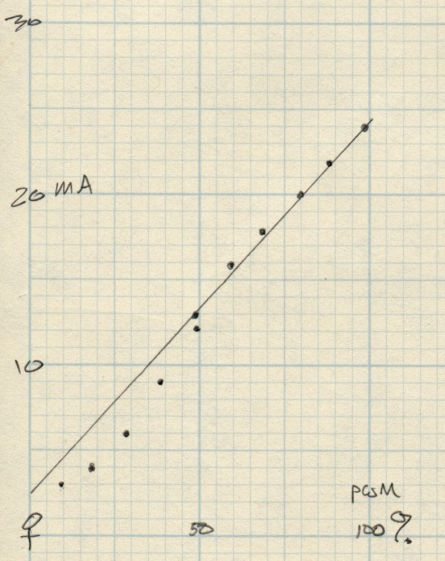
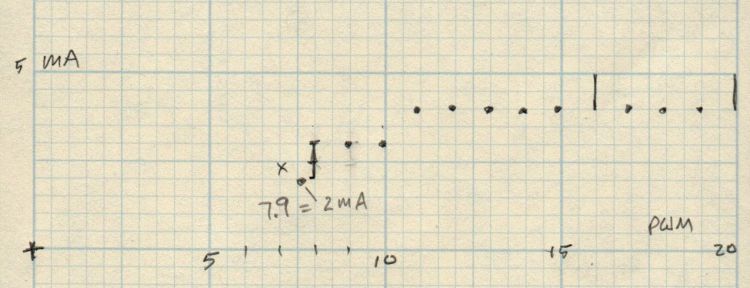
    The OMTech laser has a nominal 60 W output, although the tube life drops dramatically with regular use over 70% = 40 W. Power does not scale linearly with the laser tube current displayed on the power supply milliammeter, with the maximum value presumably preset to the tube’s 20 mA limit producing 60 W. The 20 kHz PWM duty-cycle chopping applied by the controller should linearly scale the average power downward from there.

    It looks like the ED-200 might deliver reasonable results for millisecond-scale pulses at low PWM duty cycles, but it was obviously intended for much milder lasers.

    On the other paw, it’s fully depreciated …

  • Gentec ED-200 Optical Joulemeter: Accessories

    Gentec ED-200 Optical Joulemeter: Accessories

    The Box o’ Optical Stuff disgorged an ancient Gentec ED-200 Joulemeter:

    Gentec ED-200 - measurement setup
    Gentec ED-200 – measurement setup

    It’s an optical pyrometer producing, sayeth the dataplate, an output of 10.78 V per joule of energy applied to its matte black absorber. Whether it’s accurate or not, I have no way of knowing, but aiming the business end toward the sun and waving my fingers over it produced a varying voltage, so there was hope.

    It has a 1/4-20 socket on one side and my spare magnetic mount expects a 3/8 inch rod, so I drilled a suitable hole in a suitable aluminum rod and cut the head off a suitable bolt:

    Gentec ED-200 mounting rod - parts
    Gentec ED-200 mounting rod – parts

    A dab of Loctite intended to secure bushings completed the assembly:

    Gentec ED-200 mounting rod - assembled
    Gentec ED-200 mounting rod – assembled

    I later replaced the nut with a finger-friendly nylon wingnut.

    Which allows a measurement setup along these lines:

    Gentec ED-200 - measurement setup
    Gentec ED-200 – measurement setup

    The white disk atop the sensor is a homebrewed target to indicate the active sensor area and its center point:

    Gentec ED-200 target - scorches
    Gentec ED-200 target – scorches

    The 1 mm graticule lines give a jogging suggestion to hit the center, assuming you (well, I) manage to hit anywhere on the target at the first shot. The beam is supposed to fill most of the central region, which is obviously not going to happen here, and it must not be focused to a pinpoint. The previous owner (or his minions) put a few scars on the surface and I expect to make similar mistakes.

    Early results look encouraging:

    Gentec ED-200 Joulemeter - first pulse
    Gentec ED-200 Joulemeter – first pulse

    The SVG image as a GitHub Gist:

    Loading
    Sorry, something went wrong. Reload?
    Sorry, we cannot display this file.
    Sorry, this file is invalid so it cannot be displayed.

    I added the two mounting ears in anticipation of putting the joulemeter in the beamline between the mirrors to measure their loss.

  • OMTech 60 W Laser: Laser Power Indicator

    OMTech 60 W Laser: Laser Power Indicator

    Although the OMTech laser controls the laser power supply with a key-lock switch, there’s little visible difference between the OFF and ON positions. Having occasionally mistaken it in both directions, this seemed like a useful addition:

    Laser Power Lock Indicator - installed
    Laser Power Lock Indicator – installed

    The strip of black duct tape below the lock muffles the rattle of the triangle hatch key against the metal cabinet.

    Two snippets of foam tape hold the knob to the lock cylinder, making an admittedly tenuous connection, but the knob fits around the outside of the switch housing with minimal clearance and doesn’t shouldn’t suffer any torque or pulling, so it might work.

    The solid model looks about like you’d expect:

    Laser Power Lock Indicator - solid model
    Laser Power Lock Indicator – solid model

    Unfortunately, it has no good orientation for printing, so I let PrusaSlicer generate support material inside the knob:

    Laser Power Lock Indicator - Support structures
    Laser Power Lock Indicator – Support structures

    Suffice it to say: removing all that plastic did not go well.

    I eventually grabbed the knob in the lathe and bored the interior out to its more-or-less proper dimensions, figuring nobody would ever notice the carnage, and it worked reasonably well. In the unlikely event I need another pointer, I’ll add a support spider to hold up the interior with minimal contact and less plastic.

    Yeah, the laser really needs a stack light showing its condition and safety status …

    The OpenSCAD source code as a GitHub Gist:

    // Indicator for OMTech laser power lock
    // Ed Nisley KE4ZNU 2022-04-09
    KnobOD = 35.0;
    KnobHeight = 22.0;
    KnobTaper = 4.0;
    PointerLength = 45.0;
    PointerThick = 3.0;
    TipOD = 2.0;
    /* [Hidden] */
    //——
    Protrusion = 0.1; // make holes end cleanly
    HoleWindage = 0.2;
    module PolyCyl(Dia,Height,ForceSides=0) { // based on nophead's polyholes
    Sides = (ForceSides != 0) ? ForceSides : (ceil(Dia) + 2);
    FixDia = Dia / cos(180/Sides);
    cylinder(d=(FixDia + HoleWindage),h=Height,$fn=Sides);
    }
    //———-
    // Create part
    // Plenty of magic numbers from actual measurements
    module Pointer() {
    difference() {
    union() {
    linear_extrude(height=PointerThick)
    hull() {
    circle(d=KnobOD,$fn=24);
    translate([PointerLength – TipOD/2,0])
    circle(d=TipOD,$fn=12);
    }
    cylinder(d=KnobOD,h=KnobHeight – KnobTaper,$fn=24);
    translate([0,0,KnobHeight – KnobTaper – Protrusion])
    cylinder(d1=KnobOD,d2=KnobOD – 3.0,h=KnobTaper + Protrusion,$fn=24);
    }
    translate([0,0,-Protrusion]) {
    PolyCyl(29.0,14.0 + Protrusion,24);
    PolyCyl(24.0,14.0 + 5.0 + Protrusion,24); // leaves clearance under pointer
    }
    translate([0,0,KnobHeight])
    cube([12.0,2.0,2*KnobHeight],center=true);
    }
    }
    //———-
    // Build it
    Pointer();

    And doodles giving the dimensions of the key lock, not all of which can be true at the same time:

    Laser Power Lock Indicator - Dimension Doodles
    Laser Power Lock Indicator – Dimension Doodles
  • OMTech 60 W Laser: Air Assist Flowmeter

    OMTech 60 W Laser: Air Assist Flowmeter

    With the solid state relay switching the air assist pump, an air flowmeter seemed like it would come in handy:

    OMTech Laser - air flowmeter installed
    OMTech Laser – air flowmeter installed

    It’s stuck to the lip inside the top hatch on the right side of the cabinet, which may not be the most convenient location, but keeps it out of the way and doesn’t require much additional tubing.

    The 6 mm tube kit included some (1/8 NPT?) push fittings that came heartbreakingly close to matching the flowmeter’s internal threads:

    OMTech Laser - air flowmeter - push tube fittings
    OMTech Laser – air flowmeter – push tube fittings

    Given that the air pump doesn’t produce much pressure, two snippets of 1/4 inch silicone tubing suffice to couple the blue 6 mm tubing to the flowmeter’s barbs:

    OMTech Laser - air flowmeter - silicone tube adapter
    OMTech Laser – air flowmeter – silicone tube adapter

    The run from the air pump to the flowmeter is now new blue tubing, with the original black tubing running through the drag chain to the laser nozzle:

    OMTech Laser - air flowmeter - tube layout
    OMTech Laser – air flowmeter – tube layout

    Replacing a number of overly tight cable ties along the way may remove enough restrictions to counterbalance the additional tubing.

    Opening the flowmeter’s valve all the way puts 14 l/m = 0.5 CFM through the nozzle. I have no idea of the proper rate, other than more is better while cutting and less is better for engraving.

    Four years ago, Russ Sadler laid out the plumbing required to automatically select high and low flow air assist, which seems like a worthwhile project.