The Smell of Molten Projects in the Morning

Ed Nisley's Blog: Shop notes, electronics, firmware, machinery, 3D printing, laser cuttery, and curiosities. Contents: 100% human thinking, 0% AI slop.

Category: Home Ec

Things around the home & hearth

  • Kenmore Gas Range Control: Solder Joint Failure

    Kenmore Gas Range Control: Solder Joint Failure

    The entire control panel of our longsuffering Kenmore gas range became increasingly erratic, eventually reaching the condition where touching the upper right corner would blank the display, touching the lower right corner would restore it, and gently touching the temperature knob might elicit an F2 or F4 error code on the display. Given the symptoms, the old adage “It’s always the connectors” sprang unbidden to mind; I was pretty sure the oven temperature sensor had nothing to do with it.

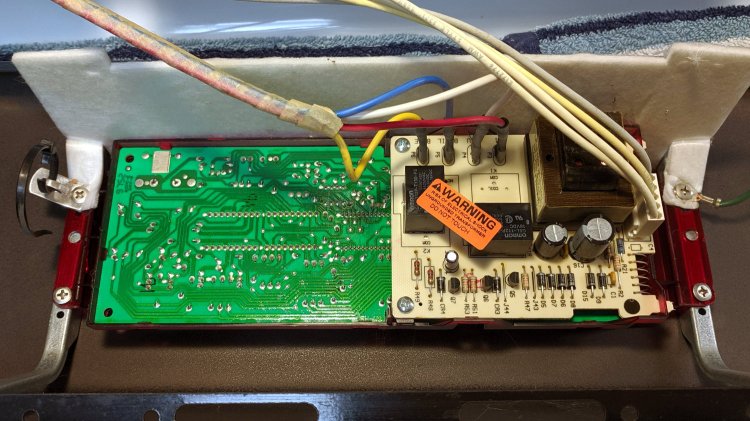
    Pulling the thing apart reveals the PCB across the back of the control panel:

    Kenmore oven control - PCB overview
    Kenmore oven control – PCB overview

    Note that all of the external connections arrive on the white power supply PCB attached over the main PCB.

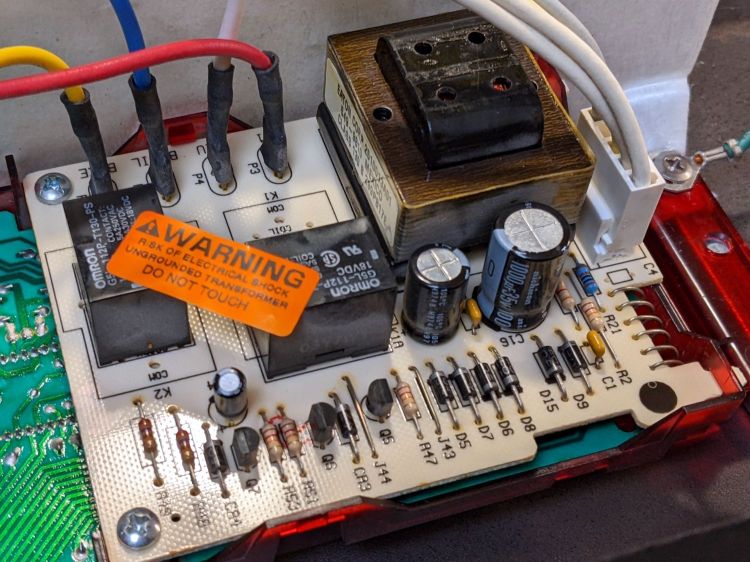
    A closer look shows one of the two groups of wire interconnects between the two boards:

    Kenmore gas range - rear PCB
    Kenmore gas range – rear PCB

    There’s a similar group hidden behind the hulking transformer.

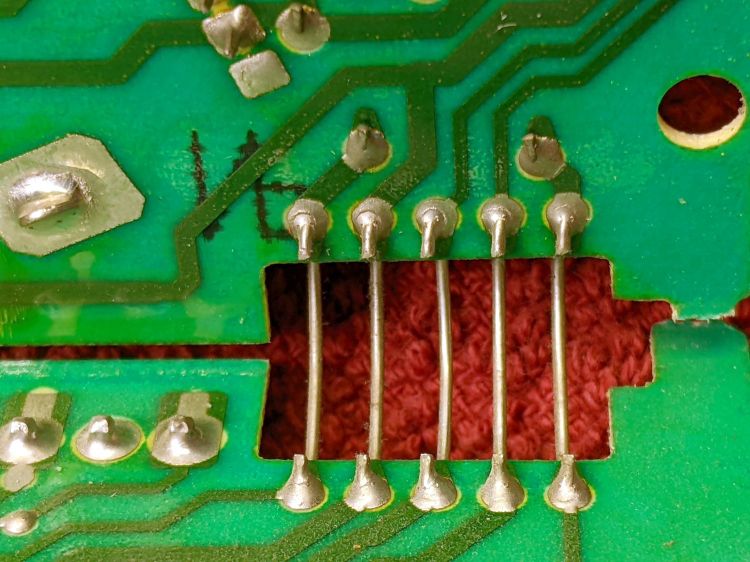
    Removing the two obvious screws and easing the PCB out of the red plastic latches made the problem instantly obvious:

    Kenmore gas range - failed solder joint
    Kenmore gas range – failed solder joint

    Yeah, that broken solder joint would definitely be touch-sensitive!

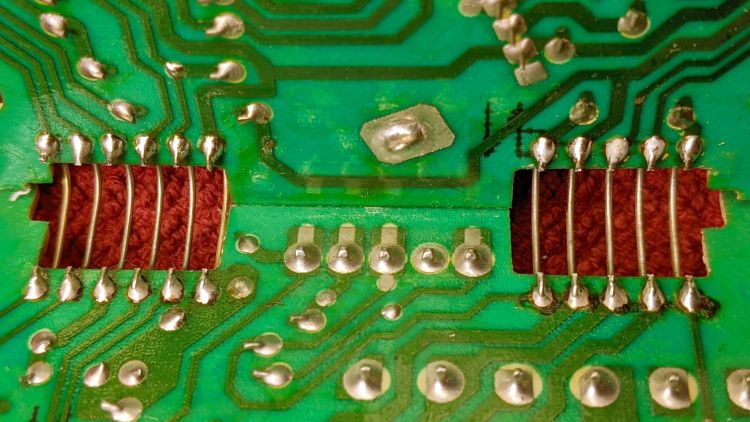
    The solder joints in the other group also show signs of fatigue:

    Kenmore gas range - broken solder joints
    Kenmore gas range – broken solder joints

    It’s of interest only the upper joints on the power supply PCB have fractured. Perhaps those ends of the wires were hand-soldered separately from the other ends in the main PCB?

    Resoldering both ends of all the wires restored perfect operation:

    Kenmore gas range - resoldered joints
    Kenmore gas range – resoldered joints

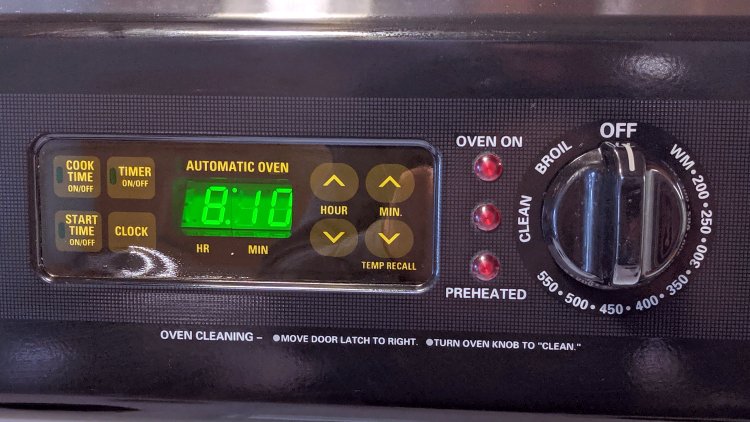
    For the record, the Kapton tape I laid over the entire control panel 2-½ years ago continues to protect the slightly cracked membrane over the pushbutton switches:

    Kenmore oven control - Kapton tape cover
    Kenmore oven control – Kapton tape cover

    Gotta love yet another zero-dollar appliance repair …

  • Laser-cut Pole Bean Ties

    Laser-cut Pole Bean Ties

    This is the season for erecting the structures upon which the pole beans will climb:

    Garden Bean Poles - overview
    Garden Bean Poles – overview

    They’re made from a dozen small trees and branches of larger trees harvested around the yard. They last for a few years, just long enough for the next crop to reach useful lengths.

    We lash them together with fabric strips:

    Garden Bean Poles - joint detail
    Garden Bean Poles – joint detail

    My knot hand is weak, but seems sufficient to the task.

    Mary formerly tore the strips from old jeans / pants / whatever, which required considerable effort, produced ragged edges, and filled the air with fabric dust. This year, I proposed an alternative:

    Garden Bean Poles - laser cutting ties
    Garden Bean Poles – laser cutting ties

    The weird thing in the middle is a reflection of an overhead can light in the laser cabinet’s polycarb lid.

    From starting the LightBurn layout to presenting the strips for final inspection required the better part of ten minutes. I scissors-cut along the main seams to get single fabric layers, with everything above the crotch seam wadded off the platform to the left.

    As with my shop raglets, the layout depends on LightBurn’s overhead camera view to align the cuts with the fabric on the platform:

    Bean Pole Ties - LightBurn layout
    Bean Pole Ties – LightBurn layout

    It’d be easier to see with lighter fabric, but that’s what came to hand in the scrap box and the beans won’t care. We do not anticipate complaints about the odor of charred fabric when they reach the top of the poles, either.

    The strips must align with the fabric’s grain to put the warp threads along their length, which makes the main side seam parallel to the X-axis. Even I can handle that layout!

    Yes, the strips have rounded corners and, no, it doesn’t matter.

  • Laser-cut Shop Wipes

    Laser-cut Shop Wipes

    Wiping down a tool or wiping up a mess with a small rag and then throwing it out simplifies cleanup:

    Shop wipes
    Shop wipes

    Long ago, I applied scissors to old towels / t-shirts / whatever to get randomly sized squares, but when Mary began using rotary cutters for her sewing projects I immediately saw the light. A few times a year, I lower the scrap box level and restock the shop wipes boxes.

    A laser cutter is even better:

    Shop Rags - LB camera layout
    Shop Rags – LB camera layout

    Flatten the rag on the honeycomb, drag a few rectangles into place, and fire the laser:

    Shop wipes - laser cut
    Shop wipes – laser cut

    Something like 50 mm/s at 60% power works for all the fabrics I’ve tried, from worn-out towels and dead sweatpants to napkins and t-shirts. Thinner fabrics can be stacked, but wrinkles and seams get in the way of clean cuts.

    Rounded-corner rectangles are easy enough to draw and the scrap cloths have different shapes, so I don’t see much point in saving a file with any specific layout. Your scrap box may be more orderly.

    A clean cut lets the outer cloth just lift away:

    Shop wipes - on honeycomb
    Shop wipes – on honeycomb

    The wipes give off a distinct smell of charred cloth, but running them through the clothes washer in a big mesh bag with everything else solves that problem.

    Obviously, one couldn’t possibly justify a laser cutter to make shop wipes, but if you happen to have one just standing around, well …

  • Garden Cart Handle Pivot

    Garden Cart Handle Pivot

    For reasons not relevant here, I was tapped to replace the plastic parts attaching the handle to a garden cart:

    Garden Cart - handle attachment
    Garden Cart – handle attachment

    The owner tried to contact the “manufacturer” to no avail; repair parts are simply not available, even if the name painted on the cart had a meaningful relationship to anything else.

    Well, I can fix that:

    Garden Cart - handle repair parts
    Garden Cart – handle repair parts

    Fortunately, another cart in the fleet provided the missing bits so I could reverse-engineer their measurements.

    The solid model looks about like you’d expect:

    Garden Cart Handle - show view
    Garden Cart Handle – show view

    Printing the two halves with those nice (yellow) bosses in place wasn’t feasible. They were exactly 1 inch in diameter, so I just parted two cookies from the end of a stout acetal rod after drilling a hole for the 2-¼ inch 5/16-18 bolt.

    The two pieces took nigh onto three hours with five perimeters and 50% infill:

    Garden Cart Handle - slicer preview
    Garden Cart Handle – slicer preview

    While delivering and installing the parts, I got volunteered to haul plants to cars with one of the carts during the upcoming Spring Plant Sale. That’ll teach me to stay in the Basement Shop …

    The OpenSCAD source code as a GitHub Gist:

    // Garden Cart Handle Pivot
    // Ed Nisley KE4ZNU 2022-05
    Layout = "Show"; // [Show,Build]
    /* [Hidden] */
    ThreadThick = 0.25;
    ThreadWidth = 0.40;
    HoleWindage = 0.2;
    Protrusion = 0.1; // make holes end cleanly
    inch = 25.4;
    function IntegerMultiple(Size,Unit) = Unit * ceil(Size / Unit);
    ID = 0;
    OD = 1;
    LENGTH = 2;
    //———-
    // Dimensions
    // Handle lies along X axis
    HandleOD = (7/8) * inch;
    BoltOD = (5/16) * inch;
    Washer = [BoltOD,1.0 * inch,2.0]; // just for Show
    Disk = [BoltOD,62.0,(3/16) * inch];
    ClampBase = [(1 + 7/8)*inch,(1 + 1/8)*inch,2.0];
    Kerf = 2.0;
    CornerRadius = 1.0;
    PivotOA = [Disk[OD],Disk[OD],HandleOD + 2*ClampBase.z + 2*Disk[LENGTH]];
    //———————-
    // Useful routines
    module PolyCyl(Dia,Height,ForceSides=0) { // based on nophead's polyholes
    Sides = (ForceSides != 0) ? ForceSides : (ceil(Dia) + 2);
    FixDia = Dia / cos(180/Sides);
    cylinder(d=(FixDia + HoleWindage),h=Height,$fn=Sides);
    }
    //———————-
    // Set up parts
    module Handle() {
    translate([-2*PivotOA.x,0,0])
    rotate([0,90,0])
    PolyCyl(HandleOD,4*PivotOA.x,24);
    }
    module Bolt() {
    translate([0,0,-PivotOA.z])
    PolyCyl(BoltOD,2*PivotOA.z,12);
    }
    module Pivot() {
    difference() {
    union() {
    hull()
    for (i=[-1,1], j=[-1,1]) // rounded block
    translate([i*(ClampBase.x/2 – CornerRadius),j*(ClampBase.y/2 – CornerRadius),-PivotOA.z/2])
    cylinder(r=CornerRadius,h=PivotOA.z,$fn=4*8);
    for (k=[-1,1])
    translate([0,0,k*(PivotOA.z/2 – Disk[LENGTH]/2)])
    rotate(180/36)
    cylinder(d=Disk[OD],h=Disk[LENGTH],$fn=36,center=true);
    }
    Handle();
    Bolt();
    cube([2*ClampBase.x,2*ClampBase.y,Kerf],center=true); // slice through center
    }
    }
    //———-
    // Build them
    if (Layout == "Show") {
    rotate([90,-45,0]) {
    Pivot();
    color("Green")
    translate([2*PivotOA.x – PivotOA.x/2,0,0])
    Handle();
    color("Red")
    Bolt();
    color("Yellow")
    for (k=[-1,1])
    translate([0,0,k*(PivotOA.z/2 + Washer[LENGTH])])
    rotate(180/36)
    cylinder(d=Washer[OD],h=Washer[LENGTH],$fn=36,center=true);
    }
    }
    if (Layout == "Build") {
    Offset = 5.0;
    intersection() {
    translate([-(PivotOA.x/2 + Offset),0,PivotOA.z/2])
    Pivot();
    translate([-2*PivotOA.x,-2*PivotOA.y,0])
    cube([4*PivotOA.x,4*PivotOA.y,PivotOA.z/2],center=false);
    }
    intersection() {
    translate([(PivotOA.x/2 + Offset),0,PivotOA.z/2])
    rotate([180,0,0])
    Pivot();
    translate([-2*PivotOA.x,-2*PivotOA.y,0])
    cube([4*PivotOA.x,4*PivotOA.y,PivotOA.z/2],center=false);
    }
    }

  • Laser-cut Cutworm Collars

    Laser-cut Cutworm Collars

    Mary, having had considerable trouble with cutworms in her gardens, routinely deploys cardboard collars around new plants:

    Cutworm Collars - assembled
    Cutworm Collars – assembled

    It seems cutworms trundle around until they find an edible plant, chew through the stem and topple the plant, then trundle off without taking another bite. A small cardboard barrier prevents them from sensing the plant: apparently, motivation to climb a short wall hasn’t yet evolved.

    Up to this point, Mary applied scissors to tissue boxes, but I proposed an alternative with an adjustable fit to any plant:

    Laser Cutting Cutworm Collars
    Laser Cutting Cutworm Collars

    A splayed cardboard box rarely lays flat, a condition enforced by a few MDF stops used as clamps.

    Come to find out no two tissue boxes have identical dimensions, even boxes from the same brand / retailer, so lay out duplicates of the collar template to match your stockpile.

    That was fun!

    The SVG image as a GitHub Gist:

    Loading
    Sorry, something went wrong. Reload?
    Sorry, we cannot display this file.
    Sorry, this file is invalid so it cannot be displayed.

  • MTD Snowthrower Friction Drive Rebuild

    MTD Snowthrower Friction Drive Rebuild

    During the last snowstorm of the season, the venerable MTD snowthrower carved a trench out of the garage and across the driveway, then abruptly stopped moving. The motor roared and the auger turned, but the drive clutch handle had no effect, so I dragged its carcass into the garage and we completed the mission by hand.

    Popping the belly plate on the next sunny day revealed the problem: the jam nut (part 34) anchoring the Friction Disk Wheel (part 28) to the Friction Wheel Bracket Assembly (part 32) had gone missing:

    MTD Snowblower - page 26 - friction drive parts
    MTD Snowblower – page 26 – friction drive parts

    Worse, the Wheel’s threaded shaft spent some time rattling around in the Bracket while chewing up its thread:

    MTD Snowthrower - friction disk wheel - damaged thread
    MTD Snowthrower – friction disk wheel – damaged thread

    This would ordinarily be No Big Deal, but what you see of the shaft is all you get: it rotates freely in the bearing embedded in the Wheel with no way to hold it while cleaning up its threads.

    Having already promised to replace the Wheel, I installed the new Wheel using a castle nut secured with a generous dollop of red Loctite, then tapped two of its castellations into the shaft’s slot as a mechanical anchor:

    MTD Snowthrower - friction disk wheel - castle nut
    MTD Snowthrower – friction disk wheel – castle nut

    I really wanted to lay a nice hard roll pin along that slot through the nut, but there’s no convincing way to secure such a thing without a second nut. Maybe next time?

    While I had the drive train apart, the sad state of the Wheel Shift Rod Assembly (part 29) became apparent:

    MTD Snowthrower - wheel shift rod - worn
    MTD Snowthrower – wheel shift rod – worn

    I scuffed up the shiny wear mark, turned a suitable acetal bushing, filled the trench with epoxy, and squished the bushing in place:

    MTD Snowthrower - wheel shift rod - acetal bushing
    MTD Snowthrower – wheel shift rod – acetal bushing

    The flange might hold it in place against the Frame Shift Bracket (part 18), which snugly contains the rest of the bushing against the epoxy, so the whole affair might outlast the next season’s first snowstorm. We shall see.

    A nice new R-clip secures the Friction Wheel Bracket Assembly in place against the old washer:

    MTD Snowthrower - friction bracket R-pin
    MTD Snowthrower – friction bracket R-pin

    You might want to insert it the other way, but the black plastic housing above it extends just far enough to thwart your (well, my) desire.

  • Kukoke Outlet Timer: Over-powered Zener Diode

    Kukoke Outlet Timer: Over-powered Zener Diode

    If the title seems familiar, it’s because there’s no visible difference (apart from the “brand name”) between the Enover timer that failed a little over a year ago and the Kuoke timer that recently failed:

    Kukoke timer - overview
    Kukoke timer – overview

    That’s what it looked like after the repair. Prior to that, it’s just a blank display with no response to any inputs.

    Given identical hardware, the overheated phenolic PCB under the Zener diode came as no surprise:

    Kukoke timer - zener heat death
    Kukoke timer – zener heat death

    As promised, though, this time I epoxied a brass shim heatsink to the new diode in hopes of cooling it enough to live long and prosper:

    Kukoke timer - zener heatsink
    Kukoke timer – zener heatsink

    I suppose I must now preemptively affix heatsinks in the two surviving timers, because we all know how their stories will end.