Ed Nisley's Blog: Shop notes, electronics, firmware, machinery, 3D printing, laser cuttery, and curiosities. Contents: 100% human thinking, 0% AI slop.
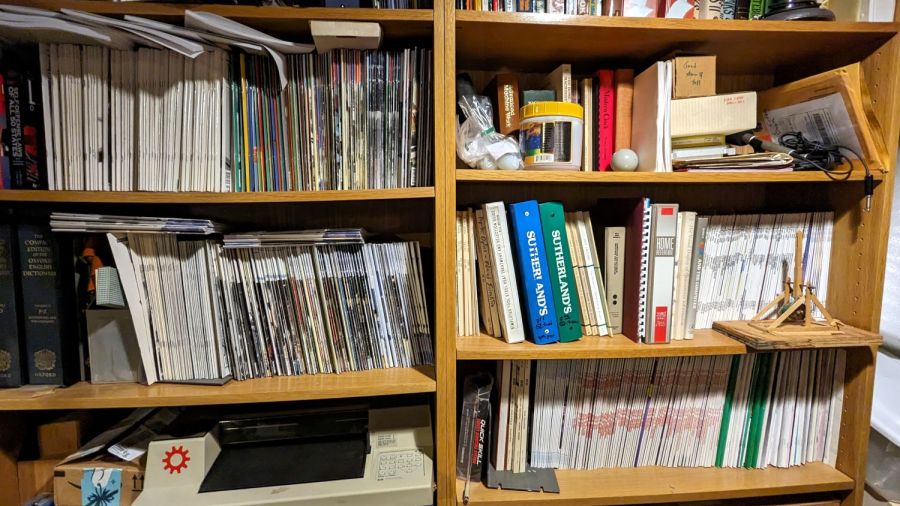
For reasons that will become relevant later on, I must clear the magazines from about ten feet of shelf space (and a stack of boxes), including this assortment:
To the best of my knowledge and belief, each collection is complete within those dates, although I’m equally sure an issue or two went walkabout over the course of four decades.
Having written columns for Digital Machinist, DDJ, and Circuit Cellar, I (still!) have multiple “author’s copies” of those, although I haven’t dug through the boxes for the specifics.
Here’s the deal:
You must take all of any set
Any offer ≥ $0.00 is acceptable
Shipping from ZIP 12603 is your problem
N.B.: Shipping Is Not My Problem (*)
Best offer on or before 30 November 2023 takes any or all.
Whatever remains becomes mulch in December 2023.
(*) A USPS Medium Flat Rate box (11×8.5×5.5 inch) costs $17 within the continental US and holds two or three dozen issues. Obviously, that’s the wrong way to ship an entire shelf of magazines, but gives you an idea of the scale.
If you want to pick ’em up in person, I’ll help heave ’em into your trunk.
Quite a while ago I’d added another LED strip to the under-cabinet light array, because the little cutting boards & suchlike on a wire shelf blocked the light, but fastened it in place with ugly wire ties.
Finally I found a Round Tuit on the desk for brackets mounting the strip directly to the shelf:
Kitchen Light Bracket – shelf blocks – solid model
Ram a pair of brass inserts in the holes, screw the strip in place, snap the brackets between the wires, and it’s much better:
Kitchen Light Bracket – installed
Stipulated: those wire ends look awful. Fortunately, they’re normally hidden by the cutting boards and suchlike on the shelf.
Although it looks precarious, the rounded sides (seem to) have enough grip on the wires to hold the LED strip in place. We’ll see how well that works in practice, but the idea was to avoid anything sticking up above the wires to collide with the stuff on the shelf.
The blocks emerge from a chunk of code glommed onto the original OpenSCAD program:
For reasons not relevant here, Mary asked for a bunch of small cloth wipes cut to a particular size. A few minutes with LightBurn for rectangle-drawing and array-fiddling produces a useful result:
Laser-cut wipes – cutting
The part about peeling away what you don’t want just never gets old:
Laser-cut wipes – on honeycomb
It turns out this is even faster than rotary cutter action, because you need not worry about the old T-shirt sliding around while you’re slashing away at it. Bonus: a free 2 mm radius on all the corners!
Let the pieces air out for a day on the patio and they’re ready for use.
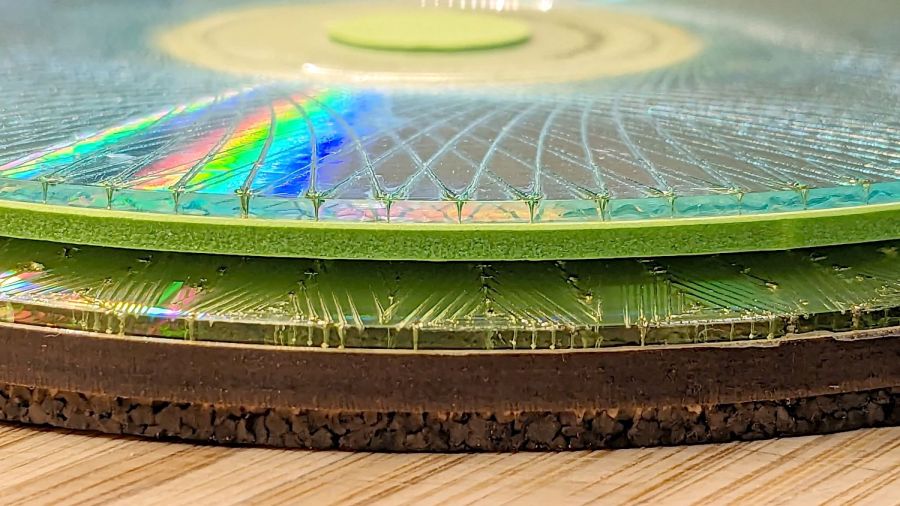
It’s a test piece with adhesive sheets between acrylic layers:
Layered Acrylic Desk Junk Collector – edge detail
From top to bottom:
Acrylic 4.3 mm – sidewall to corral the junk
Acrylic 1.5 mm – top plate
Acrylic 2.4 mm – two layers
Acrylic mirror 3 mm
Cork 2 mm – PSA backing
The pair of 2.4 mm layers add up to just an itsy more than the 4.8 mm thickness of the shattered glass atop the mirror. Unlike previous epoxy sealed coasters, the glass sits on a sheet of 3M LSE adhesive film to keep the pieces together, with the top 1.5 mm acrylic layer containing any slivers. Because there’s no epoxy involved, the project is finished with no muss, no fuss, no curing time, and no drippy edges.
The geometry comes from a scan of the glass piece:
Desk Clutter plate – smashed glass – Quick Mask
That’s the GIMP Quick Mask result of manually drawing around the perimeter with the center of a 25 pixel diameter pencil, thus creating a 12 pixel gap to ensure the glass will fit inside the cut shape: at 300 dpi, the 12 pixel gap is about 40 mil = 1 mm wide. Slightly less would work as well, although I’ve discovered some of the glass cuboids have non-vertical walls sticking out to the side above the scanner’s depth of field.
Scribbling over the interior with a bigger pencil clears it out and a few fill operations produce a binary mask perfectly suited for LightBurn’s Image Trace tool:
Desk Clutter plate – smashed glass – binary mask
Trace that outline into vectors, throw away the mask, and use the outline for a conformal cut.
The rings of acrylic and adhesive are 3 mm wide, generated from the outline by offsetting it 3 mm outward:
Desk Clutter plate – LB perimeters
The tooling circle around the perimeter simplifies drag-and-drop alignment, because the geometric center of the perimeter shape isn’t quite in the middle of where you’d (well, I’d) want to align it. Grouping the outline with the circle keeps the center snap point where it should be.
Narrow rings of adhesive sheet turned out to be even more unmanageable than I expected. Perhaps a better way:
Cut the ring with tabs holding it to the center area
Stick the ring + center to vinyl transfer tape
Peel the protective paper off the adhesive ring
Stick the acrylic ring atop the adhesive ring
Sever the tabs to release the adhesive ring
Peel the transfer tape off the ring
The “adhesive tape sheets for craft” are paper-based, rather than a plastic film, and are neither transparent nor durable. I used it mostly to get an idea of how well it sticks to acrylic, as it’s primarily intended for paper crafts.
The 3M LSE backing layer is plastic and the sheet becomes nearly transparent as the glass squishes down, although you wouldn’t want it on a mirror where you cared about the optical quality of the reflection. Underneath a chunk of smashed glass, it’s just fine.
All in all, it turned out well.
Next: how long does that craft adhesive last in abnormal conditions?
Nuheara predicts two to three years of battery lifetime for their IQbuds² MAX not-really-hearing-aids and, indeed, after 2-½ years of more-or-less steady use, the right bud developed a bad case of not charging fully and discharging quickly. The batteries are not, of course, customer-replaceable, so one can:
Buy a single bud
Buy a complete new pair + case + accessories
Ask about their repair service
Unsurprisingly, a single bud costs more than half the cost of the full set and the repair service is a complete mystery. Given that the left bud’s battery will likely fail in short order, let’s find out what’s inside.
Your ear sees this side:
Nuheara IQbud – bottom view
The dark oval is a (probably IR) sensor telling the bud when it’s jammed in your ear.
Everybody else sees this side:
Nuheara IQbud – top view
The small slit over on the right and the two holes around the top seem to be for various microphones.
Jamming a plastic razor blade into the junction between the two parts of the case, just under the mic slit, and gently prying around the perimeter eventually forces the adhesive apart:
Nuheara IQbud – case splitting
Do not attempt to yank the two pieces apart, because a ribbon cable joins the lower and upper PCBs:
Nuheara IQbud – ribbon cable
The metallic disk in the lower part is the lithium battery.
Ease the upper part away, being very careful about not tugging on the ribbon cable:
Nuheara IQbud – raising battery
The battery has moved upward, revealing the lower PCB.
Rolling the upper part toward the ribbon cable eventually produces enough space to extract the battery:
Nuheara IQbud – battery freed
Note the orientation:
The rebated end is the negative terminal and faces outward
The wider end is the positive terminal and faces inward
With the battery out, you can admire the PCBs and ribbon cable:
Nuheara IQbud – interior view
What is not obvious from the picture: two pairs of spring-loaded pogo pins contacting the battery. There is no actual battery holder, as it’s just tucked into the structure of the bud, with the perimeter adhesive providing the restraining force for the pogo pins.
The 1654 cells I got came with wire leads welded to the cell and a complete Kapton enclosure; apparently other devices use soldered connections rather than pins. They proudly proclaim their “Varta” heritage, but I have no way to prove they actually came from Germany.
I snipped off the wires, carved a pair of holes through their Kapton for the contact pins, tucked the cell in the bud, pressed the halves together, applied a clamp, then wrapped a strip of Kapton tape around the perimeter:
Nuheara IQbud – reassembled
It seems remarkably easy to wrap the tape over the front microphone, but don’t do that. Conversely, sealing the entire perimeter is the only way to prevent acoustic feedback, so I added a snippet of tape just under the front mic opening.
Do that for the other bud and declare victory.
That is, fer shure, not the most stylin’ repair you’ve ever seen, but I was (for what should be obvious reasons) reluctant to glue the halves together. I expect the tape to peel off / lose traction after a while, but I have plenty of tape at the ready. Worst case, I can glop some adhesive in there and hope for the best.
Because the buds lost power during their adventure, they required a trip through their charging case to wake them up again. After that, they work as well as they did before, with consistently longer run time from both buds.
It was a cool morning and the snake hadn’t yet reached operating temperature, but it eventually flowed off into the garage and we went on our way.
A few hours later we returned:
Garter snake under garage door seal – B
Apparently that was the best place for a snake.
Mary lined up a four-cell seedling pot ahead of the critter, encouraged it to flow forward, and much to our surprise it tucked neatly into one of the cells:
Garter snake under garage door seal – C
We carried it to the herb garden, wished it well, and a few hours later it had uncoiled and gone about its business.
While pondering what to do with the shattered kitchen scale, I got a bottom-dollar replacement touting its rechargeable lithium battery. After giving it the obligatory charge-before-using, I put it in service. Five days later, its battery was dead flat discharged.
So I gutted it to extract the battery:
Cheap digital scale – lithium cell
It’s a cute little thing, isn’t it?
Much to my surprise, the obligatory battery rundown test showed it matches its 0.74 W·hr label:
Kitchen Scale – Charge1
We all know where this is going, right?
Crunche a connector on the battery, another on the scale, and make up a suitable current tap for a meter:
Cheap digital scale – current measurement setup
Which looked like this:
Cheap digital scale – active current
That’s about what I found for the craptastic scale running from a pair of CR2032 primary cells, so it’s not out of line.
Turn off the scale and measure the idle current:
Cheap digital scale – inactive current
Do you think I got a dud?
For all I know, the little microcontroller under the epoxy blob is running a continuous attack on my WiFi network, with the intent of siphoning off all my sensitive bits. Ya never know.
Dividing the battery’s 200 mA·hr rating by 4 mA says it really should be dead in 50 hours, which is close enough to five days: diagnosis confirmed!
Rather than fight, I switched to a battery with more capacity:
Cheap digital scale – NP-BX1 replacement
It’s long past its prime, but ought to last for a month, which is about as long as the shattered scale survived on a similar battery.