Ed Nisley's Blog: Shop notes, electronics, firmware, machinery, 3D printing, laser cuttery, and curiosities. Contents: 100% human thinking, 0% AI slop.
A friend asked me to scrub and rebuild an ancient IBM Thinkpad 760XD (there were good reasons for this task that aren’t relevant here), which led to a blast from the past:
Windows 98 Welcome
After Windows settled down from its obligatory reboots, installing the exceedingly complex MWave DSP drivers from three diskettes (!) produced this classic result:
Windows 98 – BSOD
Ordinarily, I’d suggest installing some flavor of Linux, but the 760XD’s BIOS can’t boot from either CD or USB, so you’d be forced to sneak the install files onto the hard drive, hand-craft a suitable boot diskette (!), and then perpetrate some serious fiddling around. That made even less sense than (re-)installing Windows 98.
However, given that exposing a fresh Windows 98 installation to the 2012 Internet would resemble tossing a duckling into a brush chipper, we agreed that this laptop’s next experience should be at an upcoming e-waste recycling event.
The next morning confronted me with this delightful reminder that nobody knows how to handle boot-time errors, not even on a 2011 PC:
Lenovo – USB Keyboard not found
The keyboard cable had gotten dislodged when the USB hub fell from its perch along the back edge of the desk. It’s fine now…
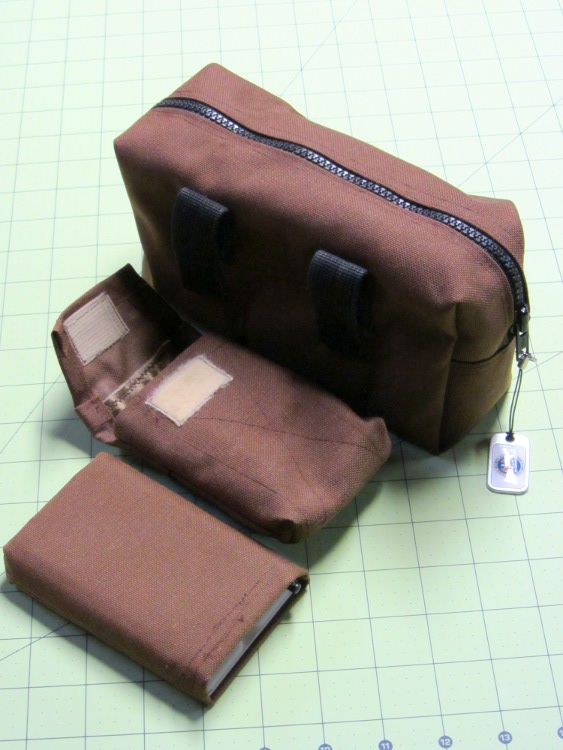
Mary made me several presents early this year: a new belt pack, a camera case for the Canon SX230HS, and a touchup for the Zire 71 case:
Belt pack – camera case – PDA case
The belt pack has an interior lining with many side pockets for the stuff I deem essential; it’s also large enough to hold both the camera and the PDA when I’m out biking around. The camera case includes a pocket nestling a battery against the camera’s front side, beside the lens cap. The Zire case, well, at some point I suppose I’ll be forced to get a phone, but, until then, this will suffice.
They’re all made from coated pack cloth, not that I expect to dunk myself in water (or that it’d do any good), but it seems to never wear out.
*hugs*
(And, yes, it probably should be “Therefor”, but …)
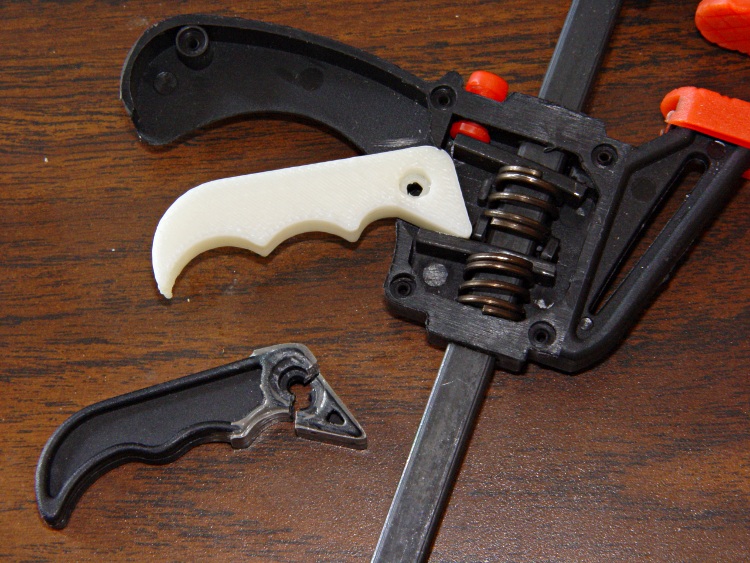
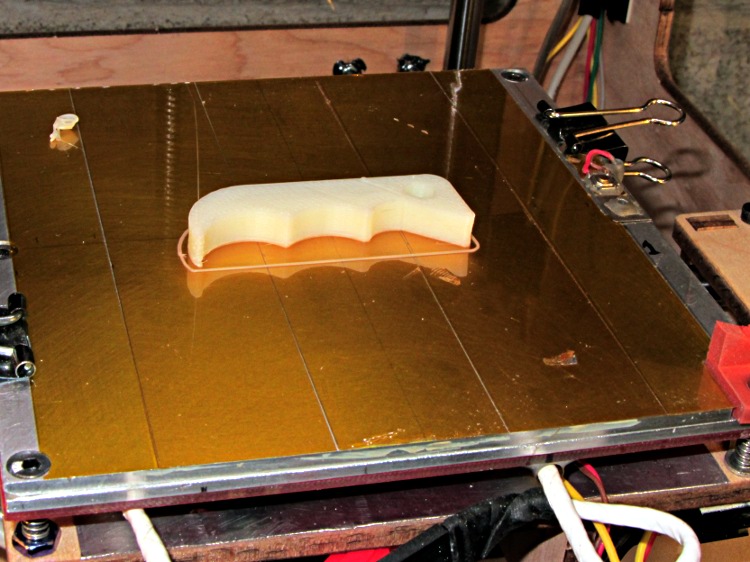
The thing omits the original’s fancy edge rounding, because I just hit the finger grips with a rat-tail file after it cooled:
HF bar clamp handle – build platform
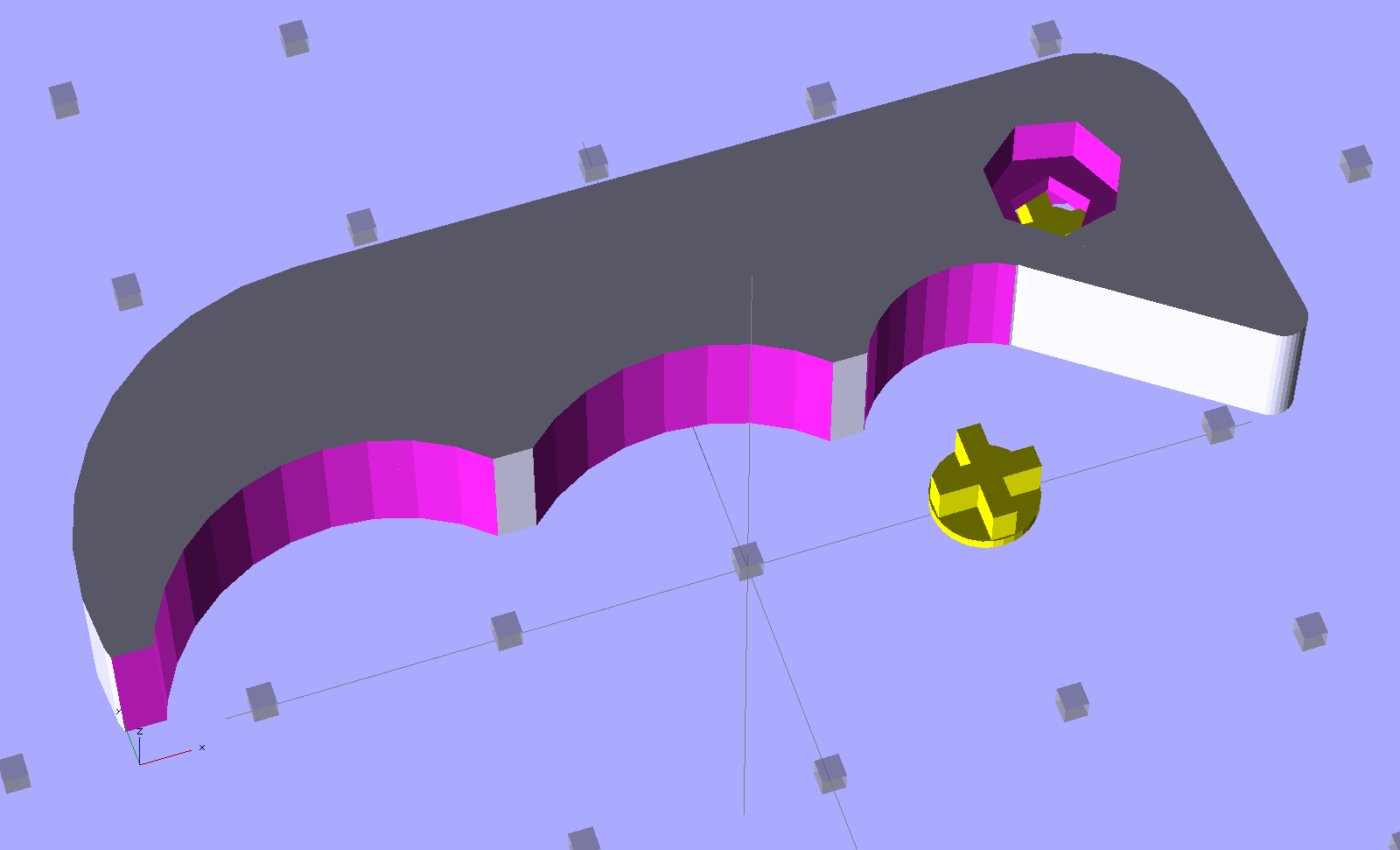
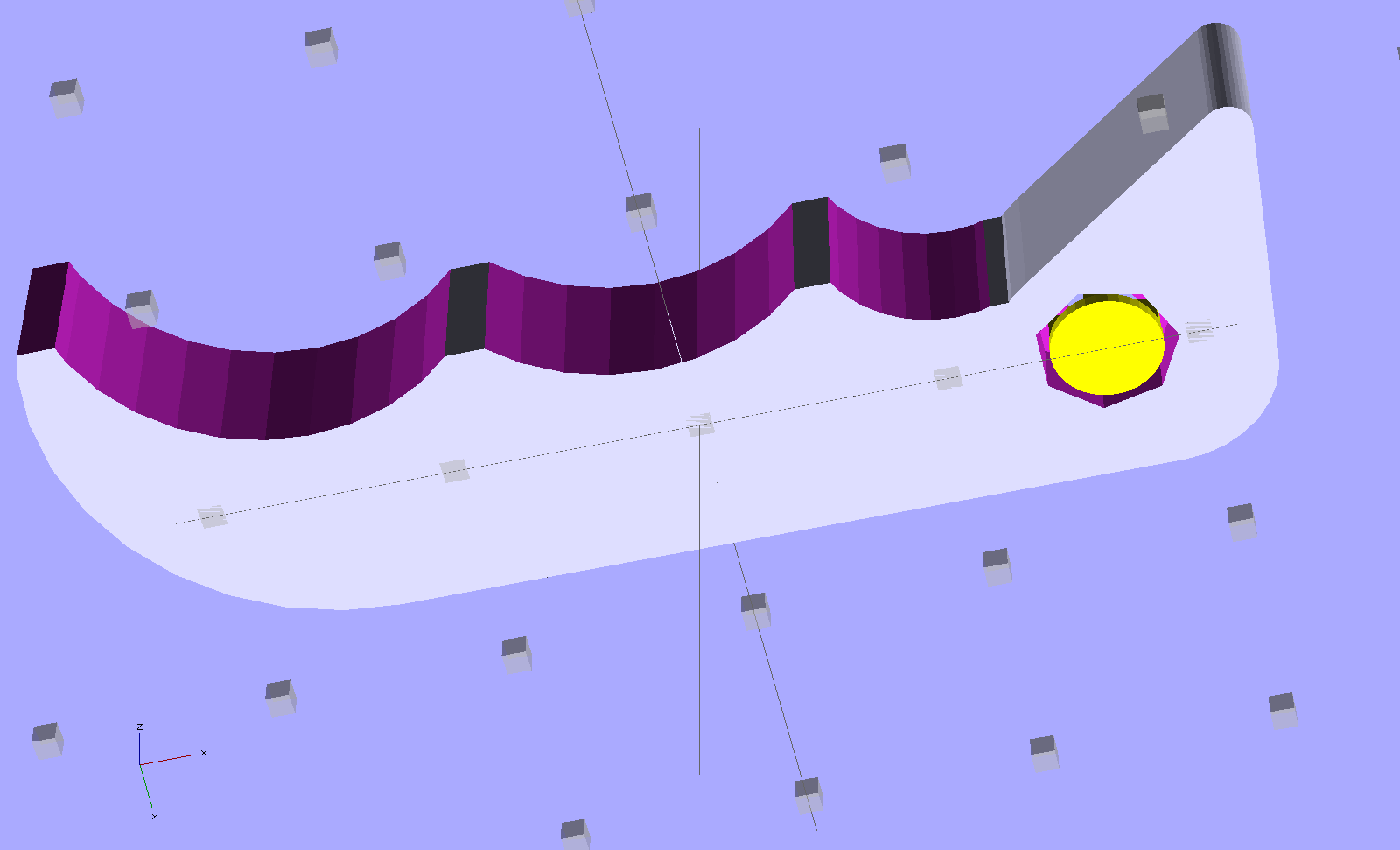
The solid model uses OpenSCAD’s hull() operation for the beak and straight side of the handle, with a handful of circles chopping out the recesses. The rightmost arc lies tangent to the near side of the beak, so as to join without a stress-raiser bump:
HF Bar Clamp – support – solid model
The little yellow doodad is (a duplicate of) the support structure inside the pivot hole that prevents the middle section from drooping. It’s easier to see from the bottom:
HF Bar Clamp – solid model – bottom
Removing the plug required nothing more than a fat pin punch and a whack from a brass hammer, with the plug centered over a hole in a random chunk of aluminum (with many other holes):
HF bar clamp handle – support plug removed
Much to my delight, the holes & pivot recesses came out exactly the right size on the first version, with HoleWindage = 0.2. What’s new & different: that the first layer height has stabilized at 0.25 mm and the first few layers don’t get squished.
I built three more handles in one setup, just to have some show-n-tell objects, with one prepped and on hot standby should the other Harbor Freight handle break. If these handles break, something aluminum on the Sherline will be in order.
Now that clamp can go back into the collection. Puzzle: which one isn’t like the other ones?
Too many bar clamps
I should’a used Safety Orange filament, eh?
[Update: xylitol designed a much better looking version that should be a drop-in replacement. Perhaps you can print it standing on edge (or end) to eliminate the support structures?]
The OpenSCAD source code:
// Handle for Harbor Freight bar clamp
// Ed Nisley KE4ZNU - Jan 2012

Layout = "Show";                // Build Show

Support = true;
SupportColor = "Yellow";

//- Extrusion parameters must match reality!
//  Print with +1 shells and 3 solid layers
//  Use infill solidity = 0.5 or more...

ThreadThick = 0.25;
ThreadWidth = 2.0 * ThreadThick;

HoleWindage = 0.2;

Protrusion = 0.1;           // make holes end cleanly

CircleSides = 4*8;
$fn = CircleSides;

//-------
// Handle dimensions

OALength = 49;
OAThickness = 6.0;

BodyWidth = 12;

BeakRadius = 12;                            // hole to tip
BeakEndRadius = 1.0;                        // roundness of tip
BeakIncludedAngle = 40;
BeakAngle = 55;
BeakAdder = [2.0,1.0];                      // additional meat on outer and upper sides

BeakHalfWidth = IntegerMultiple(BeakRadius*sin(BeakIncludedAngle/2),ThreadWidth);

PivotXY = BeakRadius*[cos(BeakAngle),sin(BeakAngle)]; // pivot hole offset from beak tip

PivotShaftDia = 2.6;
PivotRecessDia = 5.0;
PivotRecessDepth = 2.5;

NumScallops = 3;
ScallopRadius = [5,9,9];        // first scallop must be tangent to beak!
ScallopX = [-((ScallopRadius[0] + BeakHalfWidth)*cos(90 - (BeakAngle - BeakIncludedAngle/2))),
            -17.5,-31.5];
ScallopY = [-((ScallopRadius[0] + BeakHalfWidth)*sin(90 - (BeakAngle - BeakIncludedAngle/2))),
            -12,-12];

echo(str("Scallops R=",ScallopRadius," X=",ScallopX," Y=",ScallopY));

TailOuterRadius = 12;
TailInnerRadius = 22;

//-------

function IntegerMultiple(Size,Unit) = Unit * ceil(Size / Unit);

module PolyCyl(Dia,Height,ForceSides=0) {           // based on nophead's polyholes

  Sides = (ForceSides != 0) ? ForceSides : (ceil(Dia) + 2);

  FixDia = Dia / cos(180/Sides);

  cylinder(r=(FixDia + HoleWindage)/2,h=Height,$fn=Sides);
}

module ShowPegGrid(Space = 10.0,Size = 1.0) {

  Range = floor(50 / Space);

    for (x=[-Range:Range])
      for (y=[-Range:Range])
        translate([x*Space,y*Space,Size/2])
          %cube(Size,center=true);

}

//-------
// Bits and pieces

module Pivot() {

  translate([0,0,-Protrusion])
    PolyCyl(PivotShaftDia,(OAThickness + 2*Protrusion));

  translate([0,0,(OAThickness - PivotRecessDepth)])
    PolyCyl(PivotRecessDia,(PivotRecessDepth + Protrusion));

  translate([0,0,-Protrusion])
    PolyCyl(PivotRecessDia,(PivotRecessDepth + Protrusion));

}

module HandleBlock() {

  hull() {                            // beak
    cylinder(r=BeakHalfWidth,h=OAThickness);
    translate(BeakAdder)
      cylinder(r=BeakHalfWidth,h=OAThickness);
    translate([(PivotXY[0] - BeakEndRadius*cos(BeakAngle)),
              -(PivotXY[1] - BeakEndRadius*sin(BeakAngle))])
      cylinder(r=BeakEndRadius,h=OAThickness);
  }

  hull() {                            // straight body edge
    translate(BeakAdder)
      cylinder(r=BeakHalfWidth,h=OAThickness);
    translate([-(OALength - PivotXY[0] - TailOuterRadius),BeakAdder[1]])
      cylinder(r=BeakHalfWidth,h=OAThickness);
  }

  translate([ScallopX[0],0,0])        // scalloped edge tips
    rotate(180)
      cube([(OALength - PivotXY[0] + ScallopX[0] - TailOuterRadius),
            (BodyWidth/2 - ThreadWidth),      // small Finagle constant = flat tips
            OAThickness],center=false);

  translate([-(OALength - PivotXY[0] - TailOuterRadius),        // tail
            (BeakHalfWidth + BeakAdder[1] - TailOuterRadius)])
    rotate(180)
      intersection() {
        cylinder(r=TailOuterRadius,h=OAThickness);
        translate([0,-TailOuterRadius])
          cube([TailOuterRadius,2*TailOuterRadius,OAThickness]);
      }

}

module SupportPlug() {

  color(SupportColor)
  union() {
    cylinder(r=IntegerMultiple((PivotRecessDia - ThreadWidth),ThreadWidth)/2,
              h=2*ThreadThick);
    for (Index=[0,1])
      rotate(Index*90)
        translate([0,0,(PivotRecessDepth - ThreadThick)/2])
          cube([(PivotRecessDia - ThreadWidth - 2*Protrusion),
                2*ThreadWidth,(PivotRecessDepth - ThreadThick)],
              center=true);
  }
}

//------

module Handle() {

    difference() {
      HandleBlock();

      translate([-(OALength - PivotXY[0] - TailOuterRadius),    // trim tail tip
                -(PivotXY[1] - ThreadWidth),
                -Protrusion])
        rotate(180)
          cube([TailOuterRadius,TailOuterRadius,(OAThickness + 2*Protrusion)]);

      for (Index=[0:NumScallops-1]) {
        translate([ScallopX[Index],ScallopY[Index],-Protrusion])
          cylinder(r=ScallopRadius[Index],h=(OAThickness + 2*Protrusion));
      }

      Pivot();
    }

    if (Support)                    // choose support to suit printing orientation
      SupportPlug();
}

//-------

ShowPegGrid();

if (Layout == "Show") {
  translate([OALength/3,10,0])
    Handle();
  translate([10,0,0])
    SupportPlug();
}

if (Layout == "Build")
  translate([OALength/3,0,0])
    Handle();
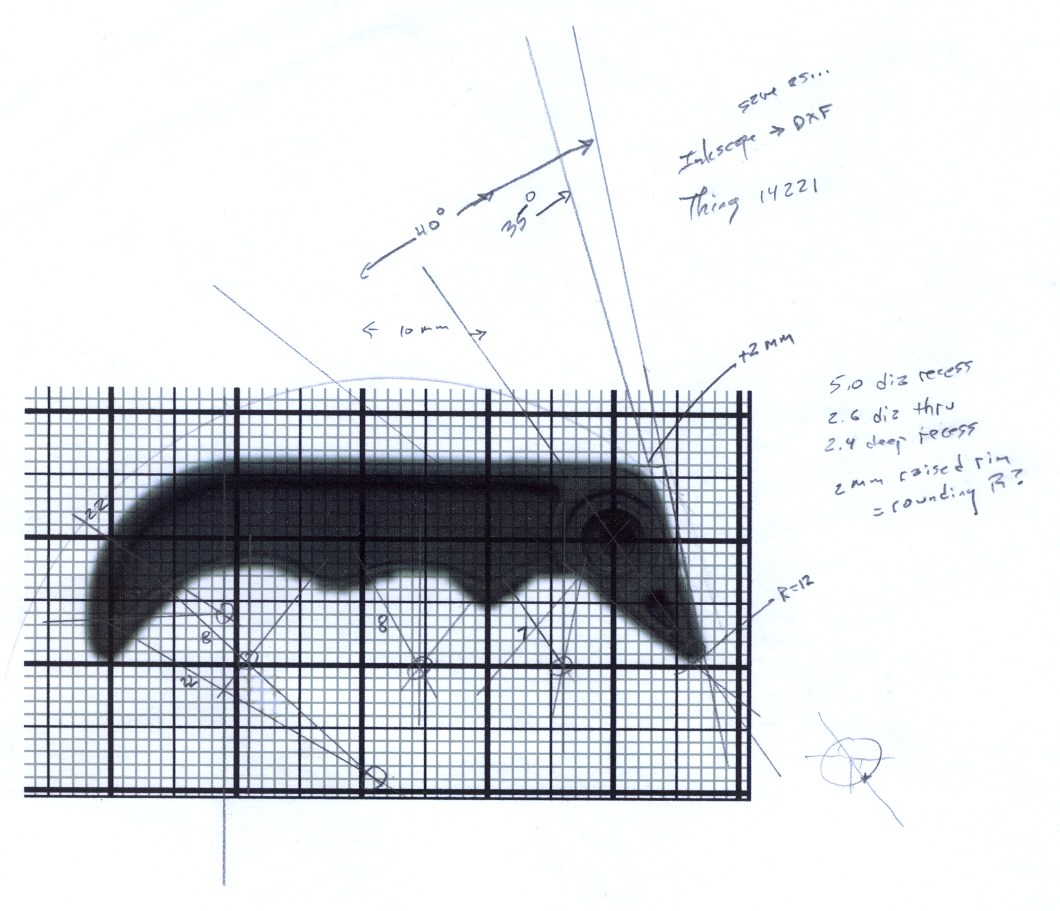
The original doodles, which I started by scanning an unbroken handle and overlaying a grid, then scaling the grid so the end-to-end measurement worked out to the proper number of millimeters:
Not all CFL bulbs fail after a year. This one seems to have lasted six years, only to burn out a few days after the other one:
Burned-out CFL bulb
I’m sure the date code just over the base means January 2006, not June 2001, simply because I used much larger bulbs a decade ago. Those have long since failed…
These bulbs all operate in nearly the worst possible condition: base-up inside a ceiling downlight can, although without a cover glass. It’s much cooler in there than with the equivalent incandescent bulb, but they still get pretty toasty. The housing discoloration and the brittle bosses around the tube glass looks a bit less saturated in real life, but this will give you an idea:
Being that sort of bear, I tend to make notations like this. Sometimes I’m delighted the next time the inscription sees the light of day and sometimes it ticks me right off…
Much of the energy-saving advantage of CFL bulbs comes from their touted long life. I’d say a year isn’t nearly long enough to reap any benefits…
There is certainly a warranty on the bulb, if only I’d:
saved the empty package and
had the original receipt and
be willing to call a presumably toll-free number and
go through whatever hassle they impose to swap the bulb
They know none of us will get very far down that checklist…
FWIW, the box of smaller CFL bulbs on the shelf says they have a two-year warranty “in normal residential service of 3 hours per day”. I’m sure the number of starts factors into it, too.
Each consists of an outer cutter rim and an inner dough press that fit neatly together.
The STL files contain a few triangle errors that seem to be typical of objects made with Google Sketchup, but the final G-Code came out fine despite a few Skeinforge warnings.
No strings, no cleanup, no muss, no fuss: the printer is back in operation once again!
The relevant Skeinforge 45 settings, about which more later:
0.25 mm layer thickness + 0.50 mm thread width
First layer: 9 mm/s perimeter + 15 mm/s infill
Other layers: 20 mm/s perimeter + 60 mm/s infill
250 mm/s travel (!)
+0 extra shells, 3 solid layers
0.20 infill + 45°/90° rectangular
200 °C extrusion + 110 °F platform
Dimension plugin settings:
Filament dia = 2.96 mm, FPD = 0.93 (natural ABS from MBI)
Retraction 2 mm @ 60 mm/s, min 1 mm travel
I’m not a big Dr. Who fan, but I know someone who is…
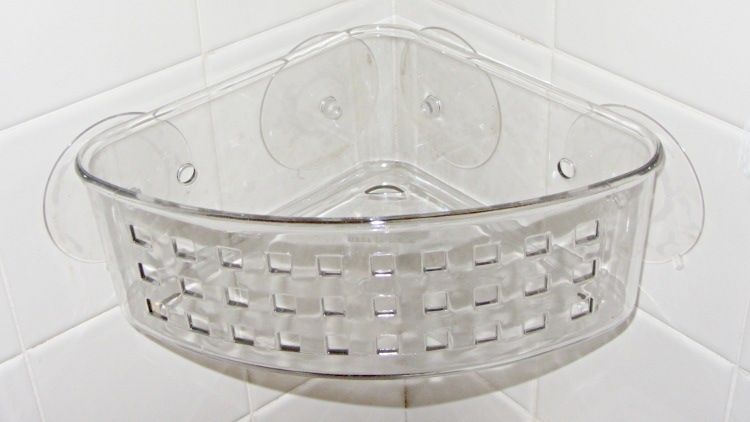
The outer suckers on the basket in the corner of the shower didn’t line up with the tiles; either tile dimensions have changed in the last half-century or it’s a hard-metric basket. It didn’t look right when I installed it (now that is a grandiose term if I’ve ever misused one), so (when the thing fell off and landed with a clatter a few days ago) I drilled two additional holes as far away from the corner as I could, using a step drill to prevent the plastic from shattering, and it’s all good.
Shower basket – redrilled
Sometimes, they’re easy…
You’ll note that I heroically resisted the urge to fire the Thing-O-Matic to print some kind of weird-ass safety-orange interposer plate, just because I could.






 The Smell of Molten Projects in the Morning