The Smell of Molten Projects in the Morning

Ed Nisley's Blog: Shop notes, electronics, firmware, machinery, 3D printing, laser cuttery, and curiosities. Contents: 100% human thinking, 0% AI slop.

Category: Electronics Workbench

Electrical & Electronic gadgets

  • USB Wire Color Code: Grand Prize Blooper

    USB Wire Color Code: Grand Prize Blooper

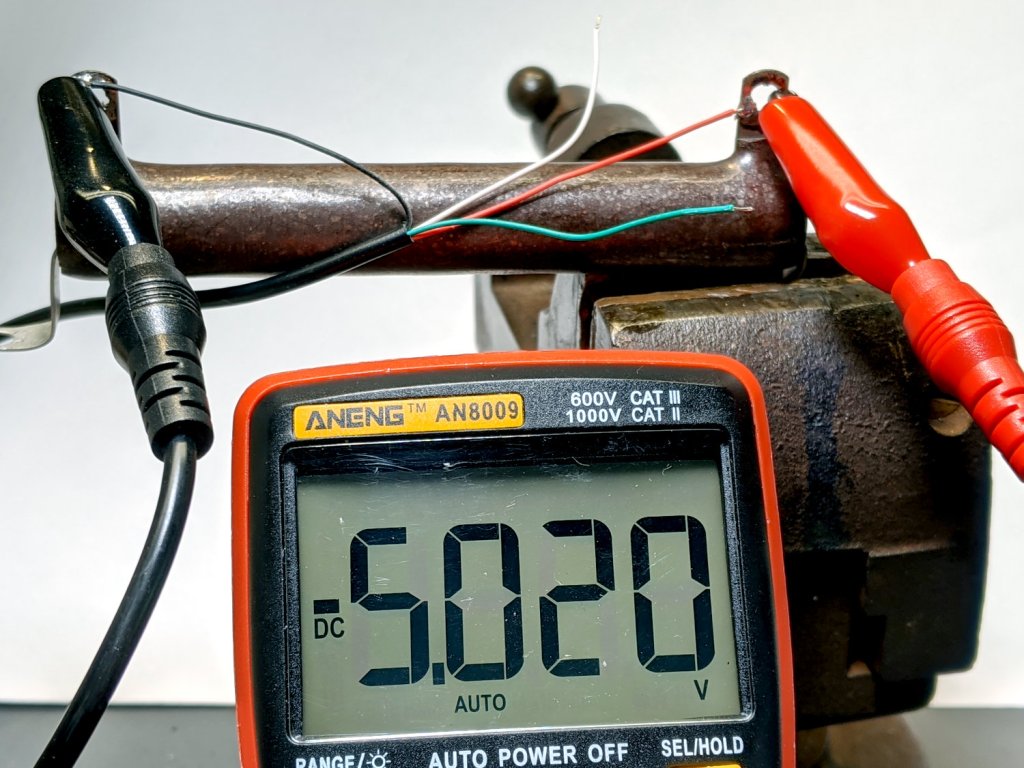
    Despite knowing the wire colors inside USB cables need not follow any particular convention, this still came as a surprise:

    USB Cable - reversed red-black wires
    USB Cable – reversed red-black wires

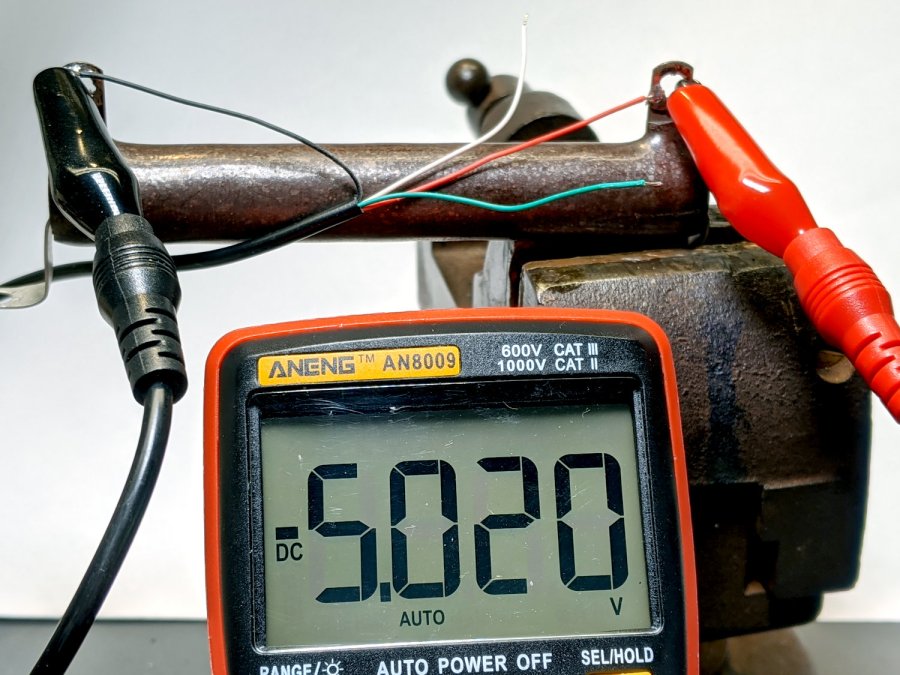
    Yes, that’s a negative indicator on the meter: it reads -5.020 V.

    No, I didn’t swap the test probe banana plugs on the other end.

    A bit of continuity testing shows the green and white data wires are also reversed, so whoever assembled the cable simply soldered the proper wire color sequence backwards onto both connectors. As long as you don’t cut the cable to reuse the connectors, it’s all good.

    Memo to Self: Stop trusting, always verify!

  • USB Current Probe Extender

    USB Current Probe Extender

    Having gotten two answers from two USB meters, I figured it was time to get primal:

    USB Current-Probe Extender - wiring
    USB Current-Probe Extender – wiring

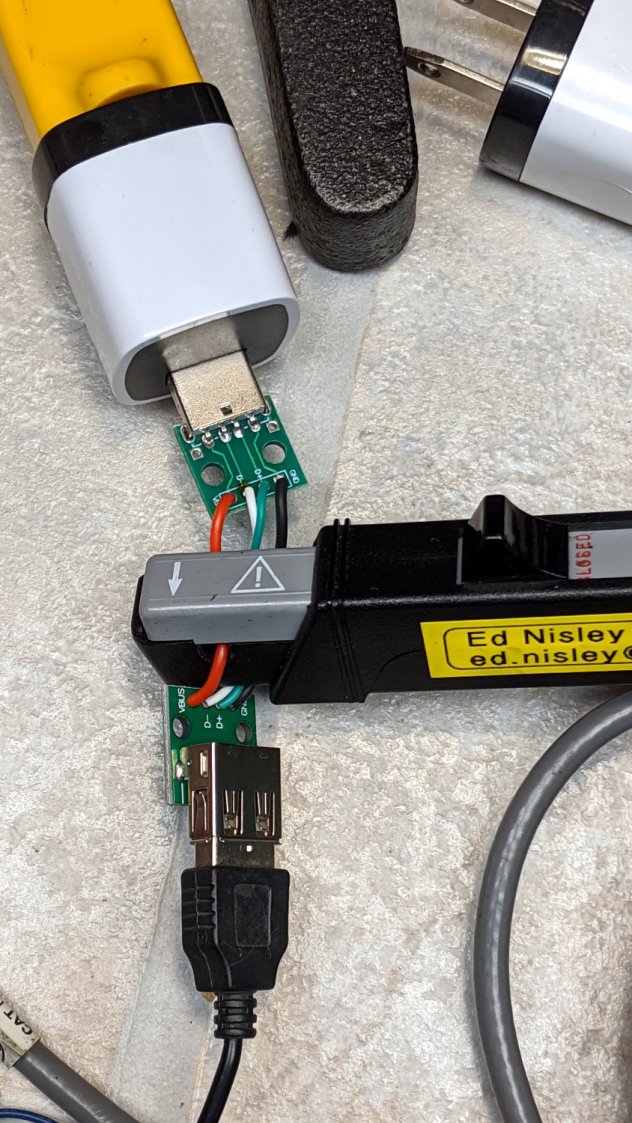
    That’s a pair of USB breakout connectors and lengths of nice silicone wire (24 AWG power & 28 AWG data), with just enough slack for a Tek A6302 current probe:

    USB Current-Probe Extender - in action
    USB Current-Probe Extender – in action

    So I can see the actual current waveform of a Glass Tile box running from a bench power supply:

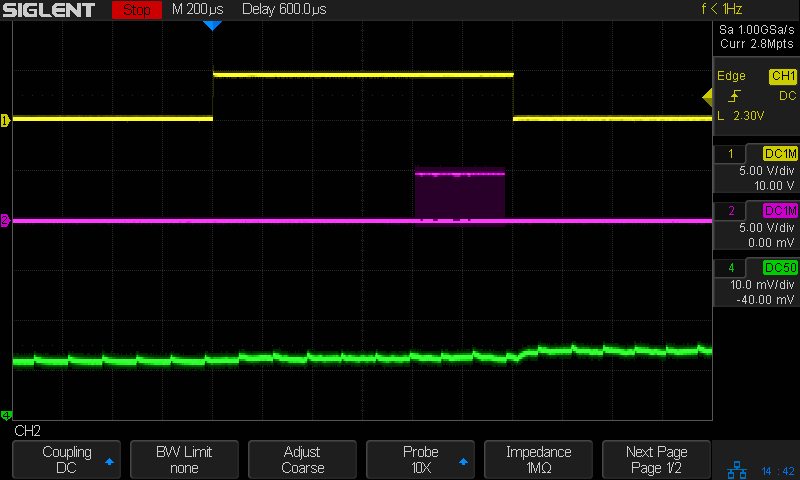
    Tiles 2x2 - bench supply - 50 mA-div
    Tiles 2×2 – bench supply – 50 mA-div

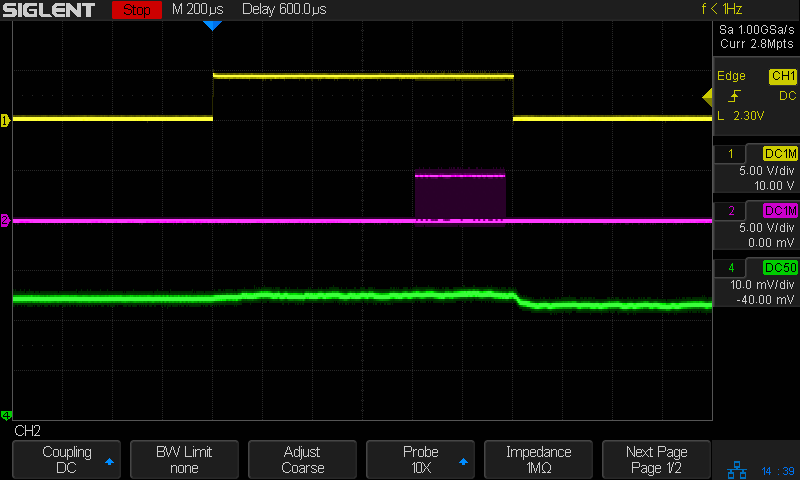
    The top trace is the firmware heartbeat from the Arduino Nano, the middle trace is the SK6812 LED data stream, and the bottom trace is the USB current at 50 mA/div. The current steps downward by about 10 mA (just after the data burst) when one of the tiles changes color and and LED shuts off.

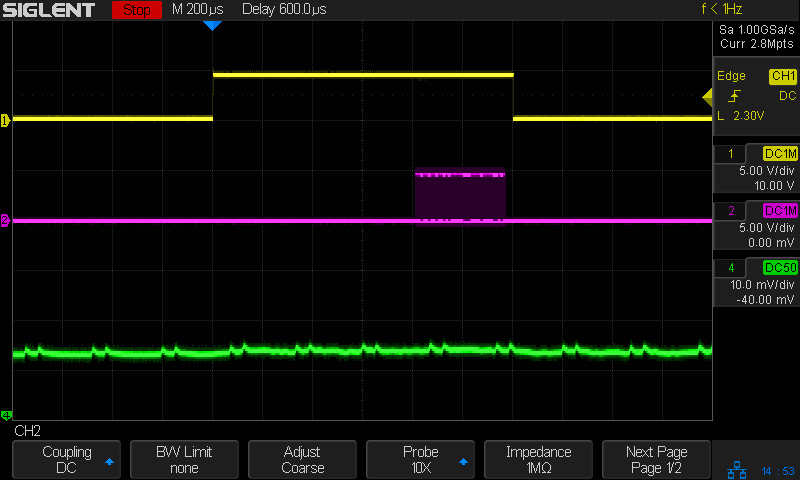
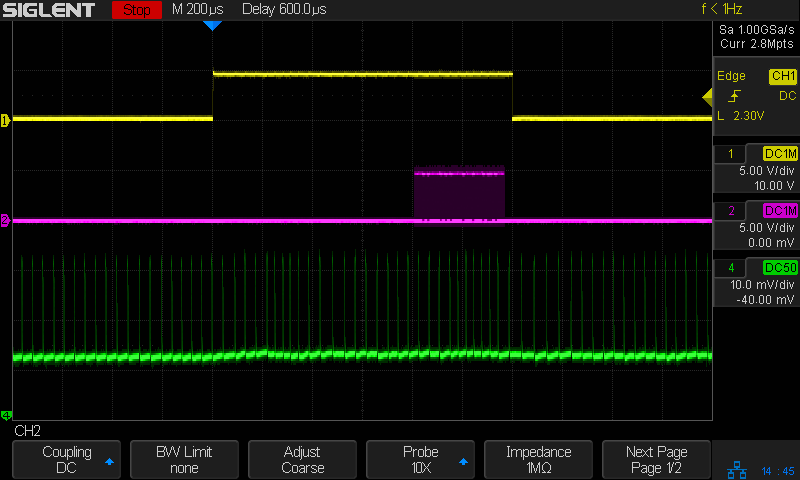
    The current probe reveals some mysteries, such as this waveform from a dirt-cheap USB charger:

    Tiles 2x2 - anon white charger - 50 mA-div
    Tiles 2×2 – anon white charger – 50 mA-div

    I wonder why it’s ramming 100 mA current spikes into the circuit, too. At least now I can see what’s going on.

  • Glass Tiles: Matrix for SK6812 PCBs

    Glass Tiles: Matrix for SK6812 PCBs

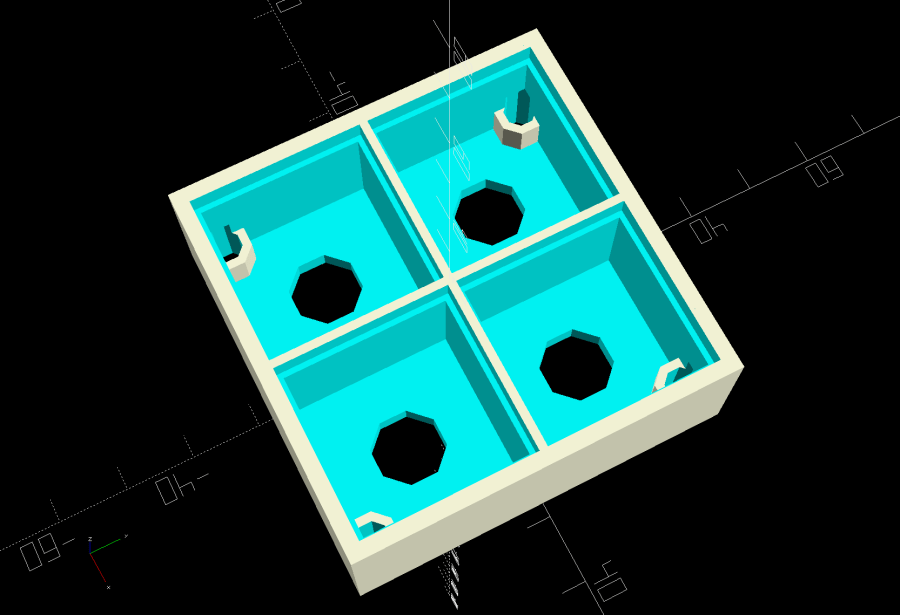
    Tweaking the glass tile frame for press-fit SK6812 PCBs in the bottom of the array cells:

    Glass Tile Frame - cell array - openscad
    Glass Tile Frame – cell array – openscad

    Which looks like this with the LEDs and brass inserts installed:

    Glass Tile - 2x2 array - interior
    Glass Tile – 2×2 array – interior

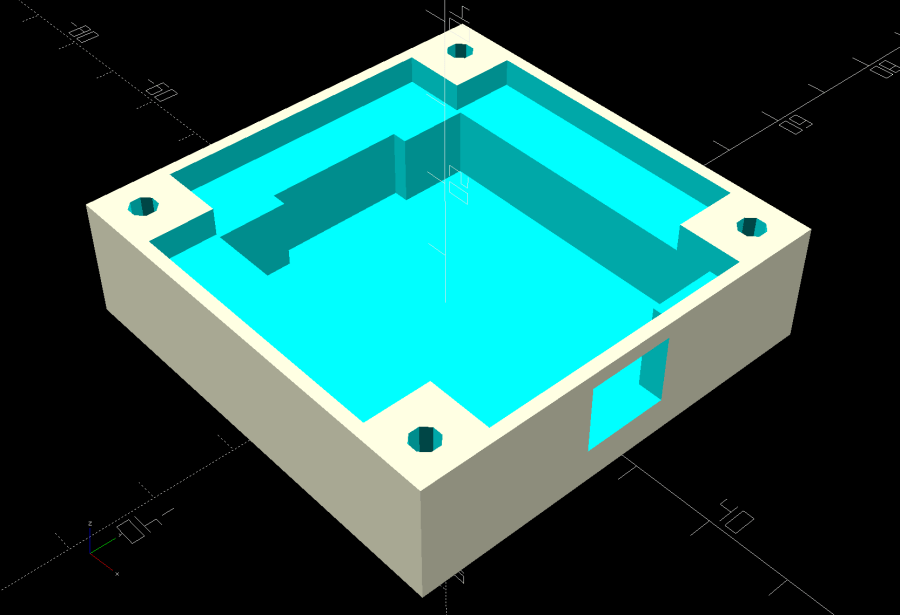
    The base holds an Arduino Nano with room for wiring under the cell array:

    Glass Tile Frame - base - openscad
    Glass Tile Frame – base – openscad

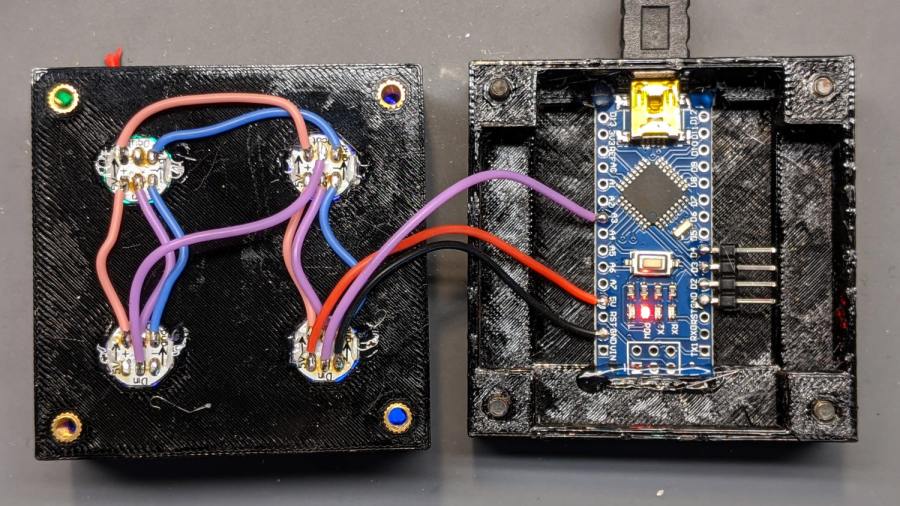
    Which looks like this after it’s all wired up:

    Glass Tile - 2x2 array - wiring
    Glass Tile – 2×2 array – wiring

    The weird colors showing through the inserts are from the LEDs. The red thing in the upper left is a silicone insulation snippet. Yes, that’s hot-melt glue holding the Arduino Nano in place and preventing the PCBs from getting frisky.

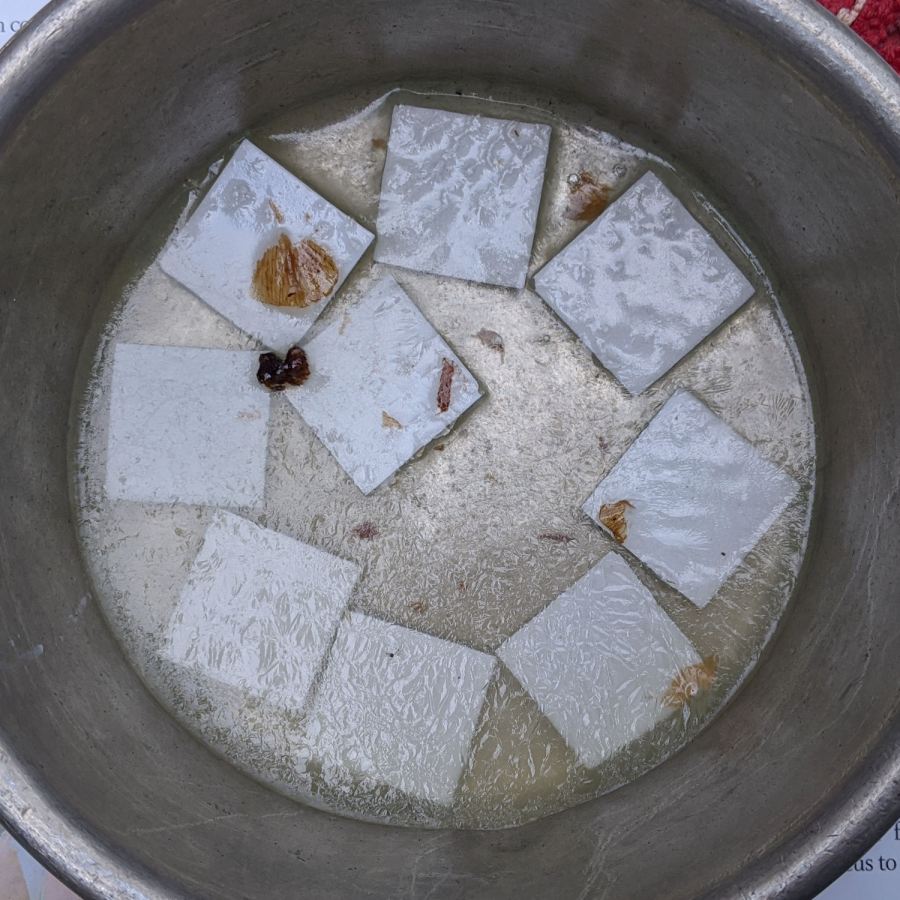
    Soak a handful of glass tiles overnight in paint stripper:

    Glass Tiles - paint stripper soak
    Glass Tiles – paint stripper soak

    Whereupon the adhesive slides right off with the gentle application of a razor scraper. Rinse carefully, dry thoroughly, and snap into place.

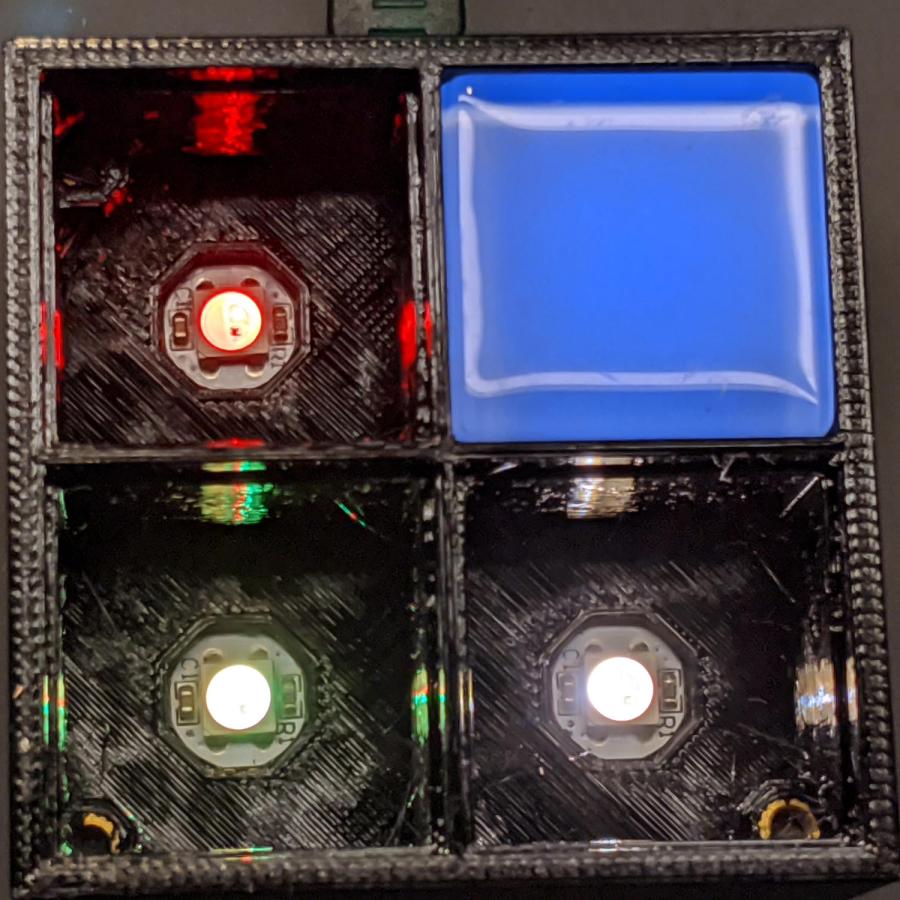
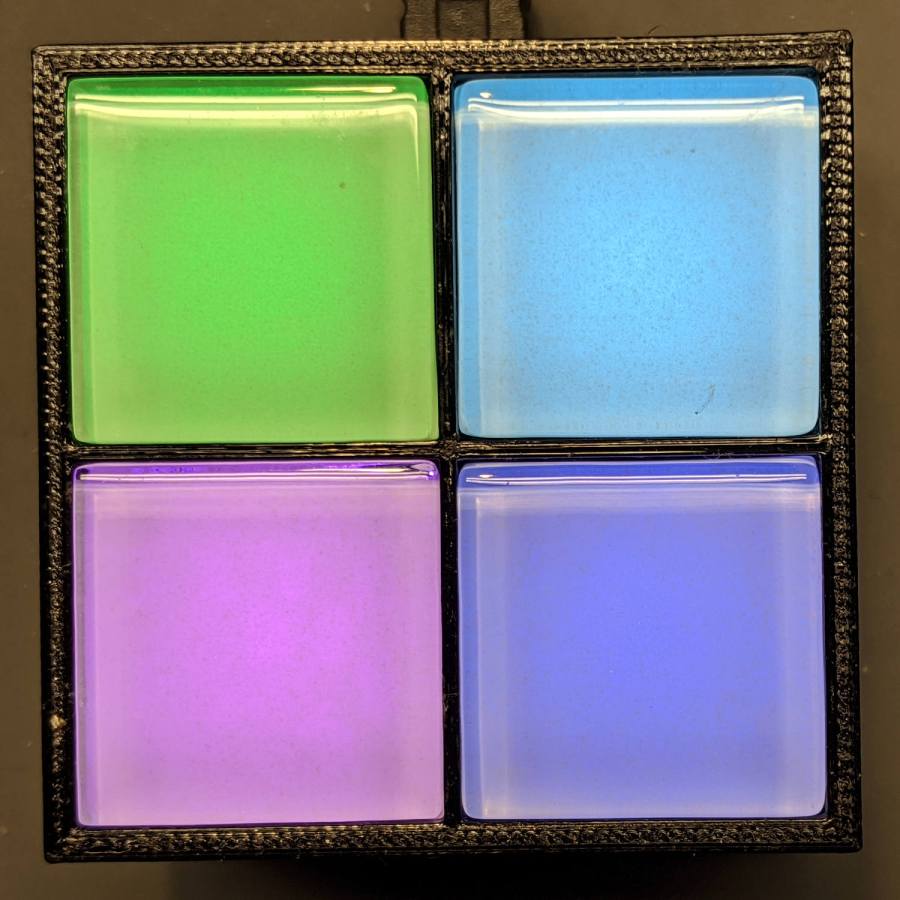
    Tighten the four M3 SHCS and it’s all good:

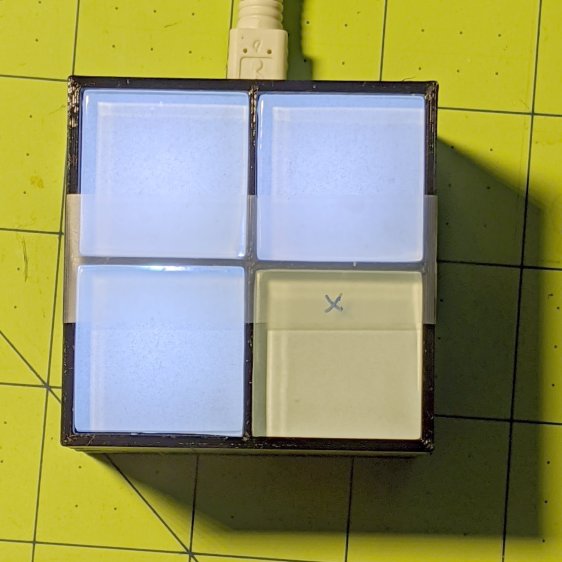
    Glass Tile - 2x2 array - operating
    Glass Tile – 2×2 array – operating

    So far, I’ve had two people tell me they don’t know what it is, but they want one:

    Glass Tile - various versions
    Glass Tile – various versions

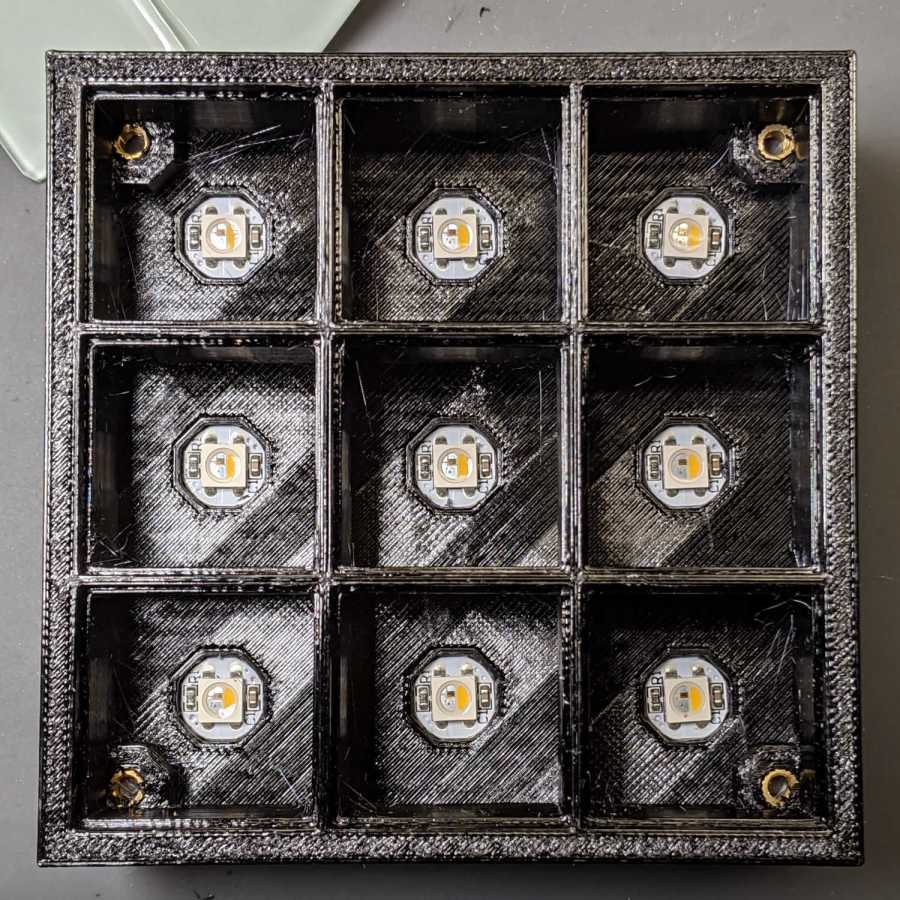
    The OpenSCAD Customizer lets you set the array size:

    Glass Tile Frame - 3x3 - press-fit SK6812 LEDs
    Glass Tile Frame – 3×3 – press-fit SK6812 LEDs

    However, just because you can do something doesn’t mean you should:

    Glass Tile Frame - 6x6 cell array - openscad
    Glass Tile Frame – 6×6 cell array – openscad

    Something like this might be interesting:

    Glass Tile Frame - 2x6 cell array - openscad
    Glass Tile Frame – 2×6 cell array – openscad

    In round numbers, printing the frame takes about an hour per cell, so a 2×2 array takes three hours and 3×3 array runs around seven hours. A 6×6 frame is just not happening.

    The OpenSCAD source code as a GitHub Gist:

    // Illuminated Tile Grid
    // Ed Nisley – KE4ZNU
    // 2020-05
    /* [Configuration] */
    Layout = "Build"; // [Cell,CellArray,MCU,Base,Show,Build]
    Shape = "Square"; // [Square, Pyramid, Cone]
    Cells = [2,2];
    CellDepth = 15.0;
    Inserts = true;
    SupportInserts = true;
    /* [Hidden] */
    ThreadThick = 0.25;
    ThreadWidth = 0.40;
    HoleWindage = 0.2;
    function IntegerMultiple(Size,Unit) = Unit * ceil(Size / Unit);
    Protrusion = 0.1; // make holes end cleanly
    ID = 0;
    OD = 1;
    LENGTH = 2;
    Tile = [25.0 + 0.1,25.0 + 0.1,4.0];
    WallThick = 4*ThreadWidth;
    FloorThick = 3.0;
    Flange = [2*ThreadWidth,2*ThreadWidth,0]; // ridge supporting tile
    Separator = [3*ThreadWidth,3*ThreadWidth,Tile.z – 1]; // between tiles
    Screw = [3.0,6.0,3.5]; // M3 SHCS, OD=head, LENGTH=head
    Insert = [3.0,4.2,8.0]; // threaded brass insert
    ScrewRecess = Screw[LENGTH] + 4*ThreadThick;
    LEDPCB = [9.6,9.6,2.9]; // round SK6812, squared-off sides
    LED = [5.0 + 2*HoleWindage,5.0 + 2*HoleWindage,1.3];
    LEDOffset = [0.0,0.0,0.0]; // if offset from PCB center
    CellOAL = [Tile.x,Tile.y,0] + Separator + [0,0,CellDepth] + [0,0,FloorThick];
    ArrayOAL = [Cells.x*CellOAL.x,Cells.y*CellOAL.y,CellOAL.z]; // just the LED cells
    BlockOAL = ArrayOAL + [2*WallThick,2*WallThick,0]; // LED cells + exterior wall
    echo(str("Block OAL: ",BlockOAL));
    InsertOC = ArrayOAL – [Insert[OD],Insert[OD],0] – [WallThick,WallThick,0];
    echo(str("Insert OC: ",InsertOC));
    TapeThick = 1.0;
    Arduino = [44.0,18.0,8.0 + TapeThick]; // Arduino Nano to top of USB Mini-B plug
    USBPlug = [15.0,11.0,9.0]; // USB Mini-B plug insulator
    USBOffset = [0,0,5.0]; // offset from PCB base
    WiringSpace = 3.5;
    WiringBay = [(Cells.x – 1)*CellOAL.x + LEDPCB.x,(Cells.y – 1)*CellOAL.y + LEDPCB.x,WiringSpace];
    PlateOAL = [BlockOAL.x,BlockOAL.y,FloorThick + Arduino.z + WiringSpace]; // allow wiring above Arduino
    echo(str("Base Plate: ",PlateOAL));
    echo(str("Screw length: ",(PlateOAL.z – ScrewRecess) + Insert.z/2," to ",(PlateOAL.z – ScrewRecess) + Insert.z));
    LegendRecess = 1*ThreadThick;
    //————————
    module PolyCyl(Dia,Height,ForceSides=0) { // based on nophead's polyholes
    Sides = (ForceSides != 0) ? ForceSides : (ceil(Dia) + 2);
    FixDia = Dia / cos(180/Sides);
    cylinder(d=(FixDia + HoleWindage),h=Height,$fn=Sides);
    }
    //———————–
    // Base and optics in single tile
    module LEDCone() {
    hull() {
    translate([0,0,CellDepth + Tile.z/2])
    cube(Tile – 2*[Flange.x,Flange.y,0],center=true);
    if (Shape == "Square") {
    translate([0,0,LEDPCB.z/2])
    cube([Tile.x,Tile.y,LEDPCB.z] – 2*[Flange.x,Flange.y,0],center=true);
    }
    else if (Shape == "Pyramid") {
    translate([0,0,LEDPCB.z/2])
    cube(LEDPCB,center=true);
    }
    else if (Shape == "Cone") {
    translate([0,0,LEDPCB.z/2])
    cylinder(d=1.0*LEDPCB.x,h=LED.z,center=true);
    }
    else {
    echo(str("Whoopsie! Invalid Shape: ",Shape));
    cube(5);
    }
    }
    }
    // One complete LED cell
    module LEDCell() {
    difference() {
    translate([0,0,CellOAL.z/2])
    cube(CellOAL + [Protrusion,Protrusion,0],center=true); // force overlapping adjacent sides!
    translate([0,0,CellOAL.z – Separator.z + Tile.z/2])
    cube(Tile,center=true);
    translate([0,0,LEDPCB.z])
    LEDCone();
    // cube([LED.x,LED.y,CellOAL.z],center=true);
    translate(-LEDOffset + [0,0,-CellOAL.z/2])
    rotate(180/8)
    PolyCyl(LEDPCB.x,CellOAL.z,8);
    }
    }
    // The whole array of cells
    module CellArray() {
    difference() {
    union() {
    translate([CellOAL.x/2 – Cells.x*CellOAL.x/2,CellOAL.y/2 – Cells.y*CellOAL.y/2,0])
    for (i=[0:Cells.x – 1], j=[0:Cells.y – 1])
    translate([i*CellOAL.x,j*CellOAL.y,0])
    LEDCell();
    if (Inserts) // bosses
    for (i=[-1,1], j=[-1,1])
    translate([i*InsertOC.x/2,j*InsertOC.y/2,0])
    rotate(180/8)
    cylinder(d=Insert[OD] + 2*WallThick,h=Insert[LENGTH],$fn=8);
    }
    if (Inserts) // holes
    for (i=[-1,1], j=[-1,1])
    translate([i*InsertOC.x/2,j*InsertOC.y/2,-Protrusion])
    rotate(180/8)
    PolyCyl(Insert[OD],Insert[LENGTH] + FloorThick + Protrusion,8);
    }
    difference() {
    translate([0,0,CellOAL.z/2])
    cube(BlockOAL,center=true);
    translate([0,0,CellOAL.z])
    cube(ArrayOAL + [0,0,2*CellOAL.z],center=true);
    }
    }
    // Arduino bounding box
    // Origin at center bottom of PCB
    module Controller() {
    union() {
    translate([0,0,Arduino.z/2])
    cube(Arduino,center=true);
    translate([Arduino.x/2 – Protrusion,-USBPlug.y/2,USBOffset.z + TapeThick – USBPlug.z/2])
    cube(USBPlug + [Protrusion,0,0],center=false);
    }
    }
    // Baseplate
    module BasePlate() {
    difference() {
    translate([0,0,PlateOAL.z/2])
    cube(PlateOAL,center=true);
    translate([PlateOAL.x/2 – Arduino.x/2 – 2*WallThick,0,FloorThick])
    Controller();
    translate([PlateOAL.x/2 – Arduino.x/2 – 2*WallThick,0,FloorThick + PlateOAL.z/2])
    cube([Arduino.x – 2*2.0,WiringBay.y,PlateOAL.z],center=true); // cutouts beside MCU
    translate([0,0,PlateOAL.z – WiringBay.z + PlateOAL.z/2 – Protrusion])
    cube([PlateOAL.x – 2*WallThick,WiringBay.y,PlateOAL.z],center=true); // cutout above MCU
    translate([0,0,PlateOAL.z – WiringBay.z + PlateOAL.z/2 – Protrusion])
    cube([WiringBay.x,PlateOAL.y – 2*WallThick,PlateOAL.z],center=true); // cutout above MCU
    if (Inserts)
    for (i=[-1,1], j=[-1,1])
    translate([i*InsertOC.x/2,j*InsertOC.y/2,-Protrusion])
    rotate(180/8) {
    PolyCyl(Screw[ID],2*PlateOAL.z,8);
    PolyCyl(Screw[OD],ScrewRecess + Protrusion,8);
    }
    cube([45,17.0,2*LegendRecess],center=true);
    }
    linear_extrude(height=2*LegendRecess) {
    translate([0,1])
    rotate(-0*90) mirror([1,0,0])
    text(text="Ed Nisley",size=6,font="Arial:style:Bold",halign="center");
    translate([0,-6.5])
    rotate(-0*90) mirror([1,0,0])
    text(text="softsolder.com",size=4.5,font="Arial:style:Bold",halign="center");
    }
    Fin = [Screw[OD]/2 – 1.5*ThreadWidth,2*ThreadWidth,ScrewRecess – ThreadThick];
    if (Inserts && SupportInserts)
    color("Yellow")
    for (i=[-1,1], j=[-1,1])
    translate([i*InsertOC.x/2,j*InsertOC.y/2,0]) {
    rotate(180/8)
    cylinder(d=6*ThreadWidth,h=ThreadThick,$fn=8);
    for (a=[0:90:360])
    rotate(a)
    translate([Fin.x/2 + ThreadWidth/2,0,(ScrewRecess – ThreadThick)/2])
    cube(Fin,center=true);
    }
    }
    //———————–
    // Build things
    if (Layout == "Cell")
    LEDCell();
    else if (Layout == "CellArray")
    CellArray();
    else if (Layout == "MCU")
    Controller();
    else if (Layout == "Base")
    BasePlate();
    else if (Layout == "Show") {
    translate([0,0,3*PlateOAL.z])
    CellArray();
    BasePlate();
    translate([PlateOAL.x/2 – Arduino.x/2 – 2*WallThick,0,FloorThick])
    color("Orange",0.3)
    Controller();
    }
    else if (Layout == "Build") union() {
    translate([0,0.6*BlockOAL.y,0])
    CellArray();
    translate([0,-0.6*BlockOAL.x,0])
    rotate(90)
    BasePlate();
    }

  • Glass Tiles: Glow vs. Flash Firmware

    Glass Tiles: Glow vs. Flash Firmware

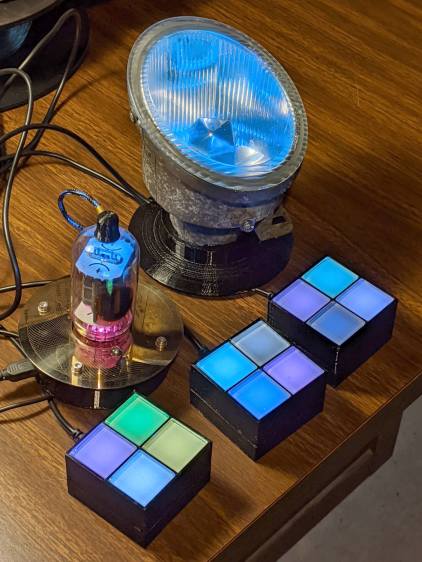
    Although it’s not obvious in a still picture, the firmware now supports both the continuously changing colors of the Nissan fog lamp (mashed with tweaks from the vacuum tube lights) and the randomly changing colors from the LED matrix, both using SK6812 LEDs rather than the failing WS2812 modules:

    Glass Tile - glow vs flash
    Glass Tile – glow vs flash

    Flash is a misnomer, as the tiles simply change from one color to the next, but I’ve never been adept at picking catchy names. In any event, the glass tiles on the left show nice pastel shades, in contrast to the bright primary(-ish) colors appearing on the right.

    The colors are random numbers from 1 to 7, because 0 produces a somewhat ugly dark cell. The SK6812 modules have a white LED in addition to the RGB LEDs in the WS2812 modules, so I replace the “additive white” R+G+B color with the more-or-less true white (warm, for these modules) LED.

    The new color goes into a cell picked at random (0 through 3, for 2×2 frames), except if the cell already holds the same color, whereupon a simple XOR flips the colors, except if the cell is already full-on white, whereupon it becomes half-on white to avoid going completely dark.

    The glass tiles must change colors at a much slower pace than the 8×8 LED matrix, because there are so few cells; a random delay between 500 ms and 6 s seems about right.

    They look really great in a dim room!

    The Arduino source code as a GitHub Gist:

    // Neopixel lighting for glass tiles
    // Ed Nisley – KE4ANU – May 2020
    #include <Adafruit_NeoPixel.h>
    #include <Entropy.h>
    //———-
    // Pin assignments
    const byte PIN_NEO = A3; // DO – data to first Neopixel
    const byte PIN_MODE = 2; // DI – select mode
    const byte PIN_SPEED = 3; // DI – select speed
    const byte PIN_SELECT = 4; // DO – drive adjacent pins low
    const byte PIN_HEARTBEAT = 13; // DO – Arduino LED
    //———-
    // Constants
    // number of pixels
    #define PIXELS 9
    // lag between adjacent pixels in degrees of slowest period
    #define PIXELPHASE 45
    // update LEDs only this many ms apart (minus loop() overhead)
    #define UPDATEINTERVAL 50ul
    // number of steps per cycle, before applying prime factors
    #define RESOLUTION 500
    //———-
    // Globals
    // instantiate the Neopixel buffer array
    Adafruit_NeoPixel strip = Adafruit_NeoPixel(PIXELS, PIN_NEO, NEO_GRBW + NEO_KHZ800);
    struct pixcolor_t {
    unsigned int Prime;
    unsigned int NumSteps;
    unsigned int Step;
    float StepSize;
    float Phase;
    byte MaxPWM;
    };
    unsigned int PlatterSteps;
    byte PrimeList[] = {3,5,7,13,19,29};
    unsigned int MaxTileTime;
    // colors in each LED
    enum pixcolors {RED, GREEN, BLUE, WHITE, PIXELSIZE};
    struct pixcolor_t Pixels[PIXELSIZE]; // all the data for each pixel color intensity
    uint32_t UniColor;
    enum dispmode {GLOW, FLASH}; // based on input pin
    unsigned long UpdateMS;
    unsigned long MillisNow;
    unsigned long MillisThen;
    //– Select three unique primes for the color generator function
    // Then compute all the step parameters based on those values
    void SetColorGenerators(void) {
    Pixels[RED].Prime = PrimeList[random(sizeof(PrimeList))];
    do {
    Pixels[GREEN].Prime = PrimeList[random(sizeof(PrimeList))];
    } while (Pixels[RED].Prime == Pixels[GREEN].Prime);
    do {
    Pixels[BLUE].Prime = PrimeList[random(sizeof(PrimeList))];
    } while (Pixels[BLUE].Prime == Pixels[RED].Prime ||
    Pixels[BLUE].Prime == Pixels[GREEN].Prime);
    do {
    Pixels[WHITE].Prime = PrimeList[random(sizeof(PrimeList))];
    } while (Pixels[WHITE].Prime == Pixels[RED].Prime ||
    Pixels[WHITE].Prime == Pixels[GREEN].Prime ||
    Pixels[WHITE].Prime == Pixels[BLUE].Prime);
    if (!digitalRead(PIN_SPEED)) { // force fast for debugging
    Pixels[RED].Prime = 3;
    Pixels[GREEN].Prime = 5;
    Pixels[BLUE].Prime = 7;
    Pixels[WHITE].Prime = 11;
    }
    printf("Primes: %d %d %d %d\r\n",Pixels[RED].Prime,Pixels[GREEN].Prime,Pixels[BLUE].Prime,Pixels[WHITE].Prime);
    Pixels[RED].MaxPWM = 255;
    Pixels[GREEN].MaxPWM = 255;
    Pixels[BLUE].MaxPWM = 255;
    Pixels[WHITE].MaxPWM = 255;
    unsigned int PhaseSteps = (unsigned int) ((PIXELPHASE / 360.0) *
    RESOLUTION * (unsigned int) max(max(Pixels[RED].Prime,Pixels[GREEN].Prime),Pixels[BLUE].Prime));
    printf("Pixel phase offset: %d deg = %d steps\r\n",(int)PIXELPHASE,PhaseSteps);
    for (byte c=0; c < PIXELSIZE; c++) {
    Pixels[c].NumSteps = RESOLUTION * Pixels[c].Prime; // steps per cycle
    Pixels[c].StepSize = TWO_PI / Pixels[c].NumSteps; // radians per step
    Pixels[c].Step = random(Pixels[c].NumSteps); // current step
    Pixels[c].Phase = PhaseSteps * Pixels[c].StepSize;; // phase in radians for this color
    printf(" c: %d Steps: %5d Init: %5d Phase: %3d deg",c,Pixels[c].NumSteps,Pixels[c].Step,(int)(Pixels[c].Phase * 360.0 / TWO_PI));
    printf(" PWM: %d\r\n",Pixels[c].MaxPWM);
    }
    }
    //– Helper routine for printf()
    int s_putc(char c, FILE *t) {
    Serial.write(c);
    }
    //——————
    // Set the mood
    void setup() {
    pinMode(PIN_HEARTBEAT,OUTPUT);
    digitalWrite(PIN_HEARTBEAT,LOW); // show we arrived
    pinMode(PIN_MODE,INPUT_PULLUP);
    pinMode(PIN_SPEED,INPUT_PULLUP);
    pinMode(PIN_SELECT,OUTPUT);
    digitalWrite(PIN_SELECT,LOW); // drive adjacent pins
    Serial.begin(57600);
    fdevopen(&s_putc,0); // set up serial output for printf()
    printf("\r\nAlgorithmic Art Light – Glass Tiles\r\nEd Nisley – KE4ZNU – May 2020\r\n");
    printf("Display mode: %s\r\n",digitalRead(PIN_MODE) == GLOW ? "Glow" : "Flash");
    printf("Speed: %s\r\n",digitalRead(PIN_SPEED) ? "Normal" : "Override");
    Entropy.initialize(); // start up entropy collector
    // set up pixels
    strip.begin();
    strip.show();
    // lamp test
    printf("Lamp test: flash full-on colors\r\n");
    uint32_t FullRGBW = strip.Color(255,255,255,255);
    uint32_t FullRGB = strip.Color(255,255,255,0);
    uint32_t FullR = strip.Color(255,0,0,0);
    uint32_t FullG = strip.Color(0,255,0,0);
    uint32_t FullB = strip.Color(0,0,255,0);
    uint32_t FullW = strip.Color(0,0,0,255);
    uint32_t FullOff = strip.Color(0,0,0,0);
    uint32_t TestColors[] = {FullR,FullG,FullB,FullRGB,FullW,FullRGBW,FullOff};
    for (byte i=0; i < sizeof(TestColors)/sizeof(uint32_t) ; i++) {
    printf(" color: %08lx\r\n",TestColors[i]);
    for (int j=0; j < strip.numPixels(); j++) {
    strip.setPixelColor(j,TestColors[i]);
    }
    strip.show();
    delay(1000);
    }
    // while (1) {continue;}; // all LEDs constant for burn-in testing
    // get an actual random number
    uint32_t rn = Entropy.random();
    printf("Random seed: %08lx\r\n",rn);
    randomSeed(rn);
    // set up the color generators
    SetColorGenerators();
    MaxTileTime = (digitalRead(PIN_SPEED) ? 6 : 1) * (1000.0 / UPDATEINTERVAL);
    UpdateMS = UPDATEINTERVAL;
    MillisNow = MillisThen = millis();
    }
    //——————
    // Run the mood
    void loop() {
    MillisNow = millis();
    if ((MillisNow – MillisThen) >= UpdateMS) { // time for color change?
    digitalWrite(PIN_HEARTBEAT,HIGH);
    if (digitalRead(PIN_MODE) == GLOW) {
    boolean CycleRun = false; // check to see if all cycles have ended
    for (byte c=0; c < PIXELSIZE; c++) { // compute next increment for each color
    if (++Pixels[c].Step >= Pixels[c].NumSteps) {
    Pixels[c].Step = 0;
    printf("Cycle %5d steps %5d at %8ld delta %8ld ms\r\n",c,Pixels[c].NumSteps,MillisNow,(MillisNow – MillisThen));
    }
    else {
    CycleRun = true; // this color is still cycling
    }
    }
    if (!CycleRun) {
    printf("All cycles ended: setting new color generator values\r\n");
    SetColorGenerators();
    }
    for (int i=0; i < strip.numPixels(); i++) { // for each pixel
    byte Value[PIXELSIZE];
    for (byte c=0; c < PIXELSIZE; c++) { // … for each color
    Value[c] = (Pixels[c].MaxPWM / 2.0) * (1.0 + sin(Pixels[c].Step * Pixels[c].StepSize – i*Pixels[c].Phase));
    }
    byte WhiteBias = min(min(Value[RED],Value[GREEN]),Value[BLUE]); // hack to reduce power
    UniColor = strip.Color((Value[RED] – WhiteBias) * Pixels[RED].MaxPWM/255,
    (Value[GREEN] – WhiteBias) * Pixels[GREEN].MaxPWM/255,
    (Value[BLUE] – WhiteBias) * Pixels[BLUE].MaxPWM/255,
    WhiteBias * Pixels[WHITE].MaxPWM/255);
    strip.setPixelColor(i,UniColor);
    }
    }
    else {
    byte c = random(1,8); // exclude 0 = all off, to avoid darkness
    printf("Color %d ",c);
    byte r = c & 0x04 ? 0xff : 0;
    byte g = c & 0x02 ? 0xff : 0;
    byte b = c & 0x01 ? 0xff : 0;
    byte w = 0;
    if (c == 7) { // use white LED instead of R+G+B
    r = g = b = 0;
    w = 0xff;
    }
    UniColor = strip.Color(r, g, b, w);
    byte i = random(strip.numPixels());
    printf("at %d ",i);
    if (UniColor == strip.getPixelColor(i)) { // flip color
    printf("^ ");
    if (w) { // white becomes dim
    w = 0x7f;
    UniColor = strip.Color(r, g, b, w);
    }
    else
    UniColor ^= 0xffffff00l; // other colors flip
    }
    else {
    printf(" ");
    }
    strip.setPixelColor(i,UniColor);
    UpdateMS = random(10,MaxTileTime) * UPDATEINTERVAL; // pick time for next update
    printf("delay: %6ld ms\r\n",UpdateMS);
    }
    strip.show(); // send out precomputed colors
    MillisThen = MillisNow;
    digitalWrite(PIN_HEARTBEAT,LOW);
    }
    }
    view raw GlassTiles.ino hosted with ❤ by GitHub

  • USB Testers vs. Reality

    USB Testers vs. Reality

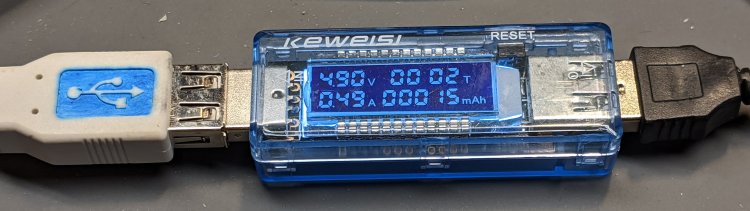
    Set up a test harness with a USB tester between two amputated USB cables:

    USB Testers - Keweisi plugged
    USB Testers – Keweisi plugged

    Input comes from a bench power supply:

    USB Testers - 5 V input clips
    USB Testers – 5 V input clips

    Output goes to an 8 Ω power resistor:

    USB Testers - 8 ohm load
    USB Testers – 8 ohm load

    Yes, it’s mounted on the isothermal block from back in the Thing-O-Matic days, disspating barely 2 W. Thermocouples FTW, but in this case I don’t care about the temperature.

    Because these are random USB cables, they come with the usual caveats. Indeed, I measured a 9.8 Ω loop resistance (!) at the input end. The resistor is slightly under 8Ω, so the 1.8 Ω wire resistance suggests (at least) one of the USB cables contains very little copper. That’s measured without the USB tester in series, because it tries really hard to power up from the ohmmeter’s source voltage and basically shorts out the resistor.

    Both testers accurately report the source voltage with no load, so I presume the voltage shown with current flowing through the resistor represents the actual voltage at the tester. The source cable drops a substantial voltage under load.

    The 8 Ω resistor should draw 5 V / 8 Ω = 625 mA at 5 V. The voltmeter probes provide a non-intrusive way to measure the actual current by working backwards: current = volts / 8 Ω. As it turned out, the resistor sees less than 4 V with the bench supply set to 5.0 V.

    So, we begin.

    With the bench supply at 5.5 V, the Keweisi meter shows 4.9 V and 0.48 A with 4.0 V across the resistor for an actual 500 mA current. The source cable drops 600 mV, indicating a wire resistance of 1.2 Ω, about 2/3 of the total wire resistance.

    The anonymous meter produces two different results for an actual 500 mA current, depending on nothing under my control:

    • Supply 5.3 V, indicated 5.0 V and 0.5 A
    • Supply 5.1 V, indicated 4.76 V and 0.5 A

    Both results show about 300 mV source drop, half of the Keweisi meter’s 600 mV, suggesting a wire resistance of 0.6 Ω. The meter displays a blinking ▲, presumably indicating the input voltage is kinda high.

    I have no explanation.

    After the meters measured an actual 500 mA load for about an hour:

    • Keweisi: 1.6 hr → 782 mA·h, should be 800 mA·h
    • Anonymous: 1.0 hr → 515 mA·h, should be 500 mA·h

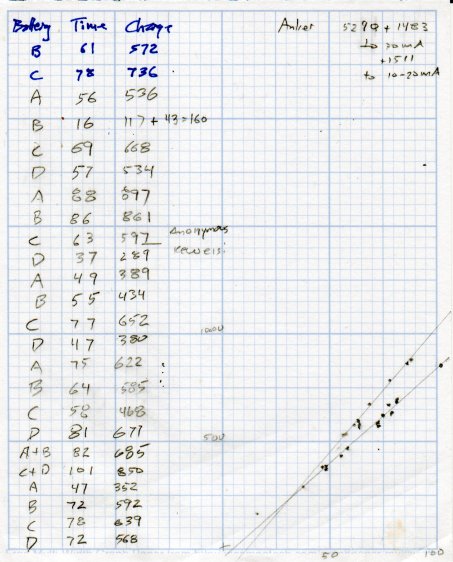
    Which roughly agrees with the battery charge data:

    USB Testers - Charge vs Runtime
    USB Testers – Charge vs Runtime

    The anonymous meter seems reasonably accurate, the Keweisi meter undershoots by 2.5%, and they’re both Close Enough for simple measurements.

    There’s probably a duty cycle effect, too, because the battery charger presents a pulsed load, but I’m just not going to worry about it.

  • More WS2812 Failures

    More WS2812 Failures

    Even though I’m using what seem to be good-quality parts, one of the WS2812 RGB LEDs in a Glass Tile frame died:

    Glass Tile - 2x2 - first WS2812B failure
    Glass Tile – 2×2 – first WS2812B failure

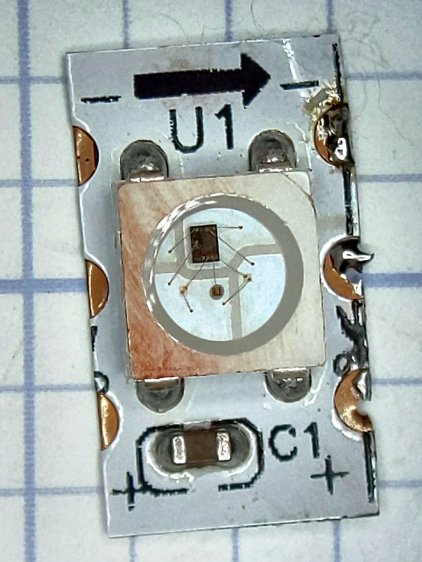
    It passed the Josh Sharpie Test:

    Glass Tile - WS2812 failure - PCB unknown
    Glass Tile – WS2812 failure – PCB unknown

    After building the third Glass Tile unit, one of the LEDs didn’t light up due to an easily diagnosed problem:

    Glass Tile - WS2812 failure - PCB cold solder - as found
    Glass Tile – WS2812 failure – PCB cold solder – as found

    A closer look:

    Glass Tile - WS2812 failure - PCB cold solder
    Glass Tile – WS2812 failure – PCB cold solder

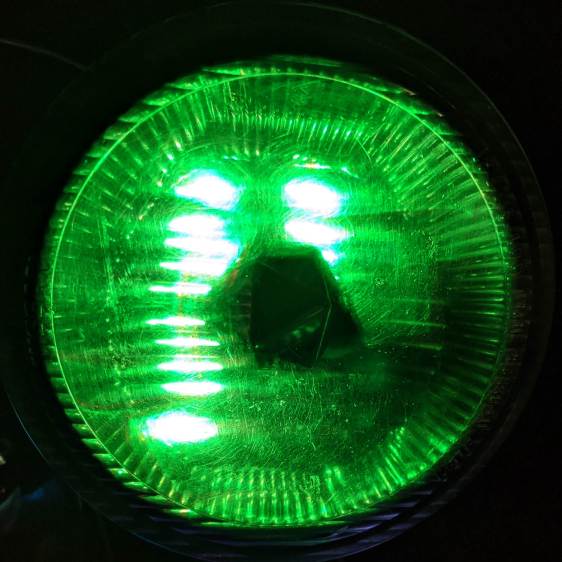
    Shortly thereafter, the Nissan Fog Lamp developed an obvious beam problem:

    Nissan Fog Lamp - failed WS2812 effect
    Nissan Fog Lamp – failed WS2812 effect

    The WS2812 had the proper voltages / signals at all its pins and was still firmly stuck to the central “heatsink”:

    Nissan Fog Lamp - failed WS2812 detail
    Nissan Fog Lamp – failed WS2812 detail

    It also passed the Josh Sharpie Test:

    Glass Tile - WS2812 failure - tape - unknown
    Glass Tile – WS2812 failure – tape – unknown

    I’m particularly surprised by this one, because eleven of the twelve flex-PCB WS2812s in the Hard Drive Platter light have been running continuously for years with no additional failures.

    The alert reader will note the common factor: no matter what substrate the LED is (supposed to be) soldered to, no matter when I bought it, no matter what it’s wired into, a WS2812 will fail.

    They’re all back in operation:

    Glowing Algorithmic Art
    Glowing Algorithmic Art

    Although nobody knows for how long …

    Obviously, it’s time to refresh my programmable RGB LED stockpile!

  • Monthly Science: USB Current Testers vs. NP-BX1 Batteries

    Monthly Science: USB Current Testers vs. NP-BX1 Batteries

    Having some interest in my Sony HDR-AS30 helmet camera’s NP-BX1 battery runtime, I’ve been measuring and plotting recharge versus runtime after each ride:

    USB Testers - Charge vs Runtime
    USB Testers – Charge vs Runtime

    The vertical axis is the total charge in mA·h, the horizontal axis is the discharge time = recorded video duration. Because 1 A = 1 coulomb/s, 1 mA·h = 3.6 C.

    The data points fall neatly on two lines corresponding to a pair of cheap USB testers:

    USB Testers
    USB Testers

    When you have one tester, you know the USB current. When you have two testers, you’re … uncertain.

    The upper tester is completely anonymous, helpfully displaying USB Tester while starting up. The lower one is labeled “Keweisi” to distinguish it from the myriad others on eBay with identical hardware; its display doesn’t provide any identifying information.

    The back sides reveal the current sense resistors:

    USB Testers - sense resistors
    USB Testers – sense resistors

    Even the 25 mΩ resistor drops enough voltage that the charger’s blue LED dims appreciably during each current pulse. The 50 mΩ resistor seems somewhat worse in that regard, but eyeballs are notoriously uncalibrated optical sensors.

    The upper line (from the anonymous tester) has a slope of 11.8 mA·h/minute of discharge time, the lower (from the Keweisi tester) works out to 8.5 mA·h/minute. There’s no way to reconcile the difference, so at some point I should measure the actual current and compare it with their displays.

    Earlier testing suggested the camera uses 2.2 W = 600 mA at 3.7 V. Each minute of runtime consumes 10 mA·h of charge:

    10 mA·h = 600 mA × 60 s / (3600 s/hour)

    Which is in pretty good agreement with neither of the testers, but at least it’s in the right ballpark. If you boldly average the two slopes, it’s dead on at 10.1 mA·h/min; numerology can produce any answer you need if you try hard enough.

    Actually, I’d believe the anonymous meter’s results are closer to the truth, because recharging a lithium battery requires 10% to 20% more energy than the battery delivered to the device, so 11.8 mA·h/min sounds about right.

    Memo to Self: Trust, but verify.