The Smell of Molten Projects in the Morning

Ed Nisley's Blog: Shop notes, electronics, firmware, machinery, 3D printing, laser cuttery, and curiosities. Contents: 100% human thinking, 0% AI slop.

Category: Electronics Workbench

Electrical & Electronic gadgets

  • OMTech 60 W Laser: Replacement HV Power Supply Waveforms

    OMTech 60 W Laser: Replacement HV Power Supply Waveforms

    While I had the hatch open, I thought it would be interesting to look at the HV supply’s current waveforms:

    HV laser power supply - current probe setup
    HV laser power supply – current probe setup

    The Tek current probe over on the right measures return current through the cathode wire, the point in the circuit where you might be tempted to install an ordinary analog (moving-coil) panel milliammeter, oriented so (conventional) current returning from the tube will produce a positive voltage.

    Unfortunately, an analog meter isn’t up to displaying anything meaningful for this nonsense:

    HV laser power supply - 5 mA-div - 50 ms 10 pct pulse
    HV laser power supply – 5 mA-div – 50 ms 10 pct pulse

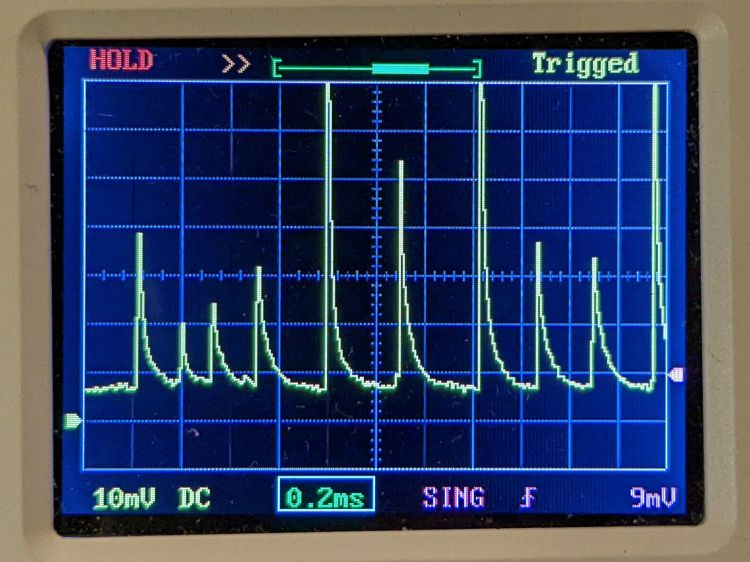
    Admittedly, that’s a 50 ms pulse, during which an analog meter would barely twitch. The vertical scale is 5 mA/div, so the highest peaks exceed 35 mA, more than twice the tube’s recommended “14-15 mA”.

    A closer look at the pulse startup waveform:

    HV laser power supply - 5 mA-div - 50 ms 10 pct pulse - detail
    HV laser power supply – 5 mA-div – 50 ms 10 pct pulse – detail

    It sure looks like the chaotic current through a forced neon-bulb relaxation oscillator. Remember neon bulbs?

    An even closer look:

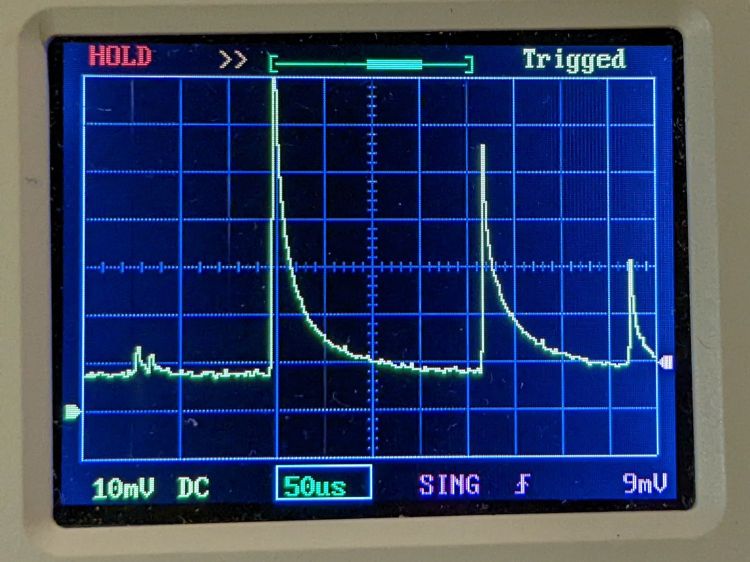
    HV laser power supply - 5 mA-div - 50 ms 10 pct pulse - tight detail
    HV laser power supply – 5 mA-div – 50 ms 10 pct pulse – tight detail

    That’s at 10% PWM, close to the threshold below which the laser just won’t fire at all. The power supply must ramp up to produce enough voltage to fire the tube while simultaneously limiting the current to prevent the discharge from sliding down the negative resistance part of its curve.

    Apparently this supply isn’t quite up to the task.

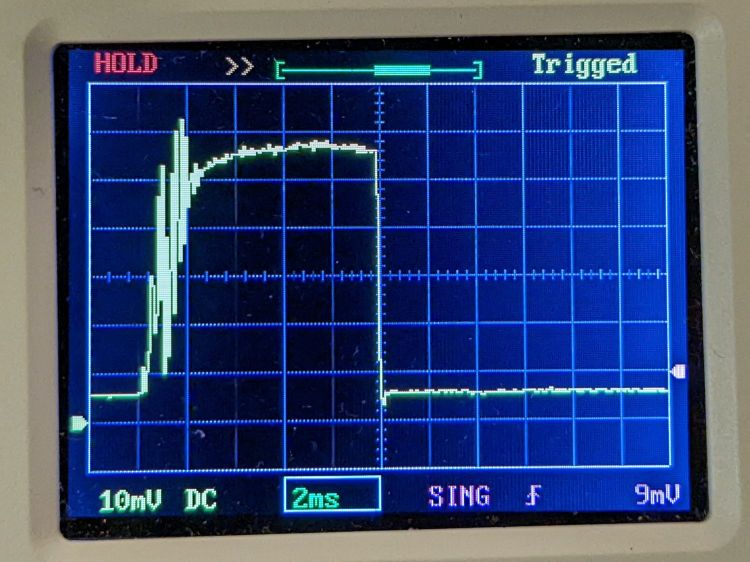
    A 10 ms pulse at 50% PWM gives the supply enough time to stabilize the current:

    HV laser power supply - 5 mA-div - 10 ms 50 pct pulse
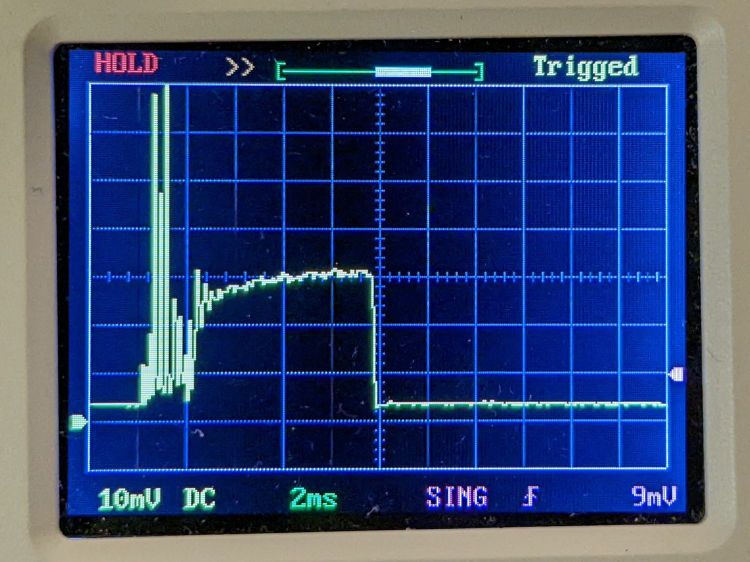
    HV laser power supply – 5 mA-div – 10 ms 50 pct pulse

    The 14-ish mA at the tail end of the pulse (note the baseline offset) matches my previous 13 to 14 mA measurements as closely as seems reasonable. That 2 ms of hash on the leading edge suggests the start of each cut or engraving line will be a bit darker than you might expect.

    Another 10 ms pulse, this time at 99% PWM:

    HV laser power supply - 5 mA-div - 10 ms 99 pct pulse
    HV laser power supply – 5 mA-div – 10 ms 99 pct pulse

    The peak 24-ish mA matches the previous measurements. Note that the peaks in all the previous pictures exceed the 99% PWM current level.

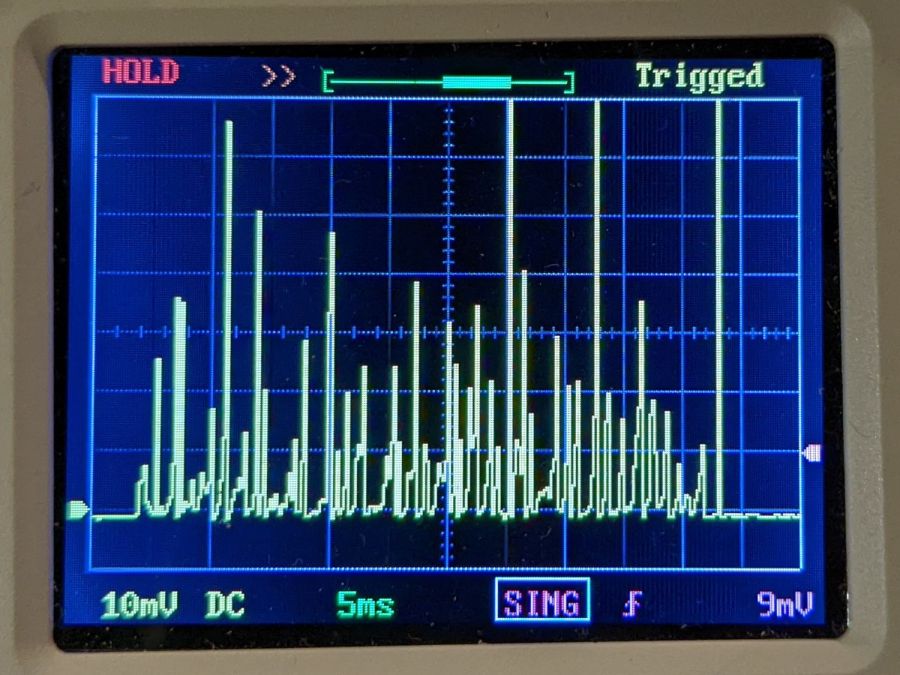
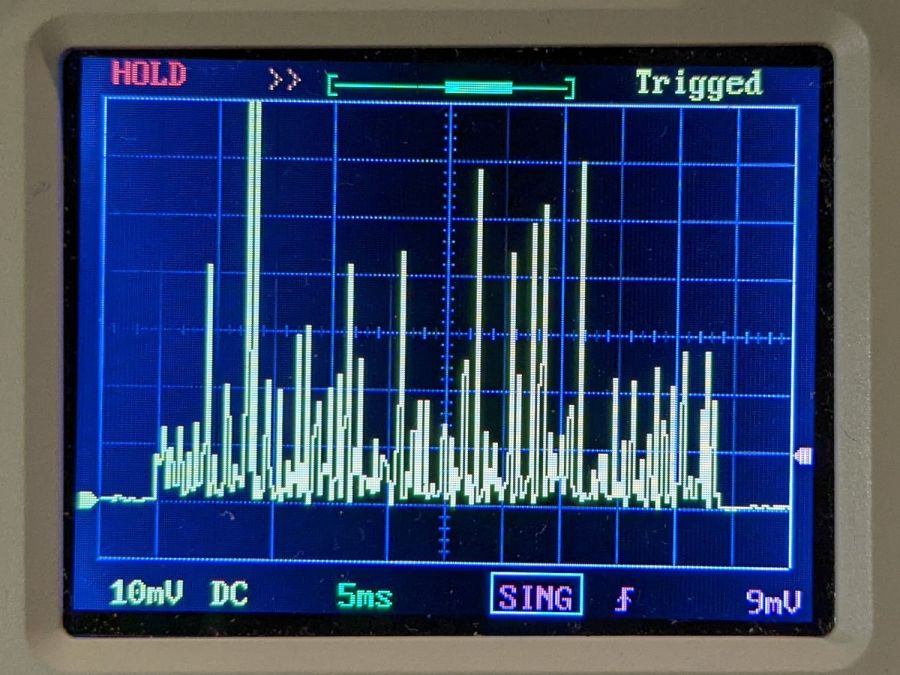
    AFAICT, all PWM values below about 25% produce equivalent results: random current spikes with unpredictable timing and amplitude. Changing the PWM value does not affect the (average) tube current or laser output power in any predictable way.

    Some samples to illustrate the point, starting with a different 50 ms pulse at 10% PWM than the first one up above:

    HV laser power supply – 5 mA-div – 50 ms 10 pct

    A 50 ms pulse at 15% PWM:

    HV laser power supply - 5 mA-div - 50 ms 15 pct
    HV laser power supply – 5 mA-div – 50 ms 15 pct

    A 50 ms pulse at 20% PWM:

    HV laser power supply - 5 mA-div - 50 ms 20 pct
    HV laser power supply – 5 mA-div – 50 ms 20 pct

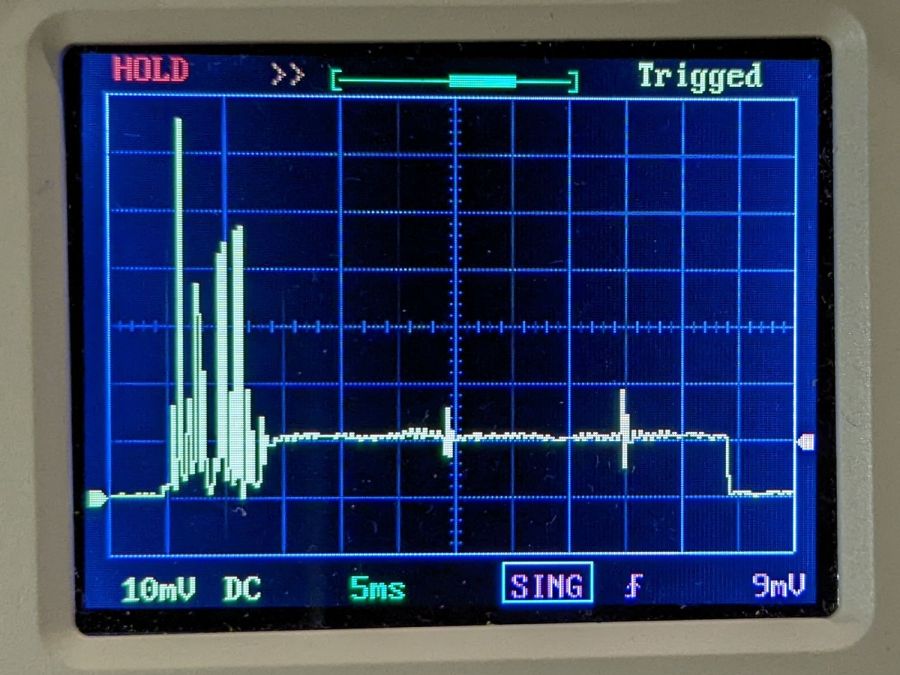
    A 50 ms pulse at 25% PWM:

    HV laser power supply - 5 mA-div - 50 ms 25 pct
    HV laser power supply – 5 mA-div – 50 ms 25 pct

    Now, that last one is different. After the hash during the first 8 ms or so, the power supply actually produces a stable 5 mA beam current, which is roughly what I measured using the power supply’s meter.

    However, the other three are pretty much identical: the 10% PWM pulse does not delivers half as energy as the 20% PWM pulse. The waveforms may be different, but not in a meaningful or consistent way: the two 50 ms 10% pulses are different, but you’d (well, I’d) have trouble separating them from the 20% pulse.

    To summarize:

    • The first several millisconds of any pulse will consist of randomly distributed spikes with very large tube currents.
    • For PWM values greater than 25%, the tube current will settle down to the corresponding current after 5 to 10 ms. Before the current settles down, the tube will be firing those random spikes.
    • For PWM values less than 25%, the tube current never settles down: the entire pulse, no matter how long, will be short, high-intensity spikes, without a consistent DC-ish level.

    No matter what an analog meter might show.

    I have no way to know if this power supply is defective, but I’ll certainly ask …

  • OMTech 60 W Laser: Replacement HV Power Supply

    OMTech 60 W Laser: Replacement HV Power Supply

    The original HV power supply in the OMTech 60 W laser went casters-up just barely inside OMTech’s six month tube-and-supply warranty period. For the record, the laser controller reports this status info since mid-March:

    Laser Stats - replacement supply
    Laser Stats – replacement supply

    I think the Total job laser on time line says the power supply failed after firing the laser for a little over eight hours. The OMTech manual says the laser tube should last 1000 to 2000 hours (low vs high power), which suggests I should stock up on power supplies.

    Its replacement just arrived:

    OMTech replacement HV supply
    OMTech replacement HV supply

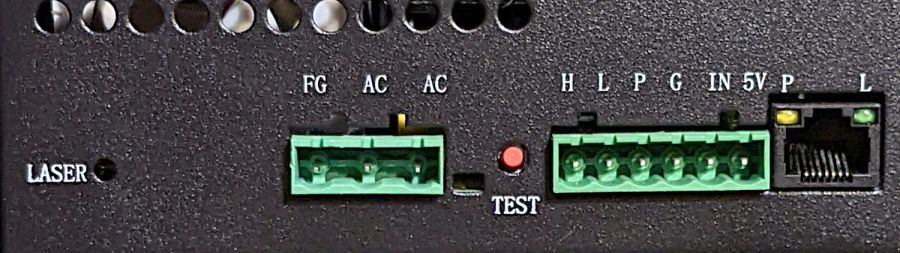
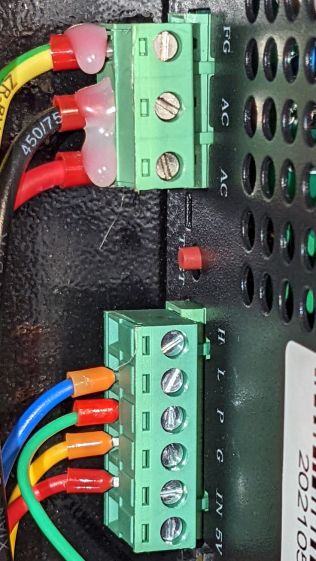
    It (bottom) seems to be a knockoff of the original ZYE Laser supply (top), with a similar model number and a “serial number” resembling a date from last year. All the connectors matched up, which isn’t too surprising.

    The three most interesting inputs:

    • L = controller’s active-low L-ON enable output
    • IN = controller’s PWM output
    • P = jumper to G (circuit ground) — not water flow sensor

    Also note the two AC power-line terminals directly adjacent to the TEST button, then consider insulation and stand-off distances before poking the button with your index finger.

    The power supply has a digital current meter, so I plotted output current against PWM input:

    Laser Power Supply - mA vs PWM - overview
    Laser Power Supply – mA vs PWM – overview

    Taking more points at the low end, with vertical bars indicating single-digit flicker on the meter:

    Laser Power Supply - mA vs PWM - 0 to 20 PWM
    Laser Power Supply – mA vs PWM – 0 to 20 PWM

    I have little reason to believe the meter reading indicates the true current with any accuracy and I know CO₂ laser output power does not scale linearly with the current.

    But it’s cutting again, which is a step in the right direction.

  • Hyde Edge Recharge Vape Pen Teardown

    Hyde Edge Recharge Vape Pen Teardown

    Now that vape “pen” refill cartridges are (mostly) dead, roadside debris has gotten chunkier:

    Hyde Charge Vape Pen - as found
    Hyde Charge Vape Pen – as found

    It’s a Hyde Edge Recharge vape pen or it could be a counterfeit. You (definitely not me) get “up to” 3300 puffs from the 10 ml container, with 50 mg of nicotine ensuring you can’t get enough and will come back for more. Although I don’t follow the market, “disposable” vape pens can still contain the fruity flavors prohibited in refillable pens, with the added decadence of throwing the whole thing away when the tank runs dry:

    Hyde Charge Vape Pen - components
    Hyde Charge Vape Pen – components

    My admittedly inexperienced eye says the “tank”, which is really just a fiber cylinder soaked in fruity juice + nicotine, still has plenty of hits remaining.

    The Basement Shop may never smell the same again.

    Of more interest, the silvery lump wrapped in a white felt strip is a 600 mA·hr lithium cell that slurped 406 mA·hr through its USB Micro-B jack when I recharged it. Perhaps the user victim sucker tossed it when the battery “died”, being unable / unwilling / ignorant-of-how to recharge it? The yellow aluminum case seems faded on the mouthpiece end, but that might be a stylin’ thing.

    A closer look at the electronics payload:

    Hyde Charge Vape Pen - electronics
    Hyde Charge Vape Pen – electronics

    The two red wires over on the right went to the coil in the draw tube to the right of the “tank”. Not being interested enough to care, I wrecked the coil while extracting the rest of the contents. Comfortingly, the red and black wires from the PCB go to the positive and negative battery tabs.

    A closer look at both sides of the PCB:

    Hyde Charge Vape Pen - PCB detail
    Hyde Charge Vape Pen – PCB detail

    The SOT23 IC sports an LTH7 topmark corresponding to an LTC4054-4.2 Standalone Charge Controller (Analog Devices absorbed Linear in 2017). The two LEDs to its right glow red during charge and white during each puff.

    The black felt disk covers an anonymous pressure sensor activating the coil during each puff. With four pins, the sensor must be far more complex than just a switch, but nowadays puff sensing could require an entire ARM microcontroller.

    Speaking of microcontrollers, there’s always this fate:

    Hyde Charge Vape Pen - Arduino battery
    Hyde Charge Vape Pen – Arduino battery

    I fought down an almost uncontrollable urge to amputate my arms at the elbows and cauterize the stumps …

  • OMTech 60 W Laser: Failed HV Power Supply

    OMTech 60 W Laser: Failed HV Power Supply

    Setting up a piece of MDF and hitting the Frame button produced a lightly scorched line around the part perimeter, plus a slightly diagonal track leading from / to the Home position in the far right corner:

    Fire while framing tracks
    Fire while framing tracks

    Doing another pass with LightBurn’s rubber-band frame produced the faint dotted circle.

    Huh. Didn’t useda do that.

    The laser should not fire while framing and, having just installed LightBurn’s 1.2.01 update, suspicion instantly fell on the most recently changed thing.

    Which turned out not to be the case, as LightBurn’s tech support pointed out:

    This is generally an indication of a failed high-voltage power supply, not a software issue.

    OMTech’s support requested a video of the equipment bay, which didn’t seem like a useful way to convey the situation. Instead, I sent pix.

    This picture shows the status of the 60 W laser power supply while the laser is incorrectly firing:

    OMTech 60W Laser - uncommanded framing fire
    OMTech 60W Laser – uncommanded framing fire

    The power supply has two LEDs on what looks like, but is not, an Ethernet jack near the bottom:

    • Orange P LED: good water flow
    • Green L LED: controller’s PWM signal

    The LASER orange LED near the top turns on when the HV output is active and the laser should be firing.

    In this case, L LED is off and the LCD shows “Laser signal OFF”, but the LASER LED is on and the LCD shows 2 mA beam current: the laser beam is ON, even though the controller has not activated the PWM signal.

    Not only that, but I discovered the laser would fire while framing even with the lid up and the “safety interlock” sensor active.

    Totally did not expect that.

    For comparison, the power supply status during a manual pulse at 49% power:

    OMTech 60W Laser - manual pulse 49%
    OMTech 60W Laser – manual pulse 49%

    In that case, the L LED shows the PWM signal is active, the LASER LED is on, and the LCD shows 14 mA of current to the tube. That’s how it should work.

    Although the function of the TEST button seems very lightly documented, pressing it did not turn on the output (the LASER LED is off), despite lighting the L LED:

    OMTech 60W Laser - Test button pressed
    OMTech 60W Laser – Test button pressed

    OMTech confirmed my suspicion:

    We are afraid that the laser power supply is defective

    A replacement should arrive in a few days.

    Protip: always practice laser eye safety.

  • Kensington Expert Mouse Scroll Ring: More Data Points

    Kensington Expert Mouse Scroll Ring: More Data Points

    A note from Alan adds more data about troubleshooting problems with the classic Kensington Expert Mouse trackball scroll ring:

    I have two comments and a question: first I made the mistake of purchasing 4 used expert mice on ebay etc and each had a different problem but 3 of 4 also had faulty scroll rings. 2nd: one of them was dated 2020 (a wireless version). so they definitely haven’t fixed this issue and it’s very wide spread (or maybe why shady sellers decide to part ways with their trackballs).

    question: from reading across your quotes it’s not clear but it seems like there is no real consistent fix to this issue nor a really strong conclusion as to what causes it? My futzing with a couple of these does seem to suggest that alignment of the ring makes a difference but not a lasting one.

    As far as the alignment non-fix goes, tweaking the detector position just changes the amount of light passing through the wrong side of the reversed IC, without solving the problem. That’s what we’ve all done, with essentially the same results: feels good, doesn’t last.

    Kensington (whoever they are these days) may have fixed the problem with a different quadrature detector oriented in the proper direction, but that’s not something we civilians can accomplish.

    It should be possible to unsolder the reversed detector (if, indeed, it is), aim the lens (if that’s what it is) at the emitter, then somehow resolder the leads to the same pads. Perhaps flip it to put the leads on the top, away from the PCB, secure it with a generous blob of hot-melt glue, and connect jumpers from pads to leads?

    So far, the two new-ish units on my desks continue to work well, depriving me of sufficient motivation to dig into my junkers.

    If anybody is willing to hack their defunct trackball, please let us all know what happened!

    Because you may be reading this in our future, comments on this particular post will probably have been disabled to reduce the attack surface for spammers. Send me an email / use the comment form (linky over on the right), or comment on the post of the day and I’ll sort it out. Thanks!

  • Gentec ED-200 Absorber Surface Damage

    Gentec ED-200 Absorber Surface Damage

    Having grossly exceeded the Gentec ED-200 maximum power spec, I wasn’t surprised to see this when I finally tucked it back in the drawer:

    Gentec ED-200 surface damage
    Gentec ED-200 surface damage

    The 0.5 mm scale suggests the damage came from a defocused 2 mm beam or the hot central part of a larger beam, but I obviously wasn’t paying enough attention at the time.

    The rest of the surface seems undamaged, so this may have been one of those inadvertent long-duration pulses or several shorter shots in one spot.

  • Miroco LED Floor Lamp: MOSFET Replacement

    Miroco LED Floor Lamp: MOSFET Replacement

    The only LED floor lamp I bought which didn’t require extensive hackery to lower the business end to suit Mary’s preferences failed after two years. The warm white LEDs continued to work fine:

    Miroco LED Floor Lamp - warm white LEDs
    Miroco LED Floor Lamp – warm white LEDs

    But the cool white LEDs were permanently on at a very low level and did not respond to any of the brightness controls:

    Miroco LED Floor Lamp - cool white LEDs
    Miroco LED Floor Lamp – cool white LEDs

    You can’t tell, but the cool whites are on in the first picture, too.

    The symptoms suggested the driver transistor for the cool whites has failed partially on, although I’d expect it to be either a dead short or completely open.

    The lamp being a year or more out of warranty and having come from one of the myriad Amazon sellers banned during the Great Paid Review Purge, there’s nothing to do but remove the four screws from the back of the control lump and see what’s inside:

    Miroco LED Floor Lamp - PCB packing
    Miroco LED Floor Lamp – PCB packing

    How this was assembled I cannot say, because the three wires going to the LED head (on the far right) have less than an inch of slack. Maybe they pulled wire into the head while screwing things together?

    I think the HC8T1212 microcontroller sticking out of the foam is a distant descendant of the Motorola (remember Motorola?) MC68HC05 family. I’m mildly surprised they didn’t use a 32-bit ARM / MIPS / whatever micro, with WiFi capability and a strong desire to siphon my private bits.

    The two pieces of closed-cell foam seemed firmly glued to the PCB, but eventually yielded to brute force. Scraping brittle yellowish goo off the right end revealed the LED ballast resistors and the wire labels:

    Miroco LED Floor Lamp - ballast resistors - LED wiring
    Miroco LED Floor Lamp – ballast resistors – LED wiring

    Note the bar-taut Y- wire going to the warm-white (“yellow”?) LEDs.

    The black foam left a mess over most of the PCB, but diligent scraping eventually revealed the driver transistors:

    Miroco LED Floor Lamp - A6SHB MOSFETs
    Miroco LED Floor Lamp – A6SHB MOSFETs

    You can’t read it, but the topmarks were A6SHB: an old Siliconix (remember Siliconix?) SI2306 30 V / 3 A MOSFET. Turns out you can get new-production SI2306 transistors from the usual Asian foundries through eBay, which I did.
    It’s not the neatest soldering job ever, but it’ll suffice:

    Miroco LED Floor Lamp - A6SHB MOSFET replaced
    Miroco LED Floor Lamp – A6SHB MOSFET replaced

    The colorful wires over on the right added enough length for a pair of Tek current probes:

    Miroco LED Floor Lamp - 200 mA-div
    Miroco LED Floor Lamp – 200 mA-div

    The top (cyan) trace is the (repaired) cool LEDs, drawing 600 mA from the 10 V supply, so the 0.5 Ω ballast dissipates 180 mW. The bottom (green) trace is the warm LEDs at 500 mA through a 0.75 Ω ballast for 190 mW. That end of the control lump does feel a bit warm after a while, but nothing out of the ordinary.

    Stuff the foam back in place, tuck the longer wires around the edges, snap the cover in place, reinstall the screws, and the lamp is at least as good as new.