The Smell of Molten Projects in the Morning

Ed Nisley's Blog: Shop notes, electronics, firmware, machinery, 3D printing, laser cuttery, and curiosities. Contents: 100% human thinking, 0% AI slop.

Category: Electronics Workbench

Electrical & Electronic gadgets

  • Gentec ED-200 Absorber Surface Damage

    Gentec ED-200 Absorber Surface Damage

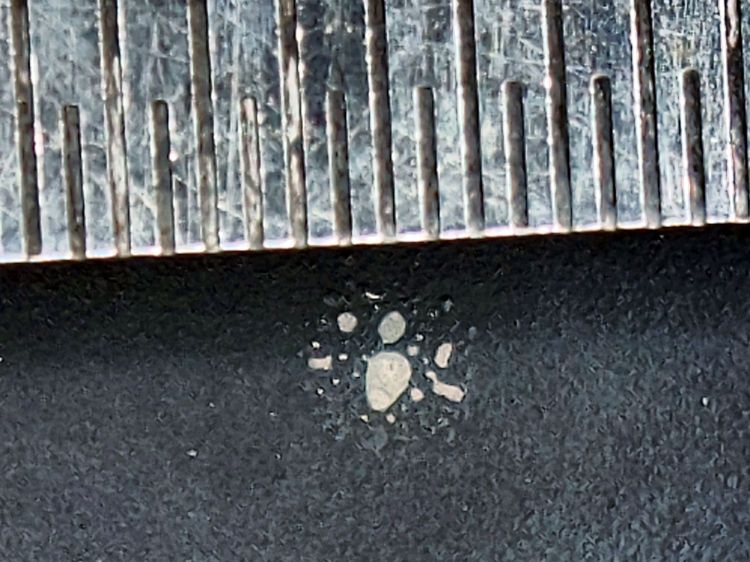
    Having grossly exceeded the Gentec ED-200 maximum power spec, I wasn’t surprised to see this when I finally tucked it back in the drawer:

    Gentec ED-200 surface damage
    Gentec ED-200 surface damage

    The 0.5 mm scale suggests the damage came from a defocused 2 mm beam or the hot central part of a larger beam, but I obviously wasn’t paying enough attention at the time.

    The rest of the surface seems undamaged, so this may have been one of those inadvertent long-duration pulses or several shorter shots in one spot.

  • Miroco LED Floor Lamp: MOSFET Replacement

    Miroco LED Floor Lamp: MOSFET Replacement

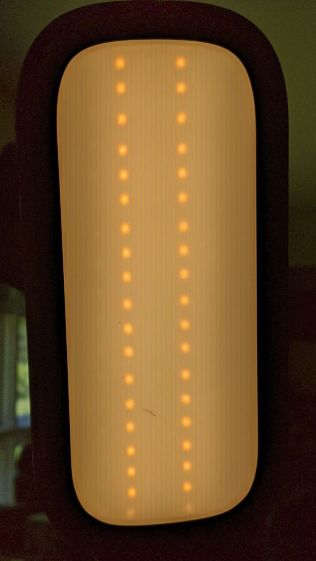
    The only LED floor lamp I bought which didn’t require extensive hackery to lower the business end to suit Mary’s preferences failed after two years. The warm white LEDs continued to work fine:

    Miroco LED Floor Lamp - warm white LEDs
    Miroco LED Floor Lamp – warm white LEDs

    But the cool white LEDs were permanently on at a very low level and did not respond to any of the brightness controls:

    Miroco LED Floor Lamp - cool white LEDs
    Miroco LED Floor Lamp – cool white LEDs

    You can’t tell, but the cool whites are on in the first picture, too.

    The symptoms suggested the driver transistor for the cool whites has failed partially on, although I’d expect it to be either a dead short or completely open.

    The lamp being a year or more out of warranty and having come from one of the myriad Amazon sellers banned during the Great Paid Review Purge, there’s nothing to do but remove the four screws from the back of the control lump and see what’s inside:

    Miroco LED Floor Lamp - PCB packing
    Miroco LED Floor Lamp – PCB packing

    How this was assembled I cannot say, because the three wires going to the LED head (on the far right) have less than an inch of slack. Maybe they pulled wire into the head while screwing things together?

    I think the HC8T1212 microcontroller sticking out of the foam is a distant descendant of the Motorola (remember Motorola?) MC68HC05 family. I’m mildly surprised they didn’t use a 32-bit ARM / MIPS / whatever micro, with WiFi capability and a strong desire to siphon my private bits.

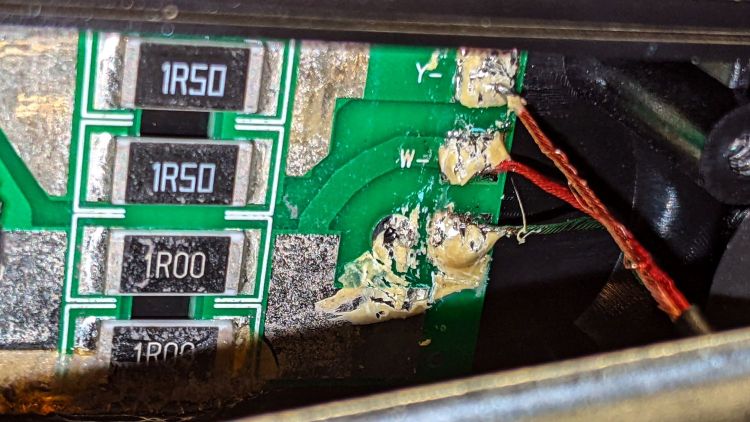
    The two pieces of closed-cell foam seemed firmly glued to the PCB, but eventually yielded to brute force. Scraping brittle yellowish goo off the right end revealed the LED ballast resistors and the wire labels:

    Miroco LED Floor Lamp - ballast resistors - LED wiring
    Miroco LED Floor Lamp – ballast resistors – LED wiring

    Note the bar-taut Y- wire going to the warm-white (“yellow”?) LEDs.

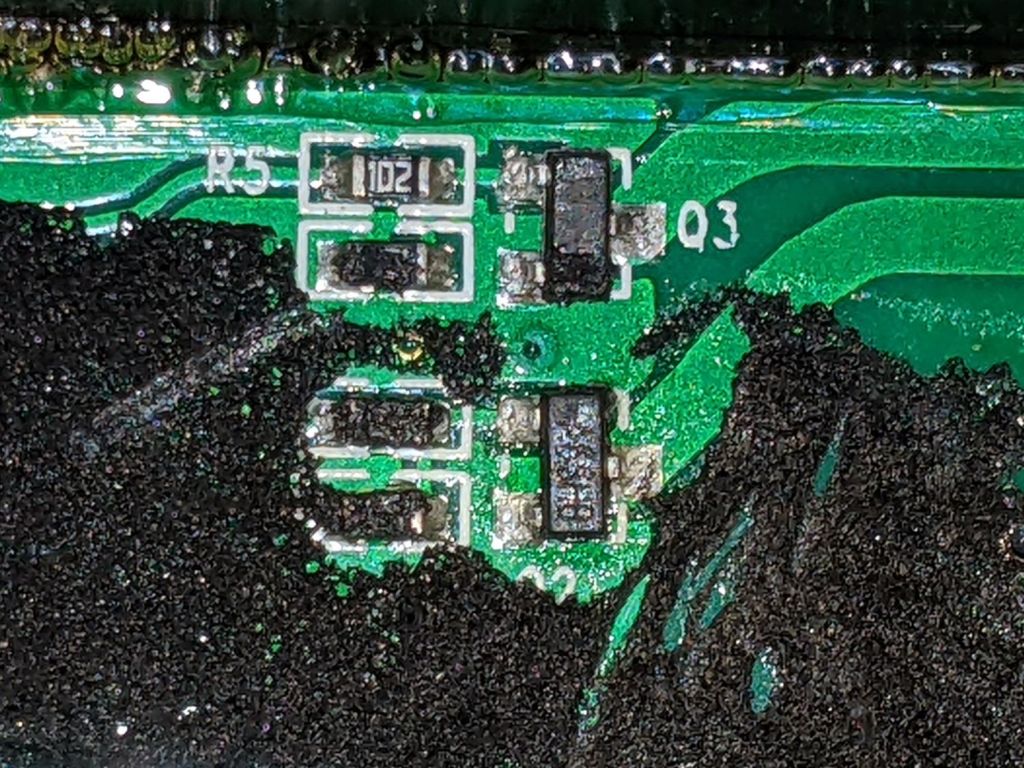
    The black foam left a mess over most of the PCB, but diligent scraping eventually revealed the driver transistors:

    Miroco LED Floor Lamp - A6SHB MOSFETs
    Miroco LED Floor Lamp – A6SHB MOSFETs

    You can’t read it, but the topmarks were A6SHB: an old Siliconix (remember Siliconix?) SI2306 30 V / 3 A MOSFET. Turns out you can get new-production SI2306 transistors from the usual Asian foundries through eBay, which I did.

    It’s not the neatest soldering job ever, but it’ll suffice:

    Miroco LED Floor Lamp - A6SHB MOSFET replaced
    Miroco LED Floor Lamp – A6SHB MOSFET replaced

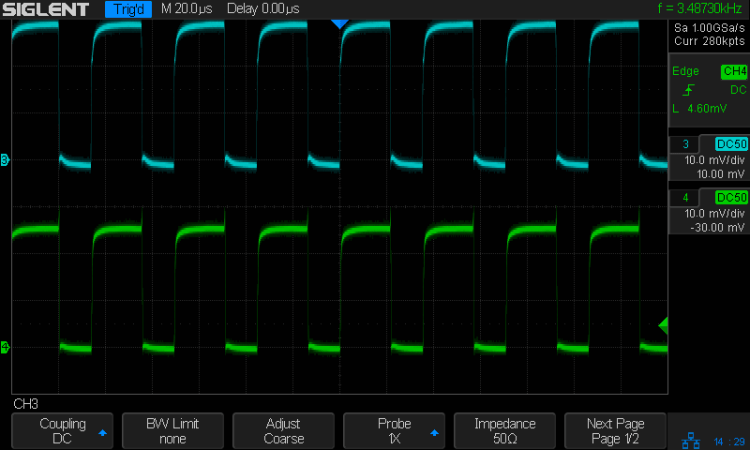
    The colorful wires over on the right added enough length for a pair of Tek current probes:

    Miroco LED Floor Lamp - 200 mA-div
    Miroco LED Floor Lamp – 200 mA-div

    The top (cyan) trace is the (repaired) cool LEDs, drawing 600 mA from the 10 V supply, so the 0.5 Ω ballast dissipates 180 mW. The bottom (green) trace is the warm LEDs at 500 mA through a 0.75 Ω ballast for 190 mW. That end of the control lump does feel a bit warm after a while, but nothing out of the ordinary.

    Stuff the foam back in place, tuck the longer wires around the edges, snap the cover in place, reinstall the screws, and the lamp is at least as good as new.

  • LitUp LED Light Pad: Direct Wiring

    LitUp LED Light Pad: Direct Wiring

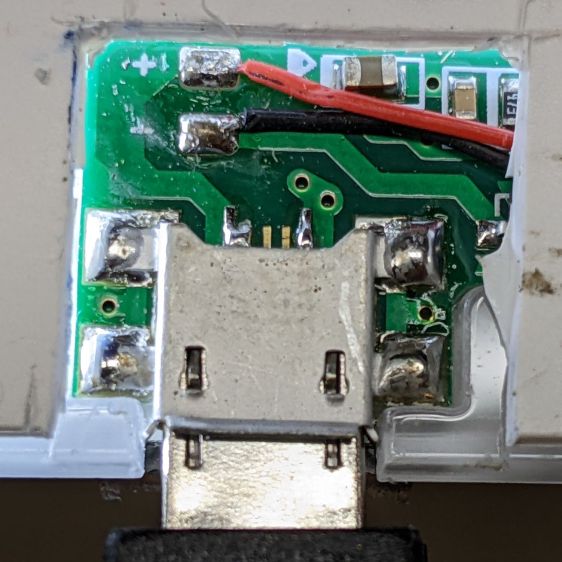
    Unfortunately, reinforcing the USB Micro-B jack on the side of the LitUp LED Light Pad only delayed the inevitable: the light became erratic even without the slightest touch. The pad consists of three acrylic sheets glued together around the entire perimeter, so there’s no way to get access to the no-user-serviceable-parts within. Apparently, you’re supposed to just throw it out.

    On the other paw, it’s already dead, so there’s nothing to lose:

    LitUp LED Light Pad - failed USB jack
    LitUp LED Light Pad – failed USB jack

    A little deft razor knife work chopped through the rear sheet without doing any (more) damage to the PCB within. The LEDs can still be convinced to light, but the USB jack is definitely wrecked.

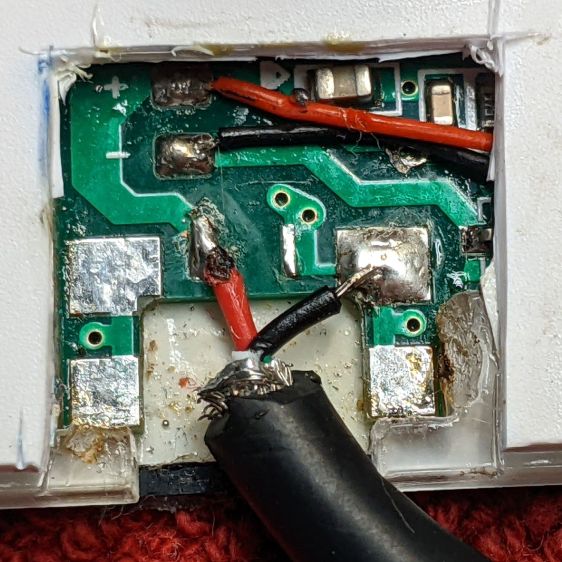
    Applying some ChipQuik let me extract the jack without (too much) more damage. Rather than replace it, I just soldered a pigtail USB cable to the obvious PCB pads:

    LitUp LED Light Pad - direct power wiring
    LitUp LED Light Pad – direct power wiring

    If I’d noticed that little solder ball, I’d have removed it before filling the cavity with hot melt glue and squishing the cut-out piece of white acrylic in place.

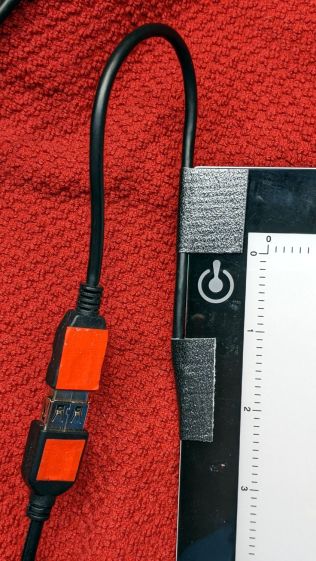
    A little black duct tape should keep the wiring stable enough for the foreseeable future:

    LitUp LED Light Pad - redirected cable
    LitUp LED Light Pad – redirected cable

    That was another (relatively) easy zero-dollar repair that should not be necessary.

  • BatMax vs. Newmowa NP-BX1 Camera Batteries: 2022

    BatMax vs. Newmowa NP-BX1 Camera Batteries: 2022

    Two years ago, a quartet of new BatMax NP-BX1 batteries performed about as well as could be expected and, by last fall, had deteriorated about as much as expected:

    Batmax NP-BX1 - 2021-09 vs 2020-03
    Batmax NP-BX1 – 2021-09 vs 2020-03

    In round numbers, the total capacity declined from 3.25 W·hr to 2.5 W·hr, which means a single battery can’t quite power the camera for the duration of our normal hour-long rides. I do not know what voltage trips the camera’s decision, but the batteries definitely shut down sooner.

    So, based on their previous track record, I bought another quartet of Batmax batteries. Being that type of guy, I tested both the old (2020) and new (2022) sets:

    NP-BX1 - BatMax 2022 vs 2020 - used-new
    NP-BX1 – BatMax 2022 vs 2020 – used-new

    The blue traces are the C/D batteries from the as-new tests back in early 2020, the green traces are C/D after two years of use, and the red traces are the “new” quartet after their first charge in the Official BatMax Charger.

    It looks very much like BatMax is selling used batteries repackaged as new items, because they are indistinguishable from my used ones. They definitely are not the “Premium Grade A cells” touted in the description.

    I returned them for a refund and sent the test results to BatMax; they sent “new replacements” even though I said I would not pay for any future shipments. The batteries had a slightly different wrapper, but the test results were still indistinguishable from used batteries. I offered to return the package and was told that would not be needed.

    Just a few more batteries for the blinkies.

    So I bought a trio of NP-BX1 batteries from Newmowa, an Amazon supplier with a few more vowels than usual, and repeated the exercise:

    NP-BX1 - Newmowa 2022 ABC - 2022-06-29
    NP-BX1 – Newmowa 2022 ABC – 2022-06-29

    It seems three good batteries now cost about as much as four crap batteries, under the reasonable assumption chargers are essentially free.

    Three batteries isn’t quite enough for my usual rotation and, for unknown reasons, one cannot buy only batteries, so in short order I will have two chargers and six batteries.

    The consolidated test results:

    NP-BX1 - Newmowa Batmax 2022 comparison
    NP-BX1 – Newmowa Batmax 2022 comparison

    The color code:

    • Newmowa: red
    • BatMax 2020 new: blue
    • BatMax 2020 used: orange
    • BatMax 2022 new: green + lime

    I stopped writing Amazon reviews after having a few detailed-writeups-with-graphs rejected for the usual unspecified reasons. As the Finn put it, “You wanna download, you know the access code already.”

  • LED Bulb Life Data Point

    LED Bulb Life Data Point

    A rare trip to the Poughkeepsie Railroad Station provided an opportunity to check out the LED bulbs in the chandeliers:

    • Pok RR Station - Chandelier A
    • Pok RR Station - Chandelier B
    • Pok RR Station - Chandelier C

    The 108 bulbs had only one deader (lower left in chandelier C).

    I have no way of knowing if they’re the same bulbs from six years ago, but the accumulation of bugs / dust / crud inside the (what I would expect to be) sealed envelopes suggests they’ve been hanging there for quite a while:

    Pok RR Station - Chandelier B - detail
    Pok RR Station – Chandelier B – detail

    The dark cruciform patches might come from failed LED chip strings, although the bulbs all had the same eyeballometric brightness. The patches all seem to have a hard lower edge, so we may be seeing shadows from dust accumulating atop the chips on the PCB.

    They’re a definite step up from CFL bulbs, although still not as pleasant as OG incandescent filaments.

  • CR2032 Lithium Cell Lifetime

    CR2032 Lithium Cell Lifetime

    The Dell Optiplex 9010 acting as a file server woke up dead after I plugged it in after returning from a road trip. Its ID sticker shows a manufacturing date almost exactly nine years ago and the problem was exactly what you might expect:

    Optiplex CR2032
    Optiplex CR2032

    I’d never measured 100 mV on a CR2032 before.

    Because the Optiplex runs headless in the basement, diagnosis required hauling it upstairs, booting it with a display & keyboard, whacking the date into the current decade, then resetting a few other vital bits.

    The electrolytic caps looked to be in fine shape, though.

  • Sunbeam 3035 Clothes Iron: Rusted Spring

    Sunbeam 3035 Clothes Iron: Rusted Spring

    Some weeks ago the Sunbeam clothes iron Mary uses for her quilting projects stopped retracting its cord and a few days ago the entire compartment holding the cord spool simply fell off:

    Sunbeam 3035 Iron - detached cord compartment
    Sunbeam 3035 Iron – detached cord compartment

    One plastic stud and two thin plastic tabs held the compartment onto the rest of the iron. How they lasted this long I do not know, but they are neither replaceable nor fixable.

    When you see badly rusted screws in an electrical device, you know the story cannot end well:

    Sunbeam 3035 Iron - cord connections
    Sunbeam 3035 Iron – cord connections

    And, indeed, it hasn’t:

    Sunbeam 3035 Iron - retraction spring rust
    Sunbeam 3035 Iron – retraction spring rust

    This being a steam iron, it has a water tank that gets filled through an awkward port with a sliding cover. Mary is as conscientious a person as you’ll ever meet, but the occasional spill has certainly happened and it is painfully obvious the iron’s designers anticipated no such events.

    The coil spring had rusted into a solid mass:

    Sunbeam 3035 Iron - spring rust - detail
    Sunbeam 3035 Iron – spring rust – detail

    I removed the spring, soaked it in Evapo-Rust for a few hours, then cleaned and oiled it:

    Sunbeam 3035 Iron - relaxed spring
    Sunbeam 3035 Iron – relaxed spring

    Rewinding and reinstalling the spring showed it has lost its mojo and cannot retract more than a few feet of cord.

    She’s in the middle of a quilting project and will replace the iron with whatever cheapnified piece of crap might be available these days. Similar irons have reviews reporting they begin spitting rust after a few months, which suggests the plastic tank or stainless steel hardware in this one have been cost-reduced with no regard for fitness-for-use.