Ed Nisley's Blog: Shop notes, electronics, firmware, machinery, 3D printing, laser cuttery, and curiosities. Contents: 100% human thinking, 0% AI slop.
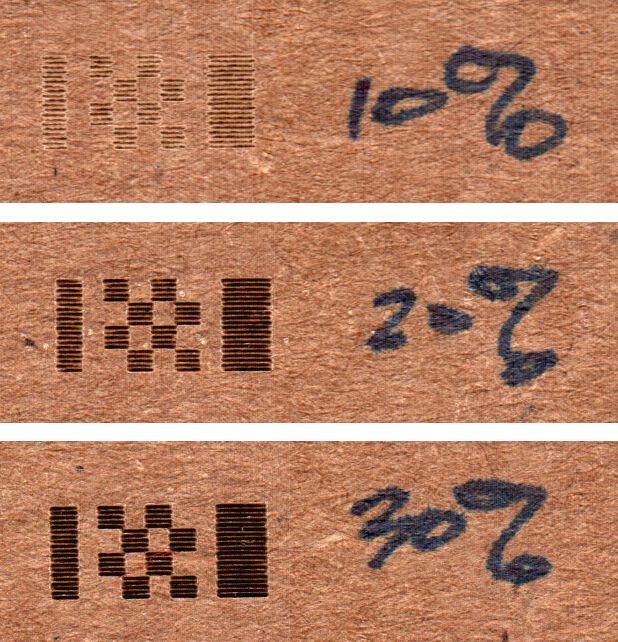
Laser power settings of 10, 20, and 30% obviously produce different results:
Pulse Timing Pattern – cardboard – 10 20 30 pct
However, the scope traces for PWM values under about 25% all look pretty much like this:
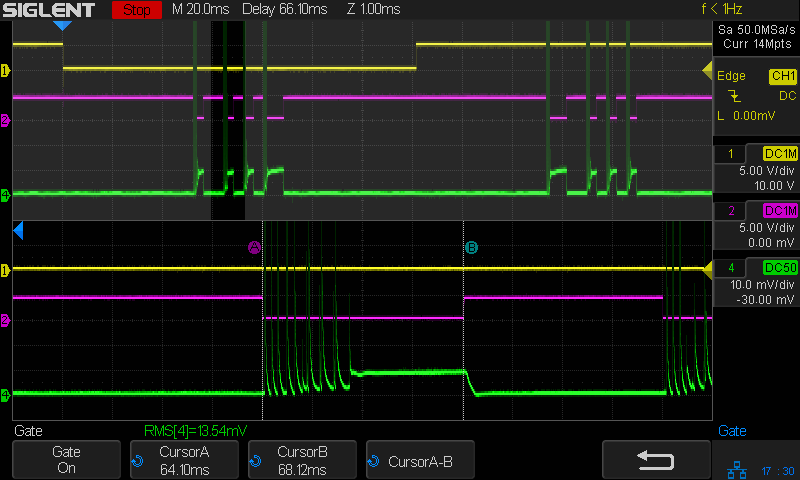
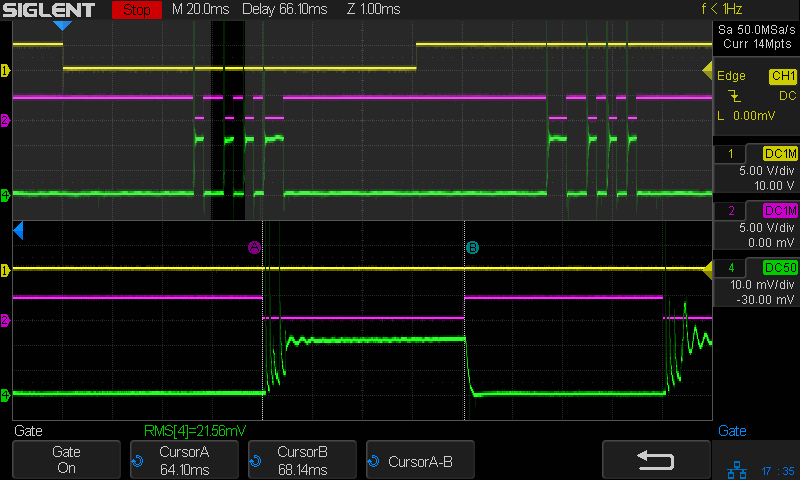
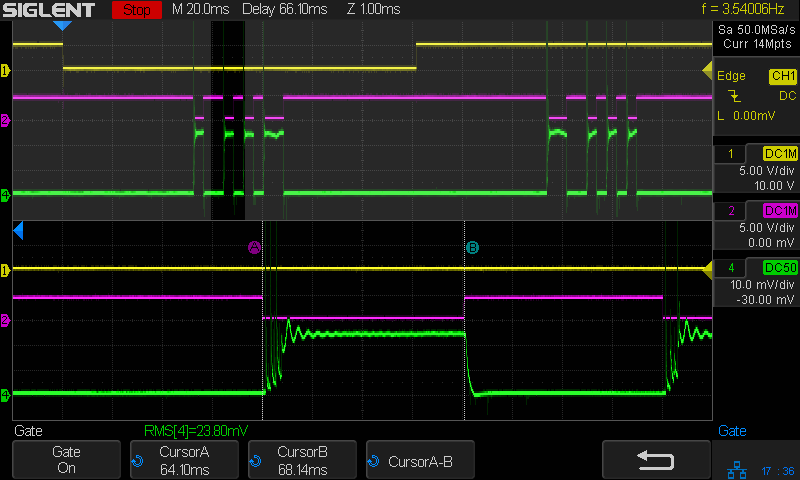
Tube Current – 10pct – 250mm-s – 5ma-div
Rather than a simple constant current source, the power supply produces very high amplitude current pulses for low PWM inputs, with no visible differences between any of the PWM values.
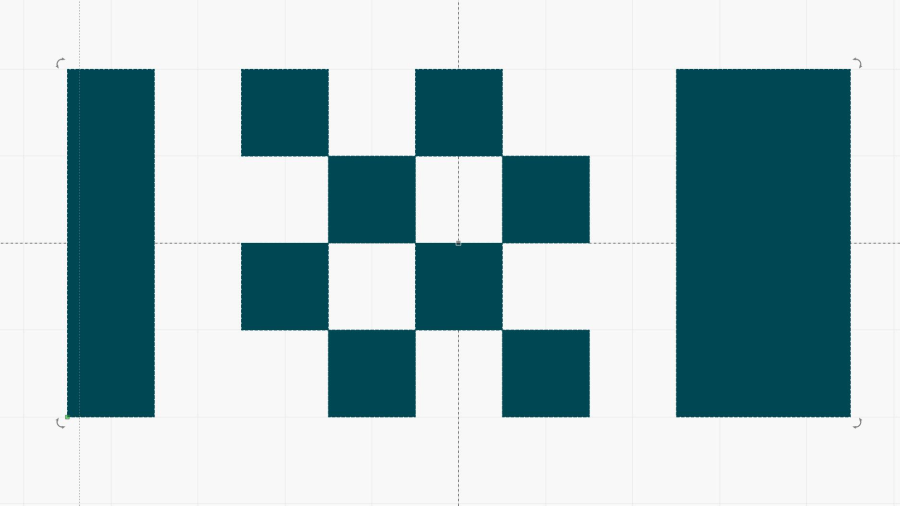
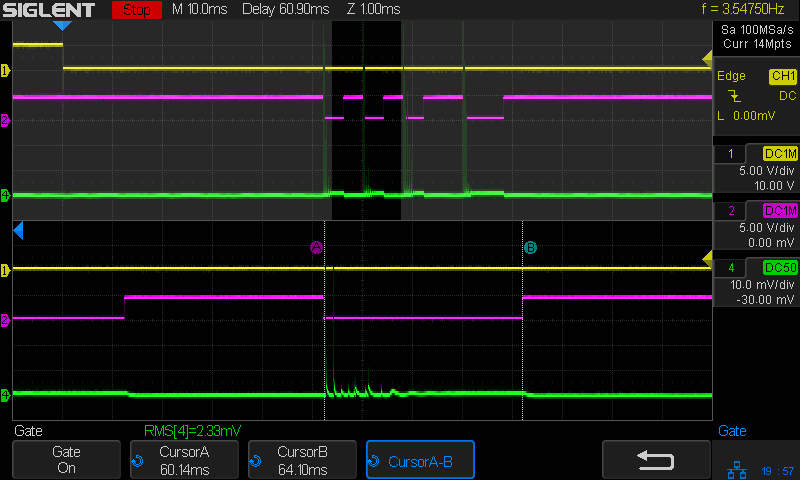
The scope can compute the RMS value of (a section of) the trace, so I aimed it at traces captured from the upper left block of this test pattern:
Pulse Timing Pattern – 1 mm blocks
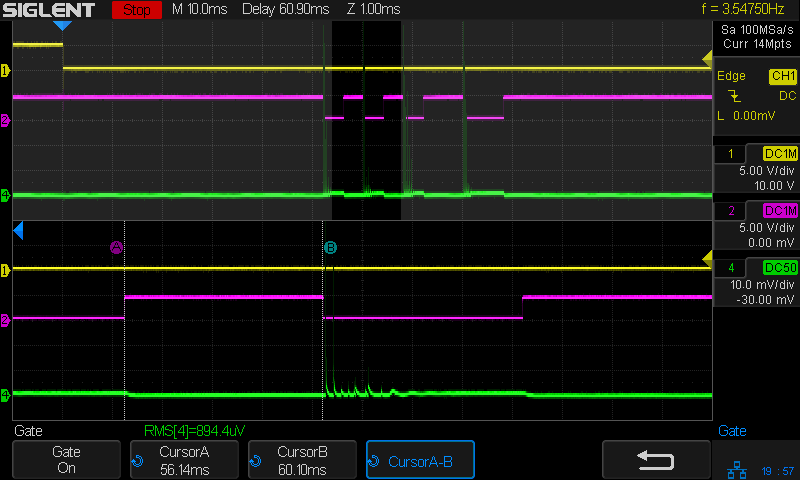
Because the pulses have such a high amplitude, I set the Tek AM502 current amp at 100 mA/div to capture the entire pulse. Measuring a part of the trace without a signal gives the baseline noise level:
The scope display is 10 mV/div, so 1 mVRMS (close enough to the 894.4 µV reported just above the bottom label row) means 10 mARMS of noise. Given that 100% PWM corresponds to about 25 mA (DC-ish during the pulse), the RMS numbers may not have any significant figures.
A slide show of the results so you can page through them:
There is a 1 mm white bar to the left of the leftmost black bar as a scope trace marker and 2 mm white bar to the right of the rightmost black bar for direction confirmation.
Setting the image to 254 dpi = 10 pix/mm makes the bars exactly 10 pixels wide and scanning at 100 mm/s makes them 10 ms wide. They’re tall enough to simplify scope triggering and capture.
Although using a black bar for 0% PWM = 0 mA and a white bar for 100% PWM makes numerical sense, at least to me, it’s the other way around for laser cutting / engraving: black = 100% and white = 0%. With the layer set to Fill in LightBurn, turn the layer’s Negative Image switch on, and everything comes out right.
Engraving a good grayscale or 3D image is a can of worms, so I just fired the beam into a shallow pan of water.
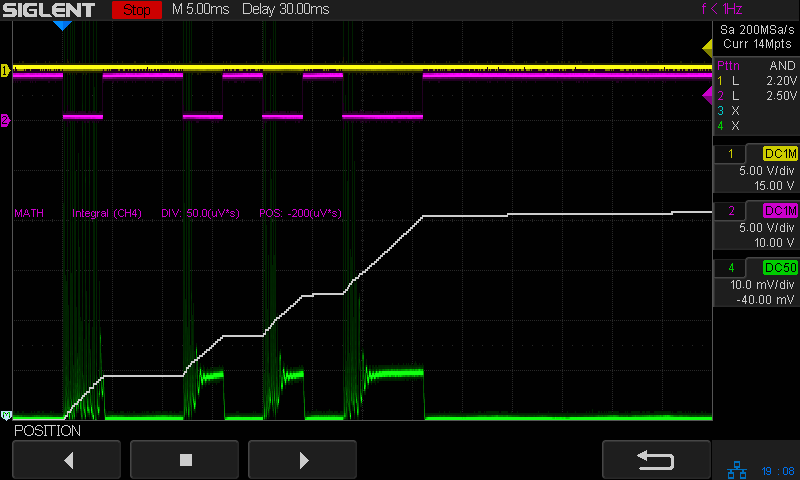
With signals and traces arranged as before, the beam current shows the same huge spikes during the 10% and 20% PWM bars and at the start of the 100% PWM bars:
Tube Current – grayscale bars – 100mm-s 100ma-div
At 100 mA/div, those spikes look to be 400 mA tall.
A closer look with the current scaled to 10 mA/div:
Tube Current – grayscale bars – 100mm-s 10ma-div
The controller sets L-ON high whenever the beam current should be zero, so the power supply is disabled during the 0% PWM bars. Note the descending glitch at the start of the 10% PWM bar: perhaps the power supply stayed all charged up from the 100% white bar on the left edge and took a few milliseconds to begin tracking the lower current setting.
Each step of what should be a stairway from 10% to 100% PWM has about 2 ms of good old single-pole response. The steps from 70% upward have enough ripple to obscure the steps; the rightmost 100% PWM bar show the ripple doesn’t damp down for 20 ms.
Eyeballometrically, the ramp compresses on the high-current end: equal PWM steps produce less current per step. The current spikes make PWM values of 10% to 20% look awful, PWM between 30% and 50% seem more linear, and increments beyond 60% are rather compressed. The slight nonlinearity makes no practical difference, particularly because the usual recommendation is to not exceed 70%-ish PWM to prolong the tube life.
A continuous grayscale gradient:
Gray gradient
As before, there’s a 1 mm white bar on the left and a 2 mm white bar on the right, with the image inverted to make the white bars 100% PWM.
Apparently the power supply can’t regulate the current down from the 100% PWM bar fast enough to match the 0% PWM start of the ramp:
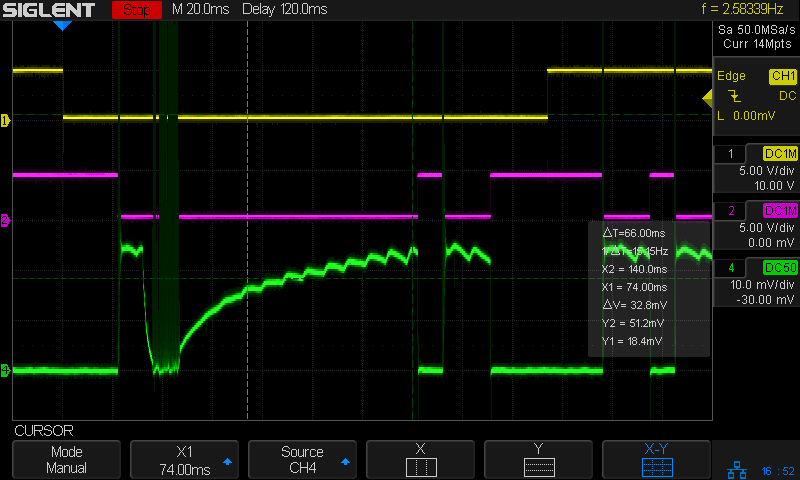
Tube Current – gray ramp – 100mm-s 10ma-div
The compressed relation between PWM and current shows there’s definitely not much benefit in driving the tube beyond about 60% PWM.
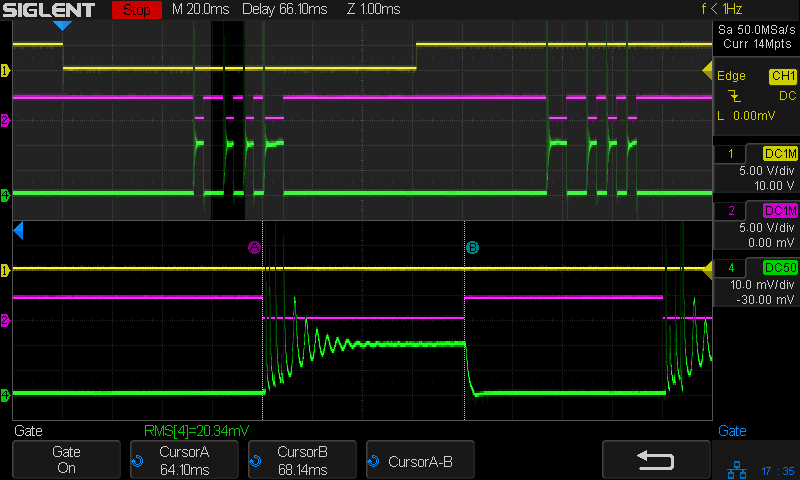
There are no high-current spikes in that screenshot, despite having a 0% to 100% PWM gradient.
Unlike the gray bars in the first test image up top, this is a continuous ramp and shouldn’t have any discontinuities. The vertical cursors span eight ripples and sit 66 ms apart, which works out to 8.25 ms/ripple. Flip it upside down and you’re looking at 120 Hz ripple from the full-wave bridge rectifier feeding the high-voltage converter. You’d expect solid low-pass filtering after the high-frequency flyback transformer, so the input filter must have the smallest possible caps the designers could possibly use.
Another smooth gradient preceded by a 10% PWM bar and bracketed by the same white bars:
Gray gradient – 10 pct bar
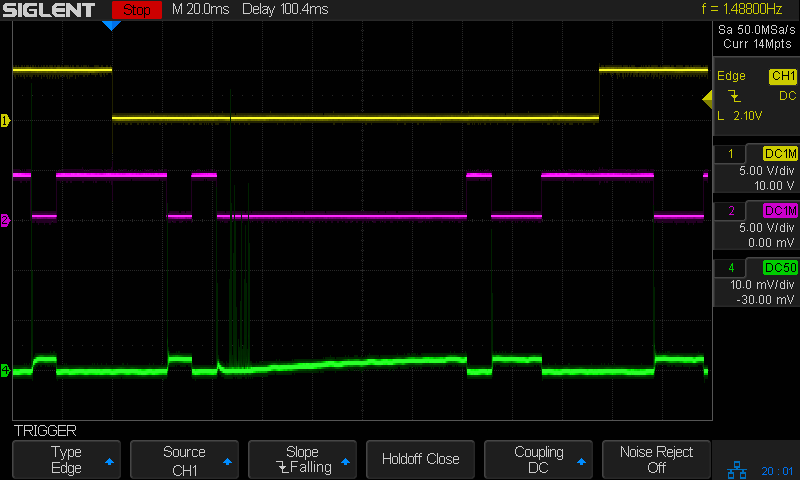
The current waveform is … odd:
Tube Current – gray ramp – 10 PWM bar – 100mm-s 10ma-div
The high-current spikes following the 100% PWM bar on the left occupy the 10% PWM bar and the start of the gradient, up to about 20% PWM. Apparently the spikes happen while the power supply attempts to produce more-or-less continuous current at PWM values below about 25%
I set the layer speed at 250 mm/s = 4 ms / mm, then set PWM (a.k.a. “power”) for each test, and measured the results, which look like this for three power levels on corrugated cardboard:
Pulse Timing Pattern – cardboard – 10 20 30 pct
The scan interval of 0.2 mm produces distinct lines at 10% PWM, the lower limit of the laser’s range. The lines remain separate at 30%, although their width is definitely increasing.
Yesterday’s post explains the test wiring setup and the signals in the scope screenshots.
The 10% PWM current waveform looks like nothing you’d expect:
Tube Current – 10pct – 250mm-s – 5ma-div
The scope triggers at the start of a left-to-right scan line, with 50 ms devoted to ramping up the speed to 250 mm/s before the start of the vertical bar along the left edge and slowing down before reversing.
The green trace shows huge spikes in the laser current, not a well-defined DC current pulse, and they’re offscale beyond 30 mA at 5 mA/div. The baseline sits well above the 0 V line due to the AM502 amplifier’s breathtaking thermal drift; I occasionally touch it up, but the current really is zero between the pulses.
Similarly for 20% PWM:
Tube Current – 20pct – 250mm-s – 5ma-div
Even through there’s little visible difference between the 10% and 20% current waveforms, there’s a distinct difference in the actual beam power delivered to the cardboard.
At 30% PWM the beam current looks a bit more reasonable:
Tube Current – 30pct – 250mm-s – 5ma-div
The 2 mm = 8 ms bar on the right gives the current time to stabilize at 6 mA, but all of the pulses have at least 3 ms of spikes. The first pulse definitely looks worse, so it seems the power supply gets better as the scan line progresses.
At 40% PWM the beam current pulses look more like pulses:
Tube Current – 40pct – 250mm-s – 5ma-div
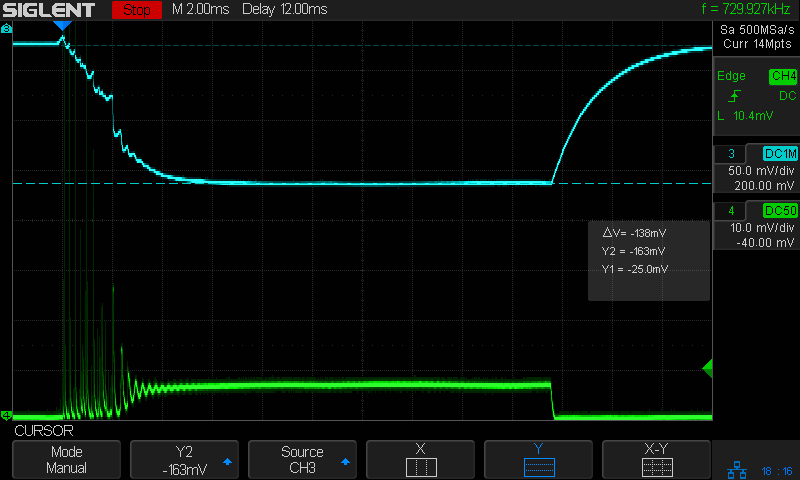
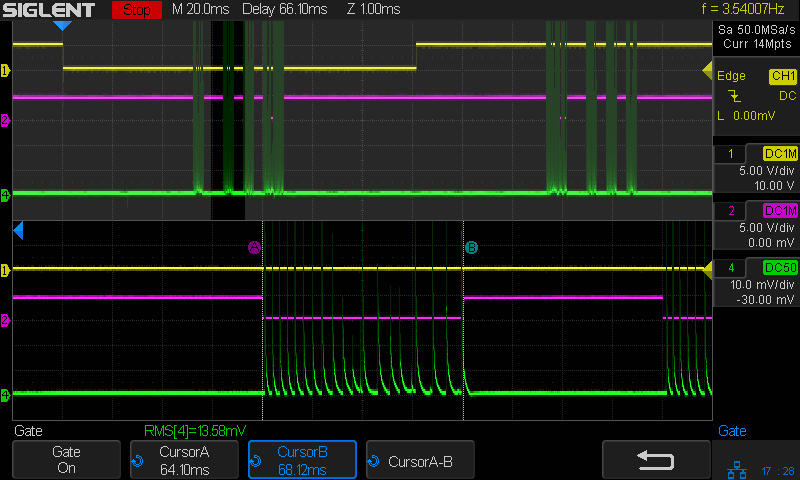
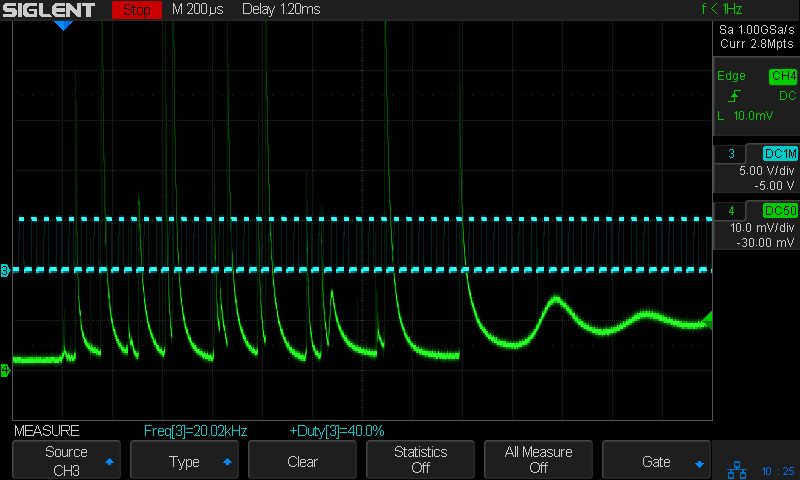
They still have 3 ms or so of those startup spikes, as seen in this closer look at the first pulse in a line, scaled at 10 mA/div (along with the PWM drive signal):
Tube Current – 40pct PWM first detail – 250mm-s – 10ma-div
The top of those spikes exceed 70 mA!
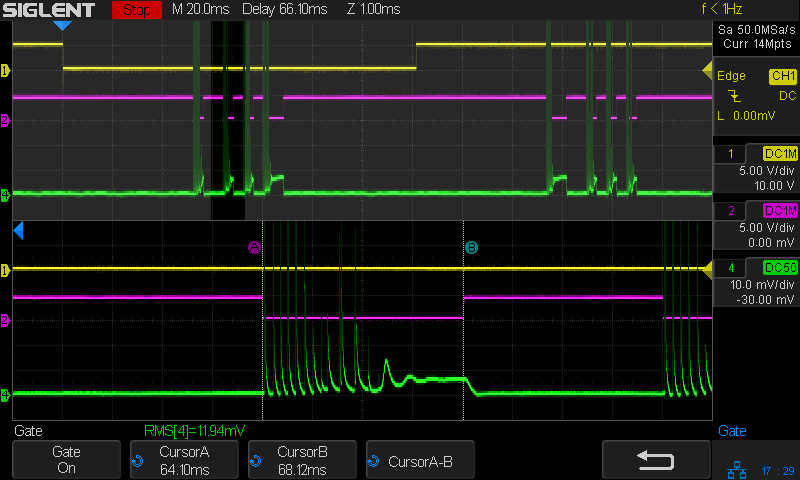
At 80% PWM, the current waveform looks like a damped tank circuit:
Tube Current – 80pct first – 250mm-s – 5ma-div
The 20 mA at the end of that pulse suggests the maximum tube current would be 25 mA, which is undoubtedly why OMTech recommends running at no more than 70% PWM = 17-ish mA.
The pulses start immediately after the L-ON signal goes active and stop promptly when it goes inactive, so there’s no question about the responsiveness. What baffles me is why the current looks the way it does.
I must figure out how to have the scope compute the RMS value of those spikes, with a sufficiently large mA/div setting to keep the entire range of the pulses on the screen.
Having seen some rather bizarre laser tube current waveforms from the replacement power supply (and an equivalent Cloudray supply I bought as a backup) in the OMTech 60 W laser, I finally got A Round Tuit for a closer look.
I tapped three signals from the Ruida KT332N controller by the simple expedient of crunching wires into the output terminal clamps along with their original ferrules:
KT332N controller – Tube Current test connections
From top to bottom:
X axis DIR: low = left-to-right motion = toward X+
Laser L-ON: low-active laser beam enable
PWM: pulse-width modulation laser power control
Those three cables pass through a small hole in the cabinet to the left of the hatch on their way to channels 1, 2, and 3 of the scope.
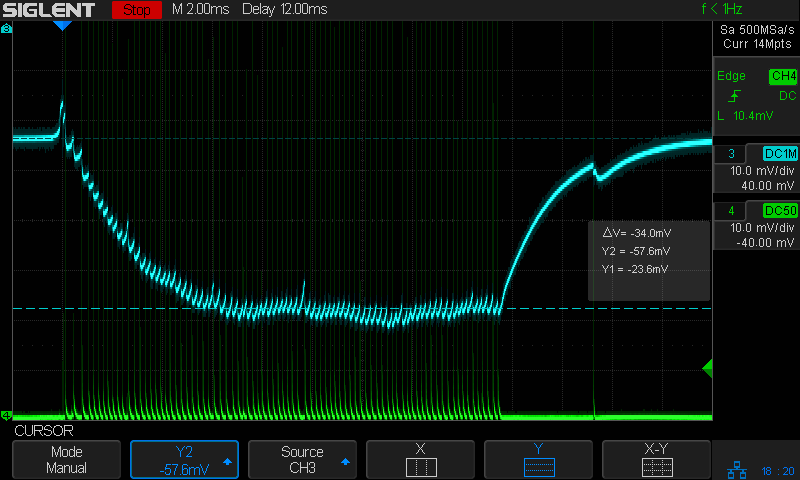
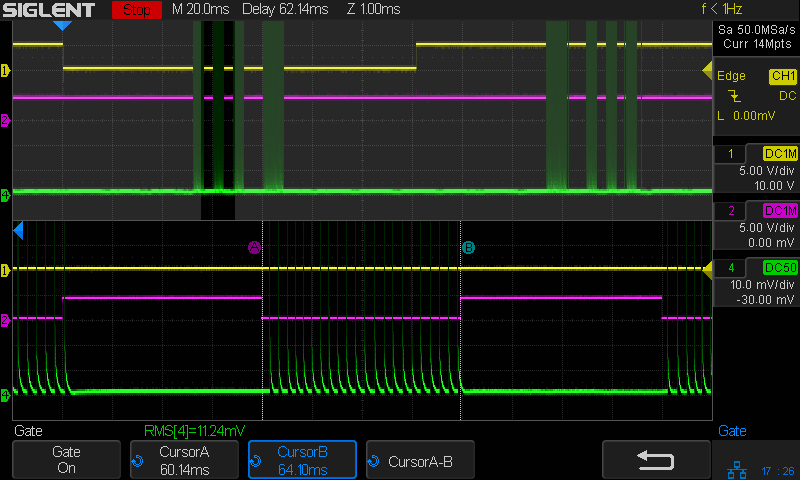
The PWM signal (cyan, channel 3) isn’t particularly useful, but a quick look confirmed it is an active-high signal ticking along at 20 kHz, with a duty cycle corresponding to the selected laser “power”:
Tube Current – 40pct PWM first detail – 250mm-s – 10ma-div
The bottom trace (green, channel 4) is the laser tube current, as monitored by a Tek A6302 Hall-effect current probe around the tube’s cathode (low voltage return) lead:
HV laser power supply – current probe setup
This time around, I poked a bight of that overly long wire through the hole in the cabinet (just above the power-line earth ground terminal) so I could keep the probe outside the cabinet and close the hatch.
Minus the PWM signal, the scope looks like this:
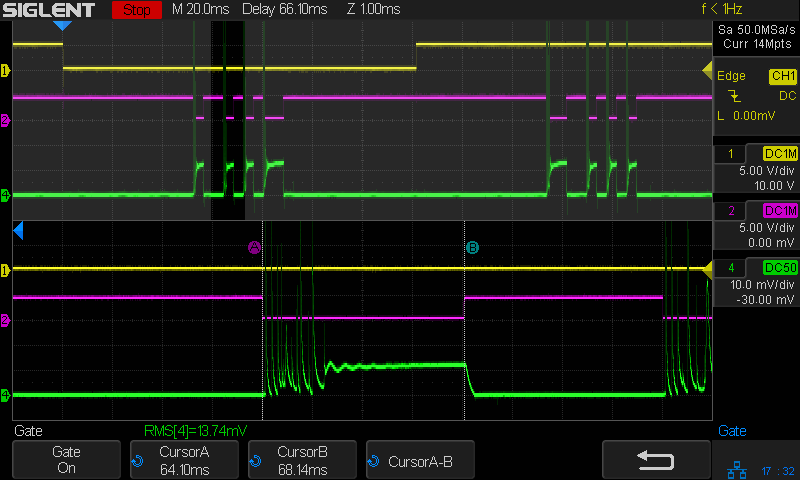
Tube Current – 40pct – 250mm-s – 5ma-div
The top trace (yellow, channel 1) is the DIR signal, with a high-to-low transition triggering the scope when the X axis begins moving from left to right.
The second trace (magenta, channel 2) is the L-ON laser enable; the high-voltage power supply drives current through the laser tube only when L-ON is low.
The third trace (green, channel 4) is, as above, the laser tube current. The Tek AM502 amplifier sets the gain, with the scope channel always set to 10 mV/div with a 50 Ω input impedance, so I must put the current scale in the screenshot file name (which becomes the caption here).
With all that in mind, the next few posts will make more sense … and I can remember what I did.
The red-dot pointer on the OMTech laser cutter has the same problem as my laser aligner for the Sherline mill: too much brightness creating too large a visual spot. In addition, there’s no way to make fine positioning adjustments, because the whole mechanical assembly is just a pivot.
The first pass involved sticking a polarizing filter on the existing mount while I considered the problem:
OMTech red dot pointer – polarizing filter installed
The red dot pointer module is 8 mm OD and the ring is 10 mm ID, but you will be unsurprised to know the laser arrived with the module jammed in the mount with a simple screw. Shortly thereafter, I turned the white Delrin bushing on the lathe to stabilize the pointer and installed a proper setscrew, but it’s obviously impossible to make delicate adjustments with that setup.
Making the polarizing filter involves cutting three circles:
OMTech red dot pointer – polarizing filter
Rotating the laser module in the bushing verified that I could reduce the red dot to a mere shadow of its former self, but it was no easier to align.
Replacing the Delrin bushing with a 3D printed adjuster gets closer to the goal:
Pointer fine adjuster – solid model
Shoving a polarizing filter disk to the bottom of the recess, rotating the laser module for least brightness, then jamming the module in place produces a low-brightness laser spot.
The 8 mm recess for the laser module is tilted 2.5° with respect to the Y axis, so (in principle) rotating the adjuster + module (using the wide grip ring) will move the red dot in a circle:
Improved red-dot pointer – overview
The dot sits about 100 mm away at the main laser focal point, so the circle will be about 10 mm in diameter. In practice, the whole affair is so sloppy you get what you get, but at least it’s more easily adjusted.
The M4 bolt clamping the holder to the main laser tube now goes through a Delrin bushing. I drilled out the original 4 mm screw hole to 6 mm to provide room for the bushing:
Improved red-dot pointer – drilling bolt hole
The bushing has a wide flange to soak up the excess space in the clamp ring:
Improved red-dot pointer – turning clamp bushing
With all that in place, the dimmer dot is visually about 0.3 mm in diameter:
Improved red-dot pointer – offset
The crappy image quality comes from excessive digital zoom. The visible dot on the MDF surface is slightly larger than the blown-out white area in the image.
The CO₂ laser hole is offset from the red laser spot by about 0.3 mm in both X and Y. Eyeballometrically, the hole falls within the (dimmed) spot diameter, so this is as good as it gets. I have no idea how durable the alignment will be, but it feels sturdier than it started.
Because the red dot beam is 25° off vertical, every millimeter of vertical misalignment (due to non-flat surfaces, warping, whatever) shifts the red dot position half a millimeter in the XY plane. You can get a beam combiner to collimate the red dot with the main beam axis, but putting more optical elements in the beam path seems like a Bad Idea™ in general.
This file contains hidden or bidirectional Unicode text that may be interpreted or compiled differently than what appears below. To review, open the file in an editor that reveals hidden Unicode characters.
Learn more about bidirectional Unicode characters
A little more than two years after replacing its internal battery, the SJCAM M20 camera on my Tour Easy once again wouldn’t last to the end of the driveway if I forgot to turn on the external battery pack. This time around, the camera was so firmly jammed in the printed seat frame mount that I had to cut the mount apart.
Yup, that puppy is all swoll up:
SJCAM M20 swollen battery – side view
Poor thing looks like a tiny pillow:
SJCAM M20 swollen battery – pouch
While I had it apart, I tried to clean / refurbish the button contacts on the top. Unfortunately, they’re pretty well buried in the camera frame and I was unwilling to dismantle the optics, remove the display, and gut the camera to find out if they were more accessible from the back surface:
SJCAM M20 – switch internals
While all that was going on, I ran off a new mount in white PETG:
SJCAM M20 – white case installed
I’m down to the last battery. The “4.35V” on the pillow indicates they’re special high-voltage lithium-polymer cells, so I can’t just drop a random lithium pouch cell in there and expect it to Just Work.
I think the “782633” is the cell size, so, if I were willing to have a few thousand on the shelf, a 552525 pouch might fit. The reduced capacity wouldn’t be a problem, as it must just keep the camera’s clock ticking between rides.
AFAICT, that’s the default layout for all similar power supplies.
The H and L pins are the High- and Low-active enable inputs that, when it’s working right, control the laser output. The KT332 controller (and, most likely, all RuiDa controllers) produce a low-active output, so you just wire the controller’s output to the L input and you’re done.
That was the original failure that got me to this point: the power supply ignored its L input and turned the beam on at whatever power the PWM signal on the IN terminal called for. Having that happen was surprising, having it happen with the cabinet lid open was … disturbing.
The P input is intended for the Water Protect signal from the flow sensor on the laser cooling plumbing. When the water is flowing, the IN terminal will be low and the power supply will pay attention to the L input.
The power supply arrived with a jumper between the P input and the G ground / common terminal:
OMTech 60W HV power supply – Water Protect jumper
The jumper holds the P input low = active, meaning the power supply thinks the water is always flowing.
It turns out that the Water Protect signal goes only to the controller. When it’s inactive = no water flowing, the controller will refuse to fire the laser and also sound an alarm. Running the signal directly to the power supply would result in a puzzling failure-to-fire with no diagnostic from the controller.
I removed that jumper and added a (green) wire from the Lid Interlock signal at the controller:
OMTech KT332 controller – Lid Interlock input – added wire
To the power supply’s P input:
OMTech 60W HV power supply – Water Protect as Lid Interlock
In principle, if this power supply fails the same way as the previous one (with its L input always active), then at least it won’t fire with the lid up.
Believing that may display a childish naivety, but at least the thing seems marginally safer than it was before.