Ed Nisley's Blog: Shop notes, electronics, firmware, machinery, 3D printing, laser cuttery, and curiosities. Contents: 100% human thinking, 0% AI slop.
Because my hombrew circuit boards don’t have plated-through holes, I solder Z-wires from top to bottom. This entails little more than a solder blob around the wire on each side, but this time I wondered if having a slightly larger solid-copper area on each surface would be an improvement. Regrettably, I wondered this after masking the board.
Because I use an Ultra-fine-point Sharpie to touch up pinholes & suchlike, I decided to try it on larger areas by simply coloring in a few of the openings in the ground-plane grid.
Sharpie etch mask – Results 1
Short answer: doesn’t work so well.
However, I’m using direct etching: rubbing ferric chloride on the masked PCB with a sponge. The abrasion probably wears the Sharpie ink off the surface and then the copper begins etching as usual. If I were doing this with normal agitation / aeration, perhaps a Sharpie mask would work better.
This is also 1-ounce copper, so there’s twice as much etching going on. Perhaps half-ounce copper would vanish fast enough that the Sharpie mask would remain effective.
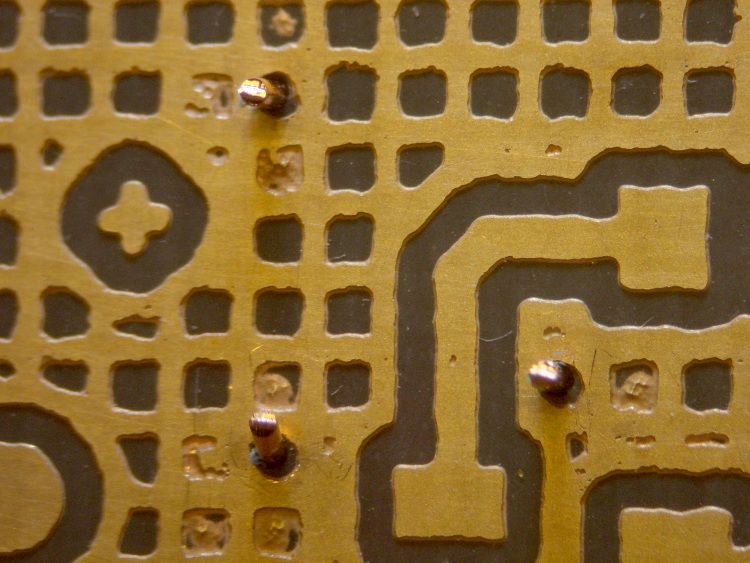
A bit more detail, with another Z-wire pointed right at you.
Sharpie etch mask – Results 2
The grid is 20-mil wide on 50-mil centers, with 25-mil isolation to other signals. The “via” holes use a 24-mil drill.
The row of dents just below the wire came from tiny openings in the mask that happen when Eagle poured the ground plane against the isolation surrounding the trace at the bottom. The toner-transfer resolution isn’t quite good enough to leave a clean opening and the etchant can’t quite reach the bottom to dig out the copper.
Memo to Self: Next time, try a 100-mil square pad around the via, centered on a grid intersection to fill in four adjacent openings.
I planned to use an Arduino Mega for an upcoming Circuit Cellar project, but … it doesn’t work. Well, it works, but under very limited circumstances.
The problem manifests itself as a complete crash / lockup under very straightforward conditions: attempting to use the serial output will suffice. This unmodified example sketch fails: AnalogInOutSerial.
After considerable Googling, there’s the showstopper: the gcc-avr compiler fails to save-and-restore a register that gets clobbered by the object constructors. Simple code doesn’t instantiate any objects, so it works fine. The serial failure is just a symptom, which means the various workarounds suggested in the forums don’t fix the general case.
The patch offered for gcc-avr is basically four lines (a pair of save / restores on R20), but requires recompiling what seems to be the entire AVR toolchain from source. That, alas, lies far beyond my capabilities… I could probably figure out enough to recompile it, but I’m very uncertain I could accomplish that without screwing up the main gcc compiler or the setup thereof.
It is not clear to me that the many claims of “it works on this version” are correct. From the nature of the problem, the failures depend critically on addresses occupied, final layout of the program / data in Flash, and (most likely) the execution path. The “working” configurations / systems may simply not fail using the sample programs.
This is on Arch Linux, for what it’s worth, with gcc-avr 4.5.1.
If anybody can walk me through the process of rebuilding whatever must be rebuilt, preferably in a safe place, perhaps I can manually stuff the new file(s) into the proper spots(s) to replace the incorrect ones…
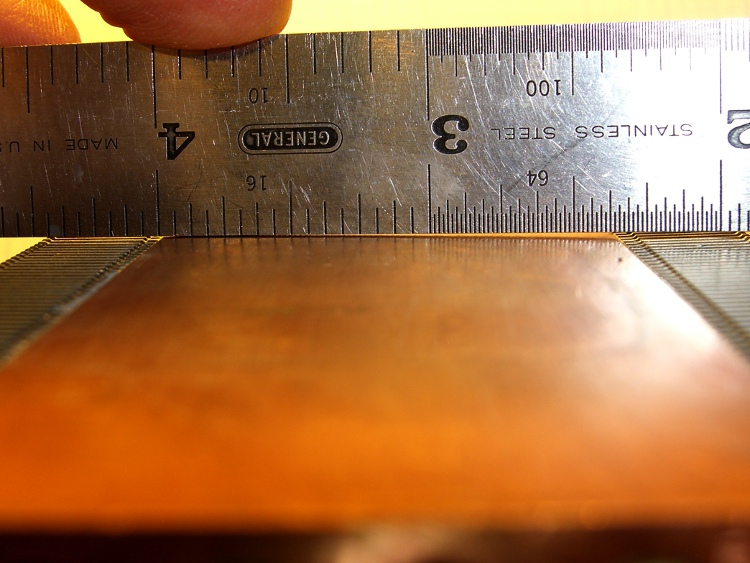
I suppose I should have known better: the bottom of that heatsink wasn’t anywhere near flat. I think it mated directly with the top of the CPU through thermal grease, not a compliant pad.
Curved copper heatsink surface
The obvious solution is to flycut the thing, which is where the Sherline’s limited Y-axis travel and teeny table put a cramp on your style. Normally, you’d put the length of the heatsink parallel to the X axis so the flycutter would clear on both ends, but there’s no obvious (read: quick and easy) way to clamp the thing that way.
So I mounted it parallel to the Y axis, which meant I couldn’t get the flycutter completely off the near end. The first pass at Z=-0.1 mm, however, showed that not only was the surface curved, but it wasn’t parallel to the top of the fins (which were flat on the tooling plate). I suppose I should have expected that.
This cut is has Z=-0.1 mm referred to the front end. It completely missed the other end:
First flycut pass
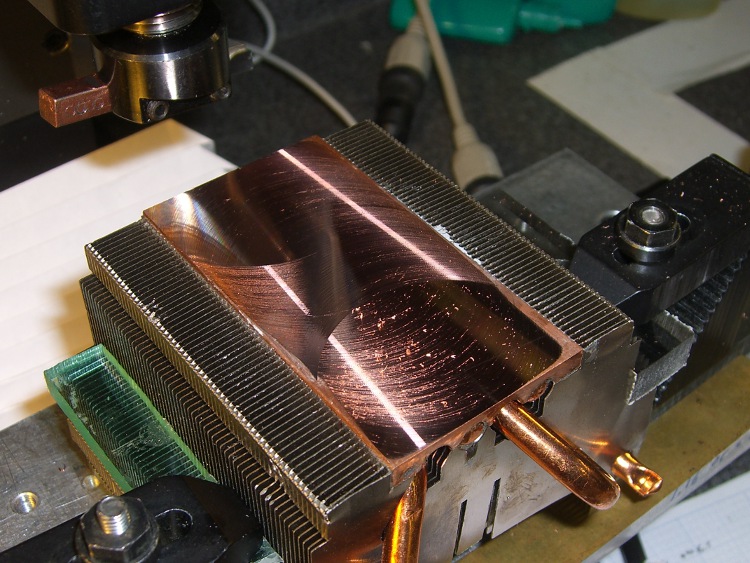
I flipped the heatsink around, measured the front-to-back tilt (about 0.16 mm), stuck a couple of brass shims under the front, and the second pass at Z=-0.05 mm from the new low point did the trick. Copper is nasty stuff and I did these cuts dry: the chips visible near the front are stuck firmly to the surface.
Final flycut pass
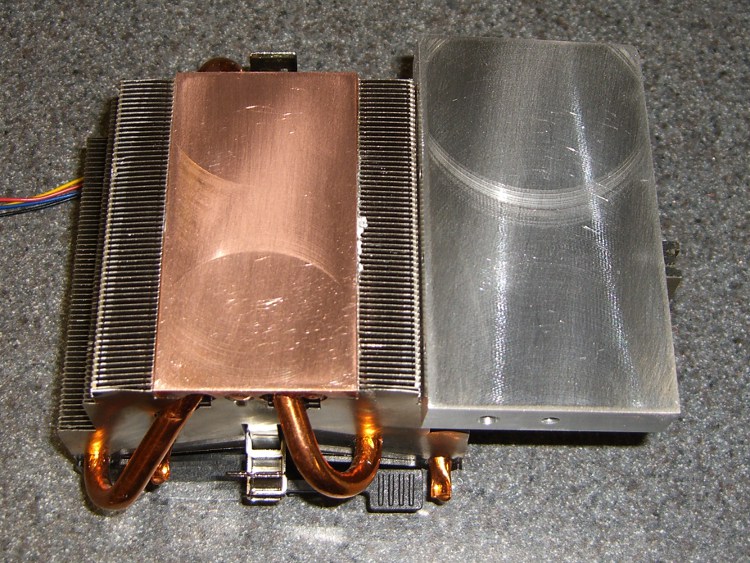
I scrubbed both the heatsink and the spreader plate on some fine sandpaper atop the sacrificial side of my surface plate until they were all good. I can see the remaining flycutter marks, but I can’t feel them, and the plates slap solidly together with a pffff of escaping air:
Flattened heatsink and spreader
A dab of heatsink compound should work wonders; the maximum dissipation will be under 20 W, roughly comparable to that old K6 CPU, but now the heatsink will be contacting the entire hot surface.
The scrap pile disgorged a chunk of aluminum plate exactly the correct size for a heat spreader that will mate eight power FETS to that heatsink. The catch: a 1-1/4-inch deep hole tapped 1/4-20 for about 3/4 inch at almost the right spot along one end. Rather than sawing off Yet Another Chunk from the original plate, I figured it’d be more useful to just plug the hole.
Note that this is somewhat different than the situation described there, where I screwed up by putting a hole in the wrong place. Here, I’m just being a cheapskate by making a piece of junk good enough to use in a project, rather than having it kick around in the scrap pile for another decade.
Anyway.
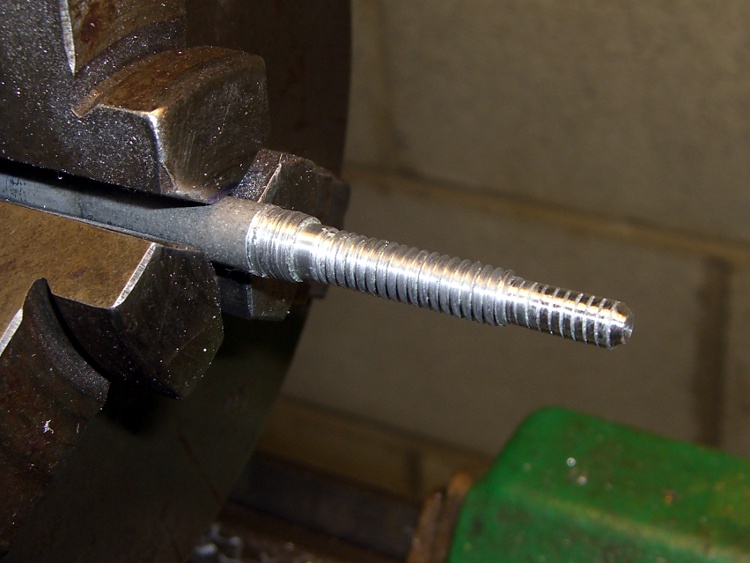
I turned a 3/8-inch diameter aluminum rod down to 1/4 inch for the threaded part and a bit under 0.200 inch to fit into the partially threaded end.
A real machinist would single-point the thread, but I just screwed a die over it. The narrow end is slightly larger than the minor thread diameter, which helped get things started. Then a trial fit, saw off the excess on the skinny end, and apply a touch of the file to shape the end to mate with the hole’s drill-point bottom:
Threaded hole plugPlug epoxied in place
I buttered up the plug with a generous helping of JB Weld epoxy and screwed it in. Toward the end of that process, the air trapped in the end became exceedingly compressed, to the extent I had to stop after each quarter-turn to let it ooze outward; eventually the hole gave off a great pffft as the remaining air pooted out. Unscrewed slightly to suck some epoxy back in, screwed it tight, and let it cure overnight.
Squared-up block with plugged hole
Sawed off the plug, filed the rubble more-or-less smooth, then squared it in the Sherline mill. The heatsink prefers to sit on a nice, smooth metal surface, so I flycut the other side of the block to get rid of a few dings and the entire anodized layer while I was at it.
The epoxy ring doesn’t have a uniform width, because you’re looking at a cross section of the thread. The skinny part is the crest of the plug thread, the wide part is along one flank. Barely a Class 1A fit, methinks.
New hole
Locate the midpoint of the block’s end, center-drill, then poke a new #29 hole 20 mm deep (I really do prefer metric!) for an 8-32 screw. The plug didn’t move at all during this process, pretty much as you’d expect. The chips came out of this hole in little crumbles, rather than the long stringy swarf from the solid aluminum on the other end.
Using a simple peck drill canned cycle is just downright wonderful:
G83 Z-20 R1 Q3 F100
The rule of thumb is 3000 RPM with a feed 100 times the drill diameter. In this case, the drill is about 3 mm and calls for 300 mm/min, but the Sherline is happier with slower feeds. Maybe if I was doing production work, I’d push it harder.
A real machinist would have a milling machine with a servo-driven spindle for rigid tapping, but I just screwed an ordinary hand tap into the holes.
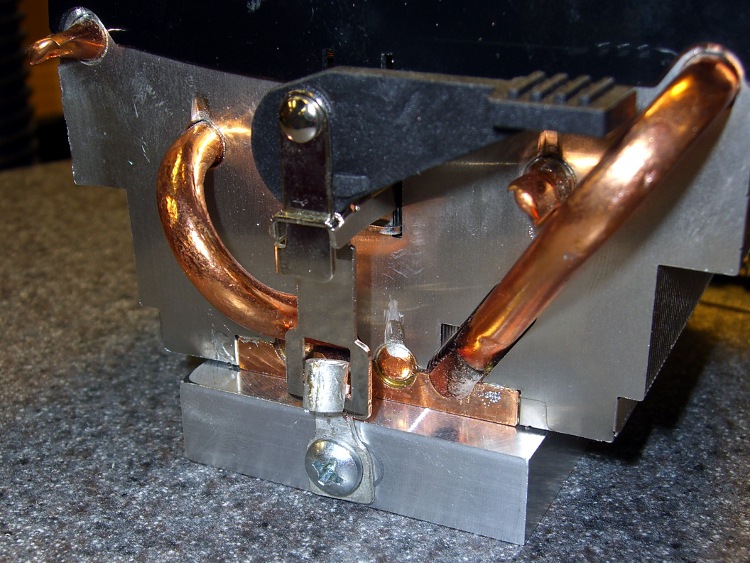
A bit of futzing converted a pair of solderless connectors into clips that capture the hooks on the ends of the heatsink’s springy wiffletree to secure the spreader to the heatsink. You can see the flycut surface peeking out from below the end of the heatsink. I should hit it with some fine abrasive to polish it out, but I think heatsink compound alone will do the trick.
Heat spreader on heatsink
The next step: drilling-and-tapping eight more blind holes along the sides for the FETs. It’d be really neat to have a servo spindle…
While walking home with the bike, I noticed that the odometer wasn’t matching up with reality. This generally means the front-wheel magnet sensor got whacked out of line and, given that I’d just laid the bike down on that side, that’s what I expected to fix.
As it turned out, the failure meant it was time for the more-or-less annual contact cleaning. The three tiny contact balls on the bottom of the Cateye Astrale tend to collect enough dirt over the course of a few thousand miles to become intermittent. The balls lead to the wheel and pedal sensors, with a single common wire.
Cateye Astrale contacts
You can see that they’re not shiny little factory-fresh bumps. Here’s a detail of the upper-right one on the base to the right. Even through the horrors of a tight crop from a hand-held shot, you can see the problem.
Cateye Astrale – contact detail
No big deal, just wipe ’em off and apply a bit of DeoxIT to make ’em happy again for another year.
So I bought an octet of Sanyo Eneloop NiMH cells from the usual Amazon source and ran a few charge / discharge tests, with the hope of powering my Sony DSC-H5 for more than a few dozen minutes at a time. It’s Marching Band season!
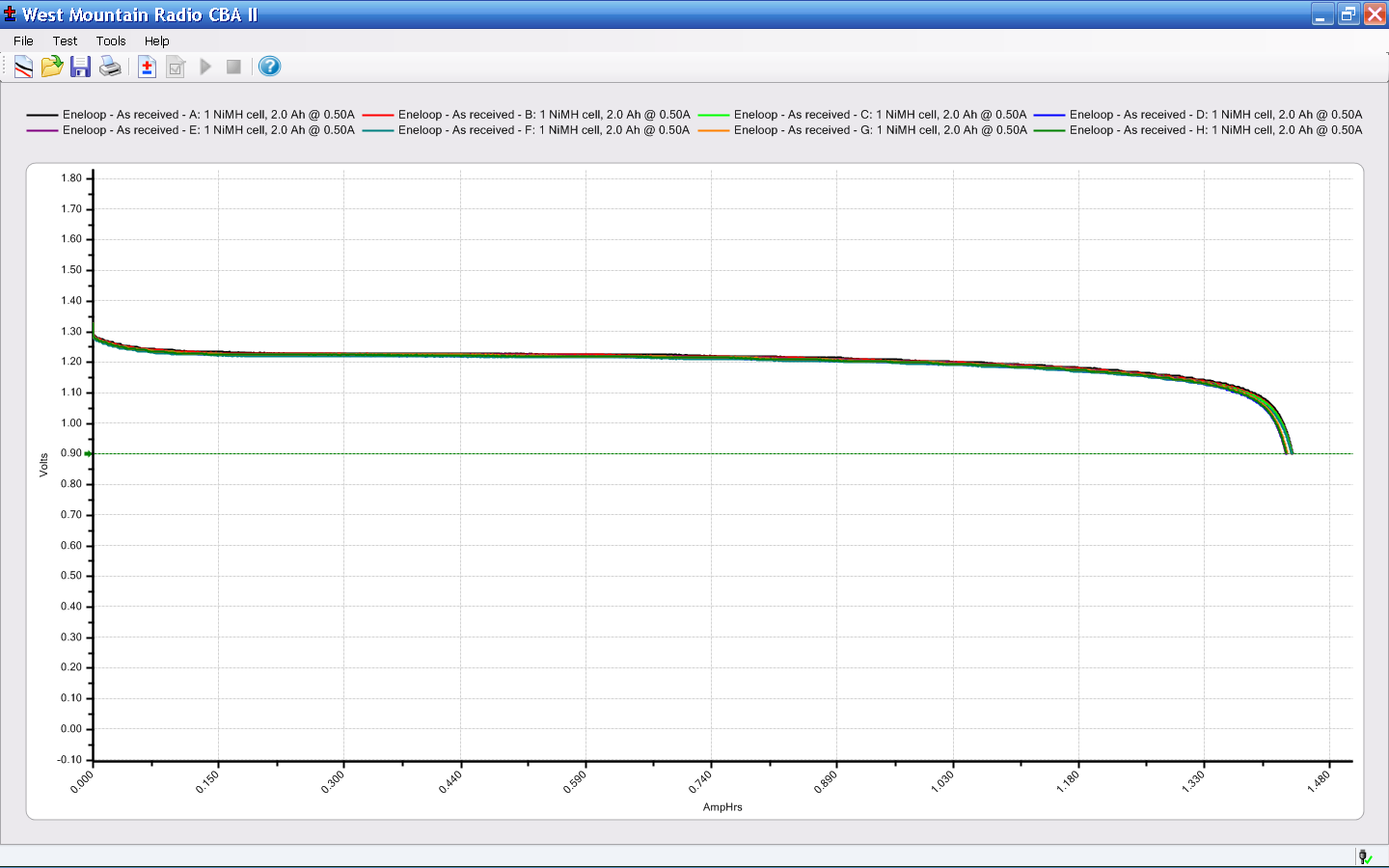
The cells bear a laser-etched 09-10-IF date code that I assume means October 2009, because they arrived in early September 2010. Rumor has it that Eneloop cells come off the manufacturing line factory-charged to 75% of their nominal 2.0 Ah; all eight arrived with the same charge: 1.43 Ah. Given the vagaries of measuring battery capacity, that’s 95% of what they started with, nearly a year ago.
The eight 500 mA constant current discharge curves are essentially identical:
Eneloop – As received
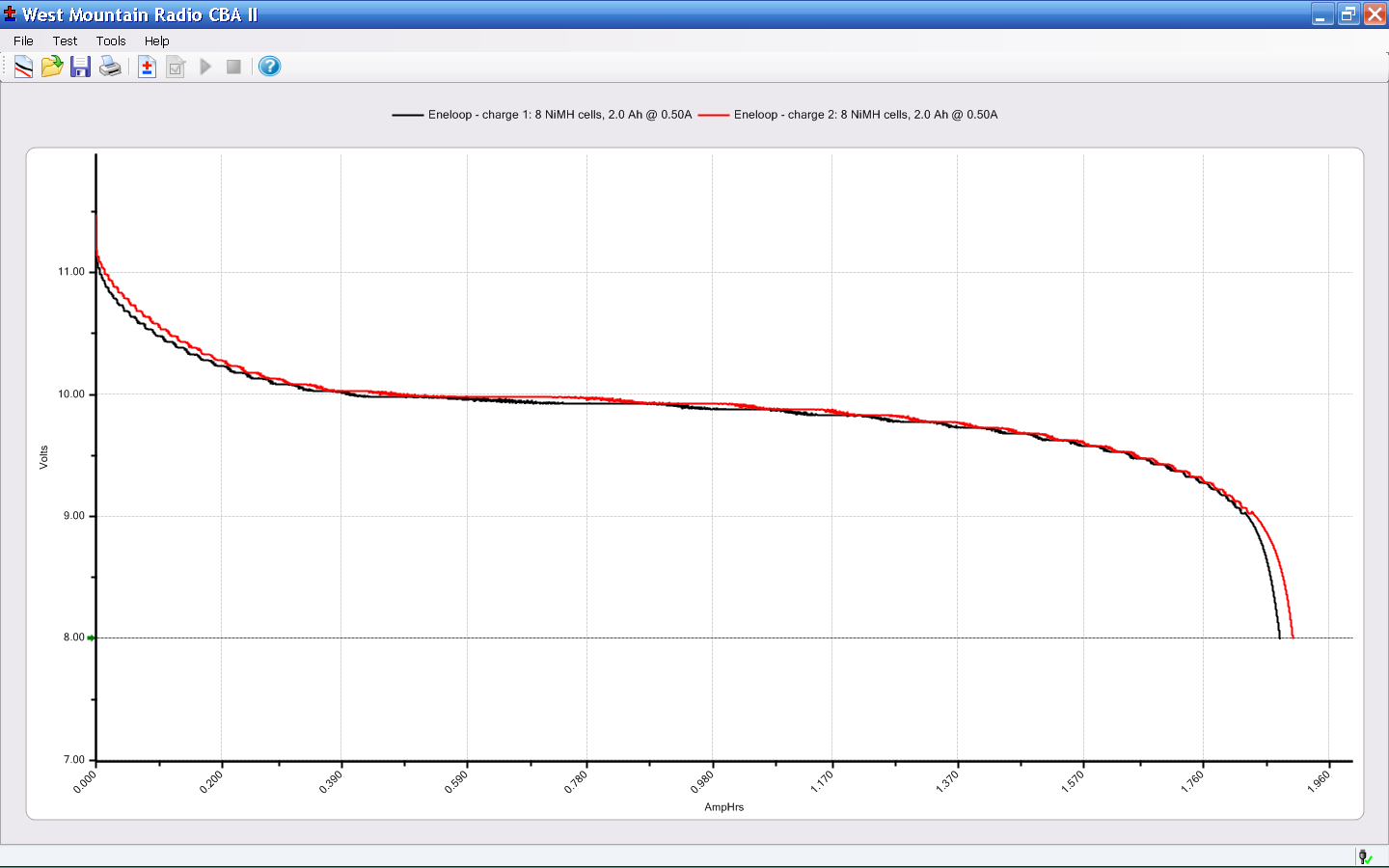
The first charge after that test was individual cells in a 400 mA charger, the second as a complete 8-cell pack with a 900 mA charger. Those two discharge curves for the pack, again at 500 mA, also overlay nicely:
Eneloop – 8-cell pack
The pack voltage remains above 9.6 V for about 1.5 Ah, far better than the tired assortment of cells in my collection (albeit those were measured at 1 A, not 500 mA).
These should get me through an entire day of Marching Band travel, setup, practice, and competition!
With transformer, circuitry, and firmware in hand, the final step is to get juice to the workpiece. Resistance soldering depends on passing a high current through a relatively low resistance: the power varies as the square of the current, so more current is much better.
The catch is that the transformer produces a relatively low voltage, so the initial circuit resistance must be exceedingly low. With 5 Vrms from the transformer secondary, a mere 0.5 Ω in the secondary circuit limits the maximum current to 10 A. Even with most of that in the joint, it’s not gonna work as you expect.
I scrounged some very flexible 6-conductor signal cable with several shields that, with everything conductive crimped-and-soldered together on both ends, worked out to 1 mΩ/foot. A pair of 7-foot leads with copper lugs swaged-and-soldered on each end, bolted together to the transformer secondary, produced 280 A at 4.1 V: a bit over a kilowatt. The secondary winding and lugs evidently contribute 4 mΩ of resistance to the total.
CAUTION – That much current makes the cables twitch in their own magnetic field. If you wear finger rings, bracelets, or metallic body jewelry, remove it. A metallic ring looks like a single shorted secondary winding that can couple magnetic flux from the cables and get surprisingly hot surprisingly quickly.
Don’t put the rings in your pocket, either. Your pants are not a good magnetic shield.
With that in mind, some electrodes:
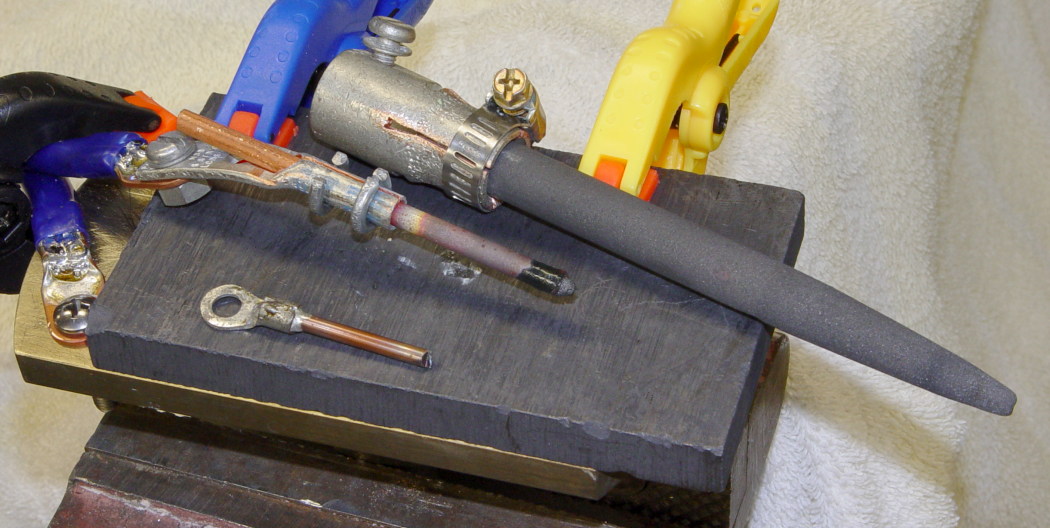
Electrodes
The black block is a slab of machinable graphite clamped to a brass plate that probably served as a wall bracket in a previous life. It serves as a nice base for most operations: conductive, non-sticky for solder, doesn’t produce nasty arc scorches. A cable from the secondary bolts firmly to the brass plate and the vast surface area provides a low-resistance contact. The cheesy plastic clamps work fine: the block doesn’t get too hot.
The huge electrode comes from a carbon-arc spotlight. It’s actually too long, with too much resistance, and doesn’t work well at all.
The tiny electrode is a steel welding rod (for gas welding). It works well for very small setups, but has essentially no resistance and requires low duty cycles.
The Goldilocks electrode in the middle is a length of 5/32-inch carbon gouging rod (for arc welding). It has a copper coating that tends to burn off near the tip, but the overall resistance remains low enough that the joint heats well. The middle glows yellow-hot if you overdo things, hence the discolored section.
To date, I’ve used a few inches off the end of one 12-inch rod. There are 49 more rods in the package. If you build one of these things and don’t want to pass a similar box along to your heirs, drop me a note and I’ll send you a rod.
The scrap box emitted a sturdy cardboard tube that slipped over the cable so well that I simply gave up thinking about making an actual handle with a contact switch and all that stuff.
Resistance soldering electrode handle
All the electrodes terminate in homebrew clamps made from copper lugs that bolt to the transformer’s secondary terminals with 10-32 machine screws. The gouging rod has steel rings (forged from husky wire) holding the lug closed around the rod; they’re a pain to (re)move, but ensure very solid contact. The cable termination is swaged-and-soldered.
AA Cell Clamping PliersCenter Electrode – Front Detail
I have not yet conjured up a pair of tweezers, as almost everything I’ve done has been suitable for pressing against the carbon plate.
One exception: a pair of snap-ring pliers became a clamp for AA cell positive terminals and worked well in that capacity, along with a repurposed oil burner tungsten electrode that even provided its own ceramic handle.
If I ever get around to building tweezers, I’d probably use chunks of that tungsten rod. It’d be easy to put a contact switch in there, too.
Right after I got it working, I grabbed some copper junk and tried it out:
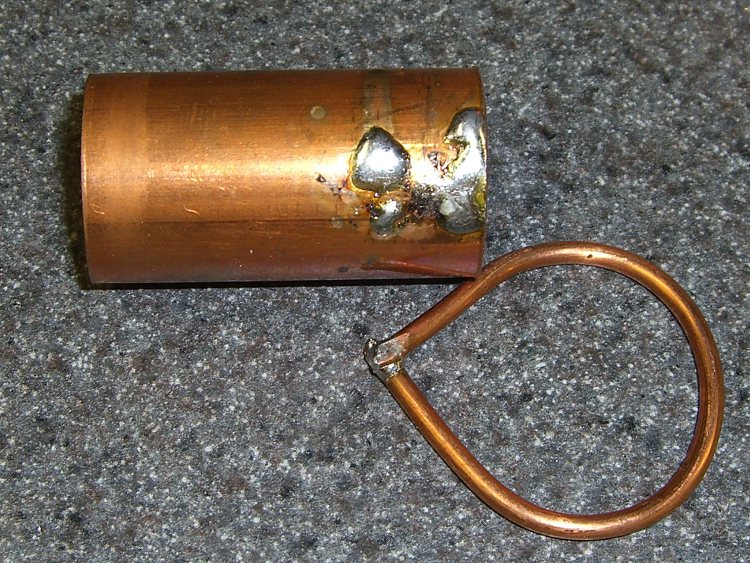
Resistance soldering test pieces
Notice that there’s not enough heat in the surrounding metal to discolor it. I’m not always that lucky good, but it’s possible.
The copper wire was instructive: even though copper is a great conductor, the joint is the lowest-resistance part of the circuit and gets all the heat. If you think of it as a parallel circuit, the ring has a relatively high resistance and sees much less current.
Cleanliness and good joint preparation are vital, because any nontrivial resistance will reduce the heat to zilch. The tip of the carbon electrode sometimes acquires an insulating flux coating; a swipe on a file solves that problem
Solder foil works well, because the current passes through the solder and starts the melting process in the middle of the joint. That’s easier than fiddling with solder wire, although your mileage may vary depending on what the joint looks like.
It’s a great tool; I wonder how I got along without it.
Now, I really must put that widowmaker breadboard inside an enclosure. There’s a dead dehumidifier near the bench (slated to contribute its compressor as a vacuum pump for a hold-down chuck on the mill) with a case that just might be the right size…










 The Smell of Molten Projects in the Morning