The Smell of Molten Projects in the Morning

Ed Nisley's Blog: Shop notes, electronics, firmware, machinery, 3D printing, laser cuttery, and curiosities. Contents: 100% human thinking, 0% AI slop.

Category: Electronics Workbench

Electrical & Electronic gadgets

  • Thing-O-Matic / MK5 Extruder: Resistor Wrapup

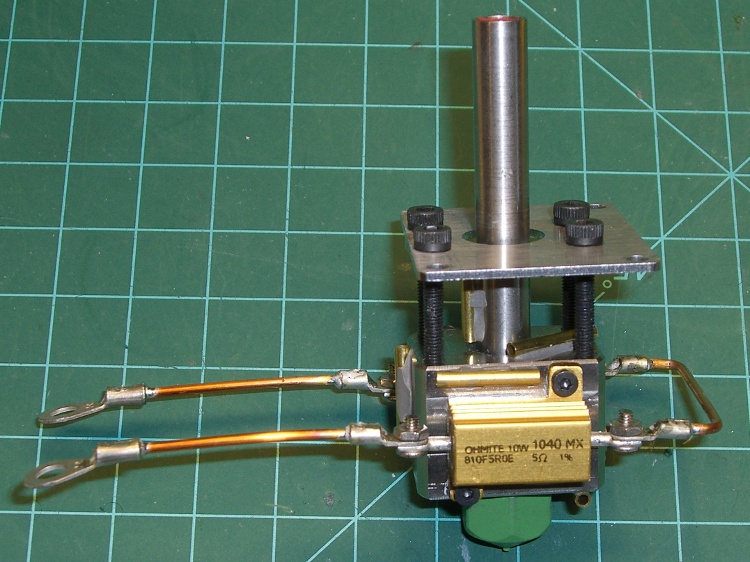
    Extruder resistor wiring
    Extruder resistor wiring

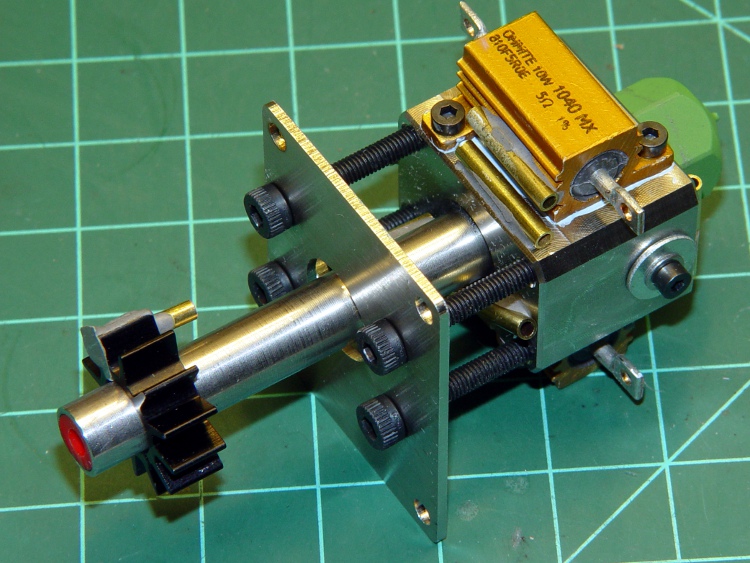
    As nearly as I can tell, using a pair of 10 W power resistors as 30 W heating elements in the Thing-O-Matic’s MK5 Extruder Thermal Core isn’t going to work, at least if you want even minimal reliability.

    The fundamental problem is that the resistor specification limits the dissipation to a few watts, tops, near 250 °C, where they must run in order to melt any of the plastic filaments.

    The Thermal Core requires 20-30 W to maintain 225 °C, so each resistor must dissipate an average of 10-15 W at that temperature. That’s half of the MK5 extruder’s original design point and still nearly a factor of 10 beyond the resistor rating.

    The original design runs at less than 50% duty cycle to maintain 225 °C, which agrees with my measurements:

    • 50% of 60 W = 30 W
    • 33% of 60 W = 20 W

    If you want to run at lower power, it’s a drop-in replacement. Change the original 5 Ω resistors to 2.5 Ω resistors (from Digikey / Mouser / wherever), change the wiring to put them in series (not parallel!), and see how long they last. They’ll certainly fare better than at 30 W, but I wouldn’t expect more than a few hours of lifetime. The specs give them 1000 hours at rated power, which this certainly is not.

    A series connection means that when one resistor fails, the heat goes off. The original parallel connection left one resistor carrying the load and, at 30 W, it can actually get the Core up to operating temperature and keep it there. Many folks have been baffled by that, but the diagnosis is simple. Measure the resistance of the parallel resistors at the Extruder Controller end of the wires:

    • 5 Ω → one resistor has failed
    • An open circuit (infinite resistance) → both are dead

    The problem with the lower power dissipation, whether from a failed resistor in the original design or my suggested change, is that the extruder head has a thermal time constant of 10-11 minutes. Lower power means a longer cold-start time; 30 W should get it up to 225 °C in about 20-30 minutes depending on the insulation. That’s not really a problem if you’re printing a series of objects, but might be objectionable for quick printing sessions.

    However, when a resistor fails, the heat goes off, the plastic stiffens up, the DC extruder motor stalls, and the essentially unlimited motor current kills the A3977 driver on the extruder board. My incandescent lamp workaround may alleviate that problem: when the light goes on, check for a failed resistor.

    I picked up a stock of 2-to-3 Ω power resistors and will do some further experimenting with power levels, insulation, and suchlike. This is a short-term fix to get my Thing-O-Matic running, but there’s a better long-term way to go: cartridge heaters on a modified Thermal Core, which I’ll discuss shortly.

    If you arrived by search engine, jump there for my earliest guesstimates, go there to the beginning of the Thing-O-Matic hardware hackage posts, then read until you get back here. The story will, perforce, continue…
  • Thing-O-Matic / MK5 Extruder: Thermal Core Time Constant

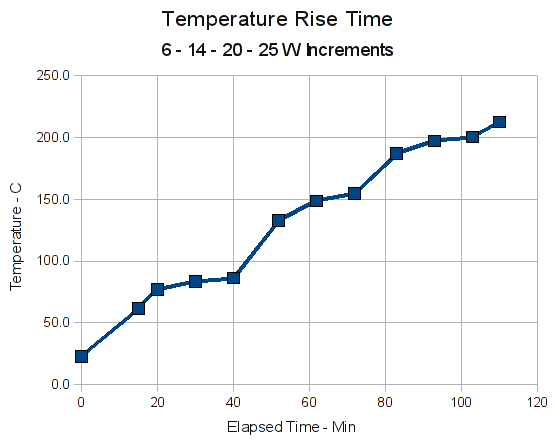
    The Thermal Core’s time constant falls neatly out of the high power measurements when they’re plotted against time:

    Thermal Core Rise Time
    Thermal Core Rise Time

    Rule of thumb:

    • Three time constants get you to 95% of the final value.

    The two plateaus for the 6 W and 14 W power inputs give enough information to pull out the time constant. They’re pretty much flat after 30 minutes (which is why I turned up the power then!), so the time constant is on the order of 10 minutes.

    Remember that the time constant doesn’t depend on the heater power. Higher power means the Core would stabilize at a higher temperature, but the overall curve would have the same time constant. What you’d see, though, is a faster rise to a given temperature, at which point the controller turns off the power to maintain the Core at that temperature.

    Thermal Core time constant data
    Thermal Core time constant data

    In round numbers, a first-order exponential rises to 10% (really 9%) of its final value in the first 0.1 time constant. In this case, guesstimate a 10-minute time constant, apply power, measure the temperature rise after a minute, and the final temperature should be ten times that value above ambient. Various nonlinearities get in the way, but that’ll get you close to the right answer.

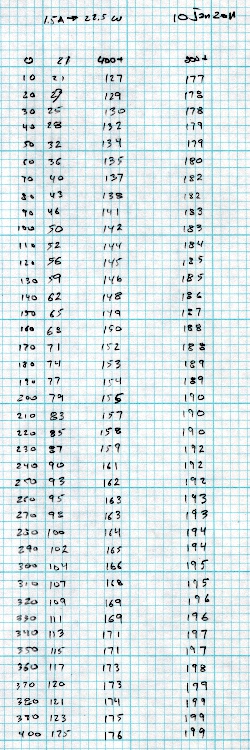
    Just for the amusement value, I applied 22.5 W to the extruder and recorded the temperature every 10 seconds for the first 1200 seconds. I’m not going to graph it, but the salient points are:

    • 21 °C — Ambient temperature
    • 199 °C — Final temperature (four consecutive dupes)

    So the final temperature rise is 178 °C above the 21 °C ambient. Multiply by 0.09 = 16 °C, so when the temperature passes 37 °C = (21 + 16) it’s 0.1 time constants from the start.

    Squint into that table and you’ll find the temperature is 36 °C at 60 seconds and 40 °C at 70 seconds, so the time constant is pretty nearly 625 seconds… call it 10.5 minutes, which I’d say is pretty close to my original eyeballometric guesstimate from that crappy graph up at the top.

    Dang, I love it when the numbers work out!

    You could do it in your head: 10% is 17.8, truncate to 17, add 21, get 38, interpolate 65 seconds. That’s just shy of 11 minutes, still close enough for what we’re doing.

    Now, the tradeoff is that you have a ten-minute delay before your MK5 Extruder can begin squeezing out parts. That may not be a big deal if you’re looking at an hour of extrusion for each part and, after the head is up to operating temperature, it just keeps on running.

    Adding more power increases the final equilibrium temperature and increases the initial temperature rise, so the head gets up to operating temperature faster. More power adds more stress to the resistors and shortens their life, which is nasty, brutish, and short even at the power levels I’m using.

    You can run the numbers the other way. Measure the temperature rise at 0.09 time constant, multiply by 10, and you’ve got the final temperature rise. If you’re running 60 W into those heaters, a firmware lockup or thermistor failure that leaves the heaters jammed on will stabilize at maybe 350 °C over ambient. Nope, the resistors aren’t going to survive that experience…

  • Thing-O-Matic / MK5 Extruder: Thermocouple Recalibration

    The data from the high-temperature experiment suggested that I’d been unjustly maligning the thermocouple in the MK5 Extruder head.

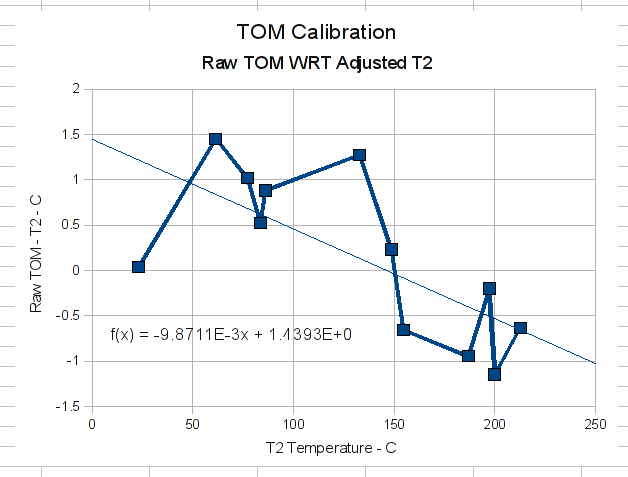
    This graph compares the raw MK5 thermocouple temperature against the adjusted reading from the Fluke 52 T2 thermocouple.


    MK5 Thermocouple Variation
    MK5 Thermocouple Variation


    The regression line says the slope matches to within 0.01 °C and the offset is less than half a degree. While the line is a bit bumpy, that has more to do with the hasty data-taking than anything else: the points corresponding to the last reading at each power level are very close to the line.

    Given that the adjustments to the T2 readings make them match the average of five thermocouples, not including the MK5 unit, I’d say the MK5 is spot on.

    This doesn’t affect any of the conclusions I’ve come to over the last few days; I always put the MK5 thermocouple bead in a non-critical location.

    Based on the earlier measurements, the Thermal Core seems like a reasonably isothermal setup. That means the reading displayed in the ReplicatorG control panel accurately reflects the Core temperature.

  • Thing-O-Matic / MK5 Extruder: Power Up!

    Based on the thermal coefficients found there, it looks like the MK5 Extruder head can reach operating temperature with only 15-ish watts of power, rather than the usual 60 W. While a factor-of-four more power certainly reduces the delay from power-on to building parts, the stress it puts on the resistors causes early failures.

    What I’m trying to find here is the minimum power required to heat the head to 225 °C, in order to guide some future tweaks. The resistors will be operating outside their specification at anything more than 1 W each, but reducing the maximum power dissipation can’t possibly be a Bad Thing.

    With that in mind, I wrapped the ceramic cloth insulation around the Thermal Core. Because the Core-to-ambient thermal coefficient was 12 °C/W without insulation and 16 °C/W with cotton cloth insulation, I didn’t do a thorough job of taping the gaps. Any insulation is better than none, but I knew I was going to dismantle the poor thing several times over the next few days.

    Insulated MK5 head in place
    Insulated MK5 head in place

    The MK5 thermocouple is now in its intended position, clamped under the washer at the rear of the Thermal Core. I added a pocket of Kapton tape to electrically insulate it from the Core to prevent a resistor failure from shorting +12 V to the MAX6675 thermocouple interface chip, but that didn’t actually work: the bead punched through the tape. I think a small epoxy blob is in order.

    I used just the Fluke 52 dual-thermocouple meter, in addition to the MK5 thermocouple:

    Name Meter Location
    TOM MK5 t-couple Standard location, Kapton wrap
    T1 Fluke 52 Resistor
    T2 Fluke 52 Core edge adjacent to resistor
    CA Craftsman A not used
    CB Craftsman B not used
    MPJA MPJA meter not used

    For the previous test, I read the temperature as the head warmed up at a specific power level. In this test, I picked the power level, read the temperatures until they sort of stabilized, then increased the power. As a result, the numbers aren’t quite comparable to what you’ve seen before: the head is not at a stable temperature.

    The adjusted temperature readings, taken every 10 minutes:

    Power TOM T1 T2 Time Current
    0 22.6 22.5 23.0 0 0.00
    6 64.8 65.1 61.5 15 0.77
    6 80.6 80.7 77.0 20 0.77
    6 86.9 87.1 83.5 30 0.77
    6 90.0 89.8 86.1 40 0.77
    14 139.6 139.5 132.7 52 1.18
    14 155.4 155.5 148.8 62 1.18
    14 160.6 161.2 154.7 72 1.18
    20 194.3 195.2 186.9 83 1.41
    20 205.9 205.4 197.2 93 1.41
    20 208.0 208.2 200.1 103 1.41
    25 221.7 222.2 212.6 110 1.58

    The Core was still heating with 25 W applied, but I couldn’t resist sticking an ABS filament into the Extruder, at which point my data-taking went downhill. Suffice it to say that 25 W heats the core well beyond 225 °C; I found a power level of 22 W (a current of 1.5 A) maintained the Core temperature at 225 °C.

    One thing popped right out: the adjusted values for the MK5 thermocouple seem completely out of line, which isn’t surprising given what I saw in the isothermal block during calibration. I’ll have more to say about that in a bit, but the calculations you’ll see here use the raw MK5 thermocouple reading.

    The last two lines show that the MK5 head, even with my crappy insulation job, can reach operating temperature with a total power under 25 W. That’s far less than the 58 W; it looks like running at about half power will be feasible.

    The temperature differences:

    Power R – Edge Edge – TOM R – Ambient Edge – Amb TOM – Amb
    0 -0.4 0.0 0.0 0.0 0.0
    6 3.5 -1.5 42.6 38.6 40.0
    6 3.7 -1.0 58.1 54.0 55.0
    6 3.7 -0.5 64.6 60.5 61.0
    6 3.6 -0.9 67.2 63.2 64.0
    14 6.8 -1.3 117.0 109.8 111.0
    14 6.7 -0.2 133.0 125.8 126.0
    14 6.5 0.7 138.6 131.7 131.0
    20 8.3 0.9 172.7 164.0 163.0
    20 8.2 0.2 182.9 174.2 174.0
    20 8.0 1.1 185.7 177.2 176.0
    25 9.6 0.6 199.7 189.7 189.0

    And, from those, the thermal coefficients for the boldified lines (which are as stable as you’re going to get for this dataset):

    R – Edge Edge – TOM R – Ambient Edge – Amb TOM – Amb
    6 W 0.6 -0.1 11.2 10.5 10.7
    14 W 0.5 0.0 9.9 9.4 9.4
    20 W 0.4 0.1 9.3 8.9 8.8
    25 W 0.4 0.0 8.0 7.6 7.6

    You can’t compare the Resistor-to-Edge coefficient to the previous numbers, as the Core is getting heated from both resistors. Indeed, I think that column is totally bogus; using half the power gives a number comparable to the previous measurements, but I’m not certain that’s valid.

    The rate of heat loss increases with higher temperatures: the Core-to-Ambient thermal coefficient is half of its previous value. The crappy insulation wrapper contributes to that, but the decline tracks the temperature for both types of insulation.

    In round numbers:

    • Heating the core to 225 °C requires maybe 25 W
    • The resistors run 10 °C higher, with thermal grease
    • This operation really stinks up your Living Room
  • Thing-O-Matic / MK5 Extruder: DC Motor Safety Lamp

    The DC motor used on the MK5 Extruder head seems unusually prone to sudden death, either by mechanical failure or something electrical. A stalled or shorted DC motor becomes a low resistance that destroys the A3977 H-bridge driver chip on the Extruder Controller board.

    Makerbot recommends inserting a 10 Ω power resistor in series with the motor, so as to limit the maximum current. Other folks have build a diode decoded relay driver that’s certainly more durable than the A3977.

    Downsides:

    The power resistor reduces the voltage available to the motor, which draw something like 40 mA when unloaded and up to maybe 250 mA at full load. I don’t know what load the extruder puts on it, but at 100 mA the resistor drops 1 V, which seems excessive.

    The relays seem like a nice solution, but they go clickety-clack and require actually building something, of which I’ve had quite enough lately, thank you very much.

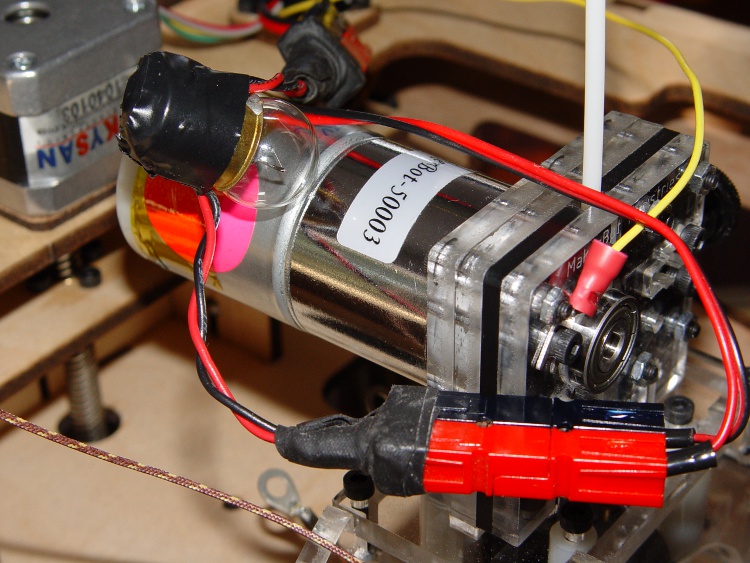
    While I was mooching those lugs, my buddy Eks suggested simply putting a low-wattage 12 V incandescent lamp in series with the motor. The cold filament has a very low resistance, but limits the current when if the motor shorts out.

    Extruder motor with series #89 bulb
    Extruder motor with series #89 bulb

    A bit of rummaging in the Lamp Box produced an old automotive #89 lamp that allows 560 mA into a dead short, which works out to 7 W.

    If the motor draws 100 mA, it drop only 100 mV: good enough!

    Not finding a suitable socket in the heap, I wired it in by soldering the wires directly to the brass shell and central solder tip and taping up the mess. Next time I get near the local AutoZone I’ll pick up a socket.

    The Anderson Powerpoles may look like overkill, but they make life a lot easier when you’re fiddling with the machinery all the time.

    Now, the lamp won’t prevent inductive transients from blowing away those puny signal-level Zener diodes that should protect the A3977 chip, but it’s exactly what you need for long-term overload prevention.

    [Update: An experiment that shows why a lamp works better than a fuse.]

    As an added benefit, when the bulb lights up you know the Extruder Motor has died!

  • Thing-O-Matic / MK5 Extruder: Resistor Connections

    Having collected useful thermal numbers at low power levels, it’s time to fire that mother up and see what happens at temperatures around 200 °C. That, however, requires powering both resistors, rather than attacking one with clip leads as I’ve been doing. Given that I expect to change the resistors several times in the course of this adventure, soldering to the lugs seemed like a lot of effort.

    I mooched some solderless lugs suited for 2-56 screw terminals from Eks, pulled off the plastic insulating sleeves, lightly crimped them on 14 AWG solid copper wire, and silver-soldered the joints. The crimp handles most of the current, while the solder keeps the interior from accumulating oxidation products at high temperatures: a gas-tight joint is a happy joint.

    Crimped and soldered lug
    Crimped and soldered lug

    The resistor leads have holes just slightly too small for 2-56 screws, but a pass with a #41 drill does the deed; I think it’s an accumulation of solder rather than an under-sized hole.

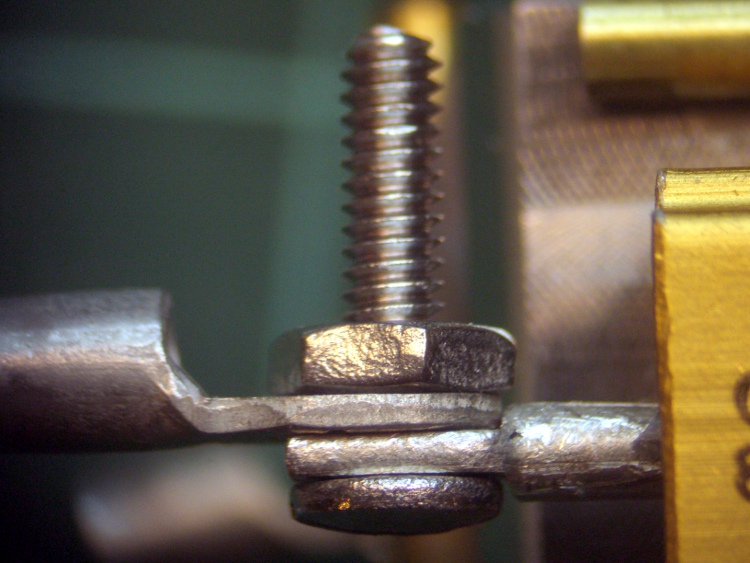
    The leads are stamped to shape and two of them didn’t have quite enough room for the lug. You don’t want the joint to look like this:

    Misaligned lug
    Misaligned lug

    The briefest touch of a riffler file made them right, so as to look like this:

    Properly aligned lug
    Properly aligned lug

    Then it was ready for insulation:

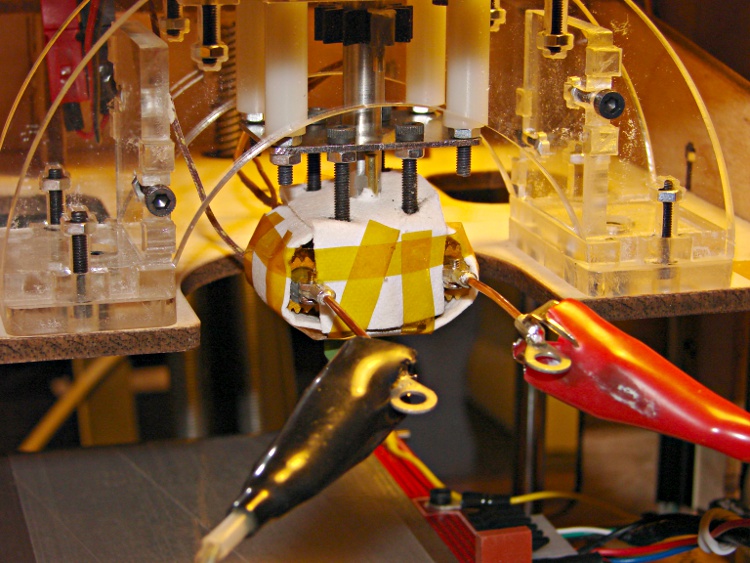
    Extruder Head with lugs
    Extruder Head with lugs

    Note that the resistors are in series, not parallel (as per the Makerbot instructions), because I want a resistor failure to produce an unambiguous symptom: no heat. In addition, I expect to operate the heaters at much lower power, making higher resistances easier to drive from the +12 V.

    In truth, those screw-and-nut connections aren’t the most durable or reliable joints, particularly without lockwashers under the nuts to soak up the differential thermal expansion. But they’re good enough for what’s coming next.

  • Thing-O-Matic / MK5 Extruder: Thermal Compound

    This test determines the effect of thermal compound between the resistor and the Thermal Core on the MK5 Extruder head. The setup is essentially the same as before, with cotton fabric insulation wrapped around the Core.

    I applied a thin layer of Thermalloy Thermalcote II from a small bottle that I’ve had since the days when you could actually use trichloroethylene as a solvent. It’s rated to 200 °C, so it won’t last long at full throttle, but it’s not nearly as permanent as epoxy.

    That’s the thin blue line around the base of the resistor. You can actually have too much of the stuff, so I applied this by rubbing a dab from a scrap of paper onto the resistor’s base and squooshing it in place.

    Resistor with thermal compound
    Resistor with thermal compound

    The instrumentation is the same as the last time around:

    Name Meter Location
    TOM MK5 t-couple Top of core
    T1 Fluke 52 Resistor
    T2 Fluke 52 Core edge adjacent to resistor
    CA Craftsman A Bottom of core
    CB Craftsman B not used
    MPJA MPJA meter not used

    After once again wrapping the core up in cotton cloth, I skipped directly to the higher power levels and sampled the data at 20-minute intervals.

    The adjusted temperature readings:

    Power TOM T1 T2 CA Time Current
    0 22.6 21.5 22.8 22.8 926 0.00
    4 69.0 73.1 70.0 66.1 946 0.89
    4 84.8 87.7 84.6 80.5 1006 0.89
    4 90.0 92.6 89.5 85.5 1026 0.89
    4 91.1 93.8 90.8 86.6 1046 0.89
    6 114.3 119.0 114.3 108.2 1108 1.10
    6 120.6 125.0 120.3 114.4 1128 1.10
    6 122.7 126.7 122.2 116.0 1148 1.10

    Notice that the T2 reading on the block starts out a bit higher than the T1 reading on the resistor; I didn’t wait quite long enough for the heat of my hands to settle out inside that insulating blanket.

    The corresponding temperature differences:

    Power R – Edge Top – Bot Edge – Top Edge – Bot R – Amb Edge – Amb
    0 -1.3 -0.1 0.1 0.0 0.0 0.0
    4 3.1 2.9 1.0 3.9 51.6 47.2
    4 3.1 4.3 -0.2 4.1 66.2 61.8
    4 3.1 4.6 -0.6 4.0 71.1 66.7
    4 3.0 4.5 -0.3 4.2 72.3 68.0
    6 4.6 6.0 0.1 6.1 97.5 91.6
    6 4.6 6.2 -0.3 6.0 103.4 97.6
    6 4.5 6.7 -0.5 6.1 105.2 99.4

    And now for the long-awaited and much anticipated thermal coefficients of the insulated and greased Thermal Core:

    R – Edge Top – Bot Edge – Top Edge – Bot R – Amb Edge – Amb
    4 W 0.8 1.1 -0.1 1.0 18.1 17.0
    6W 0.8 1.1 -0.1 1.0 17.5 16.6

    The grease reduces the thermal coefficient by about 20%, although I admit the numbers going into that calculation are getting pretty close to the limits of my instrumentation. Assuming the value remains the same at 30 W, the resistors will rise about 24 °C above the Thermal Core temperature to 250 °C, their maximum rated temperature. At that temperature, remember, their maximum rated dissipation is 10% of their 25 °C value: a whopping 1 W.

    The R – Ambient and Edge – Ambient coefficients show that the insulation has about the same effect as before, which is comforting.

    Now, to mull all this over for a bit…