Ed Nisley's Blog: Shop notes, electronics, firmware, machinery, 3D printing, laser cuttery, and curiosities. Contents: 100% human thinking, 0% AI slop.
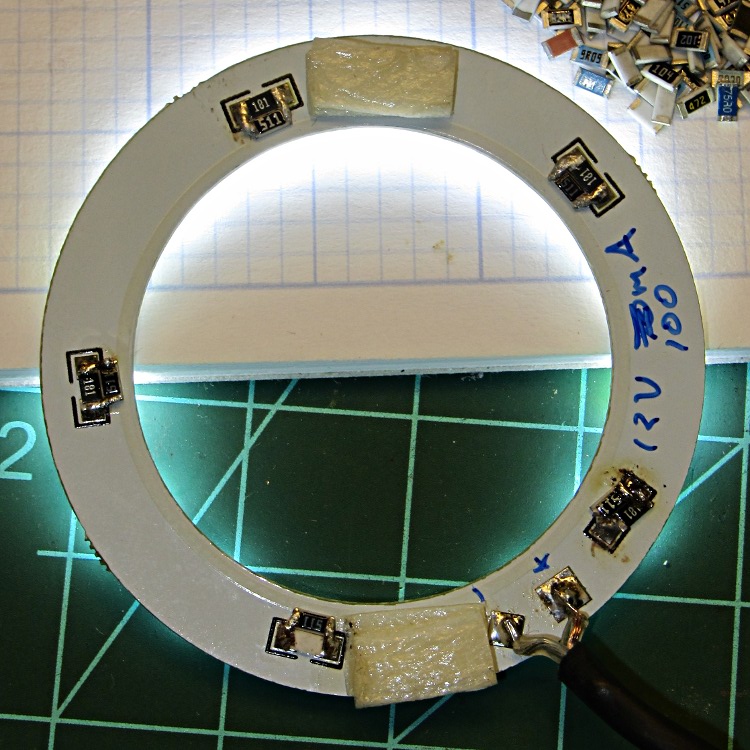
Paralleling a 510 Ω resistor with each of the 180 Ω resistors on the LED ring light around the macro lens holder boosted the LED string current from 15 to 20 mA:
LED ring light – paralleled resistors
The complete botch job in the lower right is what you get when you don’t wipe the soldering iron tip first.
LED brightness being pretty nearly linearly proportional to current, the exposure gets another 0.4 EV that probably doesn’t matter in the least.
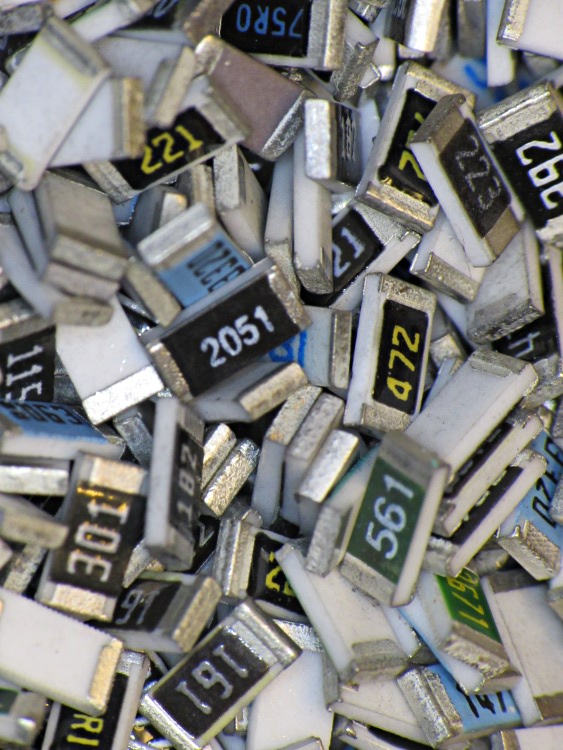
A hand-held picture of the pile of SMD resistors (which willingly produced four of the five resistors and required enhanced interrogation to extract the last one):
SX230HS – macro lens – 15 x 20 mA ring light
That’s pretty much overhead at f/8, so the depth of field is as good as it gets.
It always feels good when the parts fit together, even if they don’t actually do anything yet…
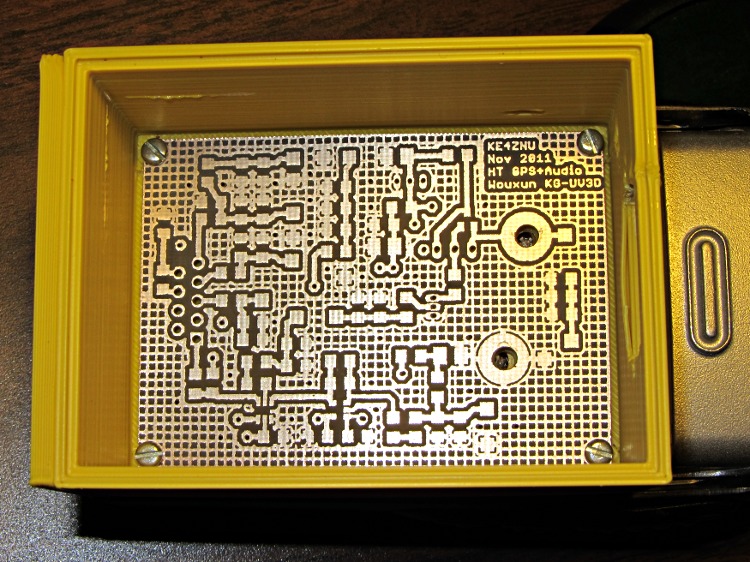
Bare PCB in Wouxun HT battery case
That’s the bare PCB in the first-pass 3D-printed battery case adapter, both of which need quite a bit more work. In particular, the case desperately needs some sort of latch to hold the yet-to-be-built contacts against the HT’s battery terminals.
Amazingly, all the holes lined up spot on, although I think the lower battery contact could move half a millimeter closer to the base of the radio. The battery case contacts are large enough to work as-is and, for what it’s worth, the Wouxun battery cases seem to differ slightly among themselves, too.
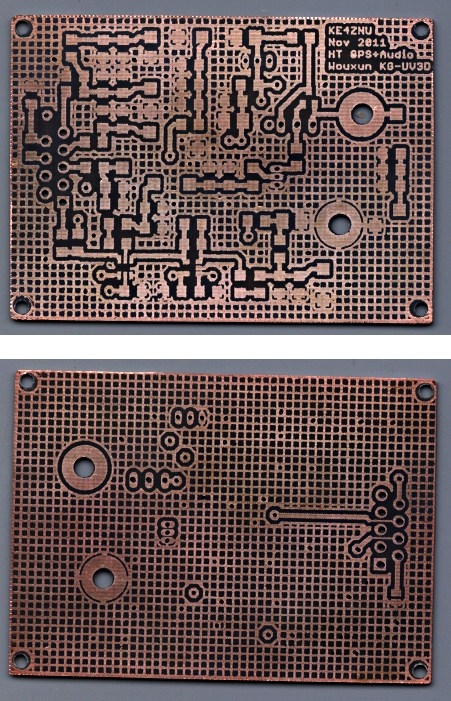
The circuit has provision for pairs of SMD caps on all the inputs, with which I hope to squash RFI from both the VHF and UHF amateur bands by choosing their self-resonant frequencies appropriately.
Edit: You may prefer my Kicad-to-HAL converter, which produces HAL files from carefully crafted Kicad schematics.
Herewith, the script that you’ll apply to schematics built with parts from the hal-config-2.4.lbr.odt library (which you must rename to get ride of the ODT extension):
/******************************************************************************
* HAL-Configurator
*
* Author: Martin Schoeneck 2008
* Additional gates and tweaks: Ed Nisley KE4ZNU 2010
*****************************************************************************/
#usage "<h1>HAL-Configurator</h1>Start from a Schematic where symbols from hal-config.lbr are used!";

string output_path =    "./";
string dev_loadrt =     "LOADRT";
string dev_loadusr =    "LOADUSR";
string dev_thread =     "THREAD";
string dev_parameter =  "PARAMETER";

string dev_names[] = {
"CONSTANT",								// must be first entry to make set_constants() work
"ABS",				// 2.4
"AND2",
"BLEND",			// 2.4
"CHARGE-PUMP",		// 2.4
"COMP",
"CONV_S32_FLOAT",	// 2.4
"DDT",				// 2.4
"DEADZONE",			// 2.4
"DEBOUNCE",			// 2.4
"EDGE",
"ENCODER",			// 2.4
"ENCODER-RATIO",	// 2.4
"ESTOP-LATCH",
"FLIPFLOP",
"FREQGEN",			// 2.4
"LOWPASS",
"MULT2",			// 2.4
"MUX2",
"MUX4",				// 2.4
"MUX8",				// 2.4
"NEAR",				// 2.4
"NOT",
"ONESHOT",
"OR2",
"SAMPLER",			// 2.4
"SCALE",			// 2.4
"SELECT8",			// 2.4
"SUM2",
"TIMEDELAY",		// 2.4
"TOGGLE",			// 2.4
"WCOMP",			// 2.4
"XOR2",				// 2.4
""					// end flag
};

/*******************************************************************************
* Global Stuff
******************************************************************************/

string FileName;
string ProjectPath;
string ProjectName;

void Info(string Message) {
dlgMessageBox(";<b>Info</b><p>\n" + Message);
}

void Warn(string Message) {
dlgMessageBox("!<b>Warning</b><p>\n" + Message + "<p>see usage");
}

void Error(string Message) {
dlgMessageBox(":<hr><b>Error</b><p>\n" + Message + "<p>see usage");
exit(1);
}

string replace(string str, char a, char b) {
// in string str replace a with b
int pos = -1;
do {
// find that character
pos = strchr(str, a);
// replace if found
if(pos >= 0) {
str[pos] = b;
}
} while(pos >= 0);

return str;
}

// the part name contains an index and is written in capital letters
string get_module_name(UL_PART P) {
// check module name, syntax: INDEX:NAME
string mod_name = strlwr(P.name);
// split string at the : if exists
string a[];
int c = strsplit(a, mod_name, ':');
mod_name = a[c-1];
// if name starts with '[' we need uppercase letters
if(mod_name[0] == '[') {
mod_name = strupr(mod_name);
}

return mod_name;
}

string comment(string mess) {
string str = "\n\n####################################################\n";
if(mess != "") {
str += "# " + mess + "\n";
}

return str;
}

// if this is a device for loading a module, load it (usr/rt)
string load_module(UL_PART P) {
string str = "";

// it's a module if the device's name starts with LOADRT/LOADUSR
if((strstr(P.device.name, dev_loadrt) == 0) ||
(strstr(P.device.name, dev_loadusr) == 0)) {

// now add the string to our script
str += P.value + "\n";
}

return str;
}

// count used digital gates (and, or, etc) and load module if neccessary
string load_blocks() {
string str = "";

int index;

int dev_counters[];
string dname[];

// count the gates that are used
schematic(S) { S.parts(P) {
strsplit(dname,P.device.name,'.');		// extract first part of name
if ("" != lookup(dev_names,dname[0],0)) {
for (index = 0;  (dname[0] != dev_names[index]) ; index++) {
continue;
}
dev_counters[index]++;
}
} }

// force lowercase module names...

for (index = 0; ("" != dev_names[index]) ; index++) {
if (dev_counters[index]) {
sprintf(str,"%sloadrt %s\t\tcount=%d\n",str,strlwr(dev_names[index]),dev_counters[index]);
}
}

return str;
}

string hook_function(UL_NET N) {
string str = "";

// is this net connected to a thread (work as functions here)?
int    noclkpins       = 0;
string thread_name     = "";  // this net should be connected to a thread
string thread_position = "";
N.pinrefs(PR) {
// this net is connected to a clk-pin
if(PR.pin.function == PIN_FUNCTION_FLAG_CLK) {
// check the part: is it a thread-device?
if(strstr(PR.part.device.name, dev_thread) == 0) {
// we need the name of the thread
thread_name = strlwr(PR.part.name);
// and we need the position (position _ is ignored)
thread_position = strlwr(PR.pin.name);
thread_position = replace(thread_position, '_', ' ');
}
} else {
// no clk-pin, this is no function-net
noclkpins++;
break;
}
}

// found a thread?
if(noclkpins == 0 && thread_name != "") {
// all the other pins are interesting now
N.pinrefs(PR) {
// this pin does not belong to the thread
if(strstr(PR.part.device.name, dev_thread) != 0) {
// name of the pin is name of the function
//string function_name = strlwr(PR.pin.name);
string function_name = strlwr(PR.instance.gate.name);
// if functionname starts with a '.', it will be appended to the modulename
if(function_name[0] == '.') {
// if the name is only a point, it will be ignored
if(strlen(function_name) == 1) {
function_name = "";
}
function_name = get_module_name(PR.part) + function_name;
}
str += "addf " + function_name + "\t\t" + thread_name + "\t" + thread_position + "\n";
}
}
}

return str;
}

string set_parameter(UL_NET N) {
string str = "";

// is this net connected to a parameter-device?
int    nodotpins       = 0;
string parameter_value = "";
N.pinrefs(PR) {
// this net is connected to a dot-pin
if(PR.pin.function == PIN_FUNCTION_FLAG_DOT) {
// check the part: is it a parameter-device?
//			str += "** dev name [" + PR.part.device.name + "] [" + dev_parameter + "]\n";
if(strstr(PR.part.device.name, dev_parameter) == 0) {
// we need the value of that parameter
parameter_value = PR.part.value;
//				str += "**  value [" + PR.part.value +"]\n";
}
} else {
// no clk-pin, this is no function-net
nodotpins++;
break;
}
}

// found a parameter?
if(nodotpins == 0 && parameter_value != "") {
// all the other pins are interesting now
N.pinrefs(PR) {
//			str += "** dev name [" + PR.part.device.name + "] [" + dev_parameter + "]\n";
// this pin does not belong to the parameter-device
if(strstr(PR.part.device.name, dev_parameter) != 0) {
// name of the pin is name of the function
//string parameter_name = strlwr(PR.pin.name);
string parameter_name = strlwr(PR.instance.gate.name);
// if functionname starts with a '.', it will be appended to the modulename
//				str += "** param (gate) name [" + parameter_name + "]\n";
if(parameter_name[0] == '.') {
// if the name is only a point, it will be ignored
if(strlen(parameter_name) == 1) {
parameter_name = "";
}
parameter_name = get_module_name(PR.part) + parameter_name;
//					str += "** param (part) name [" + parameter_name + "]\n";
}
str += "setp " + parameter_name + "\t" + parameter_value + "\n";
}
}
}

return str;
}

// if this is a 'constant'-device, set its value
// NOTE: this is hardcoded to use the first entry in the dev_names[] array!
string set_constants(UL_PART P) {
string str = "";

// 'constant'-device?
if(strstr(P.device.name, dev_names[0]) == 0) {
str += "setp " + get_module_name(P) + ".value\t" + P.value + "\n";
}

return str;
}

string connect_net(UL_NET N) {
string str = "";

// find all neccessary net-members
string pins = "";
N.pinrefs(P) {
// only non-functional pins are connected
if(P.pin.function == PIN_FUNCTION_FLAG_NONE) {
string pin_name =  strlwr(P.pin.name);
string part_name = strlwr(P.part.name);
pin_name =  replace(pin_name,  '$', '_');
part_name = replace(part_name, '$', '_');
pins += part_name + "." + pin_name + " ";
}
}

if(pins != "") {
string net_name = strlwr(N.name);
net_name = replace(net_name, '$', '_');
str += "net " + net_name + " " + pins + "\n";
}

return str;
}

/*******************************************************************************
* Main program.
******************************************************************************/
// is the schematic editor running?
if (!schematic) {
Error("No Schematic!<br>This program will only work in the schematic editor.");
}

schematic(S) {
ProjectPath = filedir(S.name);
ProjectName = filesetext(filename(S.name), "");
}

// build configuration

string cs = "# HAL config file automatically generated by Eagle-CAD ULP:\n";
cs += "# [" + argv[0] + "]\n";
cs += "# (C) Martin Schoeneck.de 2008\n";
cs += "# Mods Ed Nisley 2010\n";

FileName = ProjectPath + ProjectName + ".hal";

cs += "# Path        [" + ProjectPath + "]\n";
cs += "# ProjectName [" + ProjectName + "]\n";

//cs += "# File name: [" + FileName + "]\n\n";

// ask for a filename: where should we write the configuration?

FileName = dlgFileSave("Save Configuration", FileName, "*.hal");

if(!FileName) {
exit(0);
}

cs += "# File name   [" + FileName + "]\n";
cs += "# Created     [" + t2string(time(),"hh:mm:ss dd-MMM-yyyy") + "]\n\n";

schematic(S) {
// load modules
cs += comment("Load realtime and userspace modules");
S.parts(P) {
cs += load_module(P);
}

// load blocks
cs += load_blocks();

// add functions
cs += comment("Hook functions into threads");
S.nets(N) {
cs += hook_function(N);
}

// set parameters
cs += comment("Set parameters");
S.nets(N) {
cs += set_parameter(N);
}

// set constant values
cs += comment("Set constants");
S.parts(P) {
cs += set_constants(P);
}

// build nets and connect them
cs += comment("Connect Modules with nets");
S.nets(N) {
cs += connect_net(N);
}
}

// open/overwrite the target file to save the configuration
output(FileName, "wt") {
printf(cs);
}
The deal was, if my Shop Assistant repaired my pocket camera, she could have it. She did, which meant I lost the ability to take pix through the microscope. While I was conjuring up a replacement, it occurred to me that I should also build a gadget to hold a close-up lens in front of the camera for tighter macro shots that don’t quite require a microscope’s magnification.
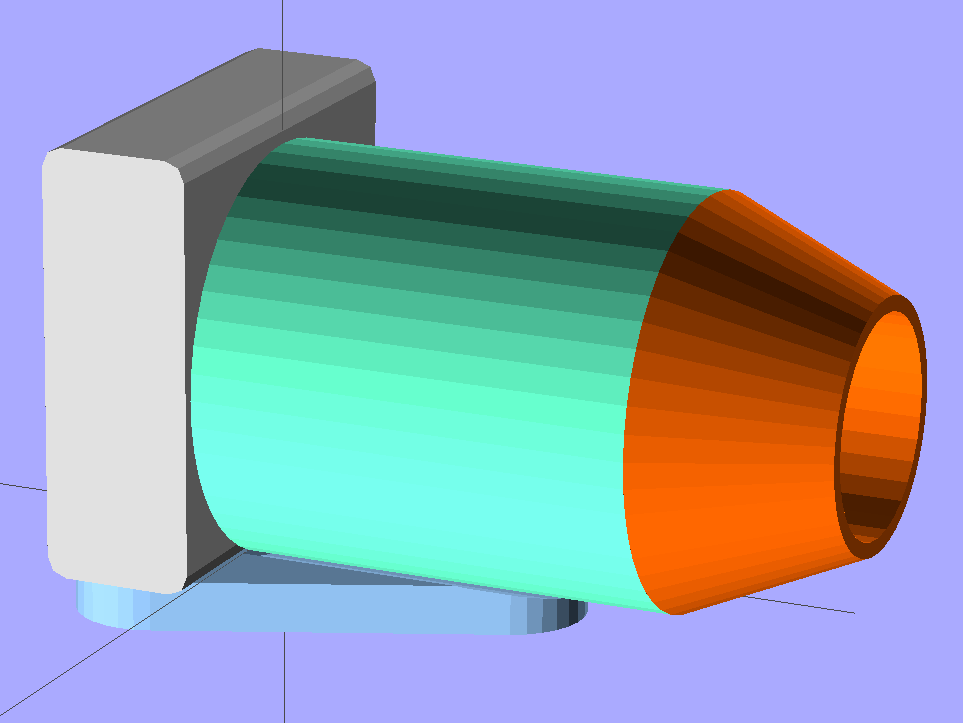
The solid model of the microscope adapter:
Microscope mount – solid model
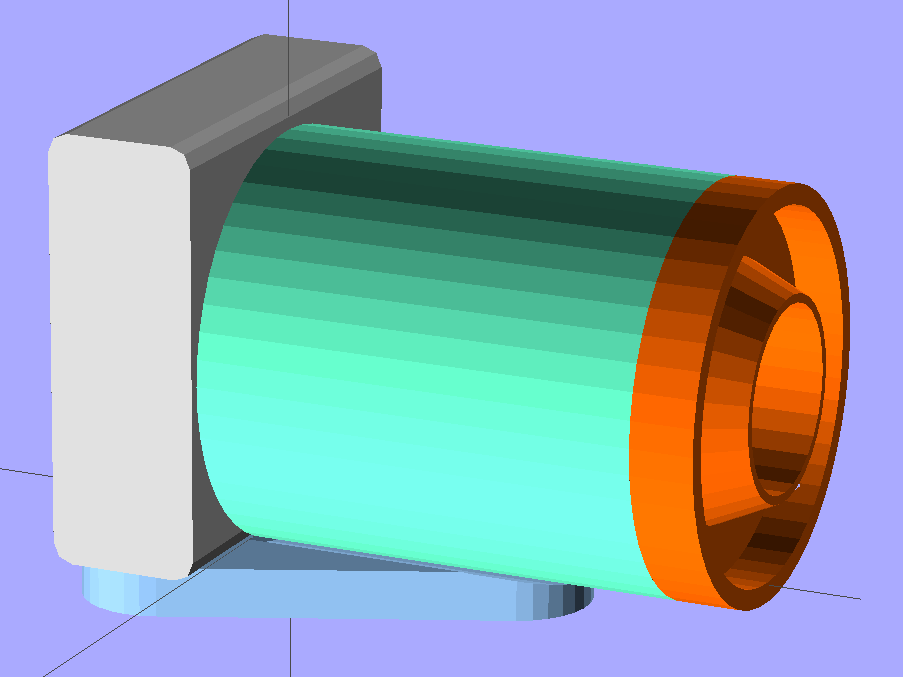
The close-up macro adapter, with an LED ring light around the snout:
LED Ring mount – solid model
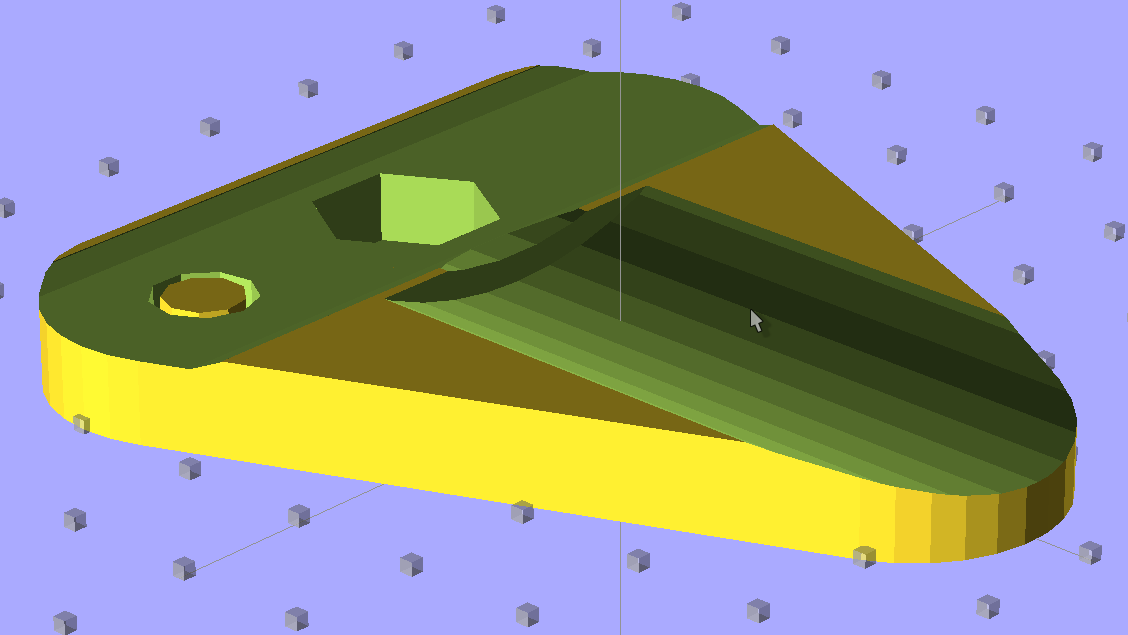
They have a common camera mounting plate, with a hex recess for a 1/4-20 nut that mates with a standard tripod screw and some support material sticking up through the hole for the screw that holds the camera to the plate:
Mounting plate – solid model – top view
The main tube glues into the plate’s cutout and is long enough to accommodate the fully extended lens turret, with four shallow holes for filament snippet locating pins to align the snout:
Main tube – solid model – bottom view
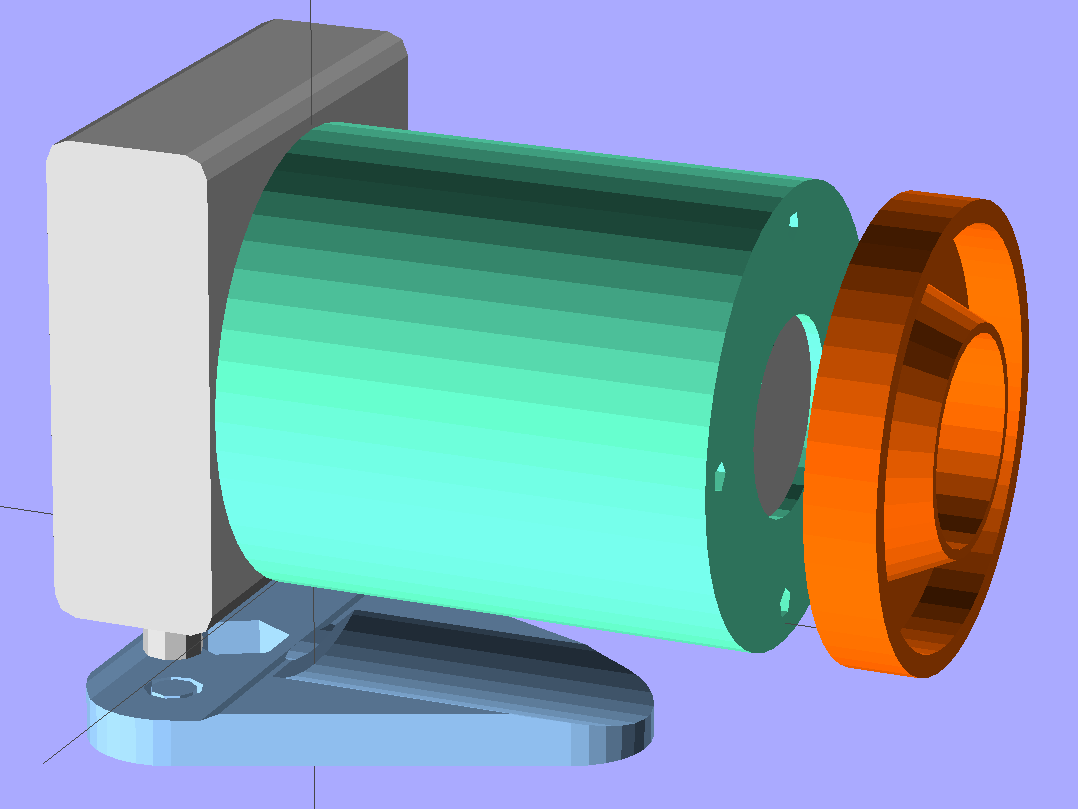
An exploded view shows how everything fits together, with the stud below the camera representing its tripod mounting screw:
LED Ring mount – solid model – exploded view
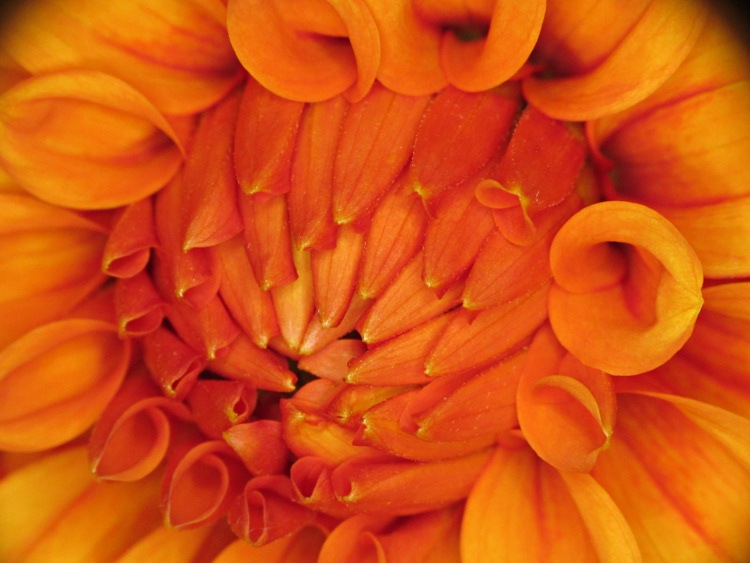
More details on the parts will appear over the next few days, but here’s the view through the macro adapter:
Dahlia through macro adapter
Yeah, some slight vignetting, but overall it’s pretty good.
The OpenSCAD source code that builds both adapters:
// Close-up lens mount & Microscope adapter for Canon SX230HS camera
// Ed Nisley KE4ZNU - Nov 2011

Mount = "Eyepiece";			// End result: LEDRing Eyepiece

Layout = "Show";			// Assembly: Show
							// Parts: Plate Tube LEDRing Camera Eyepiece
							// Build Plates: Build1..4

Gap = 12;					// between "Show" objects

include </home/ed/Thing-O-Matic/lib/MCAD/units.scad>
include </home/ed/Thing-O-Matic/Useful Sizes.scad>
include </home/ed/Thing-O-Matic/lib/visibone_colors.scad>

//-------
//- Extrusion parameters must match reality!
//  Print with +1 shells, 3 solid layers, 0.2 infill

ThreadThick = 0.33;
ThreadWidth = 2.0 * ThreadThick;

HoleFinagle = 0.2;
HoleFudge = 1.02;

function HoleAdjust(Diameter) = HoleFudge*Diameter + HoleFinagle;

Protrusion = 0.1;			// make holes end cleanly

function IntegerMultiple(Size,Unit) = Unit * ceil(Size / Unit);

//-------
// Dimensions

// doublet lens

LensDia = 25.0;
LensRad = LensDia/2;
LensClearance = 0.2;

LensEdge = 6.7;
LensThick = 8.6;
LensRimThick = IntegerMultiple((2.0 + LensThick),ThreadThick);

// LED ring light

LEDRingOD = 50.0;
LEDRingID = 36.0;
LEDBoardThick = 1.5;
LEDThick = 4.0;
LEDRingClearance = 0.5;
LEDWireHoleDia = 3.0;

// microscope eyepiece

EyepieceOD = 30.0;
EyepieceID = 24.0;
EyepieceLength = 25.0;

// camera
// Origin at base of [0] ring, Z+ along lens axis, X+ toward bottom, Y+ toward left

CameraBodyWidth = 2*10.6;							// 2 x center-to-curve edge
CameraBaseWidth = 15.5;								// flat part of bottom front to back
CameraBaseRadius = (CameraBodyWidth - CameraBaseWidth)/2;	// edge rounding
CameraBaseLength = 60.0;							// centered on lens axis
CameraBaseHeight = 55.0;							// main body height
CameraBaseThick = 0.9;								// downward from lens ring

echo(str("Camera base radius: ",CameraBaseRadius));

TripodHoleOffset = -19.0;							// mount screw wrt lens centerline
TripodHoleDia = Clear025_20;						// clearance hole

TripodScrewHeadDia = 14.5;							// recess for screw mounting camera
TripodScrewHeadRad = TripodScrewHeadDia/2;
TripodScrewHeadThick = 3.0;

// main lens tube

TubeDia = 		[53.0,	44.0,	40.0,	37.6];		// lens rings, [0] is fixed to body
TubeLength = 	[8.1,	20.6,	17.6,	12.7];

TubeEndClearance = 2.0;								// camera lens end to tube end
TubeEndThickness = IntegerMultiple(1.5,ThreadThick);
TubeInnerClearance = 0.5;

TubeInnerLength = TubeLength[0] + TubeLength[1] + TubeLength[2] + TubeLength[3] +
				  TubeEndClearance;
TubeOuterLength = TubeInnerLength + TubeEndThickness;

TubeID = TubeDia[0] + TubeInnerClearance;
TubeOD = TubeID + 6*ThreadWidth;
TubeWall = (TubeOD - TubeID)/2;
TubeSides = 48;

echo(str("Main tube outer length: ",TubeOuterLength));
echo(str("          ID: ",TubeID," OD: ",TubeOD," wall: ",TubeWall));

// camera mounting base

BaseWidth = IntegerMultiple((CameraBaseWidth + 2*CameraBaseRadius),ThreadThick);
BaseLength = 60.0;
BaseThick = IntegerMultiple((1.0 + Nut025_20Thick + CameraBaseThick),ThreadThick);

// LED ring mount

LEDBaseThick = IntegerMultiple(2.0,ThreadThick);	// base under lens + LED ring
LEDBaseRimWidth = IntegerMultiple(6.0,ThreadWidth);
LEDBaseRimThick = IntegerMultiple(LensThick,ThreadThick);

LEDBaseOD = max((LEDRingOD + LEDRingClearance + LEDBaseRimWidth),TubeOD);

echo(str("LED Ring OD: ",LEDBaseOD));

// alignment pins between tube and LED ring / microscope eyepiece

AlignPins = 4;
AlignPinOD = 2.9;
AlignPinCircleDia = TubeOD - 2*TubeWall - 2*AlignPinOD;		// 2*PinOD -> more clearance

//-------

module PolyCyl(Dia,Height,ForceSides=0) {			// based on nophead's polyholes

  Sides = (ForceSides != 0) ? ForceSides : (ceil(Dia) + 2);

  FixDia = Dia / cos(180/Sides);

  cylinder(r=HoleAdjust(FixDia)/2,h=Height,$fn=Sides);
}

module ShowPegGrid(Space = 10.0,Size = 1.0) {

  Range = floor(50 / Space);

	for (x=[-Range:Range])
	  for (y=[-Range:Range])
		translate([x*Space,y*Space,Size/2])
		  %cube(Size,center=true);

}

//-------

//- Camera body segment
//	Including lens base and peg for tripod hole access
//	Z=0 at edge of lens base ring, X=0 along lens axis

module CameraBody() {

  translate([0,0,-CameraBaseThick])
	rotate(90)
	  union() {
		translate([0,0,(CameraBaseHeight/2 + CameraBaseRadius)])
		  minkowski() {
			cube([CameraBaseWidth,
				  (CameraBaseLength + 2*Protrusion),
				  CameraBaseHeight],center=true);
			rotate([90,0,0])
			  cylinder(r=CameraBaseRadius,h=Protrusion,$fn=8);
		  }

		translate([0,0,(TubeDia[0]/2 + CameraBaseThick)])
		  rotate([0,90,0])
			rotate(180/TubeSides)
			  cylinder(r=(TubeDia[0]/2 + CameraBaseThick),
					  h=(CameraBodyWidth/2 + Protrusion),
					  $fn=TubeSides);

		translate([CameraBodyWidth/2,0,(TubeDia[0]/2 + CameraBaseThick)])
		  rotate([0,90,0])
			cylinder(r=TubeDia[0]/2,h=TubeLength[0]);

		translate([(TubeLength[0] + CameraBodyWidth/2),
				  0,(TubeDia[0]/2 + CameraBaseThick)])
		  rotate([0,90,0])
			cylinder(r=TubeDia[1]/2,h=TubeLength[1]);

		translate([(TubeLength[0] + TubeLength[1] + CameraBodyWidth/2),
				  0,(TubeDia[0]/2 + CameraBaseThick)])
		  rotate([0,90,0])
			cylinder(r=TubeDia[2]/2,h=TubeLength[2]);

		translate([(TubeLength[0] + TubeLength[1] + TubeLength[2] + CameraBodyWidth/2),
				  0,(TubeDia[0]/2 + CameraBaseThick)])
		  rotate([0,90,0])
			cylinder(r=TubeDia[3]/2,h=TubeLength[3]);

		translate([0,TripodHoleOffset,-BaseThick])
		  PolyCyl(TripodHoleDia,(BaseThick + 2*Protrusion));

	  }
}

//- Main tube

module Tube() {

  difference() {
	cylinder(r=TubeOD/2,h=TubeOuterLength,$fn=TubeSides);

	translate([0,0,TubeEndThickness])
	  PolyCyl(TubeID,(TubeInnerLength + Protrusion),TubeSides);

	translate([0,0,-Protrusion]) {
	  if (Mount == "LEDRing")
		cylinder(r=LensRad,h=(TubeEndThickness + 2*Protrusion));
	  if (Mount == "Eyepiece")
		cylinder(r=EyepieceID/2,h=(TubeEndThickness + 2*Protrusion));
	}

	for (Index = [0:AlignPins-1])
	  rotate(Index*90)
		translate([(AlignPinCircleDia/2),0,-ThreadThick])
		  rotate(180)			// flat sides outward
			PolyCyl(AlignPinOD,TubeEndThickness);
  }

}

//- Base plate

module BasePlate() {

  union() {
	difference() {
		linear_extrude(height=BaseThick)
		  hull() {
			translate([-(BaseLength/2 - BaseWidth/2),0,0])
			  circle(BaseWidth/2);
			translate([ (BaseLength/2 - BaseWidth/2),0,0])
			  circle(BaseWidth/2);
			translate([0,(0.75*BaseLength),0])
			  circle(BaseWidth/2);
		  }

		translate([0,0,BaseThick])
		  CameraBody();

		translate([0,(TubeOuterLength + CameraBodyWidth/2),
				  (BaseThick + TubeDia[0]/2)])
		  rotate([90,0,0])
			PolyCyl(TubeOD,TubeOuterLength,$fn=TubeSides);

		translate([0,0,3*ThreadThick])
		  PolyCyl((Nut025_20Dia*sqrt(3)/2),2*Nut025_20Thick,6);	// dia across hex flats

		translate([0,0,-Protrusion])
		  PolyCyl(Clear025_20,(BaseThick + 2*Protrusion));

		translate([TripodHoleOffset,0,3*ThreadThick])
		  PolyCyl((Nut025_20Dia*sqrt(3)/2),2*Nut025_20Thick,6);	// dia across hex flats

		translate([TripodHoleOffset,0,-Protrusion])
		  PolyCyl(Clear025_20,(BaseThick + 2*Protrusion));

		translate([-TripodHoleOffset,0,-Protrusion])
		  PolyCyl(TripodScrewHeadDia,(TripodScrewHeadThick + Protrusion));

	}

	translate([-TripodHoleOffset,0,0]) {				// support for tripod screw hole
	  for (Index=[0:3])
		rotate(Index*45)
		  translate([-ThreadWidth,-TripodScrewHeadRad,0])
			cube([2*ThreadWidth,TripodScrewHeadDia,TripodScrewHeadThick]);

	  cylinder(r=0.4*TripodScrewHeadRad,h=(BaseThick - CameraBaseThick),$fn=9);
	}
  }
}

//- LED mounting ring

module LEDRing() {

  difference() {
	cylinder(r=LEDBaseOD/2,h=LensRimThick,$fn=48);

	translate([0,0,-Protrusion])
	  PolyCyl((LensDia + LensClearance),
			  (LensRimThick + 2*Protrusion));

	translate([0,0,LEDBaseRimThick])
	  difference() {
		PolyCyl(LEDBaseOD,LensThick);
		PolyCyl(LEDRingID,LensThick);
	  }

	translate([0,0,LEDBaseThick])
	  difference() {
		PolyCyl((LEDRingOD + LEDRingClearance),LensThick);
		cylinder(r1=HoleAdjust(LEDRingID - LEDRingClearance)/2,
				 r2=HoleAdjust(LensDia + LensClearance)/2 + 2*ThreadWidth,
				 h=LensThick);
	  }

	for (Index = [0:AlignPins-1])
	  rotate(Index*90)
		translate([(AlignPinCircleDia/2),0,-ThreadThick])
		  rotate(180)			// flat sides outward
			PolyCyl(AlignPinOD,LEDBaseThick);

	rotate(45)
	  translate([0,LEDRingID/2,(LEDBaseThick + 1.2*LEDWireHoleDia/2)])
		rotate([0,-90,0])			// flat side down
		  rotate([-90,0,0])
			PolyCyl(LEDWireHoleDia,2*LEDBaseRimWidth);
  }

}

//- Microscope eyepiece adapter

module EyepieceMount() {

  difference() {
	cylinder(r1=TubeOD/2,
			 r2=(EyepieceOD + 8*ThreadWidth)/2,
			 h=EyepieceLength,
			 $fn=TubeSides);

	translate([0,0,-Protrusion])
	  PolyCyl(EyepieceOD,(EyepieceLength + 2*Protrusion));

	for (Index = [0:AlignPins-1])
	  rotate(Index*90)
		translate([(AlignPinCircleDia/2),0,-ThreadThick])
		  rotate(180)			// flat sides outward
			PolyCyl(AlignPinOD,6*ThreadThick);
  }

}

//-------
// Build it!

if (Layout != "Show")
  ShowPegGrid();

if (Layout == "Tube")
  Tube();

if (Layout == "LEDRing")
  LEDRing();

if (Layout == "Plate")
  BasePlate();

if (Layout == "Camera")
  CameraBody();

if (Layout == "Eyepiece")
  EyepieceMount();

if (Layout == "Build1")
  translate([0,-BaseLength/3,0])
	BasePlate();

if (Layout == "Build2")
  Tube();

if (Layout == "Build3")
  LEDRing();

if (Layout == "Build4")
  EyepieceMount();

if (Layout == "Show") {
  translate([0,TubeOuterLength,TubeDia[0]/2]) {
	rotate([90,0,0])
	  color(LTC) Tube();
	translate([0,Gap,0])
	  rotate([-90,0,0]) {
		if (Mount == "LEDRing")
		  color(OOR) LEDRing();
		if (Mount == "Eyepiece")
		  color(OOR) EyepieceMount();
	  }
  }

  translate([0,-CameraBodyWidth/2,0])
	color(PG) CameraBody();

  color(PDA)
	render()
	translate([0,-CameraBodyWidth/2,-(BaseThick + Gap)])
	  BasePlate();
}
If this is true, I can scrap out my roll of mu metal shielding:
Magnetic card protection sleeve
I think they mean the sleeve protects the magnetic stripe from mechanical damage, but wedging those two sentences together certainly suggests the envelope has serious anti-magnetic mojo…
In that version of the GPS+voice interface, I sprinkled 100 nF and 100 pF SMD caps across the input lines in the hope that they’d reduce EMI on the audio board. The board worked fine for years, but now that it’s time to build another board & box, I figured it’d be good to know a bit more about their actual response.
So I cobbled up a test fixture with a 3 dB pad from the tracking generator output and a 20 dB pad to the spectrum analyzer input (both of those are bogus, because the cap impedance varies wildly, but work with me on this):
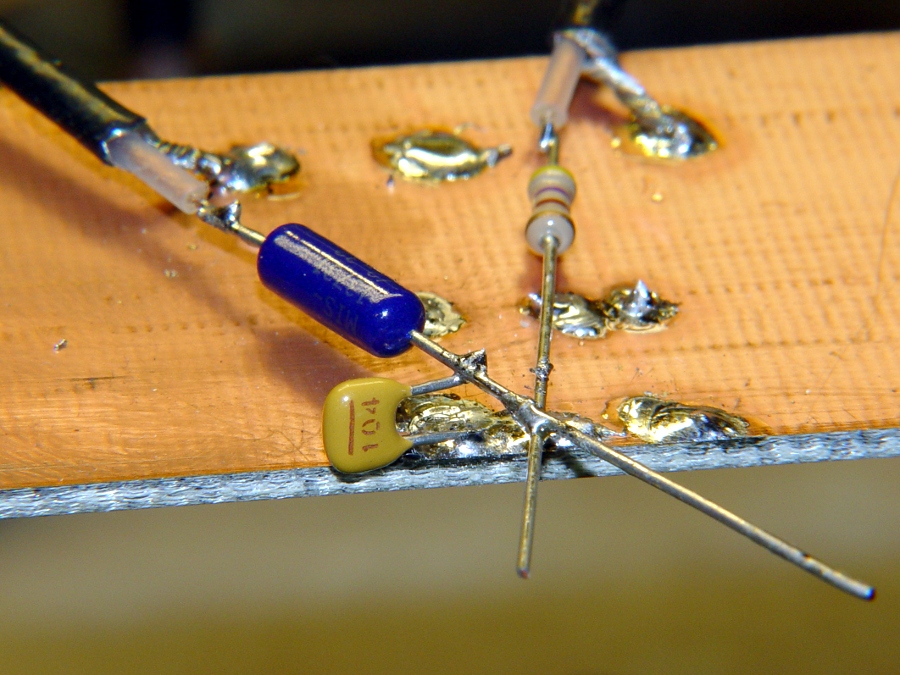
Ceramic 100 nF cap on copper
Pulled an assortment of 100 nF ceramic caps from the stockpile:
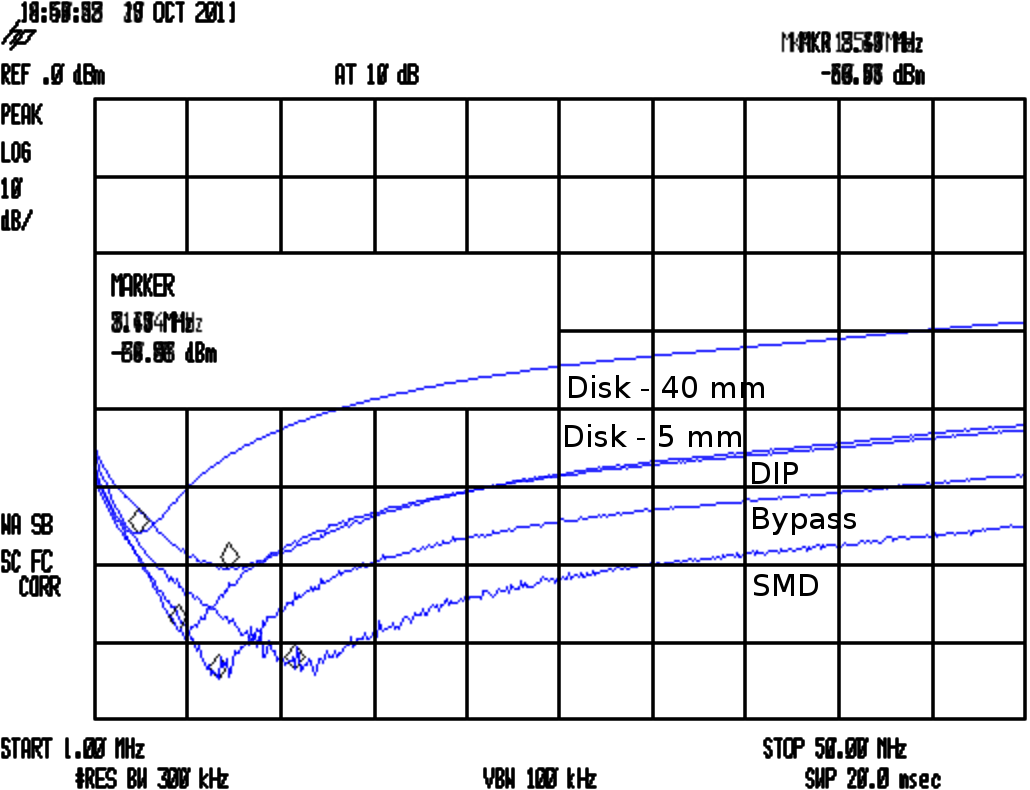
Their self-resonant frequencies are much lower than I expected:
Cap Comparison
The attenuators produce about 17 dB of loss with no cap in the circuit, so the disk caps are pretty much asleep at the switch from VHF on up. The small bypass cap in the top photo is OK and the SMD cap is pretty good, but they’re all well past their self-resonant frequency and acting like inductors.
The relevant equations:
FR = 1/(2π √(LC))
XC = 1/(2π f C)
Q = FR / BW
ESR = XC / Q
The drill goes a little something like this:
Find resonant frequency FR and 3 db bandwidth BW
Knowing FR and C, find parasitic L
Knowing FR and BW, find Q
Knowing XC and Q, find ESR
In round numbers, the 100 nF SMD cap has L=2 nH and ESR=60 mΩ.
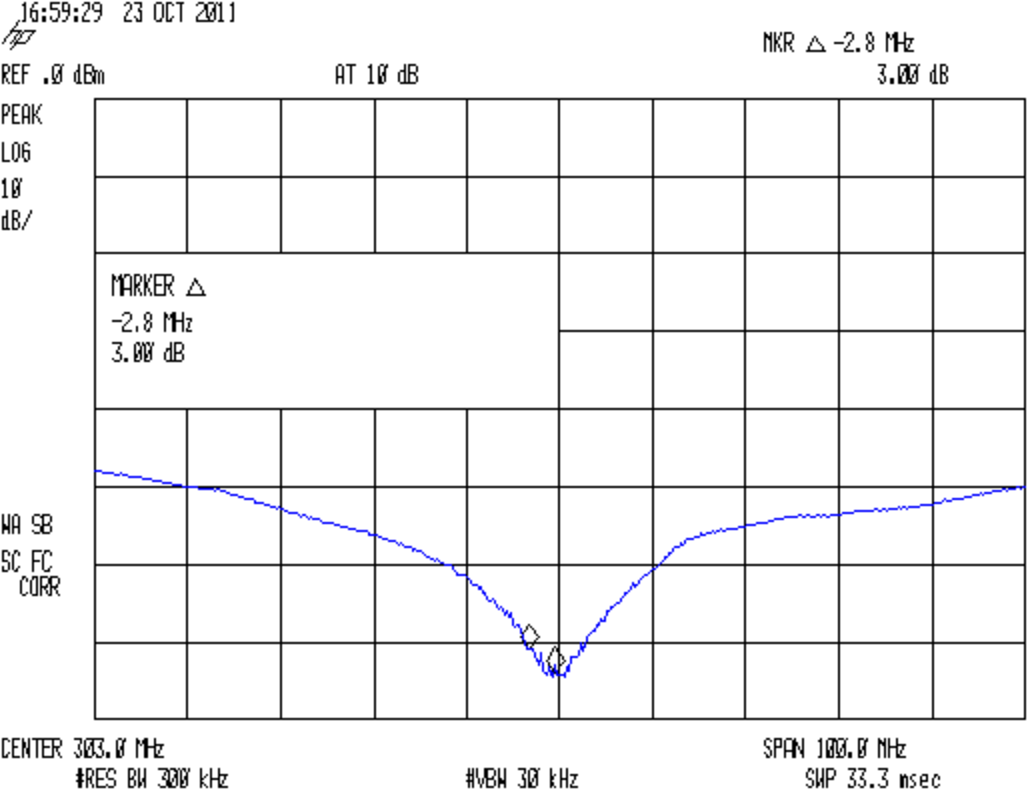
Now, it turns out a 100 pF SMD cap resonates up at 300 MHz, between the VHF and UHF amateur bands:
SMD – 100 pF Bandwidth
So I think the way to do this is to pick the capacitance to put the self-resonant frequency in the VHF band, parallel another cap to put a second dip in the UHF band, and run with it. A back of the envelope calculation suggests 470 pF and 47 pF, but that obviously depends on a bunch of other imponderables and I’ll just interrogate the heap until the right ones step forward.
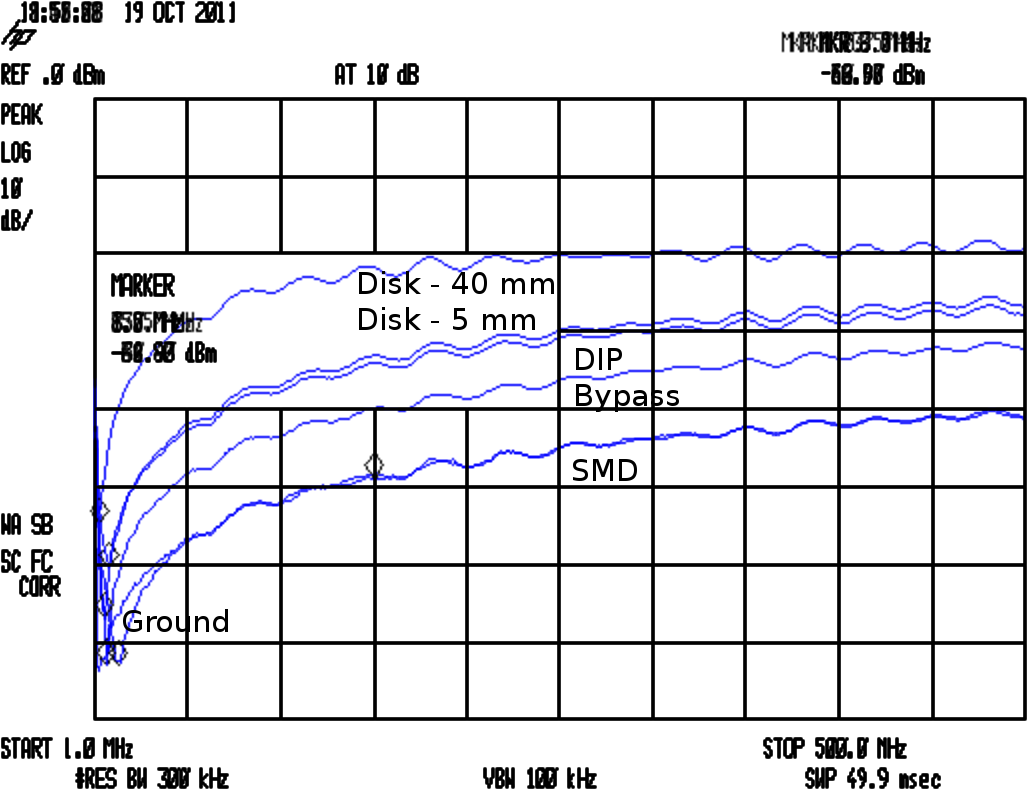
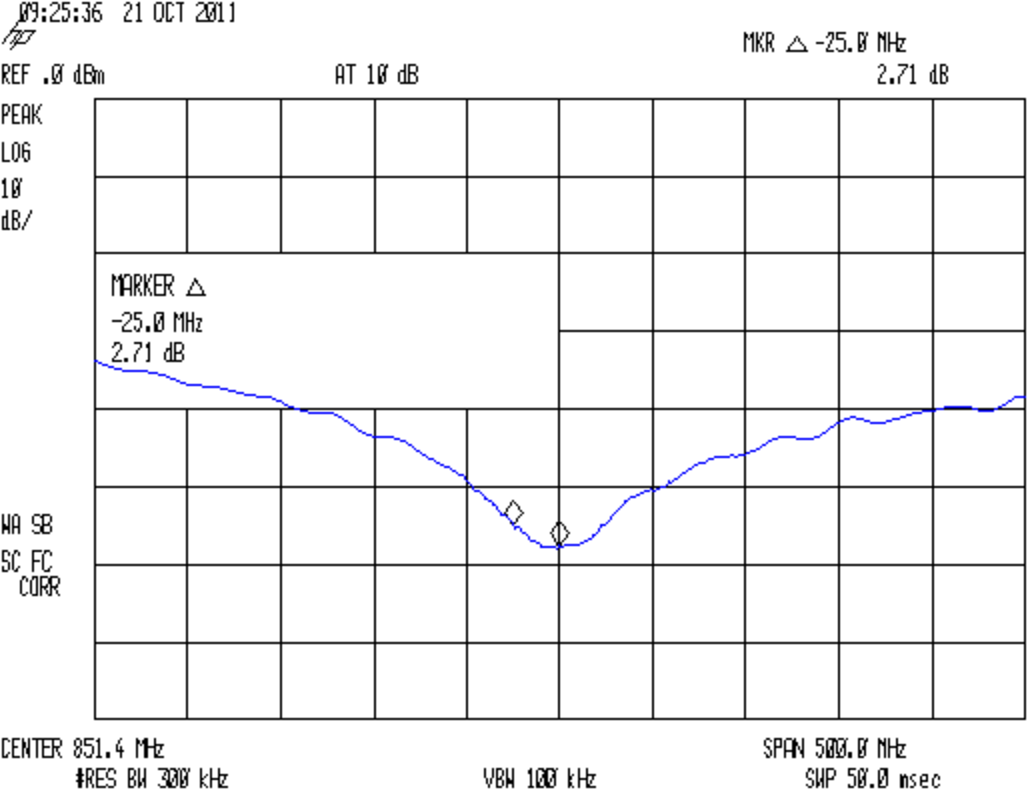
Just to show the test fixture isn’t a complete piece of crap, here’s a 12 pF cap resonating up around 850 MHz:
SMD – 12 pF Bandwidth
For the combination of components, sweep speeds, bandwidths, and suchlike in effect, the spectrum analyzer’s noise floor is down around -75 dBm. I think the 12 pF cap is actually better than it looks, but I didn’t fiddle around with a narrower resolution bandwidth.
A cheap auto escape hammer (IIRC, free in the bottom of a tag-sale box filled with stuff I could actually use) has been kicking around the back of the bench for far too long; it had a feeble single-cell incandescent bulb flashlight with the cheapest possible non-switch. I ripped all that out, carved out enough plastic to fit a CR123 lithium cell, hot-melt-glued a real pushbutton switch and 10 mm white LED in place, and soldered it up:
Lithium cell hacked into auto escape tool
The CR123 puts out enough juice to light up the LED, but it’d be happier with a bit more current. There’s no limiting resistor, so the LED gets what it gets.
Augment the screws with a few snippets of Kapton tape, use some real 3M Velcro tape, and it’s all good (albeit ugly on a stick):
Hacked auto escape hammer
Now, there’s no way to test the hammer part of it (perhaps I could visit a junkyard and whack out a few windows for practice?), but at least now we have a disposable flashlight in the van…