Ed Nisley's Blog: Shop notes, electronics, firmware, machinery, 3D printing, laser cuttery, and curiosities. Contents: 100% human thinking, 0% AI slop.
Not all CFL bulbs fail after a year. This one seems to have lasted six years, only to burn out a few days after the other one:
Burned-out CFL bulb
I’m sure the date code just over the base means January 2006, not June 2001, simply because I used much larger bulbs a decade ago. Those have long since failed…
These bulbs all operate in nearly the worst possible condition: base-up inside a ceiling downlight can, although without a cover glass. It’s much cooler in there than with the equivalent incandescent bulb, but they still get pretty toasty. The housing discoloration and the brittle bosses around the tube glass looks a bit less saturated in real life, but this will give you an idea:
Being that sort of bear, I tend to make notations like this. Sometimes I’m delighted the next time the inscription sees the light of day and sometimes it ticks me right off…
Much of the energy-saving advantage of CFL bulbs comes from their touted long life. I’d say a year isn’t nearly long enough to reap any benefits…
There is certainly a warranty on the bulb, if only I’d:
saved the empty package and
had the original receipt and
be willing to call a presumably toll-free number and
go through whatever hassle they impose to swap the bulb
They know none of us will get very far down that checklist…
FWIW, the box of smaller CFL bulbs on the shelf says they have a two-year warranty “in normal residential service of 3 hours per day”. I’m sure the number of starts factors into it, too.
A week or so after I got my HP 49GX calculator, I managed to drop a vernier caliper on it. Interior points downward, of course, putting a nice divot on the non-glare plastic over the LCD panel.
A week or so after I got my HP 50g calculator, I applied a screen protector sheet harvested from the lifetime supply I bought for my original Zire 71, back in the day.
HP 50g calculator screen protector
The fact that it’s an almost perfect fit and that the calculator sports a monochrome LCD with lower resolution is a sad commentary on the state of the calculator art.
Taking that picture in low-angle full sunlight makes the protector sheet look awful. In actual use, it’s nearly invisible. Haven’t dropped anything on it yet, either.
And, yes, I did cut it out around the HP logo button in the upper right corner.
Although reading PDF documents on the shining screen works fine for some topics, I’d much rather curl up with a printed version for the first read-through. Adobe Reader’s print-as-booklet option does all the heavy lifting required to print a PDF document four pages to a single Letter-size sheet of paper, after which I do a little slicing & binding to get a nice comb-bound book.
So I printed out the entire EAGLE 6 manual (found in /wherever/eagle-6.1.0/doc/), which led to the discovery that page 86 is missing (at least in the 1st edition version). That screws up the pagination from page 87 onward: odd-numbered pages move to the left side of the binding, even-numbered pages to the right, and the blank space reserved for the gutter / binding appears on the outside margins. Fortunately, it’s still readable.
To avoid that problem, do this:
Print Range → Pages → [1-85,301,86-334]
That selects the first set of contiguous pages, jams a copy of a “This page has been left free intentionally” page from the back of the manual in place of the missing page 86, and then selects the rest of the book.
Print the front sides, flip the stack over, print the back sides (with the same page range), and bind as usual.
FWIW, this is much better than having the printer mis-feed about 3/4 of the way through the back sides, which it has done in the past while printing a big book. I now run off about 20 sheets at a time, with only that many pieces of paper in the feeder, just to make sure it doesn’t ruin the entire job.
One could, I suppose, use pdftk to shuffle the PDF into a complete file which would Just Work, but that seems like more trouble than it’s worth. Ditto for expecting CadSoft to re-create the PDF.
Memo to Self: Check the last page. If the logical page doesn’t match what’s shown on the PDF page, then something’s wrong.
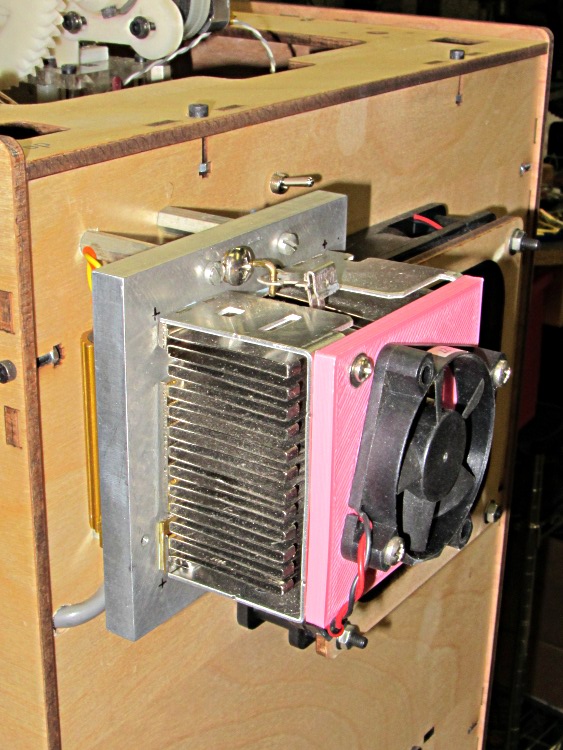
The fan on the dummy load that consumes the required minimum current to keep the ATX power supply happy wasn’t starting up reliably. That’s not surprising: I connected it to 5 V rather than the rated 12 V, because the load heatsink needs just a whisper of air flow to stay barely above room temperature, so it’s barely turning over and has no spare torque at all.
It turns out the heatsink really doesn’t need any forced air flow, despite having the fins oriented crosswise. Without the fan, it stabilizes just above comfortable-to-the-touch, a bit hotter than I’d prefer.
While I had the hood up for the HBP rebuild, though, I swapped in another fan and the heatsink is now cool to the touch. I did clean that dust off the fins, too.
If this one also fails at +5 V, I’ll fiddle the wiring to put it across the +12 V and +5 V supplies, where it’ll see 7 V. That should improve its disposition…
If you pick up consumer-grade UPS units during closeout sales, they cost little more than replacing the batteries in older units… so we now have a new UPS replacing an old Waber box.
Just for completeness, I pulled the 25 A internal fuses:
Waber UPS battery fuses
And then measured the remaining battery capacity:
Waber UPS
The pair of sealed lead-acid batteries claim 5 Ah each, so the 6 A load far exceeds the usual C/20 SLA test current. The fact that the better one hit 1.6 Ah under that load says it’s in surprisingly good shape.
In fact, the label I put on that battery in January 2008 says it hit 1.4 Ah at 2.5 A, so it’s doing much better than you’d expect.
However, the UPS claims to support 650 VA = 450 W at 0.7 power factor. The batteries must supply the real power while the inverter drives the reactive load; giving Waber the benefit of the doubt at 90% efficiency says the batteries must provide 500 W = 21 A at 24 V under full load.
The basic problem with the heater on the Heated Build Platform is that the SMD pads must both make electrical contact to the Molex-style connector and withstand mechanical stress from the dangling wires & cables as the platform moves along the X and Y axes. Rather than replace the entire heater, I attached pigtail leads to the PCB, anchored those leads to the wood platform under the heater, and routed the cables through the deck under the Y axis stage a bit differently.
However, attaching pigtail leads to the PCB poses a problem, because ordinary electronic hookup wire has thermoplastic insulation that melts or deforms at temperatures well under my usual 110 °C platform heat setting; shorting the heater wires would be a Very Bad Thing.
Some concerted rummaging in the Big Box o’ Multiconductor Cable turned up a hank of Teflon-insulated shielded two-wire cable that, as nearly as I can tell, has pure silver conductors and shield braid: the ends were tarnished like silver and there’s nary a trace of copper in the fresh cuts. It must be military surplus and, based on a vague recollection, was most likely cough salvaged by my father, who worked as an avionics tech at Olmstead AFB in the mid-60s. Ya gotta have stuff, right?
[Update: Alas, it’s not pure silver, as shown in the comments.]
The general idea is to scuff up the shiny PCB surface enough to anchor blobs of JB Industro Weld epoxy that surround brass tubes holding the cables. A pair of tubes secure each cable and provide strain relief; the cable is free to move, but not by very much. The thermistor cable has a long arch that will, I hope, keep the cable at the platform temperature and reduce its cooling effect on the thermistor:
Thermistor rewiring – heat cure
The alligator clips connect to a bench power supply that delivered 4 V @ 2 A = 8 W that heated the PCB to about 40 °C in the rather chilly Basement Laboratory and encouraged the epoxy to cure in less time than forever.
The final result looked like this, with Anderson Powerpoles now attached to the heater cable:
Rewired HBP
The 24 AWG conductors in the cable may seem scanty for 6 A of heater current, but, hey, they’re silver.
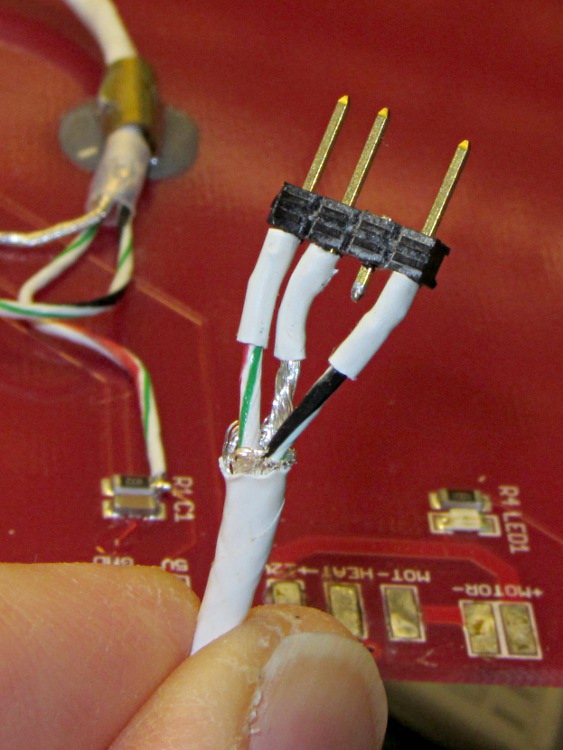
The three-pin connector on the end of the thermistor cable is a pure kludge, built from a 4-pin header to match the CD-ROM audio pinout on the new cable from the Extruder Controller. I kept the default pinout on this end to provide some protection against plugging it in backwards:
Kludged HBP thermistor connector
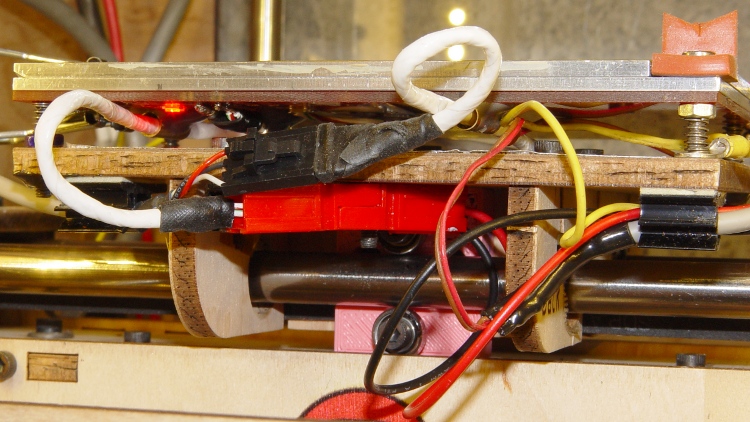
With all that in hand, I screwed the PCB to the aluminum sub-plate, bolted it to the plywood platform, and stuck the cables onto the platform with adhesive clamps:
Rewired HBP – front
Reaming out the hole between the red and black Powerpole shells provided just enough room for an M3 screw to anchor them to the HBP: they won’t flop around under acceleration.
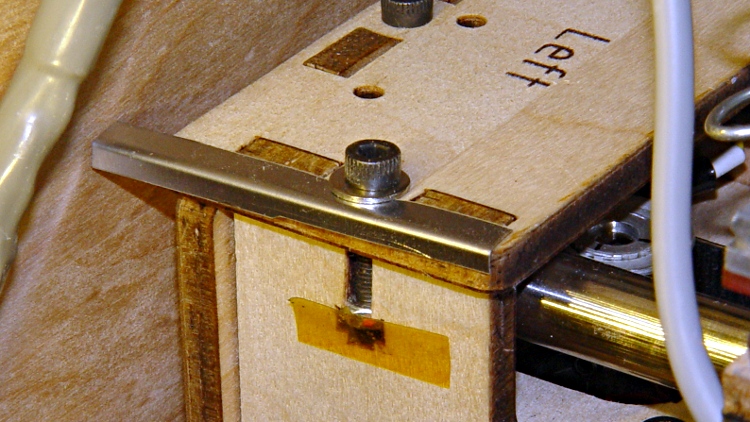
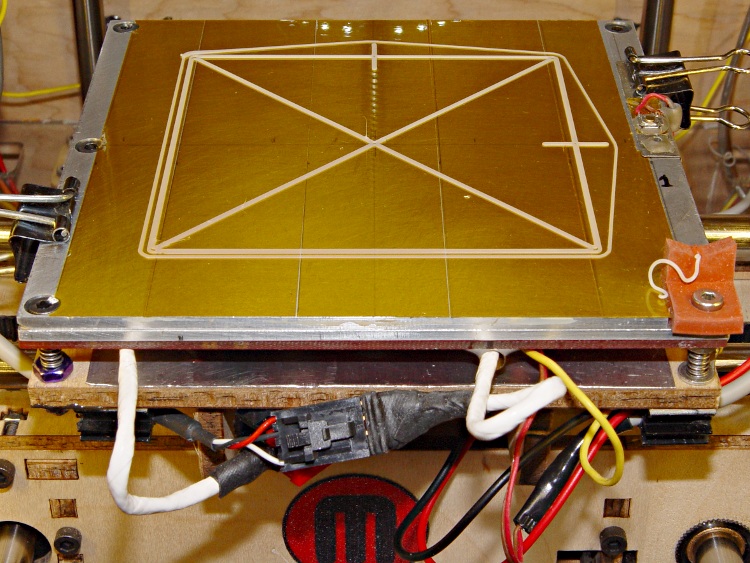
The thermistor cable exits to the left, the rest to the right, and I’m unhappy with the overall routing. I added a small bumper (made from bent steel shim stock) to keep the thermistor cable out of the gap between the Y axis stage and the left side wall:
The platform is holding level within ±0.05 mm across build plates 1 and 2, somewhat better than before. On the other paw, the whole thing doesn’t have many hours on it…




 The Smell of Molten Projects in the Morning