The Smell of Molten Projects in the Morning

Ed Nisley's Blog: Shop notes, electronics, firmware, machinery, 3D printing, laser cuttery, and curiosities. Contents: 100% human thinking, 0% AI slop.

Category: Electronics Workbench

Electrical & Electronic gadgets

  • Peltier PWM Temperature Control: MOSFET RC Snubber

    The MOSFET resistance tester I’m twiddling up for my next column will hold the transistor-under-test at a more-or-less constant temperature using a PWM-controlled Peltier module. The Peltier driver looks like this:

    Peltier Driver
    Peltier Driver

    The overall idea is that the relay selects heating or cooling and the MOSFET PWM adjusts the power to keep the module at the right temperature. The feedback comes from a thermistor epoxied to the aluminum block holding the MOSFET, which in turn is epoxied to the module and then to a CPU cooler with a fan. More on that later…

    Those fat lines mark the high-current paths: 3.3 A with a 5 V supply, as this Peltier module has about 1.5 Ω resistance. Some early tests show the resulting 17 W can pump the test block down to at least 5 °C and up to at least 40 °C in a few tens of seconds, even without any significant PI (no D) loop tweaking.

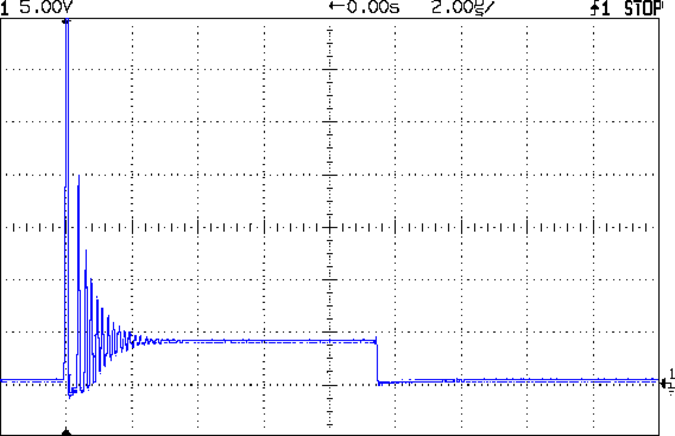
    When I fired it up a test program that just cycles the PWM up and down, the green LED lit up properly in cooling mode, but the red LED also glowed dimly. Probing the drain showed this nasty ringing when the IRLZ14 MOSFET turned off:

    Peltier Turn-Off Transient
    Peltier Turn-Off Transient

    The initial spike happens when the drain current pushes the MOSFET body diode into reverse breakdown at about 70 V (off scale high in the image). The drain goes slightly negative for the next half-cycle as the diode slams into forward conduction, then the energy engages in some serious 5 MHz ringing while it dissipates in the Peltier’s resistance.

    Obviously, this is a job for an RC snubber

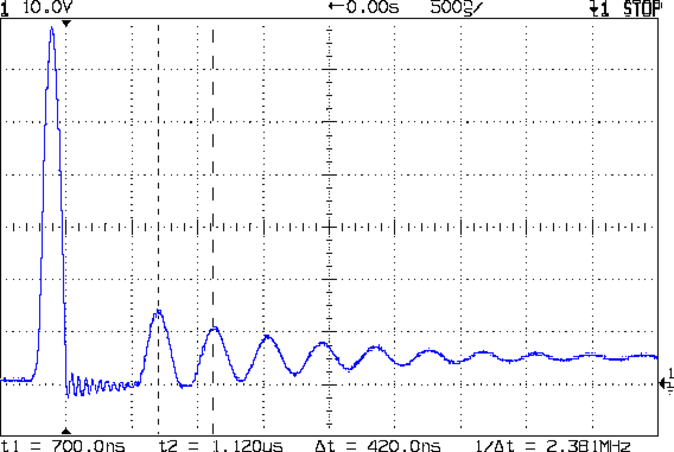
    A bit of fiddling revealed that a 1.5 nF cap dropped the ringing to 2.8 MHz and a 2.5 nF cap put it at 2.4 MHz:

    Peltier Drain - 2.5 nF
    Peltier Drain – 2.5 nF

    Notice that just putting a capacitor across the MOSFET doesn’t reduce the ringing. What’s needed here is some additional energy dissipation.

    Splitting the difference says 2.3 nF would reduce the resonant frequency by a factor of 2, so the original stray capacitance is about (2.3 nF / 3) = 770 pF.

    Knowing the resonant frequency and stray capacitance, the stray inductance falls out:

    L = 1/[(2∏ 2.5x10⁶)2 770x10-12] = 5.4x10-6 = 5.4 µH

    The Peltier module doesn’t have nearly that much inductance, so it’s hidden in the wiring and relays.

    Knowing L and C, the characteristic impedance of the circuit is:

    Z = √(L/C) = 84 Ω

    The snubber cap should be at least a factor of 4 larger than the stray capacitance, which gives 3 nF. Some rummaging produced a small 3.9 nF 100 V Mylar cap (measuring 3.7 nF, close enough) and an 82 Ω resistor, which gave this pleasing result when soldered across the MOSFET source & drain:

    Peltier Drain - 82 ohm 3.9 nF snubber
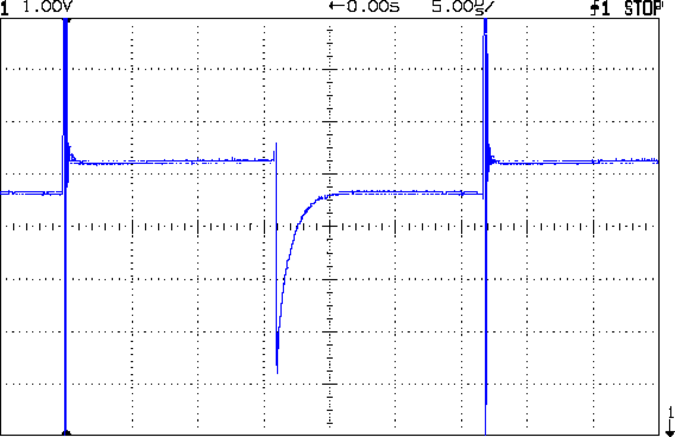
    Peltier Drain – 82 ohm 3.9 nF snubber

    The upper trace shows a pair of 32 kHz PWM pulses. The lower trace gives a magnified view of one pulse; the peak remains at about 70 V just after turn-off, because that 3.3 A must go somewhere: that’s why MOSFETs have husky body diodes with reverse-breakdown specs.

    A better view of the snubbed peak shows it’s all over in about 400 ns:

    Peltier Drain - 32 kHz PWM snubbed - detail
    Peltier Drain – 32 kHz PWM snubbed – detail

    The lower trace is the MOSFET gate drive pulse at the Arduino pin, showing the Miller capacitance delaying the transition. It turns out that removing the 22 Ω gate damping resistor doesn’t improve things, but, given the speed of the transition, I think it’s good enough.

    The MOSFET burns at (3.3 A × 70 V) = 230 W during that 100 ns peak, which works out to a mere 23 µJ (assuming constant current, which isn’t the case). The IRLZ14 has a 40 mJ single-pulse rating, so it’s in good shape.

    The DC dissipation is (3.3 A)2 x 20 mΩ = 2 W: the huge heatsink I stuck on the MOSFET doesn’t have a chance to get warm during the short tests so far.

    The red LED remains dimly lit, which goes to show how sensitive a human eye can be: the negative transient is barely 100 ns long!

  • MOSFET rDS PCB

    This one came out surprisingly well, apart from the total faceplant with that resistor. With any luck, it’ll measure MOSFET on-state drain resistance over temperature for an upcoming Circuit Cellar column; it’s a honkin’ big Arduino shield, of course.

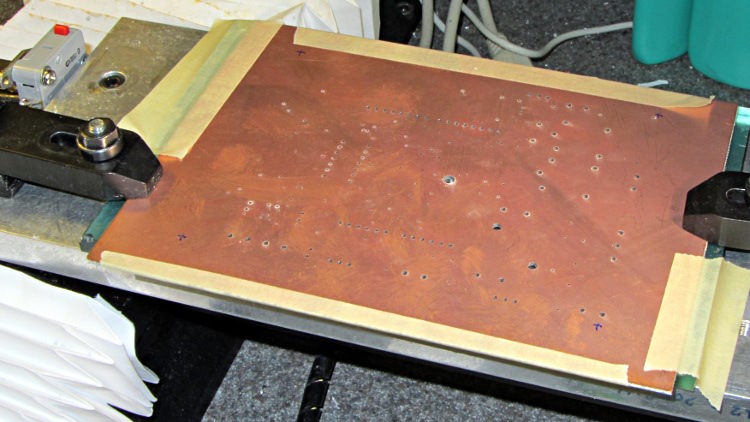
    Drilled holes on the Sherline using the relocated tool height switch:

    rDS Tester - drilled PCB
    rDS Tester – drilled PCB

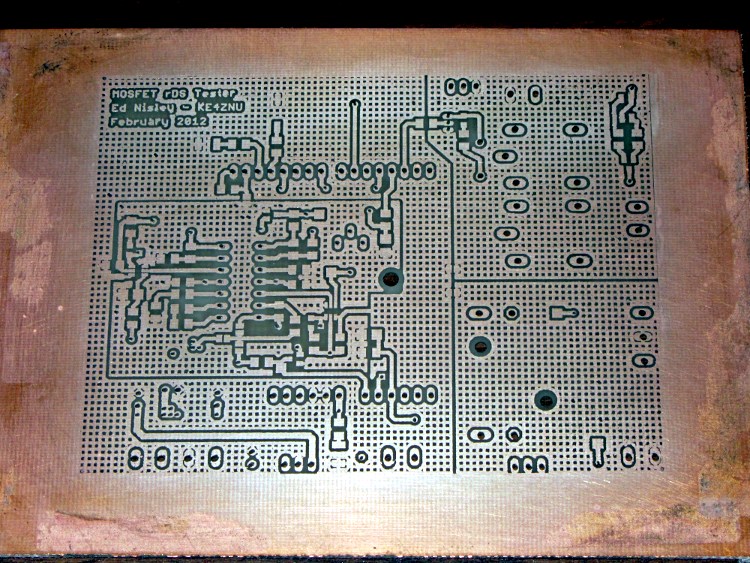
    Front copper, after etching & silver plating:

    rDS Tester - etched front
    rDS Tester – etched front

    Back copper, ditto:

    rDS Tester - etched rear
    rDS Tester – etched rear

    I think I can epoxy the resistor kinda-sorta in the right spot without having to drill through the PCB into the traces. Maybe nobody will notice?

    The traces came out fairly well, although I had to do both the top and bottom toner transfer step twice to get good adhesion. Sometimes it works, sometimes it doesn’t, and I can’t pin down any meaningful differences in the process.

    And it really does have four distinct ground planes. The upper right carries 8 A PWM Peltier current, the lower right has 3 A drain current, the rectangle in the middle is the analog op-amp circuitry tied to the Analog common, and surrounding that is the usual Arduino bouncy digital ground stuff. The fact that Analog common merges with digital ground on the Arduino PCB is just the way it is…

  • EAGLE Library: 10 W Aluminum Power Resistor

    It appears there are at least two different 10 W aluminum resistor sizes: the one used by Dale and the one used by everybody else. It’s either that or the EAGLE HS10 symbol is wrong…

    Using those dimensions, here’s a part that more closely fits the resistors in my heap. EAGLE 6 uses an XML file format, so you can stuff some ASCII text into the appropriate sections of your custom.lbr file (or whatever).

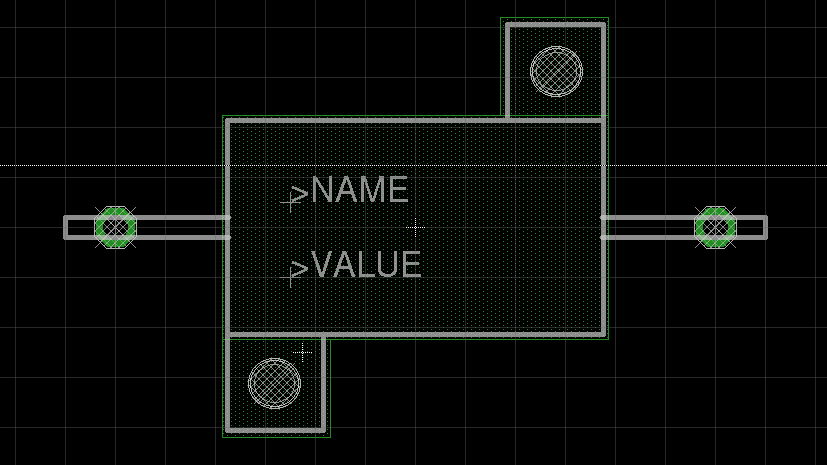
    The EAGLE package, which remains HS10 as in the resistor-power library, should produce something that looks like this:

    EAGLE 10 W Resistor package
    EAGLE 10 W Resistor package

    The XML code includes top-keepout rectangles under the body footprint:

    <package name="HS10">
    <description>DALE Power Resistor 10W</description>
    <wire x1="9.525" y1="5.461" x2="9.525" y2="10.3378" width="0.2032" layer="21"/>
    <wire x1="9.525" y1="10.3378" x2="4.6482" y2="10.3378" width="0.2032" layer="21"/>
    <wire x1="-9.525" y1="-5.461" x2="-4.6482" y2="-5.461" width="0.2032" layer="21"/>
    <wire x1="-4.6482" y1="-5.461" x2="9.525" y2="-5.461" width="0.2032" layer="21"/>
    <wire x1="9.525" y1="-5.461" x2="9.525" y2="5.461" width="0.2032" layer="21"/>
    <wire x1="9.525" y1="5.461" x2="4.6482" y2="5.461" width="0.2032" layer="21"/>
    <wire x1="4.6482" y1="5.461" x2="-9.525" y2="5.461" width="0.2032" layer="21"/>
    <wire x1="-9.525" y1="5.461" x2="-9.525" y2="-5.461" width="0.2032" layer="21"/>
    <wire x1="4.6482" y1="5.461" x2="4.6482" y2="10.3378" width="0.2032" layer="21"/>
    <wire x1="-9.525" y1="-5.461" x2="-9.525" y2="-10.3378" width="0.2032" layer="21"/>
    <wire x1="-9.525" y1="-10.3378" x2="-4.6482" y2="-10.3378" width="0.2032" layer="21"/>
    <wire x1="-4.6482" y1="-5.461" x2="-4.6482" y2="-10.3378" width="0.2032" layer="21"/>
    <wire x1="-9.47" y1="0.5" x2="-17.78" y2="0.5" width="0.2032" layer="51"/>
    <wire x1="-17.78" y1="0.5" x2="-17.78" y2="-0.5" width="0.2032" layer="51"/>
    <wire x1="-17.78" y1="-0.5" x2="-9.47" y2="-0.5" width="0.2032" layer="51"/>
    <wire x1="9.47" y1="-0.5" x2="17.78" y2="-0.5" width="0.2032" layer="51"/>
    <wire x1="17.78" y1="-0.5" x2="17.78" y2="0.5" width="0.2032" layer="51"/>
    <wire x1="17.78" y1="0.5" x2="9.47" y2="0.5" width="0.2032" layer="51"/>
    <pad name="1" x="-15.24" y="0" drill="1.3" shape="octagon"/>
    <pad name="2" x="15.24" y="0" drill="1.3" shape="octagon"/>
    <text x="-6.35" y="1.27" size="1.27" layer="25">&gt;NAME</text>
    <text x="-6.35" y="-2.54" size="1.27" layer="27">&gt;VALUE</text>
    <rectangle x1="-9.779" y1="-5.715" x2="9.779" y2="5.715" layer="43"/>
    <rectangle x1="4.318" y1="5.715" x2="9.779" y2="10.668" layer="43"/>
    <rectangle x1="-9.779" y1="-10.668" x2="-4.318" y2="-5.715" layer="43"/>
    <hole x="-7.1374" y="-7.9375" drill="2.3876"/>
    <hole x="7.1374" y="7.9375" drill="2.3876"/>
    </package>
    

    The EAGLE symbol looks just an ordinary schematic resistor:

    <symbol name="RESISTOR">
    <wire x1="-2.54" y1="0" x2="-2.159" y2="1.016" width="0.2032" layer="94"/>
    <wire x1="-2.159" y1="1.016" x2="-1.524" y2="-1.016" width="0.2032" layer="94"/>
    <wire x1="-1.524" y1="-1.016" x2="-0.889" y2="1.016" width="0.2032" layer="94"/>
    <wire x1="-0.889" y1="1.016" x2="-0.254" y2="-1.016" width="0.2032" layer="94"/>
    <wire x1="-0.254" y1="-1.016" x2="0.381" y2="1.016" width="0.2032" layer="94"/>
    <wire x1="0.381" y1="1.016" x2="1.016" y2="-1.016" width="0.2032" layer="94"/>
    <wire x1="1.016" y1="-1.016" x2="1.651" y2="1.016" width="0.2032" layer="94"/>
    <wire x1="1.651" y1="1.016" x2="2.286" y2="-1.016" width="0.2032" layer="94"/>
    <wire x1="2.286" y1="-1.016" x2="2.54" y2="0" width="0.2032" layer="94"/>
    <text x="-3.81" y="1.4986" size="1.778" layer="95">&gt;NAME</text>
    <text x="-3.81" y="-3.302" size="1.778" layer="96">&gt;VALUE</text>
    <pin name="2" x="5.08" y="0" visible="off" length="short" direction="pas" swaplevel="1" rot="R180"/>
    <pin name="1" x="-5.08" y="0" visible="off" length="short" direction="pas" swaplevel="1"/>
    </symbol>
    

    And then the EAGLE resistor device lashes everything together:

    <deviceset name="R" prefix="R" uservalue="yes">
    <description>Resistors</description>
    <gates>
    <gate name="R" symbol="RESISTOR" x="0" y="0"/>
    </gates>
    <devices>
    ... many more devices...
    <device name="ALUM-10W" package="HS10">
    <connects>
    <connect gate="R" pin="1" pad="1"/>
    <connect gate="R" pin="2" pad="2"/>
    </connects>
    <technologies>
    <technology name=""/>
    </technologies>
    </device>
    ... many more devices ...
    </devices>
    </deviceset>
    

    Update the libraries and then it should Just Work.

    It would have been much better had I discovered this before drilling & etching the board with one of those resistors…

  • Soldering Third Hand Alligator Clip Improvement

    The third hand grabbers I have all put bare alligator clip ferrules in the adjustable sockets with a thumbscrew to secure them. Over time, that thumbscrew crunches the ferrule and makes the clip hard to adjust. This has become enough of an annoyance that I rummaged around in the brass tubing cutoffs to find some that fit into the ferrules:

    Alligator clip with brass tube insert
    Alligator clip with brass tube insert

    Given the sorry state of the ferrules, they required quite a bit of squeezing and shaping until that tube fit inside, but after that they rounded up nicely.

    I suppose I should solder the tubes in place, but …

  • NP-FS11 Batteries: Final Capacity

    Having rebuilt the rebuilt packs, the dead cells (with arbitrary IDs) look like this:

    NP-FS11 - Old Packs
    NP-FS11 – Old Packs

    These are the bare cells, without the protection circuit in series, so the voltage is a bit higher than the camera will see. One is completely dead and two of them appear to have about 1 A·h of capacity, but the discharge voltage evidently drops below what the camera considers acceptable.

    They’d work fine driving a less fussy load, though…

  • EAGLE 6.x Invalid Device Names: Repair Thereof

    It seems that a much older version of Eagle allowed device names along the lines of ELECTRET MIC that contained blanks and worked perfectly at the time. Since then, the rules changed to prohibit blanks, but the EAGLE 5.x series evidently allowed those names to exist as long as they weren’t used in the schematic or touched in the library editor. In 6.x, however, you can’t even load the library without triggering an error message.

    Because 6.x won’t load the library, you can’t use the library editor to remove the blank.

    Because the most recent version of 5.x kvetches about the blank, you can’t use the library editor to remove the blank.

    Having only two offending device names, I figured I could use a hex editor to jam a hyphen in place of the blanks and be done with it. Come to find out that EAGLE (wisely) wraps a checksum around the binary library file to detect such changes and prevent the files from loading. I think that’s an excellent idea, even if it was inconvenient in this situation.

    Fortunately, 6.x both complains about the problem and offers up a “text editor” window with the complete XML source code for the library that it converted from the 5.x binary format.

    So:

    • Copy-and-paste the text into an editor that supports highlighted XML editing
    • Find the offending device names
    • Change the blanks to hyphens
    • Rename the original custom.lbr to custom.lbr.bin
    • Save the modified XML as custom.lbr

    Done!

  • Capacitor Self-resonance Calculator

    A Circuit Cellar reader recommended the KEMET Spice calculator that lets you explore the Z / ESR / capacitance / inductance of their various capacitors:

    KEMET Spice Simulation - 100 nF C0G SMD
    KEMET Spice Simulation – 100 nF C0G SMD

    As nearly as I can tell, my measurements on all those random capacitors fell into the right general neighborhood…