The Smell of Molten Projects in the Morning

Ed Nisley's Blog: Shop notes, electronics, firmware, machinery, 3D printing, laser cuttery, and curiosities. Contents: 100% human thinking, 0% AI slop.

Category: Electronics Workbench

Electrical & Electronic gadgets

  • Makergear M2: Thermistor Tables

    The Marlin firmware used by the M2 has these thermistor selections in Configuration.h:

    //// Temperature sensor settings:
    // -2 is thermocouple with MAX6675 (only for sensor 0)
    // -1 is thermocouple with AD595
    // 0 is not used
    // 1 is 100k thermistor
    // 2 is 200k thermistor
    // 3 is mendel-parts thermistor
    // 4 is 10k thermistor !! do not use it for a hotend. It gives bad resolution at high temp. !!
    // 5 is ParCan supplied 104GT-2 100K
    // 6 is EPCOS 100k
    // 7 is 100k Honeywell thermistor 135-104LAG-J01
    
    #define TEMP_SENSOR_0 1
    #define TEMP_SENSOR_1 1
    #define TEMP_SENSOR_2 0
    #define TEMP_SENSOR_BED 1
    

    The first table in thermistortables.h looks like this:

    #define OVERSAMPLENR 16
    
    #if (THERMISTORHEATER_0 == 1) || (THERMISTORHEATER_1 == 1)  || (THERMISTORHEATER_2 == 1) || (THERMISTORBED == 1) //100k bed thermistor
    
    const short temptable_1[][2] PROGMEM = {
    {       23*OVERSAMPLENR ,       300     },
    {       25*OVERSAMPLENR ,       295     },
    {       27*OVERSAMPLENR ,       290     },
    {       28*OVERSAMPLENR ,       285     },
    {       31*OVERSAMPLENR ,       280     },
    {       33*OVERSAMPLENR ,       275     },
    {       35*OVERSAMPLENR ,       270     },
    {       38*OVERSAMPLENR ,       265     },
    {       41*OVERSAMPLENR ,       260     },
    {       44*OVERSAMPLENR ,       255     },
    {       48*OVERSAMPLENR ,       250     },
    {       52*OVERSAMPLENR ,       245     },
    {       56*OVERSAMPLENR ,       240     },
    {       61*OVERSAMPLENR ,       235     },
    {       66*OVERSAMPLENR ,       230     },
    {       71*OVERSAMPLENR ,       225     },
    {       78*OVERSAMPLENR ,       220     },
    {       84*OVERSAMPLENR ,       215     },
    {       92*OVERSAMPLENR ,       210     },
    {       100*OVERSAMPLENR        ,       205     },
    {       109*OVERSAMPLENR        ,       200     },
    {       120*OVERSAMPLENR        ,       195     },
    {       131*OVERSAMPLENR        ,       190     },
    {       143*OVERSAMPLENR        ,       185     },
    {       156*OVERSAMPLENR        ,       180     },
    {       171*OVERSAMPLENR        ,       175     },
    {       187*OVERSAMPLENR        ,       170     },
    {       205*OVERSAMPLENR        ,       165     },
    {       224*OVERSAMPLENR        ,       160     },
    {       245*OVERSAMPLENR        ,       155     },
    {       268*OVERSAMPLENR        ,       150     },
    {       293*OVERSAMPLENR        ,       145     },
    {       320*OVERSAMPLENR        ,       140     },
    {       348*OVERSAMPLENR        ,       135     },
    {       379*OVERSAMPLENR        ,       130     },
    {       411*OVERSAMPLENR        ,       125     },
    {       445*OVERSAMPLENR        ,       120     },
    {       480*OVERSAMPLENR        ,       115     },
    {       516*OVERSAMPLENR        ,       110     },
    {       553*OVERSAMPLENR        ,       105     },
    {       591*OVERSAMPLENR        ,       100     },
    {       628*OVERSAMPLENR        ,       95      },
    {       665*OVERSAMPLENR        ,       90      },
    {       702*OVERSAMPLENR        ,       85      },
    {       737*OVERSAMPLENR        ,       80      },
    {       770*OVERSAMPLENR        ,       75      },
    {       801*OVERSAMPLENR        ,       70      },
    {       830*OVERSAMPLENR        ,       65      },
    {       857*OVERSAMPLENR        ,       60      },
    {       881*OVERSAMPLENR        ,       55      },
    {       903*OVERSAMPLENR        ,       50      },
    {       922*OVERSAMPLENR        ,       45      },
    {       939*OVERSAMPLENR        ,       40      },
    {       954*OVERSAMPLENR        ,       35      },
    {       966*OVERSAMPLENR        ,       30      },
    {       977*OVERSAMPLENR        ,       25      },
    {       985*OVERSAMPLENR        ,       20      },
    {       993*OVERSAMPLENR        ,       15      },
    {       999*OVERSAMPLENR        ,       10      },
    {       1004*OVERSAMPLENR       ,       5       },
    {       1008*OVERSAMPLENR       ,       0       } //safety
    };
    #endif
    

    The OVERSAMPLENR constant determines the number of successive ADC samples added together into a single value, which is then used to search the table for the corresponding entry. The table entries are pairs of:
    {nominal ADC value * number of samples, temperature in C}
    which means that if we know the temperature, we can work backwards to find the ADC value and then compute the actual thermistor resistance.

    However, before doing that, I created a modified version of the thermistor table that simply scales the temperatures down by 0.878:

    #if (THERMISTORHEATER_0 == 8) || (THERMISTORHEATER_1 == 8) || (THERMISTORHEATER_2 == 8) || (THERMISTORBED == 8) // M2 thermistors on RAMBO
    const short temptable_8[][2] PROGMEM = {
    	{23*OVERSAMPLENR, 263.51},
    	{25*OVERSAMPLENR, 259.12},
    	{27*OVERSAMPLENR, 254.73},
    	{28*OVERSAMPLENR, 250.34},
    	{31*OVERSAMPLENR, 245.94},
    	{33*OVERSAMPLENR, 241.55},
    	{35*OVERSAMPLENR, 237.16},
    	{38*OVERSAMPLENR, 232.77},
    	{41*OVERSAMPLENR, 228.38},
    	{44*OVERSAMPLENR, 223.98},
    	{48*OVERSAMPLENR, 219.59},
    	{52*OVERSAMPLENR, 215.2},
    	{56*OVERSAMPLENR, 210.81},
    	{61*OVERSAMPLENR, 206.42},
    	{66*OVERSAMPLENR, 202.03},
    	{71*OVERSAMPLENR, 197.63},
    	{78*OVERSAMPLENR, 193.24},
    	{84*OVERSAMPLENR, 188.85},
    	{92*OVERSAMPLENR, 184.46},
    	{100*OVERSAMPLENR, 180.07},
    	{109*OVERSAMPLENR, 175.67},
    	{120*OVERSAMPLENR, 171.28},
    	{131*OVERSAMPLENR, 166.89},
    	{143*OVERSAMPLENR, 162.5},
    	{156*OVERSAMPLENR, 158.11},
    	{171*OVERSAMPLENR, 153.71},
    	{187*OVERSAMPLENR, 149.32},
    	{205*OVERSAMPLENR, 144.93},
    	{224*OVERSAMPLENR, 140.54},
    	{245*OVERSAMPLENR, 136.15},
    	{268*OVERSAMPLENR, 131.76},
    	{293*OVERSAMPLENR, 127.36},
    	{320*OVERSAMPLENR, 122.97},
    	{348*OVERSAMPLENR, 118.58},
    	{379*OVERSAMPLENR, 114.19},
    	{411*OVERSAMPLENR, 109.8},
    	{445*OVERSAMPLENR, 105.4},
    	{480*OVERSAMPLENR, 101.01},
    	{516*OVERSAMPLENR, 96.62},
    	{553*OVERSAMPLENR, 92.23},
    	{591*OVERSAMPLENR, 87.84},
    	{628*OVERSAMPLENR, 83.45},
    	{665*OVERSAMPLENR, 79.05},
    	{702*OVERSAMPLENR, 74.66},
    	{737*OVERSAMPLENR, 70.27},
    	{770*OVERSAMPLENR, 65.88},
    	{801*OVERSAMPLENR, 61.49},
    	{830*OVERSAMPLENR, 57.09},
    	{857*OVERSAMPLENR, 52.7},
    	{881*OVERSAMPLENR, 48.31},
    	{903*OVERSAMPLENR, 43.92},
    	{922*OVERSAMPLENR, 39.53},
    	{939*OVERSAMPLENR, 35.13},
    	{954*OVERSAMPLENR, 30.74},
    	{966*OVERSAMPLENR, 26.35},
    	{977*OVERSAMPLENR, 21.96},
    	{985*OVERSAMPLENR, 17.57},
    	{993*OVERSAMPLENR, 13.18},
    	{999*OVERSAMPLENR, 8.78},
    	{1004*OVERSAMPLENR, 4.39},
    	{1008*OVERSAMPLENR, 0}
    };
    #endif
    

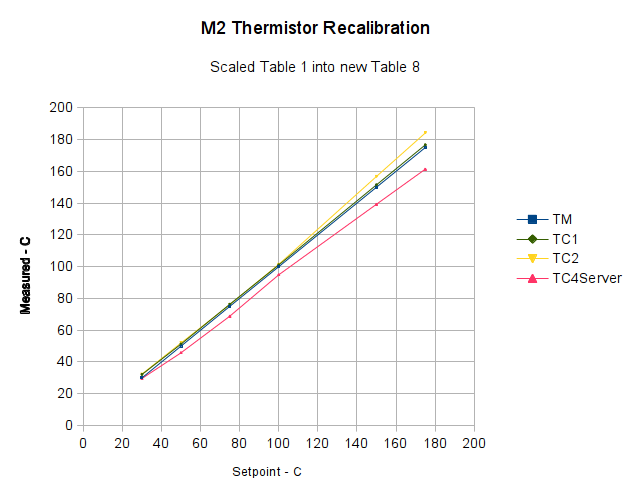
    I inserted that table, changed the thermistor selection, reloaded the firmware, and ran the same test as before, which produced this result:

    Rescaled extruder thermocouple
    Rescaled extruder thermocouple

    The stock thermistor and the thermocouple now report essentially the same values, which is entirely due to the new table. The two additional lines come from two more thermocouples taped to the nozzle and dangling downward toward the platform:

    M2 - Hot end with additional thermocouples
    M2 – Hot end with additional thermocouples

    Given that I simply taped those thermistors in place, they don’t contact the nozzle nearly as well as the epoxied sensors. The fact that one reads a bit higher and the other much lower could be explained by handwaving, but one possibility is that the various thermocouples don’t quite agree with each other.

    Time for some calibration along those lines, methinks…

  • Makergear M2: Thermistor vs. Thermocouple

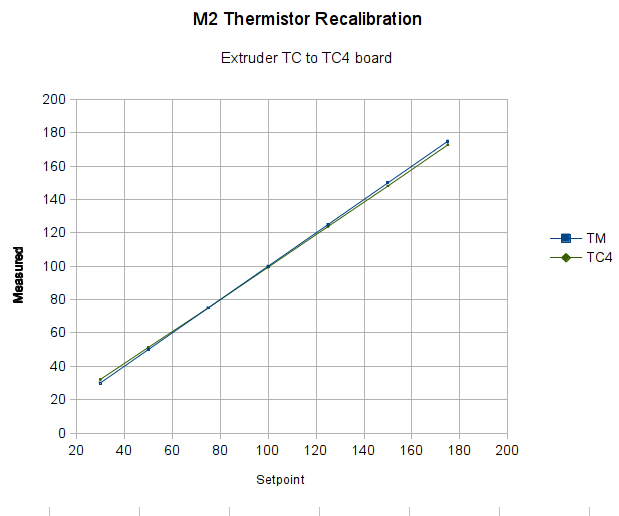
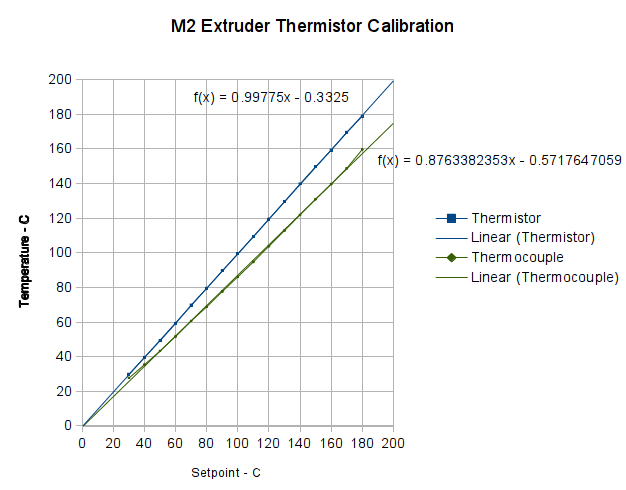
    With the stock thermistor and my added thermocouple epoxied to the M2’s nozzle, I stepped the temperature upward, let it settle, and recorded the temperature from the Pronterface status display and my Fluke thermocouple meter:

    First Heat - M2 thermistor - Fluke with thermocouple
    First Heat – M2 thermistor – Fluke with thermocouple

    Because the firmware servos the temperature through the stock thermistor, that line is dead straight at the exact setpoint values: the reference never disagrees with itself. The thermocouple, however, reads low by about 12%: according to it, the nozzle runs much cooler than the thermistor value.

    Huh?

    Several explanations come to mind:

    • The firmware is using a lookup table that doesn’t match the thermistor
    • The Fluke thermocouple meter reports the wrong value
    • The thermocouple junction is defective
    • Despite the epoxy blob, the two sensors aren’t at the same temperature
    • Something else is kaflooie

    This obviously calls for more data…

  • Zinc-air Cell Corrosion

    For reasons that, alas, have little to do with normal age-related hearing degeneration, I’ve been wearing Etymōtic (that should be a long o symbol) MP-915 High-definition Electronic Earplugs (aka, Martian Ear Beetles) when I need a 6 dB boost for normal conversations. The key advantage: a price 10 dB under full-throttle hearing aids.

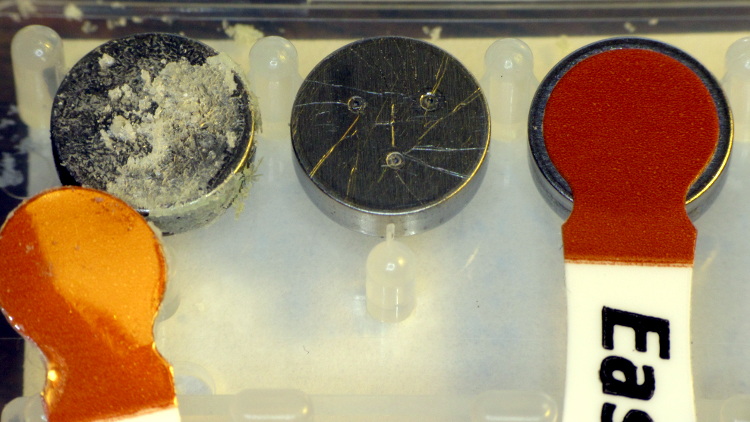
    Anyhow, each one runs for about two weeks on a 312 zinc-air primary cell, so I picked up a batch from the usual eBay vendor. These were short-dated, which let me figure out how long after the rated shelf life they’d be good for, so I know what’s the largest batch I should buy.

    One cell arrived with its air vent seal dislodged:

    Corroded zinc-air cell
    Corroded zinc-air cell

    The cell in the middle is used, with several scratches from the contact point inside the earplug. The cell on the right has a good seal.

    Assuming a good seal, the cells seem to work about as well as the long-dated fresh cells included with the earplugs.

    Although I found several datasheets (Duracell Energizer Rayovac), there seems to be no way to relate the actual cell you purchase to any particular datasheet; the part numbers do not correspond to anything on the package and the nomenclature varies wildly both between manufacturers and within product lines.

  • Makergear M2: Nozzle Temperature Sensing

    The stock Makergear M2 hot end uses a 100 kΩ thermistor for temperature sensing. A wrap of Kapton tape holds it against the brass nozzle, with a stretchy fiberglass-lined tube for protective insulation and a bit of pressure. This picture shows the tape pocket around the thermistor, with my thumbnail on the left:

    M2 Nozzle Thermistor - as-shipped
    M2 Nozzle Thermistor – as-shipped

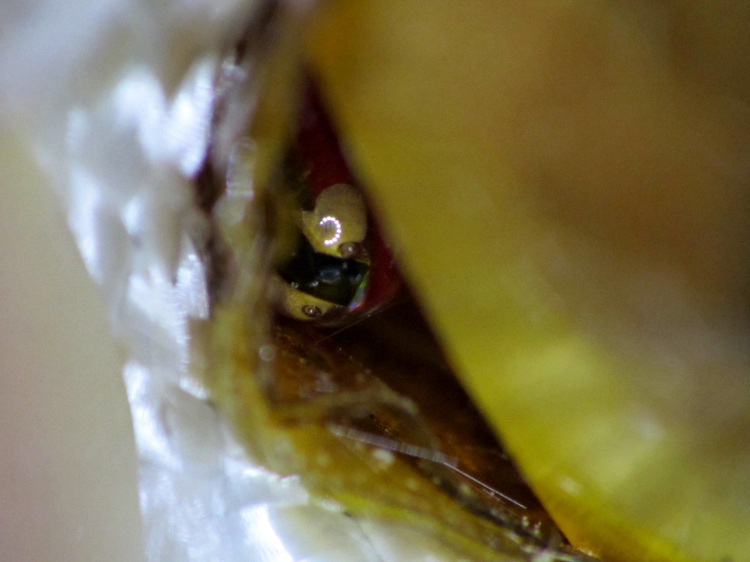
    Peeling back the tape a bit shows the thermistor against the nozzle, with the glass bead reflecting the LED ringlight around the macro lens adapter:

    M2 Nozzle thermistor - exposed
    M2 Nozzle thermistor – exposed

    The RAMBo board in the M2 has four thermistor inputs and no thermocouple inputs, which surely drove the decision to use themistors. I want to use thermocouples with the LinuxCNC controller, because they’re more compact and happier at higher temperatures.

    So I unwrapped the nozzle and lined up a thermocouple beside the thermistor:

    M2 - extruder - thermistor-thermocouple
    M2 – extruder – thermistor-thermocouple

    Where a dab of JB Weld firmly bonds them to the nozzle:

    M2 - extruder - epoxied sensors
    M2 – extruder – epoxied sensors

    As nearly as I can tell, the JB Weld that I used on the Thing-O-Matic is still going strong. I think the trick is to not apply mechanical force to the bond when it’s hot; secure the leads firmly and use the epoxy only as a thermal connection. Yes, you can get fancy higher-temperature adhesives, but this seems to work well enough.

    For the moment, I’m using ordinary cotton cloth secured with Kapton tape as insulation:

    M2 - extruder - cotton insulation
    M2 – extruder – cotton insulation

    The brown dot that looks like a bead is actually a flat stain on the nozzle.

    The insulation should become something more suited for high temperatures, perhaps the ceramic fiber I used on the Thing-O-Matic, but cotton will suffice for now.

    Now, wisely is it written that a man with one thermometer knows the temperature, while a man with two thermometers is never certain…

  • Belkin F6C1500 UPS Battery Wiring Arrangement

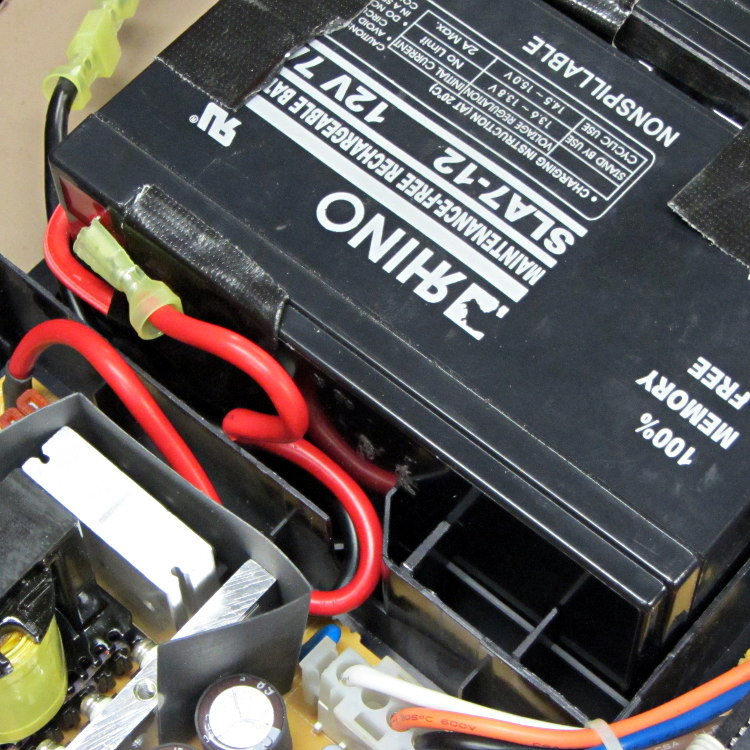
    Given the length of the battery wires inside a Belkin F6C1500 UPS, you might think any arrangement will work. Not so. The wires from the guts of the UPS must exit to the batteries exactly like this:

    F6C1500 Battery wires from UPS
    F6C1500 Battery wires from UPS

    There’s a black wire tucked under the red wire, both of which must exit though the angled slot and run toward the front of the battery compartment.

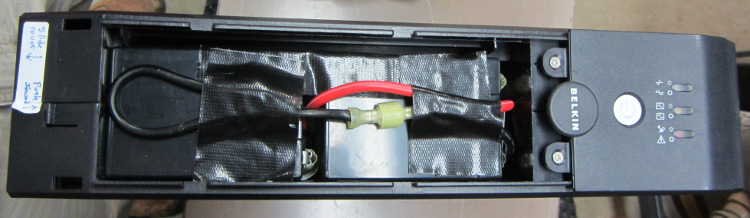
    Seen from the front, the red wire connects the positive terminal of the lower (left) battery to the negative terminal of the top (right) battery and the black wire connects the negative terminal of the lower battery to the UPS circuitry:

    F6C1500 Battery interconnect wires
    F6C1500 Battery interconnect wires

    Trust me on this: there is no other arrangement of those wires that will simultaneously connect everything properly and fit within the case.

    As for disassembly, the small tab on the left end of the case holds the front panel in place. Press that inward with a flat screwdriver, then slide the cover toward the tab. Four locking slots along the sides will disengage and you can then lift the panel off.

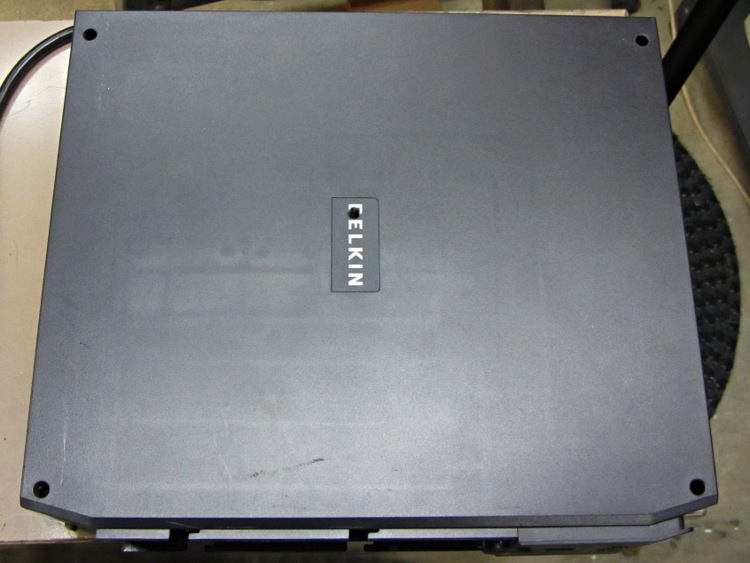
    With that out of the way, there’s a screw hidden under the BELKIN label in the middle of the removable cover:

    Belkin F6C1500 UPS Cover Screw Locations
    Belkin F6C1500 UPS Cover Screw Locations
  • Makergear M2: Z-axis Stepper Motor

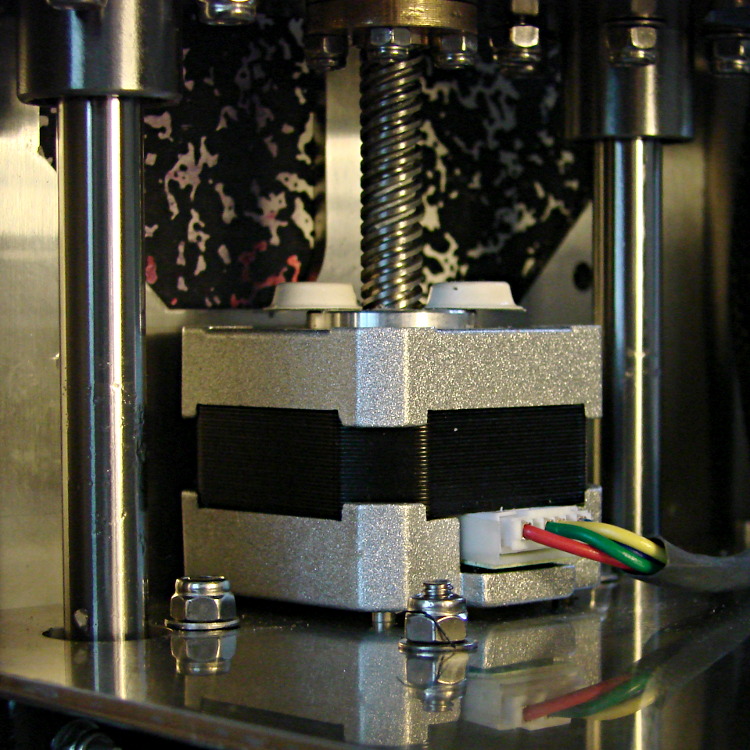
    Several users have observed that the stepper motor driving the M2’s Z axis leadscrew gets very hot. I measured about 140 °F = 60 °C on the as-built motor, so I loosened the screws and raised the motor slightly:

    M2 Z axis motor - raised
    M2 Z axis motor – raised

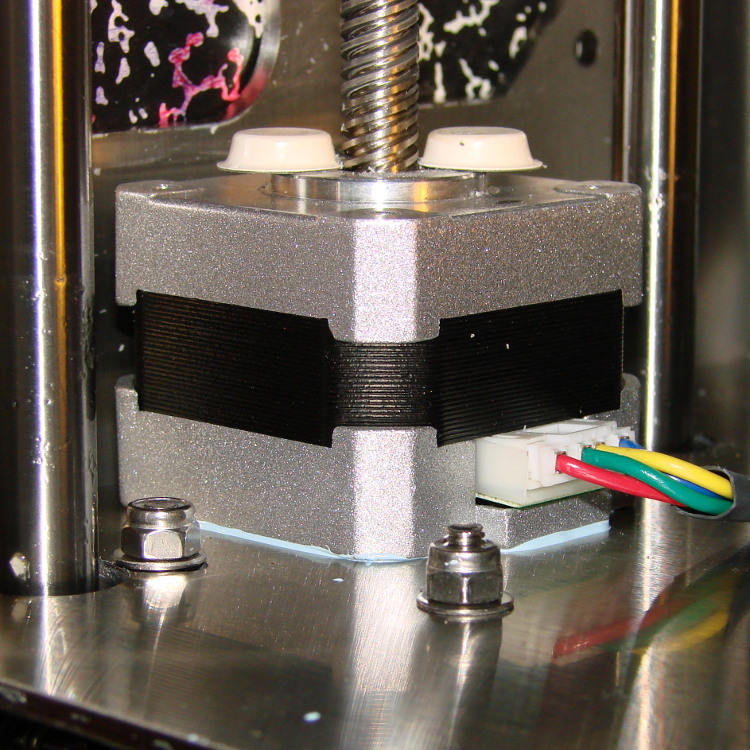
    I eased some heatsink compound underneath by putting dabs on a slip of paper and painting it on the bottom of the motor case, lowered the Z stage to the bottom of its travel, and tightened the mounting screws:

    M2 Z axis motor - added thermal compound
    M2 Z axis motor – added thermal compound

    That reduced the temperature to about 120 °F = 50 °C, which still seemed excessive for a short-stack motor mounted on a fairly large chunk of stainless steel. The motor also sounded quite rough during homing and long manual moves, sooo … something was wrong. I bet you know where this is going, right?

    Let’s start with the firmware side and determine what current the motor should be seeing.

    The M2 uses a slightly modified version of the Marlin firmware running on a RAMBo 1.1b board. The basic RAMBo doc gives these equations relating the peak winding current Imax to the constant W that defines it in the firmware:

    Vref = 0.8 * Imax
    W = 255 * (Vref / 1.66)

    Mashing those together produces this:

    W = 255 * (0.8 * Imax) / 1.66

    The default Z axis stepper current constant W (called Z_CURRENT in the Marlin source) is 135. The board in my M2 has R30 = 3.3 kΩ, which sets the maximum possible current to 2 A. Working the equation backwards, a Z_CURRENT = 135 will produce a peak winding current of 1.1 A.

    However, a nearby comment in the source code suggests this is should be about 0.75 A. The original RAMBo board had a maximum possible current of 1.5 A, but running those numbers doesn’t agree. Another comment suggests 185 corresponds to about 1 A, which isn’t right, either. There’s nothing new about stale comments not corresponding to the actual hardware; I’ve done that myself.

    With 1.1 A in hand, let’s unplug the cable and measure the winding resistance.

    Not much to my surprise, the motor has 28 Ω windings. The M2 uses a 19 V supply for the steppers, so the maximum motor current works out to 19 V/28 Ω  = 680 mA, but it must be less than that to allow the microstepping controller to manage the current.

    It seems that Makergear is connecting a high-resistance stepper intended for a simple H-bridge drive to a high-performance microstepping controller. For some background on why that combination doesn’t work, see my analysis of the original MBI Thing-O-Matic steppers.

    I thought we all agreed we weren’t going to do that any more. Maybe nobody sells a low-resistance motor-with-integral-leadscrew?

    Anyhow.

    The only thing to do in the short term is to reduce the peak current to a rational value around 600 mA:

    74 = 255 * (0.8 * 0.6) / 166

    I set it to a nice, round 75 and reloaded the firmware, which immediately made the motor hum, rather than growl, on long moves. The case temperature didn’t drop by very much, because the poor motor still dissipates about 11 W, not much less than the original 13 W. There’s only so much heat you can pull out of the case and these little motors are actually rated for maybe 5 W, tops.

    The motor’s overall performance didn’t change, which is good, because it didn’t have much performance to begin with. The X and Y motors can accelerate at 9000 mm/s2, but the Z motor limit is 30 mm/s2; it doesn’t really accelerate, it sort of gains momentum in a stately manner.

    Next: let’s see if it really matters.

  • Makergear M2: Heated Build Platform Cable

    The power + thermistor cable for the M2 Heated Build Platform attaches to the Z axis stage at the Y axis motor, with the conductors encased in a fairly stiff braided loom. The cable flexes from fully retracted to fully extended as the HBP moves along the Y axis. Here’s a view at about mid-travel:

    M2 HBP cables - wire loom
    M2 HBP cables – wire loom

    Unfortunately, there’s no provision for strain relief at the HBP or around the connectors. The silicone heating pad firmly anchors the two pairs of power wires to the aluminum plate, but that simply means they flex sharply at the edge of the pad:

    M2 HBP connections
    M2 HBP connections

    I removed the loom between the motor mount and the connectors, but that still doesn’t provide nearly enough flexibility:

    M2 HBP cables - loom removed
    M2 HBP cables – loom removed

    The wires still flex sharply at the outboard side of the connector and at the HBP pad; this can’t possibly survive more than a few thousand long cycles before something expensive breaks. The Thing-O-Matic HBP connector debacle suggests that I may need to attach a strut to the Y axis stage that rigidly supports the connectors, with a much longer loop of wire soaking up the strain to the fixed end.

    The 18 AWG wires carrying the 10+ A of HBP current get unpleasantly warm, suggesting that new loop will require heavier wire. In round numbers from that table, 18 AWG stranded wire runs 6.5 mΩ/ft, so the (roughly) four feet of wire pair between the electronics case and the HBP will drop 250+ mV and dissipate 2.5 W. I suspect it’s worse than that, but haven’t made any measurements to back up that suspicion.