The general idea is to put the electrometer circuitry directly atop the Victoreen 710-104 ionization chamber, so as to minimize the distance from the center collector electrode to the electrometer input. After a few false starts, this looked promising:

The hexagonal circuit board fits the can so nicely that I’ll run with it, despite the over-the-top twee factor. Because it’s so hard to freehand a hex, I printed the green object as a tracing template, despite having the Slic3r preview show the parts just barely fitting on the M2 platform:

Fortunately, my configuration hand is strong:
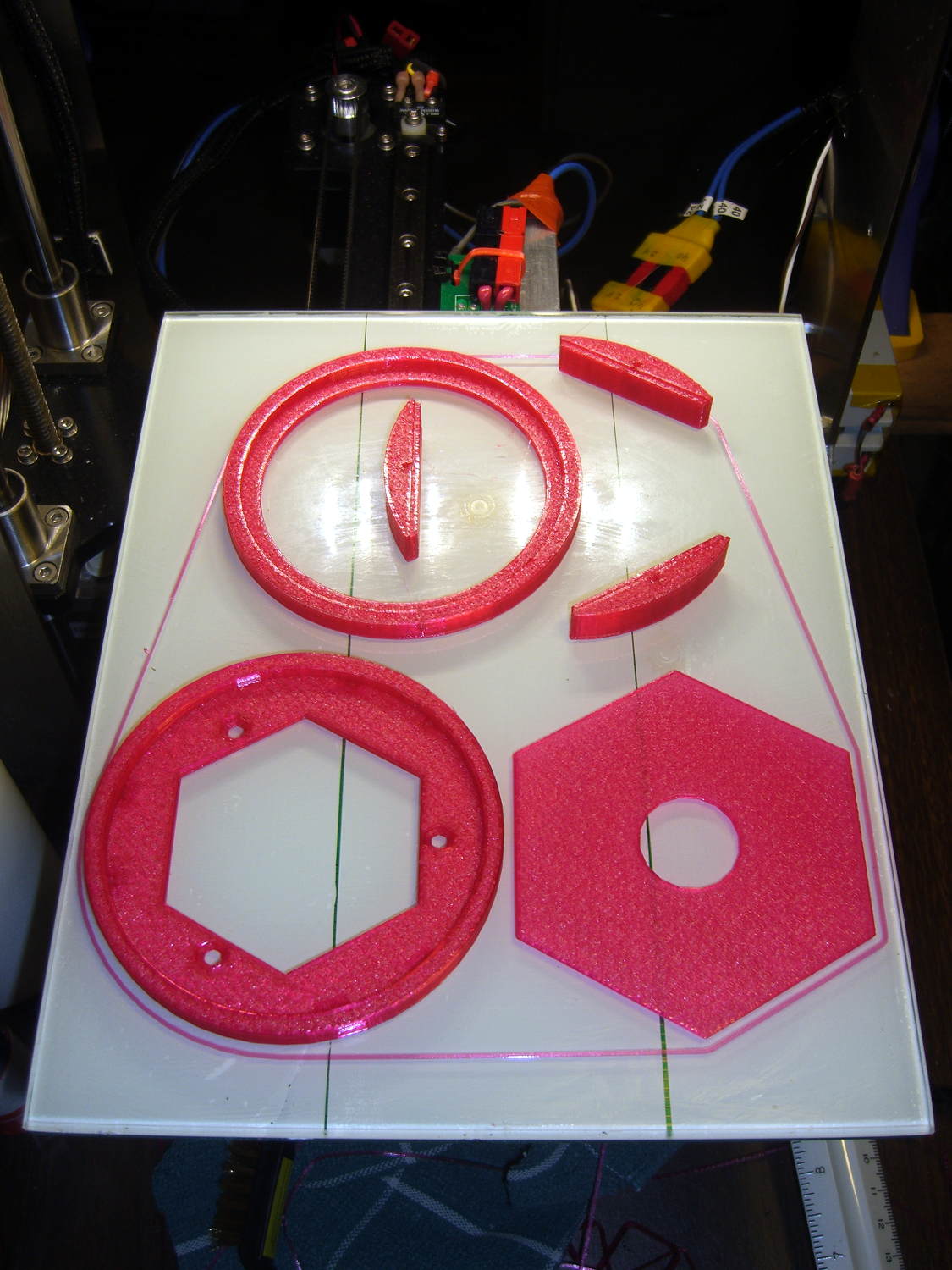
The skirt measures 0.25±0.05 around the entire perimeter, with a slight positive bias (platform too low) along the left side and a corresponding negative bias on the right. Both sides look just fine to me.
A pair of alignment pegs hold each board support in place while gluing:
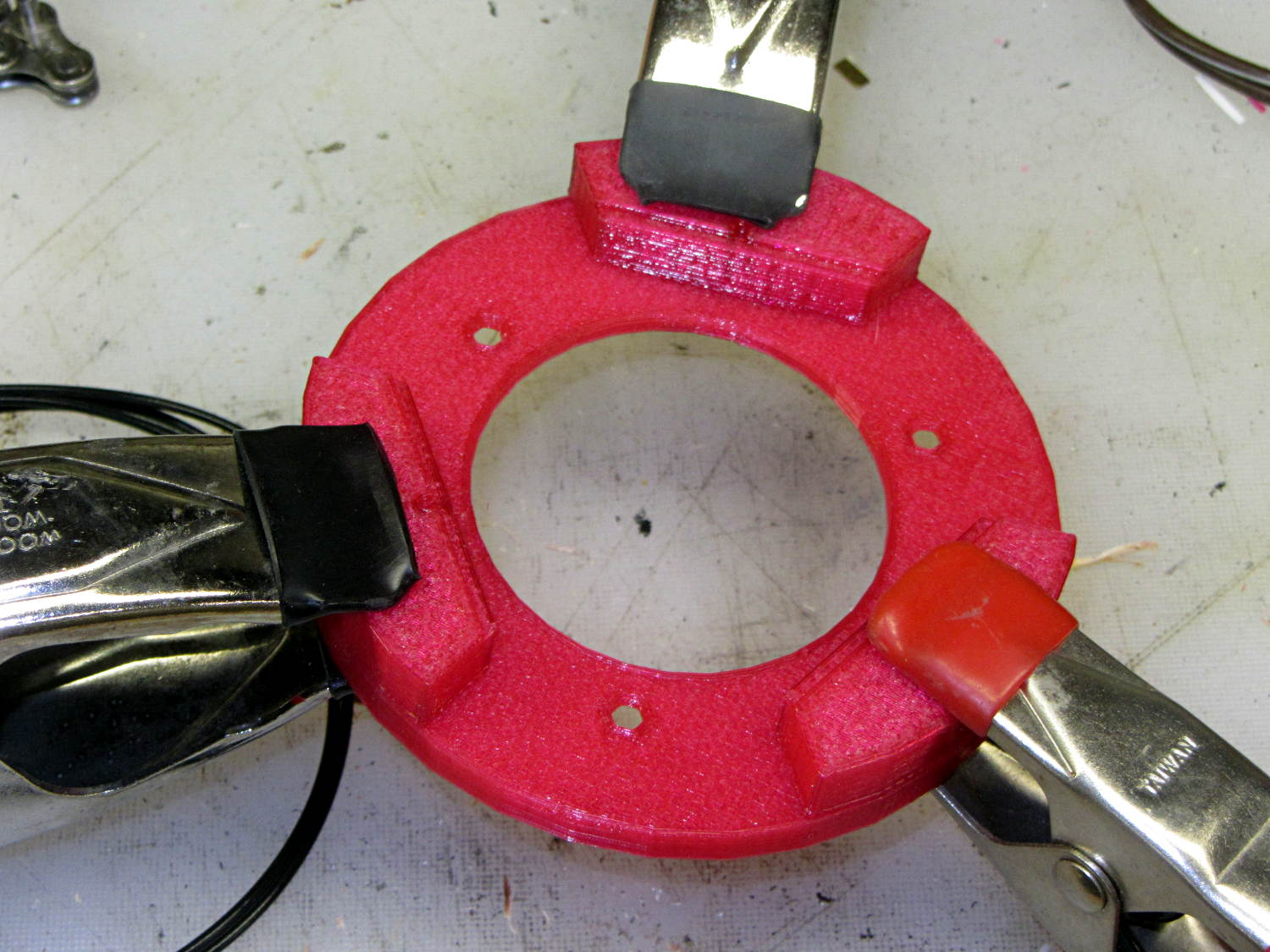
Next time around, I’ll glue the supports with the circuit board template laid in place to ensure the edges have the proper orientation, but they came out surprisingly close just by matching the outer perimeters. Of course, I probably bandsawed / belt sanded the carefully traced hex just slightly off-kilter.
The outer perimeter has 48 sides. Making it a multiple of three means each board support has the same pattern of sides and all will be interchangeable. Making it a multiple of four means each quadrant has the same pattern of sides and the ring looks pleasingly symmetrical. The factor-of-three is most important: you want interchangeable supports. Trust me on this.
The bottom ring keeps the solder dimple that seals the can base off the desk, but I also stuck a quartet of rubber feet on the can for better traction.
Here’s what it looks like with the two A23 12 V bias batteries in their holders, affixed to the can with foam tape:

The OpenSCAD source code includes a few more tweaks:
// Victoreen 710-104 Ionization Chamber Fittings
// Ed Nisley KE4ZNU July 2015

Layout = "Show";
					// Show - assembled parts
					// Build - print them out!
					// CanCap - PCB insulator for 6-32 mounting studs
					// CanBase - surrounding foot for ionization chamber
					// CanLid - generic surround for either end of chamber
					// PCB - template for cutting PCB sheet
					// PCBBase - holder for PCB atop CanCap

BuildTemplate = false;			// true to build PCB template along with everything else

//- Extrusion parameters must match reality!
//  Print with 2 shells and 3 solid layers

ThreadThick = 0.25;
ThreadWidth = 0.40;

HoleWindage = 0.2;

Protrusion = 0.1;			// make holes end cleanly

AlignPinOD = 1.75;			// assembly alignment pins = filament dia

inch = 25.4;

function IntegerMultiple(Size,Unit) = Unit * ceil(Size / Unit);

//- Screw sizes

Tap4_40 = 0.089 * inch;
Clear4_40 = 0.110 * inch;
Head4_40 = 0.211 * inch;
Head4_40Thick = 0.065 * inch;
Nut4_40Dia = 0.228 * inch;
Nut4_40Thick = 0.086 * inch;
Washer4_40OD = 0.270 * inch;
Washer4_40ID = 0.123 * inch;


//----------------------
// Dimensions

OD = 0;											// name the subscripts
LENGTH = 1;

Chamber = [91.0 + HoleWindage,38];				// Victoreen ionization chamber dimensions

Stud = [										// stud welded to ionization chamber lid
	[6.5,IntegerMultiple(0.8,ThreadThick)],		// flat head -- generous clearance
	[4.0,9.5],									// 6-32 screw -- ditto
];
NumStuds = 3;
StudSides = 6;									// for hole around stud

BCD = 2.75 * inch;								// mounting stud bolt circle diameter

PlateThick = 3.0;								// layer atop and below chamber ends
RimHeight = 4.0;								// extending up along chamber perimeter
WallHeight = RimHeight + PlateThick;
WallThick = 5.0;								// thick enough to be sturdy & printable
CapSides = 8*6;									// must be multiple of 4 & 3 to make symmetries work out right

PCBFlatsOD = 85.0 + 2*ThreadWidth;				// hex dia across flats + clearance
PCBThick = 1.1;
PCB = [PCBFlatsOD / cos(30),PCBThick - ThreadThick];		// OD = tip-to-tip dia

echo(str("Actual PCB across flats: ",PCBFlatsOD - 2*ThreadWidth));
echo(str(" ... tip-to-tip dia: ",(PCBFlatsOD - 2*ThreadWidth)/cos(30)));
echo(str(" ... thickness: ",PCBThick));

HolderHeight = 11.0 + PCB[LENGTH];				// thick enough for PCB to clear studs
HolderShelf = 2.0;								// shelf under PCB edge

echo(str("PCB holder height: ",HolderHeight));
echo(str(" ... across flats: ",PCBFlatsOD));

//----------------------
// Useful routines

module PolyCyl(Dia,Height,ForceSides=0) {			// based on nophead's polyholes

  Sides = (ForceSides != 0) ? ForceSides : (ceil(Dia) + 2);

  FixDia = Dia / cos(180/Sides);

  cylinder(r=(FixDia + HoleWindage)/2,
           h=Height,
	   $fn=Sides);
}

//- Locating pin hole with glue recess
//  Default length is two pin diameters on each side of the split

module LocatingPin(Dia=AlignPinOD,Len=0.0) {

	PinLen = (Len != 0.0) ? Len : (4*Dia);

	translate([0,0,-ThreadThick])
		PolyCyl((Dia + 2*ThreadWidth),2*ThreadThick,4);

	translate([0,0,-2*ThreadThick])
		PolyCyl((Dia + 1*ThreadWidth),4*ThreadThick,4);

	translate([0,0,-Len/2])
		PolyCyl(Dia,Len,4);

}

module ShowPegGrid(Space = 10.0,Size = 1.0) {

  RangeX = floor(100 / Space);
  RangeY = floor(125 / Space);

	for (x=[-RangeX:RangeX])
	  for (y=[-RangeY:RangeY])
		translate([x*Space,y*Space,Size/2])
		  %cube(Size,center=true);
}

//-----

module CanLid() {

	difference() {
		cylinder(d=Chamber[OD] + 2*WallThick,h=WallHeight,$fn=CapSides);
		translate([0,0,PlateThick])
			PolyCyl(Chamber[OD],Chamber[1],CapSides);
	}

}

module CanCap() {

	difference() {
		CanLid();

		translate([0,0,-Protrusion])											// central cutout
//			cylinder(d=(BCD - 2*5.0),h=Chamber[LENGTH],$fn=CapSides);
			rotate(180/6)
				cylinder(d=BCD,h=Chamber[LENGTH],$fn=6);

		for (i=[0:(NumStuds - 1)])												// stud clearance holes
			rotate(i*360/NumStuds)
				translate([BCD/2,0,0])
					rotate(180/StudSides) {
						translate([0,0,(PlateThick - (Stud[0][LENGTH] + 2*ThreadThick))])
							PolyCyl(Stud[0][OD],2*Stud[0][LENGTH],StudSides);
						translate([0,0,-Protrusion])
							PolyCyl(Stud[1][OD],2*Stud[1][LENGTH],StudSides);
					}

		for (i=[0:(NumStuds - 1)], j=[-1,1])									// PCB holder alignment pins
			rotate(i*360/NumStuds + j*15 + 60)
				translate([Chamber[OD]/2,0,0])
					rotate(180/4)
						LocatingPin(Len=2*PlateThick - 2*ThreadThick);
	}

}

module CanBase() {

	difference() {
		CanLid();
		translate([0,0,-Protrusion])
			PolyCyl(Chamber[OD] - 2*5.0,Chamber[1],CapSides);
	}
}

module PCBTemplate() {

	difference() {
		cylinder(d=((PCBFlatsOD - 2*ThreadWidth)/cos(30)),h=max(PCB[LENGTH],3.0),$fn=6);		// actual PCB size, overly thick
		translate([0,0,-Protrusion])
			cylinder(d=10,h=10*PCB[LENGTH],$fn=12);
	}
}

module PCBBase() {

	difference() {
		cylinder(d=Chamber[OD] + 2*WallThick,h=HolderHeight,$fn=CapSides);

		rotate(30) {
			translate([0,0,-Protrusion])										// central hex
				cylinder(d=(PCBFlatsOD - 2*HolderShelf)/cos(30),h=2*HolderHeight,$fn=6);

			translate([0,0,HolderHeight - PCB[LENGTH]])							// hex PCB recess
				cylinder(d=PCB[OD],h=HolderHeight,$fn=6);

			for (i=[0:NumStuds - 1])											// PCB retaining screws
				rotate(i*120 + 30)
					translate([(PCBFlatsOD/2 + Clear4_40/2 + ThreadWidth),0,-Protrusion])
						rotate(180/6)
							PolyCyl(Tap4_40,2*HolderHeight,6);

			for (i=[0:(NumStuds - 1)], j=[-1,1])								// PCB holder alignment pins
				rotate(i*360/NumStuds + j*15 + 30)
					translate([Chamber[OD]/2,0,0])
						rotate(180/4)
							LocatingPin(Len=PlateThick);
		}

		for (i=[0:NumStuds - 1])												// segment isolation
			rotate(i*120 - 30)
				translate([0,0,-Protrusion]) {
					linear_extrude(height=2*HolderHeight)
						polygon([[0,0],[Chamber[OD],0],[Chamber[OD]*cos(60),Chamber[OD]*sin(60)]]);
				}
	}


}


//----------------------
// Build it

ShowPegGrid();

if (Layout == "CanLid") {
	CanLid();
}

if (Layout == "CanCap") {
	CanCap();
}

if (Layout == "CanBase") {
	CanBase();
}

if (Layout == "PCBBase") {
	PCBBase();
}

if (Layout == "PCB") {
	PCBTemplate();
}

if (Layout == "Show") {
	CanBase();
	color("Orange",0.5)
		translate([0,0,PlateThick + Protrusion])
			cylinder(d=Chamber[OD],h=Chamber[LENGTH],$fn=CapSides);
	translate([0,0,(2*PlateThick + Chamber[LENGTH] + 2*Protrusion)])
		rotate([180,0,0])
			CanCap();
	translate([0,0,(2*PlateThick + Chamber[LENGTH] + 5.0)])
		PCBBase();
	color("Green",0.5)
		translate([0,0,(2*PlateThick + Chamber[LENGTH] + 7.0 + HolderHeight)])
			rotate(30)
				PCBTemplate();
}

if (Layout == "Build") {

	if (BuildTemplate) {
		translate([-0.50*Chamber[OD],-0.60*Chamber[OD],0])
			CanCap();

		translate([0.55*Chamber[OD],-0.60*Chamber[OD],0])
			rotate(30)
				PCBTemplate();
	}
	else {
		translate([-0.25*Chamber[OD],-0.60*Chamber[OD],0])
			CanCap();
	}

	translate([-0.25*Chamber[OD],0.60*Chamber[OD],0])
		CanBase();
	translate([0.25*Chamber[OD],0.60*Chamber[OD],0])
		PCBBase();
}





 The Smell of Molten Projects in the Morning