Ed Nisley's Blog: Shop notes, electronics, firmware, machinery, 3D printing, laser cuttery, and curiosities. Contents: 100% human thinking, 0% AI slop.
This year’s MVP health plan has a different “OTC Benefit” than last year, even though MVP is contracting with the same company to provide what seems to be essentially the same benefit.
This arrived half a year after the new OTC benefit card showed up:
MVP OTC Card Expiry
I suppose somebody noticed MVP hadn’t gotten around to telling us they were cancelling the old card, despite its Valid Thru 12/26 notation. Well, the card isn’t exactly cancelled, it just stopped working when all the money evaporated.
This not being my first ride in this particular rodeo, I spent all those sweet OTC benny bucks days after they become valid on the first day of every quarter-year, buying up my stock of overpriced OTC stuff.
In theory, you could buy the stuff elsewhere, but you had to scan each item in the retail store using the worst app imaginable to determine its eligibility and coverage. If the store was in a no-wireless-data phone zone: too bad, so sad.
This year’s program is simpler: you must buy everything from the sole-source supplier, even though it costs four times more than the comparable item at, say, Walmart or even Amazon.
A month or so ago a Manjaro update caused all file loading to take minutes, rather than seconds. This sort of breakage seems endemic to rolling update distros, although most glitches vanish within a few days as more knowledgeable users track down the problems and apply the fixes.
File loads and program startups continued to be achingly slow, so I trawled the Interwebs in search of a resolution, tried various suggestions, and had no success until:
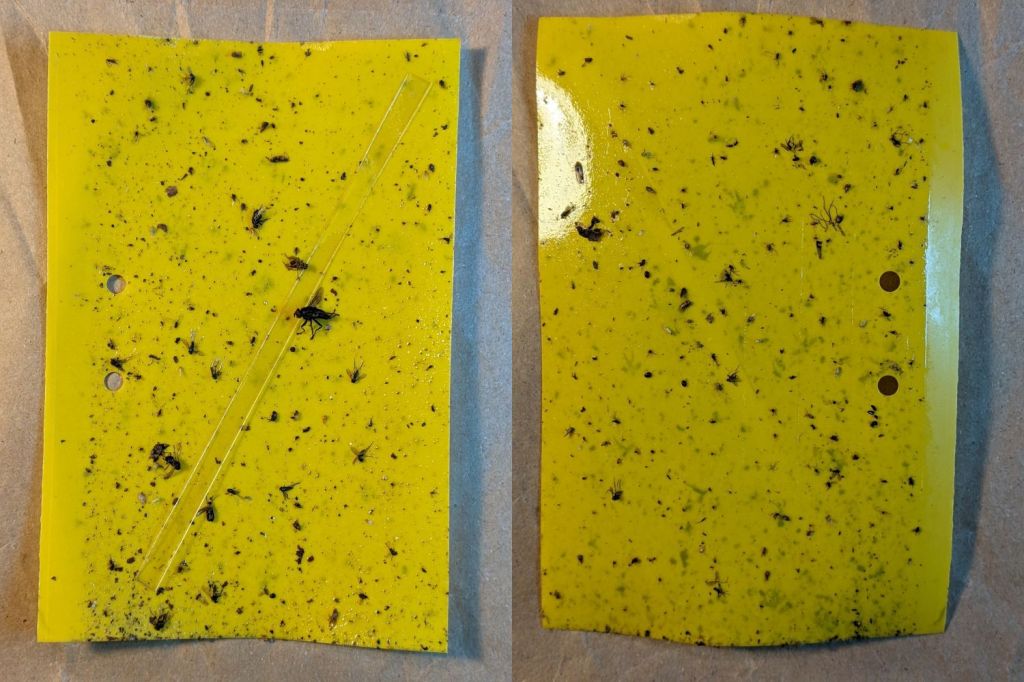
Six sticky traps have been out in Mary’s Vassar Farm onion bed from mid-April through mid-July, collecting onion maggot flies, other flying insects, and a bunch of shredded leaf mulch. Having just replaced all the sticky sheets, these are the results so far:
PXL_20230711_215255180 – VCCG Onion Maggot Trap F
PXL_20230711_215229538 – VCCG Onion Maggot Trap E
PXL_20230711_215159950 – VCCG Onion Maggot Trap D
PXL_20230711_215129817 – VCCG Onion Maggot Trap C
PXL_20230711_215041012 – VCCG Onion Maggot Trap B
PXL_20230711_215002214 – VCCG Onion Maggot Trap A
Each image is the front and back of a single sticky sheet flipped over left-to-right; I did not keep track of the original trap locations.
If you need the original camera images to get enough pixels for itemizing the smaller dots, let me know.
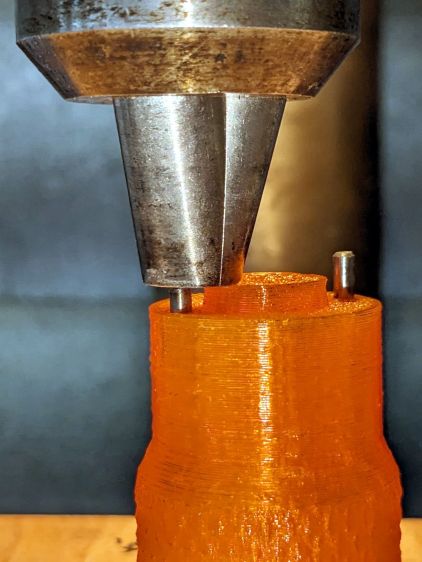
That’s the 0.3 mm exit wound in 3 mm acrylic, one of the mini-lathe chuck stops, carefully hand-held to align the channel.
Squinting at similar holes through clear acrylic shows they’re smoothly melted (as you’d expect), but not exactly perpendicular to the surface. I’m sure the acrylic gas pushes the beam around and erodes the sides of the channel as it boils out of the progressively deepening hole.
The entry wound is about half a millimeter:
Laser-cut pinhole – entry
The heat-distorted strip around the perimeter is less obvious in real life without magnification. The protective plastic film over the surface melts easily and, although it does keep the fumes from condensing, causes a bit of damage.
Each pinhole comes from a single dot in LightBurn’s Dot Mode, so you must arrange the dot spacing to match the path:
Lathe Chuck Stop – Pinhole distance
The pockets are on a 40 mm BCD, so they’re out 20 mm from the center and the hole-to-hole distance is:
34.64 mm = 2 × 20 mm × cos(30°)
Set the dot distance to that exact number and It Just Works.
The laser turns on for a specific number of milliseconds at each dot. In this case, I used 50 ms with the layer set to 70% PWM. You could surely optimize the values.
The starting pinhole gets drilled twice, which happens because Dot Mode expects to make a line of perforations with one dot at each end. In this case, the end of the last line overlaps the start of the first line; two lines would work better than a triangle.
You could make a square array from a single line with (many) dots at the desired spacing, separating the lines by the same spacing.
A circular array might work, too, with a straight line joining successive holes.
Undo would definitely be my copilot while figuring those out.
This could make an easily clogged trash strainer or a filter for small chunks.
CO₂ laser power meters seem to depend on a flat-black absorbing surface to soak up a (typically unfocused) beam pulse, backed by a known metal mass with a thermocouple to measure the temperature rise above ambient. Knowing the pulse width, the temperature rise, the absorber mass and specific heat capacity, you can compute the pulse energy and average power during the pulse.
Previous tinkering with an old Gentec ED-200 showed this works well, although the absorber surface took something of a beating because it was definitely not rated for the OMTech’s 60 W (claimed) beam power.
Rather than using a spendy absorber surface with a durable coating, perhaps a geometric absorber using reflective surfaces arranged to channel the energy into the material, rather than away from it, might suffice.
Consider a pack of ordinary utility knife blades:
Beam absorber – utility blades – overview
Seen kinda-sorta perpendicular to the sharpened side of the blade edge, they’re wonderfully reflective:
Beam absorber – utility blades – edge flat
Seen perpendicular to the edge itself, they’re dead black:
Beam absorber – utility blades – edge-on
Well, pretty close to dead black. It’s darker in real life, with glimmers along the edge and the rest of it a deep black. The edges are sharp, but utility knife blades will lead a rough life and they don’t start out Scary Sharp.
Xacto blades come closer to an ideal razor edge:
Beam absorber – Xacto 11 blades – edge-on
The only things you (well, I) see is dust on the edges. The rest is dead black, because light hitting any shiny surface is reflected deeper into the notch between two blades and eventually absorbed.
Double-edge razor blades are sharper and would likely be even blacker, particularly cheap ones without fancy lubricating coatings.
Bonus: the wavelength of CO₂ laser IR light is 10-20× that of visible light, which makes the surfaces that much more reflective. The geometry still channels the reflections into the block and nothing comes out.
There are some fairly obvious reasons why nobody uses a stack of razor blades as a beam absorber in real life:
Lethally sharp cutting hazard
Impossible to clean without wrecking the edge
But for personal use, why not?
Some doodles:
Steel has a specific heat around 0.47 J/g·K and a stack of utility blades weighing 140 g is 23 mm across. Soaking up a 60 W beam will raise the temperature of the stack by:
0.91 K/s = 60 J/s / (0.47 J/g·K × 140 g)
Which seems reasonable: fire a 10 s burst, measure the temperature rise, and multiply by 0.91.
Similarly, a stack of Xacto #11 weighing 15 g is 11 mm across and the temperature will rise 8.5 °C/s. You’d use that for lower power beams.
You could clamp the blades into a larger heatsink, perhaps with a thermocouple / thermistor in a hole drilled into the block.
Calibrate the stack / heatsink with an embedded cartridge heater: voltage × current × pulse width gives the power dumped into the block, so measuring the temperature rise gives you the temperature-power relation.
This feels like a great Arduino project, although it’s nowhere near getting started.
Although the oven igniter I just installed worked, its 3.0 A current fell below the gas valve’s minimum 3.3 A, which, based on past experience, suggested it would fail in short order. Just to see what happened, I sent a note to the seller, who offered a warranty swap and, after a bit of fiddling, the replacement arrived:
Oven Igniter B – 3.3 A initial current
This one draws exactly 3.3 A, so it just barely meets both its product description and the gas valve’s minimum current.
Daubing urethane adhesive into each pocket, sliding a tiny magnet atop the goo, and flipping them over onto a sheet of plastic atop the surface plate to let them cure went about the way you’d expect. Given the state of my fingertips, however, I was not about to fiddle with the phone / camera / anything, but it really did happen.
The final result:
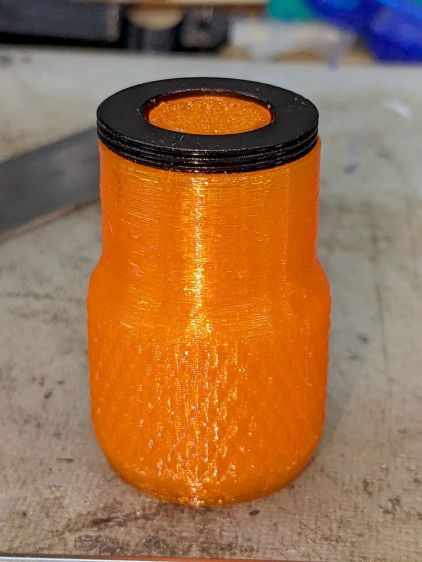
Lathe Chuck Stops – on-lathe storage
The alert reader will notice the slight gap under the left leg of the first orange stop, which provides a good introduction for a few things that should happen differently the next time I do something like this.
To my credit, I got all but one of the 54=3×6×3 magnets into their pockets in the same orientation. That’s gotta count for something and, hey, that orange stop sticks to the chuck just fine.
That one also suffered from my failure to switch the Axis UI to metric units before touching off the Z axis at 0.1 mm, thereby putting the Z=0.0 level 2.53 mm below the surface. Fortunately, the 3 mm MDF baseplate prevented that error from creating three pockets in the tooling plate, although it did produce holes instead of pockets in the stop.
I dropped the magnets into the thru-cut stop on the surface plate and dabbed some adhesive atop the magnets to bond them into their holes. This worked fine and led me to suspect the easiest way to make these stops would be to just laser-cut the holes and skip the whole CNC thing.
The disadvantage of cutting the holes through is that adhesive will inevitably ooze out around the magnet and mess up the bottom surface of the stop. Sticking both the stop and the magnets onto kapton tape seems like it should seal well, but liquid always finds a way.
In any event, the two-part urethane adhesive (JB Plastic Bonder) expands slightly as it cures, which is great for gap filling and not so good for precision bonding. With the pockets in the other 17 stops arranged open-side down, the magnets held themselves firmly to the plastic sheet atop the surface plate and the expanding urethane pushed the acrylic stop upward, leaving the magnets standing slightly proud of the stop’s surface:
Lathe Chuck Stops – protruding magnet
Not by much, mind you, but not what I wanted, having painstakingly cut the pockets 2.2 mm deep for a 2.0 mm magnet.
Next time, dot some slow-cure clear pouring epoxy in each pocket, put the stop on the surface plate with the pocket facing up, then drop the magnet in place. The magnet pulls itself into the pocket, the epoxy doesn’t expand, any overflow will fill in over the magnet, and anything sticking out can be sanded off.
The fixtures worked well and aligned perfectly on the Sherline’s tooling plate. The 0.1 mm outset around the stops in the chipboard probably wasn’t needed, although the total repeatability seemed to be around 0.2 mm and pocket position errors are visible only on the smallest (red) stops:
Lathe Chuck Stops – misaligned pocket
All in all, this turned out pretty well. Next time will be even better!