Ed Nisley's Blog: Shop notes, electronics, firmware, machinery, 3D printing, laser cuttery, and curiosities. Contents: 100% human thinking, 0% AI slop.
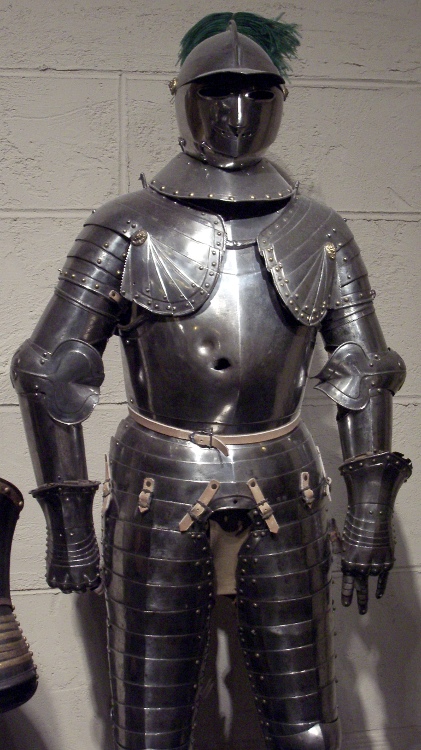
This suit of armor at Higgins Armory Museum in Worcester MA pretty much sums up why armor suits went out of style in a hurry. Click the pic for a bigger view.
That hole is much bigger than your (well, my) thumb and the dent above it isn’t much smaller. I don’t know if the gun fired two slugs (balls?) at once, but, given the accuracy of gunfire in that era, achieving two hits so close together seems unlikely.
A gut shot was inevitably fatal: peritonitis was not your friend.
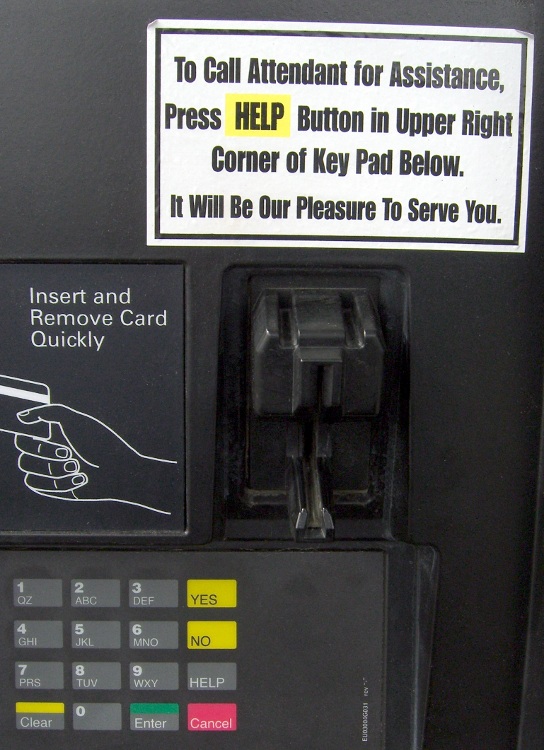
Challenge: given the conspicuous and obviously added-after-the-fact instruction sticker, find the HELP key on the stylin’ gray-on-black keypad.
You may want to click on the picture for a bigger version. I had to remove my sunglasses and peer at the keypad; I’m glad I didn’t need any actual help.
OK, maybe this is dynamiting fish in a barrel, but you’d sort of expect somebody would have noticed the problem along the way, what with the yellow background that required two-color sticker printing.
My guess: they have more than one version of the pump…
We were at a college graduation at a Prestigious University and this was one strap among many holding up the Big Tent over the assembled students & parents.
Pop quiz: how many safety problems can you count?
Let’s see…
Frayed strap sewn to loop
Strap passed around hook without thimble
Knotted strap
Broken hook safety latch spring
General corrosion
To their credit, each perimeter pole had two straps and each strap had its own three-stake ground plate. I didn’t inspect the whole tent, but this looked like the only dodgy strap along the side I was standing at.
Note: the graduate wasn’t our daughter, so we didn’t stay for the ceremony. We gabbed it up with all the assembled relations, then split before the speechifying started. Everybody survived.
This pair of halogen outdoor spotlights has been in place for at least a decade; they don’t see much use, so the filaments haven’t burned out in all that time.
A lens fell off a few days ago, at which point I realized that it was the second lens to fall off; where the first one got to, I cannot say. I suspect they’ve never been turned on in the rain, as a single drop of water on a halogen capsule would shatter it like, uh, glass.
The right-hand bulb was evidently the first to fail, as it’s full of toasted spider silk, seed husks, and bug carapaces. The reflector aluminization doesn’t like exposure to the Great Outdoors, although it’s in surprisingly good shape for the mistreatment it’s seen.
I installed a pair of ordinary fused-glass spotlights from Ol’ Gene’s stash that Came With The House; they’ve been in the basement at least as long as those halogens have been on the side of the house. I suppose he put the good spots up there and kept the plain ones in reserve.
Maybe the “new” spots will last for another decade?
Having determined that the existing Arduino LiquidCrystal library routine wouldn’t work for the Optrex DMC-16117 character LCD in my parts heap, I decided to modify it to meet the data and timing requirements mentioned in the datasheet. This is sufficiently slow and old that it should work for contemporary displays built around the Hitachi HD44780 and its ilk, but I certainly haven’t tested it!
The straight dope on building an Arduino library from scratch is there, but there’s no need to work from First Principles here.
Start by copying the library files (this FLOSS stuff is wonderful that way), renaming them, and changing all the LiquidCrystal strings to LCD_Optrex:
cd /opt/arduino/hardware/libraries/
cp -a LiquidCrystal LCD_Optrex
cd LCD_Optrex
rm LiquidCrystal.o
rename 's/LiquidCrystal/LCD_Optrex/' LiquidCrystal.*
for f in LCD* k*; do sed -i 's/LiquidCrystal/LCD_Optrex/g' $f; done
cd examples
for f in * ; do sed -i 's/LiquidCrystal/LCD_Optrex/g' $f/$f.pde
cd -
You could do that by hand with an editor if you prefer.
Depending on how you’ve installed the Arduino files, you may need a sudo to make that work. Better, perhaps, to tweak the permissions for (at least) the LCD_Optrex directory & files therein to grant yourself write access.
I created a sendraw4() function to send a single 4-bit nibble during the startup sequence, so add that to the private section of LCD_Optrex.h:
The new code is in LCD_Optrex is shamelessly adapted from the existing send() function, minus the mode selection and 8-bit stuff:
void LCD_Optrex::sendraw4(uint8_t value) {
  digitalWrite(_rs_pin, LOW);
  digitalWrite(_rw_pin, LOW);

  for (int i = 0; i < 4; i++) {
    digitalWrite(_data_pins[i], (value >> (i + 4)) & 0x01);
  }

  digitalWrite(_enable_pin, HIGH);
  digitalWrite(_enable_pin, LOW);
}
If I were doing this from scratch, I’d use d7 through d4 rather than d3 through d0 to match the datasheet, but that’s a stylin’ thing.
Replace the existing LCD panel setup code with an exact mapping of the datasheet’s procedure. For the 4-bit setup, it goes a little something like this:
delayMicroseconds(16000);       // mandatory delay for Vcc stabilization
sendraw4(0x30);                 // set 8-bit mode (yes, it's true!)
delayMicroseconds(5000);        // mandatory delay
sendraw4(0x30);
delayMicroseconds(200);
sendraw4(0x30);
delayMicroseconds(40);          // command delay
sendraw4(0x20);                 // finally set 4-bit mode
delayMicroseconds(40);          // command delay

command(0x28);            // 4-bit, 2-line, 5x7 char set
command(0x08);            // display off
command(0x01);            // clear display
delayMicroseconds(16000);
command(0x06);            // increment, no shift
command(0x0c);            // display on, no cursor, no blink
It seems you cannot use the delay() function in the constructor, as interrupts and suchlike aren’t active. The delayMicroseconds() function disables & enables interrupts; I don’t know if that is a Bad Thing or not.
The 8-bit initialization code, which I haven’t tested, doesn’t need the sendraw4() function, but does need the same alterations. Apart from enabling 4-bit mode, of course.
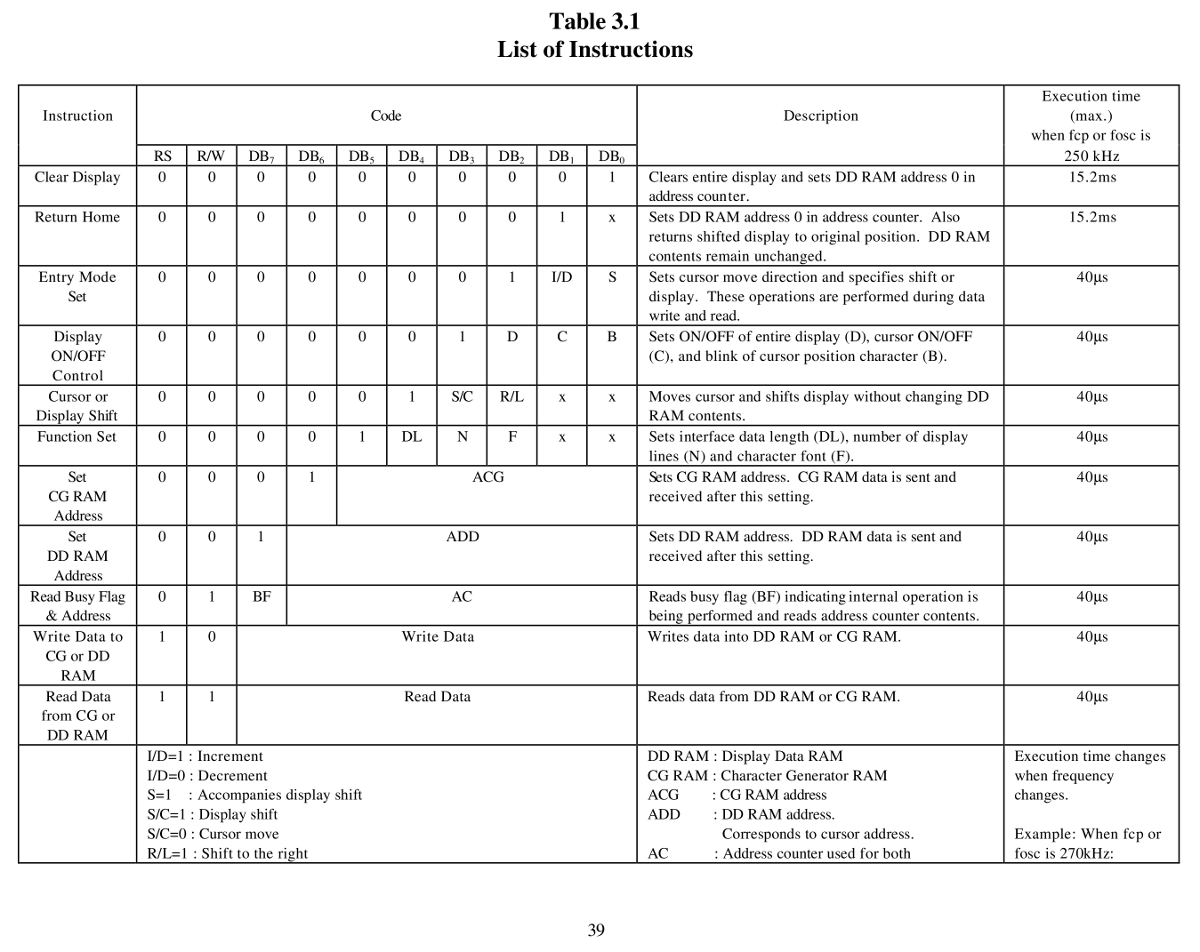
Various commands have different timing requirements, as shown on page 39 of the DMC16117 datasheet. Add a delayMicroseconds(16000); to the clear() and home() functions, then add delayMicroseconds(40); to the send() function, like this:
void LCD_Optrex::clear()
{
  command(0x01);  // clear display, set cursor position to zero
  delayMicroseconds(16000);
}
Optrex DMC16117 Instruction Timing
With all that in place, fire up the Arduino IDE and compile one of the example programs. That will build the LCD_Optrex.o file, too. If you have such a display, either wire it up as indicated or change the example code to match your connections.
What should happen is that the LCD should initialize correctly under all conditions… how’s that for anticlimactic?
Here’s an OpenOffice document with LCD_Optrex.h, LCD_Optrex.cpp, and examples.txt all in one lump: LCD_Optrex Library Files.odt. Save each section as a separate flat-ASCII text file with the appropriate name in the right spot and you’re in business. I’d present a ZIP file, but WordPress isn’t up to that.
Memo to Self: A function to write a 16-character string to the stupid 16-character DMC16117 which has a single row that’s addressed as two 8-character lines would be nice. That requires keeping track of the current cursor position, which could be tricky. Maybe I should just scrap those suckers out?
I recently attached an ancient Optrex DM16117 LCD to an Arduino and discovered that the standard LiquidCrystal library routine wouldn’t initialize it properly. After turning on the power, the display would be blank. Hitting the Reset button did the trick, but that’s obviously not the right outcome.
It turns out that initializing one of these widgets is trivially easy after you realize that the data sheet is required reading. If you do everything exactly right, then it works; get one step wrong, then the display might work most of the time, sorta-kinda, but most likely it won’t work, period.
The catch is that there’s no such thing as a generic datasheet: what you must do depends on which version of the HD44780 controller lives on the specific LCD board in your hands and what oscillator frequency it’s using. The LiquidCrystal library seems to be written for a much newer and much faster version of the HD44780 than the one on my board, but, even so, the code may not be following all the rules.
Optrex DMC16117 Initialization Sequence
To begin…
Fetch the Optrex DMC16117 datasheet, which includes the HD44780 timings for that family of LCD modules. There’s also a datasheet for just the Optrex LCD module itself, which isn’t quite what you want. You could get a bare Hitachi HD44780 datasheet, too, but it won’t have the timings you need.
Pages 32 and 33 of the DMC16117 datasheet present the 8-bit and 4-bit initialization sequences. Given that no sane engineer uses the 8-bit interface, here’s the details of the 4-bit lashup.
Two key points:
The first four transfers are not standard command sequences
The delays between transfers are not negotiable
The starting assumption is that the LCD has not gone through the usual power-up initialization, perhaps because the supply voltage hasn’t risen at the proper rate. You could drive the LCD power directly from a microcontroller pin for a nice clean edge, but most designs really don’t have any pins to spare for that sort of nonsense: code is always cheaper than hardware (if you ignore non-recurring costs, that is, as many beancounters do).
The Arduino LiquidCrystal library routine initialization sequence (in /opt/arduino/hardware/libraries/LiquidCrystal/LiquidCrystal.cpp) looks like this:
command(0x28);  // function set: 4 bits, 1 line, 5x8 dots
command(0x0C);  // display control: turn display on, cursor off, no blinking
command(0x06);  // entry mode set: increment automatically, display shift, right shift
clear();
The four-bit version of the command() function sends both nibbles of its parameter, high followed by low, which simply isn’t correct for the first few values the DMC16117 expects. Worse, the timing doesn’t follow the guidelines; there’s no delay at all between any of the outgoing values. Again, this is most likely due to the fact that LiquidCrystal was written for a newer version of the HD44780 chip.
After a bit of fiddling around, I decided that the only solution was to create a new library routine based on LiquidCrystal with the proper delays and commands: LCD_Optrex. It might not work for newer LCDs, but at least it’ll play with what I have in my parts heap.
Every now and again the Arduino IDE spits out an error message along the lines of “couldn’t determine program size” or simply fails to compile with no error message at all. The former is evidently harmless, but the latter can be truly annoying.
The cause is described for Macs there as a race condition in the IDE on multi-core processors, with a patch that either partially fixes the problem or pushes it to a less-likely part of the code. That’s true on my system, as the error still occurs occasionally.
How you apply it to Xubuntu 8.10: unzip the file to get Sizer.class, then copy that file to /usr/lib/jvm/java-6-sun-1.6.0.10/jre/lib/. That won’t be the right place for a different Xubuntu or different Java, so use locate rt.jar and plunk it into that directory.
A less dramatic change seems to be setting build.verbose=true and upload.verbose=true in ~/.arduino/preferences.txt.
This is evidently an error of long standing, as it’s been discussed since about Arduino 11. I’m currently at 15 and it seems that patch will be in the next version of the IDE.



 The Smell of Molten Projects in the Morning