Ed Nisley's Blog: Shop notes, electronics, firmware, machinery, 3D printing, laser cuttery, and curiosities. Contents: 100% human thinking, 0% AI slop.
The standard Sherline mill comes with tapered plastic knobs on the handwheels, which is exactly what you want for a manual mill and what you don’t want on a CNC machine: they rattle like crazy during computer-controlled moves.
Some folks contend the knob unbalances the handwheel, but I’m not convinced that’s a real problem. Their advice is to remove the entire knob assembly, leaving a bare shaft sticking out of the motor. Seems a bit extreme to me.
In any event, shortly after I got the mill, I unscrewed the little retaining screw from the end of each knob, put all the parts in a ziplock bag, tucked it in my tool box, and have been rattle-free ever since.
The metal shaft is entirely adequate for those rare occasions when I turn the knob manually, the graduated settings let me detect when if I’ve screwed up the acceleration (on a new installation) to the point where the motor is losing steps, and all is right with the world.
Oh, that orange-barred white tape in front of the motor? That’s a reminder to keep the usual pile of crap away from the spinning knob. That little shaft can fling small objects a fair distance and makes a nasty tangle out of a misplaced red rag…
We met this lass while walking around the high school one evening.
My first thought was that eliminating the Morse Code requirement has definitely broadened the amateur radio population, but it turns out she’s part of the Hudsonia Blanding’s Turtle study. Perhaps the new construction around the school has opened pathways for her to explore the world.
She seemed to be looking for a way up-and-over the curb to return home. We figured she was big enough to figure this out on her own and old enough to have done so many times before, so we left her to her own devices. When last seen, she was chugging along the curb at a pretty good clip.
Listen for tag 123122 (or 817) on 150.888 MHz… she’s running AM QRP with a bad antenna.
Update: It’s hard to tell with turtles, but it’s a girl! When I reported the tag number to Hudsonia, they said “817 is one of our old-timers; we’ve been tracking her for at least 10 years now.”
Gnuplot can do curve fitting (of all kinds) and parks the coefficients in variables. In general, you’d like to display those values on the final plot for later reference…
The trick is using the sprintf() function, which behaves largely like the C version, to insert the variable into a formatted string for use in the label command.
I drive Gnuplot with shell scripts, which simplifies introducing parameters & suchlike. That’s conspicuous by its absence here, but when you need it, you need it bad.
The script to generate that plot looks like this, with some key points in the highlighted lines:
#!/bin/sh
export GDFONTPATH="/usr/share/fonts/truetype/msttcorefonts/"
gnuplot << EOF
set term png font "arialbd.ttf" 18 size 950,600
set output "Calibration Curve - Full.png"
set title "Calibration Curve - Full"
set key noautotitles
unset mouse
set bmargin 4
set grid xtics ytics
set xlabel "10^5/ADC"
set format x "%3.0f"
set ylabel "Resistance - Ohm"
set format y "%3.0f"
set yrange [0:100]
set datafile separator "\t"
f(x) = m*x + c
fit f(x) "Measurements/Calibration.csv" using 3:1 via m,c
set label 1 sprintf("m = %3.4f",m) at 510,75 font "arialbd,18"
set label 2 sprintf("c = %3.4f",c) at 510,70 font "arialbd,18"
plot    \
 "Measurements/Calibration.csv" \
 using 3:1 with linespoints lt 3 lw 3 pt 3 , \
f(x) lt 4 lw 2
EOF
The dataset for that plot is tucked into the obvious file and looks like this, with tabs between the columns:
Most character-mode LCDs seem to be happy with a VEE supply of about 0 V, which produces enough contrast to get by. If you have a negative supply handy, then it’s easy to goose it with a little negative bias and improve the contrast.
What if you don’t have a negative supply and you’re using an old craptastic LCD that really wants VEE = -1 V and you didn’t realize that until you had everything wired up and it’s a one-off / low-duty-cycle instrument that you don’t want to spend much more time on?
Just whack up a quick-and-dirty charge pump inverter…
Quick and dirty LCD VEE Inverter
It turns out that the circuitry already had a 33 kHz PWM square-wave signal driving something else, so I air-wired this inverting charge pump to the PWM output. You could, of course, put an otherwise unoccupied PWM output to good use, which is a better idea if you have the option.
You can use a PWM output, but the charge pump depends on being fully charged & discharged in every cycle. Run your own numbers.
The LCD’s VEE input dumps about 1 mA to the supply, which means the charge pump must be able to pull out 1 mC/s, more or less. At 33 kHz, each cycle must haul 30 nC.
Assuming the Arduino (well, any microcontroller will do, but that’s what I’m using) has a 5 V power supply and the output pin isn’t overloaded from the rest of its function and the cap charges & discharges completely during each half-cycle, then the first cap must store that 30 nC of charge. You want a lot more than that so you have a stiff supply to work with.
Q = CV, so you need at least 30 nC/5 V = 6 nF. Nothing exceeds like excess, so I soldered a 220 nF box cap standing up from the header pin on the circuit board and air-wired the diodes in place. That will transfer lots more charge and keep the voltage nicely negative.
I have a lifetime supply of 10 µF solid tantalum caps, so that’s what I used for the filter cap. Regulation isn’t critical, but each pump cycle shouldn’t change the voltage on that cap very much. In fact, pulling 220 nF * 5 V = 1 µC from the filter cap while injecting 30 nC from the LCD leaves you with a whopping 970 nC deficit: it’ll stay around -5 V just fine.
Actually, it won’t. The negative supply will be about two diode drops above -5 V. The diodes aren’t carrying a lot of current, so they’ll be running at maybe half a volt apiece. Call it -4 V, more or less. You could use Schottky diodes if you need more negative volts.
If the LCD dumps 1 mA into the supply and -1 V produces the right contrast, then a 3 k resistor will drop the necessary voltage from the supply.
As it turned out, the LCD dumped 800 µA, -0.8 V gave the right contrast, and a 4.7 k resistor worked just fine. Maybe you want a twiddlepot in there to adjust things.
You need that little cap right at the LCD VEE pin to soak up the spikes from the LCD drive multiplexing, as this “power supply” has nearly 5 k output impedance. Yow!
If you’re worried about temperature compensation, then you’ll need something fancier. In that case, you’ll also want a Spice model to be sure all these rough-and-ready calculations cut somewhere close to the truth.
Memo to Self: maybe next time this should be on the PCB right from the start, even if it’s not really needed? Or, much better, just go with a single-chip inverter and be done with it!
Update: If you’re worried about driving a bare cap from your microcontroller pin, add a small-value series resistor. The time constant should be maybe a third of the square-wave period: 15/3 = 5 µs in this case, so the resistor should be 5 µs/220 nF = 22 Ω. That limits the peak current to no more than 5 V/22 Ω = 230 mA, not a big improvement. Mostly, the microcontroller pin will be OK if you’re using small caps.
The thumb roller fell off my digital caliper in the heat of a project, forcing me to deploy a hot backup from the upstairs desk.
This looks like a clear-cut case of underdesign, because it broke exactly where you’d expect: at the midpoint of the arch. Having my thumb right over the spot marked X, though, meant that I had all the pieces and could, at least in principle, glue everything back together.
Glued and clamped
As with all repairs involving adhesives, the real problem is clamping the parts together while the glue cures. I clamped a stack of random plastic sheets to the back of the case to establish a plane surface behind the mount, with a small steel shim to prevent the top sheet from becoming one with the repair.
The roller shaft was about the same size as a #33 drill and the opening was about 110 mils. Some 3/32″ (actually about 96 mils) rectangular telescoping brass tubing was about the right size & shape to hold the opening in alignment. Another length of tubing kept the broken part from sliding to the left.
A dab of solvent glue (I still use Plastruct, but it’s not like it used to be before it became less toxic) on both pieces, line ’em up, apply a clamp to hold it in place, and let it cure overnight.
I have no confidence that this will stay together for very long, so I’ll probably be forced to mill a little replacement mounting doodad.
Ought to be good for a few hours of quality shop time…
Memo to Self: Don’t run the slide off the end of the body, because that rubber boot is an absolute mumble to put back in place.
For those of you still using Windows, here’s a sobering look at why you shouldn’t: an analysis of the Torpig botnet by an academic group that managed to take over its command & control structure for a few days.
The report is tech-heavy, but well worth the effort to plow through.
Here are some of the high points…
Why do the bad guys do this? It’s all about the money, honey:
In ten days, Torpig obtained the credentials of 8,310 accounts at 410 different institutions.
… we extracted 1,660 unique credit and debit card numbers from our
collected data.
Does an antivirus program help?
Torpig has been distributed to its victims as part of Mebroot. Mebroot is a rootkit that takes control of a machine by replacing the system’s Master Boot Record (MBR). This allows Mebroot to be executed at boot time, before the operating system is loaded, and to remain undetected by most anti-virus tools
In these attacks, web pages on legitimate but vulnerable web sites are modified with the inclusion of HTML tags that cause the victim’s browser to request JavaScript code from a[nother] web site under control of the attackers. This JavaScript code launches a number of exploits against the browser or some of its components, such as ActiveX controls and plugins. If any exploit is successful, an executable is downloaded from the drive-by-download server to the victim machine, and it is executed.
What happens next?
Mebroot injects these modules […] into a number of applications. These applications include the Service Control Manager (services.exe), the file manager, and 29 other popular applications, such as web browsers (e.g., Internet Explorer, Firefox, Opera), FTP clients (Leech-FTP, CuteFTP), email clients (e.g., Thunderbird, Outlook, Eudora), instant messengers (e.g., Skype, ICQ), and system programs (e.g., the command line interpreter cmd.exe). After the injection, Torpig can inspect all the data handled by these programs and identify and store interesting pieces of information, such as credentials for online accounts and stored passwords.
If you think hiding behind a firewall router will save you, you’re wrong:
By looking at the IP addresses in the Torpig headers we are able to determine that 144,236 (78.9%) of the infected machines were behind a NAT, VPN, proxy, or firewall.
If you think you’ve got a secure password, you’re wrong:
Torpig bots stole 297,962 unique credentials (i.e., username and password pairs), sent by 52,540 different Torpig-infected machines over the ten days we controlled the botnet
If you think a separate password manager will save you, you’re wrong.
It is also interesting to observe that 38% of the credentials stolen by Torpig were obtained from the password manager of browsers, rather than by intercepting an actual login session.
Remember, the virus / worm / Trojan / botnet attacks you read about all the time only affect Windows machines. Linux isn’t invulnerable, but it’s certainly safer right now. If you’re running Windows, it’s only a matter of time until your PC is not your own, no matter how smart you think you are.
If you have one or two must-gotta-use Windows programs, set up a dedicated Token Windows Box and use it only for those programs. Network it (behind a firewall) if you like, but don’t do any email / Web browsing / messaging / VOIP on it. Just Say No!
For everything else, run some version of Linux. It’ll do what you need to get done with less hassle and far less risk. It’s free for the download, free for the installation, and includes all the functions you’re used to paying money for. Just Do It!
If you think using Linux is too much of a hassle, imagine what putting your finances back together will be like. Remember, the bad guys will steal everything you’ve ever put on your PC, destroy your identity, and never get caught.
The Axis user interface for EMC2 has a manual command entry mode, wherein you can type G-Code statements and EMC2 will do exactly what you say. That’s handy for positioning to exact coordinates, but I rarely use it for actual machining, as it’s just too easy to mis-type a command and plow a trench through the clamps.
OK, on a Sherline mini-mill, you’d maybe just snap off a carbide end mill, but you get the general idea.
I was making a simple front panel from some ancient nubbly coated aluminum sheet. The LCD and power switch rectangles went swimmingly.
Then I tried to mill an oval for the test prod wires using G42.1 cutter diameter compensation. I did a trial run 1 mm above the surface, figured out how to make it do what I wanted, then punched the cutter through the sheet at the center of the oval and entered (what I thought were) the same commands by picking them from the history list.
EMC2 now handles concave corners by automagically inserting fillets, so it must run one command behind your typing. I drove the cutter to the upper-right end of the oval (no motion) so it could engage cutter comp mode, entered the G2 right endcap arc to the lower edge (cuts straight to upper right), and then did something wrong with the next command.
Epoxy-patched front panel hole
The cutter carved the endcap properly, then neatly pirouetted around the end and started chewing out an arc in the other direction. Even looking at the command trace I can’t figure out what I mistyped, but as it turns out it doesn’t matter… I was using the wrong dimensions for the hole anyway.
So it’s now patched with epoxy backed up by a small square of aluminum. When it’s done curing, I’ll manually drill a pair of holes at the right coordinates, manually file out the oval, shoot a couple of coats of paint, and it’ll be OK.
Nobody will ever know!
If I recall correctly, Joe Martin of Sherline was the first person to observe that, unlike word processing programs, CNC machines lack an Undo key…
Update: Like this…
Patched panel – rear view
The shoot-a-couple-of-coats thing did not go well: a maple seed landed on the front panel. Ah, well, it’s close enough. Here’s a trial fit; the bellyband height extenders on the sides need a dab of epoxy and a shot of paint, too, but I may never get a round ‘tuit for that.
Front panel trial fit
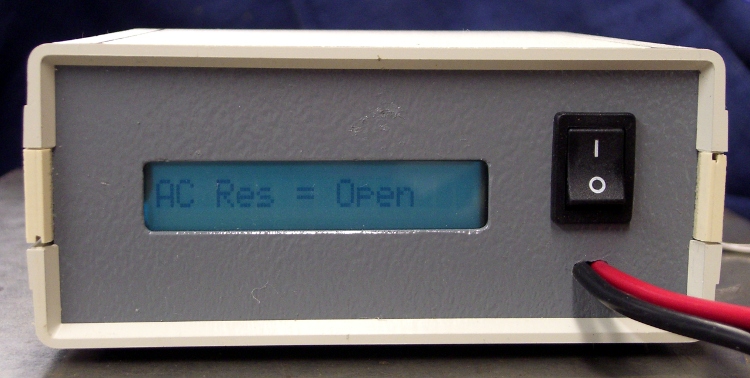
It’s the long-awaited Equivalent Series Resistance meter…


 The Smell of Molten Projects in the Morning