Ed Nisley's Blog: Shop notes, electronics, firmware, machinery, 3D printing, laser cuttery, and curiosities. Contents: 100% human thinking, 0% AI slop.
It’s that time of the year again: a pair of hens and about a dozen chicks have been cruising through the yard. The chicks vary from softball- to football-sized, so we think the hens are tending a creche.
The chicks are, of course, insufferably cute…
We haven’t seen a hen with chicks roosting in the trees this year, but that just means they’re using trees near the creek rather than ones we can see from the house.
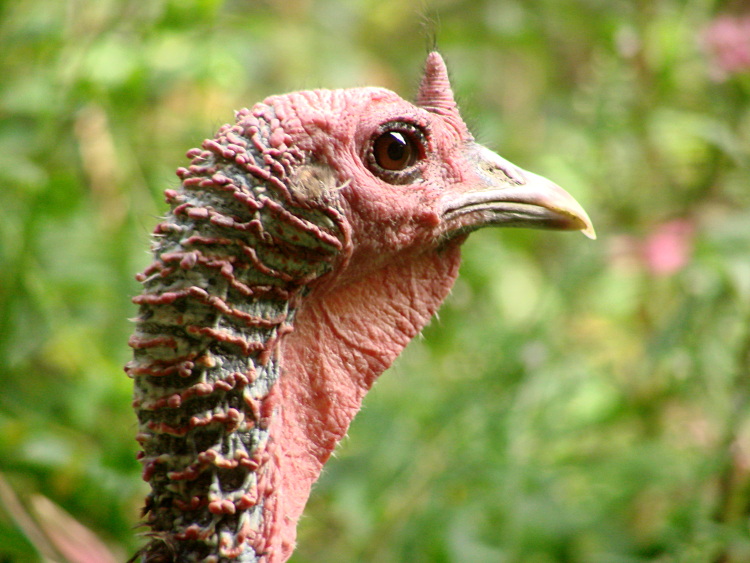
Tom Turkey Closeup
That cute thing the chicks have going for them tapers off pretty quickly as they grow up.
Wow, are those big toms ugly!
But it works well enough for turkeys, so who are we to complain?
While I was putting together the Tek 492 memory board reader, I though it’d be a nice idea to add a small display. While the Arduino has USB serial I/O, the update rate is fairly pokey and an on-board display can provide more-or-less real time status.
Given that the reader was built for an early-80s memory board, I just had to use a pair of Litronix DL-1414 4-character LED displays from my parts heap. The DL-1414 datasheet[Update: link rot? try that] proudly proclaims:
The 0.112″ high characters of the DL1414T gives readability up to eight feet. The user can build a display that enhances readability over this distance by proper filter selection.
I think that distance is exceedingly optimistic.
DL-1414 LED display schematic
However, I needed to see only a few feet to the benchtop. Even better, adding the displays required no additional hardware: the SPI-driven shift registers on the board already had address and data lines, plus a pair of unused bits for the write strobes. What’s not to like?
This schematic connects to the one you just clicked on; the two big blue bus lines are the same bus as in that schematic.
If you don’t have anything else riding the data bus, adding a pullup on the D7 bit that isn’t used by these displays will make all the bits float high; the DL-1414s seem to pull their inputs upward. That came in handy when I was debugging the EPROM-burning code, because reading data without an EPROM in the socket produced 0xff, just like an erased EPROM byte.
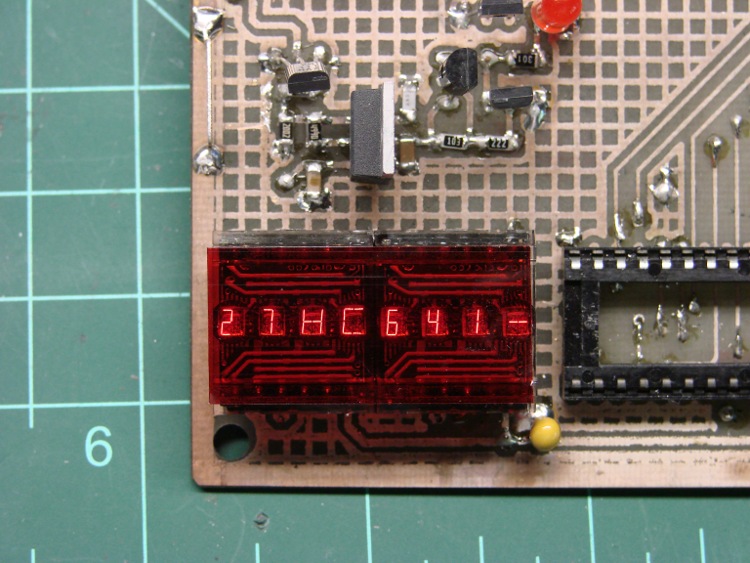
The two displays are the dark-red rectangle in the lower-right of the first picture, covered with a snippet of the Primary Red filter described there.
These closeups, without and with the filter, demonstrate why you really, really need a filter of some sort.
DL1414 UnfilteredDL1414 Filtered
Using the displays is straightforward, given the hardware-assisted SPI code from there. You could actually do it with just the I/O pins on an Arduino board, but you wouldn’t be able to do anything else. If you don’t have any other SPI registers, you could get away with a pair of HC595 outputs: 7 data + 2 address + 2 strobes + 5 outputs left over for something else.
A few constants set the display size and a global buffer holds the characters:
#define LED_SIZE            4            // chars per LED
#define LED_DISPLAYS        2            // number of displays
#define LED_CHARS           (LED_DISPLAYS * LED_SIZE)

char LEDCharBuffer[LED_CHARS + 1];       // raw char buffer, can be used as a string
A routine to exercise the LEDs by scrolling all 64 characters they can display goes a little something like this:
Serial.println("Exercising LED display ...");

 Outbound.Controls |= CB_N_WRLED1_MASK | CB_N_WRLED0_MASK;        // set write strobes high
 digitalWrite(PIN_DISABLE_DO,LOW);                                // enable data outputs

 while (digitalRead(PIN_PB)) {

  digitalWrite(PIN_HEARTBEAT,HIGH);

  byte Character, Index;

  for (Character = 0x20; Character < 0x60; ++Character) {
   for (Index = 0; Index < LED_CHARS; ++Index) {
    LEDCharBuffer[Index] = Character + Index;
   }
   UpdateLEDs(LEDCharBuffer);
   delay(500);

   if (!digitalRead(PIN_PB)) {
    break;
   }
  }

  digitalWrite(PIN_HEARTBEAT,LOW);
 }

 WaitButtonUp();
A routine to plop a string (up to 8 characters!) on the LEDs looks like this:
void UpdateLEDs(char *pString) {
byte Index = 0;

 while (*pString && (Index < LED_CHARS)) {

  Outbound.DataOut = *pString;           // low 6 bits used by displays
  Outbound.Address = ~Index;             // low 2 bits used by displays, invert direction
  Outbound.Controls &= ~(Index < LED_SIZE ? CB_N_WRLED1_MASK : CB_N_WRLED0_MASK);

  RunShiftRegister();

  digitalWrite(PIN_DISABLE_DO,LOW);      // show the data!

  Outbound.Controls |= CB_N_WRLED1_MASK | CB_N_WRLED0_MASK;
  RunShiftRegister();

  digitalWrite(PIN_DISABLE_DO,HIGH);     // release the buffers

  ++pString;
  ++Index;
 }
You can use sprintf() to put whatever you like in that string:
Not, of course, that anybody would actually use DL-1414 displays in this day & age, but the general idea might come in handy for something more, mmmm, elegant…
Having gotten my buddy Eks back on the air with new EPROMs for his Tek 492 spectrum analyzer, here are the Tek 492 ROM Images (← that’s the link to the file!) you’ll need to fix yours.
[Update: the comments for that post have pointers to other images and a clever hack to use a standard EPROM. If you’re not a stickler for perfection, that’s the way to go.]
They’re taken from a “known good” Tek 492, so they should work fine: the firmware verifies the checksum in each chip as part of the startup tests; if it’s happy, we’re happy.
Because WordPress doesn’t allow ZIP files, I tucked the HEX files into an OpenDocument file that also contains the pinouts and some interposer wiring hints & tips.
If you’re using the OpenOffice.org word processor, you’re good to go. Open the document and get all the instructions you need to extract the files and put them to good use.
If you’re not using OOo, then choose one of:
Install OpenOffice.org (it’s free software, so kwitcher bitchin’)
Futz with whatever Microsoft claims will import ODT files (if it doesn’t work, don’t blame me)
Just extract the HEX files and do whatever you want (if you know what you want)
The trick, explained in the document itself, is that ODT files are just ZIP files with a different file extension, so any unzip program will unpack them. You won’t see the HEX files in the document, you must apply unzip to the ODT file itself.
After unzipping, you’ll find three HEX files in the directory that originally held the ODT file, along with the collection of files that make up the OpenDocument document.
Oh, if you haven’t already figured it out, the DIP switch on your board is also bad. Saw the damn thing apart with a Dremel tool, pry off the debris, unsolder the pins, and install a new one. Just Do It.
Watching the tree frogs crawl up the tent from inside let us see how they move: hand-over-hand up the fabric. A dozen of them crawling along was spooky…
I took a movie with my pocket camera that turned into an 8 MB AVI, which I can’t upload here. Most of it isn’t all that interesting, anyway, an observation which hasn’t stopped YouTube dead in its tracks yet, but we can do better than that.
A pair of Free Software programs extracts the interesting part and produces a (somewhat) smaller animated GIF that works with WordPress.
A bit of browsing showed that I wanted frames 227 through 265 and that the frog was pretty much in the upper-middle of the image. So, crop a 320×240 image around the frog from those 640×480 frames:
cd frames
mkdir stills
for f in `seq 227 265` ; do convert frame-$f.jpg -crop 320x240+160+60 stills/still-$f.jpg ; done
Then convert them into an animated GIF with a 500-ms frame rate (the -delay ticker is 10 ms):
cd stills
convert -delay 50 still-2* frogwalk.gif
It’s a 1.6 MB wad, but gets the message across: frogs keep three paws stuck to the floor.
Remember, that little guy is moving at glacial speed in the GIF: those 40 frames of video last just over a second in real time.
Memo to self: MPEG-1 and MPEG-2 only support video-style frame rates around 30 fps.
Update: Regular reader Przemek Klosowski showed me how to generate those numeric sequences on the fly, without using a for loop:
There's this neat Bash construct {1..10} that you can use directly after ffmpeg:
convert -delay 50 still-{227..430}* result.gif

You can even skip every nth frame:
convert -delay 50 still-{227..430..5}* result.gif
We bicycled along the Pine Creek Gorge rail-trail in north-central Pennsylvania on a Rails-to-Trails Conservancy group ride, camping at schools and campgrounds along the trail. Quick summary: for four days we rode in the sun and slept in the rain.
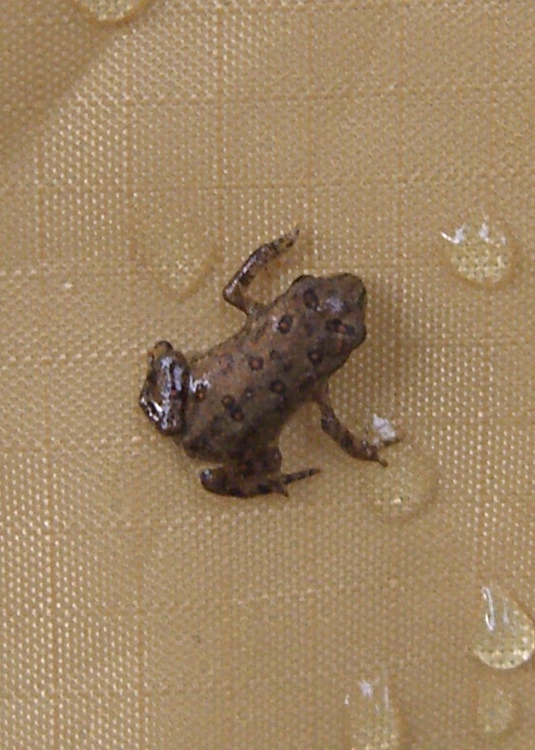
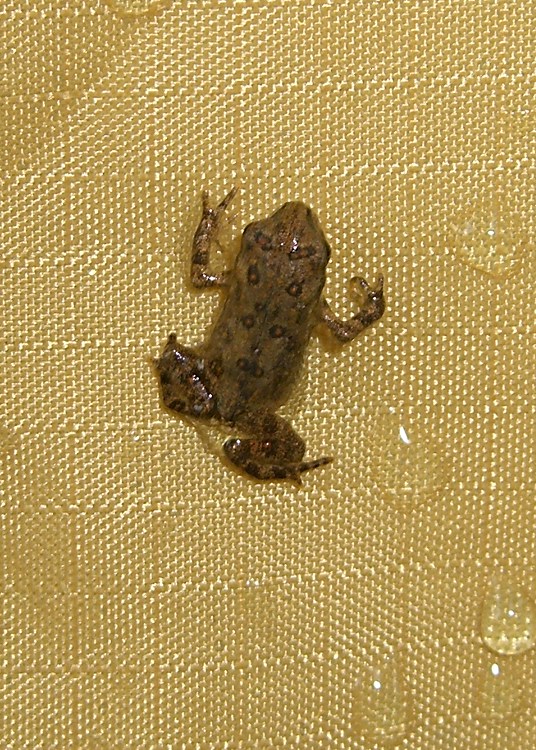
Tree Frog – Natural Light
As we set up camp at Pettecote Junction, the wet ground was hopping with tiny tree frogs. It was impossible to avoid stepping on the critters. When we got the tent set up, they swarmed up the sides between the tent and the rain fly; perhaps they had an imperative to get above the flood?
The lines in the tent fabric are about 3.7 mm apart, so the frogs are perhaps 10 mm from snout to butt. That size rules out everything in our RTP Eastern Reptiles & Amphibians book except the Little Grass Frog, which used to live only south of Virginia. The spot pattern doesn’t match, either, although they’re said to be highly variable. Who knows what’s going on in these degenerate days?
Tree Frog – Flash Illumination
They didn’t like the mesh vent screens, favored the rougher tent fabric over the smoother seam binding, and didn’t seem to mind falling off the tent.
We’ve been using Cateye Astrale “computers” on our bikes for decades, mostly to get the cadence function. After all this time, we pretty much know how fast to pedal, but old habits die hard.
The cadence sensor counts pedal revolutions per minute, which requires a magnet on the crank arm. They provide a small plastic-encased magnet with a sticky-tape strip that’s worked fine on our previous crank arms.
Our daughter’s Tour Easy arrived with fancy curved pedal crank arms that put the cadence sensor magnet much too far from the frame. You really want the magnet & sensor close to the bottom bracket so that it doesn’t get kicked and doesn’t snag anything as you pedal, but that just wasn’t going to work out here.
A turd of JB Weld epoxy putty solved the problem: mix up a generous blob, shape it into a pedestal, glom the magnet atop it, adjust so the magnet is parallel to and properly spaced from the sensor, then smooth the contours a bit.
Add the cable tie for extra security; you don’t want to lose the magnet by the side of the road!
The black electrical tape is mildly ugly, but serves the purpose of keeping the cable from flapping in the breeze. The adhesive lasts about a year, then it’s time for routine maintenance anyway.
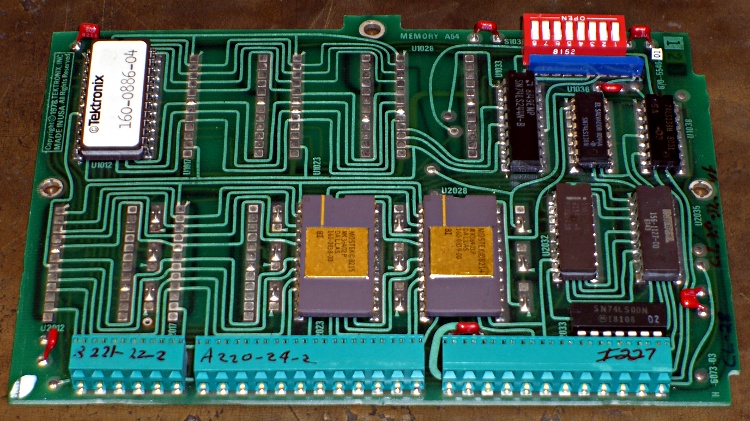
My buddy Eks asked me to help fix his new-to-him and guaranteed broken Tek 492 spectrum analyzer, which turned into a tour-de-force effort. One sub-project involved sucking the bits out of an existing “known-good” Tek memory card, which meant building a backplane connector and a circuit that behaved like a 6800 microcontroller… fortunately, it could be a lot slower.
[Update: It seems searches involving “Tektronix 492” produce this page. You may also be interested in these posts…
The HEX files you’ll need to replace failed ROMs and EPROMs
If those aren’t what you’re looking for, note that the correct spelling is “Tektronix“.
Good luck fixing that gadget: it’s a great instrument when it works!]
You can tell just by looking that this board was designed back in the day when PCB layout involved flexible adhesive tape traces and little sticky donut pads. Ground plane? We don’t need no stinkin’ ground plane!
Actually, it’s a four-layer board done with the usual Tek attention to detail. They didn’t need a ground plane because they knew what they were doing. Remember, this is in a spectrum analyzer with an 18-GHz bandwidth and 80 dB dynamic range; a little digital hum and buzz just wouldn’t go unnoticed.
Tek 492 Backplane Geometry
Anyhow, the backplane pins are on a 0.150-inch grid within each block. The center block (pins 13-36) is 0.200 inches from the left block (pins 1-12) and 0.250 from the right block (pins 37-60).
That means the left and right blocks are neatly aligned on the same 0.150-inch grid, with the middle block offset by 50 mils. You can’t plug the board in backwards unless you really work at it.
Of course, Eks had some genuine gold-plated Tek pins in his stash: 24 mils square and 32 mils across the diagonal. They have 1/4″ clear above the crimped area that anchors them to the black plastic spacer and are 1/2″ tall overall. They’re not standard header pins, but I suspect you could use some newfangled pins in a pinch.
Here’s what the reader board finally looked like, hacked traces and all, with the board connector to the rear. The memory board didn’t use all the backplane pins, so I only populated the ones that did something useful. The power-and-ground pins (left side of right pin block) stand separately from the other because I had to solder them to both the top and the bottom of the board: no plated-through holes!
Tek 492 Memory Board Reader
I cannot imagine this being useful to anybody else, but I defined an Eagle part for the connector so I could CNC-drill the board. Drop me a note and I’ll send it to you.







 The Smell of Molten Projects in the Morning