Ed Nisley's Blog: Shop notes, electronics, firmware, machinery, 3D printing, laser cuttery, and curiosities. Contents: 100% human thinking, 0% AI slop.
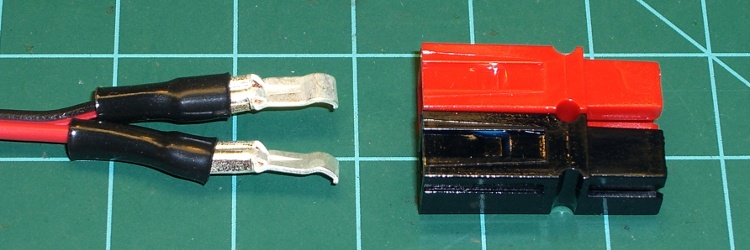
This is quick & easy. When you’re making a Powerpole connector, shrink a length of small heatshrink tubing over the end of the terminal after crimping.
Heatshrink tubing stress relief for Anderson Powerpole terminals
You can’t cover the entire crimped region, lest the terminal not snap into the housing, but halfway seems to work fine.
The goal is to keep the wires from flexing right at the end of the terminal, which is exactly where they’ll break.
I’ve also wrapped a length of self-vulcanizing rubber tape around the entire connector housing and the wire, which is appropriate for high-stress applications. Looks hideous, though, not that that matters much.
This Philips LumiLED app note gives some specs on automotive lighting. The one we bikies all tend to ignore is the surface area: greater than 37.5 square centimeters for rear combination stop-turn fixtures. Call it a scant 4 inches in diameter. You’ve never seen a bike light that large, have you?
LED combo tail stop light
Maybe the right thing to do is start with a street-legal truck light and build some electronics around it. This is a 4 inch diameter, 44 LED rear light with both taillight and brake light terminals. At 12 V, the taillight draws 10 mA and the brake light is 250 mA. Got it from Gemplers with a recent order, but they’re certainly not the optimum supplier if that’s all you’re buying.
Obviously, it’s unreasonable to run a 3 watt taillight on a bike, as the most recent crop of single-LED killer headlights are merely a watt or three. Battery life remains a problem.
At 10% duty cycle the brake LEDs would average 300 mW. That might be roughly comparable to the running lights on some cars these days.
With the taillight constantly energized and the brake flashing at 4 Hz, it’d be 120 + 0.5 * 300 = 270 mW.
That’s more reasonable. With a 50% efficient upconverter to 12 V, that’s half a watt. Start with 4 AA cells, triple the voltage, draw 100 mA, runtime is 1500 / 100 = 15 hours. Good enough.
And it ought to be attention-getting enough for anybody! The only trouble will be fitting the damn thing on the back of the bike; fortunately, ‘bents have plenty of room behind the seat, so maybe attaching it below the top seat rail will work.
Memo to Self: The rear reflector must be something like 3 inches in diameter, too. We ignore that spec, too.
Let’s quote that text so you can read it (or click the picture for a bigger one):
Yeah… we’re talking down there. With lots of supporting data that says prolonged riding while your boys are numb is a no-no, we decided to build a saddle you can fine-tune to fit… you.
Speaking of prolonged riding, the current hour records:
Upright bike: 30.882 miles
Recumbent: 56.2948 miles
Sam Whittingham (who also holds that recumbent hour record) recently set the new human-powered land speed record at Battle Mountain: 82.43 miles per hour. Yup, pedaling a bicycle, on level ground, in minimal wind.
Admittedly, he was riding a recumbent that bears as much relation to the Tour Easy I ride as a Formula One car bears to yours. On the other paw, those Tour de France bikes aren’t exactly factory stock, either.
If you want to go as fast as you can on a bike, you want a recumbent. Unless, of course, you’re doing UCI races, in which case you may go as fast as they’ll allow you and wreck your body in the process.
When you get back from a ride on a recumbent bike, no matter how long you rode the bike, not only do all your parts still work, but nothing hurts. What’s not to like?
My earlier musing on bike performance is there. Clicking on the “Recumbent Bicycling” category summons forth more posts…
A new fast NiMH pack charger that uses a thermistor to detect the abrupt temperature rise at full charge just arrived on my Electronics Workbench. The instructions say to tape (“Use rubberized fabric …”) the thermistor to a cell in the middle of the pack, a process which loses its charm fairly quickly.
The intent is to have the thermistor bead in intimate thermal contact with the cell, but air is a rather crappy thermal conductor. We can do better than that.
Sooo, off to the Basement Laboratory Adhesives Division we go…
NiMH cells have a steel shell, so holding the sensor in place with a magnet makes at least some sense. I used a pair of teeny rare-earth magnets (Electronic Goldmine G16913) bridged by a snippet of steel strap. One magnet points up, the other points down, the strap provides a magnetic path, and the whole assembly sticks to the cell like glue.
First epoxy setup
I trimmed the heatshrink tubing surrounding the thermistor back a bit, then applied enough epoxy to secure the magnets to the strap and smooth out the edges, leaving the thermistor sticking out in mid-air.
Although it looks risky, the epoxy doesn’t bond well to the (sacrificial, dead) cell. Doing it this way produces a nearly perfect AA-cell-shaped contour in the epoxy on the bottom of the magnets.
It’s JB-Kwik fast-curing epoxy, not quite so runny as its slower-setting and much stronger JB-Weld relative.
Epoxy covering thermistor
After the epoxy cured, I bent the thermistor down to contact the cell and dabbed epoxy over the bead. This puts the thermistor in good thermal contact with the cell. Epoxy isn’t a great thermal conductor, but it’s a lot better than air.
The alert reader will note that I wrapped a layer of masking tape around the cell for this operation. I wasn’t convinced I could pop the epoxy off the cell without cracking the thermistor leads, but that turned out not to be a problem.
Trimming the edges of the epoxy around the bead gave it a certain geeky charm.
And it works like a champ: get the assembly close to a cell and it snaps right in place. I align the thermistor more-or-less in the middle of the cell, although I suspect the temperature gradient from the middle to either end isn’t all that large.
Magnetically attached thermal sensor
Now, one could argue that this lump increases the thermal mass surrounding the thermistor, thus slowing the charger’s reaction time. That might be true, but the pack’s end-of-charge temperature rise seems considerably subdued now; the charger used to cook the living piss right out of the cells (with the thermistor taped down): I couldn’t hold them in my hand, so they were well over 150 °F.
Now they become just uncomfortably warm, which says they’re closer to 130 °F.
The charger’s single page instructions (two pages if you count the sheet illustrating the rubberized fabric taping thing) cautions “Stop charging when [the cell’s surface temperature] is over 70C or it feels very hot”.
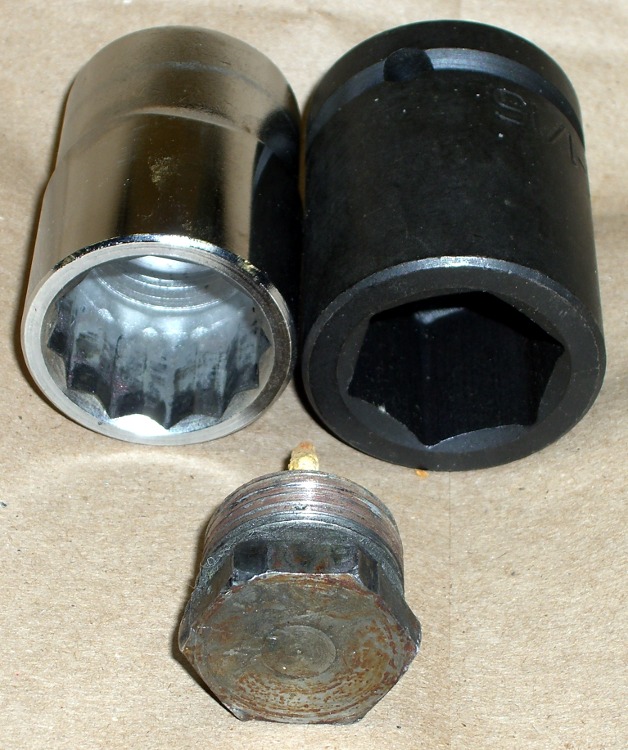
As mentioned there, removing a water heater anode rod generally requires considerable, umm, persuasion. I used a 12-point socket wrench, as I didn’t have a 1-1/16″ impact wrench on hand. Now I do…
The first pic shows the head in front of the two sockets; the 6-point socket on the right will do a much better job of not ruining the anode rod bolt head because it grips along the entire length of all six sides.
Now, in general, you don’t care about ruining the head, because the rod’s pretty much not going to be there by the time you remember to check it. What you do not want: the wrench rips the corners off the head before loosening the thread.
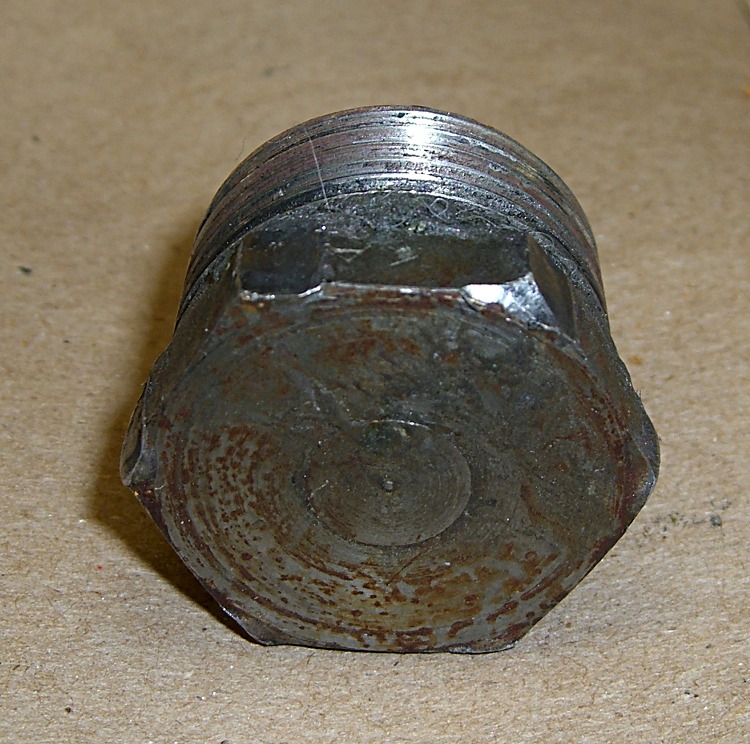
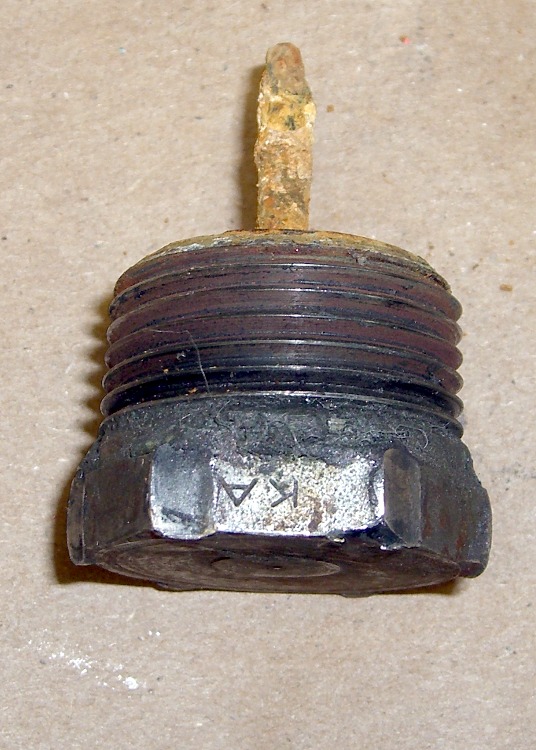
Goobered anode rod headGoobered anode rod head – side view
The thread on this anode rod was in great shape (I’d wrapped it in Teflon tape the last time it was out), but it was still firmly jammed in place. These pix show what the 12-point socket did to the bolt head during the beatdown.
Bottom line: right now, while you’re thinking about it, buy yourself the nice 6-point 1-1/16-inch impact socket you’ll need to extract the anode rod from your water heater. If you don’t already have a honkin’ big breaker bar, get one of those, too; this is no job for a sissy 3/4″-drive ratchet wrench.
The real problem is holding the water heater in place while you beat on the breaker bar. I have yet to see a good solution.
Offset Tank – 2009
That husky 6-point socket isn’t going to fit into the stupidly offset hole in the top of the water heater, even after applying the nibbling tool to get the 12-point socket in place, but that’s in the nature of fine tuning…
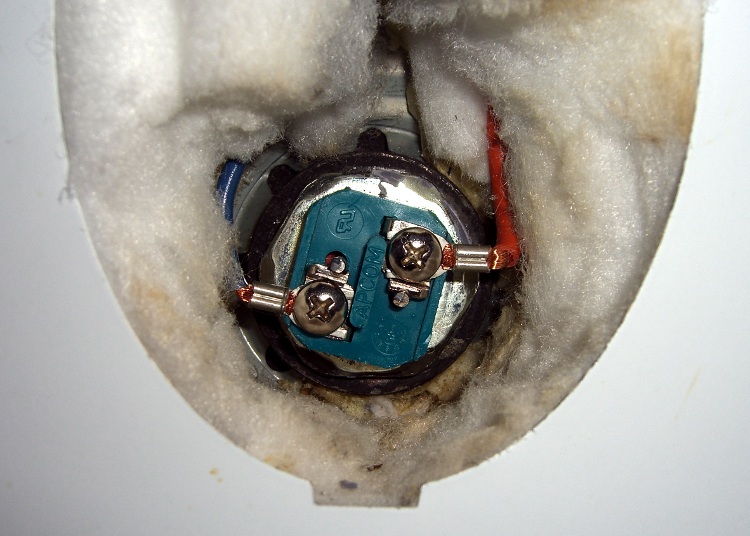
Removing a water heater element is no big deal: apply the appropriate socket (1-1/2 inch for this heater) to the hex head and turn it out. The trouble comes during installation, when you must hold that long rod exactly horizontal inside the tank, gripping the electrical fittings inside a narrow access port amid all the insulation.
My fingers can’t hold the element horizontal and twist it at the same time, so I made a tool: cross-threading the heating element and goobering the threads in the tank port is not an option!
Improvised heating element installation tool
A 32 mm socket just cleared the square blue electrical insulation block and butted against the 1-1/2 inch hex head. Because the block is square and the socket is hex, it was a pretty loose fit, but this was the right general idea.
I put a layer of masking tape on the inside of the socket and covered the electrical connections on the element.
Then I mixed up a batch of Bondo auto-body repair epoxy, buttered up the end of the heating element, and gooshed it into the socket. The Bondo filled in the gaps between hex and square, turning the wrench into a custom-fit tool that firmly gripped the heating element.
Reinstalled heating element
A brief pause for Bondo curing, pop an extension into the socket to use as a handle, return to the water heater, and screw that sucker right in place. Worked like a charm!
There’s a flexible gasket sealing the element to the tank port and I gave the element a few degrees more twist when I tightened it up, so the insulation block isn’t neatly aligned.
Getting the socket off wasn’t too difficult: twist to the side, pull, and the Bondo pops off the masking tape. Peel the tape off the element and it looks pretty much like it did before. The Bondo fell out of the socket when the element came out, so that was easy enough.
I was busy getting the water heat back in action and didn’t take any detailed pix, but I think you get the idea…
While draining the water heater tank, I extracted the anode rod. Well, that was the plan; it took longer to drain the tank than I expected and much longer to get the anode rod out.
The anode rod is basically an aluminum cylinder around a steel-wire core, attached to a steel bolt that screws into the top of the water heater. It has a 1-1/16″ hex head that calls for a rather large socket.
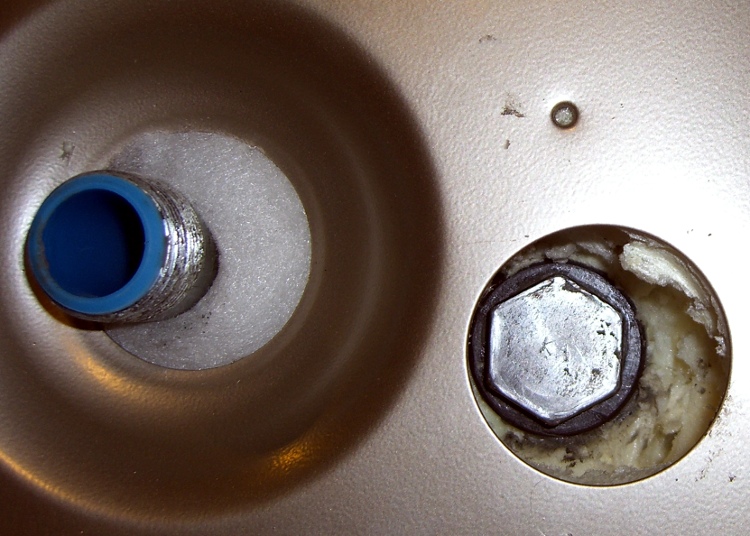
You can see one problem right away: the anode rod’s head is offset in its opening atop the water heater, making it essentially impossible to get an ordinary 1-1/16″ socket onto the thing. No, they didn’t mis-punch the hole… notice that the cold water inlet nipple is offset in its opening. The hot-water nipple is offset, too, just in case you were wondering.
Why is that? Well, the one thing that isn’t offset is the temperature & pressure relief valve on the right-front side of the tank. It seems when Whirlpool’s engineers were tasked with adding more insulation to the shell to get a better efficiency rating, they forgot that T&P valves don’t have arbitrarily long stems. Thus, the inner tank is offset within the shell so the T&P valve can reach outside.
Of course, that means the insulation is thinner on the right-front than the left-rear, you can’t extract the anode rod, and the inlet & outlet nipples rub against the top cover, but so what?
Offset Tank – 2003
The photo is of the Whirlpool water heater I just installed, but it’s identical to this one installed back in 2002 and another installed in 2001 (the one that recently failed). They haven’t seen fit to correct the holes in the top cover in the last seven or eight years:
This on a $400 water heater. “Made with pride in the USA”, indeed.
Anyway, when I installed the heater, I applied a nibbling tool to the top cover and gnawed an opening sufficient to get the socket in and the anode rod out. When I checked the rod in 2004 (after two years), it was corroding, but that’s the way it’s supposed to be: it’s working!
Missing Anode Rod
The recommended inspection interval is three years, but I admit I let it slide for five, based on what I saw earlier. Well, this time the anode rod was well and truly stuck. I eventually clicked an 18-inch breaker bar into the socket and wailed on the end with a two-pound hammer; after far more beating that I really liked, the bolt head loosened and the whole affair unscrewed easily and came out without further protest.
Behold, there’s no rod attached to the head!
I used a 12-point socket for this operation, but I have a six-point impact socket arriving shortly ($0.99 from eBay, plus $2 shipping). A 6-pointer has the advantage of applying force along the sides of the hex head, rather than just the vertices, which reduces the risk of stripping the head. Been there, done that, you’d think I’d learn from my experience, but I needed to get that thing out so I could proceed with the sediment extraction.
[Update: More about why you really want a 6-point socket there.]
There was an ominous clank inside the tank while I was massaging the breaker bar with the hammer. Peering down inside the tank through the rod hole, I spy the remains of the rod standing against the lower heating element, atop the expected pile of sediment in the bottom which is clogging the piddly little drain valve. It’s like looking into the Titanic’s dining room through a rivet hole.
Turns out that the rod had broken off quite some time earlier. After better than an hour of laparoscopic surgery through the lower heating element port, I finally extracted the rod: it was bent double, which means it had been standing upright for a while and eventually folded over. The long section to the right is actually two rod cores folded against each other; the far right end has a neat U-bend.
Corroded anode rod core
OK, I shouldn’t have left it slide for that long…
So it goes. Leaving the rod across the heating element seems like a Bad Thing, plus I should get the rest of the sediment out of the bottom. That’ll be easier if I can flush the tank through the lower element’s port.
I picked up a new magnesium rod at JD Johnson, a local plumbing outlet, for $28. That’s far less than at Water Heater Rescue, an invaluable source of information on the subject. The rod is 36 inches long, half a foot less than the 42 inch original, but that’s close enough; given the limited headroom, it’s easier to get into the tank.
Removing the lower heating element requires a 1-1/2″ socket and the courage to cut back the insulation packed into the element port. More on that tomorrow…






 The Smell of Molten Projects in the Morning