The Smell of Molten Projects in the Morning

Ed Nisley's Blog: Shop notes, electronics, firmware, machinery, 3D printing, laser cuttery, and curiosities. Contents: 100% human thinking, 0% AI slop.

Author: Ed

  • Sherline: Flycutting Too-Long Acrylic Panels

    Flycutting acrylic top panel
    Flycutting acrylic top panel

    The Totally Featureless Clock will have a black acrylic case with a Graylite Lexan faceplate. The top & bottom panels are 11.75 inches long, which is much too large for the Sherline’s 9-inch maximum X travel.

    Fortunately, in this case I can cheat.

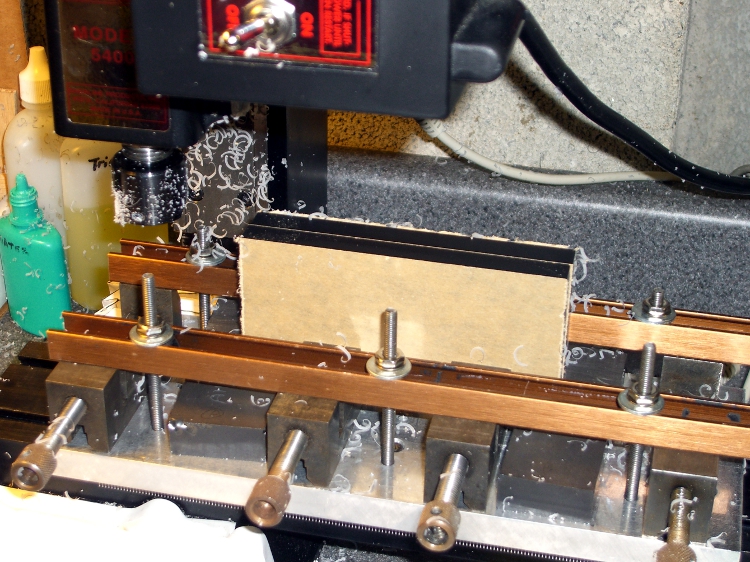
    This setup cut the panels to the proper width. A pair of parallel blocks, made from some mysterious glass-like material and ground very nicely flat, support the panel just over the body of the four toolmaker’s vises lined up along the tooling plate. I drilled the brown bookshelf rails to match the tooling plate and secured them with 10-32 studs.

    The front rail secures the vise bodies to the tooling plate; they’re aligned parallel to the X axis by the simple expedient of laying a parallel along the back edge and matching that to the tooling plate. No real precision is in order here; the flycut is across the whole top edge.

    The rear rail holds the movable vise jaws down; they tend to rise up just slightly when tightened, but the difference amounts to barely enough to release pressure on the parallel blocks. Not enough to matter, as it turned out.

    The general notion is to flycut about 2/3 of the length of the panel, then slide it far enough to cut the remainder. Flip it over and flycut the other side the same way.

    About 1000 rpm and 150 mm /min, cutting 0.5 mm or so on each pass.

    This worked surprisingly well. I expected to find a bow in the middle due to an uneven bandsaw cut on the initial downward side, but it was all good; evidently the blocks were wide enough to average things out.

    The joint where the two cuts meet turns out to be visible, but barely detectable with a fingernail: entirely suitable for this application. I’ll hit the sides with  sandpaper on a sheet of plate glass before bonding them  to the faceplate.

    Flycutting the end panels was much simpler: one pass clears their entire length. I moved the clamping rails to simplify the whole process; turned out that clamping the movable jaw didn’t really gain very much at all while complexicating the slide-the-stock process beyond belief.
    Flycutting end panels
    Flycutting end panels

    Overall, the width varies by about two mils along the length of the long panels and they’re perfectly straight as measured against a surface plate. Definitely close enough!
  • Toolmaker’s Vise Repair

    Toolmaker's Vises
    Toolmaker

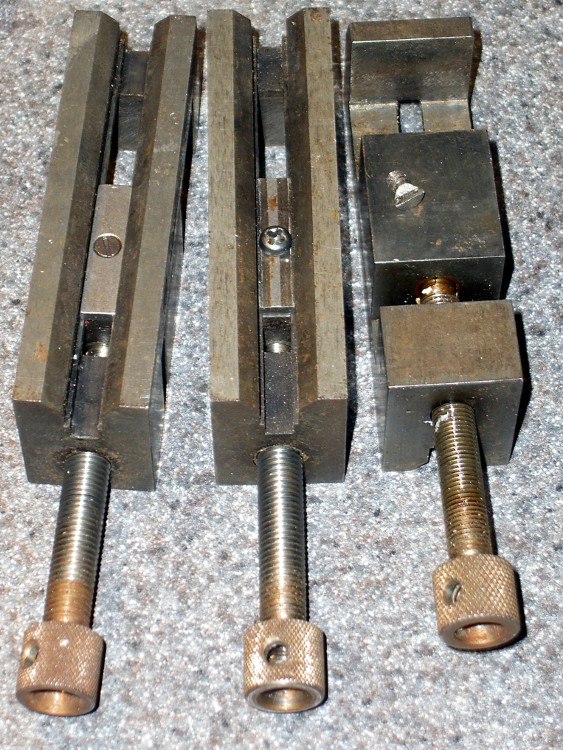
    Discovered that one of my toolmaker’s vises had a defunct screw securing the jaw to the body: one side of the head simply vanished over the years. Hadn’t mattered up until now, but I really wanted the jaw to not ride up when clamping the workpiece and the screw was rather loose.

    It’s difficult to tighten a screw with half a slot…

    Eventually I figured out that the screw has a 6-40 thread. My Brownells Gunsmith screw assortment (which they no longer offer) has, among others, 6-48 and 8-40 screws in flat, fillister, socket, and round head, but nothing in 6-40.

    After exhausting all other possibilities, I looked in the assortment box again and found four round-head crosspoint screws with captive lockwashers that I must have salvaged from some dead piece of gear.

    Of course, they turned out to be 6-40. Whew!

    Chopped off the lockwasher, added a dab of Loctite, and it fit perfectly. I flipped the sliding plate over, as it appeared somewhat worn, but I’m certain that didn’t make any difference.

    The screw must have a flat head (and you can’t flip the plate over) if you mount the vise on a machined V-way, but that’s not anything I’m likely to do. In that event, maybe I’ll just file the top off the screw and be done with it.

  • Arch Linux: Volume Control

    My Microsoft Comfort Curve 2000 keyboard has the usual gaggle of multimedia & program-control keys. I tend to not use many of those keys, but Volume +/- and Mute come in handy.

    The default Arch Linux keyboard configuration, whatever it is, reports the appropriate codes from the keyboard, so I didn’t have to fiddle with any of that.

    I used the same basic procedure as I described there, with tweaks to the amixer commands:

    amixer sset Master,0 3dB+
    amixer sset Master,0 3dB-
    amixer sset Master,0 toggle

    Linking the keys and commands goes through the XFCE4 Keyboard settings applet (or whatever those things are called).

    For what it’s worth, the Back and Forward keys work perfectly in Firefox, right out of the box.

  • Arch Linux: Wacom Graphire3 FDI File

    Again, this is similar to the FDI file for Xubuntu, with a partial match on the name.

    The button mapping swaps the two buttons along the pen, leaving the tip as Button 1. Button 2 pops up context menus, which I find easier when it’s on the front part of that two-button rocker.

    X occasionally crashes hard when the tablet moves the pointer between the two screens. It’s more common when scrolling, where the pointer is moving vertically along the gutter and falls off the edge. The workaround: restrict the tablet pointer so that it can’t quite get off the edge of the screen. Setting the BottomX value to just slightly more than the tablet can produce seems to work well: Tablet max = 16704 and BottomX = 16750.

    Unlike in Xubuntu, the tablet values mapped pretty closely to the whole screen; there was no need for absurd scaling values to expand a small upper-left rectangle to the full screen.

    The problem with hard X crashes is that X takes the (USB) keyboard down with it. The only solution seems to be ssh-ing in from another system and killing startx; you cannot Ctrl-Alt-Backspace or Ctrl-Alt-F1 or any of that stuff with a completely dead keyboard.

    You must include the SendCoreEvents option, otherwise The GIMP (and, presumably, other tablet-aware apps) will capture the events and never relinquish focus to system dialog boxes. Like, for example, the tablet won’t be able to focus inside the File->Save As dialog box…

    Herewith, the file /etc/hal/fdi/policy/10-linuxwacom.fdi:

    <?xml version="1.0" encoding="ISO-8859-1"?>
    <deviceinfo version="0.2">
     <device>
     <match key="info.product" contains="Wacom Graphire3">
     <merge key="input.x11_driver" type="string">wacom</merge>
     <merge key="input.x11_options.Type" type="string">stylus</merge>
     <merge key="input.x11_options.SendCoreEvents" type="string">True</merge>
     <merge key="input.x11_options.Button2" type="string">3</merge>
     <merge key="input.x11_options.Button3" type="string">2</merge>
     <merge key="input.x11_options.MMonitor" type="string">off</merge>
     <merge key="input.x11_options.ScreenNo" type="string">0</merge>
     <merge key="input.x11_options.BottomX" type="string">16750</merge>
    <!-- <merge key="input.x11_options.BottomY" type="string">11893</merge> -->
     <append key="info.callouts.add" type="strlist">hal-setup-wacom</append>
     <append key="wacom.types" type="strlist">eraser</append>
     <append key="wacom.types" type="strlist">cursor</append>
     </match>
     </device>
     <!-- Wacom names "parser" -->
     <device>
     <match key="info.udi" contains_not="subdev_0">
     <match key="info.udi" contains_not="subdev_1">
     <match key="info.udi" contains_not="subdev_2">
     <match key="input.x11_options.Type" contains="stylus">
     <merge key="info.product" type="string">stylus</merge>
     </match>
     <match key="input.x11_options.Type" contains="eraser">
     <merge key="input.x11_options.SendCoreEvents" type="string">True</merge>
     <merge key="info.product" type="string">eraser</merge>
     <merge key="input.x11_options.MMonitor" type="string">off</merge>
     <merge key="input.x11_options.ScreenNo" type="string">0</merge>
     <merge key="input.x11_options.BottomX" type="string">16750</merge>
    <!-- <merge key="input.x11_options.BottomY" type="string">11893</merge> -->
     </match>
     <match key="input.x11_options.Type" contains="cursor">
     <merge key="info.product" type="string">cursor</merge>
     </match>
     </match>
     </match>
     </match>
     </device>
    </deviceinfo>
    

    All in all, it’s much better than it was.

  • Arch Linux: Kensington Expert Mouse FDI File

    The FDI file is similar to the one I used for Xubuntu, with the exact match changed to a partial match. For some reason, the exact match seemed to not work.

    Because the XFCE4 Mouse configuration utility sets handedness on a per-mouse basis, you need not swap buttons 1+3 here. I did, anyway, and the mouse automagically came up left-handed.

    I swapped 2+8, the top two buttons, putting the browser “back one page” button at the upper left and the “open in new tab” button at the upper right.

    The contents of /etc/hal/fdi/policy/10-expertmouse.fdi:

    <?xml version="1.0" encoding="ISO-8859-1"?>
    <deviceinfo version="0.2">
     <device>
     <match key="input.product" contains="Kensington Expert Mouse">
     <append key="input.x11_options.ButtonMapping" type="string">3 8 1 4 5 6 7 2</append>
     </match>
     </device>
    </deviceinfo>
    

    And, for whatever reason, the scroll ring now works perfectly without the least hint of stuttering or jamming.

  • Arch Linux: X11 and XFCE4 Setup

    The Arch Linux Installation Guide gets X11 up and running in fairly short order, leaving you with a bare xterm session. That handled a single screen, so I copied the /etc/X11/xorg.conf file I’d hand-carved for Xubuntu, restarted X, and by gosh-and-golly, it worked perfectly!

    The right-hand screen is still in landscape mode while physically rotated to portrait, but that’s fixable with xrandr.

    For future reference…

    Section "ServerLayout"
        Identifier     "RotatedPortrait"
        Screen      0  "Landscape" 0 0
        Screen      1  "Portrait" RightOf "Landscape"
    EndSection
    
    Section "Module"
        Load           "dbe"
        Load           "extmod"
    #   Load           "type1"
    #   Load           "freetype"
        Load           "glx"
    EndSection
    
    Section "ServerFlags"
        Option         "Xinerama" "0"
    EndSection
    
    Section "Monitor"
        # HorizSync source: edid, VertRefresh source: edid
        Identifier     "Dell2001FP"
        VendorName     "Dell"
        ModelName      "DELL 2001FP"
        HorizSync       31.0 - 80.0
        VertRefresh     56.0 - 76.0
        Option         "DPMS"
    EndSection
    
    Section "Monitor"
        # HorizSync source: edid, VertRefresh source: edid
        Identifier     "Dell2005FP"
        VendorName     "Dell"
        ModelName      "DELL 2005FPW"
        HorizSync       30.0 - 83.0
        VertRefresh     56.0 - 75.0
        Option         "DPMS"
    EndSection
    
    Section "Device"
        Identifier     "GF9400_0"
        Driver         "nvidia"
        VendorName     "NVIDIA Corporation"
        BoardName      "GeForce 9400 GT"
        BusID          "PCI:1:0:0"
        Screen          0
    EndSection
    
    Section "Device"
        Identifier     "GF9400_1"
        Driver         "nvidia"
        VendorName     "NVIDIA Corporation"
        BoardName      "GeForce 9400 GT"
        BusID          "PCI:1:0:0"
        Screen          1
    EndSection
    
    Section "Screen"
        Identifier     "Landscape"
        Device         "GF9400_0"
        Monitor        "Dell2001FP"
        DefaultDepth    24
        Option         "TwinView" "0"
        Option         "metamodes" "DFP-0: 1600x1200 +0+0"
        Option         "NoLogo" "Off"
        SubSection     "Display"
            Depth       24
        EndSubSection
    EndSection
    
    Section "Screen"
        Identifier     "Portrait"
        Device         "GF9400_1"
        Monitor        "Dell2005FP"
        DefaultDepth    24
        Option         "TwinView" "0"
        Option         "metamodes" "DFP-1: 1680x1050 +0+0"
        Option         "NoLogo" "Off"
        Option         "RandRRotation" "On"
    #    Option         "Rotate" "CCW"
        SubSection     "Display"
            Depth       24
        EndSubSection
    EndSection
    

    With that in hand, the Install Guide gets you through setting up XFCE4 with no problems at all; consult the XFCE guide for more details.. It handles both screens, lets you install panels on both with no complaint, and generally Just Works.

    Useful widgets:

    • clipman
    • cpugraph
    • datetime
    • netload
    • screenshooter
    • time-out (wish it knew about screensaver timeouts)

    Add xscreensaver which politely blanks both screens. Timeout in 5 minutes, lock after 1 more, then power saving stages in at 7/8/9 minutes.

  • Monthly Aphorism: On Choosing Jobs

    • This project is doomed, but you can have fun for the next two years.

    That’s how a friend of mine introduced the IBM Digital Video Disk project. She was absolutely right on both counts; before the project went down the toilet, I wrote the killer hard-real-time track-following code that:

    1. Laid a one-micron laser beam dead-nuts on a one-micron data track while the one-foot-diameter floppy disk rotated at 3600 rpm with a few hundred microns of eccentricity.
    2. Acquired and mapped the aforementioned spiral track’s eccentricity from a cold start, so Step 1 would actually work.

    Everything I’ve written after that has been pretty straightforward.

    The project was a Skunk Works deal, running well outside the mainline IBM planning hierarchy, and had plenty of capital & expense budget to go around. Unfortunately, the technical foundation was a bit, mmm, flaky; one of the marketeers insisted that some combination of primary light colors would project black on a screen.

    It eventually imploded, of course, pretty much on the timeline she expected. For some reason splitting the assets off into an independent company and moving the neutron-star remnant to California made sense to the higher-ups. They offered a few key guys good jobs in sunny CA (the rest of us got token offers that didn’t get any takers), the core group lasted another few years, and then the thing went into a black hole.

    Would it surprise you to know the spinoff was called “Disc-O-Vision”? Bear in mind this was before the whole disco music era, but, still … and it’s entirely unrelated to the MCA laser disk of the same name, independently developed somewhat later.

    Word had it that the single most valuable asset was a patent on slapping digital data on a disk: that patent yielded a quarter-cent royalty on every pressed CD ever made. I have no way to know whether that story is true, but you can do the math.