Ed Nisley's Blog: Shop notes, electronics, firmware, machinery, 3D printing, laser cuttery, and curiosities. Contents: 100% human thinking, 0% AI slop.
Real men have real CNC milling machines and real CNC milling machines have home switches. I have an itsy Sherline CNC mill, but now my mill has home switches just like a Real Man’s mill.
Sorta, kinda.
Truth is, I really don’t need home switches for the Sherline. I haven’t done any “production” milling with fancy fixtures, so zeroing the coordinate system to the lower-left vertex of the part-to-be-milled works reasonably well. But I figured it’d be fun to see what I was missing…
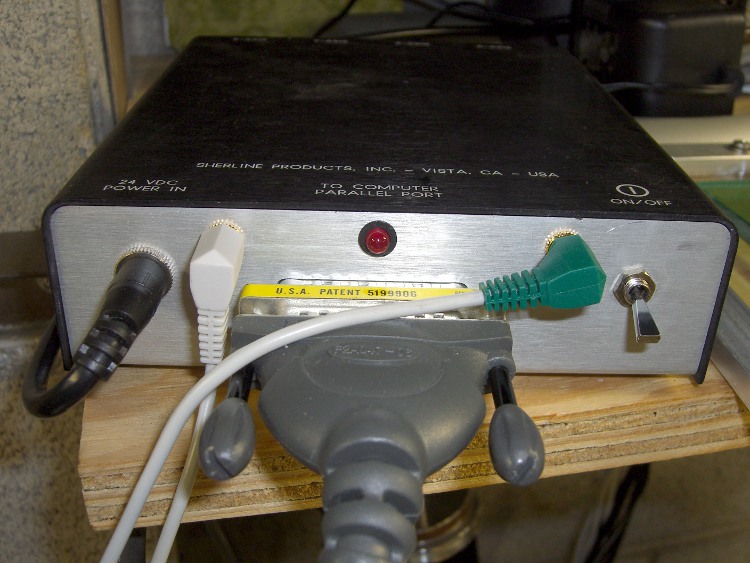
The first step was to hack another jack on the Sherline controller box and connect it to parallel port bit 10. The process is pretty much the same as I used for the probe switch jack documented there. I actually put the jack in the hole used for the power LED and drilled a new hole for the LED smack in the middle above the connector.
Sherline Controller with Probe and Home Jacks
The simplest way to do home switches is to wire them all in parallel using a single port pin. You can even wire the probe switch in parallel with home switches, too, but I figured it’d be nice to have separate jacks… and, besides, the controller still has a few port pins left.
Adding the home switches requires a few lines (adapted from there) in custom.hal that connect the sense inputs in parallel:
net homeswitches <= parport.0.pin-10-in-not
net homeswitches => axis.0.home-sw-in
net homeswitches => axis.1.home-sw-in
net homeswitches => axis.2.home-sw-in
Using the -not suffix flips the sense of the input so the signal is True when the buttons get pushed. I don’t know of any algorithmic way to determine the actual logic states for a given button configuration, so just try it, use Halmeter to see what happens, then flip as needed.
The catch with adding home (or limit) switches is that Sherline mills have an attentuated mechanical structure with no good places to affix switches. I figured a trio of microswitches and a few dollops of JB Quik epoxy would suffice; if I must remove the switches, a quick shot with a chisel should pop the epoxy right off the metal.
The microswitches have about 20 mils of overtravel. I located the switches so the actuator buttons are bottomed out against the cases with the axes at the far limits of their travels. The steppers are puny enough to stall when the mechanical bits hit their hard limits, so there’s no risk of wrecking the machinery or knocking the switches off.
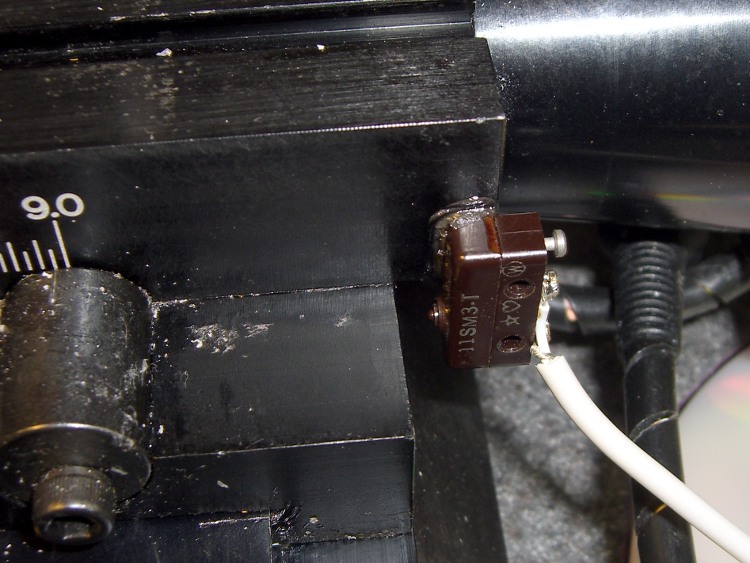
The X-axis home switch goes on the right side of the table, where it contacts the Y-axis slide at the end of travel. Putting it there also means I can remove the table by simply running the leadscrew out of the nut and pulling the whole affair off to the right. I lashed the switch cable to the motor cable with (wait for it) cable ties, which is probably a Bad Idea for larger machines, but seems to be OK in this situation.
X Axis Home Switch
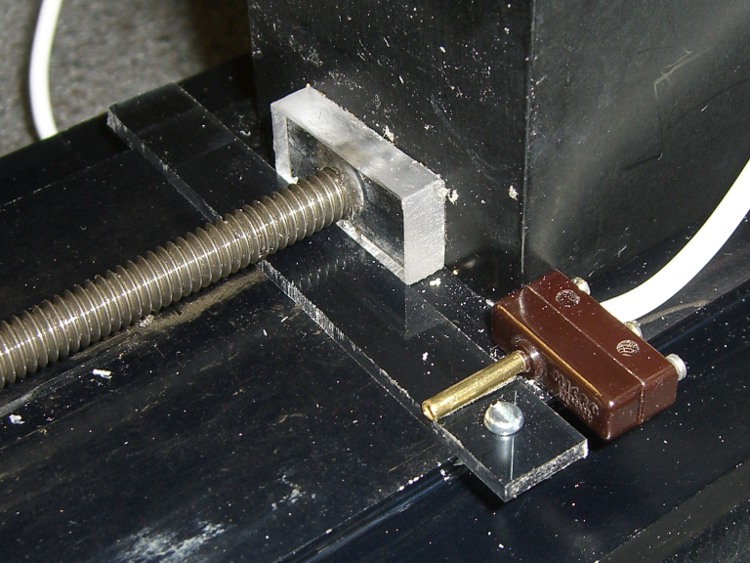
The Y-axis home switch goes at the rear of the machine base, aligned with the plastic bushing I put there to capture the end of the leadscrew. That’s the travel limit for the bare table, but the Sherline tooling plate sticks out another half-inch: the plate hits the column before the table hits the bushing. Alas, I use the plate a lot.
Rather than futz with an adjustable switch position, I made a removable extender. The 3 mm (1/8″ nominal) thick plastic strip has 1 mm milled off the bottom, leaving a tab on the left side that snaps over the dovetail. The screw extends down past the dovetail on the right, so the whole affair slides back & forth just enough to connect the Y-axis slide with the button. The brass tubing exactly fits the tit on the switch actuator and is urethane-glued to the strip.
It’s removable by lifting the left end and sliding the whole affair out under the leadscrew.
Y Axis Home Switch with Extender
The alternative, putting the Y-axis home switch on the very front of the base, would expose the switch & cable to all the slings & arrows of outrageous fortune to be found around the area of the countertop I use most. That may still prove to be a better location: if the back doesn’t work out, it’s easy to move.
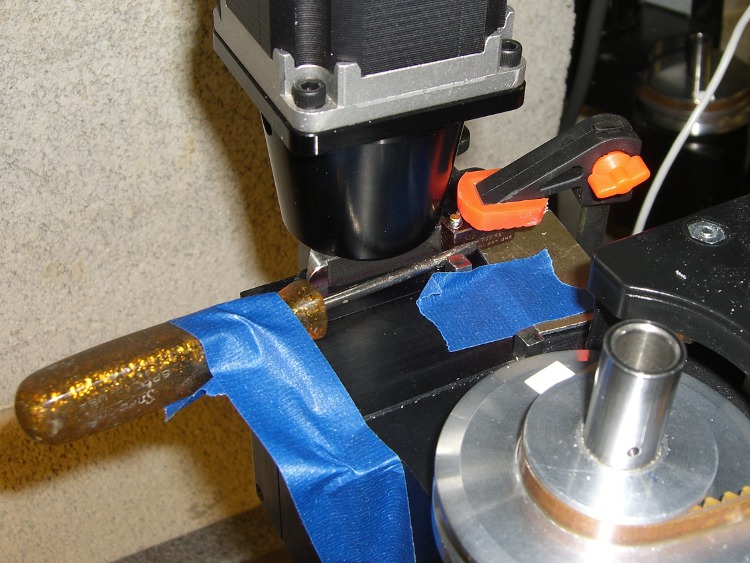
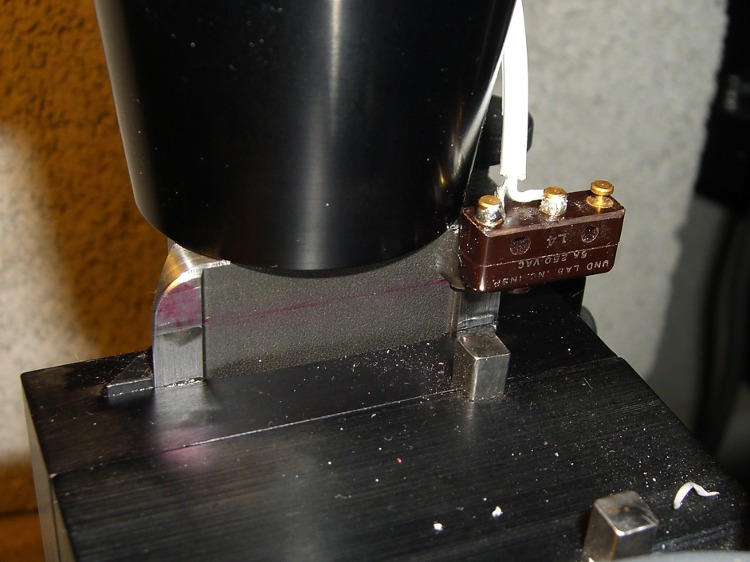
The Z-axis switch had to go at the top-of-column mechanical limit, as homing to the downward limit of travel seemed fraught with peril. I epoxied the switch in place by clamping it to a shim atop the Z-axis slide to align the switch body, then applying gentle sideways pressure with a small screwdriver.
Epoxying the Z Axis Switch
This is what it looks like after the epoxy cured. The square key bar sticking out of the extender block clears the switch with plenty of room to spare, no matter what it looks like.
Z Axis Home Switch
The cables from all three switches go to a common junction where they’re connected in parallel to the cable leading to the green plug in the top picture.
Tomorrow, the configuration file that makes all this work…
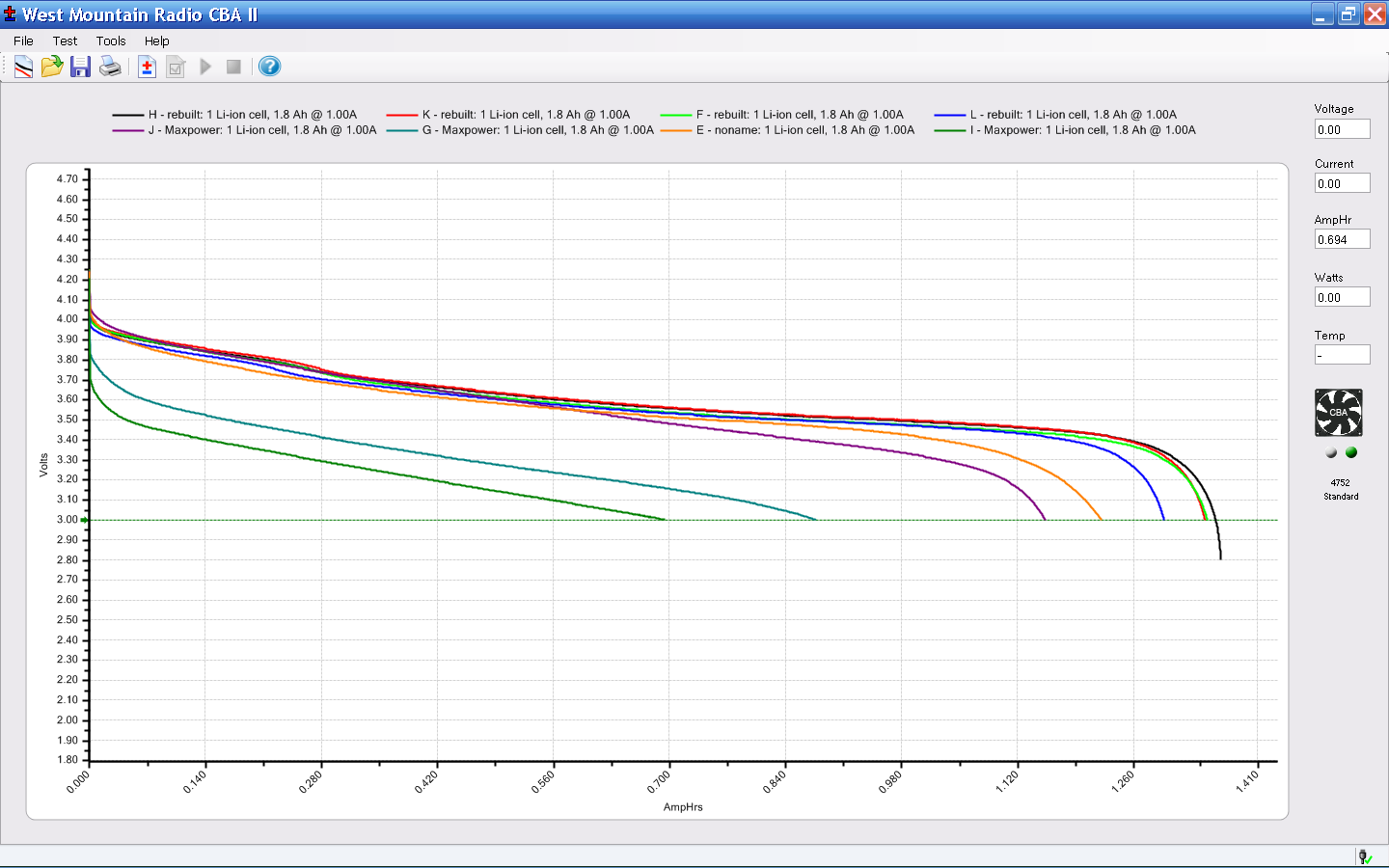
Herewith, the discharge test results for all the generic Sony NP-FS11 battery packs I have (click for a bigger image).
Sony NP-FS11 Status – 2010-04
The five mostly overlapping upper traces consist of:
Three packs (H, K, and L) rebuilt from the eBay junkers
F rebuilt from a deader in my collection
E is an older, no-name pack that just continues to work
The rebuilt packs now have cells from batteryspace.com that are working fine: nominal capacity 600 mAh, actual around 1200 to 1400 for a parallel pair. It’s surprising to see a cell producing its rated capacity…
The two lowest traces (G & I), plus the purple trace (J) are from the eBay source. The first two are obvious junk, but pack J is actually pretty good. The fact that it’s the best of six packs from that vendor tells you all you need to know about their QC.
For those of you joining us via search engines, the rest of the story:
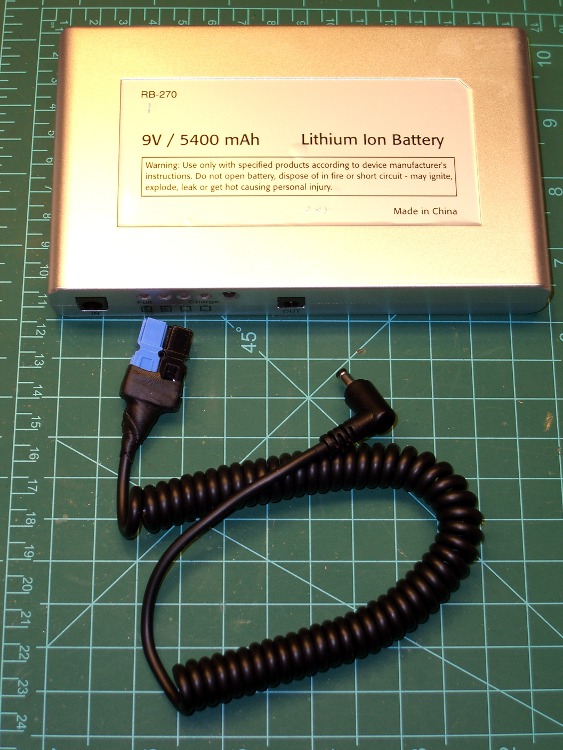
Finally got around to hacking PowerPoles into the coily cable from those Li-Ion packs, suitable for powering the amateur radio HT on my Tour Easy. The cable has surprisingly fat conductors, on the order of 22 AWG, that (when doubled over) half-filled the 30 A PowerPole terminals. I remembered to use the blue-and-black color code for 9 volt power on the second and third cables…
The right-angle connector activates a switch that turns on the pack’s voltage regulator, which means that leaving the cable plugged in slowly discharges the battery. They self-discharge by about half in two weeks, which means that it’s not absolutely urgent to unplug the battery at every stop, but … I’d rather have an actual power switch.
I also want to bypass that regulator, so as to get more voltage out of the pack. That may not be feasible, as I suspect they’re using the pass transistor as part of the over-current shutdown circuit, but it’ll be interesting to find out. So this is in the nature of a test to find out how well the lashup works before cracking the case.
This view of the installed pack is looking down on the butt end of the bike, which is leaning against the Shelf O’ Crap in the garage.
Battery on Tour Easy Rack
A four-inch length of adhesive-backed Genuine Velcro mates the battery to the rack, although I stuck both Velcro strips to some carpet tape in the hopes that’ll stick better than the OEM goo. Hooks on the bike and loops on the battery, which means the battery won’t affix itself to everything else in the universe while off the bike.
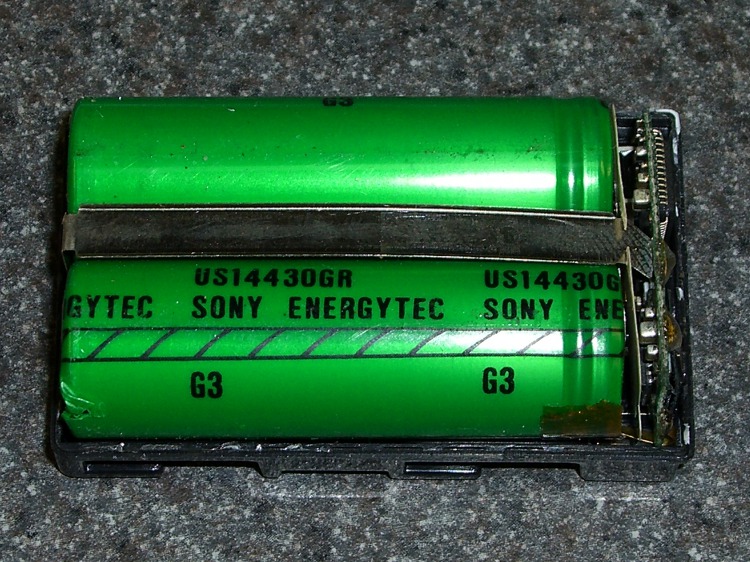
So I dismantled the three junk packs I got from halfway around the world and rebuilt them with better-quality cells. Search for NP-FS11 and you’ll find the rest of the story.
Some observations…
These cases are the thinnest plastic that doesn’t actually break when you pick it up: to crack the case seam, you must push firmly. Two of the three packs were already cracked and the third yielded to a slight squeeze.
The cells are labeled Sony Energytec, which ought to be a reputable brand name. Some possibilities:
Counterfeit cells
Quality test rejects
I don’t know why you’d bother putting counterfeit cells inside a generic case; it’d be more profitable to sell a completely counterfeit battery with a fancy Sony label. So I’m guessing these came from a batch of cells that failed inspection and were miraculously saved from destruction.
Battery Protection Circuit Board
They have the usual protection circuit board on the top. What’s a bit tricky is that you must unsolder the three leads connecting to the case terminals before you can extract the cells. I unsoldered the strap from the negative terminal while I was at it; the positive lead is inaccessible beyond the black IC on the left.
Magnet wire wants to unspool itself, so it comes with a wrap of tape that eventually turns into a gummy layer. Rather than put new tape on the spool, gash a notch in the rim with a utility knife and capture the wire therein.
Notched Wire Spool
If you’re really clever, you’ll angle the notch so the wire folds backwards and holds itself snug. If you’re not, well, there’s nobody going to notice having two opposing notches in the spool, right?
They used to do this with thread and string, back in the old days when such stuff came on wooden spools, but it seems a lost art…
My buddy Eks once observed that knurling is something you want to do on somebody else’s lathe, because it puts so much stress on the bearings. As it happens, both Home Shop Machinist and Machinist’s Workshop have run several articles / series on improved knurling, ranging from better clamp knurling tools to a wonderful widget that turns your lathe into something like a shaper with a rotary axis.
I wondered if a touch of G-Code could do the same thing on my Sherline CNC milling machine, using an ordinary end mill…
Pretty much, yes, it can.
The knurled diamonds aren’t raised above the surface, as they are in classical crush-rolled knurling, but my fingers can’t really tell the difference. That’s a chunk of 1-inch PVC pipe, turned smooth in the lathe and knurled with a 2-mm end mill; the fluff is left over from wiping off the swarf with a rag.
The setup mounts the workpiece in the rotary table on the right with the tailstock on the right end. In this case, a little boring (on the lathe) produced a slip fit on the tailstock ram, but you probably should have a plug that supports the tubing with a center-drilled hole for the tailstock’s dead center.
CNC Knurling SetupGeometry Sketch
The general idea is to do the cutting at a 45-degree angle in front of the workpiece, where the end mill will carve a neat 90-degree recess almost like a real 90-degree conical engraving point. This sketch shows the layout, albeit for a very large cutter and a very small workpiece. The YZ origin is at the center of the workpiece, with the X origin at the left edge of the knurled region.
The Z axis remains constant at the level where the bottom of the cutter intersects the 45-degree angle at the proper depth-of-cut. Then you drive Y into the workpiece and drag the end mill along X while twirling A to make a single cut. Move Y out to clear, return X to the start, index A by the angle between the knurls, repeat.
This isn’t perfect, because the bottom of the cutter isn’t parallel to the cut between the knurl diamonds. The leading edge cuts too high / low and the trailing edge cuts too low / high (depending on which way you’re moving X and twirling A), but for small cutters and large workpieces the approximation is probably Close Enough.
Machined Knurl Measurements
The key number is the diametral pitch DP: the number of knurl diamonds around the workpiece divided by the workpiece OD in inches. Machinery’s Handbook suggests that a DP of 48 is coarse and 96 is fine. Measuring some knurled tools lying around the shop shows those values aren’t hard numbers, but they’re a start.
Given an initial DP and the workpiece diameter, figure an actual DP that will produce an integral number of knurl diamonds around the circumference (call it NA):
NA = round (DP * OD) to the nearest integer
Actual DP = NA / OD
Knowing the number of diamonds NA, figure the width of a diamond in degrees (call it the Width-in-Angle):
WA = 360/NA
and also as a fraction of the circumference in inches:
W = π * diameter / NA
Typical knurl diamonds seem to be about twice as long their width, so the nominal aspect ratio is 2. Given the desired length-of-the-knurled-region, figure an actual aspect that will produce an integral number of diamonds along the length (call it NX):
NX = round (length-of-knurl / nominal-aspect) to the nearest integer
Knowing NX, figure the angle to turn (call it TA) while making the cut along X:
TA = WA * NX
Depth of Cut Sketch
This sketch shows the depth-of-cut geometry, with the cutter producing skeletal points where the cut just touches the next knurl over. With a 45 degree angle between the diagonal, all the trig boils down to factors of √2.
The perimeter of an NA-sided polygon inscribed in a circle of radius R (which is just the OD/2 is:
Perimeter = 2 NA R sin (180 / NA)
which simplifies to
Perimeter = NA OD sin (180 / NA)
The length of the chord L from tip to tip for such a polygon:
L = Perimeter / NA
The side of the triangle from the corner of the cut perpendicular to the chord is half the chord length, because it’s an isosceles triangle with angles of 45 and 90 degrees.
The height of the segment above the chord:
(L / 4) tan (WA / 4)
The total depth-of-cut along the diagonal is the sum of those two numbers. Given that, figure the coordinates (Y is negative because it’s out in front):
Z = (radius – depth) / √2
Y = -Z
Now, because the end mill has a nontrivial length along the X axis, it’s doing too much cutting. Reductio ad absurdum, imagine putting a 1-inch knurl along a pencil using a 6-inch end mill: the thing would cut a horizontal swath the entire length of the knurled region, leaving no material behind.
So it makes sense to heave in a Fudge Factor limiting the actual depth-of-cut to some percentage of that value. The knurl above was with that factor set to 0.50, but (as with rolled knurls) be sure to test in an inconspicuous spot before actual use. Subtract the shrunken depth-of-cut from the radius as above to get the YZ coordinates.
Notice the difference between the ends of the cut in that first picture: you can clearly see the shape of the end mill’s cylindrical cut. I ran the cutter at 2500 rpm to avoid overheating the PVC, so you can see the cuts on the top edges of the diamonds: the trailing edge makes neat little swipes. In actual practice, you’d run it much faster to get a smooth cut.
Then it’s just a matter of writing some G-Code…
Knurled Pencil
Herewith, the G-Code that did the pencil, with depth-of-cut set to 0.30. It cuts to the right and cuts to the left, then indexes to the next cut by unwinding the A axis. The nominal DP = 48 makes for a coarse, yet oddly attractive, knurl. The variable names don’t track what you see above, but should be pretty obvious. Also see the notes on optimizations down near the bottom.
(Engraved knurling)
(Ed Nisley - KE4ZNU - May 2010)
(G55 Coordinate Origin: 	X to left of checkering)
(							YZ on centerline of workpiece)
(							A = 0 wherever you like)
(Touch off tool center at Y = workpiece radius)
(				   tip at Z = workpiece radius)

(-- Input dimensions)

#<_Outer_Dia>			= 0.324					(outside dia of workpiece - INCHES)

#<_Knurl_Start_X>		= 0.0					(X offset to start of kurling)
#<_Knurl_Length>		= 1.0					(length of knurled section)

#<_Diamet_Pitch>		= 48					(96 = fine 48 = coarse)
#<_Depth_Fraction>		= 0.3					(fraction of max cut depth)
#<_Aspect_Nominal>		= 2.0					(desired knurl diamond length-to-width ratio)

#<_Tool_Dia>			= 0.078					(end mill diameter)
#<_Feed>				= 20					(cutting speed, inch/min)

#<_Traverse_Clear>		= 0.050					(clearance for traverse moves)

(-- Calculated dimensions)

#<_PI>					= 3.14159265358979323

#<_Outer_Radius>		= [#<_Outer_Dia> / 2]
#<_Tool_Radius>			= [#<_Tool_Dia> / 2]

#<_Num_Points_A>		= ROUND [#<_Diamet_Pitch> * #<_Outer_Dia>]	(points around circumference)
#<_Point_Width_Deg>		= [360 / #<_Num_Points_A>]					(degrees per point)
#<_Point_Width>			= [#<_PI> * #<_Outer_Dia> / #<_Num_Points_A>]

#<_Num_Points_X>		= ROUND [#<_Knurl_Length> / [#<_Aspect_Nominal> * #<_Point_Width>]]
#<_Rotation_Per_Cut>	= [#<_Point_Width_Deg> * #<_Num_Points_X>]
#<_Point_Length>		= [#<_Knurl_Length> / #<_Num_Points_X>]		(actual point length)
#<_Aspect>				= [#<_Point_Length> / #<_Point_Width>]		(actual aspect ratio)

#<_Perimeter>			= [2 * #<_Num_Points_A> * #<_Outer_Radius> * SIN [180 / #<_Num_Points_A>]]
#<_Chord>				= [#<_Perimeter> / #<_Num_Points_A>]		(across one point)
#<_Segment_Height>		= [[#<_Chord> / 2] * TAN [#<_Point_Width_Deg> / 4]]

#<_Cut_Depth_Max>		= [#<_Segment_Height> + #<_Chord> / 2]
#<_Cut_Depth>			= [#<_Depth_Fraction> * #<_Cut_Depth_Max>]

#<_Cut_Z>				= [[#<_Outer_Radius> - #<_Cut_Depth>] / SQRT [2]]	(corner of cut)
#<_Cut_Y>				= [0 - #<_Cut_Z>]

#<_Tool_Z>				= #<_Cut_Z>									(tool bottom)
#<_Tool_Y>				= [#<_Cut_Y> - #<_Tool_Radius>]				(tool centerline)

#<_Safe_Z>				= [#<_Outer_Radius> + #<_Traverse_Clear>]	(clear workpiece top)
#<_Safe_Y>				= [0 - #<_Safe_Z> - #<_Tool_Radius>]		(clear workpiece side)

#<_Retract_Y>			= [0 - [#<_Safe_Z> / SQRT [2]] - #<_Tool_Radius>]	(clear cut)

(-- Start cutting!)

G40 G49 G80 G90 G94 G97 G98		(reset many things)

G55					(working coord system)
G20					(inch!)

F#<_Feed>			(set cutting speed)

(debug,Num points AX: #<_Num_Points_A> #<_Num_Points_X>)
(debug,Pt Width Deg Len: #<_Point_Width> #<_Point_Width_Deg> #<_Point_Length>)
(debug,Aspect: #<_Aspect>)
(debug,Cut Depth: #<_Cut_Depth>)
(debug,Cut YZ: #<_Cut_Y> #<_Cut_Z>)
(debug,Tool YZ Retract: #<_Tool_Y> #<_Tool_Y> #<_Retract_Y>)

(msg,Press [Resume])
M0

G0 Z#<_Safe_Z>					(get air)
G0 Y#<_Safe_Y>					(move to cutting side)

G0 X#<_Knurl_Start_X> A0		(get to knurl XA start)

G0 Y#<_Retract_Y> Z#<_Tool_Z>	(get to clearance point)

#<This_Point> = 0				(loop setup)
#<This_Angle> = 0

O1000 DO

;(debug,Angle: #<This_Angle>)

#<Far_A> = [#<This_Angle> + #<_Rotation_Per_Cut>]
#<Near_A> = [#<This_Angle> + 2 * #<_Rotation_Per_Cut>]

G1 Y#<_Tool_Y>					(cut into workpiece)
G1 X[#<_Knurl_Start_X> + #<_Knurl_Length>] A#<Far_A>	(cut right)

G1 X[#<_Knurl_Start_X>] A#<Near_A>						(cut left)

G0 Y#<_Retract_Y>				(get air)

#<This_Point> = [#<This_Point> + 1]
#<This_Angle> = [#<This_Point> * #<_Point_Width_Deg>]

G0 A#<This_Angle>				(index to next cut)

O1000 WHILE [#<This_Point> LT #<_Num_Points_A>]

G0 Y#<_Safe_Y> Z#<_Safe_Z> A0	(get big air)

M2
Some obvious improvements:
Use G92.whatever to whack A appropriately or
Fiddle the angle variable to track the actual A windup and
Figure the shortest direction to unwind A & tweak the variable
Cut in only one direction to reduce backlash or
Make all the cuts with common endpoints in one pass
Knurl along a known taper by interpolating Y & Z along X
Offset the workpiece axis to match the knurl angle (ugh!)
Although I find it hard to believe I’m the first person to figure this out, a search on CNC knurling using an end mill doesn’t provide any meaningful hits. If you get rich using this idea, send me a generous donation…
Spotted these signs on the outside wall of a local Big Box home repair store. It’s not as if I’ve never misspelled anything, but this required consistent effort by two of the three folks who wrote up the signs.







 The Smell of Molten Projects in the Morning