Ed Nisley's Blog: Shop notes, electronics, firmware, machinery, 3D printing, laser cuttery, and curiosities. Contents: 100% human thinking, 0% AI slop.
Heat pumps behave like bidirectional refrigerators: they cool the building by heating the outside air or heat the building by cooling the outside air. In relatively mild, dry weather, this works perfectly.
Here in the Northeast US, it’s not such a bright idea. For about half the year, the ambient temperature is low enough and the humidity high enough that pumping heat out of the exchanger drops its temperature below the dew point, whereupon ambient moisture condenses on the fins and, given the temperature differential between ambient and coil, freezes solid.
In that situation, the efficiency of the heat exchanger drops well below zero: it turns on electric resistance heating bars to warm the inside air and runs a defrost cycle on the exterior heat exchanger.
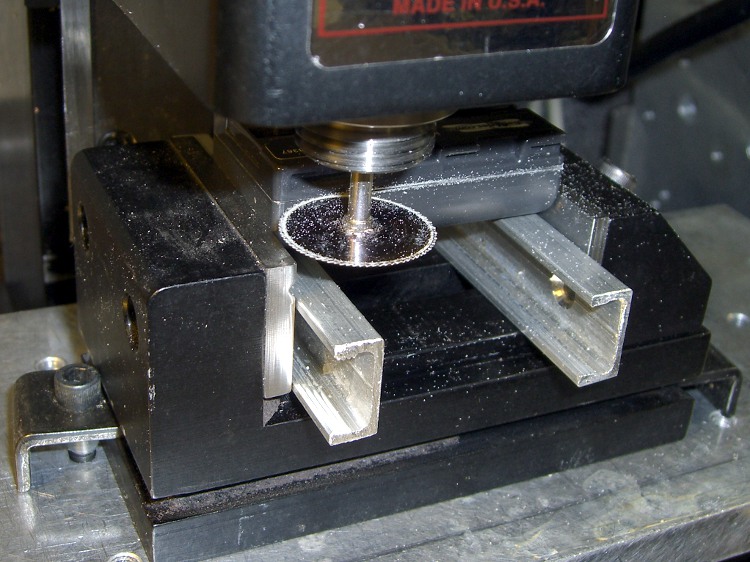
Just for curiosity’s sake, I applied a slitting saw to the oldest defunct generic NP-FS11 battery pack, cutting carefully along the bonded joint between the two parts.
No coolant, 1000 rpm, 200 mm/min, the saw is 22 mm diameter. Much slower than you’d use if you were in production, but I’m not.
First cut all the way around at 0.5 mm inside the case, then another pass at 1.0 mm. The second cut went ting as it passed the tabs at the base of the cells, so I knew the halves were released.
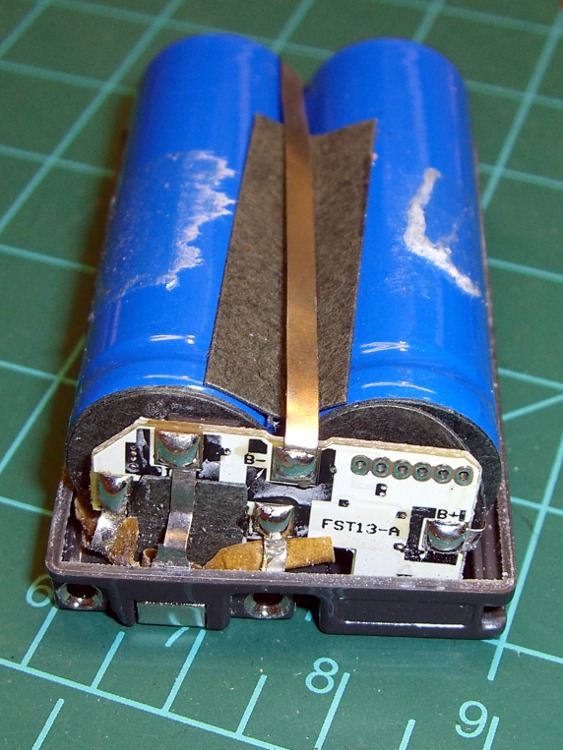
Inside we find a pair of 14430 Li-Ion cells, wired in parallel, with a little protection circuit board just jam-packed with teeny parts. One may reasonably assume the circuit controls over-charge and over-discharge, as well as current limiting.
Pack opened
So a reasonable (or, perhaps, amusing) thing to do would be to buy raw cells from a nominally reputable supplier, do a heart transplant, and see if that improves the situation.
Protection Circuit – Outboard
Photos of the protection PCB, showing the cell connections. Positive end of the cells is toward the PCB. I think there’s enough clearance in the camera’s battery compartment to allow a wrap of tape around the case in lieu of re-bonding the plastic together.
Sony no longer offers the NP-FS11 Li-Ion batteries required for my DSC-F505V camera, so I’ve been using “generic” replacements for quite some time. My experience has been mixed: some batteries provide a reasonable amount of run time, others provide almost none.
Feeding the appropriate keywords into Froogle gives you a range of battery suppliers, with offerings from, as of this writing, $3 to $103. Perhaps not surprisingly, the image for a $70 battery exactly matches the one on my desk that cost perhaps $15 a few years ago… although I’m certain that the actual battery you’d get wouldn’t match that picture.
I just bought three NP-FS11 batteries from the usual low-buck Hong Kong eBay supplier: six bucks apiece, shipped halfway around the world. The eBay listing claimed 1800 mAh, which seemed aggressive, and the batteries sport a 3900 mAh label, which is flat-out impossible.
Frankly, I didn’t expect much and here’s the discharge test graph to show I wasn’t disappointed. I used a 1-amp rate as a reasonable guess at the camera’s peak draw, although that might be a touch high for a continuous discharge.
Generic Sony NP-FS11 Li-Ion Batteries
The top blue curve is from a two-year-old literally no-name battery (no logo, no nothing!) that still provides decent run time; it’s the one matching that $70 battery. It provides about 1100 mAh, reasonably close to its 1300 mAh rating.
The middle curves, black and purple, are two of the new cells that provide about 900 mAh: half the as-listed-on-eBay capacity, 25% of the absurd label value. Their very low terminal voltage during most of the discharge says that these won’t provide much run time at all.
The green curve piddling off on the bottom is the third new cell, which is obviously defective. As I said, I didn’t expect much and I certainly wasn’t surprised.
The red curve is an old and completely defunct batteries.com offering that never provided good service.
Here’s another plot of three successive charge-discharge cycles for just the three new batteries. The first curves (at 1.0 A) correspond to what you see above, the remaining two sets (at 0.5 A) are the next two cycles. Batteries G and I have improved, H remains a dud.
MaxPower NP-FS11 Battery Tests
Given the varied offerings on the Web, I believe that there is no way to ensure you’re getting a known-good battery from a reputable supplier. It’s absolutely certain that price does not correlate with quality; the ones I bought simply establish that low-end offerings are crap.
The purchase was worth it for the amusement value alone; I don’t expect any action from the vendor, although I did send a copy of that graph with some explanatory text. The question is whether I should give them a five-star rating for prompt delivery…
As it happens, there’s enough room to slide a standard CR123A-size cell into the battery compartment. I think a bit of Quality Shop Time applied to a dead NP-FS11 battery case (and the vital Sony “Infolithium” DRM module) will provide a baseplate with all the proper connectors. Perhaps I can conjure up a “battery” containing a single cell of known-good quality?
Primary CR123A cells supply only 3 V, not the 3.6 V the camera really wants, so I can’t use disposable cells.
Father Vaughn, one of the best managers I ever had, evaluated new project proposals on a simple basis: if you couldn’t demonstrate that the result would be ten times better / faster / bigger / smaller than the existing product, then it wasn’t worth starting the project.
He knew that all benefits are overestimated, all problems underestimated, and that if you couldn’t show an overwhelming advantage right from the start, it’d never actually work.
I have an X10 CM11A “Two Way Computer Interface” handling the very very very few scheduled events for our house. Basically, it turns the living room lights on in the evening and everything off much later.
As a result, I tend to ignore it for years at a time. A recent power outage killed the regularly scheduled events, which suggested that the backup batteries needed changing… and, yes, they were pretty well corroded.
With that out of the way, I discovered that the last time I’d loaded a program into the thing was so long ago that the heyu config files had either gone missing or were on a system not near the top of my heap. It’s easy enough to configure, so I installed heyu and spun up a new set of config files.
All the doc I can find says the CM11A has an RJ11 modular phone jack, which mates with the standard 6-position 4-conductor dingus found on the end of every phone in this part of the world. My CM11A, however, has a 4P4C jack, the narrower dingus found on phone handsets. Given that heyu reports
Firmware revision Level = 1
I suspect that this thing is slightly older than some of the folks reading this post and the X10 factory switched to a somewhat less bizarre connector in mid-stream.
Anyhow, the DB9 (yeah, it’s a DE9, but nobody calls it that) connector has “X10 Active Home” printed on it in my very own handwriting, with a standard RJ11 plug on the end. A double-jack adapter connects a hank of cable with an RJ11 plug on one end and a 4P4C connector on the other. I have no idea where that cable came from; perhaps I replaced the 4P4C plug with something less bizarre to add that extension so the cable would stretch from PC to wall outlet?
I plugged the thing into a USB-RS232 adapter and heyu had no trouble talking to the CM11A. However, trying to execute
heyu dim n13 10
produced the discouraging report
RI serial line may be stuck.
A bit of deft multimeter work produced this pinout list, which agrees with most of the doc you’ll find elsewhere. Hold the 4P4C connector with the tab down and the cable away from you: the pin numbers are 4 3 2 1 from left to right. The RS-232 pins are printed right on the DB-9 connector.
4P4C   DB9
 1      2 RxD
 2      9 RI
 3      3 TxD
 4      5 Gnd
It’s entirely possible the USB converter doesn’t support RI or it doesn’t do a good job of it. I jammed the cable into the serial port on the back of the PC and shazam it works perfectly.
The x10.conf file, for the next time around
TTY /dev/ttyS0

HOUSECODE N

LATITUDE 	41:40N
LONGITUDE	73:53W

ALIAS MBR_Dresser	N1
ALIAS Front_Hall	N5
ALIAS RV_XCVR		N9
ALIAS Couch		N10
ALIAS Mary_Reading	N11
ALIAS LR_Ceiling	N12
ALIAS Fireplace		N13
ALIAS Kitchen		N14
ALIAS Patio		N15
ALIAS Garage_Spots	N16

START_ENGINE	AUTO

LOG_DIR		/var/log/heyu/

DATE_FORMAT	YMD '-'
I finally made a test bar to line up the (vertically mounted) rotary table and tailstock on the Sherline milling machine. It’s a ground-and-polished 0.500-inch rod from a defunct HP2000C inkjet printer; the print head zipped back and forth along the rod while printing, so you know it’s pretty smooth. You could probably salvage something similar from any dead inkjet printer.
Making the bar is simple: saw off a suitable length, stick it in the lathe, face off the end, chamfer the edge, poke a center drill into it, and it’s all good.
If you’re a tool-and-die jig-boring high-precision kind of machinist, you better stop reading right about now before you catch a heart attack.
Lining the bar up is almost trivially easy with a laser spot coming down the spindle bore. Move the table so the spot grazes the side of the bar and casts a shadow on the table, jog X to the other end of the bar, and tweak the angle for the same picture on the table.
Repeat until satisfied.
The trouble comes at the tailstock end, where the ram extends about 1.5 inches, tops. That’s good enough for the Sherline, but it also means the test bar must be pretty close to the length of whatever you’ll be machining, rather than as long as possible to get the best alignment.
However, after you get Sherline tailstock aligned to the end of the bar, vertically, horizontally, and angularly, the magic happens
The ram is quite stable, with very little radial play, so the point moves along the X axis (assuming you did a good job aligning the tailstock). Retract the ram a bit, jog X and Y to put the laser spot on the tip of the center (which should correspond to the Y axis coordinate of the center of the bar), and you’ll see a defocused spot on the table (I put a white card on the table to improve the contrast). Jog Z until there’s a nice triangular image of the dead center’s point in that bright round spot.
It turns out that the laser beam in the top picture is about 10 mils wide at the dead center axis, so you can easily see a difference of 1 mil in the Y coordinate. That’s perfectly accurate for the sort of work I do.
Now, remove the test bar, unclamp the tailstock, move it to wherever you need it for the actual thing-to-be-made, snug it down, and jog the table in X (only!) to move the spot over there, too. Move the tailstock around to align the image of the center point in the middle of the laser spot again and you can be sure it’s aligned to the same Y coordinate. Verify that the tailstock has the same angular alignment. Mine is consistent with the T-nuts pressed against the front of the table slots and it’s easy to slide it carefully along the Y axis to get the point in the spot.
Because the bar was parallel to the X axis to start with, the point is now aligned with the axis of the rotary table.
Laser spot focused on tip
The minimum spot size depends on the beam width and the lens, but it turns out that for my setup, twiddling the Z position of the lens can shrink the spot down to essentially the width of the dead center point. As nearly as I can tell, the beam width is 3 mils and the point pretty much occludes the beam when it’s properly aligned.
The picture shows that situation; the spot is half-occluded because the point now looks like the side of a barn. It’s difficult to tell, but the lens (on the brass snout in the endmill holder) is lower in this picture.
All that jogging, particularly creeping up on the proper alignment, goes much easier with a joggy thing!
After replacing the seat strut screws, I found a Round Tuit lying there on the workbench, right next to the rear reflectors I’ve been meaning to install for a truly embarrassing period.
Recumbents don’t have the usual assortment of standard-sized tubing in the usual road-bike places, making common items like reflectors difficult to attach. The ideal spot on our bikes is at the base of the VHF/UHF antennas, right next to the white blinky LEDs, but, alas, that’s 20 mm in diameter and the reflector clamp barely shrinks down to a bit under 28.
Turns out that a chunk of 1.5 inch PVC pipe has a 4 mm wall thickness, so wrapping a layer of that around the antenna base will do the trick. I whacked off a length of pipe, faced off both ends in the lathe, and put a shallow recess around the middle of the ring to capture the reflector clamp.
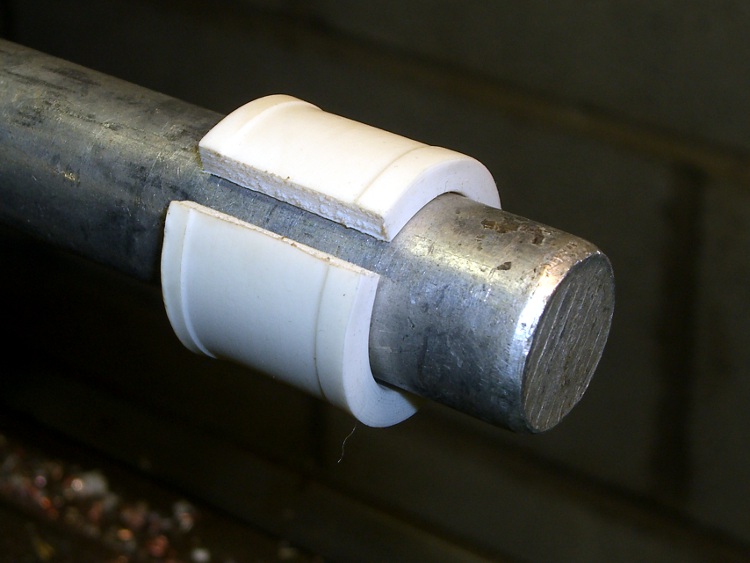
By another rare coincidence, 1.5 inch PVC pipe has an ID of exactly 40 mm… so cutting the ring exactly along a diameter produces the right length. The catch is that the pipe isn’t flexible at all, but brandishing a heat gun in a threatening manner solves that problem.
Reshaped bushing on mandrel
A random hunk of 3/4-inch aluminum rod is about 19 mm in diameter, so I chucked that in the lathe and shaped the saggy strip around it… wearing thick leather gloves.
It springs out to 20 mm with no problem, slides right on, and grips reasonably well. I may add a strip of tapeless sticky (think double-sided tape without the tape: just the adhesive!) under the bushing if it wants to walk away.
I made two of ’em, of course, and put a reflector on Mary’s bike while I was at it. Our young lady’s bike already has a reflector, although I should upgrade that bushing as well… it’s a layer of self-vulcanizing rubber tape that works perfectly, so this may take a while.
I suppose I should buy a length of gray or black PVC pipe, but that’s in the nature of fine tuning.




 The Smell of Molten Projects in the Morning