The Smell of Molten Projects in the Morning

Ed Nisley's Blog: Shop notes, electronics, firmware, machinery, 3D printing, laser cuttery, and curiosities. Contents: 100% human thinking, 0% AI slop.

Author: Ed

  • Silver-Soldering a Stainless Steel Measuring Cup

    Quite some years ago, the spot weld holding half of the handle to the side of my all-time-favorite 1/3-cup measuring cup broke loose. The minuscule weld nugget suggested that the spot welder got distracted; the weld on other side of the handle is perfectly bonded.

    I tried repairing it with silver solder and a torch, which simply proved that’s not within my skill set. I buffed off most of the residue and applied JB Weld epoxy, which lasted just fine until a few days ago. It’s a low-stress situation, indeed, but I’m not surprised that the epoxy didn’t really bond to a slightly scuffed stainless steel surface.

    So, this time around, I did it right: sandpapered off the epoxy, scuffed up the cup and handle by shoe-shining a sandpaper strip face up and face down in the gap, then silver-soldered the handle in place using my resistance soldering gadget (which I promise to describe some day).

    The setup was straightforward. Clamp the cup in the bench vise with soft copper jaws (hammered from ordinary pipe) that also grip one electrode from the soldering unit.

    Silver-soldered handle - left side
    Silver-soldered handle – left side
    Silver-soldered handle - right side
    Silver-soldered handle – right side

    I used a strip of fancy Brownell’s Silvalloy 355 silver solder ribbon (which is 56% silver instead of the chintzy 4% junk I normally use) with some truly toxic silver solder flux. About ten seconds of heat melted the solder and produced a pair of nice fillets along the sides of the handle.

    The flux washed off in hot water and a few licks with fine sandpaper cleaned things up just fine. The carbon electrode left a bit of schmutz on the handle, but nothing a Dremel brass brush wheel couldn’t solve.

    The inside has a bit of heat discoloration, but the sandpaper knocked that back reasonably well, too.

    Heat discoloration inside cup
    Heat discoloration inside cup

    The final product looked a lot better than these in-work pictures, but it’s tough to photograph subtle differences in a shiny silver object.

    Anyhow, as you might expect, we value function over form in this household.

  • Dry Ice Sublimation Rate

    For reasons I’m not at liberty to discuss, we had a cooler of dry ice pellets in the freezer for a few days. I used about a pound of it a time to mumble.

    I started with “10 pounds” of dry ice in a half-pound Styrofoam container with 1.5-inch thick walls; the total weights include the container. For what it’s worth, dry ice costs $3.50/pound under 10 pounds, then $2.75/pound over that. It used to be plenty cheaper in the old days, evidently, but everything else was, too.

    In between withdrawals, the cooler sat in the freezer and and the dry ice quietly sublimated; here’s how the weight varied between uses.

    Starting weight: 9.2 lb gross, so I lost quite a bit in transit. Which, as it happened, was about half an hour in a bike trailer during a rather hot afternoon.

    A) 7.2 to 6.7 lb -> 0.5 lb / 15 hr = 0.033 lb/hr

    B) 3.8 to 3.0 lb -> 0.8 lb / 11 hr = 0.072 lb/hr

    C) 2.7 lb to 2.0 lb -> 0.7 lb / 11 hr = 0.064 lb/hr

    I’m suspicious of that low number for the first stay, too. Maybe a side effect of having the cooler’s cavity nearly full of dry ice? Or the freezer ran defrost cycles for the other two?

    Anyhow, to a back-of-the-envelope resolution the cooler loses a bit over 0.05 lb/hour of dry ice. Call it 15 hr/lb.

    The temperature of sublimation is, according to Wikipedia, -109°F. The freezer is around 0°F: a differential of 109°F across 1.5 inches of Styrofoam. Assuming the cooler foam has R=4 with units of (ft^2·hr·°F) / (BTU·in ) and an internal surface area of 304 in^2, the cooler leaks heat at 38 BTU/hr. Call it 11 W.

    Cross check: Wikipedia says the enthalpy of sublimation at STP is 571 kJ/kg. Sublimating 0.07 lb = 0.031 kg requires 18 kJ (18 kW·s) and doing that over the course of an hour requires 5 W.

    Well, considering the rough-and-ready measurements and the fact that the freezer isn’t at STP and that I’m ignoring gas leakage and a bunch of other stuff, a factor of two error is spot on.

    If I were you, though, I’d double-check those calculations before leaping to any particular conclusions. Fair enough?

    When all was said and done, I found this thing in the bottom of the cooler. It wasn’t there when we started, soooo

    Dry Ice Thing
    Dry Ice Thing
  • Stopping Bike Helmet Strap Creepage

    My bike helmet sports a mirror, microphone boom, and earbud, so I generally hang it from the top of the seat on my Tour Easy. There’s a convenient peg seemingly made for capturing the triangle of strap that normally goes over my ear and, up to the point where I set up this helmet, everything was good.

    Helmet hanging on Tour Easy seat
    Helmet hanging on Tour Easy seat

    After about a week, I noticed that the buckle was grossly off-center under my chin: the straps had shifted to one side.

    Come to find out that the front strap on this helmet passes through an opening across the central member, below the plastic covering. Judging from the teardown of an older helmet, Bell used double-stick tape to hold the strap in place. Applying a constant force in one direction (I’m a creature of habit, the helmet always hangs from its right-side triangle) gently pulls the strap through the passage.

    Front strap passing through helmet
    Front strap passing through helmet

    So I cut two slabs of closed-cell foam and jammed them into the opening atop the strap, one from each side, with a screwdriver. That forced the strap against the adhesive and mechanically wedged it in place.

    Problem solved!

  • Chipmunks Discover Agriculture

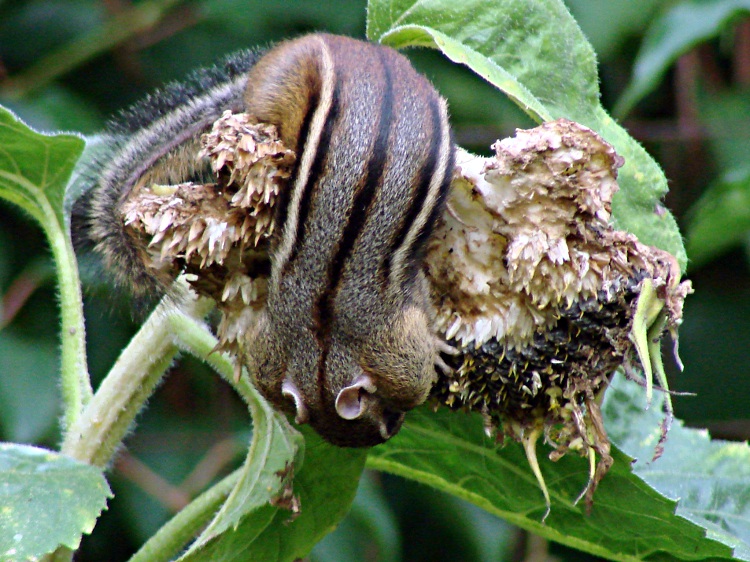
    Chipmunk atop sunflower
    Chipmunk atop sunflower

    One of the sunflowers in the garden started swaying wildly, despite having no breeze at all. I though it was a goldfinch plucking seeds, but a quick look through the binoculars showed a brown furry tail hanging below the topmost seed head, about five feet off the ground.

    Mary reports that this is one of five sunflower plants growing in a tight group near the garden fence; she thinks a chipmunk’s seed stash sprouted. This could be the start of something big: next thing you know, they’ll be planting seeds and harvesting crops!

    As we watched, the critter’s cheeks became more and more distended.

    Chipmunk stuffing cheek pouches
    Chipmunk stuffing cheek pouches

    Eventually, however, gluttony overcame common sense.

    Getting the last seed
    Getting the last seed

    Seconds after the shutter clicked, the sunflower head disintegrated, depositing the chipmunk on the ground with a rustle and a soft plop.

    No damage done, we’re sure, and that critter’s pantry should be stuffed full in short order. Next year Mary will probably do some extensive sunflower culling to get room for the rest of her crops!

    And, yes, the title is a riff on Bears Discover Fire

  • APRS SmartBeaconing Parameters for Bicycling

    Setting relatively prime beacon times for the GPS-to-APRS trackers on our three bikes worked quite well, but I wondered how much better SmartBeaconing would be. The trick is getting the numbers right for typical bicycling speeds.

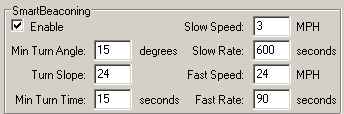
    Here’s some settings (from the TinyTrack3+ config program display) that seem to work reasonably well…

    SmartBeaconing Parameters
    SmartBeaconing Parameters

    The general idea is to beacon every 10 minutes at rest and about three / mile in motion.

    The only time I hit 3 MPH is up a really nasty hill, the likes of which I avoid with all due diligence. On the other end, 24 MPH is pretty much as fast as I can go for any length of time; faster, certainly, on downhills, but those are rare & precious commodities on most rides around here. The Slow and Fast parameters control both ends of that range. The beacon rate increases linearly below the Fast speed: 180 seconds at 12 MPH, which is roughly what I used for the constant-time setting.

    Note that the Rate parameters are actually periods. Rate is thing/time, period is time/thing. The period varies as 1/speed, while the rate varies directly with speed. See the SmartBeaconing writeup or the TinyTrak3+ doc for the algorithm.

    The Turn Slope parameter is the most confusing. It has units of degrees/MPH degree·MPH and serves to modify the Min Turn Angle so that you must turn more sharply at lower speeds to generate a beacon. This works better for vehicles with a wider dynamic range: our bikes tend to stay within 5-20 mph and a factor-of-four doesn’t affect the basic angle very much at all.

    My track through a residential area shows pretty good “Corner Pegging” for those settings and, in any event, it’s much better than the simple every-three-minutes beaconing I’d been using before. On the other hand, this is in a low-RF-traffic area with a digipeater about a mile away across the Northway, so very few packets get clobbered.

    APRS Track with SmartBeaconing
    APRS Track with SmartBeaconing

    Perhaps setting Turn Slope to 240 degrees/MPH degree·MPH with a Fast Speed of 24 MPH and a Turn Angle of 10 degrees would be slightly better. At top speed the minimum turn angle would be 10 + 240/24 = 20 degrees and nose-pickin’ speed relaxes the angle to 10 + 240/6 = 50 degrees. On the other hand, that track looks pretty good as-is!

    One problem with three bikes in close proximity (the track above is just me) is that we’ll all be turning at about the same time and, thus, sending beacons almost simultaneously. This will take a while to sort out, given that many beacons never make it to a receiver…

    [Update: A correction shows why the units aren’t what I expected.]

  • Getting More Clearance While Bicycling

    Some cyclists complain that motorists don’t give them enough room while passing. That’s less of a problem for recumbent bikes, but this gets me a lot more clearance:

    Bike trailer with propane tank
    Bike trailer with propane tank

    There’s one section of very nice and totally gratuitous 6-lane highway (NY Route 55 near the NYS DOT Region 8 HQ; I think they’re just showing off) where drivers normally edge over to the left side of the right-hand lane where I’m riding. With a 20-lb propane tank lashed to my bike trailer, most folks have no trouble whatsoever with a double lane change into the far left lane…

  • How to Impress a Contest Judge

    Every now and again, I’m asked to judge a technical contest of one sort or another. Let us assume, for the purposes of this discussion, that you are participating in such a contest and I’ve just begun to look at your entry…

    Rule 0: Send a PDF

    The contest rules will tell you what document files they expect; typically, it’ll involve some version of Microsoft Word. Why they do that, I cannot say, but Word documents aren’t really suited to read-only document distribution. Not to mention, some of us don’t have MS Word installed…

    In addition to those files, also include a PDF of your final document file so that when I open it, it’ll look exactly the way you intended. MS Word documents tend to look weird on any PC other than yours, particularly if you have any odd fonts or formatting options turned on. If you can’t figure out how to produce a PDF, install OpenOffice and use the direct PDF export; that’ll also show you how weird MS Word can appear in a different word processor.

    Don’t waste time on a fancy layout, but do pay attention to the basics:

    • Images must fit inside the margins of a single page
    • Use simple fonts that are large enough to read
    • Avoid complex tables and drawings: use PNG images instead

    Hint: ask a friend to review your submission, ideally a few days before you plan to submit it. Take any comments you get very seriously.

    Rule 1: Tell Me What You Did

    The first two paragraphs of your documentation must tell me:

    • What your project does
    • Why that’s a great idea

    That should take, at most, half of the first page.

    You have two paragraphs to catch my attention; sweat bullets over those words!

    Hint: If you can’t summarize what your project does in one sentence, maybe you don’t have a good project.

    Rule 2: Let Me Judge How Easy (or Hard) It Was

    Going on at length about how easy the project was produces the impression that maybe there’s not enough effort in there to justify a few kilobucks of prize money. Conversely, kvetching about how hard you worked indicates that you bit off more than you can chew.

    Let the project tell the story. A good project requires more than a few evenings of effort and, believe it or not, the amount of effort will show up in your description, even if you don’t mention it at all.

    Hint: If you’re trying to be funny, it probably won’t work.

    Rule 3: Use Good Pictures

    Examine all the pictures with a hyper-critical eye.

    • If they’re blurry, delete them and take them again.
    • If you think a picture might be out of focus, it is.
    • If there is the slightest trace of doubt in your mind about the quality of a picture, delete it and try again until you get it right.

    When you get the focus right, ruthlessly crop your pictures. Hint: I don’t need to see the crap on your workbench or the dirty laundry in the corner of your room. Devote all the pixels to your project!

    When you don’t care enough to invest a few minutes getting a good picture, the rest of your project is probably sub-optimal, too. Don’t bother to submit it, OK?

    Crisp pictures can’t sell a weak project. Blurry images rarely accompany a good project.

    Hint: That big LCD on the back of your camera is there for a reason. Use it!

    Rule 4: Support Your Claims

    If you claim to have built a multi-node, RF-networked, high-bandwidth, vibration sensor measurement system, then you must include data supporting your claims. Otherwise, I’ll assume you don’t know what you’re talking about or haven’t actually gotten it working, should my back-of-the-envelope calculations indicate there’s not enough RF bandwidth / range / compute power to pull it off.

    You must convince me that your project does what you claim!

    Hint: Should you claim to have built a snake-armed robot that balances atop a ball while serving drinks from a refrigerator, a video demonstrating it in action is worth a thousand words.

    Rule 5: Don’t Hide a Skeleton

    You may encounter a serious problem that simply can’t be fixed before the contest deadline. When that happens, explain what you intended to have happen, what the problem is, and what you propose as a solution. As long as the problem is secondary to the project’s intent, that’ll be fine.

    For example, if your project involves half a dozen different sensors and you just can’t get the humidity sensor working, explain your debugging efforts and the results.

    Conversely, if it’s a networking project and you can’t get the Ethernet code working, then your entire project just went down the drain and you shouldn’t submit it. I can generally tell when a project simply isn’t going to work, so your efforts to hide the corpse won’t gain you any points.

    Hint: Start your project early enough so that when something goes wrong, you have time to fix it.

    Rule 6: Use the Specified Hardware and Use It Hard!

    The contest is generally about using some particular microcontroller or chunk of hardware. Your project should fully utilize that chip: make sure you read the manual and exploit a whole bunch of its unique features.

    Hint: a project where all the action takes place in a Javascript routine or another, entirely different microcontroller probably isn’t making good use of the specified chip.

    The Bottom Line

    If you’ve got a good project and describe it well, you’re probably in the money. Plenty of other entrants will ignore these suggestions and wind up on the bottom of the pile.

    Fair enough?