The Smell of Molten Projects in the Morning

Ed Nisley's Blog: Shop notes, electronics, firmware, machinery, 3D printing, laser cuttery, and curiosities. Contents: 100% human thinking, 0% AI slop.

Author: Ed

  • Sharpie as PCB Etch Resist

    Because my hombrew circuit boards don’t have plated-through holes, I solder Z-wires from top to bottom. This entails little more than a solder blob around the wire on each side, but this time I wondered if having a slightly larger solid-copper area on each surface would be an improvement. Regrettably, I wondered this after masking the board.

    Because I use an Ultra-fine-point Sharpie to touch up pinholes & suchlike, I decided to try it on larger areas by simply coloring in a few of the openings in the ground-plane grid.

    Sharpie etch mask - Results 1
    Sharpie etch mask – Results 1

    Short answer: doesn’t work so well.

    However, I’m using direct etching: rubbing ferric chloride on the masked PCB with a sponge. The abrasion probably wears the Sharpie ink off the surface and then the copper begins etching as usual. If I were doing this with normal agitation / aeration, perhaps a Sharpie mask would work better.

    This is also 1-ounce copper, so there’s twice as much etching going on. Perhaps half-ounce copper would vanish fast enough that the Sharpie mask would remain effective.

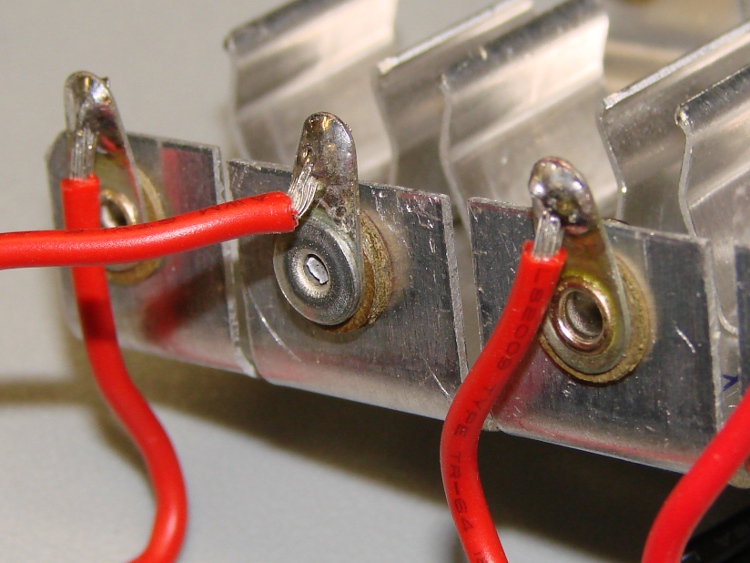
    A bit more detail, with another Z-wire pointed right at you.

    Sharpie etch mask - Results 2
    Sharpie etch mask – Results 2

    The grid is 20-mil wide on 50-mil centers, with 25-mil isolation to other signals. The “via” holes use a 24-mil drill.

    The row of dents just below the wire came from tiny openings in the mask that happen when Eagle poured the ground plane against the isolation surrounding the trace at the bottom. The toner-transfer resolution isn’t quite good enough to leave a clean opening and the etchant can’t quite reach the bottom to dig out the copper.

    Memo to Self: Next time, try a 100-mil square pad around the via, centered on a grid intersection to fill in four adjacent openings.

  • Arduino Mega: Showstopper!

    I planned to use an Arduino Mega for an upcoming Circuit Cellar project, but … it doesn’t work. Well, it works, but under very limited circumstances.

    The problem manifests itself as a complete crash / lockup under very straightforward conditions: attempting to use the serial output will suffice. This unmodified example sketch fails: AnalogInOutSerial.

    After considerable Googling, there’s the showstopper: the gcc-avr compiler fails to save-and-restore a register that gets clobbered by the object constructors. Simple code doesn’t instantiate any objects, so it works fine. The serial failure is just a symptom, which means the various workarounds suggested in the forums don’t fix the general case.

    The patch offered for gcc-avr is basically four lines (a pair of save / restores on R20), but requires recompiling what seems to be the entire AVR toolchain from source. That, alas, lies far beyond my capabilities… I could probably figure out enough to recompile it, but I’m very uncertain I could accomplish that without screwing up the main gcc compiler or the setup thereof.

    It is not clear to me that the many claims of “it works on this version” are correct. From the nature of the problem, the failures depend critically on addresses occupied, final layout of the program / data in Flash, and (most likely) the execution path. The “working” configurations / systems may simply not fail using the sample programs.

    This is on Arch Linux, for what it’s worth, with gcc-avr 4.5.1.

    If anybody can walk me through the process of rebuilding whatever must be rebuilt, preferably in a safe place, perhaps I can manually stuff the new file(s) into the proper spots(s) to replace the incorrect ones…

  • Experimental Determination of Squirrel Sprint Speed

    So there we were, biking along the northern segment of the Dutchess Rail Trail, when a squirrel scampered up a fencepost a few hundred feet ahead of us and struck a classic tree-rat pose: standing up atop the post, tail arched behind, front paws together.

    As we rolled closer, the squirrel noticed us and, as squirrels are wont to do, panicked.

    *Must* *run* *away*

    Squirrels tend to escape up the nearest tree, which works perfectly with most predators. In this case, though, the squirrel was already as high as it could get on the post and there were no trees within jumping distance.

    Decision time: can’t run up, can’t escape to the side, must not run toward the threat.

    *Must* *run* *away*

    So the critter lit off along the top rail, hurdling over the protruding fenceposts in a dead run, as fast as its little legs could carry it.

    Which, as it turned out, was just over 15 mph. We stopped pedaling and coasted, but this section is slightly down-grade and we didn’t slow very much.

    The thing was running at my eye level, about five feet to my left, and kept pace with us for maybe a dozen fenceposts. Finally it decided this tactic wasn’t working and dove off the fence into the bushes beside the trail.

    Squirrels must produce adrenaline like I produce saliva.

    And I really, really need a helmet camera…

  • CPU Heatsink: Flattening Thereof

    I suppose I should have known better: the bottom of that heatsink wasn’t anywhere near flat. I think it mated directly with the top of the CPU through thermal grease, not a compliant pad.

    Curved copper heatsink surface
    Curved copper heatsink surface

    The obvious solution is to flycut the thing, which is where the Sherline’s limited Y-axis travel and teeny table put a cramp on your style. Normally, you’d put the length of the heatsink parallel to the X axis so the flycutter would clear on both ends, but there’s no obvious (read: quick and easy) way to clamp the thing that way.

    So I mounted it parallel to the Y axis, which meant I couldn’t get the flycutter completely off the near end. The first pass at Z=-0.1 mm, however, showed that not only was the surface curved, but it wasn’t parallel to the top of the fins (which were flat on the tooling plate). I suppose I should have expected that.

    This cut is has Z=-0.1 mm referred to the front end. It completely missed the other end:

    First flycut pass
    First flycut pass

    I flipped the heatsink around, measured the front-to-back tilt (about 0.16 mm), stuck a couple of brass shims under the front, and the second pass at Z=-0.05 mm from the new low point did the trick. Copper is nasty stuff and I did these cuts dry: the chips visible near the front are stuck firmly to the surface.

    Final flycut pass
    Final flycut pass

    I scrubbed both the heatsink and the spreader plate on some fine sandpaper atop the sacrificial side of my surface plate until they were all good. I can see the remaining flycutter marks, but I can’t feel them, and the plates slap solidly together with a pffff of escaping air:

    Flattened heatsink and spreader
    Flattened heatsink and spreader

    A dab of heatsink compound should work wonders; the maximum dissipation will be under 20 W, roughly comparable to that old K6 CPU, but now the heatsink will be contacting the entire hot surface.

  • New Theme?

    There’s no way to tell if a theme will actually look right without enabling it and investing an hour fiddling with the options.

    That’s why it looks different with each refresh…

  • Comfy Office Desk Chair

    Chair from auto seat
    Chair from auto seat

    Most office desk chairs are crap. Spend a couple of hours in a typical office chair and you wonder if it had been designed by aliens who, perhaps, read the specs for human beings, but never actually met a person in the flesh.

    Conversely, you can drive for a couple of hours and get out of the car feeling at least OK. (Well, if you buy a decent car, that is. Last rental car I drove had terrible seats.)

    Anyway, you can buy an office chair made from a car seat, but they seem staggeringly expensive for what you get.

    So, a couple of decades ago, I went to a junkyard and picked up a nice seat from a fancy wreck for about $50, built a plywood base with six casters from Home Depot, put a 1-foot-diameter Lazy Susan bearing between the two, and bolted everything together. The seat even had power adjustments, so (just for fun) I tucked a battery underneath.

    After a while, I stripped off the seat belt doodads… and, of course, you really don’t need power adjustments after the first week.

    Worked like a champ for about a decade, but even a high-end seat cushion eventually goes flat. So I swapped in a front seat salvaged from one of our cars (a Toyota Camry wagon, from back before minivans ruled the road) and that lasted another decade. It finally went flat and I swapped in the other front seat.

    The 2×6-inch upright boards have slopes and cutouts that match the peculiar shape of the seat frame, with holes drilled in the wood for the metric machine bolts, and that’s a good enough anchorage for an office environment.

    Chair base
    Chair base

    The Lazy Susan bearing is between the top plywood layer and the square corner sticking out to the front. That layer bolts to the bottom sheet, providing enough clearance for the various heads and whatnot.

    You really need six casters on a fairly large base, because the chair is immensely heavy (it was, after all, designed to not fall apart during a full-on collision) and rather top-and-back-heavy without you in place.

    Considerations:

    • Get the seat close to the right height, as the adjustment range isn’t all that wide
    • Put your center of gravity in the middle of the base. Fortunately, the seat has plenty of forward-aft adjustment
    • Get the seat base pretty much horizontal

    A closer look at the front:

    Front detail
    Front detail

    The back isn’t a lot different:

    Back detail
    Back detail

    Maybe I just have a weird butt or don’t spend enough money on office chairs.

  • Continuous Ink Reservoirs: Elevation Thereof

    Do Not Raise External Ink Reservoir
    Do Not Raise External Ink Reservoir

    The continuous ink system I have on the Epson R380 occasionally stops the yellow ink flow. I think it’s related to back pressure: the lines drain down quickly after the printer stops and the yellow line is on top.

    The label on the front of the continuous ink supply reservoir minces no words:

    Do not raise the external ink reservoir higher because of curiosity or insufficient ink-supply …

    Well, maybe a little bit won’t hurt?

    As it turns out, the original ink tanks inside the printer are pretty high up, with the bottom of the print heads maybe 60 mm off the table. That chunk of foam packing material is 40 mm tall: the bottom of the ink supply remains well below the heads.

    The ink supply tubes drain back a few cm when the printer has been idle, which means the elevated reservoir isn’t applying positive pressure to the heads. And, after a few weeks of this treatment, the yellow ink flow hasn’t stopped!

    I’ll call it a win.

    Here’s the overall view, with a few ink splotches visible from previous blunders. If the table wasn’t a raw slab of half-inch plywood bolted to a surplus printer (?) stand in the basement, I’d care a lot more…

    Elevated continuous ink reservoir
    Elevated continuous ink reservoir

    The amount of ink in the waste ink tank beside the printer is breathtaking: about 50% more than noted there.