Ed Nisley's Blog: Shop notes, electronics, firmware, machinery, 3D printing, laser cuttery, and curiosities. Contents: 100% human thinking, 0% AI slop.
The Thing-O-Matic Extruder Controller uses a 7805 linear regulator to produce +5 V logic power from the +12 V input. Unfortunately, the board’s +12 V supply input is grossly overloaded: a single 20 AWG wire and Molex-style connector pin must supply several simultaneously active high-power loads:
5 A → Extruder heater
6 A → Build Platform heater
1-2 A → Extruder motor
The return current path to the ATX supply uses two pins and wires, so it contributes half as much to the problem. Molex connector pins aren’t rated for that much current (11 A @ 30 °C rise), so the +12 V supply arrives at the board in poor condition.
Worse, the brushes on the DC Extruder motor introduce large switching transients, even without PWM speed-control chopping. The Extruder and Build Platform heaters also present somewhat inductive loads to their MOSFET switches that create significant switching transients. The 7805 regulator isn’t well-suited to removing high-voltage transients; its bandwidth isn’t high enough.
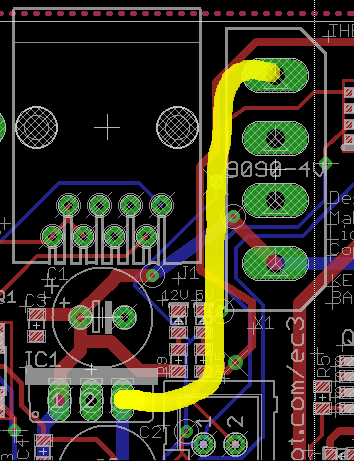
This modification gives the Extruder Controller clean +5 V logic power by removing the 7805 regulator chip and connecting the +5 V pin at the power supply Molex-style connector directly to the PCB pad that was the regulator’s output pin.
This is what the modification looks like on the PCB layout.
Extruder Controller board modification
Unsolder the regulator and remove it, which will reveal the outline printed on the circuit board. This picture is rotated a quarter-turn counterclockwise from the PCB layout shown above.
Extruder Controller minus 7805 regulator
You’ll need a beefy soldering iron or an Old Skool soldering gun to make headway on the 7805′s center pin, because it’s firmly attached to the ground plane on both sides of the circuit board. A solder sucker and desoldering braid will come in handy to remove excess solder before extracting the regulator.
Then connect a jumper from the Molex connector’s +5 V pin to Pin 3 of the 7805 regulator outline. The wire can be any size, because it carries minimal current to the logic circuitry; I used a strand stripped from a ribbon cable.
Put the wire on the bottom of the board, because the connector pin isn’t accessible from the top. However, the trace at the regulator output pad is on the bottom where it’ll butt against the wire insulation, so make sure there’s a solder fillet between the wire and the pad.
Extruder Controller with 5 V jumper
Reinstall the Extruder controller and marvel that nothing seems to have changed.
The next modification to this board will move the heater power supplies off the board, but it’s a much more aggressive hack. This simple change should eliminate the random resets and crashes that seem to be plaguing the stock Extruder Controller board; it will not prevent burning out the DC motor controller chip.
OpenSCAD grumps about not finding OpenGL 2.0 whenever it starts up on my ancient laptop, which is tedious: that situation just isn’t going to change. Not a fatal error, although I do wonder what the OpenCSG rendering would look like.
Anyhow, a bit of rummaging turns up a hack that’ll cause OpenSCAD to STFU and just start up. That doesn’t make OpenCSG work, which is pretty much not a problem for my simple needs.
On Ubuntu-flavored distros, install driconf, then activate two options (in the Performance and Debugging tabs, respectively):
Enable limited ARB_fragment_shader support on 915/945
Enable stub ARB_occlusion_query support on 915/945
That post reminded me of an incident at my parents’ house, long after I’d moved out and many years ago.
For context, the Ancestral Home is a three-story brick pile dating back to the late 1800s, with nonstandard bricks and much thicker walls than you’d expect, with plaster-on-lathe interior finishing and really nice wood trim. It’s on the southwest corner of the Hummelstown PA town square, where Main Street tapers down to two lanes.
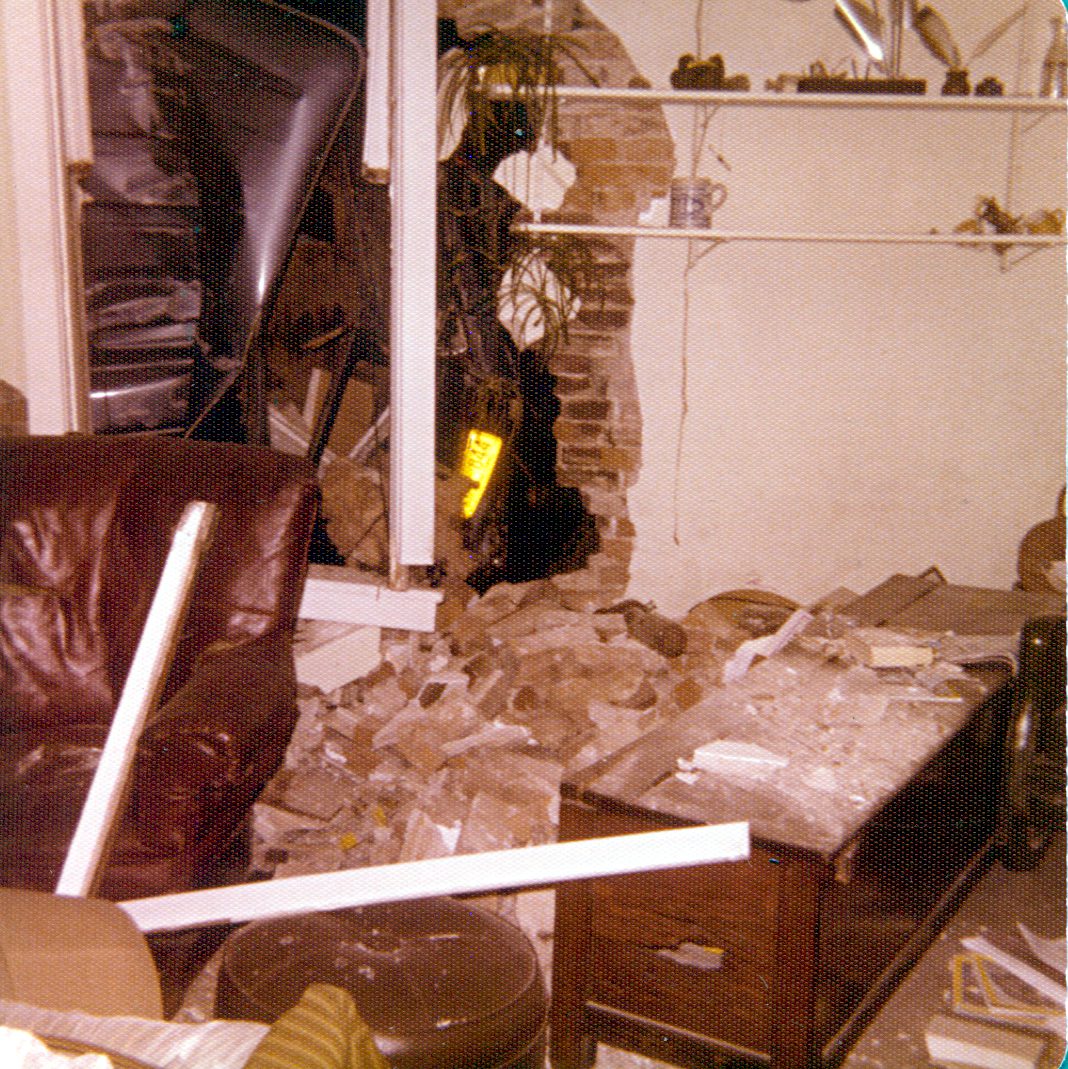
They were awakened around midnight by a mighty crash downstairs and found this in the front room:
Interior View
It seems a westbound van, traveling at what’s tautologically called “a high rate of speed”, swerved across Main Street, tripped on the curb, plowed down a concrete planter, and spanked the front corner of the house pretty hard:
Front View
The driver wasn’t thrown clear, but a whole pile of crap fell out as they were extracting him.
Outside View
Even in the days before air bags, this one was a total loss:
Aftermath – The Van
IIRC, the charge came down DWI but I vaguely recall he somehow wriggled out of that.
The building was never quite the same thereafter, either: those plaster walls were never meant to take a direct hit.
The pix are more horribly discolored satin-finish pages from the Family Album. One could do better color correction if one really had to, but …
Once again I’m planning to attend the Cabin Fever Expo in York; my shop assistant says this year she won’t barf in the kitchen sink Thursday evening just before bedtime…
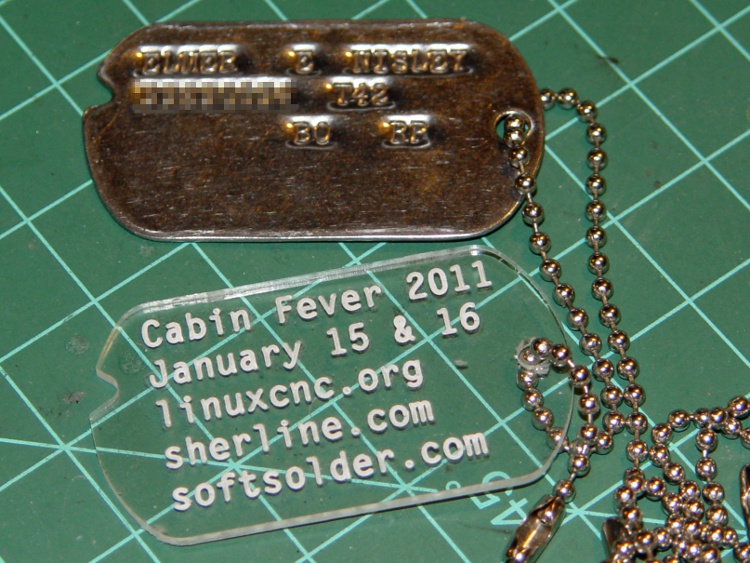
If I’m going to haul a Sherline CNC setup that far and spend all day talking machining, I must have some tchotchkes / swag to talk about. We figured a small plastic dog tag with relevant URLs would be appropriate.
Cabin Fever Dog Tag
I modeled the tag after my father’s WWII tag, including the mysterious notch. The rounded ends actually have three curves: two small fairing arcs blend the sides into the end cap.
The G-Code routine figures out all the coordinates and suchlike from some basic physical measurements & guesstimates, so tweaking the geometery is pretty straightforward. There was a blizzard going on while I wrote it: a fine day to spend indoors hacking code.
My assistant fired up Inkscape, laid out the text, figured out how to coerce G-Code out of Inkscape using the cnc-club.ru extension, then aligned it properly with the center of the chain hole as the origin on the right side. My routine calls the text G-Code file as a subroutine.
The extension’s header and footer files wrap EMC2’s SUB / ENDSUB syntactic sugar around the main file. The default files include an M2 that kills off the program; took a while to track that one down.
The header file:
O<dogtagtext> SUB
And the matching footer file:
O<dogtagtext> ENDSUB
The Inkscape-to-gcode instructions come out with absolute coordinates relative to the origin you define when you create the layout. The nested loops in my wrapper slap a G55 coordinate offset atop each label in turn, then call the subroutine.
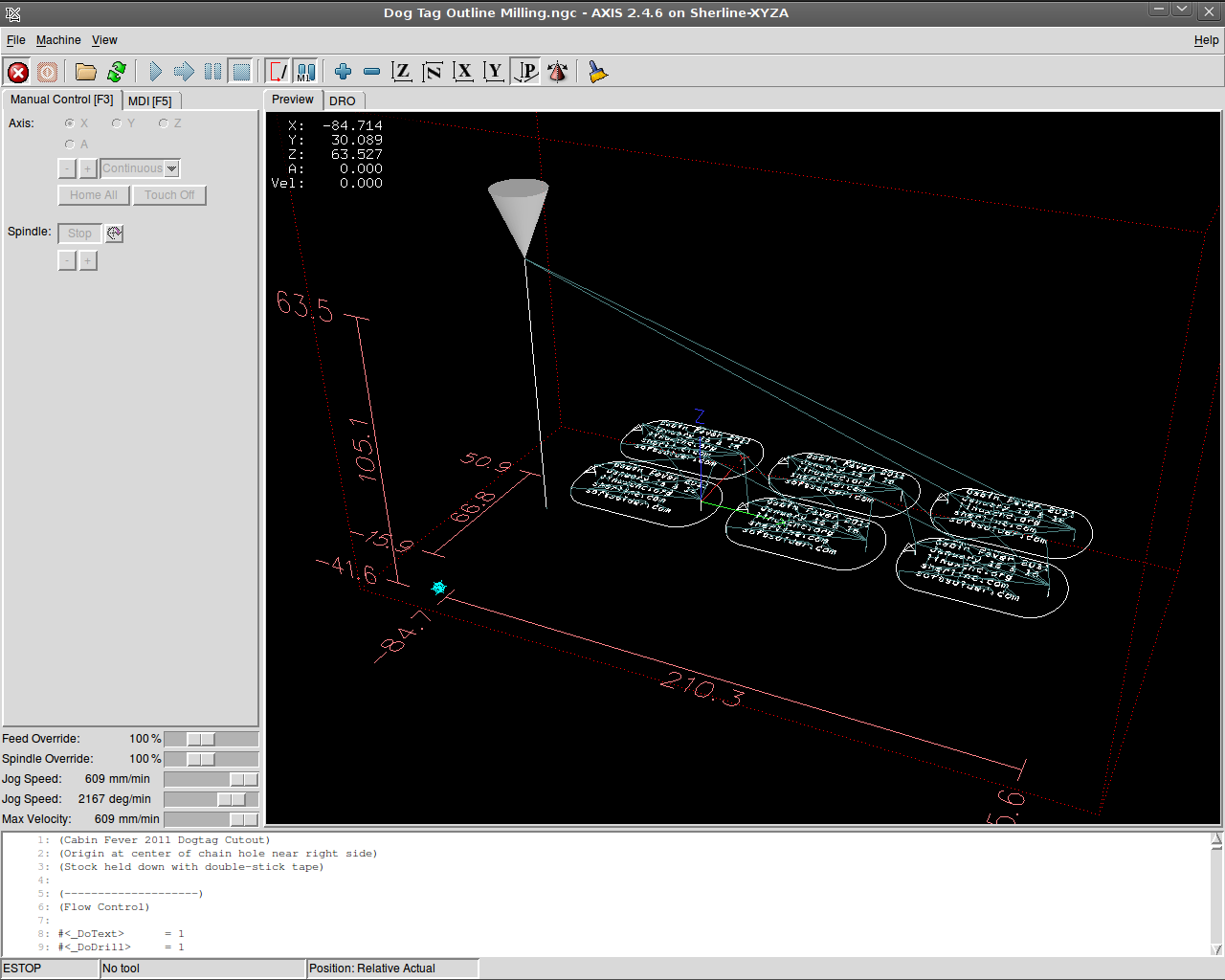
The result is pretty slick:
Screenshot: AXIS Dog Tags
I carved out that proof-of-concept label atop double-sided adhesive tape, but peeling off the goo is a real pain; a 2×3 array will be much worse. I’d rather do that than figure out how to clamp the fool things to the sacrificial plate, though.
The engraving is 0.2 mm deep with a Dremel 30 degree tool. My shop assistant describes it as “disturbing” the acrylic, not actually engraving a channel. This isn’t entirely a Bad Thing, as the font isn’t quite a stick font and the outline of each character mushes together. We must fiddle with the font a bit more; she favors a boldified OCR-A look.
Some lessons:
The Kate G-Code syntax highlighter isn’t down with EMC2’s dialect
Be very sure you touch off the workpiece origin in G54, not G55
Xylene doesn’t bother acrylic and works fine on tape adhesive
Symlinks aimed across an NFS link work fine in ~/emc2/nc_files/
That 2×3 array may be too big for the Sherline’s tooling plate
Tool length probing FTW!
The G-Code:
(Cabin Fever 2011 Dogtag)
(Ed Nisley - KE4ZNU - December 2010)
(Origin at center of chain hole near right side)
(Stock held down with double-stick tape)

(--------------------)
(Flow Control)

#<_DoText>      = 1
#<_DoDrill>     = 1
#<_DoMill>      = 1

( Sizes and Shapes)

(-- Tag array layout)

#<_NumTagsX>    = 3                         (number of tags along X axis)
#<_NumTagsY>    = 2                         ( ... Y axis)

#<_TagSpaceX>   = 60                        (center-to-center along X axis)
#<_TagSpaceY>   = 35                        ( ... Y axis)

(-- Tag Dimensions)

#<_TagSizeX>    = 50.8                      (2.0 inches in WWII!)
#<_TagSizeY>    = 28.6                      (1-1/8 inches)
#<_TagSizeZ>    = 2.0

#<_HoleOffsetX> = 4.0                       (hole center to right-side tag edge)

#<_NotchSizeX>      = 3.5                   (locating notch depth from far left edge)
#<_NotchCtrY>       = 5.0                   (locating notch from Y=0)

#<_NotchAngleBot>   = 30                    (lower angle in notch)
#<_NotchAngleTop>   = 45                    (upper angle in notch)

(-- Fairing Curve Dimensions as offsets from end arc center)

#<_EndFairR>    = [0.68 * #<_TagSizeY>]
#<_CornerFairR> = [0.25 * #<_TagSizeY>]

#<_PCRadius>    = [#<_EndFairR> - #<_CornerFairR>]
#<_PCY>         = [[#<_TagSizeY> / 2] - #<_CornerFairR>]
#<_PCTheta>     = ASIN [#<_PCY> / #<_PCRadius>]
#<_PCX>         = [#<_PCRadius> * COS [#<_PCTheta>]]

#<_P1Y>         = [#<_TagSizeY> / 2]                    (top / bottom endpoint)
#<_P1X>         = #<_PCX>

#<_P2X>         = [#<_EndFairR> * COS [#<_PCTheta>]]
#<_P2Y>         = [#<_EndFairR> * SIN [#<_PCTheta>]]

(-- Tooling)

#<_TraverseZ>   = 1.0                       (safe clearance above workpiece)

#<_DrillDia>    = 3.2                       (drill for hole and notch)
#<_DrillNum>    = 1                         ( ... tool number)
#<_DrillRadius> = [#<_DrillDia> / 2]
#<_DrillFeed>   = 200                       (drill feed for holes)
#<_DrillRPM>    = 3000

#<_MillDia>     = 3.2                       (mill for outline)
#<_MillNum>     = 1                         ( ... tool number)
#<_MillRadius> = [#<_MillDia> / 2]
#<_MillFeed>    = 150                       (tool feed for outlines)
#<_MillRPM>     = 5000

#<_TextDia>     = 0.1                       (engraving tool)
#<_TextNum>     = 1
#<_TextFeed>    = 600                       (tool feed for engraving)
#<_TextRPM>     = 10000

(-- Useful calculated values)

#<_TagRightX>   = #<_HoleOffsetX>           (extreme limits of tag in X)
#<_TagLeftX>    = [#<_TagRightX> - #<_TagSizeX>]

#<_EndFairRtX>  = [#<_TagRightX> - #<_EndFairR>]
#<_EndFairLfX>  = [#<_TagLeftX> + #<_EndFairR>]

#<_NotchCtrX>   = [#<_TagLeftX> + #<_NotchSizeX> - #<_DrillRadius>]

(--------------------)
(--------------------)
( Initialize first tool length at probe switch)
(    Assumes G59.3 is still in machine units, returns in G54)
( ** Must set these constants to match G20 / G21 condition!)

#<_Probe_Speed>     = 400            (set for something sensible in mm or inch)
#<_Probe_Retract>   =   1            (ditto)

O<Probe_Tool> SUB

G49                     (clear tool length compensation)
G30                     (move above probe switch)
G59.3                   (coord system 9)

G38.2 Z0 F#<_Probe_Speed>           (trip switch on the way down)

G0 Z[#5063 + #<_Probe_Retract>]     (back off the switch)

G38.2 Z0 F[#<_Probe_Speed> / 10]    (trip switch slowly)

#<_ToolZ> = #5063                    (save new tool length)

G43.1 Z[#<_ToolZ> - #<_ToolRefZ>]    (set new length)

G54                     (coord system 0)
G30                     (return to safe level)

O<Probe_Tool> ENDSUB

(-------------------)
(-- Initialize first tool length at probe switch)

O<Probe_Init> SUB

#<_ToolRefZ> = 0.0      (set up for first call)

O<Probe_Tool> CALL

#<_ToolRefZ> = #5063    (save trip point)

G43.1 Z0                (tool entered at Z=0, so set it there)

O<Probe_Init> ENDSUB

(--------------------)
(Start machining)

G40 G49 G54 G80 G90 G94 G97 G98     (reset many things)

G21                                 (metric!)

(msg,Verify G30.1 position in G54 above tool change switch)
M0
(msg,Verify XYZ=0 touched off at left front tag hole center on surface)
M0

O<Probe_Init> CALL
T0 M6                           (clear the probe tool)

(-- Engrave Text)

O<DoText> IF [#<_DoText>]

(msg,Insert engraving tool)
T#<_TextNum> M6         (load engraving tool)
O<Probe_Tool> CALL

F#<_TextFeed>
S#<_TextRPM>

(debug,Set spindle to #<_TextRPM>)
M0

G0 X0 Y0                (get safely to first tag)
G0 Z#<_TraverseZ>       (to working level)

G10 L20 P2 X0 Y0 Z#<_TraverseZ>         (set G55 origin to 0,0 at this point)
G55                                     (activate G55 coordinates)

O3000 REPEAT [#<_NumTagsX>]

O3100 REPEAT [#<_NumTagsY>]

O<dogtagtext> CALL

G0 X0 Y0
G10 L20 P2 Y[0 - #<_TagSpaceY>]         (set Y orgin relative to next tag in +Y direction)

O3100 ENDREPEAT

G10 L20 P2 X[0 - #<_TagSpaceX>] Y[[#<_NumTagsY> - 1] * #<_TagSpaceY>] (next to +X, Y to front)

O3000 ENDREPEAT

G54                                     (bail out of G55 coordinates)

(-- Drill holes)

O<DoDrill> IF [#<_DoDrill>]

T0 M6
(msg,Insert drill)
T#<_DrillNum> M6
O<Probe_Tool> CALL

F#<_DrillFeed>
S#<_DrillRPM>

#<_DrillZ> = [0 - #<_TagSizeZ> - #<_DrillRadius>]

(debug,Set spindle to #<_DrillRPM>)
M0

G0 X0 Y0                (get safely to first tag)
G0 Z#<_TraverseZ>       (to working level)

#<IndexX> = 0
O1000 DO

#<IndexY> = 0
O1100 DO

#<TagOriginX> = [#<IndexX> * #<_TagSpaceX>]
#<TagOriginY> = [#<IndexY> * #<_TagSpaceY>]

G81 X#<TagOriginX> Y#<TagOriginY> Z#<_DrillZ> R#<_TraverseZ>
G81 X[#<TagOriginX> + #<_NotchCtrX>] Y[#<TagOriginY> + #<_NotchCtrY>] Z#<_DrillZ> R#<_TraverseZ>

#<IndexY> = [#<IndexY> + 1]
O1100 WHILE [#<IndexY> LT #<_NumTagsY>]

#<IndexX> = [#<IndexX> + 1]
O1000 WHILE [#<IndexX> LT #<_NumTagsX>]

G30     (go home)

O<DoDrill> ENDIF

(-- Machine outlines)

O<DoMill> IF [#<_DoMill>]

T0 M6                   (eject drill)
(msg,Insert end mill)
T#<_MillNum> M6         (load mill)
O<Probe_Tool> CALL

F#<_MillFeed>
S#<_MillRPM>

(debug,Set spindle to #<_MillRPM>)
M0

G0 X0 Y0                (get safely to first tag)
G0 Z#<_TraverseZ>       (to working level)

G10 L20 P2 X0 Y0 Z#<_TraverseZ>         (set G55 origin to 0,0 at this point)
G55                                     (activate G55 coordinates)

O2000 REPEAT [#<_NumTagsX>]

O2100 REPEAT [#<_NumTagsY>]

G0 X[#<_NotchCtrX>] Y[#<_NotchCtrY>]     (get to center of notch hole)
G0 Z[0 - #<_TagSizeZ>]                      (down to cutting level)

G91                                         (relative coordinate for notch cutting)
G1 X[0 - #<_NotchSizeX>] Y[0 -  #<_NotchSizeX> * TAN [#<_NotchAngleBot>]]
G1 X[0 + #<_NotchSizeX>] Y[0 +  #<_NotchSizeX> * TAN [#<_NotchAngleBot>]]
G1 X[0 - #<_NotchSizeX>] Y[0 +  #<_NotchSizeX> * TAN [#<_NotchAngleTop>]]
G90                                         (back to abs coords)

G42.1 D#<_MillDia>                          (cutter comp to right)
G1 X[#<_TagLeftX>] Y0                       (comp entry move to tip of left endcap)

G3 X[#<_EndFairLfX> - #<_P2X>] Y[0 - #<_P2Y>] I[#<_EndFairR>] J0    (left endcap front half)

G3 X[#<_EndFairLfX> - #<_P1X>] Y[0 - #<_P1Y>] I[#<_P2X> - #<_PCX>] J[#<_P2Y> - #<_PCY>]

G1 X[#<_EndFairRtX> + #<_P1X>]                                      (front edge)

G3 X[#<_EndFairRtX> + #<_P2X>] Y[0 - #<_P2Y>] I0 J[#<_CornerFairR>]

G3 X[#<_EndFairRtX> + #<_P2X>] Y[#<_P2Y>] I[0 - #<_P2X>] J[#<_P2Y>]    (right endcap)

G3 X[#<_EndFairRtX> + #<_P1X>] Y[#<_P1Y>] I[#<_PCX> - #<_P2X>] J[#<_PCY> - #<_P2Y>]

G1 X[#<_EndFairLfX> - #<_P1X>]                                      (rear edge)

G3 X[#<_EndFairLfX> - #<_P2X>] Y[#<_P2Y>] I0 J[0 - #<_CornerFairR>]

G3 X[#<_EndFairLfX> - #<_P2X>] Y[0 - #<_P2Y>] I[#<_P2X>] J[0 - #<_P2Y>]    (left endcap complete)

G0 Z#<_TraverseZ>

G40

G0 X0 Y0
G10 L20 P2 Y[0 - #<_TagSpaceY>]         (set Y orgin relative to next tag in +Y direction)

O2100 ENDREPEAT

G10 L20 P2 X[0 - #<_TagSpaceX>] Y[[#<_NumTagsY> - 1] * #<_TagSpaceY>] (next to +X, Y to front)

O2000 ENDREPEAT

G54                                     (bail out of G55 coordinates)

G30         (go home)

O<DoMill> ENDIF

M2
Half of the daily traffic arrives by search engine for topics of general interest. The hackaday firestorm skews the numbers (the Alpha Geek clock was hackaday’s favorite a year ago), but a few other topics peek through.
Views	Title
73159	Home page
6063	Bed Bugs: Wrapup
5754	Bed Bugs: Hot Box Disinsector
5148	Changing the Arduino PWM Frequency
3688	Arduino Hardware-assisted SPI: Synchronous Serial Data I/O
2823	Arduino Command Line Programming: Avrdude Puzzlement
2768	Ubuntu 9.10 Partition Backup: ext4 vs partimage vs dd
2751	Bed Bugs: Overview
2450	Alpha-Geek Clock
2291	Ubuntu 9.10 HAL FDI: Input Device Configuration - Kensington Expert Mouse FAIL
2202	Finding Transformer Pi Model Parameters
2184	Arduino vs. ATMega168 Chip Pinouts
2091	Bed Bugs: Infestation and Breeding
2019	Arduino Fast PWM: Faster
1981	Sherline Mill Counterweight Gantry
1890	Cold & Fractured Solder Joints
1851	Bed Bugs: Dying on Planet Sticky
1848	Bed Bugs: Living on Planet Sticky
1830	Bed Bugs: Assured Destruction
1734	Bed Bugs: Killing Fields
1692	Bed Bugs: Traps From Planet Powder
1637	Bed Bugs: Thermal Kill
1488	Dell GX270 Auto-On Power Setting
1481	Bed Bugs: Lures
1364	Removing a Water Heater Anode Rod
1356	Bed Bugs: Disinsecting the Bedroom
1352	Arduino LiquidCrystal Library vs Old HD44780 LCD Controller
1319	Bed Bugs: Furniture Isolation
1208	Kensington Expert Mouse Trackball: Scroll Ring Troubles
1199	Camera Microscope Adapter
1193	Bed Bugs: Pesticides
1177	Sunglasses Repair: Half a Hinge Is Better Than None
1152	Kubuntu Remote Desktop via SSH Tunnel
1123	Mysterious USB Disconnects
1039	Recumbent Bicycle Amateur Radio Antenna Mount
1027	American Standard Elite Kitchen Faucet Disassembly
1005	Bullet Hole in Plate Glass
The search terms are fascinating, at least to me:
Views	Search
832	arduino pwm frequency
795	arduino pwm
500	arduino pinout
460	chain catcher
433	milling
408	arduino spi
397	staghorn beetle
357	transformer model
355	atmega168 pinout
351	atmega328 pinout
317	cold solder joints
255	cold solder joint
253	bellows
245	partimage ext4
231	avid rollamajig
226	triple alert redemption
214	arduino fast pwm
203	sherline
193	avrdude arduino
192	arduino command line
176	photoresistor circuit
172	turkey hen
162	camera microscope
160	kubuntu remote desktop
158	magnetizer
155	front derailleur cable
147	dl1414
145	sinking ship
145	arduino avrdude
144	cold solder
140	resistance soldering
137	hen turkey
134	rollamajig
130	pspice transformer
125	giant swallowtail butterfly
123	milling projects
122	the smell of molten projects
121	arduino struct
121	visible light blocking filter
116	swallowtail butterfly
115	rats leaving a sinking ship
115	dragonfly
109	tektronix 492
109	taxact vs turbotax
108	garrotte
108	bob yak
107	hv transformer
107	nielsen tv survey
107	arduino cnc
107	sherline mill
106	ss president coolidge
105	if you can read this roll me over
105	wwvb receiver
104	trackball
104	pwm arduino
101	stag horn beetle
101	backup ext4
101	scratch paper
I knew Arduino hardware and programming was interesting, but I would not ever have predicted that the fourth most popular search term would land there! Must be a lot of bicyclists with chain troubles out there…
Any sufficiently precise instrument is a thermometer
That’s in addition to whatever it’s supposed to be measuring, of course, but it’s amazing how temperature effects creep into those last few digits without you noticing anything different.
The differences between precision, accuracy, and resolution remain relevant, if commonly misunderstood. In particular, precision is not the same as resolution. A good introduction is there.
I stand in awe of the analog IC design folks who can build temperature compensation into a chip by tweaking junction areas and currents. A tip o’ the cycling helmet to ’em!





 The Smell of Molten Projects in the Morning