Ed Nisley's Blog: Shop notes, electronics, firmware, machinery, 3D printing, laser cuttery, and curiosities. Contents: 100% human thinking, 0% AI slop.
The switch on that screwdriver failed again, this time by having the internal switch mounting bosses disintegrate:
Cordless screwdriver – broken switch mounts
Not being one to worry about outside appearances, I simply drilled out the bosses to fit a pair of 4-40 screws, put the nuts inside, and it was all good:
Cordless screwdriver – switch with screws
Except that the switch now required an unseemly amount of force to operate in the forward direction. The switch is the cheapest possible collection of bent metal strips and injection molded plastic bits you can imagine, but with some bending and re-staking and general futzing around, it works fine again.
A gust of wind blew Mary’s bike helmet off the seat and, by the conservation of perversity, it landed on the mirror with predictable results:
Broken helmet mirror mount
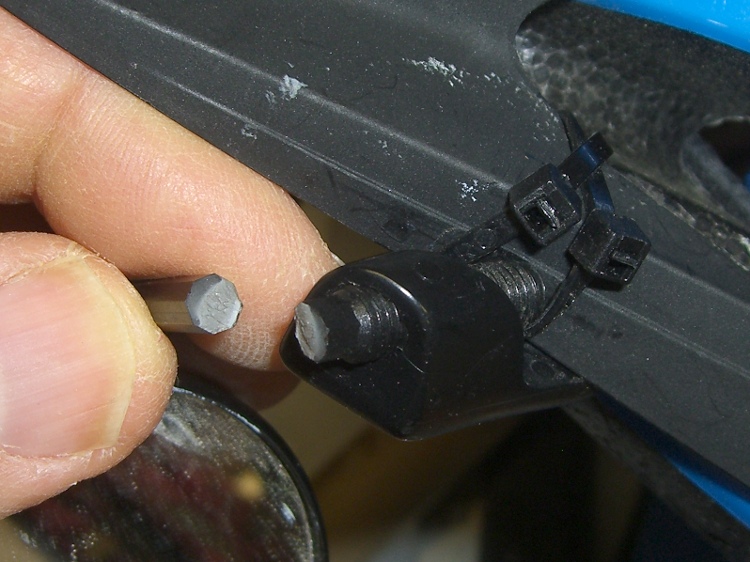
I affixed the two ends with solvent glue, then epoxied a brass tube around them to stiffen it up. While I had the epoxy and brass out, I added a splint over a previous repair near the mirror ball:
Re-repaired mirror mount
After taking that picture, I heated and bent the remaining shaft just slightly to put the ball near the middle of its range. There’s no possible way this can survive this year’s cycling, so I must get cracking on building some durable mirrors. A 3-D printer should come in handy for something in that project!
In order to get good scope pictures of the winding current in a stepper motor, the scope must sync to the step pulses. However, it must also sync to the groups of 32 step pulses that make up a single set of four full steps, because the winding current repeats for each of those groups. Triggering once per revolution and delaying for a fixed amount will get you where you need to be.
The sync wheel provides a once-per-revolution pulse, but there’s some jitter in the edge for all the usual reasons and you’d be better off with a sync based on the stepper driver’s step input. The general idea is to find the leading edge of the optical pulse, find the next step pulse, then produce output pulses based on the step signal. Assuming a regular step pulse stream (from a pulse generator, for example), the output will be both locked to the wheel rotation and to the step pulses.
Normally this calls for a tedious wiring session involving logic gates and counters, but an Arduino has all the requisite machinery built in. The trick is to generate the pulses using the ATmega’s hardware, rather than program instructions, thus eliminating the usual jitter caused by instruction execution time.
I set up Timer 1 in Mode 4 (CTC with OCR1A controlling the matches) to count step pulse inputs on its T1 external clock input pin and produce a once-per-revolution output pulse on the OC1A pin. Because the output changes on the rising edge of the input clock, its rising and falling edges will provide rock-solid stable scope synchronization.
The big picture goes a little something like this:
Tell the counter to set the output on match, load the duration of the output pulse
Wait for the once-per-revolution signal, then enable the external clock input
Wait for the comparison to happen and reset the match flag
Set a one-pulse delay and tell set the counter to clear the output on match
Wait for the compare, clear the flag, turn off the counter
Wait until the once-per-rev signal goes low
And then do it all over again
Which produces this:
Sync Wheel
Top trace = optical signal from interrupter, middle = 1/rev sync from Arduino OC1A pin, bottom = step pulses. The motor is turning 3.5 rev/s = 210 rev/min. The top half of the screen is at 2 ms/div, the bottom half at 200 μs/div.
You could synchronize the counter to the 1/rev input exactly once, then produce the output pulse just by counting stepper pulses. It’d also be nice to have a pulse that repeats for each group of 32 microsteps within each set of four full steps, perhaps settable to a particular microstep within the group. All that’s in the nature of fine tuning.
Of course, devoting an Arduino to this project would be absurd, but for a one-off effort it makes a lot of sense.
The Arduino source code:
// Stepper motor driver synchronization
// Ed Nisley KE4ZNU June 2011

//-- Pin definitions, all of which depend on internal hardware: do *not* change

#define PIN_REV	2					// INT0 = positive 1/rev pulse from optical switch
#define PIN_STEP 5					// T1 = positive 1/step pulse from stepper driver
#define PIN_TRIGGER 9				// OC1A = positive trigger pulse to scope

#define SYNC_OFFSET	15				// steps from 1/rev puse to start of first 4-full-step group

#define PIN_TRACE_A    10
#define PIN_TRACE_B    11
#define PIN_TRACE_C    12

#define PIN_LED		13

//---------------------
// Useful routines

//--- Input & output pins

void TogglePin(char bitpin) {
	digitalWrite(bitpin,!digitalRead(bitpin));    // toggle the bit based on previous output
}

//----------------
// Initializations

void setup() {

  pinMode(PIN_REV,INPUT);		// INT0 1/rev pulse from wheel

  pinMode(PIN_STEP,INPUT);		// T1 step pulse from stepper driver

  pinMode(PIN_LED,OUTPUT);
  digitalWrite(PIN_LED,LOW);

  pinMode(PIN_TRACE_A,OUTPUT);
  pinMode(PIN_TRACE_B,OUTPUT);
  pinMode(PIN_TRACE_C,OUTPUT);

//--- Prepare Timer1 to count external stepper drive pulses

  TCCR1B = B00001000;				// Timer1: Mode 4 = CTC, TOP = OCR1A, clock stopped

  pinMode(PIN_TRIGGER,OUTPUT);		// OC1A to scope trigger

}

//----------------
// The main event

void loop() {

//-- Wait for rising edge of 1/rev pulse from optical switch

  TCCR1A = B11000000;						// COM1A set on compare
  TCNT1 = 0;								// ensure we start from zero
  OCR1A = SYNC_OFFSET;						// set step counter

  while(!digitalRead(PIN_REV)) {			// stall until 1/rev input rises
	TogglePin(PIN_TRACE_A);
  }

//-- Got it, fire up the timer to count stepper driver pulses

  TCCR1B |= B00000111;						// enable clock from T1 pin, rising edge

  digitalWrite(PIN_LED,HIGH);				// show we got here
  digitalWrite(PIN_TRACE_A,LOW);

  while(!(TIFR1 & _BV(OCF1A))) {			// wait for compare
	digitalWrite(PIN_TRACE_B,digitalRead(PIN_STEP));
	continue;
  }
  TIFR1 |= _BV(OCF1A);						// clear match flag

//-- Scope sync pulse now active

  digitalWrite(PIN_LED,LOW);				// show we got here
  digitalWrite(PIN_TRACE_B,LOW);

//-- Wait for another step pulse to clear scope sync

  TCCR1A = B10000000;						// COM1A clear on compare
  OCR1A = 1;								// wait for another pulse

  while(!(TIFR1 & _BV(OCF1A))) {			// wait for compare
	digitalWrite(PIN_TRACE_B,digitalRead(PIN_STEP));
	continue;
  }
  TIFR1 |= _BV(OCF1A);						// clear match flag
  digitalWrite(PIN_TRACE_B,LOW);

//-- Shut down counter and wait for end of 1/rev pulse

  TCCR1B &= ~B00000111;						// turn off timer clock

  while(digitalRead(PIN_REV)) {				// stall until 1/rev pulse goes low again
	TogglePin(PIN_TRACE_C);
  }
  digitalWrite(PIN_TRACE_B,LOW);

}
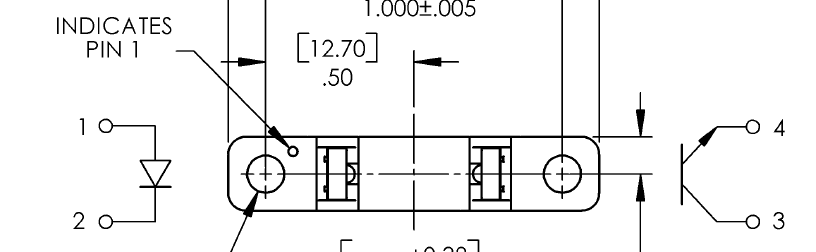
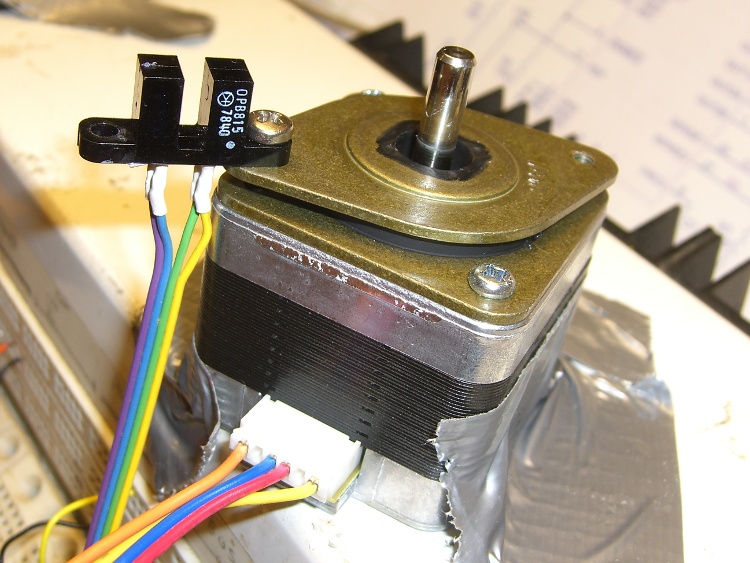
One might reasonably be led to believe that the white dot on the part marks the LED anode. That’s what I thought, too, but the innards are actually rotated 180° from the picture: the dot marks the transistor collector.
Took me a while to figure that out; I eventually tore one apart and used my pocket camera to look for the blue-white glare of the IR emitter.
After the dust settled, I rummaged around in the impacted shitpile holding my paper documents and found the original 1982 datasheet, with my very own scrawled notes:
Original OPB815 Datasheet Pinout Diagram
Back in the day, the dot on pin 1 marked the transistor collector…
Memo to Self: No, scanning all that old paper wouldn’t help.
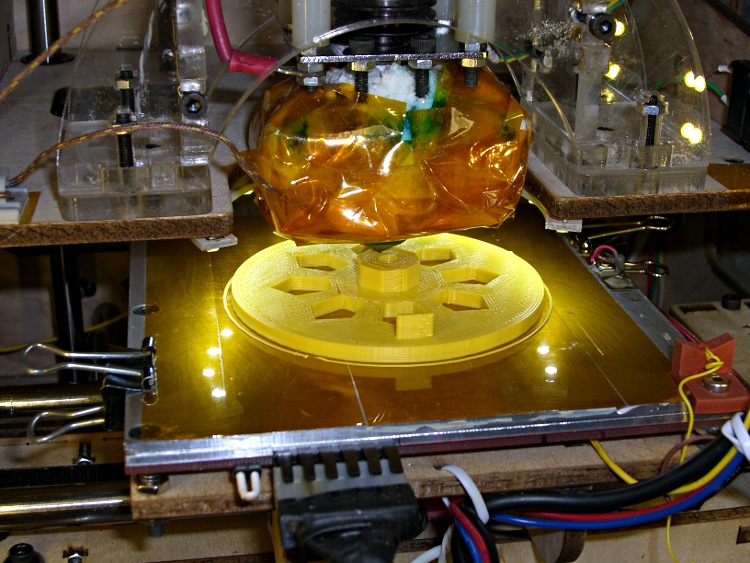
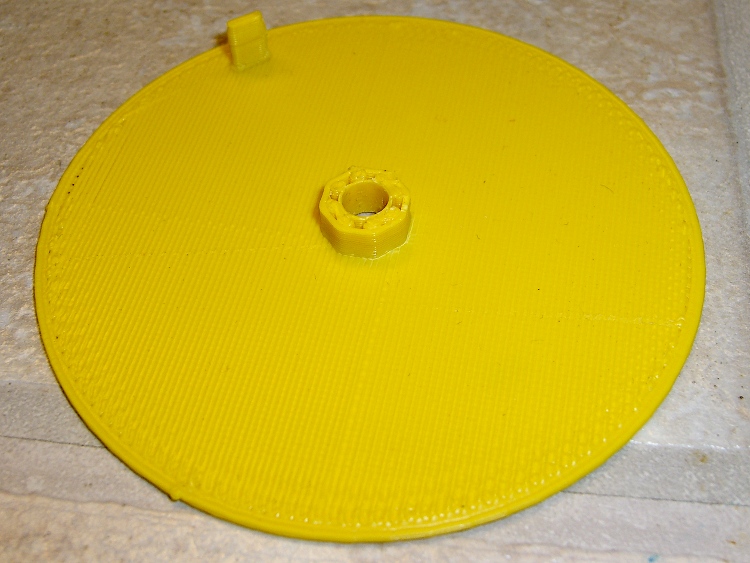
A need for pix of the current waveforms in a stepper motor produced a need to synchronize to the shaft rotation. Rather than cobble something up using random spare parts, I printed a wheel with a tab:
Final rotation sync disk
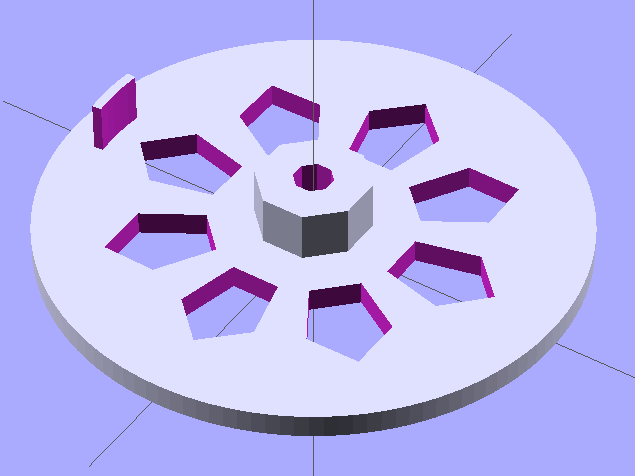
The model looks about like you’d expect:
Synch wheel solid model
Those stretched pentagonal holes give it a vaguely religious aspect, don’t they?
The tab is 2/50 of the circumference, so that the resulting pulse neatly brackets two consecutive groups of four full-step pulses. There’s no way to align the tab with the rotor position, so producing a good scope sync pulse becomes a simple matter of software.
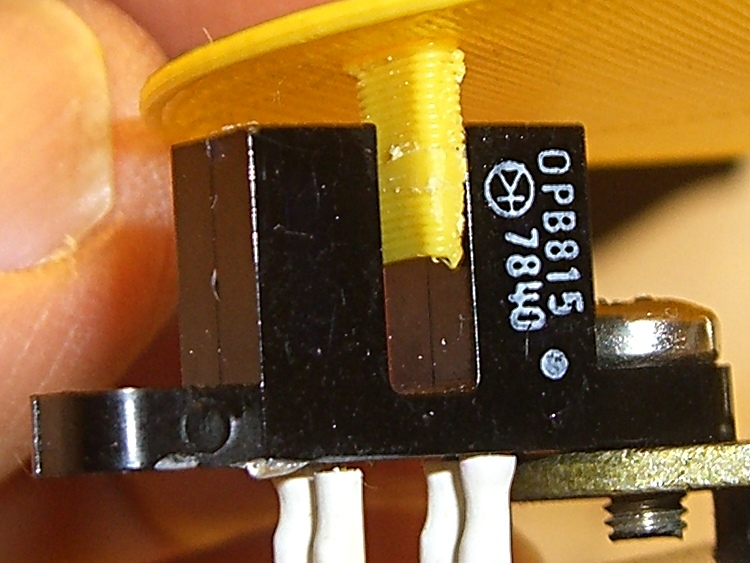
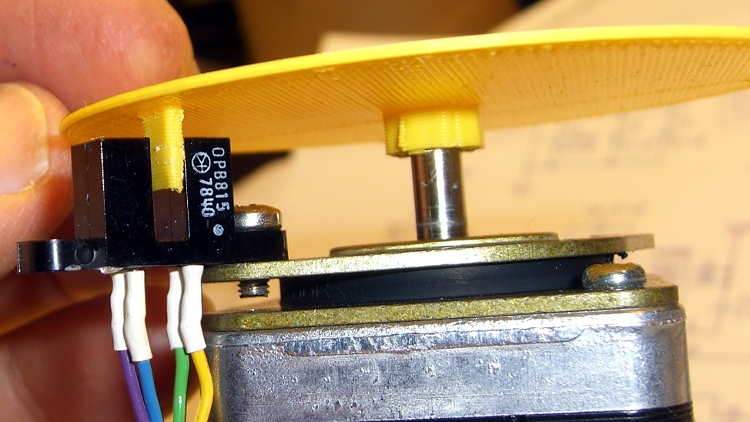
The tab’s length and radial position corresponds to this carefully engineered bit of mayhem:
Optical interrupter on stepper isolator bushing
The shaft hole will be just slightly too small for the motor shaft, which is perfectly fine. Drill the hole to 5 mm using a #9 drill, working your way up from about #12 to keep the hole concentric.
Actually, that was the second version. The first was a quick-and-dirty disk with a tab, but it came out too floppy at only 1 mm thick and utterly boring:
Simple rotation sync disk
But it served as the prototype to settle the tab dimensions and location:
First synch disk with optical interrupter
The OpenSCAD source:
// Optical Interrupter
// Suited for low speed demonstrations!
// Ed Nisley KE4ZNU June 2011

//- Extrusion parameters - must match reality!
//  Print with +2 shells and 3 solid layers

ThreadThick = 0.33;
ThreadWidth = 2.0 * ThreadThick;

//- Plate dimensions

MotorShaftDia = 5.0;
MotorShaftDiaSides = 8;
MotorShaftPolyRadius = (MotorShaftDia/2)/cos(180/MotorShaftDiaSides);

HubDia = MotorShaftDia + 16*ThreadWidth;
HubThick = ceil(10.0/ThreadThick)*ThreadThick;		// total, not added to plate
HubSides = 8;

BladeRadius = 31.5;				// to center of optical switch gap
BladeThick = 2*ThreadWidth;		// measured radially
BladeAngle = (2/50)*360;		// 50 repeats of 4 full step sequences per rev
BladeHeight = 7.0;				// beyond ribs

PlateRadius = BladeRadius + 5.0;
PlateThick = ceil(3.0/ThreadThick) * ThreadThick;

HoleCenterRad = (BladeRadius + HubDia/2)/2;
HoleDia = 0.75 * (3.14159 * 2 * HoleCenterRad)/HubSides;
HoleSides = 5;

//- Convenience items

Protrusion = 0.1;
$fn = 128;						// make large circles very smooth

//- Build it!

difference() {
  union() {
	cylinder(r=PlateRadius,h=PlateThick);			// base plate

	cylinder(r=HubDia/2,h=HubThick,$fn=HubSides);	// hub

	translate([0,0,PlateThick])						// blade
	  difference() {
		cylinder(r=BladeRadius+BladeThick/2,h=BladeHeight);
		cylinder(r=BladeRadius-BladeThick/2,h=BladeHeight + Protrusion);
		rotate([0,0,(180 - BladeAngle/2)])
		  translate([PlateRadius,0,(BladeHeight + Protrusion)/2])
			cube([PlateRadius*2,PlateRadius*2,BladeHeight+Protrusion],center=true);
		rotate([0,0,(BladeAngle/2)])
		  translate([PlateRadius,0,(BladeHeight + Protrusion)/2])
			cube([PlateRadius*2,PlateRadius*2,BladeHeight+Protrusion],center=true);
	  }

  }

  translate([0,0,-Protrusion])						// shaft hole
	cylinder(r=MotorShaftPolyRadius,
			 h=HubThick+2*Protrusion,
			 $fn=MotorShaftDiaSides);

  for (Angle = [0:(HubSides-1)])					// beautification holes
	rotate([0,0,Angle*(360/HubSides)])
	  translate([HoleCenterRad,0,-Protrusion])
		rotate([0,0,180])
		  scale([1.33,1.0,1.0])
			cylinder(r=HoleDia/2,
					 h=(PlateThick + 2*Protrusion),
					 $fn=HoleSides);

}
Yeah, that optical switch really is older than you are…
Most of my machining involves one-off setups and simple cuts, so I usually type G-Code directly into EMC2’s Axis interface: CNC hits precise locations and makes smoother cuts than I ever could. Most of the time, that works really well.
Occasionally, though, I think one thing and type something else.
The air conditioning in our Toyota Sienna van emitted some barely cool air during the previous heat wave, which was definitely new news and not to be tolerated. The sight glass showed white foam when running and nothing when stopped, but the compressor hadn’t locked out on low pressure yet. My guess was that everything still worked and that the refrigerant had just slowly leaked away over the last 11.5 years; nothing lasts any more, eh?
I consulted with my cronies and devoted a few hours to discovering that many seemingly qualified people don’t understand the notion of vapor pressure, but that a DIY recharge wasn’t exactly rocket science. Picked up a Harbor Freight manifold gauge (on sale for 50 bucks, less one of the ubiquitous 20% coupons = $40) and two cans of R134a plus a can tapper from Autozone. Parked the car in the garage and popped the hood to let things cool off overnight.
The never-sufficiently-to-be-damned Toyota engineers put the low pressure port far back on the inside of the right-side wheel well, where I can barely reach it by standing next to the car facing forward, reaching backwards with my left arm, easing my outstretched hand through the gap between the well and the engine, then feeling around to find and unscrew and not drop the cap. No, I’m not left-handed, I just can’t contort my right hand sufficiently to do more than touch the cap.
Aligning and securing the low-pressure fitting on that port requires far more agility and strength than should reasonably be expected from one’s weak-side hand. A pox on their backsides!
Anyway.
The static pressure started out at 67 psi in the morning, which is roughly correct for R134a in the low 20 °C range: chart or table. That’s a good sign indicating that the sump still had liquid refrigerant, confirmed by the myriad bubbles in the sight glass. Eyeball the outer ring of the low-side gauge to find the R134a temperature corresponding to the pressure on the inner ring.
Harbor Freight AC Low Pressure Gauge
That gauge shows whatever pressure was left in the hose after finishing the job a few hours prior to the picture. It seems the manifold / hoses / valves hold pressure quite well, which is not a foregone conclusion given Harbor Freight’s QC.
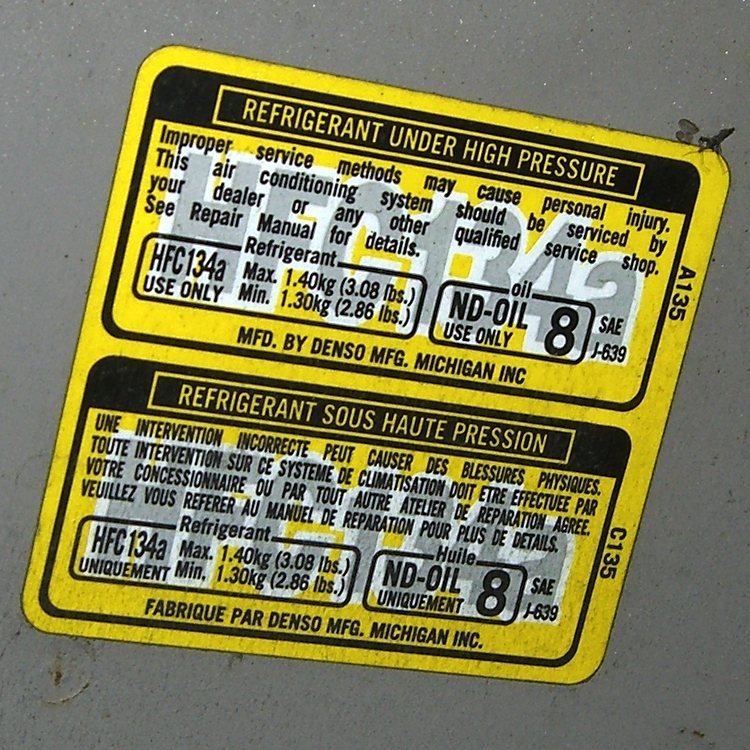
The sticker under the hood reports the AC requires about 3 pounds of refrigerant. That’s far more than most cars because the van also has a rear-cabin AC evaporator with one honkin’ big compressor for both.
2000 Toyota Sienna Refrigerant Sticker
I made the working assumption that if the AC still had some liquid refrigerant, it also had pretty nearly all the OEM oil. Most of the year the AC stays off, so I figure we’ve got a slooowww gas leak past the (usually) non-rotating seals driven by vapor pressure, all of which left the oil down in the sump. In addition, I haven’t the slightest idea if Toyota’s ND-OIL 8 gets along with the current PAG oil and adding too much oil seemed worse than having slightly too little.
The running pressures were 7 and 75 psi: grossly low.
So I fired in both cans of R134a: one with UV leak detector and another with leak sealer. That brought the pressures up to 20 / 120 psi: still too low, but at least air from the center vent now came out at 9 °C. The sight glass showed mostly foam, although with bursts of bubbly fluorescein green liquid. No leaks in evidence anywhere I could find without a nose-to-tail under-the-car inspection back to that rear evaporator.
Another trip (this time by bike) to the Autozone fetched a third can of straight R134a, which gradually cleared up the sight glass and got the pressures up to 35 / 150 psi, roughly matching the actual evaporator and condenser temperatures. I figured a few excess ounces wouldn’t do the least bit of damage; the three cans add up to 35 ounces of refrigerant, so the system was about 3/4 empty.
Early reports from the current heat wave seem encouraging.







 The Smell of Molten Projects in the Morning