The Smell of Molten Projects in the Morning

Ed Nisley's Blog: Shop notes, electronics, firmware, machinery, 3D printing, laser cuttery, and curiosities. Contents: 100% human thinking, 0% AI slop.

Author: Ed

  • Credit Card Services: A Tinge Of Doubt Crosses His Mind

    This call from Credit Card Services lasted about a minute, but was highly informative. I pressed 1 to lower my interest rates, then …

    CCS: This call is regarding an issue with your Visa and Mastercard credit card accounts. Based on changes in your credit score and repayment history over the last twelve months, you may be eligible for a lower interest rate. In order to qualify, you must have a balance on at least one card of at least $4000. Is that the case?

    Me: Sure.

    CCS: The interest rate on that account must average more than 12 percent. Is that the case?

    Me: Sure.

    CCS: I must verify your phone number. Our records show that it is [reads off number].

    Me: Sure.

    CCS: And your name is [reads off my formal name, which shows he doesn’t know me from Adam Smith].

    Me: Sure.

    CCS: What is the total balance on all your credit cards?

    Me: Well, that’s hard to say.

    CCS: All we need is an estimate.

    Me: Let’s call it ten grand. [This is a lie. Next time, I’ll say twenty grand.]

    CCS: And how many credit cards do you have?

    Me: Four. [Also a lie. Next time, I’ll say eight.]

    CCS: [background chatter, loud crash, call disconnects.]

    Previous Credit Card Services contestants have sworn that they do not know what number they dialed. After you pass a minimum qualification, well, suddenly they do know your number and your name. Huh. Who’d’a thunk it?

    This contestant did not pass me to the CCS Level 2 Closer, the guy who attempts to tongue-wrestle victims into divulging a credit card number that he will instantly siphon money out of. We recently burned the balance in a gift card obtained for test-driving a Toyota (hey, I won’t pass up free money), so maybe I’ll feed those digits into the next call.

    If I sounded more enthusiastic, I’m sure I could reach the Closer!

    I used to think that a sensible person running a scam like CCS would make it a point to not re-call smartasses who jerk my reps around. Now, I’m sure the reps run on pure commission and the marginal cost of making a phone call sits right around zero, so the sensible person running CCS has nothing to lose.

    Search herein for Credit Card Services (or just CCS) to find previous installments of this continuing adventure.

    The title is a tip o’ the cycling helmet to Zappa:

    Motorcycle Man: Well, let’s make a deal if you think that’s true
    I mean, you’re the devil, so whatcha gonna do?

    Devil: Wait a minute. A tinge of doubt crosses my mind
    When you say that you want to make a deal with me.

    You find the rest on your own, OK?

  • Whirlpool Refrigerator Fan Noise: Cartridge Bearings?

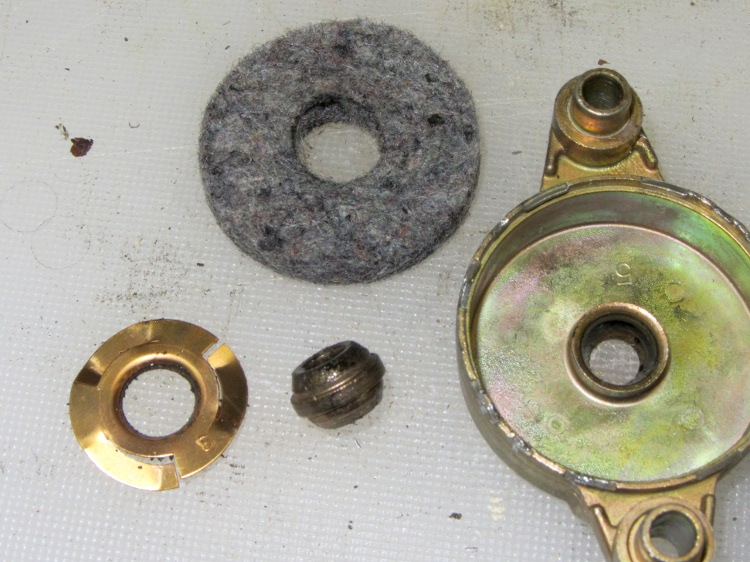
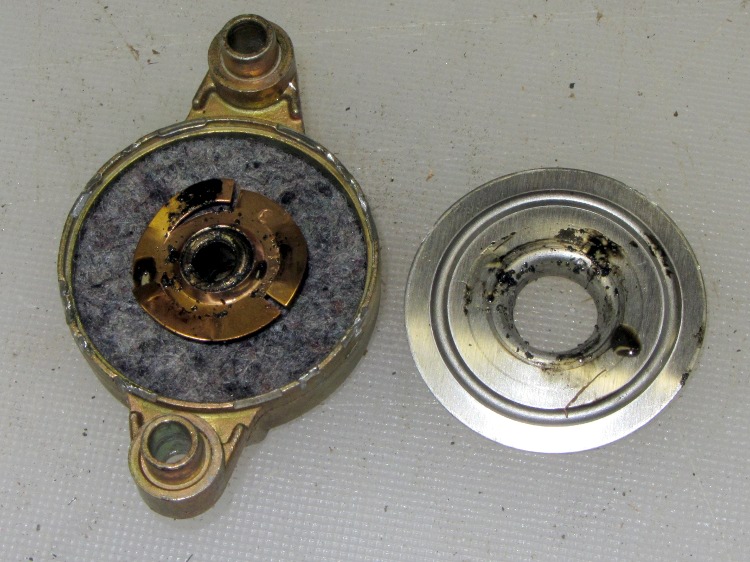
    The endcaps of that fan motor have a crimped-in-place aluminum disk capturing a felt washer that held oil and a circular spring that presses the spherical bronze bearing in place:

    Fan motor endcap - interior
    Fan motor endcap – interior

    Pulling all that out reveals the bearing (tilted on its side to show the spherical outer shape):

    Fan motor endcap - parts
    Fan motor endcap – parts

    The shaft is a scant 3/16 inch in diameter, about 0.181 instead of 0.1875 inch. I have some 3/16 inch ID cartridge bearings in the heap that are a sloppy fit on the shaft, but nothing that a wrap of 2 or 3 mil shimstock and a dab of green Loctite wouldn’t cure.

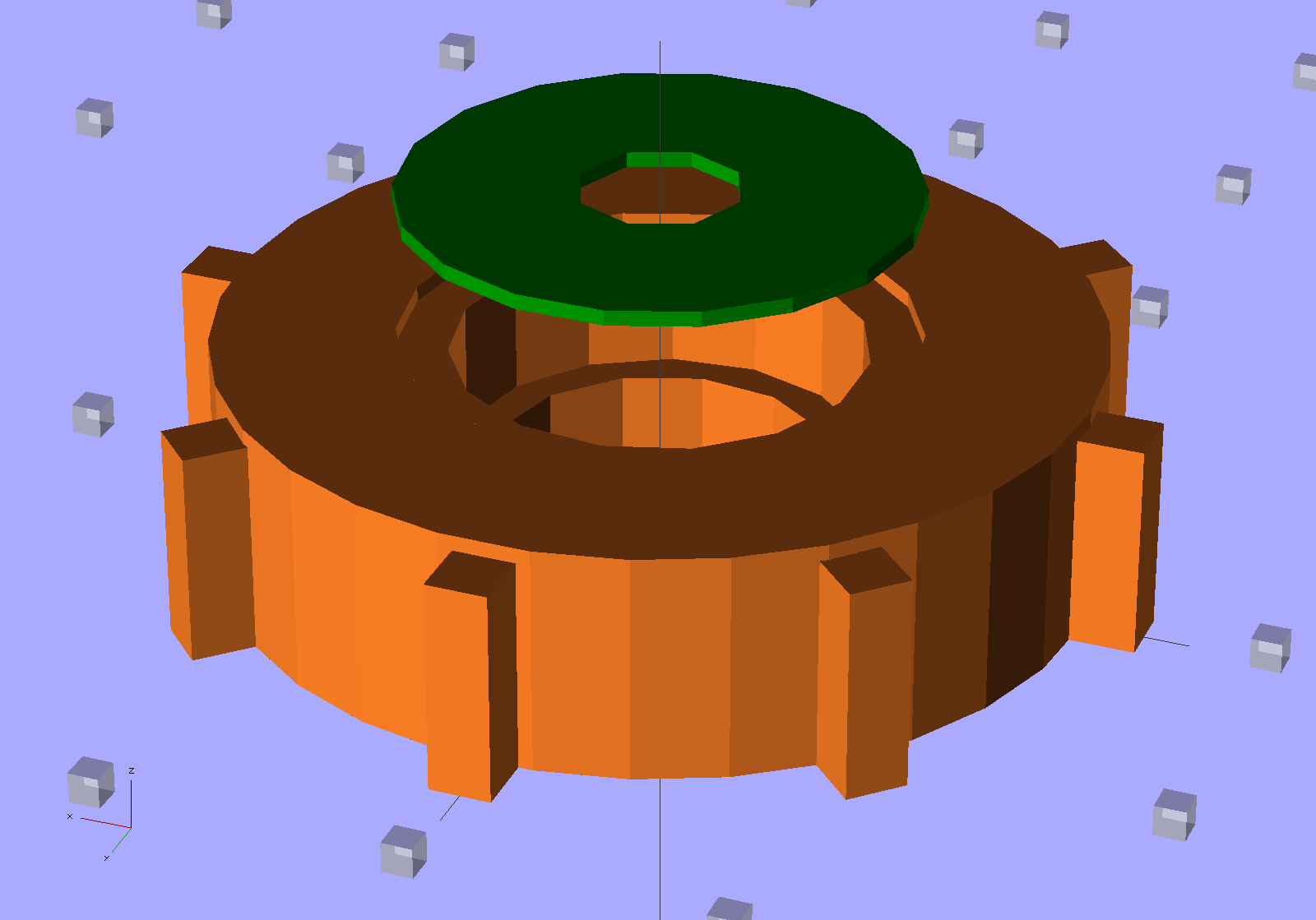
    A bit of doodling suggests two of these bearing holders should fit in the endcaps, stand over the spherical bearing mounts, capture the ball bearing OD, keep dust out of the balls, and perhaps have enough compliance to let the bearings self-adjust to the right fit:

    Fan Bearing Holder
    Fan Bearing Holder

    The fan tries to pull the rotor out of the frame, although I think the bearings & Loctite can handle that much axial load. I must try this out on the bench and see how long it takes for the Freezer Dog to return…

    It needs a trial print and some sizing adjustment, plus maybe an allowance for end play, but it’s close.

    The OpenSCAD source code:

    // Refrigerator Fan Bearing Support
    // Ed Nisley KE4ZNU - May 2012
    
    // Layouts
    
    Layout = "Show";			// Show Fit Build
    
    Gap = 5.0;					// between parts in Show mode
    
    BuildOffset = 5.0;			// offset between parts on build plate
    
    //- Extrusion parameters must match reality!
    //  Print with +1 shells and 3 solid layers
    
    ThreadThick = 0.25;
    ThreadWidth = 2.0 * ThreadThick;
    
    HoleWindage = 0.2;
    
    function IntegerMultiple(Size,Unit) = Unit * ceil(Size / Unit);
    
    Protrusion = 0.1;			// make holes end cleanly
    
    //----------------------
    // Dimensions
    
    CapID = 32.0;				// bearing endcap
    CapHeight = 7.0;			//  ... below aluminum cap recess
    
    SupportOD = 10.3;			// spherical bearing support
    SupportHeight = 3.0;
    
    BearingOD = 12.7;			// ball bearing race
    BearingID = 4.68;			//  ... shaft dia
    BearingThick = 4.0;
    
    Ribs = 8;					// number of support ribs
    RibLength = 2.0;			// length beyond cylinder
    RibWidth = 4*ThreadWidth;
    
    LidOD = CapID/2;			// bearing retainer lid
    LidThick = 2*ThreadThick;
    
    //----------------------
    // Useful routines
    
    module PolyCyl(Dia,Height,ForceSides=0) {			// based on nophead's polyholes
    
      Sides = (ForceSides != 0) ? ForceSides : (ceil(Dia) + 2);
    
      FixDia = Dia / cos(180/Sides);
    
      cylinder(r=(FixDia + HoleWindage)/2,
               h=Height,
    	   $fn=Sides);
    }
    
    module ShowPegGrid(Space = 10.0,Size = 1.0) {
    
      Range = floor(50 / Space);
    
    	for (x=[-Range:Range])
    	  for (y=[-Range:Range])
    		translate([x*Space,y*Space,Size/2])
    		  %cube(Size,center=true);
    
    }
    
    //-------------------
    // Objects
    
    module Retainer() {
      color("Green")
      difference() {
    	PolyCyl(LidOD,LidThick);
    	translate([0,0,-Protrusion])
    	  PolyCyl(BearingID,(LidThick + 2*Protrusion),8);
      }
    }
    
    module Holder() {
    
      color("Chocolate")
      difference() {
    
    	union() {
    	  cylinder(r=(CapID - 2*RibLength)/2,h=(CapHeight + LidThick));
    	  for (Index = [0:Ribs-1]) {
    		rotate(Index*360/Ribs)
    		  translate([0,-RibWidth/2,0])
    			cube([CapID/2,RibWidth,CapHeight],center=false);
    	  }
    	}
    
    	translate([0,0,-Protrusion])
    	  PolyCyl(SupportOD,(CapHeight + 2*Protrusion));		// clear old support
    
    	translate([0,0,SupportHeight])
    	  PolyCyl(BearingOD,CapHeight);						// bearing pocket
    
    	translate([0,0,(SupportHeight + BearingThick)])
    	  PolyCyl(LidOD,CapHeight);							// bearing retainer
    
      }
    }
    
    //-------------------
    // Build things...
    
    ShowPegGrid();
    
    if (Layout == "Show") {
      Holder();
      translate([0,0,(CapHeight + Gap)])
    	Retainer();
    }
    
    if (Layout == "Fit") {
      Holder();
      translate([0,0,CapHeight])
    	Retainer();
    }
    
    if (Layout == "Build") {
      translate([(CapID/2 + BuildOffset),0,0])
    	Holder();
      translate([-(LidOD/2 + BuildOffset),0,0])
    	Retainer();
    
    }


    Well, it’s a thought…

  • Blog Hits: Dirac Delta

    The admin pages for this blog have a “sparkle bar” along the top that shows the hourly hit rate, which is usually a simple diurnal cycle: most activity happens during the Western Hemisphere daylight hours.

    Yesterday was different:

    Blog Hourly Hits - 2012-05-19
    Blog Hourly Hits – 2012-05-19

    In the space of about 10 minutes, my sleepy post about a bicycle saddle advertisement received 207 hits from “bike riding” at Yahoo! image search. For the last two and a half years, it’s been ticking along at about 1 hit/day, so I think that spike represents a nice example of a Dirac Delta Function in action.

    I no longer even pretend to know what’s going on…


  • Ladybugs!

    These freshly hatched alligator-oid critters:

    Ladybug larvae
    Ladybug larvae

    …. quickly become something even more fearsome, at least to aphids smaller than they are:

    Ladybug Larva Eating Aphid
    Ladybug Larva Eating Aphid (by Cheryl Hearty – CCE/DC)

    Eventually they turn into Ladybugs who relentlessly stalk larger aphids on garden plants:

    Ladybug with aphids
    Ladybug with aphids

    And then they do this and the wheel goes around:

    Ladybugs mating
    Ladybugs mating

    Gardeners love them ever so much…

  • Presentation for Poughkeepsie ACM: DIY 3D Printing Hardware & Software

    Calibration - Thin wall box - extruding
    Calibration – Thin wall box – extruding

    Next Monday evening I’ll give a presentation on the hardware & software of DIY 3D printing for the Poughkeepsie chapter of the ACM. After reviewing some current printers and coordinate systems, I’ll explore the process of beating Constructive Solid Geometry into a solid model of a printable part, with attention to some gotchas along the way from a seemingly perfect CAD design to a tangible plastic part.

    The PDF file has the slides, but you gotta show up in person to get a tchotchke and hear the patter…

  • Kindle Fire Configuration

    Amazon obviously designed the Kindle Fire as an extension of their on-line store: they stripped everything out of Android that could possibly get in the way of buying stuff. Some functions seems obviously necessary, though, so here’s a short list of what I’ve added so far (in addition to the button protector and speaker seals, that is), with all the links collected for reference.

    First and foremost, set a Lock Screen Password. Yes, that means that you must type the password every time the Fire lights up, which is a major nuisance. Remember that the Fire connects directly to your Amazon One-Click account and the browser has the rest of your userids & passwords on tap, so losing it could be a very, very expensive oversight.

    I like 24 hour clocks, but there’s no clock configuration. Dropping a buck on 24 Hours solves that problem.

    My old Zire 71 reminded me of my few appointments & things-to-do, but the Fire lacks the whole Android calendar infrastructure. The Calengoo app syncs with my (previously unused) Google Calendar & Contacts, which means that they now know my social network (such as it is) and what I’m up to. So it goes…

    The system volume control exposes only the Media Volume sound channel. Calengoo produces reminders through the Notification sound channel and, under certain perverse conditions that took me about two days to encounter, can mute that channel and leave it muted forever more. The only way to get audible reminders again is by installing a separate mixer app and resetting the levels: Volume Manager Free.

    Hint: to get dependable audible reminders when the Fire is asleep (which is most of the time), you must enable Pop-up Reminders and disable Pop-up windows, because the dialog box occasionally kills the sound. With that configuration, you’ll get a note in the status bar along the top of the display for each reminder. Set the reminder repeat interval to at least a minute to have enough time for password typing…

    The main reason I got a Fire was to carry all my datasheets & manuals in my pocket, hence the need for color and a backlit screen. Although the Fire can handle PDFs without an app, the native interface leaves quite a bit to be desired. Dropping a few bucks on ezPDF Reader solves most of those problems. Choosing a single file from a collection of several hundred, using a selection browser that ignores the overlaid subdirectory structure, remains challenging.

    File Expert helps a bit by presenting subdirectories and their contents. I think that might be the only way to find a specific PDF.

    Engineering bears need an RPN calculator, of which NeoCal Lite seems to be the best of the bunch.

    Passwords go in KeePassDroid, although it has a clunky clipboard interface to other apps. Of course, any Android app can root the Fire and steal my sensitive bits; that seems to not bother anybody else, so why should I worry? The advantage of using a unique password for each website seems to outweigh the disadvantage of having a single password controlling all of them.

    Turn off the browser’s helpful “remember passwords” function, though…

    Although I’m now using Dropbox to back up the KeePassDroid database file, that whole interface seems overly awkward and I’d rather have encryption applied to every Dropbox file.

    Putting the KeePassDroid database file in the Dropbox folder requires a bit of intervention, as KeePassDroid provides no way to specify the database location. You must find the Dropbox folder using File Expert, slow-click the database file, then drill down through File Expert’s menus in order to specify that KeePassDroid should open the file. After that, KeePassDroid will remember its location. For future reference, it’s at:

    /mnt/sdcard/Android/data/com.dropbox.android/files/scratch/keepass.kdb

    The alert reader may wonder why a Kindle Fire, with a conspicuously missing SD Card slot, has an sdcard subdirectory structure hanging from /mnt: that’s just the way it is. I suppose that’s baked into the Android filesystem; hooray for hardware independence and futureproofing.

    The built-in Silk browser runs slower (certainly, no faster) with Accelerate Page Loading turned on, so there seems no compelling reason to sluice my web content through Amazon’s servers. Not that turning it off improves privacy, of course.

    The Maxthon Mobile Web Browser works reasonably well. The highly regarded Dolphin HD browser isn’t available from the Amazon App Store and sideloading apps from Google Play seems unreasonably difficult. The Firefox Aurora browser isn’t quite ready for prime time, but is the only browser to cover its password database with a master password.

    For the occasional times when I need a stopwatch or timer, the aptly named Stopwatch and Timer app should suffice. It has a breathtakingly awkward UI compared to the Zire app, showing that re-invented wheels sometimes sport square corners…

    ColorNote supports both checklists and text notes for my simple needs.

    Sketch-n-Draw ably demonstrates the Fire’s huge latency between touch-pad input and LCD output; it’s impossible to actually draw anything meaningful. FWIW, the ancient Zire had no trouble doing that, adding Yet Another data point to the curve of software demanding more than the hardware can provide.

    The WordPress blogging app is pretty much useless in comparison with their full web interface, not to mention that typing text on the Fire’s one-finger (or, for those with smaller hands, two thumbs) keyboard is agony, not to mention that the Fire lacks a camera, a microphone, and USB host support. It’s a media consumption device, not a media production device; I knew that when I bought it.

    Although it’s awkward, a conductive-tip Acase stylus helps during extended screen-poking sessions. I have my doubts about the rubbery tip’s durability, though.

    All in all, the Fire seems serviceable…
  • Kindle Fire Speaker Covers

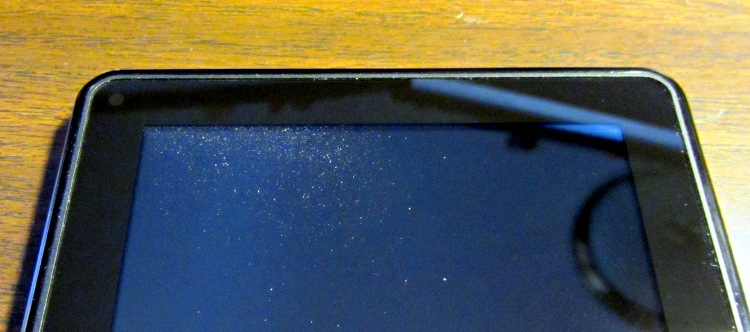
    My Kindle Fire is a typically featureless black slab with one button, two small speakers, and no fasteners. After a few days in my pocket, the upper-left corner began collecting dust on the inside face of the cover glass:

    Kindle Fire - internal dust
    Kindle Fire – internal dust

    That’s not terrible, but it does look ugly and lowers the contrast a bit in that corner. As nearly as I can tell, the speaker grilles provide the only way for that dust to get in, although this was a refurb unit and perhaps the seal around the rim is broken.

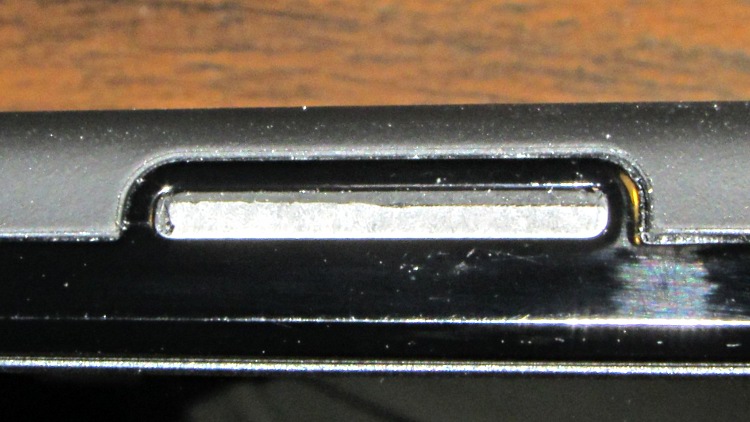
    In any event, the speaker grilles look like this:

    Kindle Fire speaker
    Kindle Fire speaker

    I slapped a strip of 3M Micropore tape over the openings as a stop-gap fix:

    Kindle Fire speaker - taped
    Kindle Fire speaker – taped

    After a few days, the dust wasn’t getting any worse, so I ran a scalpel blade around the speaker opening and sank the tape atop the grille:

    Kindle Fire speaker - trimmed tape
    Kindle Fire speaker – trimmed tape

    The advantage of Micropore tape is that it won’t completely block the already feeble sound from the speakers.