The Smell of Molten Projects in the Morning

Ed Nisley's Blog: Shop notes, electronics, firmware, machinery, 3D printing, laser cuttery, and curiosities. Contents: 100% human thinking, 0% AI slop.

Author: Ed

  • Dead-on-arrival Lithium Cell

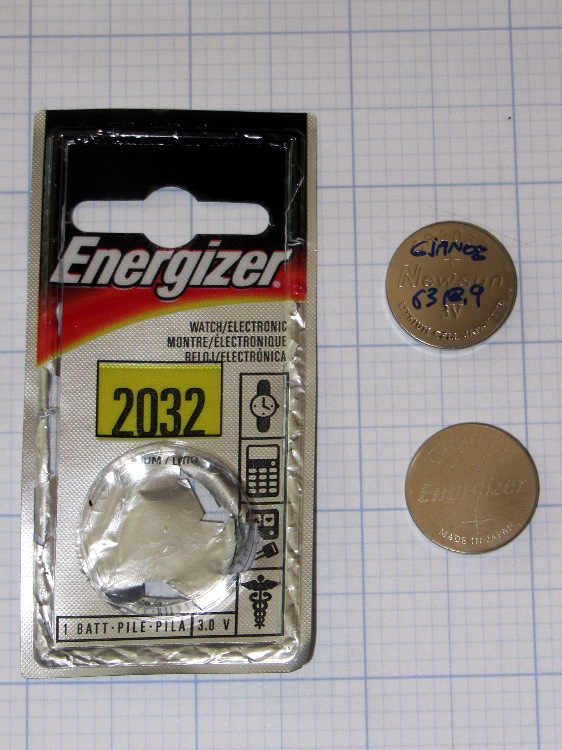
    DOA Energizer CR2032 cell
    DOA Energizer CR2032 cell

    The display on Mary’s Cateye Astrale cyclocomputer (remember cyclocomputers?) faded to gray, which meant a new CR2032 lithium cell was in order. I grabbed one from the heap, popped out the old cell, inserted the new cell, and … the display stayed blank.

    Quick like a bunny, I reinserted the old cell to save the odometer (15524 miles) and wheel circumference (1475 mm) data; the display returned to dim gray.

    The “new” cell, which came from an unopened pack, read 0.45 V with no load…

    The cell didn’t have a date code, but the package sports a cryptic MU that might encode the date of manufacture or the date of packaging or the copyright date or something; the various search results aren’t forthcoming and the Energizer site gives no explanation.

    I’m pretty sure I haven’t owned that package for more than a few years and it’s been in a shirtsleeve environment (plus the occasional hot van) ever since.

    Another Energizer cell from a more recent lot, bearing CA on the package and YA on the cell, worked fine.

    Being that sort of bear, I wrote the date and mileage on the previous cell (a Newsun, whoever they are, with a 3Y code), because the last time around the odometer value didn’t survive the cell change. The current total works out to 277 miles/month = 3300 miles/year, including winter downtime, which is fine with us; we mostly ride the bikes around town on errands and take the occasional tour.
  • Multimeter Range Switch Contacts: Whoops!

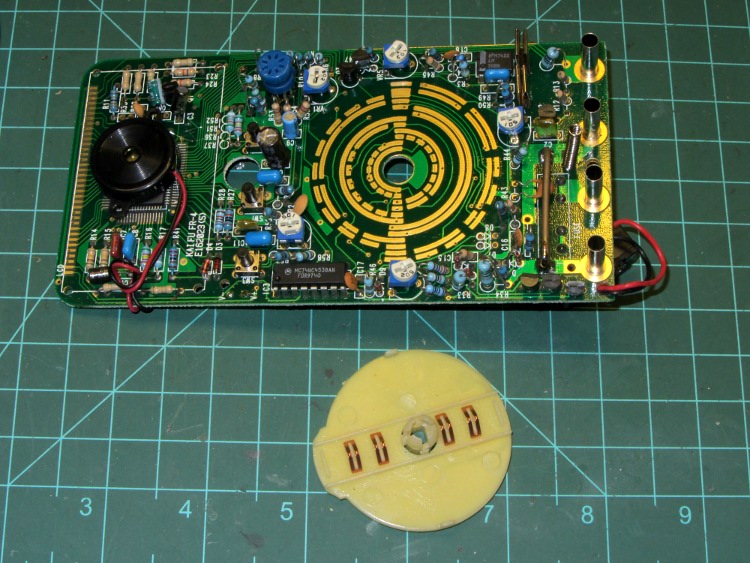
    One of my multimeters began reporting bogus values that improved by working the range switch back-and-forth, which suggested the switch contacts need cleaning. Taking the meter apart was easy, right up to the point where I removed the range switch from the PCB by compressing the four locking tabs on the central shaft:

    Multimeter range selector switch
    Multimeter range selector switch

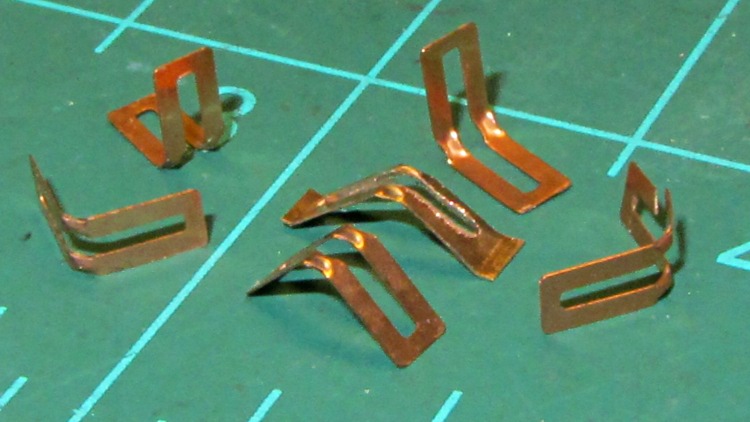
    Just before taking that picture, the switch launched half a dozen spring contacts across the bench, my shirt, and the floor… I recovered four for the picture and later found a fifth smashed on the floor, but the last contact remains AWOL.

    The contact in the middle, the oddly shaped one with small tabs on the ends, is a prototype replacement conjured from 6 mil phosphor bronze stock:

    Multimeter range switch contacts
    Multimeter range switch contacts

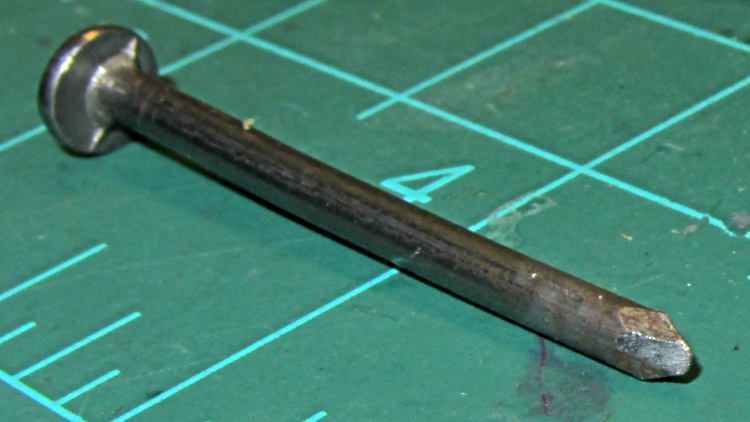
    The little domes ensure a good sliding surface, but require two bends in the middle of the contact and some way to shape the metal into a dome. After a few experiments, I filed the end of a nail into a rounded chisel that worked pretty well:

    DMM switch contact punch
    DMM switch contact punch

    The original contacts came from 3.5 mil stock and have considerably more flex; 6 mil stock is what I have.

    I think I should make half a dozen contact springs to replace the entire set, a task requiring more time than I have right now. For the record, the overall process goes like this:

    • lay out overall shape, slightly longer than needed
    • cut center opening with abrasive wheel
    • cut out contact
    • punch contact domes (from back = dimples)
    • bend to shape
    • trim ends to length (not done in picture)
    • dress raw edges (not done in picture)

    Given the number of parts and the fiddly accuracy required to make the slot, this might be a good job for the Sherline, although clamping each little proto-spring down while getting the abrasive wheel in there seems daunting.

    Perhaps cutting the slots and punching the dimples would work better before cutting out the contacts, with a sheet clamped on four sides? The center will be floppy, what with all the slots, but grinding slots on the middle contacts first might be helpful. Would adhesive under the sheet to hold down the middle gunk up the abrasive wheel?

    So many projects …

    Memo to self: Springs! Always expect springs!

  • Black and Decker Pocket Power: Battery State

    A Black & Decker Pocket Power emerged from the heap and refused to take a charge, which obviously calls for a teardown. The case has three screws, one lurking behind the label:

    Pocket Power - case screws
    Pocket Power – case screws

    The sticker over on the right says it’s five years old, which explains the whole problem right there; you can evidently buy new-old-stock units from the usual low-dollar sources that will arrive with a similarly dead battery.

    Peeling off the rubber bumpers and prying the case open reveals the innards:

    Pocket Power - internal layout
    Pocket Power – internal layout

    The battery pack looks to be an octet of ordinary NiMH cells; the label on the other side of the shrink wrap reports 9.6 V @ 1200 mA·h, which is about what you’d expect, with a date in mid-2007 that matches the sticker on the case.

    The upper left corner of the main label has some interesting information:

    Pocket Power - label specs
    Pocket Power – label specs

    The tiny wall wart that came with the unit produces 12 VDC at 300 mA, which doesn’t match the INPUT spec at all. Perhaps the maximum current from the internal pack made its way to the label by mistake?

    The label also shows the reason I got this thing: it can produce just enough 120 VAC power to run an arbitrary wall wart charger for a gadget that doesn’t charge from a 12 VDC source. Upconverting 9.6 VDC to 120 VAC, then downconverting it to, say, 14.4 VDC makes no sense whatsoever, unless that’s the only way to charge that particular gadget. Which has, I’m sorry to say, been the case every now and again.

    I think the Model name has a typo: everything else suggests this is a CP120B. So it goes.

    Unsoldering the leads and perpetrating the obvious tests produces these curves:

    B&D Pocket Power
    B&D Pocket Power

    The black curve is the initial “won’t accept a charge” state with the wall wart and internal circuitry; the pack obviously has two weak cells. The curves in the lower left correspond to individual cells and series pairs that I discharged to 0.9 V/cell after the top curve ended.

    The tiny stroke between the sets, way over on the Y axis, is cell pair BC (my arbitrary labels) that probably accounts for the sudden drop in the black curve. However, the orange curve also came from pair BC after charging for about 18 hours at 120 mA, so they’re not completely dead. Their capacity has dropped to about 700 mA·h, though, which isn’t good.

    Soldering the pack back together and charging for another 18 hours at 120 mA produced the green curve at the top, which shows the same sudden dropoff at about 700 mA·h.

    So I’ll put it back together again and let it charge for a while, but new cells will definitely brighten its disposition.

  • Three-way Lamp Socket: Fuse Test

    After un-bending the top of a pole lamp that suffered an untimely collision with the floor, I discovered that the entire stock of three-way bulbs in the heap had at least one burned-out filament each; I’d acquired them when Mom moved out of the Ancestral House, so they dated back a long time. So I figured I’d insert a decently sized single-filament bulb and be done with it.

    Three-way lamp sockets have an additional tab contact between the usual central contact and the outer shell:

    Interior of 3 way lamp socket
    Interior of 3 way lamp socket

    The shell forms the common contact for the filaments and the switch counts in binary: off / off, off / on, on / off, on / on. In principle, the tab sits low enough to not contact the shell of an ordinary bulb.

    I was doing this in the Basement Laboratory Workshop Wing, with the lamp plugged into the outlet strip along the front edge of the bench; that way, I simply poked the power strip button to remove line voltage from the lamp while swapping bulbs. So I:

    • turned the power strip off
    • unscrewed the last dead three-way bulb
    • threw it away
    • screwed in an ordinary bulb
    • turned the strip on

    At which point all the fluorescent overhead lights in the Laboratory went dim, the shop resounded with a deep resonant groan, and the acrid smell of electrical death filled the air. Elapsed time less than a second, tops.

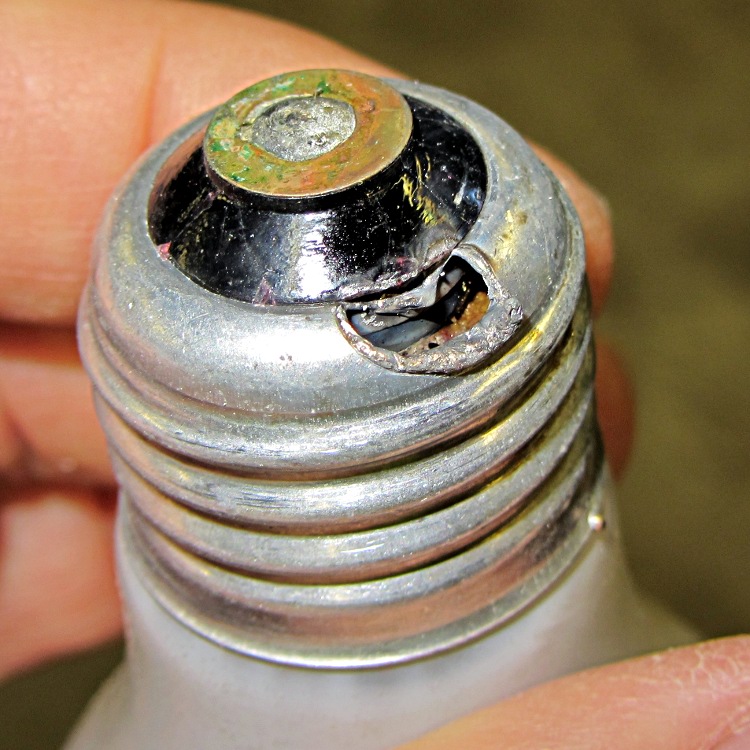
    Come to find out that the socket’s contact tab stuck up a little bit further than it should, producing a dead short across the line:

    Melted bulb base
    Melted bulb base

    Of interest: the branch circuit breaker didn’t trip, the GFI on the circuit didn’t trip, and the pop-out breaker in the power strip didn’t trip.

    Huh.

    I harvested the pole sections, the base counterweight, and the line cord. The rest of the corpse joined the bulbs in the trash…

  • Dismantling a Gas Tank

    That gas tank has evidently reached the end of its life:

    Cutting up spherical CHGE gas tank
    Cutting up spherical CHGE gas tank

    Many of the nearby gas pipelines end in open stubs and a concrete crusher worked over one of the pads for a long-vanished cylindrical tank, so it looks like they’re scrapping the whole installation. I think the project to install an elevator for the Walkway lands nearby, which may explain everything.

    I took the picture from the Walkway, aligning the SX230HS lens through the chain-link fence. Occasionally a small lens wins over more glass!

  • Orb-Weaving Spiders

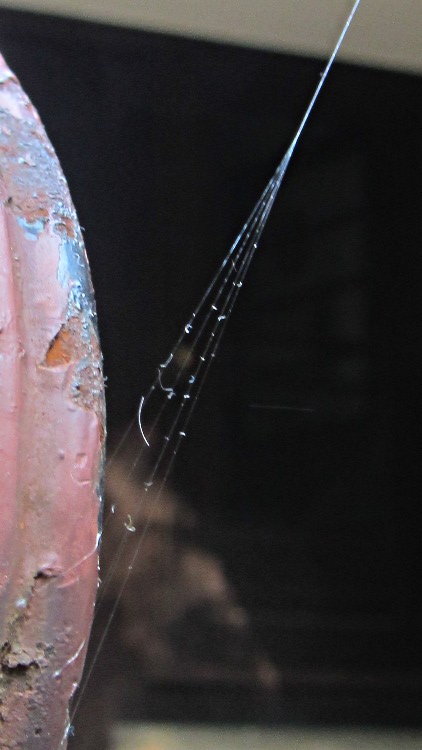
    August was the month for giant orb weaving spiders; a pair of thumb-sized monsters took up residence under the gutter over the patio. One started by anchoring its web to the handrail by the steps:

    Web anchor on handrail
    Web anchor on handrail

    While we like and encourage spiders, that anchorage didn’t last long and, yes, I must strip and repaint that railing…

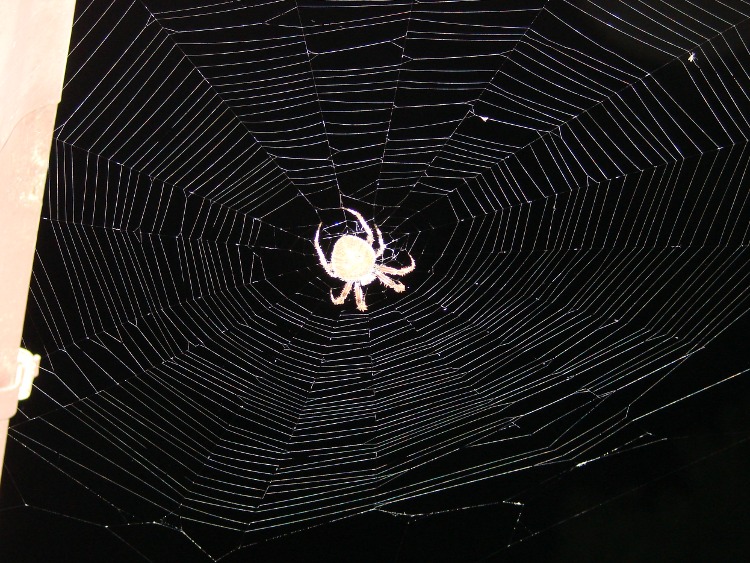
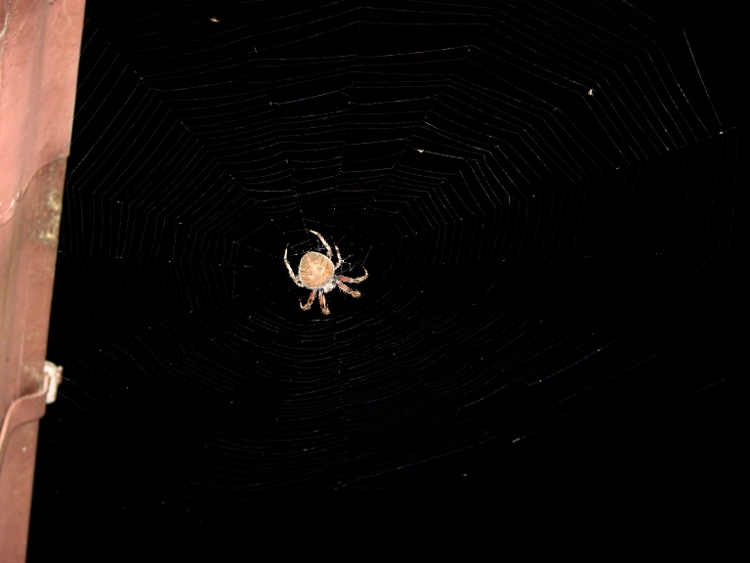
    There’s a horizontal web at the corner of the gutter over the back door:

    Orb spider at gutter - light
    Orb spider at gutter – light

    Changing the exposure to favor the spider loses the web strands:

    Orb spider at gutter - dark
    Orb spider at gutter – dark

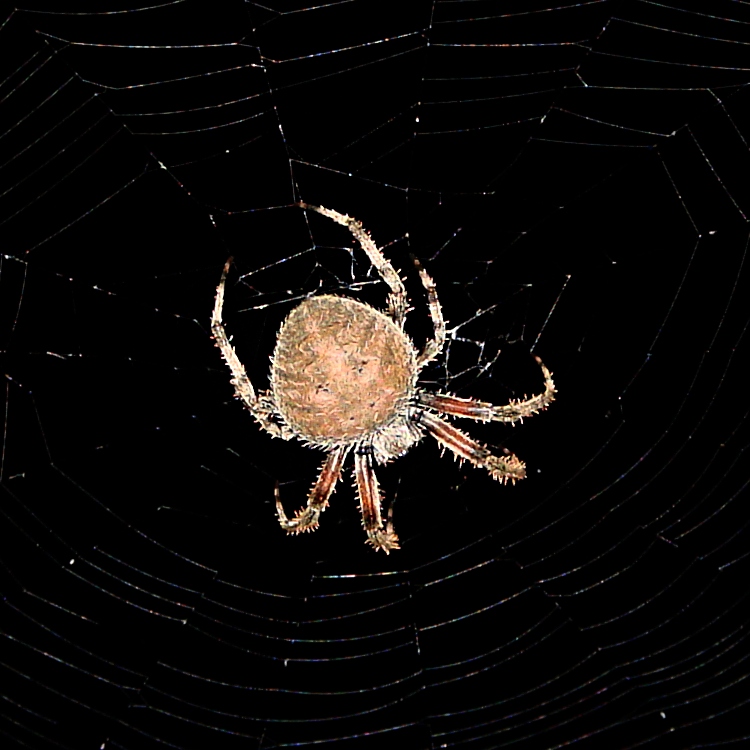
    Cropping that one down around the spider shows they really are the stuff of nightmare:

    Orb spider - detail
    Orb spider – detail

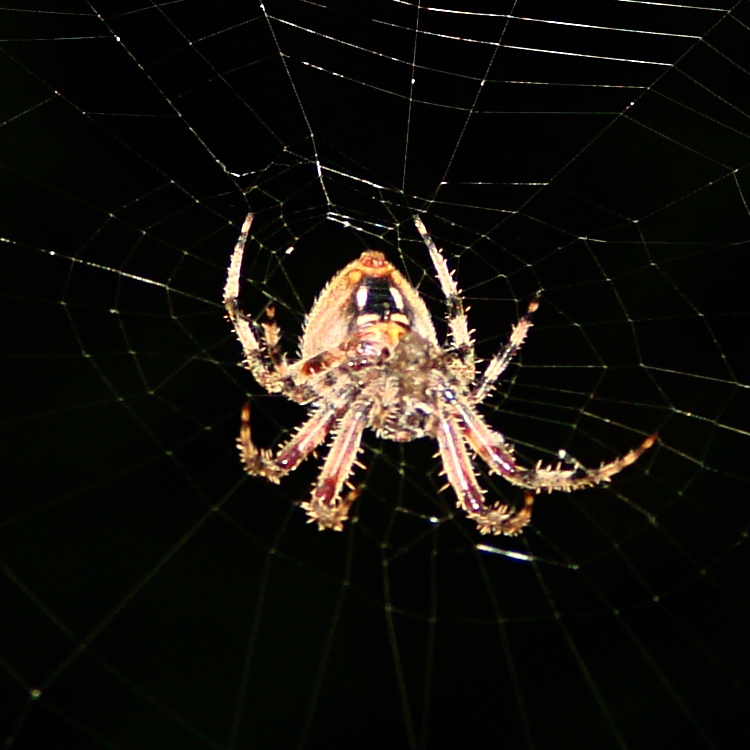
    The other spider prefers a vertical web attached along the gutter and anchored to a patio chair, which means I can get between the house and the web to see the spider’s tummy:

    Orb spider - ventral
    Orb spider – ventral

    We leave the lights on in the evening for their benefit…

  • Monthly Picture: Paper Wasp Nest

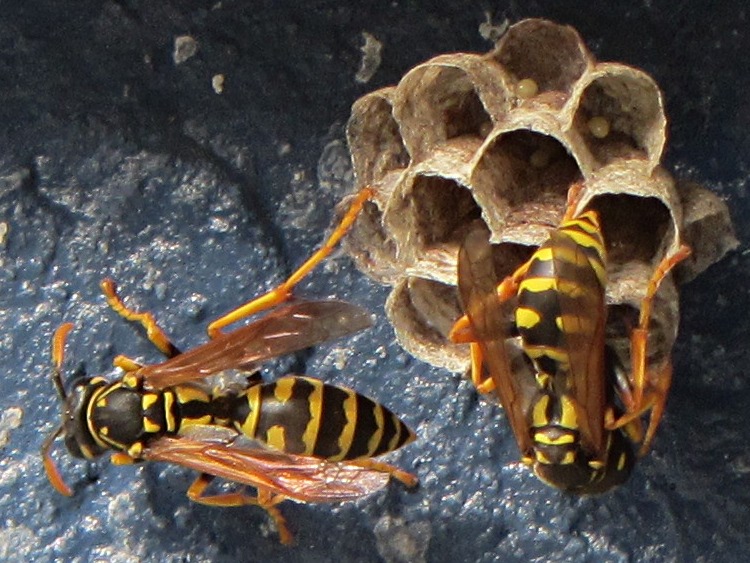
    Found these paper wasps building their nest on a painted brick post:

    Paper wasp nest with eggs
    Paper wasp nest with eggs

    That’s a new nest with eggs a-cooking!

    They were minding their own business, but they’re in a very public area and won’t last long…

    This is a dot-for-dot crop from a larger image, with just a touch of unsharp mask to bring out their hazard warning stripes.