Ed Nisley's Blog: Shop notes, electronics, firmware, machinery, 3D printing, laser cuttery, and curiosities. Contents: 100% human thinking, 0% AI slop.
Our Larval Engineer may have a commission to fit her Speed-Sensing Ground Effect Lighting controller to another longboard. To that end, the case now sports mouse ears to spread the force from the cooling ABS over more of the Kapton tape, in the hope the plastic won’t pull the tape off the aluminum build platform:
Longboard Case Solid Model – mouse ears
That view shows the bottom slice that will hold the battery, but the ears appear on all three layers.
For quite some time, the Canon S630 printer connected to the file server downstairs has been printing some documents in what looks like garbled reverse video: all of the text areas render as white characters on a black background, with peculiar graphic gibberish filling the space to the right margin. I’d provide a picture, but it wouldn’t be too informative; suffice it to say that if I wasn’t using bulk ink the pages would cost about a buck each.
Printing documents with two-up pages (two document pages on one paper sheet) generally resulted in the first sheet coming out garbled with the remainder emerging unscathed, but sometimes I found an entire stack of black paper. Ouch!
This usually affected documents printed from Web pages, but sometimes clobbered pure PDF documents. Given that Linux printing involves multiple transformations between Postscript / Ghostscript / PDF / PNG / what-have-you, it’s impossible to pin down a common cause.
Searching for the obvious keywords showed other folks had similar problems with different printers and different drivers. None of the threads had any resolution.
Printing the same document on the Epson R380 worked perfectly.
One recent morning I had four out of six documents fail, so I tried some of this and a little of that, before it occurred to me that I should switch the driver. I had chosen the default recommended printer driver during installation: the oddly named bj8xxyyz.upp file produced by the Ghostscript folks. Switching to the Gutenprint 5.2.7 driver seems to have solved the problem; all four failing documents printed perfectly and the problem hasn’t returned in a week of printing.
The R380 was already using the Gutenprint driver, which (in retrospect) should have been a big, fat hint.
I’d file a bug report, but to which project about what? [sigh]
The two packets at 15:50:20 represent two different paths from the WA2YSM-15 digipeater to the APRS database: one through WB2ZII-15 and the other through KC2DHU. The “Rate limited” message indicates that the database regarded the two as different packets, which they are: the position data differs by one character. The database discards identical packets without comment, because the network must handle all the packets generated by a single RF transmission from one GPS tracker to multiple receivers, but rejects what it sees as deliberate (or inadvertent) attempts to overwhelm it.
Decoding the packets provides a bit more information:
2012-10-21 15:49:53 EDT: KE4ZNU-9>T1TP5W,WA2YSM-15,WIDE1*,WIDE2,qAR,WB2ZII-15:`eS$l{1b/"4U}
   type: location
   format: mice
   srccallsign: KE4ZNU-9
   dstcallsign: T1TP5W
   latitude: 41.67616666666667 °
   longitude: -73.91800000000001 °
   course: 121 °
   speed: 16.668 km/h
   altitude: 62 m
   symboltable: /
   symbolcode: b
   mbits: 101
   posresolution: 18.52 m
   posambiguity: 0

2012-10-21 15:50:20 EDT: KE4ZNU-9>T1TP5V,WA2YSM-15,WIDE1,K2PUT-15*,WIDE2,qAR,WB2ZII-15:`eR lzlb/"4V}
   type: location
   format: mice
   srccallsign: KE4ZNU-9
   dstcallsign: T1TP5V
   latitude: 41.676 °
   longitude: -73.90066666666667 °
   course: 80 °
   speed: 16.668 km/h
   altitude: 63 m
   symboltable: /
   symbolcode: b
   mbits: 101
   posresolution: 18.52 m
   posambiguity: 0

2012-10-21 15:50:20 EDT: KE4ZNU-9>T1TP5V,WA2YSM-15,WIDE1,K2PUT-15*,WIDE2,qAR,KC2DHU:`eR<0x7f>lzlb/"4V} [Rate limited (< 5 sec)]
   type: location
   format: mice
   srccallsign: KE4ZNU-9
   dstcallsign: T1TP5V
   latitude: 41.676 °
   longitude: -73.9165 °
   course: 80 °
   speed: 16.668 km/h
   altitude: 63 m
   symboltable: /
   symbolcode: b
   mbits: 101
   posresolution: 18.52 m
   posambiguity: 0

2012-10-21 15:52:31 EDT: KE4ZNU-9>T1TP8T,W2LW-15,W2LV,WIDE2*,qAR,W2GSA:`eR|lz:b/<4T}
   type: location
   format: mice
   srccallsign: KE4ZNU-9
   dstcallsign: T1TP8T
   latitude: 41.68066666666667 °
   longitude: -73.916 °
   course: 30 °
   speed: 16.668 km/h
   altitude: 61 m
   symboltable: /
   symbolcode: b
   mbits: 101
   posresolution: 18.52 m
   posambiguity: 0
Feeding the coordinates into Google Maps shows that the first packet (to WB2ZII-15) at 15:50:20 carries the damaged data. The second (to KC2DHU) has the correct position, but was rejected because it arrived just after the first and wasn’t an exact duplicate.
AX.25 packets carry a checksum and it’s a convolutional code, not a simple XOR, so I think it’s safe to say the packets were received as transmitted; you’ll find an intro to that whole topic, with further references, in the N1VG OpenTracker project. The database doesn’t store complete AX.25 packets, so we can’t run their headers and data through the checksum algorithm to see if they both produce good results. Here’s the raw packet payload:
2012-10-21 15:50:20 EDT KE4ZNU-9: 75 bytes
0x00 K E 4 Z N U - 9 > T 1 T P 5 V , W A 2 Y S M - 1 5 , W I D E 1 ,
     4b45345a4e552d393e5431545035562c57413259534d2d31352c57494445312c
0x20 K 2 P U T - 1 5 * , W I D E 2 , q A R , W B 2 Z I I - 1 5 : ` e
     4b325055542d31352a2c57494445322c7141522c5742325a49492d31353a6065
0x40 R   l z l b / " 4 V }
     52206c7a6c622f2234567d

2012-10-21 15:50:20 EDT KE4ZNU-9: 72 bytes [Rate limited (< 5 sec)]
0x00 K E 4 Z N U - 9 > T 1 T P 5 V , W A 2 Y S M - 1 5 , W I D E 1 ,
     4b45345a4e552d393e5431545035562c57413259534d2d31352c57494445312c
0x20 K 2 P U T - 1 5 * , W I D E 2 , q A R , K C 2 D H U : ` e R 7fl
     4b325055542d31352a2c57494445322c7141522c4b43324448553a6065527f6c
0x40 z l b / " 4 V }
     7a6c622f2234567d
So it seems the TinyTrak3+ sent out a packet containing bad position data, wrapped with a correct checksum.
The NMEA-format 4800 baud 8N1 serial data from the GPS receiver puck to the TT3+ has no parity error detection, so I suspect a character or two got clobbered (by RFI?) and produced a bad position. NMEA messages have a simple XOR checksum that’s susceptible to that kind of error. Note that the Mic-E encoded message shown above is not passed from the GPS receiver to the TT3+; we never see the raw GPS data.
Our TinyTraks use SmartBeaconing to transmit only on significant course changes, so the sequence of events probably went like this:
The TT3+ decodes a damaged NMEA message from the GPS receiver
It notices an abrupt position change and sends that incorrect position
The next NMEA message arrives correctly
The TT3+ sees another abrupt jump and sends that position
The aprs.fi database rejects the message due to rate limiting
The TT3+ remains silent until the next turn
The map doesn’t show all the turns, because that’s a hilly area and not all RF packets make their way from my bike to an APRS receiver.
For what it’s worth, although we were riding at a fairly steady pace, I don’t believe the five-significant-figure accuracy of those speeds, either.
The plunger is basically a pin that eventually deforms the top of the switch membrane. Tee’s DSC-H1 had an exposed switch, although this picture shows that membrane was still in reasonably good condition:
Shutter Switch Closeup
My DSC-H5 has a thin black protective disk atop the switch, but the disk wasn’t particularly protective and developed a dimple that held the contacts closed even with the shutter button released (which is why I’m tearing the camera apart in the first place):
DSC-H5 Shutter Switch – dimpled protector
The C-clip around the plunger is now plastic, rather than metal, making it less likely to erode the thin plastic shaft. Pulling the clip off while holding the button down releases all the parts:
DSC-H5 Shutter Button – components
A few measurements from an intact shutter button, which may come in handy if you don’t have one:
DSC-H5 Shutter Button – plunger measurements
Mount three-jaw chuck on the Sherline table, laser-align chuck to spindle, grab shutter button by its shaft in a Jacobs chuck, grab shutter button in three-jaw chuck, release from Jacobs chuck:
DSC-H5 Shutter Button – in Sherline chuck
That’s not particularly precise, but it’s close enough for this purpose. I used manual jogging while testing the fit with a paper shim until all three jaws had the same clearance, then tightened the jaws.
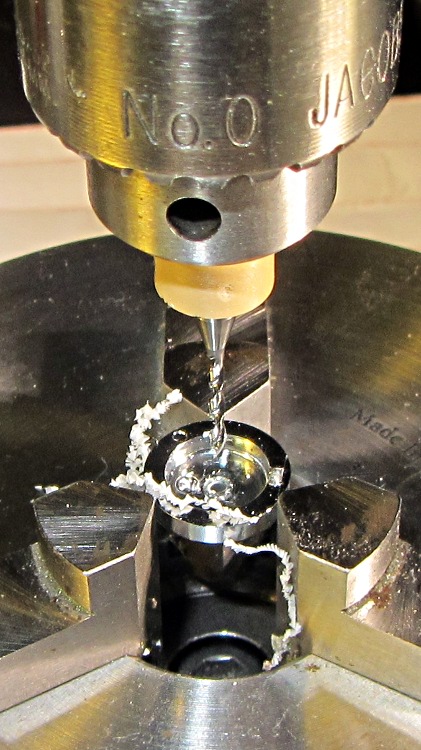
I nicked the plunger at its base with a flush-cutting diagonal cutter, snapped off the plunger, and drilled a #56 hole through the button:
DSC-H5 Shutter Button – cap drilling
For reasons that made sense at the time, I repaired Tee’s DSC-H1 with a 1-72 brass screw. This time, I used an 0-80 (which I learned as ought-eighty, if you’re wondering about the indefinite article) screw and nut, because the screw head fit neatly into the bezel recess and I had a better idea of how to smooth out the threads.
This being plastic, I used the chuck to hold the tap in the proper alignment, then turned the tap through by finger pressure. This trial fit showed it worked:
DSC-H5 Shutter Button – 0-80 screw
Milling the nut down to a 2.8 mm cylinder required the usual manual CNC, with repeated iterations of this chunk of code in the MDI panel:
The 2.8 in the first line is the current OD and the 3.11 is the measured diameter of the 1/8 inch end mill. I started from a 5.0 mm OD that just kissed the nut, then worked inward by 0.2 mm at a time for very shallow 0.1 mm cuts:
DSC-H5 Shutter Button – 0-80 nut milling
The alert reader will notice, as did I, that the head isn’t quite centered: the cut trimmed the left side and left the right untouched, with an offset far larger than the centering error. As nearly as I can tell, the heads of those screws aren’t exactly centered on their threaded shafts, but the final result fixed that… and the overall error is a few tenths of a millimeter = maybe 10 mils, tops, so it’s no big deal.
With all that in hand, I applied a very very thin layer of epoxy to fill the threads below the now-cylindrical nut and convert the screw into a rod:
DSC-H5 Shutter Button – 0-80 plunger
My original intent was to use the screw head as-is atop the PET shield (per those instructions) on the switch membrane, but after reassembling enough of the camera to try that out, it didn’t work correctly: the half-pressed switch didn’t activate reliably before the full-pressed switch tripped.
The PET shield I used came from the side of a 1 liter soda bottle and turned out to be 0.27 mm thick:
DSC-H5 Shutter Switch – cover removed
I think the PET shield would work with the original plunger shape concentrating the force in the middle of the shield, but the nice flat screw head spreads the force out over a wider area. As a result, the force required to close the half-pressed switch contacts was roughly the same as that required to close the full-pressed contacts; remember the nub on the bottom of the black plastic tray concentrates the force in the middle of the full-pressed switch membrane.
So I removed the PET shield, added a dot of epoxy to fill the screw slot and compensate for the missing shield thickness, then filed a flat to make a nice pad:
DSC-H5 Shutter Button – epoxy on plunger
Reassembling the camera once more showed it worked exactly the way it should. In fact, the button seems more stable than the OEM version, probably because the slightly enlarged plunger shaft fits better in the bezel. Too bad about those scuffs on that nice shiny button dome, though:
DSC-H5 – repaired shutter button
Tossing the leftover parts seems entirely appropriate…
The half-pressed shutter switch position on my Sony DSC-H5 recently stopped working, which seems to be one of two common failures. The other, a broken switch shaft, happened to Tee’s camera, as described there, and I figured I should preemptively fix that while I was inside my camera.
This being a common failure, several folks have described how to dismantle the camera; I followed that guide’s English version.
The DSC-H5 differs slightly from that description. After I got the thing apart, it became obvious that there’s no need to remove the LCD panel, the main control board, and most of the ribbon cables if you have a Philips #0 or #00 screwdriver with a very thin shaft. There’s no way to describe this operation, so take it apart his way, then you’ll see what I mean: the guts can come out as one big lump.
In any event, all the camera controls eventually emerge from the body:
DSC-H5 Control Assembly
Looking back into the camera body reveals the bottom of the shutter button, captured by a static discharge contact and the gray plastic frame of the Focus / Break button caps:
DSC-H5 Shutter Button – interior view
Removing the pushbutton frame and pushing the left button bezel latch with a small flat-blade screwdriver extracts the shutter button; it falls out of the inverted body. This is one of the few intact DSC-H[1-9] shutter buttons you’ll ever see:
DSC-H5 Shutter Button – bottom view
Those rectangular protrusions lock into the slots in the black plastic cap that appears almost silver in this front view that shows the dimple in the switch membrane:
DSC-H5 Shutter Button Switch – depressed surface
You must remove the cap to release the flex PCB with the shutter switches. Two heat-staked pins retain the cap; a scalpel neatly slices off the melted plastic:
DSC-H5 Shutter Switch – cover removed
Nota bene: the DSC-H1 button bezel I repaired earlier does not have features that lock into the cap over the switch assembly, which means you can remove and replace it without disassembling the camera. You cannot remove or install the DSC-H5 button without taking the camera apart. I suppose this counts as a continuous product improvement, but …
The shutter switch has two parts:
The full-press switch that takes the picture (the white dot on the blue flex, shown above)
The half-press switch that triggers the focus & exposure is in a black plastic tray (seen edge-on above the white dot)
The bottom of the half-press tray has a small nub that activates the full-press switch, so the force required to activate the half-press switch must be considerably less than the force that activates the full-press switch. This turns out to be a critical part of the repair…
A closeup of the half-press switch with the protective cover sheet (the “damn confetti” of the disassembly instruction) and the dimple that held the contacts together with the button released:
DSC-H5 Shutter Switch – dimpled protector
A closeup of the switch through a snippet of PET plastic shows the switch membrane itself is in fine shape:
DSC-H5 Shutter Switch – cover removed
However, the new plastic shield did not work out well, for reasons having to do with the new button plunger. That’s the next step: rebuild the plunger…
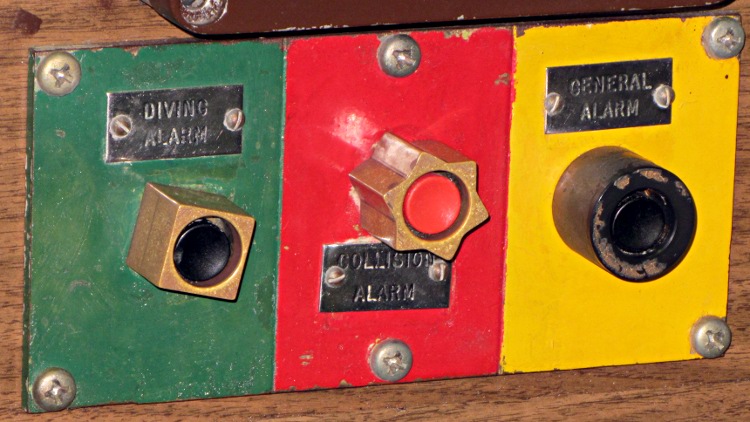
Those aren’t alarm pushbuttons. These are alarm pushbuttons:
Submarine Albacore – alarm pushbuttons
They’re in the USS Albacore and obviously intended for use by someone in a hurry: the tactile shapes tell your fingers everything they need to know. If I understand the ship’s history, the Collision Alarm switch contacts closed only during tests, although they did have a close call with the sub towing the (unpowered) Albacore from the Philly boneyard to its final resting site.
According to the information we saw, the control board was refitted / replaced / redone to remove classified hardware, so the woodgrain Formica background may not be original. On the other hand, this was a sub intended for extensive experimentation, so maybe they used a cheap and easily machined material.
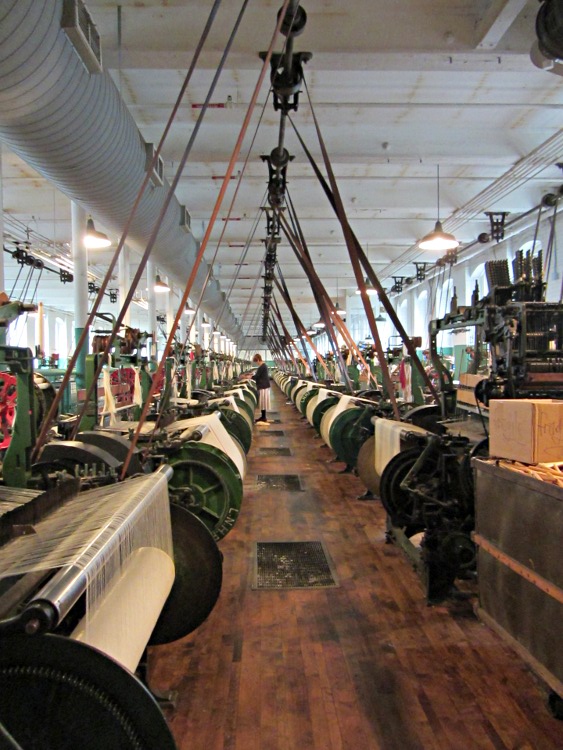
We stopped at Lowell MA to visit the New England Quilt Museum (photography prohibited) and the Boott Cotton Mills Museum (photography encouraged). The NPS, among others, managed to salvage the buildings and restore some of the machinery, to the extent that one room on one floor of one building has some running cotton mills:
Boott Cotton Mill Museum
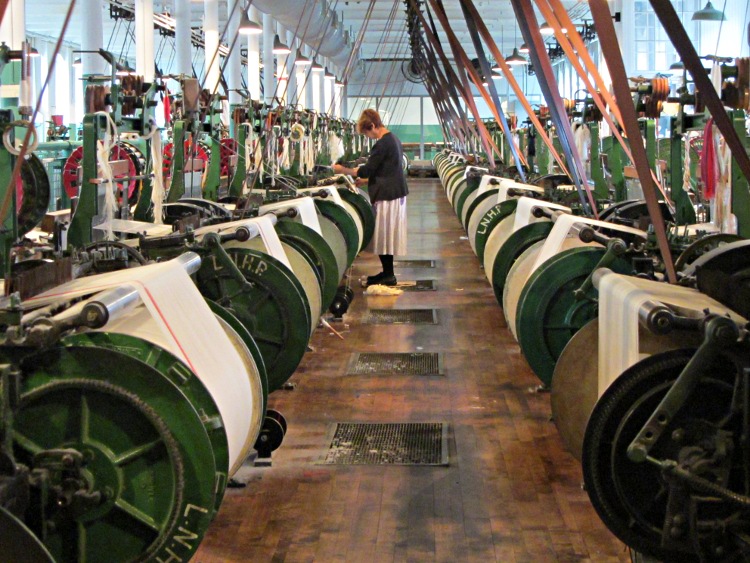
A bit more detail:
Boott Cotton Mill Museum – line detail
The original mills used water power, as did much of New England’s industry, but moments after Watt worked the bugs out of that newfangled steam engine, water power was history. The museum uses a huge old electric motor, mounted on the ceiling, to drive the line shafts above the mills; the vibration shakes the entire building and they hand out ear plugs at the door, despite having only half a dozen mills operating at any time. The working environment, horrific though it was, attracted employees (largely young women) from across the region; it was a better deal than they had on the family farm.
Employees were, of course, prohibited from using cotton to plug their ears…
They sell the cloth in the museum shop and we’ll eventually have some kitchen towels.




 The Smell of Molten Projects in the Morning