Ed Nisley's Blog: Shop notes, electronics, firmware, machinery, 3D printing, laser cuttery, and curiosities. Contents: 100% human thinking, 0% AI slop.
The epoxy usually has some fluorescence, but this seems more dramatic than usual. In any event, the die’s wide beam angle shows clearly; the beam along the axis out in front is actually pretty tight.
It’s sitting on the back of a white ceramic tile and the colors came out surprisingly close to real life.
Adding this to an Arduino would follow the same logic as, say, the pager motor: power the LED + resistor + MOSFET from a +5 V external regulator that won’t heat the Arduino board, then define an unused bit in the shift register as, say UV_LED.
While putting together the PIR sensor, I had occasion to haul out the old HP10525T Logic Probe (a bookend for the Tek logic probe) to figure out why the shift register wasn’t updating; that was easier than hauling the breadboard to the oscilloscope. While it showed the problem (wire tucked into wrong hole, hidden behind a cluster of other wires), it didn’t seem to be blinking quite right. The HP10525T Logic Probe Operating and Service Manual says it should blink at about 10 Hz for any pulse train from about 10 Hz up through 50 MHz (yes, 50 megahertz), with a minimum pulse width of 10 ns (yes, 10 nanoseconds), but it didn’t do that for the PWM going to the RGB LED strip or the shift register clock.
Given a manual printed in February 1975, I’m sure you know where this will end up…
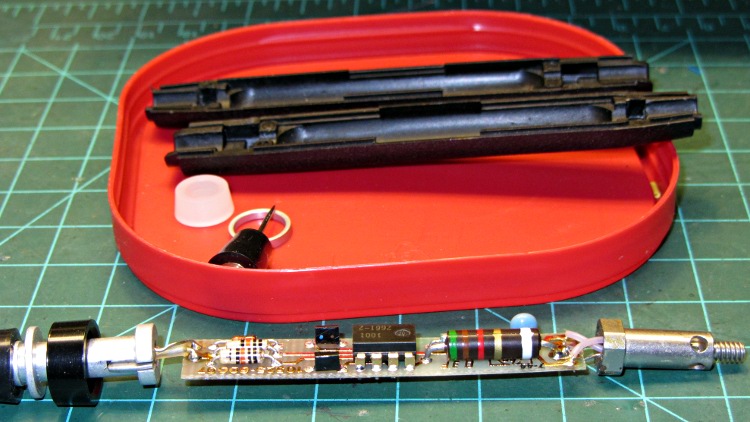
Unlike contemporary gear, the manual tells you how to dismantle the probe, using the needle tip as a tool. Doing so reveals a tidy circuit board with gold plated PCB traces:
HP10525T – original caps
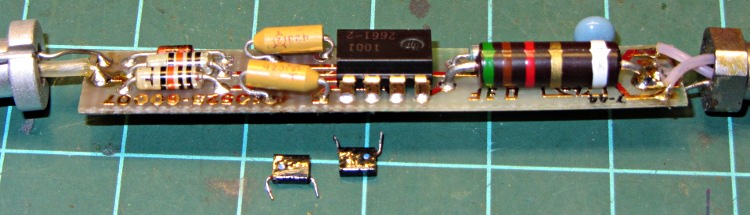
The two tiny black rectangular capacitors just to the left of the 8 pin DIP IC are C1 and C2, rated 10 μF at 2 V (yes, 2 volts). As you might expect, they had ESRs in the 3 to 5 Ω range, rather than around 0.2 Ω. The catch is that the case doesn’t have room for anything much taller, but I did contort some solid tantalum through-hole caps into the space available:
HP10525T – replacement caps
Buttoned it up again and … it works fine. There really isn’t that much else to go wrong, is there?
This picture shows the incandescent lamp glowing half-bright to indicate that the lethally sharp probe tip (on the left here, with its stud on the right in the other pictures) sees a floating input:
HP10525T Logic Probe – glowing
I love happy endings, although I’m sure the accompanying HP10526T Logic Pulser needs recapping, too. When that project comes around, I’ll probably use SMD ceramic caps, because the pulser’s circuit board packs even more parts into the same volume.
Speaking of unhappy endings, HP used to be run by real techies: The Fine Manual’s body starts with Page 0 verso, after the title and two pages of front matter. ‘Nuff said.
Suddenly a resonant thwup-thwup-thwup-thwup fills the house, but no helicoptersfill the skies; in fact, most of the noise seems to be inside the house and … it’s coming from the shop. We look at each other and dash toward the basement door, knowing perfectly well that this is the part of the movie where the audience chants “Don’t open the door!Don’t open the door!”
Come to find out that it’s the pair of old Harman-Kardon powered speakers attached to the PC attached to the Thing-O-Matic; the PC is off, but I left the speakers turned on. Quick diagnostics: turning the volume down doesn’t reduce the motorboating, pulling the audio cable out of the PC doesn’t change anything, the only cure is to turn them off.
Under normal circumstances, they’re pretty good-sounding speakers, at least to my deflicted ears, although I have my doubts about the effectiveness of that reflex port. I plugged in a pair of unpowered speakers as subwoofers down near the floor, just because they were lying around; a pair of 75 mm drivers does not a subwoofer make, fer shure.
Pop quiz: what’s wrong?
Need a hint? Looky here:
HK Powered Speakers – wall wart
Disassembly:
The front cloth grille has four snap mount posts, two secured by hot-melt glue blobs: pry harder than you think necessary
Two screws near the top of the bezel thus revealed hold it to the back
The bottom two screws holding the driver frame in place also hold the bezel to the back
Remove two screws from the grooves in the bottom of the back
Amazingly, the driver has two different size quick-disconnect tabs; the neatly polarized wires slide right off
Cut the audio cable just behind the back panel, then push the two-piece cable clamp outward from the inside:
HK Powered Speakers – cable grommet
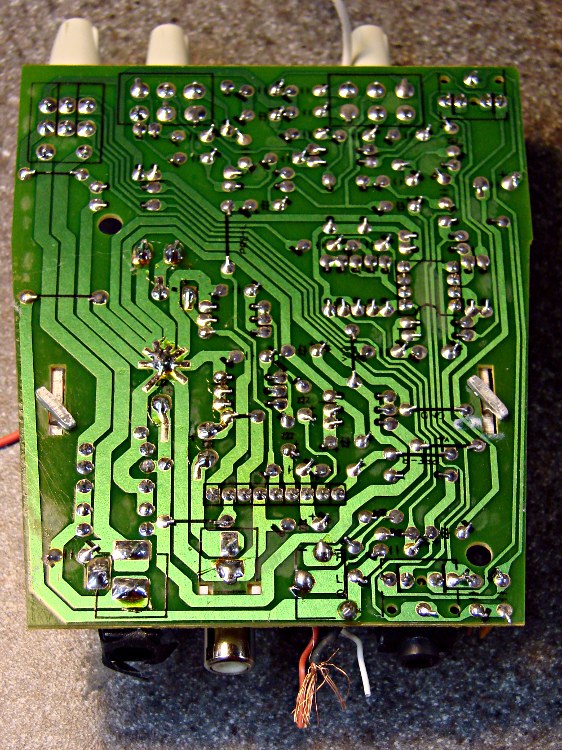
The bottom of the circuit board shows considerable attention to detail. Note the excellent single-point ground at the negative terminal of the big filter capacitor:
HK Powered Speakers – PCB foil side
And, of course, that’s the problem: most of the electrolytic capacitors were dried out. My ESR tester reported the big filter cap (downstream of the bridge rectifiers) as Open and several of the smaller caps were around 10 Ω. Replacing them with similarly sized caps from the heap solved the problem.
Hanging a Hall effect sensor on an Arduino brings up the notion of building a DC current sensor that doesn’t depend on measuring the voltage across a resistor. This would be important for a battery-powered gizmo, where not dropping voltage in a sense resistor makes more voltage available for the load as the batteries discharge.
Pages 55-57 of that Honeywell booklet provides the outline: take a ferrite toroid with a cross-section larger than a linear Hall effect sensor’s package, cut a radial slit just barely big enough for the sensor’s thickness, wind N turns, and pass a current through the winding. Shazam! The sensor output varies linearly with the core flux, which varies linearly with the current, albeit subject to all the usual approximations.
Some variables:
Ia = air gap (cm)
Ic = mean length of core (cm)
I = winding current (A)
Bc = flux density in core (G)
Ba = flux density in air gap (G)
μc = relative permeability of core (dimensionless)
N = wire turns around core (dimensionless)
Yes, they use capital-eye for both length and current. They probably know what they’re doing. I don’t have to like it.
Assuming a narrow gap with respect to the cross-section, Ba ≈ Bc. Assuming the core isn’t close to saturation, then Ba is proportional to current, thusly:
Ba = (0.4 π · μc · NI)/(Ic + μc · Ia)
I wondered how the numbers would work for a typical ferrite toroid…
An FT50-43 toroid looks to be both the smallest ferrite core that will surround the sensor and the largest lump you’d want in a gadget. Some specs (that collection will be helpful):
0.50 OD (inch) = 1.27 cm
0.281 ID (inch) = 0.714 cm
0.188 height (inch) = 0.478 cm
0.0206 area (inch2) = 0.1232 cm2
1.19 mean path length (inch) = 3.02 cm
μ = 850 (that’s “initial” permeability, with 2000 peak)
2750 saturation flux (G) at 10 Oe
AL = 523 in weird units: N=√(nH/AL)
More toroid info, including some background and inches-per-turn tables, lives there. A good guide to building the things, with more tables, is there.
The sensors on hand seem to be 0.060 inch thick = 0.15 cm, although cutting an exact gap may be a challenge; a diamond slitting wheel in the Sherline may be needed for this operation. They claim a maximum flux density anywhere from 400 to 1000 G, depending on which datasheet extract you believe and whether the parts match their descriptions.
Which means in order to have 1 A produce 1000 G at the sensor, I must cram 122 turns through that little toroid.
The inner circumference of the toroid works out to 0.88 inch if you ignore the gap, which means a single layer requires 122/0.88 = 138 turn/inch. Consulting the enameled wire tables, that’s AWG 34 or 35. I doubt overlapping a few turns makes any difference and I’m certain I can’t wind that many perfect turns anyway, so that spool marked 32-33 AWG / 8.5 mil might actually get used.
The Specialty Wire Box has a nearly full spool of AWG 44-½ wire (that grosses nearly half a pound and might reach NYC), but that’s just crazy talk; the stuff is 1.88 mil in diameter, almost exactly 1 RCH. There’s also a small solenoid coil wound with 4.5 mil wire (about AWG 37), still deep in the realm of craziness for winding that many turns by hand.
Working backwards, NI varies linearly with flux density, so 400 G would require NI = 49 and only 60-ish turn/inch. That’s AWG 26 enameled wire and seems much more sensible.
The gotcha is wire resistance: all this should offer less resistance than a sense resistor on the order of 100 mΩ. AWG 26 wire is 42 Ω/1000 ft = 42 mΩ/ft and FT-50 cores have about 0.6 inch/turn, so a 60 turn winding would be 3 ft long = 126 mΩ. The finer wires would be much much worse, so this is not a clear win despite its overwhelming geekiness.
An op amp could boost the output by a factor of 10, reducing the winding to a dozen turns and the resistance to 13 mΩ, even if you didn’t use bigger wire. I like that a whole lot better, although the amp must remove the Hall sensor’s nominal Vcc/2 offset to get a sensible range & output for DC current, assuming unipolar current. We have control over the current, so we could turn it off, measure the op amp’s offset at 0 mA, then send the offset (as a filtered PWM output) to the op amp’s inverting input.
A gain of 100 would give full-scale sensor output for 100 mA current, although I’d be suspicious of the overall accuracy and stability. For pretty-close measurements, like for LED current control, it might be Good Enough.
Given the reduced number of turns, you could do a bifilar winding and then buck the main current with a sampling current. That has the benefit of reducing the core flux to zero during the measurement, so the sense amp can have huge gain and the sensor maintains a large dynamic range. At the cost of a calibrated current source, of course, but … maybe with more buck turns than sense turns?
A small buzzer motor should come in handy for something. Perhaps alerting you to the presence of AC magnetic fields? Anyhow, driving a pager motor from one of the spare bits on the DL1414 display control shift register worked out well enough:
Motor Driver with LED Character Display
These cute little surplus motors expect a 2.5 V supply and buzz overenthusiastically at 5 V; the 100 Ω resistor reduces the current to about 30 mA. That says the motor now runs on about 2 V and I admit picking the resistor became totally empirical, because starting even a little teeny motor requires more current than keeping it running and my first guess was far too high. The 1N4148 diode can handle a few tens of milliamps and will become inadequate for larger motors.
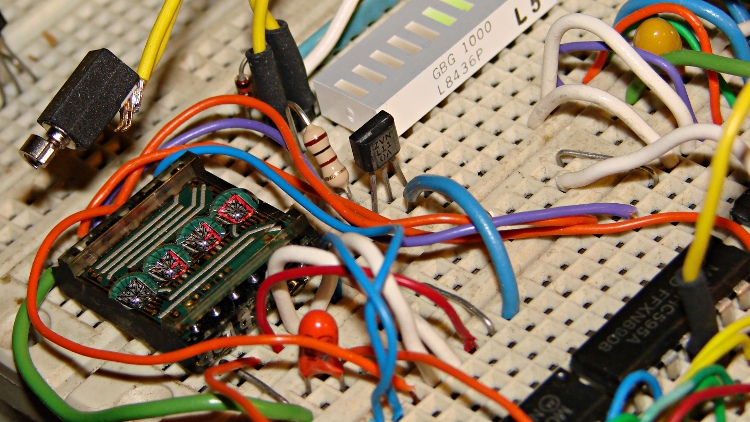
The MOSFET driver resides between the LED displays, with the motor hanging in mid-air on a long wire and the diode hiding behind the motor terminals:
Buzzer Motor Driver – breadboard
Dropping the motor control bit into the DL1414 struct suggested that renaming the whole affair would be a Good Idea:
union CONTROLBITS_ {
	word ShiftWord;				// word overlay
	struct {					// bitfield sent to the display
		unsigned int Addr:2;
		unsigned int NotWrite:1;
		unsigned int Ctl3_6:4;			// unused bits
		unsigned int Motor:1;			// buzzer motor drive
		unsigned int Data:7;
		unsigned int Data7:1;			// unused bit
	} ShiftBits;
};
Controlling the motor requires changing only that single bit in the shift register:
We assume that the DL1414 control bits remain properly configured from the previous operation. The variable holding that struct (actually, the union wrapped around it), must have global scope so everybody uses the most recent bits. Global variables are obviously fraught with peril; hide it inside a method or other fancy construct, as you prefer.
The demo code alternates the motor between on and off as you press Button 1 and shows the current status on the DL1414 display. I mashed up the button demo code with the LED character code, then sprinkled the motor on top:
The picture shows the motor sitting idle and the DL1414 reporting OFF.
When you turn the knob, that display shows the value of the knob click counter, with the first character indicating the motor state.
If you ran the motor directly from an Arduino PWM output, you might get some speed control, but I think the dynamic range wouldn’t justify the effort. Buzzing in patterns of a few hundred milliseconds over the course of a second might be more distinctive; you could even do Morse code.
The Arduino source code:
// Quadrature knob with switch
// Ed Nisley - KE4ANU - November 2012
// Based on:
// https://softsolder.com/2009/03/03/reading-a-quadrature-encoded-knob-in-double-quick-time/
//----------
// Pin assignments
const byte PIN_KNOB_A = 2; // knob A switch - must be on ext interrupt 2
const byte PIN_KNOB_B = 4; // .. B switch
const byte PIN_BUTTONS = A5; // .. push-close momentary switch
const byte PIN_MOSI = 8; // data to shift reg
const byte PIN_SCK = 6; // shift clock to shift reg
const byte PIN_RCKB = 7; // latch clock for LED Bargraph
const byte PIN_RCKC = 12; // latch clock for LED character display
const byte PIN_SYNC = 13; // scope sync
//----------
// Constants
const int UPDATEMS = 10; // update LEDs only this many ms apart
#define TCCRxB 0x02 // Timer prescaler
enum KNOB_STATES {KNOB_CLICK_0,KNOB_CLICK_1};
enum BUTTONS {SW_KNOB, B_1, B_2, B_3, B_4, N_BUTTONS};
#define LED_SIZE 4 // chars per LED
#define LED_DISPLAYS 1 // number of displays
#define LED_CHARS (LED_DISPLAYS * LED_SIZE)
union CONTROLBITS_ {
word ShiftWord; // word overlay
struct { // bitfield sent to the display
unsigned int Addr:2;
unsigned int NotWrite:1;
unsigned int Ctl3_6:4; // unused bits
unsigned int Motor:1; // buzzer motor drive
unsigned int Data:7;
unsigned int Data7:1; // unused bit
} ShiftBits;
};
//----------
// Globals
volatile char KnobCounter = 0;
volatile char KnobState;
char PrevKnobCounter = 0;
byte Button, PrevButton;
// ButtonThreshold must have N_BUTTONS elements, last = 1024
word ButtonThreshold[] = {265/2, (475+265)/2, (658+475)/2, (834+658)/2, (1023+834)/2, 1024};
union CONTROLBITS_ ControlBits;
char LEDCharBuffer[LED_CHARS + 1] = "HELO"; // raw char buffer, can be used as a string
unsigned long MillisNow;
unsigned long MillisThen;
//-- Helper routine for printf()
int s_putc(char c, FILE *t) {
Serial.write(c);
}
//-- Pulse selected pin high
void PulsePinHigh(byte PinID) {
digitalWrite(PinID,HIGH);
digitalWrite(PinID,LOW);
}
//-- Write single char to DL1414, other control bits as defined
void WriteLEDChar(char Char,char CharID) {
ControlBits.ShiftBits.Data = Char & 0x7F;
ControlBits.ShiftBits.Addr = ~CharID & 0x03; // reverse order of chars
ControlBits.ShiftBits.NotWrite = 1; // set up data and address
shiftOut(PIN_MOSI,PIN_SCK,MSBFIRST,ControlBits.ShiftWord >> 8);
shiftOut(PIN_MOSI,PIN_SCK,MSBFIRST,ControlBits.ShiftWord & 0x00ff);
PulsePinHigh(PIN_RCKC);
// delay(1000);
ControlBits.ShiftBits.NotWrite = 0; // write the character
shiftOut(PIN_MOSI,PIN_SCK,MSBFIRST,ControlBits.ShiftWord >> 8);
shiftOut(PIN_MOSI,PIN_SCK,MSBFIRST,ControlBits.ShiftWord & 0x00ff);
PulsePinHigh(PIN_RCKC);
// delay(1000);
ControlBits.ShiftBits.NotWrite = 1; // disable write
shiftOut(PIN_MOSI,PIN_SCK,MSBFIRST,ControlBits.ShiftWord >> 8);
shiftOut(PIN_MOSI,PIN_SCK,MSBFIRST,ControlBits.ShiftWord & 0x00ff);
PulsePinHigh(PIN_RCKC);
// delay(1000);
}
void WriteLEDString(char *pString) {
for (byte i=0; (i < LED_CHARS) && *pString; ++i)
WriteLEDChar(*pString++,i);
return;
}
void MotorControl(byte State) {

	ControlBits.ShiftBits.Motor = State ? 1 : 0;

	shiftOut(PIN_MOSI,PIN_SCK,MSBFIRST,ControlBits.ShiftWord >> 8);
	shiftOut(PIN_MOSI,PIN_SCK,MSBFIRST,ControlBits.ShiftWord & 0x00ff);
	PulsePinHigh(PIN_RCKC);

}
//-- Knob interrupt handler
void KnobHandler(void)
{
byte Inputs;
Inputs = digitalRead(PIN_KNOB_B) << 1 | digitalRead(PIN_KNOB_A); // align raw inputs
// Inputs ^= 0x02; // fix direction
switch (KnobState << 2 | Inputs) {
case 0x00 : // 0 00 - glitch
break;
case 0x01 : // 0 01 - UP to 1
KnobCounter++;
KnobState = KNOB_CLICK_1;
break;
case 0x03 : // 0 11 - DOWN to 1
KnobCounter--;
KnobState = KNOB_CLICK_1;
break;
case 0x02 : // 0 10 - glitch
break;
case 0x04 : // 1 00 - DOWN to 0
KnobCounter--;
KnobState = KNOB_CLICK_0;
break;
case 0x05 : // 1 01 - glitch
break;
case 0x07 : // 1 11 - glitch
break;
case 0x06 : // 1 10 - UP to 0
KnobCounter++;
KnobState = KNOB_CLICK_0;
break;
default : // something is broken!
KnobCounter = 0;
KnobState = KNOB_CLICK_0;
}
}
//-- Read and decipher analog switch inputs
// returns N_BUTTONS if no buttons pressed
byte ReadButtons(int PinNumber) {
word RawButton;
byte ButtonNum;
RawButton = analogRead(PinNumber);
// printf("RawButton: %d ",RawButton);
for (ButtonNum = 0; ButtonNum <= N_BUTTONS; ButtonNum++){
// printf(" (%d:%d)",ButtonNum,ButtonThreshold[ButtonNum]);
if (RawButton < ButtonThreshold[ButtonNum])
break;
}
// printf(" ButtonNum %d\n",ButtonNum);
return ButtonNum;
}
//------------------
// Set things up
void setup() {
pinMode(PIN_SYNC,OUTPUT);
digitalWrite(PIN_SYNC,LOW); // show we arrived
// TCCR1B = TCCRxB; // set frequency for PWM 9 & 10
// TCCR2B = TCCRxB; // set frequency for PWM 3 & 11
pinMode(PIN_KNOB_B,INPUT_PULLUP);
pinMode(PIN_KNOB_A,INPUT_PULLUP);
pinMode(PIN_MOSI,OUTPUT);
digitalWrite(PIN_MOSI,LOW);
pinMode(PIN_SCK,OUTPUT);
digitalWrite(PIN_SCK,LOW);
pinMode(PIN_RCKB,OUTPUT);
digitalWrite(PIN_RCKB,LOW);
pinMode(PIN_RCKC,OUTPUT);
digitalWrite(PIN_RCKB,LOW);
KnobState = digitalRead(PIN_KNOB_A);
Button = PrevButton = ReadButtons(PIN_BUTTONS);
attachInterrupt((PIN_KNOB_A - 2),KnobHandler,CHANGE);
Serial.begin(9600);
fdevopen(&s_putc,0); // set up serial output for printf()
printf("Motor, knob, and buttons\r\nEd Nisley - KE4ZNU - December 2012\r\n");
ControlBits.ShiftWord = 0x0000;
WriteLEDString(LEDCharBuffer);
delay(1000);
MillisThen = millis();
}
//------------------
// Run the test loop
void loop() {
MillisNow = millis();
if ((MillisNow - MillisThen) > UPDATEMS) {
digitalWrite(PIN_SYNC,HIGH);
Button = ReadButtons(PIN_BUTTONS);
if (PrevButton != Button) {
if (Button == N_BUTTONS) {
printf("Button %d released\n",PrevButton);
}
else {
printf("Button %d pressed\n",Button);
if (Button == B_1) {
ControlBits.ShiftBits.Motor = ~ControlBits.ShiftBits.Motor;
sprintf(LEDCharBuffer,"%s",
ControlBits.ShiftBits.Motor?"ON ":"OFF ");
WriteLEDString(LEDCharBuffer);
}
}
PrevButton = Button;
}
if (PrevKnobCounter != KnobCounter) {
printf("Knob count: %d\n",KnobCounter);
sprintf(LEDCharBuffer,"%c%3d",
ControlBits.ShiftBits.Motor?'*':'_',
KnobCounter);
WriteLEDString(LEDCharBuffer);
PrevKnobCounter = KnobCounter;
}
digitalWrite(PIN_SYNC,LOW);
MillisThen = MillisNow;
}
}
The hard-floor brush for our old Samsung VAC-9048R vacuum cleaner began scratching the hardwood floor, which called for some investigation & repair. The Fine Manual doesn’t even mention the hard floor brush, so it’s obvious I’m on my own (as is usually the case). Believe it or not, we actually discussed buying a vacuum cleaner, but the new ones have poor reviews, bulky & awkward plastic widgets on the handle, or suffer from other glaringly obvious faults; although this one is aging poorly, it’s at least workable. Plus, I bought a lifetime supply of bags when it was new and it’s not dead yet.
So, we begin…
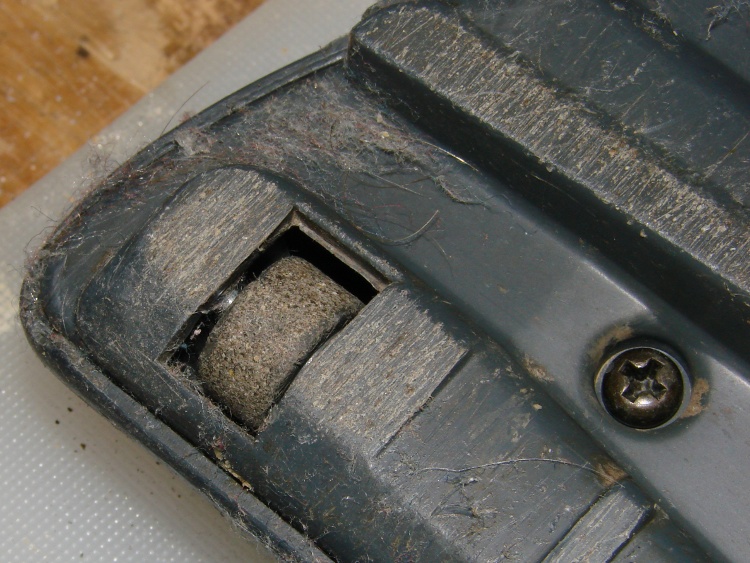
The rollers that used to support the front of the brush have worn down, allowing the bottom cover to erode on the floor. The right side ran through something sticky in the recent past:
Samsung 9048 – worn roller – right
The left side may not be sticky, but it’s in no better shape:
Samsung 9048 – worn roller – left
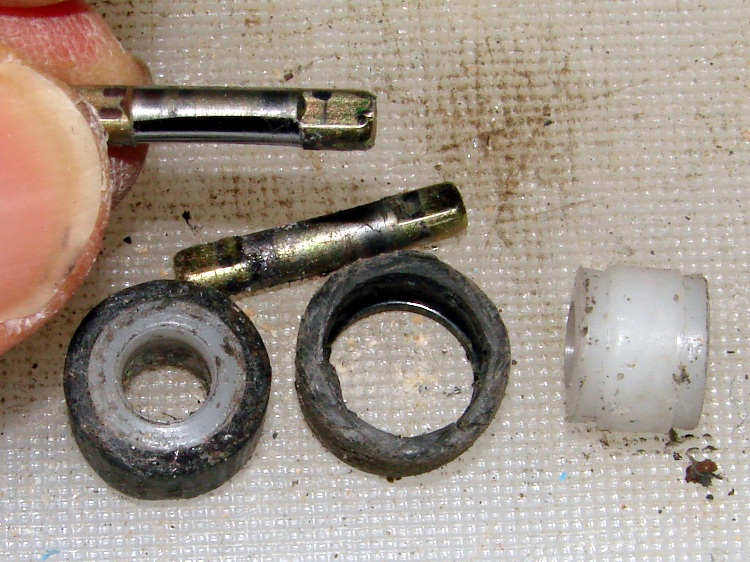
Remove the two obvious screws, pry the front edge up, and the whole cover plate pops off to reveal the two rollers. They pull straight out of the shaft support brackets molded into the top frame. Even their metal shafts show grievous wear:
Samsung 9048 – worn roller parts
The rollers consist of a hard plastic hub supporting a flexible rubbery tire, turning on a 3 mm steel shaft that’s worn on one side (which was downward, of course). The central holes in the rollers probably used to fit the shafts, but they’re now worn to 4 mm ID. The tires were probably a lot larger in diameter, too, back when they were new.
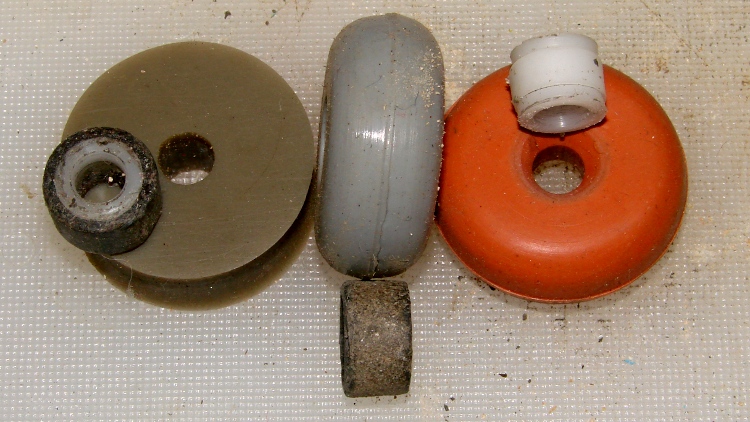
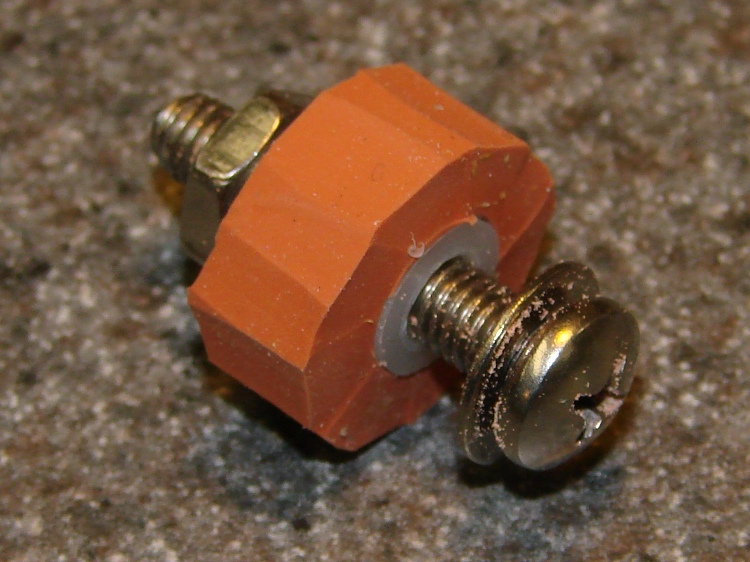
A bit of rummaging in the Basement Laboratory Warehouse Wing produced a bag of vibration isolation bushings that had about the right consistency to become tires:
Samsung 9048 – rollers and surplus vibration isolation bushings
They’re much larger than necessary, but are now, shall we say, fully depreciated and ready for a new, if somewhat downsized, lifestyle.
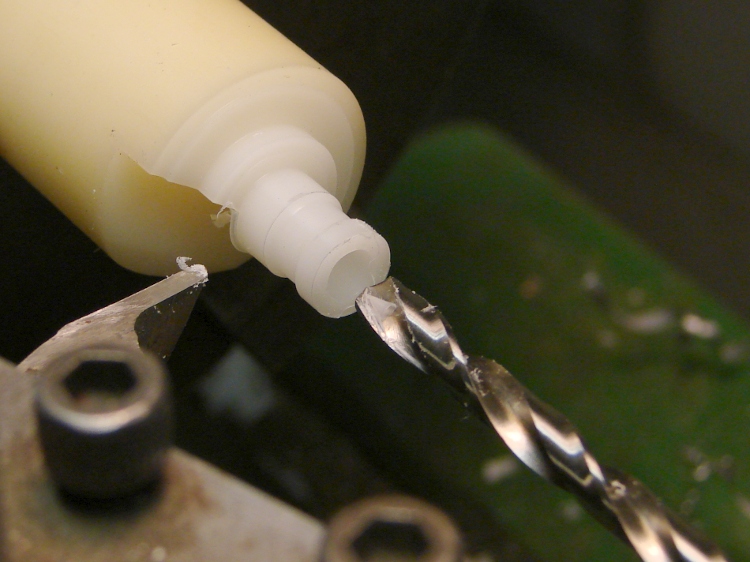
Unfortunately, they don’t fit onto the existing hubs, so I can’t use the hubs as a template. Fortunately, I have a lathe and some random nylon stock (with crosswise notches that didn’t pose much of a problem):
Samsun 9048 – turning roller hub
I came to my senses before converting this into a 3D printer project. If I had to make more than two hubs, it’d be a good idea to solid-model and print them, even if they’re just barely large enough to allow solid infill:
Samsun 9048 – finished roller hub
I’d go for a 3 mm ID to increase the wall width; these have a 4 mm ID to fit the brass bushings described below. There’s no significant overhang and they’d print with no problems. Maybe next time?
The isolation bushings cut easily with a sharp razor knife, so I pared them down to a bit over what I estimated to be the finished roller OD and width:
Samsung 9048 – roller tire before grinding
The 10-32 screw in that shiny new hub serves as an arbor in the lathe, where I held a Dremel tool with a sanding drum down on the compound rest, ran the lathe at its slowest back-gear speed, and sanded the bushing down to what seemed to be the right OD for the tire:
Samsung 9048 – grinding roller tire
The white snout in front leads to a shopvac that caught most of the dust. The front of the lathe chuck shows it wasn’t perfectly effective and I should have worn a dust mask; my glasses didn’t collect much dust, so maybe my lungs didn’t, either.
A trial fit in the floor brush body showed that this one was slightly too large and the sides needed tapering. The inside view:
Samsung 9048 – ground roller before side trim
The outside view, with the cover just slightly unable to snap closed:
Samsung 9048 – slightly oversize roller in place
Grinding a bit more off produced a pair of 15.5 mm OD tires which fit nicely. Some careful razor knife work smoothed and tapered the sides:
Samsung 9048 – finished rollers
Brass tubes (from the stash of cutoffs) compensate for the flat on the severely worn steel shafts; a fix that turned out to be much easier than building new shafts:
Samsung 9048 – roller shaft bushing hub
Then reassemble in reverse order and it’s all good!
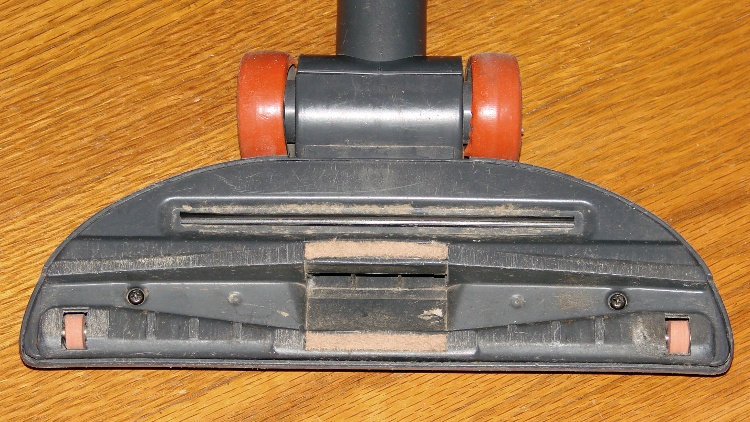
I wrapped a layer of silicone tape around the large and slightly worn hard-plastic rear tires, even though I’m sure that won’t last very long at all:
Samsung 9048 – repaired hard floor brush – bottom
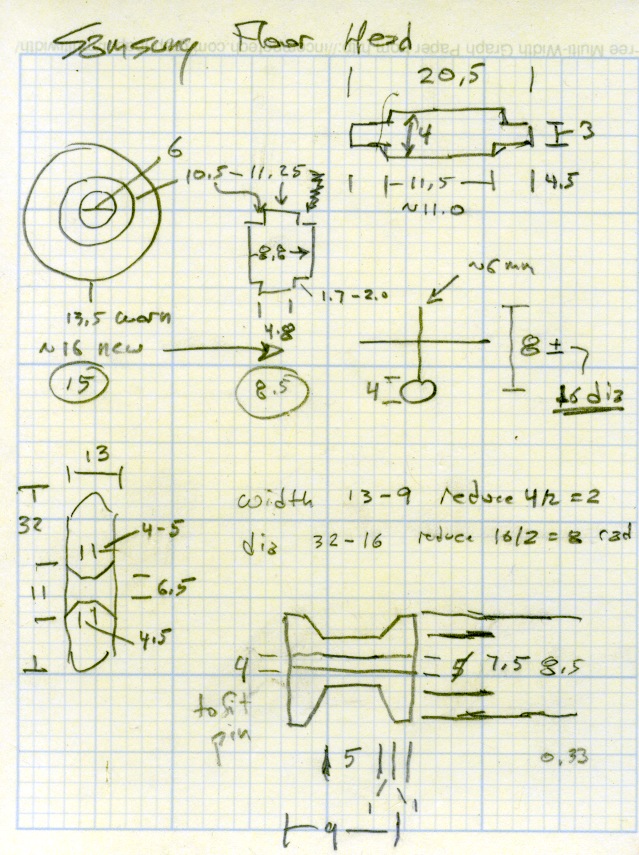
The shop doodle giving all the sizes:
Samsung 9048 – Roller dimension doodles
Now, if that doesn’t count as a gonzo repair, I don’t know what would… [grin]
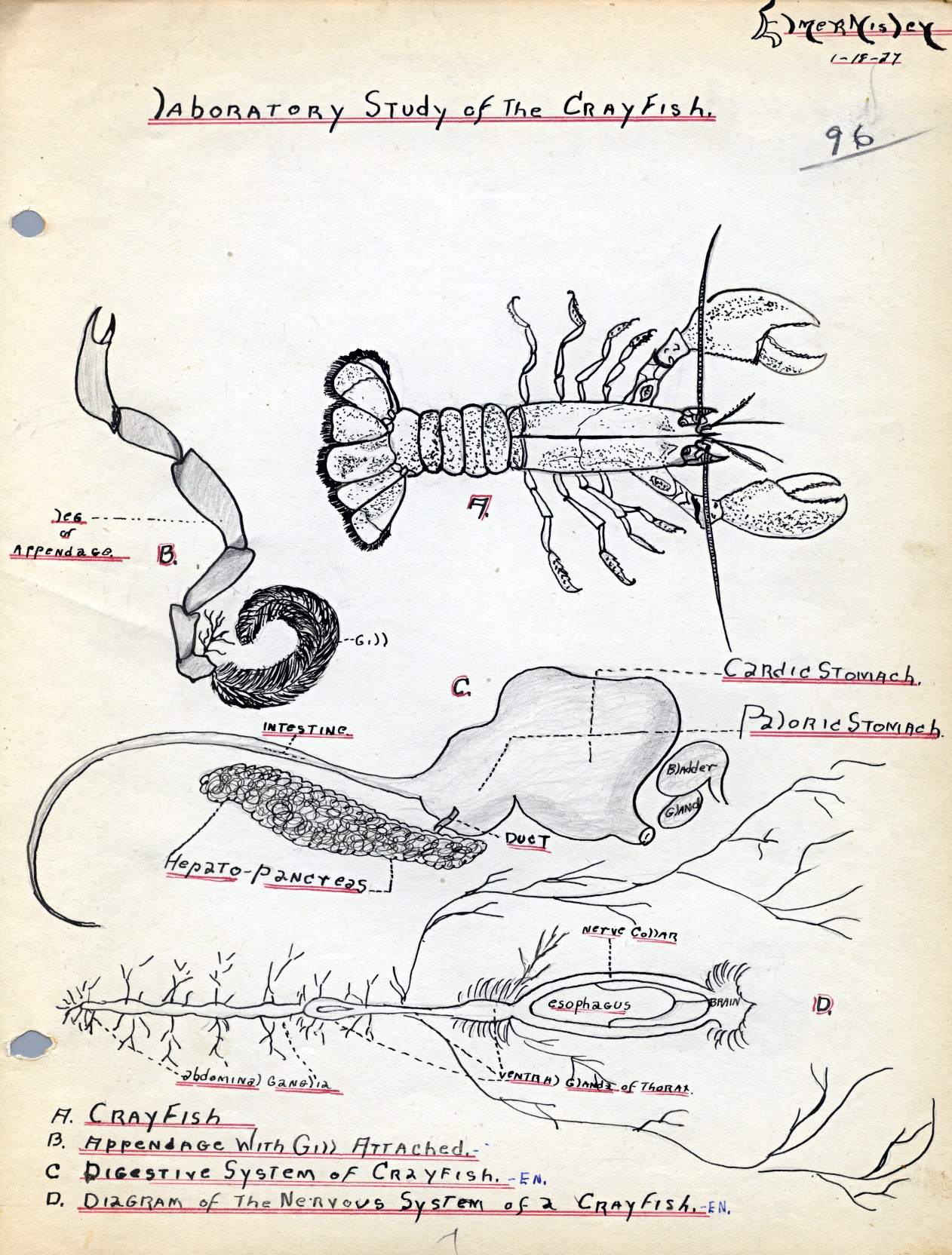
My father obviously devoted considerable time to drawing the gills on this critter in his Sophomore Biology Notebook:
Laboratory Study of the Crayfish
The stomach and nervous system seem sufficiently stylized that they’re not drawn from a specimen; I’m pretty sure a real crayfish doesn’t come apart quite so neatly.
Our Larval Engineer reports that the lab sessions for her second quarter of Anatomy and Physiology will involve dissecting sheep hearts and eyeballs (which arrive in plastic buckets festooned with hazmat stickers for the preservative). She regards this as more than making up for having to sit through A&P lectures and memorizing all those bones & muscles. Must be another generation-skipping trait, is all I can say…









 The Smell of Molten Projects in the Morning