The Smell of Molten Projects in the Morning

Ed Nisley's Blog: Shop notes, electronics, firmware, machinery, 3D printing, laser cuttery, and curiosities. Contents: 100% human thinking, 0% AI slop.

Author: Ed

  • HAL Pin Names for an Arduino Leonardo Knockoff

    Going through the usual dance to reveal the HAL pin names for an Arduino Leonardo knockoff shows that it is, indeed, both a mouse and a keyboard.
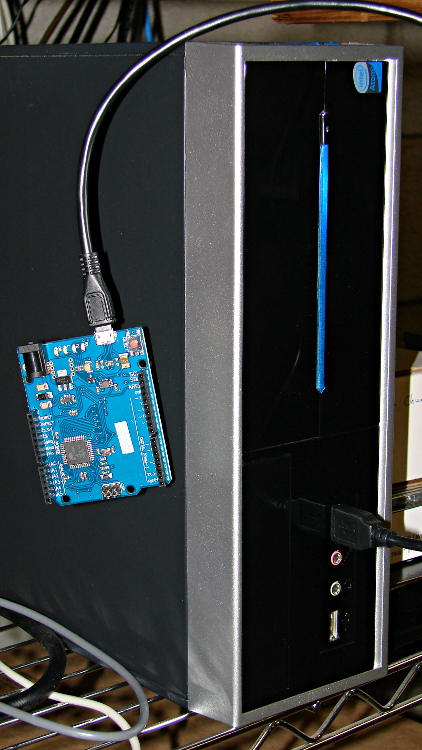
    Arduino Leonardo knockoff - LinuxCNC box
    Arduino Leonardo knockoff – LinuxCNC box

    Pawing through less /proc/bus/input/devices reveals:

    I: Bus=0003 Vendor=2341 Product=8036 Version=0101
    N: Name="Arduino LLC Arduino Leonardo"
    P: Phys=usb-0000:00:1d.0-1/input2
    S: Sysfs=/devices/pci0000:00/0000:00:1d.0/usb2/2-1/2-1:1.2/input/input3
    U: Uniq=
    H: Handlers=kbd mouse1 event3
    B: EV=100017
    B: KEY=70000 0 0 0 0 e080ffdf 1cfffff ffffffff fffffffe
    B: REL=103
    B: MSC=10
    

    Tweaking the permissions:

    sudo chgrp users /dev/input/event3
    sudo chgrp users /dev/input/mouse1
    sudo chmod g+w /dev/input/event3
    sudo chmod g+w /dev/input/mouse1
    

    The output of lsusb shows something interesting:

    Bus 005 Device 001: ID 1d6b:0001 Linux Foundation 1.1 root hub
    Bus 004 Device 006: ID 06f2:0011 Emine Technology Co. KVM Switch Keyboard
    Bus 004 Device 005: ID 046d:c401 Logitech, Inc. TrackMan Marble Wheel
    Bus 004 Device 004: ID 04d9:1203 Holtek Semiconductor, Inc. MC Industries Keyboard
    Bus 004 Device 003: ID 046d:c216 Logitech, Inc. Dual Action Gamepad
    Bus 004 Device 002: ID 0451:2046 Texas Instruments, Inc. TUSB2046 Hub
    Bus 004 Device 001: ID 1d6b:0001 Linux Foundation 1.1 root hub
    Bus 003 Device 001: ID 1d6b:0001 Linux Foundation 1.1 root hub
    Bus 002 Device 002: ID 2341:8036
    Bus 002 Device 001: ID 1d6b:0001 Linux Foundation 1.1 root hub
    Bus 001 Device 001: ID 1d6b:0002 Linux Foundation 2.0 root hub
    

    For whatever reason, this board doesn’t report a device name. It’s plugged into the same USB port as that mouse, so it gets the same Bus and Device numbers, which helps confirm that’s the board.

    Querying the attributes with udevadm produces the all-important product string:

    udevadm info --query=all --attribute-walk --name=/dev/bus/usb/002/002
    ... snippage ...
      looking at device '/devices/pci0000:00/0000:00:1d.0/usb2/2-1':
        KERNEL=="2-1"
        SUBSYSTEM=="usb"
        DRIVER=="usb"
        ATTR{configuration}==""
        ATTR{bNumInterfaces}==" 3"
        ATTR{bConfigurationValue}=="1"
        ATTR{bmAttributes}=="80"
        ATTR{bMaxPower}=="500mA"
        ATTR{urbnum}=="17"
        ATTR{idVendor}=="2341"
        ATTR{idProduct}=="8036"
        ATTR{bcdDevice}=="0100"
        ATTR{bDeviceClass}=="02"
        ATTR{bDeviceSubClass}=="00"
        ATTR{bDeviceProtocol}=="00"
        ATTR{bNumConfigurations}=="1"
        ATTR{bMaxPacketSize0}=="64"
        ATTR{speed}=="12"
        ATTR{busnum}=="2"
        ATTR{devnum}=="2"
        ATTR{version}==" 2.00"
        ATTR{maxchild}=="0"
        ATTR{quirks}=="0x0"
        ATTR{authorized}=="1"
        ATTR{manufacturer}=="Arduino LLC"
        ATTR{product}=="Arduino Leonardo"
    

    Then we know enough to discover what it can do:

    halrun
    halcmd: loadusr -W hal_input -KRAL Leo
    halcmd: show all
    Loaded HAL Components:
    ID      Type  Name                                      PID   State
         5  User  hal_input                                 11265 ready
         3  User  halcmd11264                               11264 ready
    
    Component Pins:
    Owner   Type  Dir         Value  Name
         5  bit   OUT         FALSE  input.0.btn-middle
         5  bit   OUT          TRUE  input.0.btn-middle-not
         5  bit   OUT         FALSE  input.0.btn-mouse
         5  bit   OUT          TRUE  input.0.btn-mouse-not
         5  bit   OUT         FALSE  input.0.btn-right
         5  bit   OUT          TRUE  input.0.btn-right-not
         5  bit   OUT         FALSE  input.0.key-0
         5  bit   OUT          TRUE  input.0.key-0-not
         5  bit   OUT         FALSE  input.0.key-1
         5  bit   OUT          TRUE  input.0.key-1-not
         5  bit   OUT         FALSE  input.0.key-102nd
         5  bit   OUT          TRUE  input.0.key-102nd-not
         5  bit   OUT         FALSE  input.0.key-2
         5  bit   OUT          TRUE  input.0.key-2-not
         5  bit   OUT         FALSE  input.0.key-3
         5  bit   OUT          TRUE  input.0.key-3-not
         5  bit   OUT         FALSE  input.0.key-4
         5  bit   OUT          TRUE  input.0.key-4-not
         5  bit   OUT         FALSE  input.0.key-5
         5  bit   OUT          TRUE  input.0.key-5-not
         5  bit   OUT         FALSE  input.0.key-6
         5  bit   OUT          TRUE  input.0.key-6-not
         5  bit   OUT         FALSE  input.0.key-7
         5  bit   OUT          TRUE  input.0.key-7-not
         5  bit   OUT         FALSE  input.0.key-8
         5  bit   OUT          TRUE  input.0.key-8-not
         5  bit   OUT         FALSE  input.0.key-9
         5  bit   OUT          TRUE  input.0.key-9-not
         5  bit   OUT         FALSE  input.0.key-a
         5  bit   OUT          TRUE  input.0.key-a-not
         5  bit   OUT         FALSE  input.0.key-apostrophe
         5  bit   OUT          TRUE  input.0.key-apostrophe-not
         5  bit   OUT         FALSE  input.0.key-b
         5  bit   OUT          TRUE  input.0.key-b-not
         5  bit   OUT         FALSE  input.0.key-backslash
         5  bit   OUT          TRUE  input.0.key-backslash-not
         5  bit   OUT         FALSE  input.0.key-backspace
         5  bit   OUT          TRUE  input.0.key-backspace-not
         5  bit   OUT         FALSE  input.0.key-c
         5  bit   OUT          TRUE  input.0.key-c-not
         5  bit   OUT         FALSE  input.0.key-capslock
         5  bit   OUT          TRUE  input.0.key-capslock-not
         5  bit   OUT         FALSE  input.0.key-comma
         5  bit   OUT          TRUE  input.0.key-comma-not
         5  bit   OUT         FALSE  input.0.key-compose
         5  bit   OUT          TRUE  input.0.key-compose-not
         5  bit   OUT         FALSE  input.0.key-d
         5  bit   OUT          TRUE  input.0.key-d-not
         5  bit   OUT         FALSE  input.0.key-delete
         5  bit   OUT          TRUE  input.0.key-delete-not
         5  bit   OUT         FALSE  input.0.key-dot
         5  bit   OUT          TRUE  input.0.key-dot-not
         5  bit   OUT         FALSE  input.0.key-down
         5  bit   OUT          TRUE  input.0.key-down-not
         5  bit   OUT         FALSE  input.0.key-e
         5  bit   OUT          TRUE  input.0.key-e-not
         5  bit   OUT         FALSE  input.0.key-end
         5  bit   OUT          TRUE  input.0.key-end-not
         5  bit   OUT         FALSE  input.0.key-enter
         5  bit   OUT          TRUE  input.0.key-enter-not
         5  bit   OUT         FALSE  input.0.key-equal
         5  bit   OUT          TRUE  input.0.key-equal-not
         5  bit   OUT         FALSE  input.0.key-esc
         5  bit   OUT          TRUE  input.0.key-esc-not
         5  bit   OUT         FALSE  input.0.key-f
         5  bit   OUT          TRUE  input.0.key-f-not
         5  bit   OUT         FALSE  input.0.key-f1
         5  bit   OUT          TRUE  input.0.key-f1-not
         5  bit   OUT         FALSE  input.0.key-f10
         5  bit   OUT          TRUE  input.0.key-f10-not
         5  bit   OUT         FALSE  input.0.key-f11
         5  bit   OUT          TRUE  input.0.key-f11-not
         5  bit   OUT         FALSE  input.0.key-f12
         5  bit   OUT          TRUE  input.0.key-f12-not
         5  bit   OUT         FALSE  input.0.key-f2
         5  bit   OUT          TRUE  input.0.key-f2-not
         5  bit   OUT         FALSE  input.0.key-f3
         5  bit   OUT          TRUE  input.0.key-f3-not
         5  bit   OUT         FALSE  input.0.key-f4
         5  bit   OUT          TRUE  input.0.key-f4-not
         5  bit   OUT         FALSE  input.0.key-f5
         5  bit   OUT          TRUE  input.0.key-f5-not
         5  bit   OUT         FALSE  input.0.key-f6
         5  bit   OUT          TRUE  input.0.key-f6-not
         5  bit   OUT         FALSE  input.0.key-f7
         5  bit   OUT          TRUE  input.0.key-f7-not
         5  bit   OUT         FALSE  input.0.key-f8
         5  bit   OUT          TRUE  input.0.key-f8-not
         5  bit   OUT         FALSE  input.0.key-f9
         5  bit   OUT          TRUE  input.0.key-f9-not
         5  bit   OUT         FALSE  input.0.key-g
         5  bit   OUT          TRUE  input.0.key-g-not
         5  bit   OUT         FALSE  input.0.key-grave
         5  bit   OUT          TRUE  input.0.key-grave-not
         5  bit   OUT         FALSE  input.0.key-h
         5  bit   OUT          TRUE  input.0.key-h-not
         5  bit   OUT         FALSE  input.0.key-home
         5  bit   OUT          TRUE  input.0.key-home-not
         5  bit   OUT         FALSE  input.0.key-i
         5  bit   OUT          TRUE  input.0.key-i-not
         5  bit   OUT         FALSE  input.0.key-insert
         5  bit   OUT          TRUE  input.0.key-insert-not
         5  bit   OUT         FALSE  input.0.key-j
         5  bit   OUT          TRUE  input.0.key-j-not
         5  bit   OUT         FALSE  input.0.key-k
         5  bit   OUT          TRUE  input.0.key-k-not
         5  bit   OUT         FALSE  input.0.key-kp0
         5  bit   OUT          TRUE  input.0.key-kp0-not
         5  bit   OUT         FALSE  input.0.key-kp1
         5  bit   OUT          TRUE  input.0.key-kp1-not
         5  bit   OUT         FALSE  input.0.key-kp2
         5  bit   OUT          TRUE  input.0.key-kp2-not
         5  bit   OUT         FALSE  input.0.key-kp3
         5  bit   OUT          TRUE  input.0.key-kp3-not
         5  bit   OUT         FALSE  input.0.key-kp4
         5  bit   OUT          TRUE  input.0.key-kp4-not
         5  bit   OUT         FALSE  input.0.key-kp5
         5  bit   OUT          TRUE  input.0.key-kp5-not
         5  bit   OUT         FALSE  input.0.key-kp6
         5  bit   OUT          TRUE  input.0.key-kp6-not
         5  bit   OUT         FALSE  input.0.key-kp7
         5  bit   OUT          TRUE  input.0.key-kp7-not
         5  bit   OUT         FALSE  input.0.key-kp8
         5  bit   OUT          TRUE  input.0.key-kp8-not
         5  bit   OUT         FALSE  input.0.key-kp9
         5  bit   OUT          TRUE  input.0.key-kp9-not
         5  bit   OUT         FALSE  input.0.key-kpasterisk
         5  bit   OUT          TRUE  input.0.key-kpasterisk-not
         5  bit   OUT         FALSE  input.0.key-kpdot
         5  bit   OUT          TRUE  input.0.key-kpdot-not
         5  bit   OUT         FALSE  input.0.key-kpenter
         5  bit   OUT          TRUE  input.0.key-kpenter-not
         5  bit   OUT         FALSE  input.0.key-kpminus
         5  bit   OUT          TRUE  input.0.key-kpminus-not
         5  bit   OUT         FALSE  input.0.key-kpplus
         5  bit   OUT          TRUE  input.0.key-kpplus-not
         5  bit   OUT         FALSE  input.0.key-kpslash
         5  bit   OUT          TRUE  input.0.key-kpslash-not
         5  bit   OUT         FALSE  input.0.key-l
         5  bit   OUT          TRUE  input.0.key-l-not
         5  bit   OUT         FALSE  input.0.key-left
         5  bit   OUT          TRUE  input.0.key-left-not
         5  bit   OUT         FALSE  input.0.key-leftalt
         5  bit   OUT          TRUE  input.0.key-leftalt-not
         5  bit   OUT         FALSE  input.0.key-leftbrace
         5  bit   OUT          TRUE  input.0.key-leftbrace-not
         5  bit   OUT         FALSE  input.0.key-leftctrl
         5  bit   OUT          TRUE  input.0.key-leftctrl-not
         5  bit   OUT         FALSE  input.0.key-leftmeta
         5  bit   OUT          TRUE  input.0.key-leftmeta-not
         5  bit   OUT         FALSE  input.0.key-leftshift
         5  bit   OUT          TRUE  input.0.key-leftshift-not
         5  bit   OUT         FALSE  input.0.key-m
         5  bit   OUT          TRUE  input.0.key-m-not
         5  bit   OUT         FALSE  input.0.key-minus
         5  bit   OUT          TRUE  input.0.key-minus-not
         5  bit   OUT         FALSE  input.0.key-n
         5  bit   OUT          TRUE  input.0.key-n-not
         5  bit   OUT         FALSE  input.0.key-numlock
         5  bit   OUT          TRUE  input.0.key-numlock-not
         5  bit   OUT         FALSE  input.0.key-o
         5  bit   OUT          TRUE  input.0.key-o-not
         5  bit   OUT         FALSE  input.0.key-p
         5  bit   OUT          TRUE  input.0.key-p-not
         5  bit   OUT         FALSE  input.0.key-pagedown
         5  bit   OUT          TRUE  input.0.key-pagedown-not
         5  bit   OUT         FALSE  input.0.key-pageup
         5  bit   OUT          TRUE  input.0.key-pageup-not
         5  bit   OUT         FALSE  input.0.key-pause
         5  bit   OUT          TRUE  input.0.key-pause-not
         5  bit   OUT         FALSE  input.0.key-q
         5  bit   OUT          TRUE  input.0.key-q-not
         5  bit   OUT         FALSE  input.0.key-r
         5  bit   OUT          TRUE  input.0.key-r-not
         5  bit   OUT         FALSE  input.0.key-right
         5  bit   OUT          TRUE  input.0.key-right-not
         5  bit   OUT         FALSE  input.0.key-rightalt
         5  bit   OUT          TRUE  input.0.key-rightalt-not
         5  bit   OUT         FALSE  input.0.key-rightbrace
         5  bit   OUT          TRUE  input.0.key-rightbrace-not
         5  bit   OUT         FALSE  input.0.key-rightctrl
         5  bit   OUT          TRUE  input.0.key-rightctrl-not
         5  bit   OUT         FALSE  input.0.key-rightmeta
         5  bit   OUT          TRUE  input.0.key-rightmeta-not
         5  bit   OUT         FALSE  input.0.key-rightshift
         5  bit   OUT          TRUE  input.0.key-rightshift-not
         5  bit   OUT         FALSE  input.0.key-s
         5  bit   OUT          TRUE  input.0.key-s-not
         5  bit   OUT         FALSE  input.0.key-scrolllock
         5  bit   OUT          TRUE  input.0.key-scrolllock-not
         5  bit   OUT         FALSE  input.0.key-semicolon
         5  bit   OUT          TRUE  input.0.key-semicolon-not
         5  bit   OUT         FALSE  input.0.key-slash
         5  bit   OUT          TRUE  input.0.key-slash-not
         5  bit   OUT         FALSE  input.0.key-space
         5  bit   OUT          TRUE  input.0.key-space-not
         5  bit   OUT         FALSE  input.0.key-sysrq
         5  bit   OUT          TRUE  input.0.key-sysrq-not
         5  bit   OUT         FALSE  input.0.key-t
         5  bit   OUT          TRUE  input.0.key-t-not
         5  bit   OUT         FALSE  input.0.key-tab
         5  bit   OUT          TRUE  input.0.key-tab-not
         5  bit   OUT         FALSE  input.0.key-u
         5  bit   OUT          TRUE  input.0.key-u-not
         5  bit   OUT         FALSE  input.0.key-up
         5  bit   OUT          TRUE  input.0.key-up-not
         5  bit   OUT         FALSE  input.0.key-v
         5  bit   OUT          TRUE  input.0.key-v-not
         5  bit   OUT         FALSE  input.0.key-w
         5  bit   OUT          TRUE  input.0.key-w-not
         5  bit   OUT         FALSE  input.0.key-x
         5  bit   OUT          TRUE  input.0.key-x-not
         5  bit   OUT         FALSE  input.0.key-y
         5  bit   OUT          TRUE  input.0.key-y-not
         5  bit   OUT         FALSE  input.0.key-z
         5  bit   OUT          TRUE  input.0.key-z-not
         5  s32   OUT             0  input.0.rel-wheel-counts
         5  float OUT             0  input.0.rel-wheel-position
         5  bit   IN          FALSE  input.0.rel-wheel-reset
         5  float IN              1  input.0.rel-wheel-scale
         5  s32   OUT             0  input.0.rel-x-counts
         5  float OUT             0  input.0.rel-x-position
         5  bit   IN          FALSE  input.0.rel-x-reset
         5  float IN              1  input.0.rel-x-scale
         5  s32   OUT             0  input.0.rel-y-counts
         5  float OUT             0  input.0.rel-y-position
         5  bit   IN          FALSE  input.0.rel-y-reset
         5  float IN              1  input.0.rel-y-scale
    

    That’s a pretty decent assortment of directly usable names and features, even without keyboard LEDs. The mouse pins could be repurposed for general sensor values:

    • counts = integer = accumulated encoder wheel ticks
    • position = float = count / scale (why divided? I don’t know)
    • scale = float = turns counts into position
    • reset = bit = resets position or maybe count (not sure)

    I think you could use count to transfer a bare ADC reading from the Leonardo, then use scale to get the actual voltage in “position”. In that situation, reset wouldn’t be at all useful.

    The keyboard pins could transfer Boolean sensors.

    You’d want to give HAL exclusive control of the Leonardo-is-not-a-mouse, because the incoming data would make hash of the, ah, LinuxCNC UI experience in short order. I’m not sure how to control that; the Leonardo advice boils down to “be careful” and “use a physical switch”.

    I have *no* idea where the names come from, but apparently the OS / kernel / something has a HID layer that translates bare USB capability bits into strings. How that relates to a particular device, what the choices might be, how one could add / replace the names for a given device, and all that, I don’t know yet.
  • Stepper Motor Thermal Coefficient vs. Thermal Compound and Forced Air

    Prompted by that comment, a bit more data emerges.

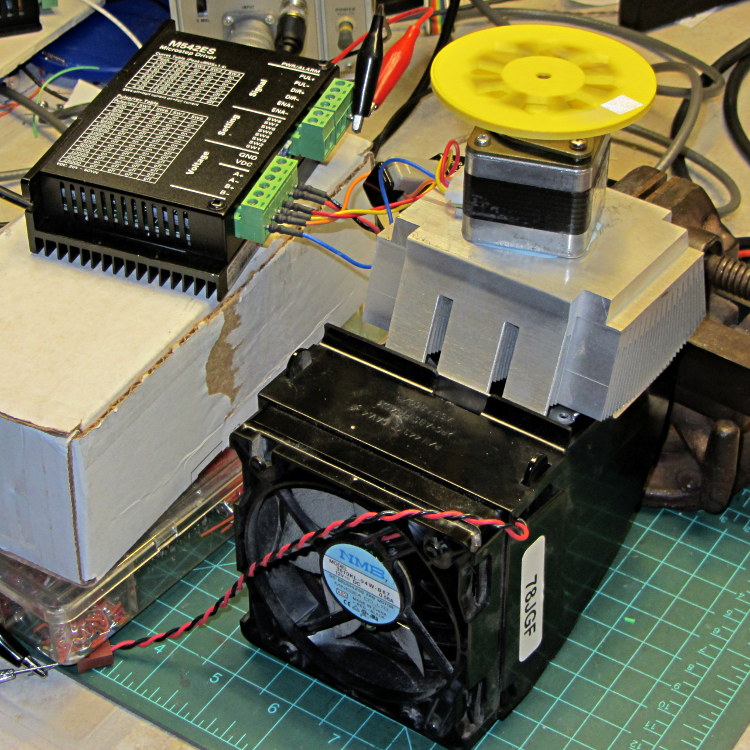
    This unsteady ziggurat barely supports the aluminum CPU heatsink atop a PC CPU exhaust duct; the two came from different PCs and have no relation to each other.  The vise in the background keeps the whole affair from falling over. The fan sucks air through the heatsink and exhausts it out the front.

    NEMA 17 Stepper - Heatsink with Fan
    NEMA 17 Stepper – Heatsink with Fan

    Throughout all this, the stepper driver runs at a bit over 10 k step/sec, tuned to avoid the howling mechanical resonances in that stack. At 1/8 microstepping, that’s 6.25 rev/s = 375 RPM, which would drive the Thing-O-Matic at 210 mm/s and the M2 at 225 mm/s. Your speed will vary, of course, depending on the pulley diameter / number of teeth / belt pitch, etc.

    Under the same conditions as before (i.e., no thermal compound, fan off), the stepper stabilized at 143 °F = 62 °C in the 57 °F = 14 °C Basement Laboratory ambient, with 1.91 A peak current (I don’t believe that second decimal place, either) and a 6.6 °C/W case-to-ambient coefficient. That’s close enough to the 63 °C and 6.7 °C/W coefficient from the earlier test, so the conditions seem roughly the same.

    Smoothing a thin layer of heatsink compound on the butt of the motor, then squishing it firmly atop the heatsink, cut the temperature to 130 °F = 53 °C without the fan. That suggests the case-to-ambient coefficient is now 5.3 °C/W: the thermal compound helps by 1.3 °C/W.

    Turning on the fan drops the case temperature to 84 °F = 29 °C, which works out to a coefficient of 2.1 °C/W. Obviously, moving air over that heatsink helps the cooling a lot: the heatsink felt cold to the touch and the motor case was barely warm.

    Increasing the current to 2.37 A dissipates 11.2 W, which would be scary without the heatsink and air flow. The temperature stabilized at 91 °F = 33 °C, for a coefficient of 1.7 °C/W.

    At 2.83 A = 16 W, the temperature rises to 100 °F = 38 °C, with a coefficient of 1.5 °C/W. While it’s not unstoppable with that much current, the motor has plenty of torque! The motor becomes pleasantly warm, the heatsink stays just above cool, and all seems right with the world. I suspect the windings get a bit toasty in there, but they can’t possibly be worse off than inside a case at boiling-water temperatures.

    Using the original insulated-motor coefficient of 19 °C/W, 16 W would cook the motor at 320 °C. Perhaps the case would make a nice extruder heater after it stopped being a motor?

    [Update: See the comments for the results of just blowing air over the motor case.]

  • Stepper Motor Thermal Coefficient

    You’ve probably seen this exchange on whatever DIY 3D printing forum you monitor:

    1. My stepper motors get scorching hot, what should I do?
    2. Turn down the current!
    3. That worked great, but …
    4. … now all my objects have a shift in the middle.
    5. Your motor is losing steps: turn up the current!
    6. Uh, right.
    NEMA 17 Stepper on cloth
    NEMA 17 Stepper on cloth

    So, with that setup on the bench, I ran a simple experiment with current, temperature, and heat transfer. Most DIY 3D printers have stepper motors attached to a plywood chassis or plastic holder, so the first data point comes from a motor with no mechanical thermal path to the outside world (which is the Basement Laboratory at 14 °C ambient).

    Running at about 1200 step/s with a winding current of 1 A peak from a 24 A supply, the motor stabilized at 52 °C = 125 °F after half an hour.

    Both windings have a 2 Ω resistance and carry 1 A peak = 0.7 A rms, so the total power dissipation is:

    2 × [(1 A / √2)2 × 2 Ω] = 2 W

    That’s the same power produced with the motor stopped at a full step position, where the peak current flows in a single winding and the other winding carries zero current:

    (1 A)2 × 2 Ω = 2 W

    The temperature rise suggests a thermal coefficient of about 19 °C/W = (52 °C – 14 °C) / 2 W.

    The next current setting on the driver is 1.46 A, which doubles the power dissipation to 4.3 W. Assuming a large number of linearities, that would cook the motor at 82 °C = 180 °F above ambient. Even though the motor could probably withstand that temperature, for what should be obvious reasons I didn’t go there.

    Instead, I parked the motor atop a big CPU heatsink harvested from an obsolete PC, sans thermal compound, mechanical fitting, and anything more secure than gravity holding it in place:

    NEMA 17 Stepper on Heatsink
    NEMA 17 Stepper on Heatsink

    The results:

    Ambient 14 °C
    Winding 2 ohm
    A pk A rms Power W Case °C °C/W amb °C/W incr
    1.00 0.71 2.0 28 7.0 7.0
    1.46 1.03 4.3 42 6.6 6.2
    1.91 1.35 7.3 63 6.7 6.9

    The thermal coefficients represent the combination of all interfaces from motor case to ambient, but the case and heatsink stabilized to about the same temperature, so the main limit (as always) will be heat transfer to ambient air. Obviously, the heatsink sits in the wrong orientation with little-to-no air flow, not to mention that the butt end of a stepper motor isn’t precisely machined and has plenty of air between the two surfaces. Improving all that would be in the nature of fine tuning and should substantially lower the coefficient.

    What’s of interest: just perching the motor on a big chunk of aluminum dropped the case temperature 24 °C without no further effort.

    Blowing air over the case (probably) won’t be nearly as effective. Epoxy-ing a liquid-cooled cold plate to the end cap would improve the situation beyond all reasonable bounds, plus confer extreme geek cred.

    Hmmm, the Warehouse Wing does have some copper tubing…

  • Stepper Driver Waveforms: Current Control

    A bit more data from this setup:

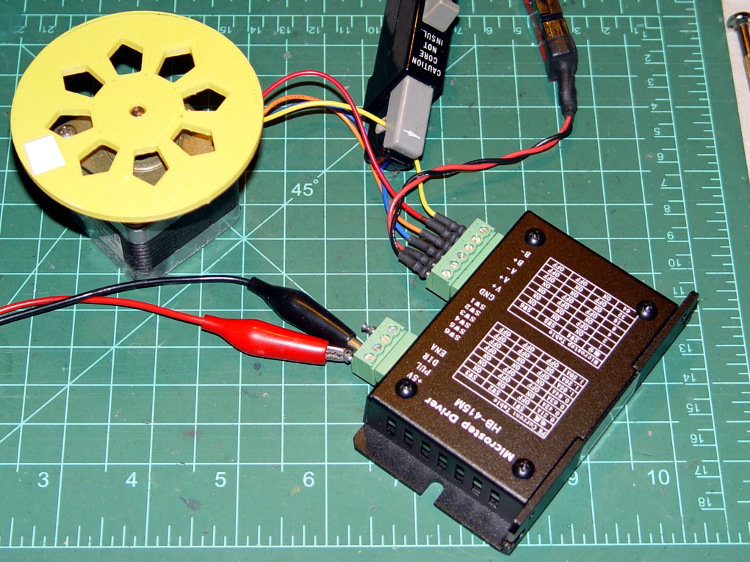
    HB-415M Driver - test setup
    HB-415M Driver – test setup

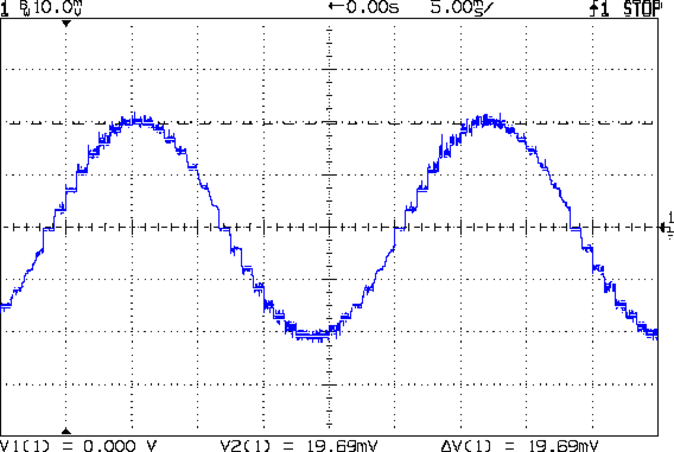
    As you saw earlier the low-speed waveform looked reasonably good, although the HB-415M driver produces only 71% of its rated current (so it’s actually 1 A peak, not the 1.5 A in the caption):

    HB-415M 8-step 1.5A 20V
    HB-415M 8-step 1.5A 20V

    The driver runs in 1/8 microstep mode, which means 1 revolution = 8 × 200 step = 1600 steps. Each cycle of that stepped sine wave has 32 microsteps  = 4 full steps/cycle × 8 microsteps. One cycle is about 27 ms, so 1 step = 840 µs → 1200 step/s → 0.74 rev/s → 44 rpm. The Thing-O-Matic runs at 47 step/mm → 34 mm/rev, so this speed corresponds to travel at 25 mm/s, roughly the usual printing pace.

    Admittedly, that hairball on the bench isn’t a realistic arrangement, because the motor runs with no load. On the other paw, assuming you’ve done a good job eliminating mechanical binding, then it’s probably pretty close to what you’d see during constant-speed travel.

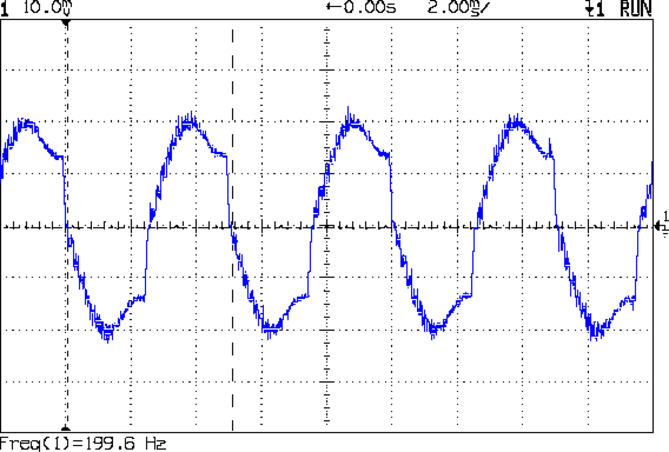
    Cranking the pulse generator to 6400 step/s = 133 mm/s produces this waveform:

    HB-415M 1A 8step 24V
    HB-415M 1A 8step 24V

    The power supply was 24 V, but there was no visible difference at 20 V. The driver evidently can’t control the winding current on the downward side of the waveform. Adding some frictional torque by grabbing the yellow interrupter wheel improved the situation, but not by much.

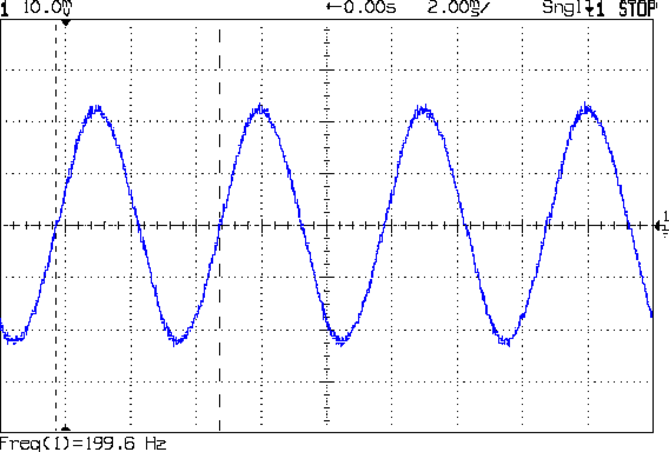
    A box of 2M542 drivers just arrived from a nominally reputable supplier, although they were actually labeled M542ES. Under the same conditions, they produce this waveform:

    M542ES 1A 8step 24V
    M542ES 1A 8step 24V

    So there’s something to be said for larger drivers; the HB-415M drivers were operating at their upper limit and the M542ES at their lower limit, both producing close to 1 A peak.

  • HAL Pin Names for a Bone-Stock USB Mouse

    I’ve always wondered what the LinuxCNC HAL pin names would be for an ordinary mouse, particularly nowadays when an Arduino Leonardo can become a USB HID gadget without much effort at all. If one had a Leonardo and l337 programming skillz, one might receive far more interesting data than just fast-twitch muscle movement…

    Logitech Optical Mouse - LinuxCNC box
    Logitech Optical Mouse – LinuxCNC box

    So. We begin…

    From less /proc/bus/input/devices:

    ... snippage ...
    I: Bus=0003 Vendor=046d Product=c077 Version=0111
    N: Name="Logitech USB Optical Mouse"
    P: Phys=usb-0000:00:1d.0-1/input0
    S: Sysfs=/devices/pci0000:00/0000:00:1d.0/usb2/2-1/2-1:1.0/input/input10
    U: Uniq=
    H: Handlers=mouse3 event10
    B: EV=17
    B: KEY=ff0000 0 0 0 0 0 0 0 0
    B: REL=143
    B: MSC=10
    

    From ll /dev/input:

    ... snippage ...
    crw-r-----   1 root root 13, 74 2013-02-23 07:46 event10
    ... snippage ...
    crw-r-----   1 root root 13, 35 2013-02-23 07:46 mouse3
    

    Manually beat the permissions into shape, because this is a one-off affair:

    sudo chgrp users /dev/input/event10
    sudo chgrp users /dev/input/mouse3
    sudo chmod g+w /dev/input/event10
    sudo chmod g+w /dev/input/mouse3
    

    Find the USB address from lsusb:

    Bus 005 Device 001: ID 1d6b:0001 Linux Foundation 1.1 root hub
    Bus 004 Device 006: ID 06f2:0011 Emine Technology Co. KVM Switch Keyboard
    Bus 004 Device 005: ID 046d:c401 Logitech, Inc. TrackMan Marble Wheel
    Bus 004 Device 004: ID 04d9:1203 Holtek Semiconductor, Inc. MC Industries Keyboard
    Bus 004 Device 003: ID 046d:c216 Logitech, Inc. Dual Action Gamepad
    Bus 004 Device 002: ID 0451:2046 Texas Instruments, Inc. TUSB2046 Hub
    Bus 004 Device 001: ID 1d6b:0001 Linux Foundation 1.1 root hub
    Bus 003 Device 001: ID 1d6b:0001 Linux Foundation 1.1 root hub
    Bus 002 Device 002: ID 046d:c077 Logitech, Inc.
    Bus 002 Device 001: ID 1d6b:0001 Linux Foundation 1.1 root hub
    Bus 001 Device 001: ID 1d6b:0002 Linux Foundation 2.0 root hub
    

    Query the attributes with udevadm:

    udevadm info --query=all --attribute-walk --name=/dev/bus/usb/002/002
    ... snippage ...
      looking at device '/devices/pci0000:00/0000:00:1d.0/usb2/2-1':
        KERNEL=="2-1"
        SUBSYSTEM=="usb"
        DRIVER=="usb"
        ATTR{configuration}==""
        ATTR{bNumInterfaces}==" 1"
        ATTR{bConfigurationValue}=="1"
        ATTR{bmAttributes}=="a0"
        ATTR{bMaxPower}==" 98mA"
        ATTR{urbnum}=="13"
        ATTR{idVendor}=="046d"
        ATTR{idProduct}=="c077"
        ATTR{bcdDevice}=="6700"
        ATTR{bDeviceClass}=="00"
        ATTR{bDeviceSubClass}=="00"
        ATTR{bDeviceProtocol}=="00"
        ATTR{bNumConfigurations}=="1"
        ATTR{bMaxPacketSize0}=="8"
        ATTR{speed}=="1.5"
        ATTR{busnum}=="2"
        ATTR{devnum}=="2"
        ATTR{version}==" 2.00"
        ATTR{maxchild}=="0"
        ATTR{quirks}=="0x0"
        ATTR{authorized}=="1"
        ATTR{manufacturer}=="Logitech"
        ATTR{product}=="USB Optical Mouse"
    

    Fire up halrun, load hal_input, and dump the pins:

    halrun
    halcmd: loadusr -W hal_input -KRAL Optical
    halcmd: show all
    Loaded HAL Components:
    ID      Type  Name                                      PID   State
         5  User  hal_input                                  1693 ready
         3  User  halcmd1692                                 1692 ready
    
    Component Pins:
    Owner   Type  Dir         Value  Name
         5  bit   OUT         FALSE  input.0.btn-back
         5  bit   OUT          TRUE  input.0.btn-back-not
         5  bit   OUT         FALSE  input.0.btn-extra
         5  bit   OUT          TRUE  input.0.btn-extra-not
         5  bit   OUT         FALSE  input.0.btn-forward
         5  bit   OUT          TRUE  input.0.btn-forward-not
         5  bit   OUT         FALSE  input.0.btn-middle
         5  bit   OUT          TRUE  input.0.btn-middle-not
         5  bit   OUT         FALSE  input.0.btn-mouse
         5  bit   OUT          TRUE  input.0.btn-mouse-not
         5  bit   OUT         FALSE  input.0.btn-right
         5  bit   OUT          TRUE  input.0.btn-right-not
         5  bit   OUT         FALSE  input.0.btn-side
         5  bit   OUT          TRUE  input.0.btn-side-not
         5  bit   OUT         FALSE  input.0.btn-task
         5  bit   OUT          TRUE  input.0.btn-task-not
         5  s32   OUT             0  input.0.rel-hwheel-counts
         5  float OUT             0  input.0.rel-hwheel-position
         5  bit   IN          FALSE  input.0.rel-hwheel-reset
         5  float IN              1  input.0.rel-hwheel-scale
         5  s32   OUT             0  input.0.rel-wheel-counts
         5  float OUT             0  input.0.rel-wheel-position
         5  bit   IN          FALSE  input.0.rel-wheel-reset
         5  float IN              1  input.0.rel-wheel-scale
         5  s32   OUT             0  input.0.rel-x-counts
         5  float OUT             0  input.0.rel-x-position
         5  bit   IN          FALSE  input.0.rel-x-reset
         5  float IN              1  input.0.rel-x-scale
         5  s32   OUT             0  input.0.rel-y-counts
         5  float OUT             0  input.0.rel-y-position
         5  bit   IN          FALSE  input.0.rel-y-reset
         5  float IN              1  input.0.rel-y-scale
    ... snippage ...
    

    Hmmm, that was interesting…

  • Leaked Spam Template

    A wannabe spammer inadvertently sent me a nice comment-spam template:

    {{You must|You need to|You have to|You should} {take advantage of|make the most of|benefit from|take full advantage of} {all the|all of the|each of the|every one of the} software advancements that {happen to be|are actually|are|are generally} {a successful|an effective|an excellent|a prosperous} {Internet marketer|Online marketer|Internet entrepreneur|Affiliate marketer}. {If your|In case your|Should your|When your} work {begins to|starts to|actually starts to} suffer, {the competition|your competition|competition|your competitors} could {leave you|make you|create} {in the|within the|inside the|from the} dust. Show {that you are|that you will be|that you are currently|you are} always {on the|around the|in the|about the} {cutting edge|innovative|leading edge|really advanced}, {and they will|and they can} {learn to|learn how to|figure out how to|discover how to} trust {you and your|both you and your|you and the|your} products.

    Multiplying the number of choices together gives a tidy 4.8×10⁹ different comments, each one heartbreakingly close to making sense.

    It’s now in my spam collection, along with some other nuggets snatched from the Internet’s outfall pipe

  • Poking Around in Upstart

    The hack I added to the lightdm startup script occasionally causes it to hang, which suggests a timing problem. The result leaves the default text-mode login screen active on VT1, after which I can log in and issue sudo lightdm start to produce the usual GUI screen. Using startx doesn’t (seem to) start the display manager, resulting in all manner of weird behavior.

    The definitive Upstart info seems to be in the Upstart Intro, Cookbook, and Best Practises document.

    The stanza I modified looks like this:

    start on ((filesystem
               and runlevel [!06]
               and started dbus
               and (drm-device-added card0 PRIMARY_DEVICE_FOR_DISPLAY=1
                    or stopped udev-fallback-graphics)
               and mounted MOUNTPOINT=/mnt/bulkdata)
              or runlevel PREVLEVEL=S)
    

    According to the timing diagram in section 10.1.8, the filesystem event should happen after all the remote filesystems have been mounted, which seems like that stanza might produce a race condition. So just waiting for the filesystem event should suffice, but it doesn’t; that’s why I had to add the mounted event.

    According to the example in section 11.14, that stanza should probably look like:

    start on ((filesystem
               and (runlevel [!06]
               and (started dbus
               and (drm-device-added card0 PRIMARY_DEVICE_FOR_DISPLAY=1
                    or stopped udev-fallback-graphics))))
              or runlevel PREVLEVEL=S)
    

    The additional parentheses around successive conditions seem to serialize them, so that they need not all occur at the same time.

    At least I think that’s how it should work…

    Unfortunately, it doesn’t.  The good news is that it’s converted the intermittent failure into a hard fault, which is generally a step in the right direction.

    Changing the stanza to:

    #start on ((filesystem
    start on ((mounted MOUNTPOINT=/mnt/bulkdata
               and runlevel [!06]
               and started dbus
               and (drm-device-added card0 PRIMARY_DEVICE_FOR_DISPLAY=1
                    or stopped udev-fallback-graphics))
    #           and mounted MOUNTPOINT=/mnt/bulkdata))
              or runlevel PREVLEVEL=S)
    

    … also fails hard.

    At this point, I have no idea what to do, so I’ve restored the original stanza.