Ed Nisley's Blog: Shop notes, electronics, firmware, machinery, 3D printing, laser cuttery, and curiosities. Contents: 100% human thinking, 0% AI slop.
Loading the STL into PrusaSlicer, adding a text label to remind me which way it printed, then slicing with my PETG-CF profile shows the “Actual Speed”, which seems to take acceleration into consideration:
PrusaSlicer preview – actual speed
The colors in the legend don’t quite match the colors on the model, but the greenish layers with the jolts trundle along in the mid-20 mm/s range and the blue-ish straight-through layers at 30-ish mm/s.
Eryone PETG-CF has a somewhat fuzzy appearance that seems not characteristic of other brands, so I’ll try something else when these spools run out:
MK4 Resonance Test Box – overview
The right side of the box (as oriented on the platform) got all the layer retractions and came out festooned with PETG hairs:
MK4 Resonance Test Box – right side
You can check my labels by tracking the small retraction zit sticking up from the top layer; I got it wrong the first time. Open the images in a new tab to see more pixels.
The front:
MK4 Resonance Test Box – front side
The left:
MK4 Resonance Test Box – left side
And the rear:
MK4 Resonance Test Box – rear side
You can barely see the shadow of the “Rear” text on the surface, even though the wall is two threads thick and the text is indented by 0.2 mm, about half the thread width.
As far as I can tell, the MK4 Input Shaper compensation does a great job of suppressing resonance or wobble in all directions.
Judging from the dates codes on the ICs inside, Mary’s HandiQuilter Sixteen long-arm machine is about two decades old and many of the white LEDs in the front handlebars have gone dark:
HQ Sixteen – dead handlebar LEDs
The vertiginous view looks upward into the handlebar at the top of the machine (more on this later). The PCBs run strings of three series LEDs from a 16 VDC supply with a 390 Ω ballast resistor (oddly enough, on the ground end of the string), so one failed LED takes down all three.
I decided to replace all the LEDs, on the principle they’re surely dimmer than they used to beand to take advantage of a decade or so of improvement in white LEDs (yes, I have old stock).
After discovering that the HandiQuilter engineers violated the Principle of Least Surprise by orienting adjacent LED strings in opposite directions, I found one of the strings still didn’t light up.
Pop quiz: which one of these LEDs caused the problem?
5 mm LEDs – swapped polarity
To the best of my knowledge, all 5 mm round LED packages mark the cathode lead with a flat edge. It’s easy to remember, as the cathode side of the schematic symbol has a bar: straight bar = straight edge.
Inside, the LED chip’s cathode lead is bonded to the reflective cup, with the anode lead wire-bonded to the top.
Took me a while to see what was wrong, too.
For whatever it’s worth, the backward LED works fine.
Mary is at least the third owner of a steel rack, originally intended to hold packages of retail stuff, which now holds (much of) her collection of quilting rulers:
Quilting Ruler Rack Base – overview
Obviously, it was never intended to hold heavy acrylic sheets, but it worked surprisingly well, right up to the point where too many of the rulers collected on two adjacent columns of pegs and overbalanced the whole affair atop her while she attempted to remove a ruler.
Subsequent accident recreation showed the rack toppled when the weight of the rulers on the two adjacent columns of hooks moved the center of mass outward, just inside the line between those feet, whereupon the slightest tug on a ruler pulled it over.
Measurements revealed the four legs do not sit on a square contact patch, are not parallel to the radii from the center point, and are not uniformly distant from the center. Rather than committing to a finished product, I made a cardboard prototype to verify a bigger base would solve the problem and I could capture all those feet.
You don’t have such a rack, so the exact dimensions don’t matter, but the LightBurn layout looks like this:
Quilting Ruler Rack Base
The disk is two cross-laid sheets for stiffness, with marks burned on the top to help align the feet more-or-less around the center point.
The oblong rings fit around the feet to capture them, so cut eight or twelve to make four stacks a bit taller than the wire diameter.
The H shape then glues atop the rings to hold the feet in place. They’re not removable, but a razor knife will eventually solve that problem.
I slobbered hot melt glue across the cardboard disks to hold them together, glued and aligned the rings where the feet dented the disks, stood the rack in the rings, and glued the H plates.
About an hour elapsed from the sound of the crash to the rack once again standing quietly beside the fabric cabinets.
We’ll run this for a while and eventually replace it with a plywood disk and screwed-in-place clamps for the feet, which will surely call for wood surface preparation / stain / seal treatment.
The Prusa belt tension guide pretty much explains that subject, with their Belt Tuner making up for my utter tone deafness. FWIW, if the Belt Tuner produces inconsistent results differing by an octave, either up or down from the correct value, the belt is way too loose: give the axis belt tension screw a turn or two to drag the results into the right time zone, then fine-tune from there.
While it is possible to reach both tensioning screws without too much trouble, they’re definitely not convenient.
The accelerometer fits on the hot end:
Prusa MK4 Accelerometer – on hot end
Then under the steel sheet, where it’s clamped by the platform magnets:
Prusa MK4 Accelerometer – on platform
The MK4 firmware measures the resonant frequencies while prompting you to put the accelerometer in the proper locations, then computes the best shaper values.
For reference, the stock OEM values:
X = MZV 50 Hz
Y = MZV 40 Hz
Just after I got the accelerometer and without doing anything to prep the MK4, these results popped out:
X = MZV 56 Hz
Y = MZV 42 Hz
Now, with bling and properly tensioned belts:
X = MZV 59 Hz
Y = MZV 45 Hz
The most recent values were also the most stable, once again pointing out the value of careful assembly and maintenance.
With that in mind, though, I built the laser ramp focus fixture shortly after doing the first recalibration and it has no visible ripples on any of its walls:
Ramp Test Fixture – corner detail
That’s a square corner perpendicular to the sloped top surface at the default 45 mm/s. It’s not as difficult a test as some you’ll see, but it suffices for my simple needs. The MK4 definitely behaves better around corners than the Makergear M2.
Although essentially all kitchens feature a microwave over the stove, essentially all women have difficulty reaching it. As a result, our kitchen has two microwaves: the built-in Samsung over the stove and our trusty Sears Kenmore on the counter.
We’ve had it for a while:
Sears Microwave – data plate
Apart from the turntable rollers, it’s been utterly reliable for the last two decades, until the Start button stopped working:
Sears Microwave – control panel
The membrane switch panel seems to be in good shape, with no cracks in the plastic surface. Only the Start button failed, which suggested the switch contact pad had failed and ruled out broken matrix traces on the flexible circuitry.
Back in the day, they kept casual tinkerers out of the dangerous interior:
Sears Microwave – Torx security screw
That would not be me:
Sears Microwave – security bit set
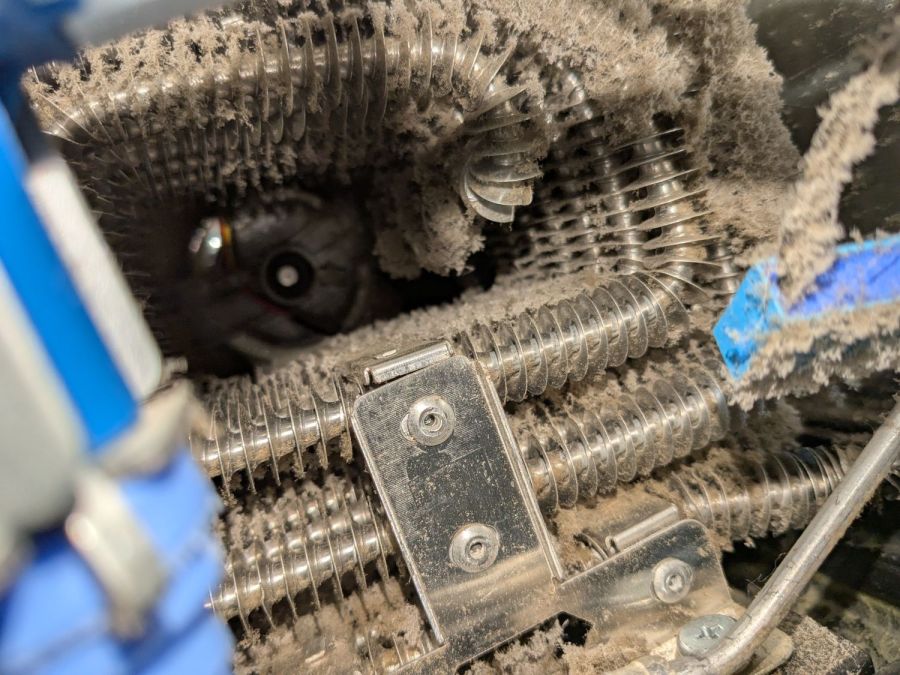
Over the course of two decades, an occasional food explosion produces a surprising amount of debris:
Sears Microwave – exhaust vent spatter
Go ahead, I dare you, show us your microwave exhaust vent.
The control panel circuit board & wiring looks like this:
Sears Microwave – control board – in place
Unplugging all the connectors proceeds as you’d expect, whereupon a single screw (out of sight to the top) releases the control assembly and pulling the whole thing upward gets it out of the cabinet:
Sears Microwave – control board
The capacitors show no signs of The Plague, but those resistors near the optoisolator (?) in the middle have a suspicious thermal plume.
The ribbon cable from the control surface goes into a connector with the usual locking collar:
Sears Microwave – control panel cable connector
The cable also has cutouts latching into tabs molded into the collar:
Sears Microwave – control panel ribbon cable – locking tabs
Removing two screws at the transformer releases the PCB:
Sears Microwave – control panel interior
Which promptly slammed the whole repair mission to a dead stop: with the entire membrane switch assembly glued to the front of the plastic shell, there is no way to get to the Start switch. Trying to peel the membrane off will most certainly destroy it.
Because all the other functions still worked, including the Add Minute button, we figured we can eke out a few more years before something else fails or the lack of one button gets intolerably annoying.
I reassembled everything in reverse order, plugged it in, and, while setting the clock, discovered the Start button once again worked perfectly.
It’s a classic laying-on of hands repair: take something apart, replace nothing, reassemble, and it works!
If the Start button is not part of the overall switch matrix, with a separate conductor through the ribbon cable, un- and re- plugging would be enough to restore a flaky contact. We’ll never know the rest of the story, although with this post as a reminder, maybe I can remember to tear the matrix apart when we scrap it out.
Although replacing the Sonicare E5000 battery six years ago was supposed to be the last time I’d do that, the poor thing died leaving most of a year’s supply of brush heads in the drawer.
Half a quartet of NiMH AA cells should keep it happy while using up that stash:
Sonicare Toothbrush – NiMH AA cells installed
The AA cells sit at a jaunty angle due to re-re-using the original contact tabs soldered into the PCB.
I’m getting pretty good at taping the case closed:
Sonicare Toothbrush – Kapton tape
Although I have no pictures to prove it, the other half of the AA cell quartet restored youthful vigor to the Norelco T770 beard trimmer. Having interior pictures made finding and popping its case latches so much easier.
If they think you’re crude, go technical; if they think you’re technical, go crude. I’m a very technical boy. So I decided to get as crude as possible. These days, thought, you have to be pretty technical before you can even aspire to crudeness.
William Gibson — Johnny Mnemonic
Now that the trees have shed most of their leaves / needles, it’s time to get the accumulation off the roof edges. Fortunately, the upstairs windows overlook the biggest piles and, after I considered and rapidly rejected the notion of using the wind stick, Mary convinced me a roof rake would suffice by deploying a too-short broom.
After considering and rejecting several decreasingly elaborate variations of 3D-printed pole-to-pusher-plate adapter nonsense that almost involved our pole saw, this happened:
Roof Rake – in use
The wood pole comes from a left-behind assortment atop the garage’s open ceiling joists and the pusher plate comes from the cardboard box treasure trove.
A laser cutter makes close-fitting rings and hot-melt glue sticks those plates together with gleeful abandon:
Roof Rake – detail
The blue-and-white cardboard plate consists of two box flaps glued together, the glued-up stack of half a dozen rings transfers the torque from the plate to the pole, and the whole affair took the better part of fifteen minutes from idea to cool-enough glue.
It’s back on the garage joists for next year, unless we decide that pole has a higher purpose in life. Worst case, it loses two inches of length.
Bonus: Chore accomplished before the predicted weekend snowfall!