The Smell of Molten Projects in the Morning

Ed Nisley's Blog: Shop notes, electronics, firmware, machinery, 3D printing, laser cuttery, and curiosities. Contents: 100% human thinking, 0% AI slop.

Author: Ed

  • OMTech 60 W Laser: Axis Angle Check

    OMTech 60 W Laser: Axis Angle Check

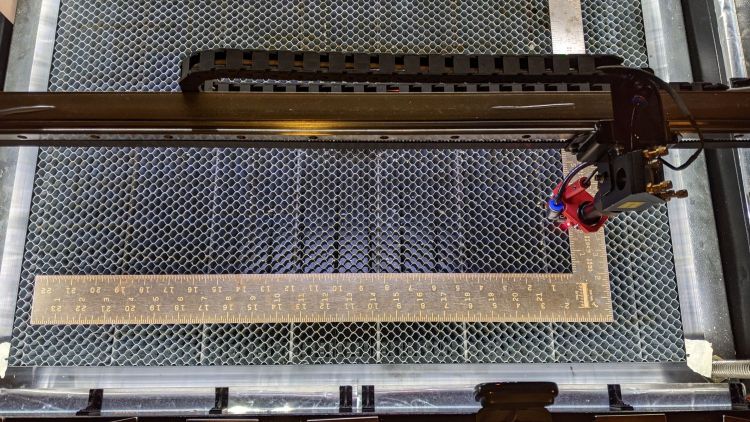
    After tweaking the OMTech laser’s axis scale calibration, it seemed like a good idea to see whether the axes run perpendicular to each other:
    OMTech Axis Cal - framing square
    OMTech Axis Cal – framing square

    A carpenter’s framing square isn’t the most precise instrument, but the pair in my collection agree on their right-angularity to within my ability to measure the difference.

    Aligning the short arm with the Y axis showed the X axis was off by 1.2 mm in 21 inches = 530 mm, an angle of 0.13°, which is just about as good as it’s ever going to be.

    The honeycomb frame is definitely not a precisely aligned unit, but the front edge is parallel to the X axis within an astonishing 0.03°, measured along the rear edge of the long arm pushed against the front of the frame. The aluminum frame has a distinct outward bow in the middle averaged out by the long arm.

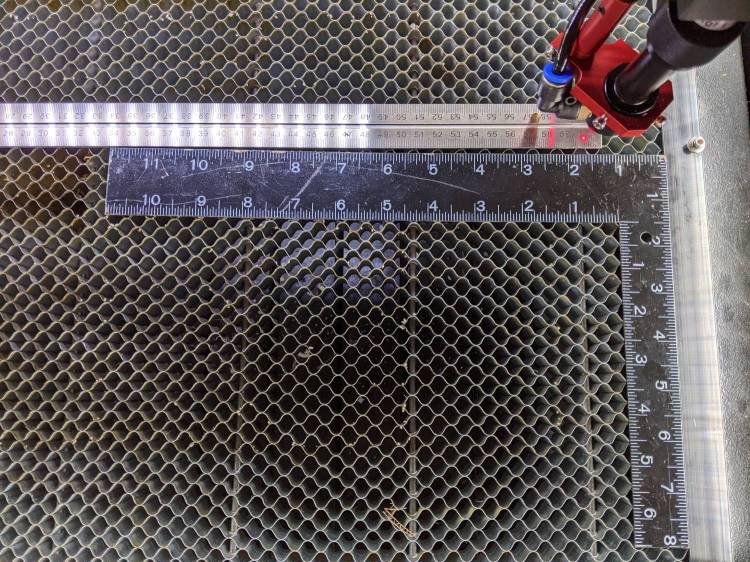
    Unfortunately, the honeycomb frame on the right side is nowhere near that nice. While I had the long scale aligned with the X axis travel, I sleazed a smaller square up against it:
    OMTech Axis Cal - honeycomb frame misalignment
    OMTech Axis Cal – honeycomb frame misalignment

    It’s as bad as it looks:

    OMTech Axis Cal - honeycomb frame vs axis travel - detail
    OMTech Axis Cal – honeycomb frame vs axis travel – detail

    The scale departs from the black square’s arm by 4 mm over 260 mm, for a 0.88° misalignment.

    I think the honeycomb frame is, at best, a parallelogram (and likely a trapezoid), and each side is also bowed by a few millimeters along its length, so any misalignment will depend on where you stand and which way you look.

    In all fairness, it was never intended as an alignment fixture and nobody really cares about angular misalignment as long as the puppy portrait comes out pretty much in the middle of the coaster.

    Angular Alignment meme
    Angular Alignment meme

    Yes, yes I am.

    It’s easy enough to make an alignment fixture:

    OMTech Axis Cal - honeycomb frame angle fixture
    OMTech Axis Cal – honeycomb frame angle fixture

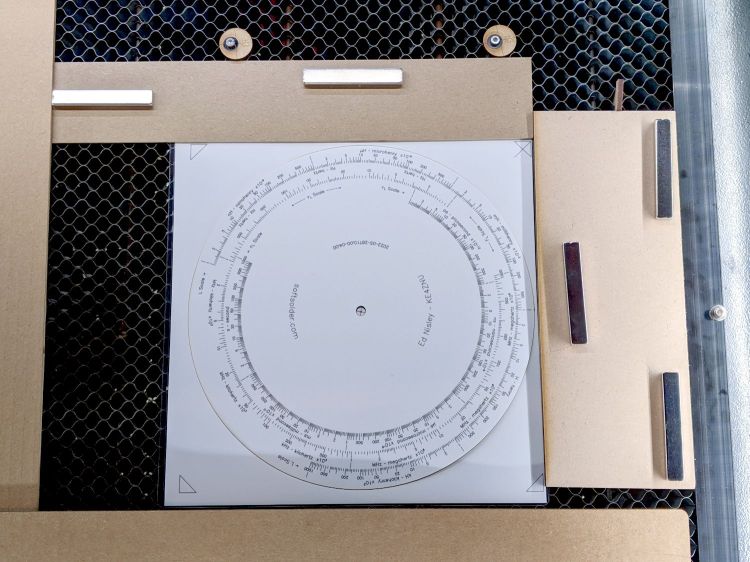
    The cut along the left edge is, by definition, parallel to the Y axis, so the left edge of the larger slice serves to align flat things to be cut and hold them in place:
    Laser cutter deck fixture
    Laser cutter deck fixture

    The upper sheet (a simple chipboard rectangle) sits perpendicular (set with the short square) to the edge, held to the honeycomb with magnets, and kept in alignment with two adjustable stops snugged against it. A few smaller magnets can hold the sheet flat against the honeycomb as needed.

    The sliver cut off the MDF is 7.85 mm at the top and 9.70 mm at the bottom, for an angle of 0.53° over its 210 mm length, a bit less than the angle measured above. It now lives in the tooling pile against future need.

  • DripWorks Valve Fracture

    DripWorks Valve Fracture

    Early in the irrigation season, Mary turned on a DripWorks Micro-Flow Valve, only to have the knob + stem pop out and release a stream of water in the wrong place. Mary jammed it back in place until I could chop out the offending valve and install a known-clear replacement.

    The knob broke off the stem when I tried to pry it out of the valve body:

    Failed Dripworks valve - parts
    Failed Dripworks valve – parts

    The lip around the inside of the cap snaps over the top of the body, which is why I wrecked the stem, but the chip broke off the cap while Mary was turning it just before the stem popped out. Her fingers are barely strong enough to turn the valve, which means something had gone wrong before she started turning.

    A look straight into the valve body:

    Failed Dripworks valve - top view
    Failed Dripworks valve – top view

    The stem has swarf left over from drilling out the mold flash last year:

    Failed Dripworks valve - stem
    Failed Dripworks valve – stem

    All in all, the Dripworks drip irrigation system works well, but their overall attention to QC leaves something to be desired.

  • Onion Maggot Flies vs. Sticky Traps: Round 1

    Onion Maggot Flies vs. Sticky Traps: Round 1

    We deployed six sticky traps in the onion patch immediately after planting in late April and replaced the cards in mid-June. The first set of cards collected a considerable number of what resemble, to my untrained eye, onion maggot flies and the onion plants remain healthy:

    • VCCG Onion Card A
    • VCCG Onion Card B
    • VCCG Onion Card C
    • VCCG Onion Card D
    • VCCG Onion Card E
    • VCCG Onion Card F

    Each image shows both sides of a single card.

    The cards sit a foot above the shredded leaf mulch and I managed to drop at least one of the cards while extracting it from the cage, but they all have plenty of onion maggot flies in addition to the random debris.

    The cards inside their cages have not accumulated larger insects like honeybees / moths / butterflies, although the tiniest specks are definitely mini-critters along the beetle / gnat / aphid / mosquito axis.

    Unlike last year, the second set of cards will remain in place until harvest to maintain continuous pressure on the fly population.

    If you’re really interested, the dozen original camera images have more detail.

  • 70 inch OD Curved Quilting Layout Template

    70 inch OD Curved Quilting Layout Template

    Mary sketched a quilt layout on ordinary Letter-size paper using her quilting templates, but the final design will be a 30×30 inch layout requiring a suitably upscaled template. Running the numbers suggested a template with curved edges lying on a 70 inch diameter circle, which was easy enough:

    Quilting Template - 70 inch dia - short
    Quilting Template – 70 inch dia – short

    The normal-size acrylic template with a 20 inch diameter sits atop the upscaled cardboard version. We decided cardboard would work fine for a single-use tool; should she need one in the future, I have the technology.

    It turns out that the inner curve also has a 70 inch diameter: its center point is displaced 200 mm along the center radius from the outer curve. The straight sides are parallel, not radii of either circle.

    She decided a much longer template would simplify smooth edge-to-edge curves, so I laid out a skinnier version with a keyed joint in the middle:

    Quilting Template - 70 inch dia - long
    Quilting Template – 70 inch dia – long

    The grid represents the OMTech laser’s 700×500 mm platform, so I used LightBurn’s Cut Shapes function to chop the template into two overlapping parts:

    Quilting Template - 70 inch dia - split
    Quilting Template – 70 inch dia – split

    The cuts at the keyed ends extend slightly more than needed, but weren’t critical. Similarly, I didn’t worry about kerf compensation for two pieces of cardboard joined by packing tape.

    The template looks a lot like a scimitar:

    Quilting Template - 70 inch dia - long
    Quilting Template – 70 inch dia – long

    The shorter version had its corrugations running along the short dimension. I put the longer version’s corrugations along the longer dimension, thinking they would prevent bending. That was true, but they also interfered with the pencil tracing the curves. Next time, I’ll know better!

  • OMTech 60 W Laser: Axis Scale Check

    OMTech 60 W Laser: Axis Scale Check

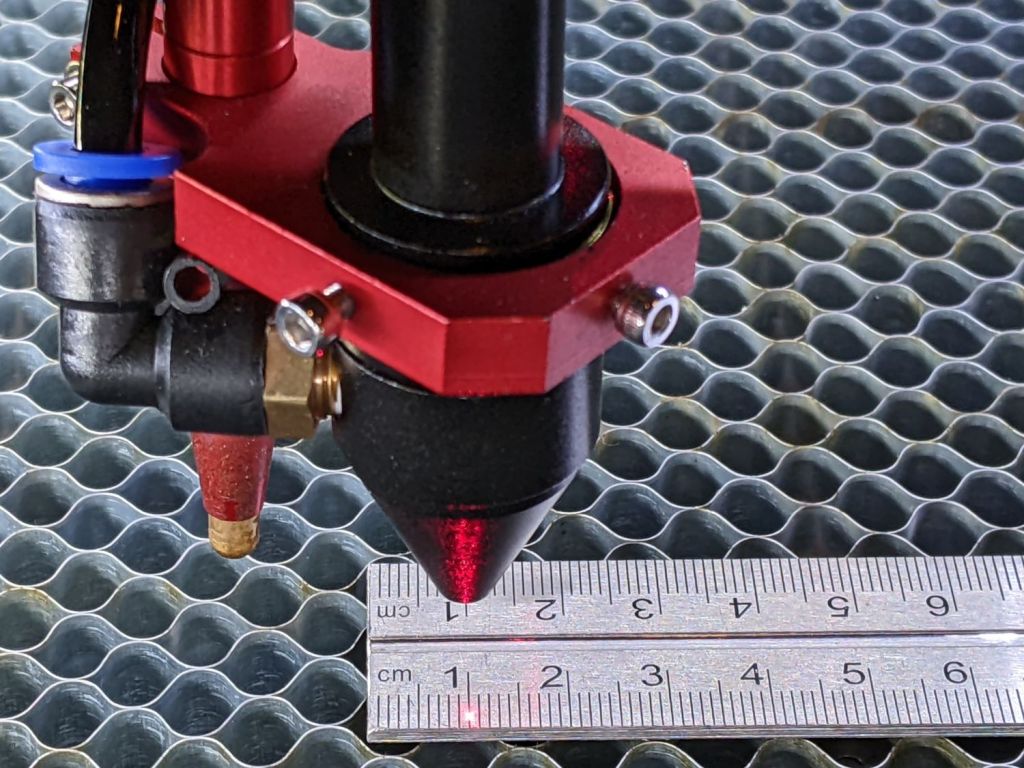
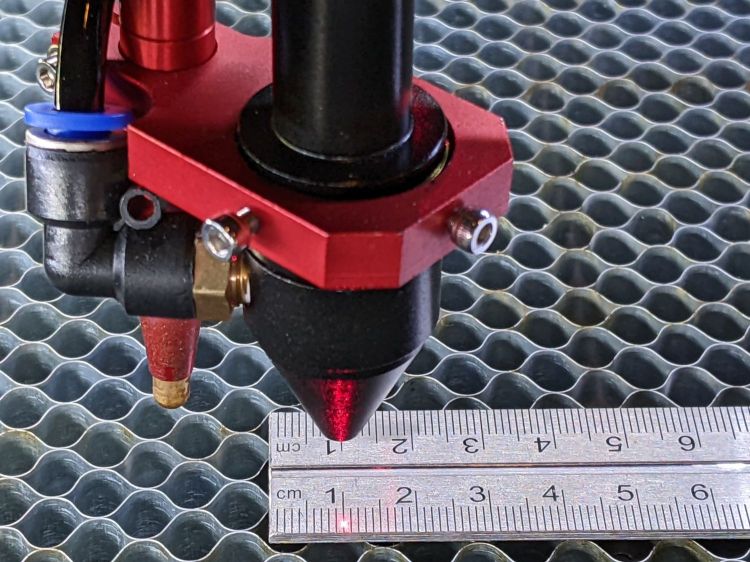
    Laying out my longest engraved scale on the honeycomb:

    OMTech Axis Cal - dot positioning
    OMTech Axis Cal – dot positioning

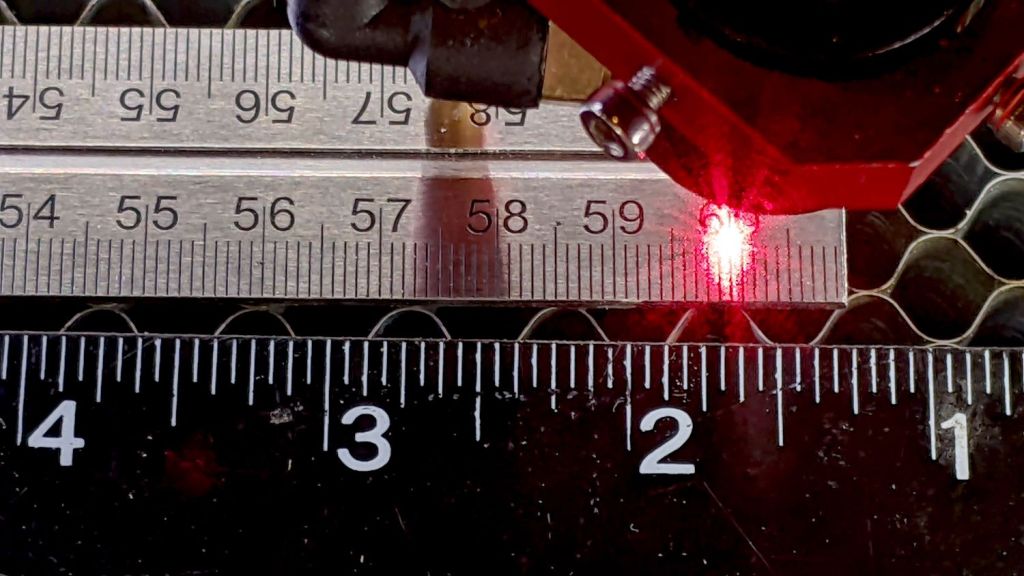
    The zero-th step aligns the scale with the axis travel: slide one end of the scale to put the dot on the edge, jog to the other end, slide to put the dot on the edge, iterate until the dot is the same brightness on both ends.

    The scale lines are a tidy 0.2 mm wide, the red laser dot might be 0.4 (it’s rectangular-ish), and a jog increment of 0.2 mm works well. I can manually align (pronounced “slide”) the scale on the honeycomb to center the dot within a line, whereupon moving the head a known distance to the other end of the scale and counting-while-jogging a few steps until the dot drops into the proper line gives the offset from the correct distance.

    Jogging 590 mm along the X axis produced 589.8 mm of actual travel (one jog step short of the line 590 mm from the start), an error of -340 ppm.

    Jogging 495 mm along the Y axis travels 494.4 mm, an error of 1212 ppm. That’s considerably more than I expected and required a few iterations until I believed it.

    Both axes use steppers with 20 tooth pulleys and 3 mm pitch belts, so the laser head moves 60 mm per motor revolution. The stepper drivers are configured for 5000 steps/rev, so the axes should have a step length of 12 µm = 60 mm / 5000 step. Both axes arrived with Step Length values set to weird numbers very close to 12 µm, but, after a quick check showed incorrect travel distances, I reset them to 12 µm before making real measurements.

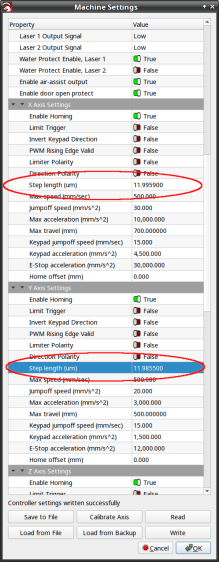
    LightBurn provides access to the Ruida controller’s “Vendor Settings” (after a warning to not mess things up) and allows you to change them:

    OMTech Laser - Axis step length settings
    OMTech Laser – Axis step length settings

    The values shown above come from multiplying 12 µm by the ratio of the actual to the intended distance:

    • 11.9959 = 12 × 589.8 / 590
    • 11.9855 = 12 × 494.4 / 495

    Repeating the tests with those slightly smaller step sizes produces motions that are spot on to within my ability to measure them.

    Neither of those changes was large enough to affect the outcome of cutting the Tek Circuit Computer decks, which are much smaller than the full extent of the axes and thus see much smaller errors.

  • Laser Printer vs. Laser Cutter: Alignment & Scale

    Laser Printer vs. Laser Cutter: Alignment & Scale

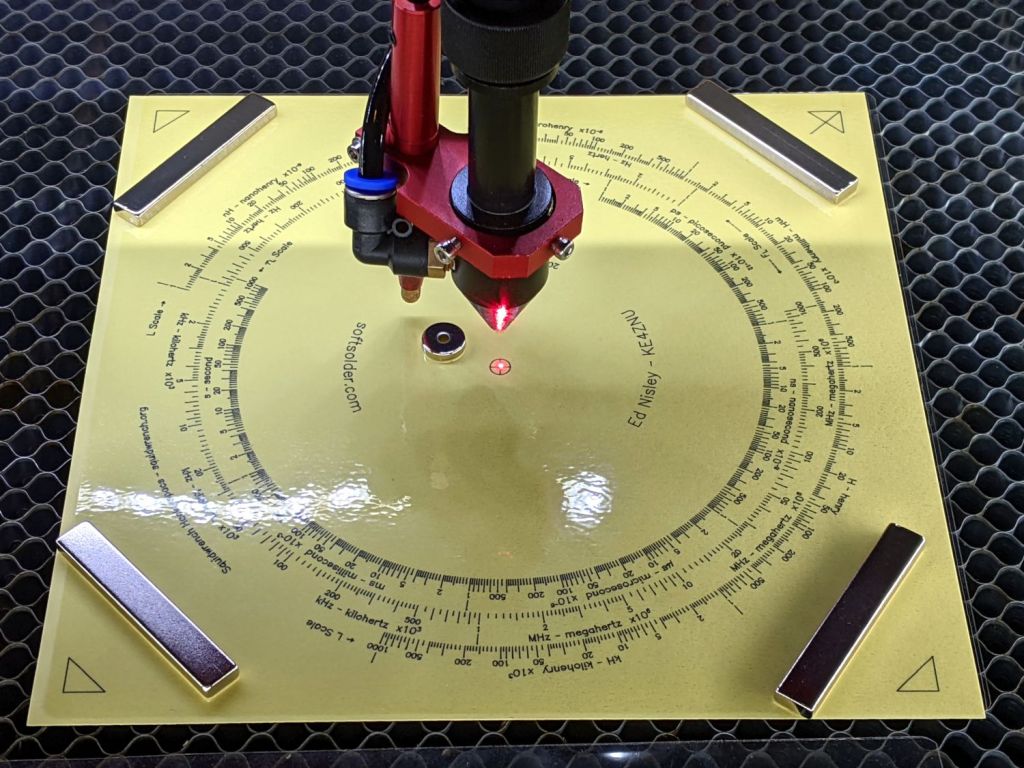
    The setup for cutting the Tektronix Circuit Computer decks looks like this:

    Tek CC - Bottom Deck cutting setup
    Tek CC – Bottom Deck cutting setup

    Four neodymium bar magnets hold the corners flat against the honeycomb and the neo disk magnet pins the center down, thus ensuring the red alignment laser meets the cutting beam at its focal point on the surface.

    The triangular shapes mark the OD of the perimeter (177.8 mm) plus twice the cut margin on each side (2×2 mm), with the tick mark in the upper right ensuring I slap every deck down in the proper orientation. Aligning the two right marks to the edge of the honeycomb frame (with a straightedge for some offset) aims the deck’s 0° index along the cutter’s X axis.

    The cut pattern origin is, naturally enough, the center point of the deck, so aligning the red dot to the center cross should put the OD cut at the place all around the perimeter. For confirmation, I fire the laser (“A single ping, Comrade.”) and verify the hole is in the middle of the cross.

    Before cutting the deck, the laser also marks the corner shapes, so this may come as some surprise:

    Tek CC Middle Deck Corner Targets
    Tek CC Middle Deck Corner Targets

    The laser printer (a venerable HP LaserJet 1200) produced the dark triangles and the laser cutter (a new OMTech 60 W) burned the light brown marks. The picture is a composite of the four corners, with the blank center removed to concentrate on what’s important.

    The scrawls give the edge-to-edge distances in both inches (because that was the scale at hand) and converted to millimeters (because that’s how it’s laid out), with the L suffix for the laser marks.

    What’s of interest is that you can’t overlay the two sets of marks by a combination of scaling and rotation with the centers (not shown) of the two patterns pinned together.

    The laser measurements differ from the ideal 181.8 mm by 0.1 mm vertically and 0.4 mm horizontally. This may require dinking with the scale factors in the firmware, which I recall having weird values.

    The LaserJet is definitely not a precise instrument, off by 0.4 mm vertically and a millimeter horizontally, with considerable variation. I think this comes down to unrealistic expectations for toner stuck to a flexible sheet wrapped around rollers and heated enough to melt dust into the fibers.

    More study is indicated …

  • Memory Is the First Thing to Go

    Memory Is the First Thing to Go

    An email from Amazon arrived a few days ago:

    Purchase Reminder - not found
    Purchase Reminder – not found

    I suppose we’re even, because I have no recollection of setting a Purchase Reminder on anything at any time.

    By default, my email client does not display remote content in messages, which chops out the cute pictures, as well as killing all the cruft and tracking widgetry infesting commercial email these days.