Ed Nisley's Blog: Shop notes, electronics, firmware, machinery, 3D printing, laser cuttery, and curiosities. Contents: 100% human thinking, 0% AI slop.
Unfortunately, reinforcing the USB Micro-B jack on the side of the LitUp LED Light Pad only delayed the inevitable: the light became erratic even without the slightest touch. The pad consists of three acrylic sheets glued together around the entire perimeter, so there’s no way to get access to the no-user-serviceable-parts within. Apparently, you’re supposed to just throw it out.
On the other paw, it’s already dead, so there’s nothing to lose:
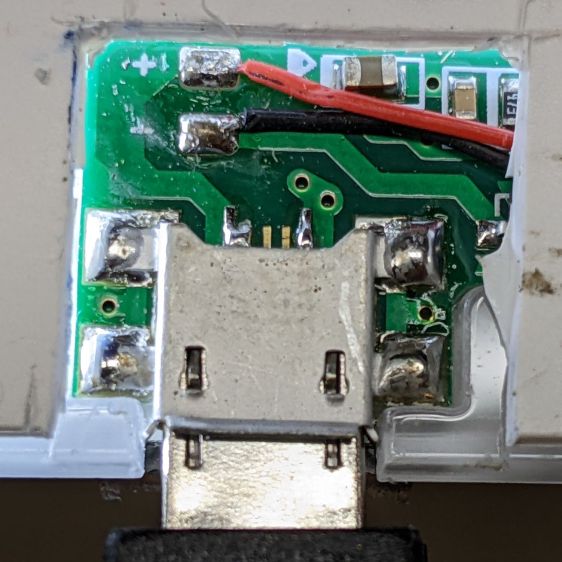
LitUp LED Light Pad – failed USB jack
A little deft razor knife work chopped through the rear sheet without doing any (more) damage to the PCB within. The LEDs can still be convinced to light, but the USB jack is definitely wrecked.
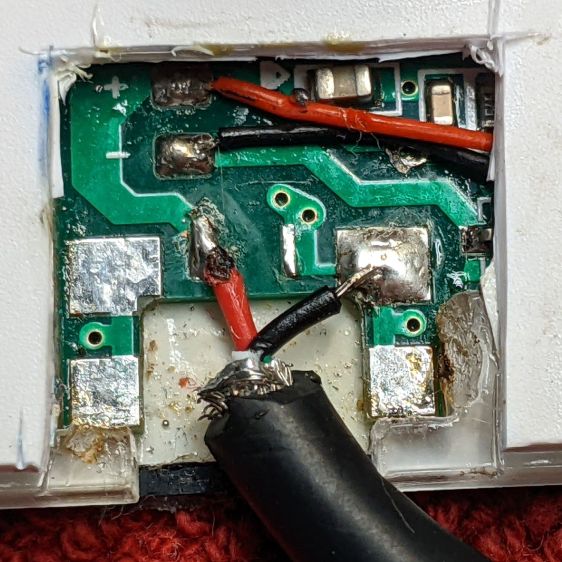
Applying some ChipQuik let me extract the jack without (too much) more damage. Rather than replace it, I just soldered a pigtail USB cable to the obvious PCB pads:
LitUp LED Light Pad – direct power wiring
If I’d noticed that little solder ball, I’d have removed it before filling the cavity with hot melt glue and squishing the cut-out piece of white acrylic in place.
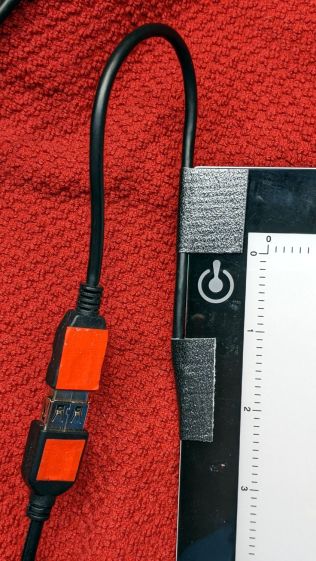
A little black duct tape should keep the wiring stable enough for the foreseeable future:
LitUp LED Light Pad – redirected cable
That was another (relatively) easy zero-dollar repair that should not be necessary.
If you’re a particularly sharp person, these may accentuate your wardrobe:
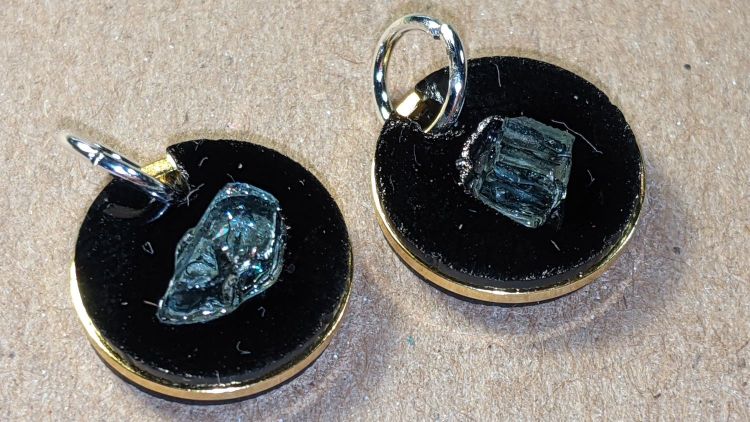
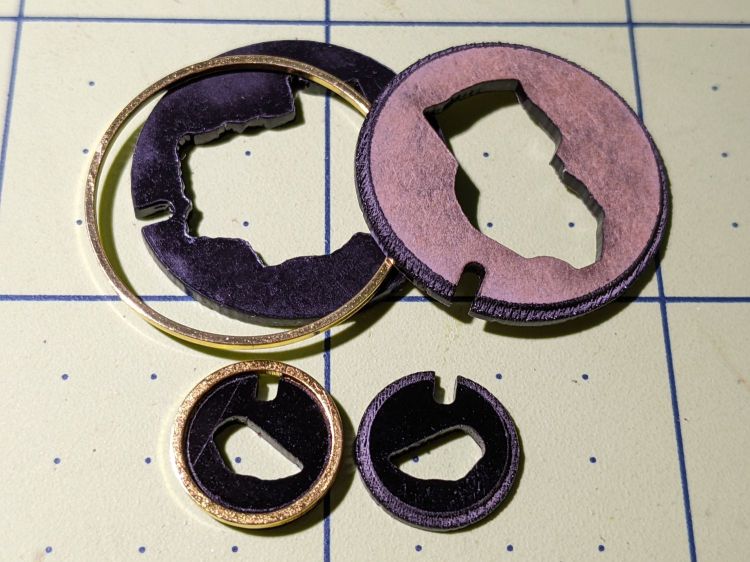
Earrings – 12mm – finished
They’re fragments of smashed tempered glass, epoxied into laser-cut disks, with a ring providing some structural support. Although it’s hard to tell from the photos, the fragments sit flush with one side of the disk, which is likely the side you want closest to your carotid artery:
Earrings – 12mm – finished
Each chunk consists of a few smaller cuboids, so you get internal reflections from the minute air gaps between them. They’re not diamonds, but they’re surprisingly glittery in the proper light. Bonus: you can see right through!
The “gold” band around the disk is a beading ring held in a notch engraved around both disks:
Earrings – rings
The smaller ring is 12 mm OD, the larger is 25 mm, with 16 mm (the descriptions says 15, but ya get what ya get) and 20 mm available for other glass fragment sizes.
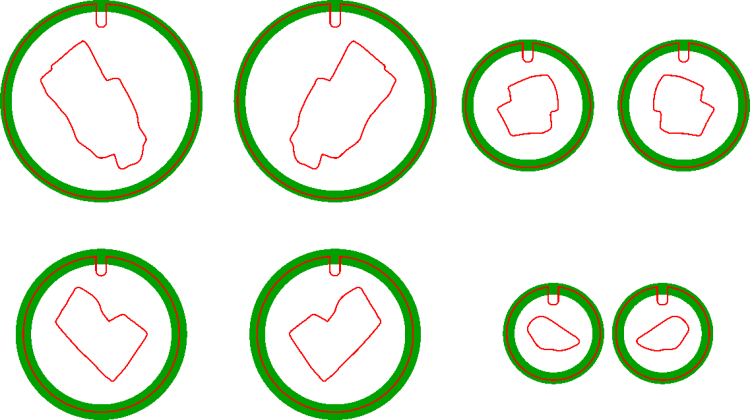
The engraved recess (green) is slightly larger than the OD to allow the perimeter cut to proceed through a thinner section:
Earring templates – 25 20 16 12 mm
Cross-hatch engraving puts a steep edge all around the recess, so the ring fits with just a little slack and turns freely around the disks.
You will, of course, have different glass fragments requiring different shapes, but the outlines came from the same process I used to make the palette organizing the fragments:
Smashed glass palette – fresh cut
You (well, I) can just import that layout, copy the outline of the chunk to be used, then delete the rest. Mirror the outline so the engraved sides of the disks fit together around the chunk, position symmetrically in the template halves, and fire the laser.
Affixing the fresh-cut disk and its glass chunk to a strip of Kapton tape (sticky side up) holds them in proper alignment and prevents the epoxy from leaking out the bottom:
Earrings – 12mm – taped
With everything lined up, run a small bead of epoxy around the chunk, squish the top disk in place, and line up the notches. When the epoxy cures, peel the earring off the tape and slide a jump ring into the notch.
As a finishing touch, you’d add a suitable ear hook or stud, but I think it’s fair to assume anything from Amazon would consist of the finest arsenic-plated plutonium and be completely unsuitable for skin contact. Neither of us have any piercings, so I cannot provide enticing action photos.
The 25 mm versions failed because I made the outlines such a snug fit around the chunks they didn’t quite fit:
Earrings – 25mm – failed
Protip: do not attempt to coerce two rigid bodies into alignment by applying firm pressure, particularly when one of them is already-broken glass.
The small earrings weigh 0.7 g each and a 25 mm one (well, the parts for a large one) comes in a bit over 3 g, plus whatever hardware goes in / on / around your ear.
This was (obviously) an exercise in small-scale laser machining, rather than a venture into haute couture. In the highly unlikely event you can’t live without a pair of custom-designed high-impact earrings, I’ll shut up and take your money … let me know if you want little or big. Black is the new black; I do have other colors, but who are you kidding?
Blow out the contrast, flip right-to-left, then mask them en masse:
Small fragments – masked
Delete the images (inside their selection masks) to create a binary mask:
Small fragments – masks
Have LightBurn trace the binary images, wrap a rounded rectangle around the lot of them, duplicate the rectangle as a base plate, then fire the laser:
Smashed glass palette – fresh cut
They’re not secured in their sockets, but they won’t fall out unless I fat-finger the whole affair:
Smashed glass palette – loaded
The thing that takes getting used to: the whole process was about two hours of wall clock time from start to finish, with a leisurely breakfast and KP in the middle.
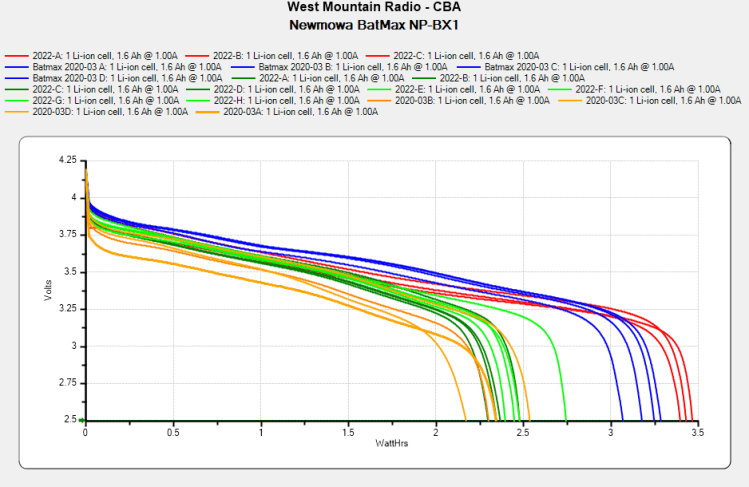
In round numbers, the total capacity declined from 3.25 W·hr to 2.5 W·hr, which means a single battery can’t quite power the camera for the duration of our normal hour-long rides. I do not know what voltage trips the camera’s decision, but the batteries definitely shut down sooner.
So, based on their previous track record, I bought another quartet of Batmax batteries. Being that type of guy, I tested both the old (2020) and new (2022) sets:
NP-BX1 – BatMax 2022 vs 2020 – used-new
The blue traces are the C/D batteries from the as-new tests back in early 2020, the green traces are C/D after two years of use, and the red traces are the “new” quartet after their first charge in the Official BatMax Charger.
It looks very much like BatMax is selling used batteries repackaged as new items, because they are indistinguishable from my used ones. They definitely are not the “Premium Grade A cells” touted in the description.
I returned them for a refund and sent the test results to BatMax; they sent “new replacements” even though I said I would not pay for any future shipments. The batteries had a slightly different wrapper, but the test results were still indistinguishable from used batteries. I offered to return the package and was told that would not be needed.
It seems three good batteries now cost about as much as four crap batteries, under the reasonable assumption chargers are essentially free.
Three batteries isn’t quite enough for my usual rotation and, for unknown reasons, one cannot buy only batteries, so in short order I will have two chargers and six batteries.
The consolidated test results:
NP-BX1 – Newmowa Batmax 2022 comparison
The color code:
Newmowa: red
BatMax 2020 new: blue
BatMax 2020 used: orange
BatMax 2022 new: green + lime
I stopped writing Amazon reviews after having a few detailed-writeups-with-graphs rejected for the usual unspecified reasons. As the Finn put it, “You wanna download, you know the access code already.”
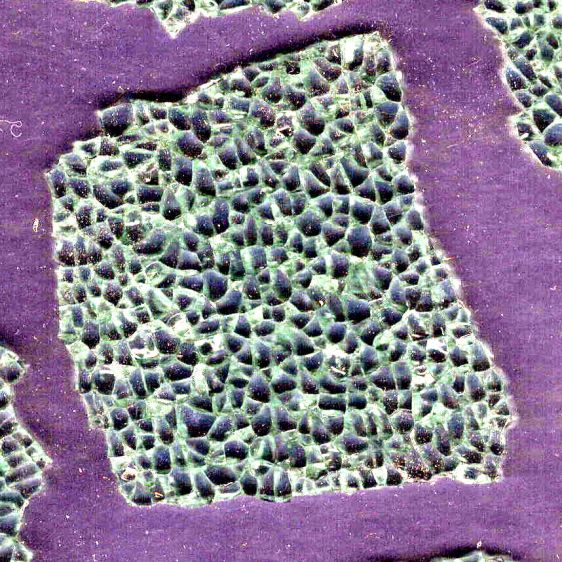
Lay some pieces atop an acetate sheet (to prevent scratching) on the scanner, grab the whole thing, then isolate an interesting chunk:
Smashed Glass – dark – piece 1
Next time: flip the image left-to-right to match the glass piece as seen from the top, because the scanner was looking at the bottom.
The weird purple background started as black, but blowing out the contrast while ignoring the color mis-correction makes the next step easier.
Trace around the perimeter with Scissors Select, clean up the result in Quick Mask mode, expand the selection by a few pixels to improve clearance, then turn it into a two-color image mask:
Smashed Glass – piece 1 – outline
Import the mask into Lightburn, trace it into vector paths (which is trivially easy and accurate given such a high-contrast image), then cut a chipboard prototype to make sure it fits:
Smashed Glass – piece 1 – acrylic mount
Clean up any misfits, test as needed, cut the inner shape and outer perimeter from 1.5 mm black acrylic, cut just the outer perimeter from 3 mm clear acrylic. Put the piece of black acrylic matching the glass shape into the scrap box.
Mix up a few milliliters of clear pourable epoxy, butter up the clear acrylic, lay the black acrylic on top, line up the edges, then gently place the shattered glass into the cutout:
Smashed Glass – piece 1 – acrylic top
Next time: apply gentle pressure, perhaps through a flexy sheet, to ensure the entire glass surface contacts the epoxy layer while squeezing out the bubbles. This will surely skate the glass across the acrylic, so don’t leave it unsupervised.
The relatively clear areas show where epoxy eased its way into the cracks between the granules; there is no correlation between the air bubbles and unfilled cracks. The epoxy had the viscosity of warm honey and I didn’t expect it to flow so easily, but it doesn’t affect the outcome.
Wait for a day, no matter how hard that may seem, for the epoxy to cure. Leave the small cup holding the remnants of the mixed epoxy nearby so you can test the cure without disturbing the Main Event.
The bottom looks pretty much like the top:
Smashed Glass – piece 1 – acrylic bottom
The shattered edge reflects off the bottom of the clear acrylic, as seen through the side:
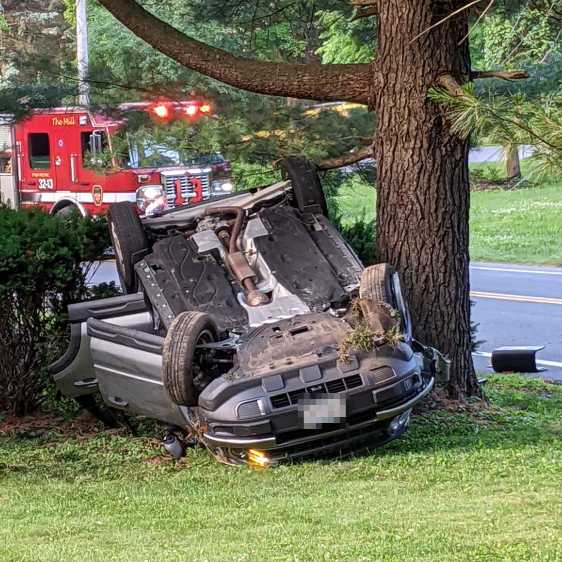
At first we thought a mighty crunch in the morning meant the trash collection truck had dropped a garbage bin from a great height, but the sound of sirens and a myriad flashing lights revealed the true cause in our neighbor’s front yard:
NHR Crash – frontal view
The extent of the damage was more apparent from the road side:
The driver was walking around uninjured and the ambulance left quietly.
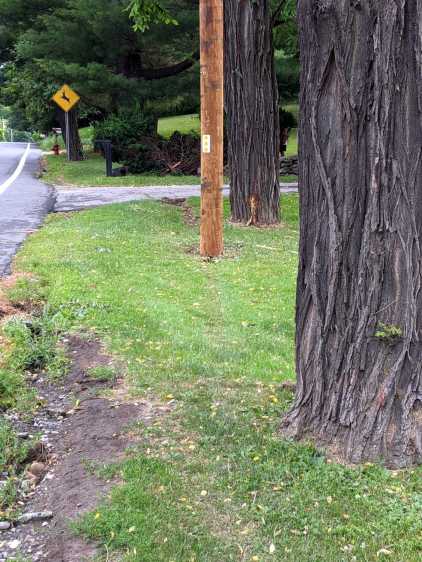
A day later, the trajectory became apparent:
NHR Crash – trajectory
The right side barely kissed the tree on the right, but the front wheel hooked the utility pole (that’s the new pole in the picture), snapped it off at ground level in addition to the usual break maybe ten feet up, and bounced a piece off the other tree:
NHR Crash – utility pole
I didn’t know you could shatter a cast aluminum alloy wheel, but the missing half of the outer face was lying amid the rather scrambled stone wall along driveway.
We’re reasonably sure we know the cause. Feel free to draw your own conclusions.
After the flatbed hauled away the car and everybody left, I harvested a few pounds of interesting debris from the lawn:
NHR Crash – tempered glass
It’s tempered glass from the driver-side windows, shattered into small chunks and barely hanging together in those sheets. Laminated windshield glass is entirely different stuff.
The smaller chunks glitter like jewels:
NHR Crash – tempered glass fragments
Obviously, the window had a bit of tint.
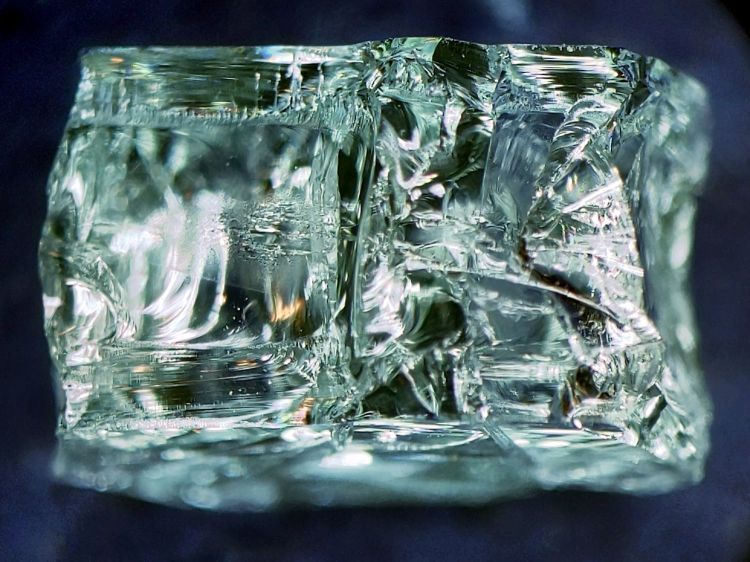
The smallest chunk, seen from its flat surface, shows the cuboid fragments:
NHR Crash – tempered glass fragment – front
A side view shows more complexity:
NHR Crash – tempered glass fragment – side
Tempering prevents a glass sheet from shattering into long knife-blade shards. Although the edges of the fragments are not keen, we are dealing with broken glass: they are sharp.
Broken tempered glass also sheds razor-edged flakes perfectly shaped to penetrate bike tires, although most roadside glass comes from ordinary beverage bottles. The tiniest flakes can make a mess of your eyes, so exercise at least some rudimentary shop safety practices.
Those slabs ought to be good for something, even if they fall apart at the slightest touch …
It seems two months of sunlight will fade laser charred MDF down to its original state:
Please Close The Gate – unpainted faded
That’s through a thick layer of indoor urethane sealant slathered over MDF without any surface prep. Obviously, not removing the char had no effect on the outcome. On the upside, the urethane did a great job of protecting the MDF from rainfall.
So. Back to the shop.
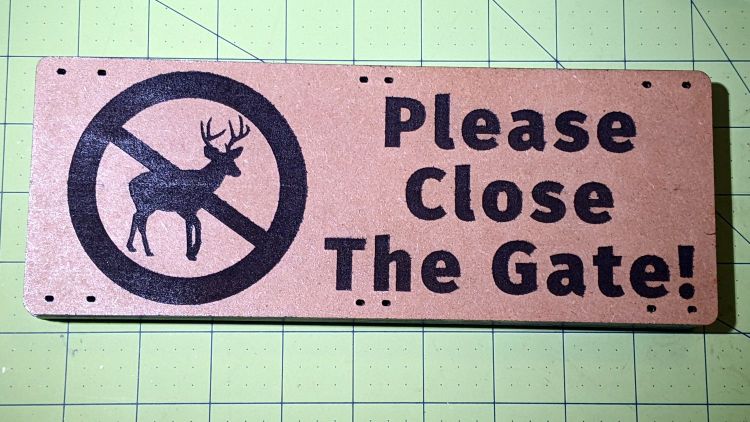
Lacking wider masking tape, two strips of tape laid along a cut-to-suit slab of fresh MDF will serve as a paint mask:
Please Close The Gate – masked engraving
Belatedly I Learned: cut the tape close to the edge, then fold it under so the autofocus pen can’t possibly snag it en passant.
Shoot the entire surface with a couple of black enamel rattlecan coats:
Please Close The Gate – masked paint
Yes, the engraved areas look reddish, most likely due to another complete lack of surface prep. Perhaps brushing / vacuuming / washing would remove some of the char, but let’s see how it behaves with no further attention.
Peel the tape, weed the letters / antlers, slather on a coat of urethane, and it looks downright bold:
Please Close The Gate – sealed
Of course, if those two tape strips don’t exactly abut, the paint produces a nasty line:
Please Close The Gate – mask gap
Should you overlap the strips a wee bit to ensure cleanliness, the engraved surface will then have a noticeable (in person, anyhow) discontinuity due to the laser losing energy in two tape layers, which wouldn’t matter in this application. We defined the few paint lines as Good Enough™ for the purpose; a strip of absurdly wide masking tape is now on hand in anticipation of future need.
Burnishing the tape might have prevented paint bleed around the engraved areas:
Please Close The Gate – paint creep
But, given that I was painting raw / unfinished MDF with an unsmooth surface, burnishing probably wouldn’t produce a significantly better outcome.
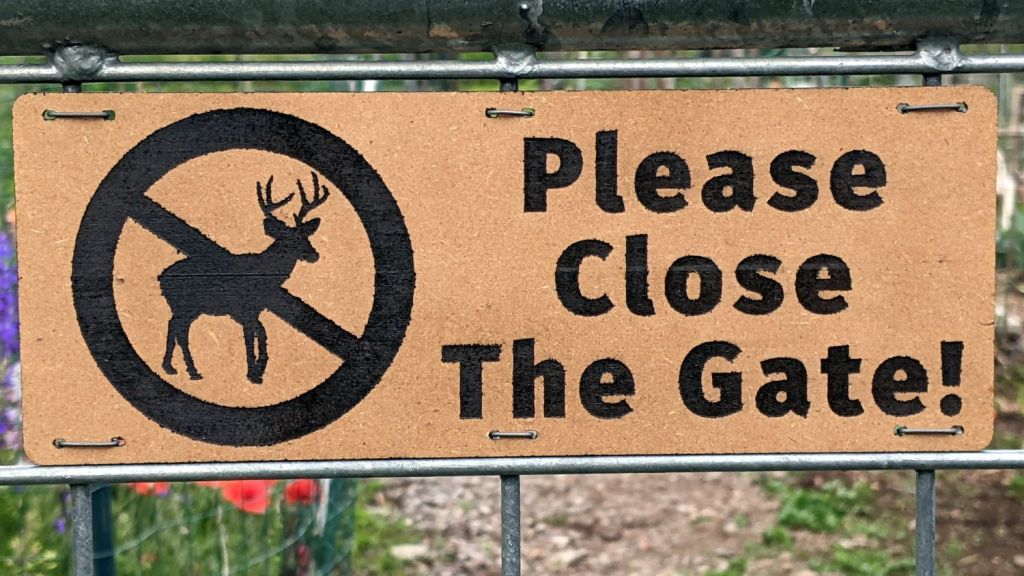
By popular request, the new signs sit a few grids lower on the gates:




















 The Smell of Molten Projects in the Morning
