The Smell of Molten Projects in the Morning

Ed Nisley's Blog: Shop notes, electronics, firmware, machinery, 3D printing, laser cuttery, and curiosities. Contents: 100% human thinking, 0% AI slop.

Author: Ed

  • Dogbone Pillow Pattern

    Dogbone Pillow Pattern

    Mary is putting together a dogbone headrest pillow for a friend who will be spending a lot of time in a chair. It’ll be similar to this one from a while ago:

    Dog Bone Pillow
    Dog Bone Pillow

    She used Bonnie Browning’s pattern and I offered to laser-cut it as practice for other projects I have in mind.

    It eventually worked out well enough:

    Dog Bone Pillow - cut pattern
    Dog Bone Pillow – cut pattern

    Fold a piece of fabric in half, align the pattern’s bottom edge with the fold, cut around the perimeter, make two more, and sew ’em together.

    My first mistake was attempting to assemble the two halves of the pattern from the PDF document into a bitmap image using The GIMP:

    D0G-BONE pattern - rejoined
    D0G-BONE pattern – rejoined

    That is both tedious and unnecessary, as I found out while trying to align the pieces.

    The end goal is a simple and symmetric vector path defining the outline, including a line across the bottom, suitable for laser cutting. Rather than assembling an image, tracing it into a bunch of vectors, then cleaning up the mess, just lay a smooth spline vector path around half of it and invoke symmetry, much as happened with the Lip Balm Holder.

    So import the slightly misaligned bitmap into LightBurn, draw a rectangle over just the left half, convert the rectangle to a path, then add a few nodes anchoring the splines to key points of the image:

    Dog Bone Pillow - LB half pattern first splines
    Dog Bone Pillow – LB half pattern first splines

    Although it’s not visible, the top and bottom spline nodes defining the vertical line down the middle are not quite vertically aligned, even though I dragged them to the middle of the pattern. Unsurprisingly, the bitmap image is not exactly aligned with the axes, even though the conversion from PDF to bitmap is entirely digital; the original design may be off by an itsy that would never matter for its intended application.

    Tweak the splines / control points, add a few more nodes, and in short order the vector path runs pretty nearly along the middle of the bitmap image:

    Dog Bone Pillow - LB half pattern overlay
    Dog Bone Pillow – LB half pattern overlay

    Rather than trying to draw the second half just like the first half, duplicate the path and mirror the copy left-to-right to get the right half of the pattern. Grab the lower-left corner of the copy and snap it to the lower-right corner of the original, whereupon you will find the two points at the top of those lines don’t quite line up.

    This is a grossly zoomed look at the top center, with the two red angles showing the two halves not quite meeting in the middle:

    Dog Bone Pillow - LB top center spline mismatch
    Dog Bone Pillow – LB top center spline mismatch

    Now the magic happens.

    In quick succession:

    • Select the right-side path
    • Invoke Arrange → Two-point Rotate / Scale
    • Zoom way in on the bottom center
    • Click on the center point to define the Rotate center
    • Zoom way in on the top center
    • Click-n-drag the right corner to snap it onto the left corner
    • Done!

    What just happened is that the right half now directly adjoins the left half, with the upper and lower center points overlapping.

    Invoke the node editor and delete the center lines from both halves, leaving just the (overlaid) top and bottom nodes. Select both paths, then invoke Edit → Auto-join selected shapes to merge the two halves into one:

    Dog Bone Pillow - LB splines
    Dog Bone Pillow – LB splines

    I missed the clip line in the middle of the top, but that’s why the first version is always a prototype.

    This was easy, but it’s good to stay in practice …

  • More Laser-Cut Shop Wipes

    More Laser-Cut Shop Wipes

    A filled box of worn-out clothing produced more shop wipes:

    Laser-cut Shop Wipes - assortment
    Laser-cut Shop Wipes – assortment

    The last few pieces were a bit finicky, but provided good on-the-fly practice with linear arrays:

    Shop Wipe - LightBurn setup
    Shop Wipe – LightBurn setup

    This trick never grows old:

    Laser-cut Shop Wipes - as-cut
    Laser-cut Shop Wipes – as-cut

    I washed those neat stacks (in their very own load!), which didn’t turn out well:

    Laser-cut Shop Wipes - washed
    Laser-cut Shop Wipes – washed

    They’ll get used no matter what they look like!

  • Ed’s Fireball Cocoa: Magnetic Stirring

    Ed’s Fireball Cocoa: Magnetic Stirring

    An addition to my morning cocoa makes it mmmm turn out better:

    Cocoa magnetic stirring - magnet
    Cocoa magnetic stirring – magnet

    Start with an ounce of milk, dump in the rest of the ingredients, spin up the stirrer, and slowly add the 8 oz of milk that just reached the end of its 70 seconds in the microwave:

    Cocoa magnetic stirring - vortex
    Cocoa magnetic stirring – vortex

    The green LED to the left of the speed knob runs from the PWM signal driving the motor, so it flickers visibly and interacts with the camera shutter.

    Let it whir for a few minutes until all the cocoa bombs vanish and it’s ready for another 33 seconds in the microwave.

    The most recent batch of cocoa arrived in an exceedingly vacuum-packed mylar bag, to the extent the bag resembled a brick and the solid cocoa within fractured into big chunks. Bashing the chunks with a fork got tedious enough to remind me of the stirrer I got to mix titanium dioxide for the yet-to-be-tried glass engraving.

    Back in the day, the teflon shell molded on the magnet had a rib around its middle to make it pivot neatly on a point contact. This one is flat and dislikes spinning on the slightly concave cup bottom.

    Protip: fish the stirrer out before sipping the cocoa, lest it become a tiny cow magnet.

  • Lip Balm Holder, Laser Cut Edition

    Lip Balm Holder, Laser Cut Edition

    Loading the bike batteries into the Rolltop Cupcake Box reminded me I hadn’t updated the Lip Balm Holder around the latest tube of sunscreen. My excuse was I didn’t quite know how to model the not-quite-elliptical shape of the Coppertone sunscreeen tube in OpenSCAD, but now I can bypass that whole problem:

    Lip Balm Holder - installed
    Lip Balm Holder – installed

    The trick is to scan the bottom of the cap to get a high-contrast image:

    Coppertone Sport Tube - lid scan
    Coppertone Sport Tube – lid scan

    Import the image into LightBurn, draw a circle tangent to the outside of the cap’s smaller diameter, turn the circle into a path, drag the nodes and twiddle the control points to create a symmetric shape just outside the cap, then outset the result by 1.5 mm for clearance around the tube:

    Coppertone Sport Tube - LB splines
    Coppertone Sport Tube – LB splines

    That 3 mm of wiggle room lets us drop the tube into its socket without careful alignment.

    The lip balm tubes all fit into 18 mm circles requiring no special design skillz:

    Lip Balm Holder - LB layout
    Lip Balm Holder – LB layout

    The mid-left oval goes around the Coppertone tube.

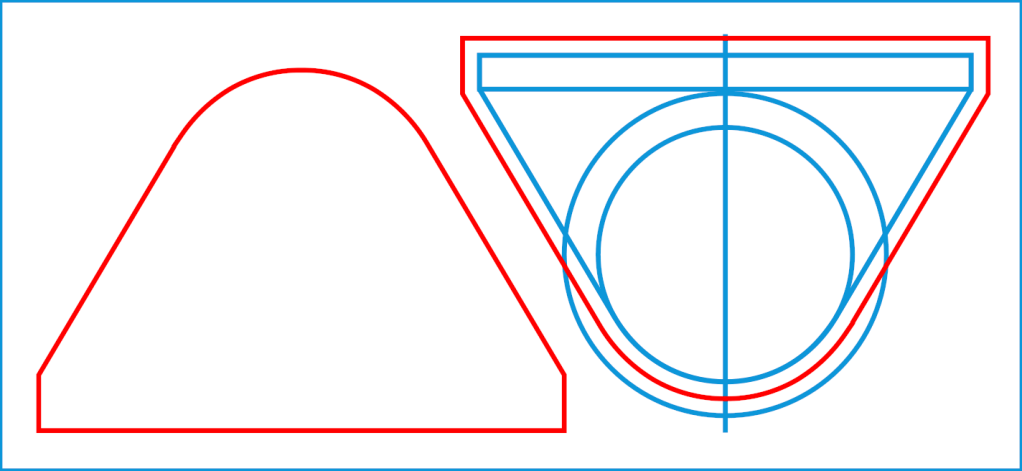
    The top-mid drawing shows the 3 mm outset around each of the pieces, with the smaller tubes arranged to put their midlines tangent to each other and the oval tube. LightBurn does not, as far as I can tell, have a direct way to align a shape tangent to two other shapes at the same time, but iterating at increasingly absurd zoom levels gets the job done fairly quickly.

    Welding those shapes together produces the top-right drawing, which serves as the template for the lower set of layers.

    Deleting the inner details produces the mid-right blob for the bottom layer.

    Most of the layers come from 3 mm plywood, with edge-lit acrylic on the top and bottom surfaces:

    Lip Balm Holder - side view
    Lip Balm Holder – side view

    Mary pronounced it better looking than the 3D printed version, which I agree clears a rather low bar, but it suffices for the job.

    The LightBurn layout as a GitHub Gist:

    Loading
    Sorry, something went wrong. Reload?
    Sorry, we cannot display this file.
    Sorry, this file is invalid so it cannot be displayed.

  • Toilet Valve Mystery

    Toilet Valve Mystery

    Last week Mary reported the toilet in the front bathroom had the sound of running water, which is unfortunately the sort of noise I can no longer hear. I replaced the flush (a.k.a. “flapper”) valve, because it’s always the flush valve, cleaned the valve seat, washed my hands vigorously, cauterized both stumps, and declared victory.

    This week she reported it was once again leaking.

    A bit of poking around showed the tank was now full to the top of the overflow pipe and the refill tube was piddling down the pipe: obviously, something was wrong with the fill valve, because the flush valve was sealed tight.

    Having been through this rodeo a few times, I fetched a replacement valve disk from the Box o’ Toilet Stuff, installed it, and was about to declare victory when I noticed the refill tube was still piddling.

    Pop the top off the fill valve and peer inside:

    Toilet Fill Valve - aligned
    Toilet Fill Valve – aligned

    Did you see it? I didn’t, either, when I replaced the valve disk.

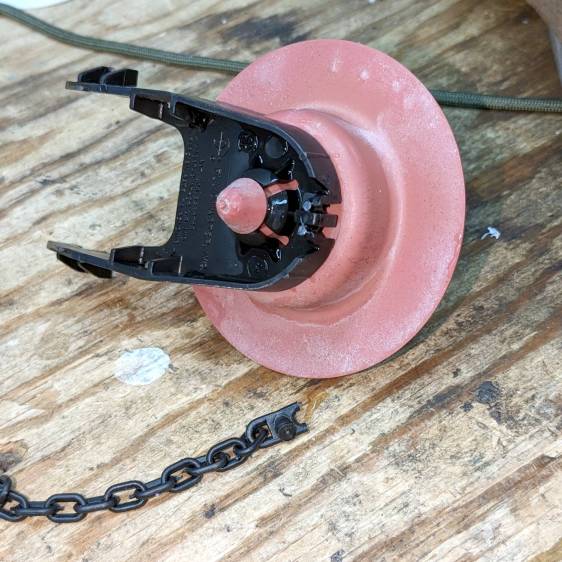
    More fiddling produced this view:

    Toilet Fill Valve - cracked
    Toilet Fill Valve – cracked

    The valve seat is attached to a plastic stem going down the length of the fill tube, but it’s free to rotate on both ends. I have no idea what applied enough torque or how it could break all those ribs, but there they were(n’t).

    Fetch a complete valve kit from the aforementioned Box, drain the tank, install All. The. Parts., verify that the valve now shuts off properly, declare victory, etc, etc.

    Whereupon I could switch caps and begin making the weekly pizza.

    Never a dull moment around here …

  • Christmas Cookies: Mystery Date Code

    Christmas Cookies: Mystery Date Code

    Spotted during a grocery trip:

    Christmas Cookies - date code
    Christmas Cookies – date code

    I’m sure they have a good reason for whatever date code format they chose, but 2012272 seems open to misinterpretation in the runup to Christmas 2022.

  • Laser Cutter vs. Mirrorshades: Rear

    Laser Cutter vs. Mirrorshades: Rear

    Continuing with the same battered sunglass lens:

    Laser vs sunglasses - beam front overview
    Laser vs sunglasses – beam front overview

    It’s now oriented with the back side of the lens toward the unfocused beam going into the laser head.

    The front surface remains undamaged after two pulses at 500 ms 50% power:

    Laser vs sunglasses - beam rear - front overview
    Laser vs sunglasses – beam rear – front overview

    The red disk in the middle of both wounds is new this time.

    As seen from the rear, the first pulse shattered the rear glass layer:

    Laser vs sunglasses - beam rear - A
    Laser vs sunglasses – beam rear – A

    The image is about 7 mm from side to side.

    A chip of glass popped out of the upper part of the fracture, but the other pieces remained in place.

    The distinct blue ring is 3 mm OD and marks the inner boundary of a purple disk surrounding the central burn. The disk appears only in reflected light (which is impossible to photograph with any setup I can manage), suggesting it comes from diffraction in a surprisingly uniform air layer blown between the glass and the plastic polarizing sheet.

    Also seen from the rear, the second pulse produced a neater wound:

    Laser vs sunglasses - beam rear - B
    Laser vs sunglasses – beam rear – B

    The blue ring is again 3 mm OD and the image is 7 mm across.

    The central red spot probably comes from damage to the polarizing sheet.

    The most surprising things, at least to me, didn’t happen:

    • the glass lens didn’t disintegrate
    • the laser beam didn’t punch completely through

    Protip: Don’t depend on ordinary glasses, even fancy sunglasses, to protect your eyes from CO₂ laser beams.