The CNC 3018-Pro doesn’t absolutely need home switches, but (in principle) they let you install a workholding fixture at a known position, home the axes, pick a preset coordinate system for the fixture, and not have to touch off the axes before making parts.
Having used Makerbot-style endstop switch PCBs for the MPCNC, this was straightforward:
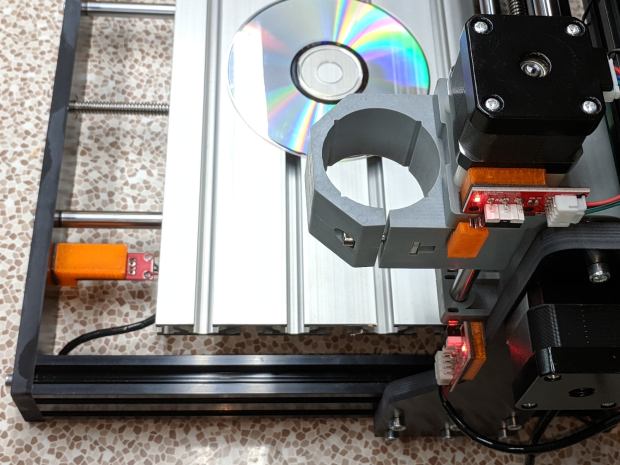
The X and Z axis switches simply press against the appropriate moving parts:

The little tab stuck on the tool clamp provides a bit of clearance around the upper part of the X axis assembly.
The Y axis switch needed a slightly tapered tab to extend the bearing holder:

It’s made from a random scrap of clear plastic, hand-filed to suit, and stuck on the bearing to trigger the switch in exactly the right spot.
You can find elaborate switch mounts on Thingiverse, but I’ve become a big fan of genuine 3M outdoor-rated foam tape for this sort of thing: aggressive stickiness, no deterioration, possible-but-not-easy removal.
The switches need +5 V power, so add a small hack to the CAMTool V3.3 control board to let the connectors plug right in:

The solid models borrow their central depression around the switch terminals from the MPCNC blocks:

The OpenSCAD source code as a GitHub Gist:
| // 3018-Pro Mount for Makerbot Endstop PCB | |
| // Ed Nisley KE4ZNU – 2019-07 | |
| /* [Build Options] */ | |
| Layout = "Show"; // [Build, Show] | |
| /* [Hidden] */ | |
| ThreadThick = 0.25; // [0.20, 0.25] | |
| ThreadWidth = 0.40; // [0.40] | |
| function IntegerMultiple(Size,Unit) = Unit * ceil(Size / Unit); | |
| Protrusion = 0.01; // [0.01, 0.1] | |
| HoleWindage = 0.2; | |
| ID = 0; | |
| OD = 1; | |
| LENGTH = 2; | |
| //- Shapes | |
| // Basic PCB with hole for switch pins | |
| // origin at switch actuator corner, as seen looking at component side | |
| SwitchClear = [15.0,5.0,2.0]; // clearance around switch pins | |
| SwitchOffset = [12.5,9.0,0.0]; // center of switch pins from actuator corner | |
| PCB = [26.0,16.4,2*SwitchClear.z]; // switch PCB beyond connector, pin height | |
| XBlock = [PCB.x,PCB.y,5.0]; | |
| module XMount() { | |
| difference() { | |
| cube(XBlock,center=false); | |
| translate(SwitchOffset + [0,0,XBlock.z – SwitchClear.z/2]) | |
| cube(SwitchClear + [0,0,Protrusion],center=true); | |
| } | |
| } | |
| YBlock = [PCB.x + 10.0,PCB.y,20.0]; | |
| module YMount() { | |
| difference() { | |
| translate([-10.0,0,0]) | |
| cube(YBlock,center=false); | |
| translate([0,-Protrusion,10.0]) | |
| cube(YBlock + [0,2*Protrusion,0],center=false); | |
| translate(SwitchOffset + [0,0,10.0 – SwitchClear.z/2]) | |
| cube(SwitchClear + [0,0,Protrusion],center=true); | |
| } | |
| } | |
| ZBlock = [PCB.x,PCB.y,6.0]; | |
| ZPin = [20.0,10.0,5.5]; | |
| module ZMount() { | |
| difference() { | |
| cube(ZBlock,center=false); | |
| translate(SwitchOffset + [0,0,ZBlock.z – SwitchClear.z/2]) | |
| cube(SwitchClear + [0,0,Protrusion],center=true); | |
| } | |
| translate([0,-ZBlock.y,0]) | |
| difference() { | |
| cube(ZPin,center=false); | |
| translate([ZPin.x/2,-Protrusion,4.0]) | |
| cube(ZPin + [0,2*Protrusion,0],center=false); | |
| } | |
| } | |
| //- Build things | |
| if (Layout == "Show") { | |
| translate([0,YBlock.y,0]) | |
| XMount(); | |
| translate([0,-YBlock.y/2]) | |
| YMount(); | |
| translate([0,-(ZBlock.y + YBlock.y)]) | |
| ZMount(); | |
| } |
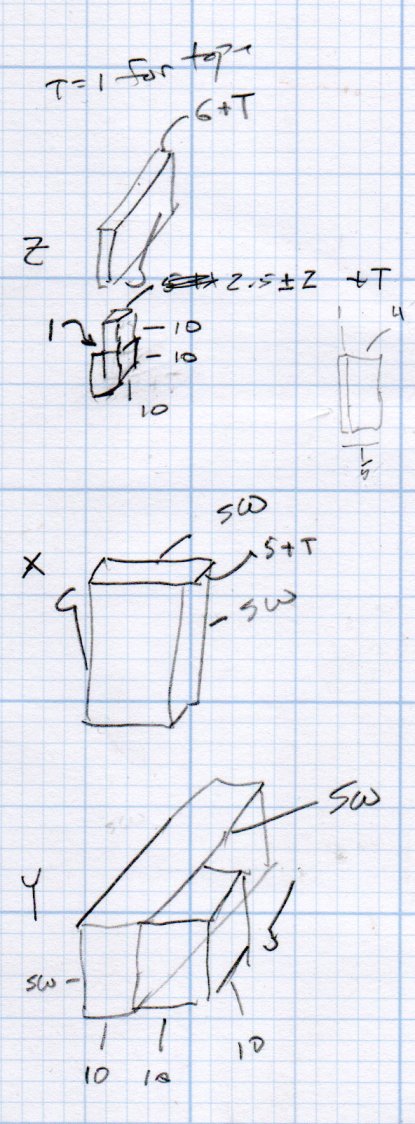
The dimension doodles:
 The Smell of Molten Projects in the Morning
Comments
3 responses to “CNC 3018-Pro: Home Switches”
[…] the Camtool V3.3 board and ran well enough, although it accelerated very slowly. After installing Home switches, figuring out the travel limits, and trying different speeds & accelerations, it runs much […]
[…] platform solves the repeatability problem by putting the CD at a fixed location relative to the machine’s Home coordinates. The next step puts the XY=0 coordinate origin at the exact center of the platter, so the pattern […]
[…] are absolute machine coordinates, with Y and Z pulled off home by 1 mm. I set one of bCNC’s buttons to emit G28 and park the tool carrier over there, out of the […]