I finally broke down and bought a Kindle Fire last week, with the intent of having my accumulation of datasheets and manuals where I need them when I need them, and it works reasonably well. One ergonomic blunder: the power button stands just slightly proud of the edge:

That’s exactly where my little finger rests when I’m supporting the slab in my left hand. Past experience has also shown that any opening will admit dust that eventually accumulates behind the screen, so a small protector seemed in order:

Printed with zero added shells and 1.0 infill produced a solid block of plastic that required very little cleanup:
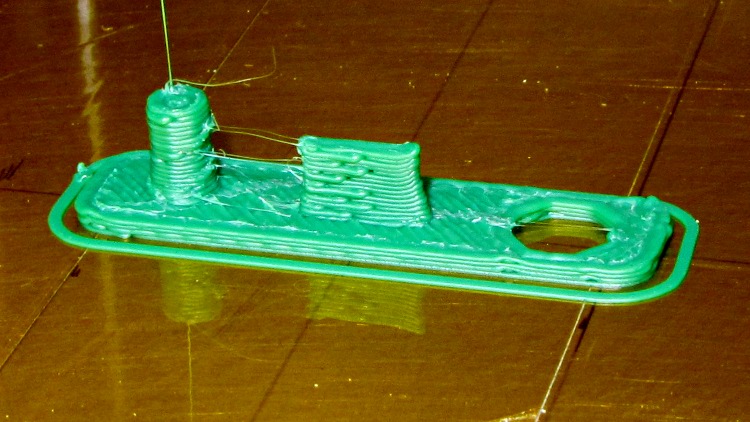
The zittage serves to improve the fit: the protector should require a bit of fingernail persuasion to remove.
It took two tries to get the Micro-B USB connector slab offset from the centerline just right, but eventually everything lined up correctly:
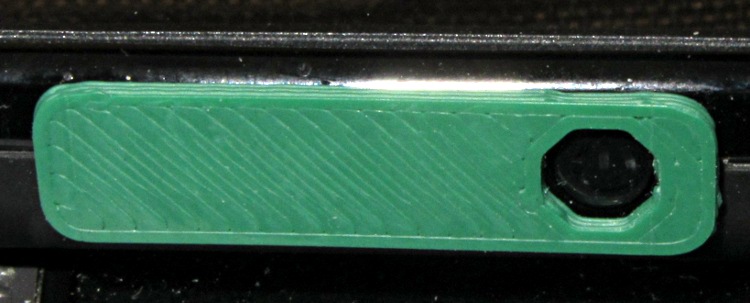
My pudgy finger squeezes into that opening just enough to turn the thing on and off, but pressing on the green plastic bar has no effect. There’s not enough plastic to allow chamfering the edge in the solid model, but a bit of riffler file action worked wonders on those sharp edges.
The OpenSCAD source code:
// Kindle Fire Power Button Protector
// Ed Nisley KE4ZNU April 2012

include </home/ed/Thing-O-Matic/lib/MCAD/boxes.scad>

//- Extrusion parameters must match reality!
//  Print with +0 shells and 3 solid layers

ThreadThick = 0.25;
ThreadWidth = 2.0 * ThreadThick;

HoleWindage = 0.2;

function IntegerMultiple(Size,Unit) = Unit * ceil(Size / Unit);

Protrusion = 0.1;			// make holes end cleanly

//----------------------
//- Dimensions

PlugDia = 3.5;					// audio jack
PlugLength = 5.0;
PlugOffset = -10;

USBThick = 1.0;					// Micro-B USB jack
USBWidth = 6.8;
USBLength = 4.0;
USBOffset = -0.25;

ButtonDia = 5.2;				// power button
ButtonOffset = 10.0;

PlateWidth = 7.5;
PlateLength = 30.0;
PlateThick = 1.0;
PlateRadius = 2.0;

//----------------------
// Useful routines

module PolyCyl(Dia,Height,ForceSides=0) {			// based on nophead's polyholes

  Sides = (ForceSides != 0) ? ForceSides : (ceil(Dia) + 2);

  FixDia = Dia / cos(180/Sides);

  cylinder(r=(FixDia + HoleWindage)/2,
           h=Height,
	   $fn=Sides);
}

module ShowPegGrid(Space = 10.0,Size = 1.0) {

  Range = floor(50 / Space);

	for (x=[-Range:Range])
	  for (y=[-Range:Range])
		translate([x*Space,y*Space,Size/2])
		  %cube(Size,center=true);

}

//-------------------
// Component parts

//-------------------
// Build things...

ShowPegGrid();

union() {
  translate([PlugOffset,0,0])
	cylinder(r=PlugDia/2,h=(PlugLength + PlateThick),$fn=8);
  translate([0,USBOffset,(PlateThick + USBLength)/2])
	cube([USBWidth,USBThick,(PlateThick + USBLength)],center=true);
  difference() {
	translate([0,0,PlateThick/2])
	  roundedBox([PlateLength,PlateWidth,PlateThick],PlateRadius,true,$fn=4*4);
	translate([ButtonOffset,0,-Protrusion])
	  rotate(360/(2*8))
		PolyCyl(ButtonDia,(PlateThick + 2*Protrusion));
  }
}
I loves me my 3D printer…
 The Smell of Molten Projects in the Morning
Comments
4 responses to “Kindle Fire Power Button Protector”
[…] Kindle Fire is a typically featureless black slab with one button, two small speakers, and no fasteners. After a few days in my pocket, the upper-left corner began […]
[…] necessary, though, so here’s a short list of what I’ve added so far (in addition to the button protector and speaker seals, that is), with all the links collected for […]
wonderful. You could design one for the ipod, too, and make a fortune.
where can I buy this?
Truth be known, I’ve given up using this widget, as it got annoying whenever I wanted to charge the Kindle (every night!) or plug in the USB cable.
The simplest workaround: rotating the whole tablet so the button points away from me, then locking that orientation. Although the Kindle occasionally turns on in my pocket, I generally notice the screen glowing and poke the button again.
If you know someone with a 3D printer, perhaps they can use the source… [grin]