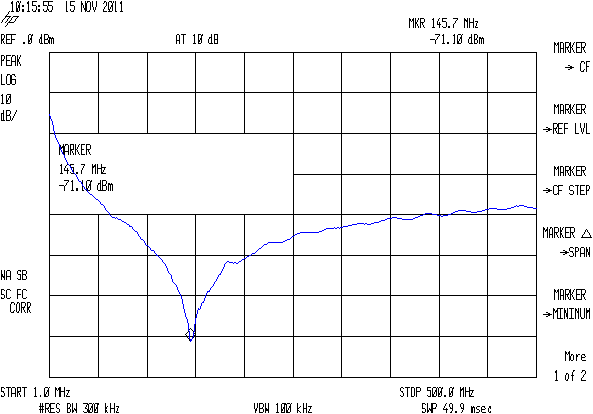
The script I use to fetch screen dumps from my HP8591 spectrum analyzer works fine, but it turns out that the screen images have (at least) two sizes.
The hp2xx program converts the screen dumps from HP-GL text files to PNG bitmaps:
for f in *hgl ; do hp2xx -m png -c 1436 "$f" ; done
The usual size is 593x414 pixels:
The other size is 593x395 pixels:
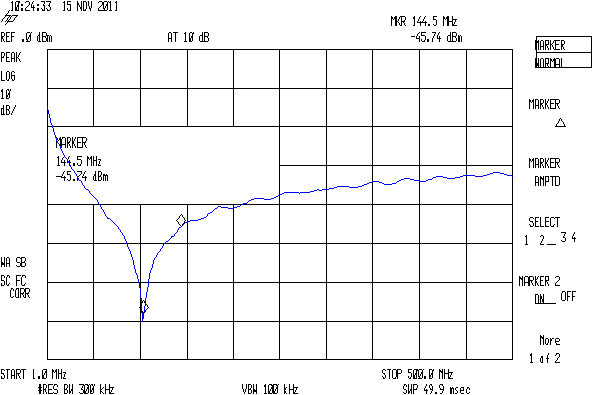
As nearly as I can tell, the spectrum analyzer mashes the Y coordinate when any of the soft keys along the right edge have reverse-video highlights, which print as outlined boxes. There may be other sizes; those are the two I’ve stumbled over so far. This doesn’t much matter unless I’m using the images in a column, in which case it’s awkward to have two sizes: a one-size-fits-all script to trim off the soft keys doesn’t produce the proper results.
Musing on how to figure this programmatically…
The file command gives the pixel dimensions, with the file name (which may contain blanks: so sue me) set off with a colon:
file "SMD 470 pF - Surplus.png"
SMD 470 pF - Surplus.png: PNG image, 593 x 395, 8-bit colormap, non-interlaced
Judicious application of cut extracts the relevant numbers, albeit with a trailing comma that requires another pass through the grinder:
file "SMD 470 pF - Surplus.png" | cut -d\: -f2 | cut -d\  -f4,6
593 395,
Although I think a sed script might be better, that requires more skull sweat than I have available right now.
Given that, then an appropriate mogrify would crop off the softkey labels; the first one is what’s in the script right now:
mogrify -crop "540x414+0+0" SMD\ 470\ pF\ -\ Comm\ Spec.png
mogrify -crop "515x395+0+0" SMD\ 470\ pF\ -\ Surplus.png
Which looks like this:
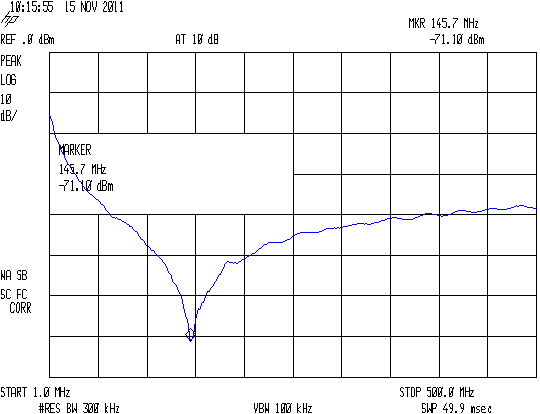
The two sizes come out pretty close to the same 1.3 aspect ratio, but resizing the smaller one to match the larger doesn’t work well:
convert -resize '540x414+0+0!' SMD\ 470\ pF\ -\ Surplus.png SMD\ 470\ pF\ -\ Surplus\ resized.png
You need single quotes around the geometry parameter to prevent Bash (or Dash or whatever) from gnawing on the bang character (yes, that’s how you pronounce “!”).
The images are lossless PNGs because they consist entirely of single-pixel lines and characters; alas, resizing by non-integer factors close to 1.0 introduces nasty picket-fence aliasing artifacts:

I resize the pix by a nice, even factor of two (which also adds aliasing artifacts, but in small and very regular doses) and set the dots/inch value so the images print at about the right size without further hassle along the production pipeline:
mogrify -density 300 -resize 200% whatever.png
Which looks like this:

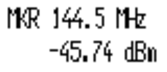
Resizing from the smaller images to (roughly) the final size in one step doesn’t look quite so awful:
convert -density 300 -resize 209% "SMD 470 pF - Surplus.png" "SMD 470 pF - Surplus large.png"
Like this, still with a distinctly garbled dBm:
But it’s decidedly better than this result from a two-step enlargement, although not as wonderful as one might like:

So the script needs a tweak for the file sizes, but …
Memo to Self: It’d be simpler to not have highlighted softkeys when doing screen dumps!
 The Smell of Molten Projects in the Morning
Comments
7 responses to “HP8591 Spectrum Analyzer Screen Dump Sizes”
Over the summer a client asked me to resurrect a 20 year old medical billing program that would crash hard if you tried to print with it. It turned out that the program was writing HPGL jobs straight to the parallel port and was choking when it couldn’t find a suitable printer. Outside of eBay,you aren’t going to find such a device. Flexing my very limited Windows abilities, I was able to pipe the job to hp2xx.
As I understand it, HPGL is a vector graphics language designed for pen plotters. Why anyone would try to write medical bills (essentially all text) in plotter language is left as an exercise for the reader. In any case, I dumped the file to a temporary postscript file and then, finally to the printer. Have you tried converting the files to postscript instead of png? They might scale better.
All we’ll ever know is that it made perfect sense at the time…
That’s what I’m doing with screen shots from the HP54602 oscilloscope: making a bank shot off EPS produced better-looking images in the final PNG that I need for publication.
And, yes, that made perfect sense at the time… [grin]
At the time, plotter language was ubiquitous: everyone made everything able to print to plotters, so even when we’d changed over from dedicated test equipment designed to print to plotters and from plotters over to printers, they still used HPGL. In this case, plotting might have been a better choice because a lot of the printers were thermal, and thermal paper prints have about a 10 year lifetime, if that. (I recently had to digitize a lot of old thermal printouts from the 1975-1985 timeframe; they were basically two different shades of dark brown.)
I thought that may have been the case. In the early 2000’s I actually got work with one of these HP pen plotters in undergraduate chem lab. (It was old even then.)
Sort of like saving receipts from a big-box retailer in case you must use the warranty: a year later, the printing fades to light gray on white and won’t serve as proof of anything!
HPGL isn’t awfully hard to parse. You can write something that scans the file for any instance of a string “PA[x]” with x>396 and that’d tell you that you have one of the 414 pixel shots, I believe. I had to make an HPGL parser one time to track down a buffer overflow problem in getting screenshots from the scope.
A quick look says the first PA in the file identifies the max Y coordinate, but … ugh!
Maybe I can force the image height or aspect ratio to make the PNG come out right, without having to peek inside the file, then just crop off everything that sticks out? I vaguely recall trying to do something like that, but maybe I was working with the PNG image; there’s a vast array of easy-to-do tweaking that produces terrible results.