The Smell of Molten Projects in the Morning

Ed Nisley's Blog: Shop notes, electronics, firmware, machinery, 3D printing, laser cuttery, and curiosities. Contents: 100% human thinking, 0% AI slop.

Tag: Thing-O-Matic

Using and tweaking a Makerbot Thing-O-Matic 3D printer

  • Cartridge Heaters: Mounting Blocks

    Drilling SHCS head clearance
    Drilling SHCS head clearance

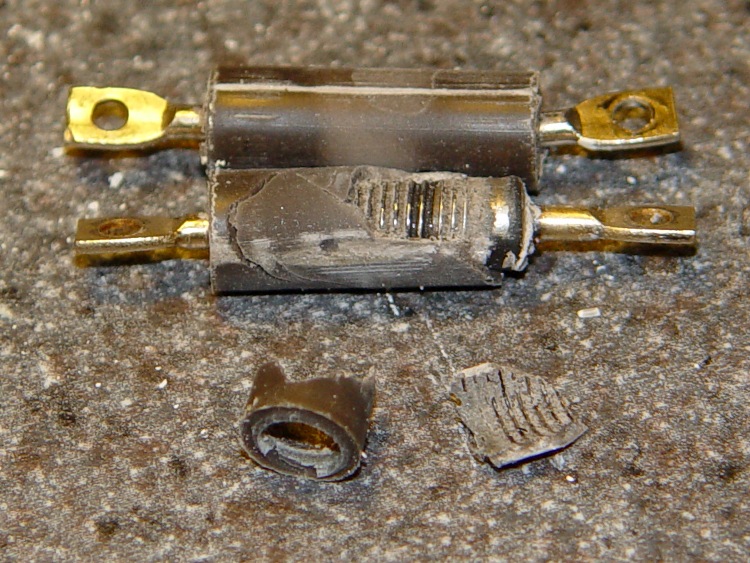
    MBI sent me a selection of 1/4-inch cartridge heaters to evaluate, seeing as how I’ve been such a pest on the subject of those poor aluminum-case power resistor heaters. Thanks, Zach!

    I initially thought I could punch the cores out of the resistors and slip the cartridge heaters into the holes, but it turns out the resistor bodies aren’t quite the right size: slightly too short with slightly too large holes. So it goes. Some earlier thoughts live there.

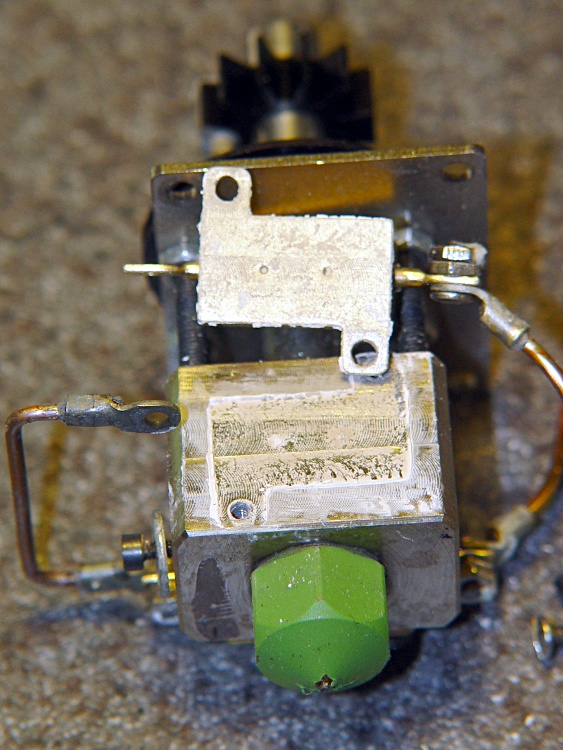
    This is a first pass at building mounting blocks to attach cartridge heaters to a stock MK5 Thermal Core. Ideally, you want a solid Thermal Core with a hole or two for the heaters next to the filament extrusion nozzle, but that requires fancier machining that I’m ready for right now. The fabled nophead shows how that looks for a ceramic power resistor.

    The obvious question is whether you want a single high-wattage cartridge heater or a pair of low(er)-wattage units. I think a core-with-hole can get away with a single heater, which is also the lower-cost option. My thermal measurements suggest the Core is pretty much isothermal, so there’s no problem with distributing the heat evenly from one side to the other.

    However, adding two lower-wattage heaters to a stock MK5 Thermal Core makes more sense, because the interface between the blocks and the Core seems to run a bit under 1 °C/W. A single 40 W heater would thus run 30-40 °C higher than the Core: call it 260 °C. IMO, that’s much too high for something an inch away from a plywood frame and an acrylic support structure.

    A pair of 25 W heaters would run at 245 °C-ish. That’s still pretty hot, but every little bit helps. I’ll start with that arrangement and see how it works.

    Block top and bottom
    Block top and bottom

    The blocks are ordinary steel from the Scrap Box: a convenient length of 1×1-inch bar stock that somebody else had made into something else a long time ago. I bandsawed off four 1×1-inch slabs, each about 5/8″ thick. A second bandsaw cut turned the square slabs into rectangles. I finished two blocks; the other two slabs await more experience with how these work.

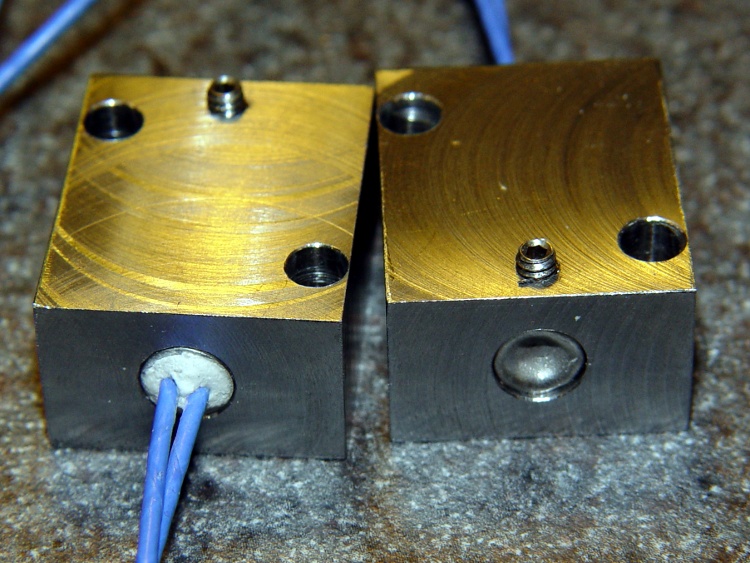
    I squared up the blocks with a flycutter in the Sherline, then sanded down the bottom surface a bit. The thermal tests suggest the contact is Good Enough with a reasonably flat surface, so I settled for a used-car finish: high shine and deep scratches. They’re actually smoother than the pictures would have you believe.

    The Thermal Core has hard inch dimensions (minus cleanup cuts): 1 inch front-to-back and 13/16 inch tall. I generally work in metric, so the sketch at the bottom has everything in millimeters.

    The mounting blocks have holes matching the resistor footprint. I drilled clearance holes for the heads of the original M2 socket head cap screws, ran an end mill down the hole to flatten the bottom, then drilled clearance holes for the threads. Those holes are perilously close to the edge, but the blocks really don’t want to be any taller. Perhaps use a less-generous clearance?

    The alternative would be to mill a flange along the edge to match the resistor mounts and put the SHCS heads in free air, but that seemed like more work and it would cramp the thermal path from cartridge to block.

    I also thought about chamfering the edges to make the blocks look less, well, blocky, but that’s in the nature of fine tuning.

    The cartridge heaters slip-fit into a nominal 0.250 hole; the samples are 0.247 to 0.248 and (from what I read) the diameter tolerance stays on the minus side of 0.250. I don’t have a 0.250 reamer, which is how you get a precise hole ID, so I’ll go with drilled holes. Fortunately, I have a set of letter-size drills in nearly new condition:

    • A drill = 0.234 to poke a hole in the block
    • E drill = 0.250 to get the final diameter

    The final holes worked out to be exactly 0.250 inch, to the limits of my measurement ability, which I will declare to be Good Enough. The cartridges have a loose slip fit with no side-to-side play.

    The cartridges expand when heated and squeeze against the hole to make good thermal contact. While cool, however, they can slide out without much urging, so I added a 4-40 setscrew. It’s on the butt end of the cartridge heater shell, away from the leads, so if a cartridge becomes one with the block I can drive it out with a pin punch. Putting the setscrew at the end with the wire leads makes more sense (it’s cooler there), but then you’d be beating the entire length of the cartridge out past the setscrew hole.

    The setscrew and the M2 SHCSs get a liberal dose of anti-seize grease before assembly.

    Here’s what the holders looked like, just before bolting them in place:

    Cartridge heaters in blocks
    Cartridge heaters in blocks

    Doodles with the more-or-less as-built dimensions:

    Heater block dimensions
    Heater block dimensions
  • Thing-O-Matic: MK5 Plastruder Feet

    The MBI assembly instructions blithely direct you to:

    Using superglue, or ideally acrylic cement, you’ll want to attach the spacer feet to the bottom of the supports.

    As it turns out, though, the tabs on the Support sides stand just a bit proud of the Bottom plates, so that any attempt to glue the Feet in place will simply attach them to the side tabs and nothing else. Not what you want…

    So I rubbed the Bottom plates on a sheet of coarse sandpaper until everything was nice and flat:

    Flattened Plastruder Support bottom plates
    Flattened Plastruder Support bottom plates

    Then the spacer feet glued neatly in place:

    Gluing Plastruder feet
    Gluing Plastruder feet

    I tried to keep the acrylic cement off the tabs, so it’s theoretically possible to dismantle the whole thing, but I suspect that’ll never happen.

  • Miniature Ball Bearing Sizes

    Having had to look up ball bearing sizes far too often, here’s the table…

    Bearing ID OD Thick
    603 3 9 5
    623 3 10 4
    633 3 13 5
    683 3 7 3
    693 3 8 4
    605 5 14 5
    625 5 16 5
    635 5 19 6
    606 6 17 6
    626 6 19 6
    608 8 22 7
    629 9 26 8

    The first digit is something like the bearing type; I think 6xx = miniature bearings.

    The second digit has something to do with the overall size, but is a code rather than an actual dimension.

    The last digit is, hal-lay-loo-ya, the actual bore diameter.

    [Update: Shows what I know; an excellent explanation of the numbers lives there. The short summary:

    • First digit: bearing type, 6 = single row deep groove
    • Second digit: series, 0 = extra light, 2 = light, 3 = medium duty, 8 & 9 = thinner
    • If three digits, third digit = ID in mm
    • If four digits, last two = ID/5, except 00-03 = 10/12/15/17

    Moral: always verify everything you read on the InterTubes!]

    Of course, a randomly chosen eBay listing will list the bearing size as:

    • ID x thickness x OD
    • OD x thickness x ID
    • ID x OD x thickness
    • and be wrong in at least one dimension

    Of most interest to Thing-O-Matic hackers: a 635 bearing ought to fit a NEMA 17 stepper shaft (pay attention if you’re buying surplus: not all are 5 mm) and slip into the same hole as a 626 bearing.

    Alas, there seems to be no 5 mm ID bearing equivalent to the 606 bearing in the MK5 extruder head, but a 0.5 mm = 20 mil shim around the outside would adapt a 625 to that hole. Might take some careful forming, though.

    Buy ’em in bulk and save…

  • Thing-O-Matic: Ouch!

    This should be obvious, but don’t reach across the build platform of your Thing-O-Matic with the extruder at 215 °C: you might bump the nozzle with the back of your hand.

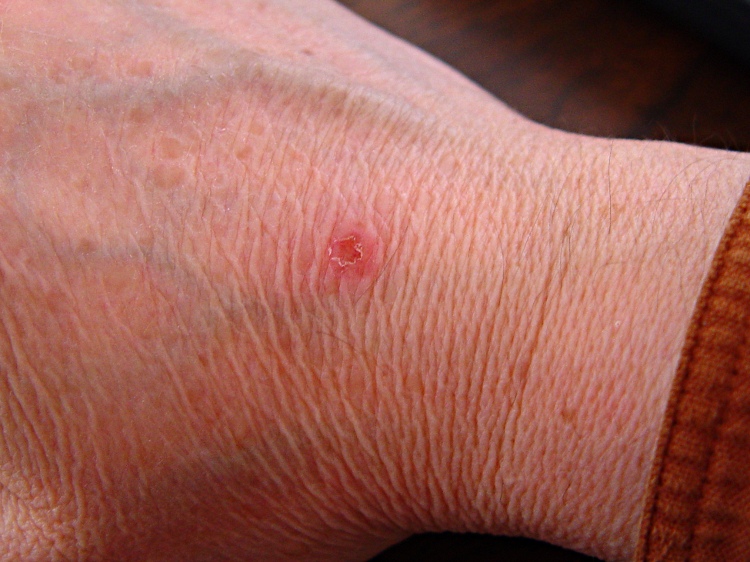
    Scorch mark from TOM nozzle
    Scorch mark from TOM nozzle

    It never really hurt, but the nozzle tip made a nasty punch mark in the middle of a disk of scorched skin.

    Ah, you’re not that stupid, are you…

    Memo to Self: Gloves?

  • Thing-O-Matic: Measuring Extruder Height

    Here’s how you measure the height of the extruder head over the build platform to calibrate the Z-axis travel: a taper gauge.

    Home the Z stage, zero the readout, move the stage downward by known increments until it’s less than 4 mm above the platform, then slide a taper gauge under the nozzle until it touches. Read off the actual nozzle height above the platform, add that to the distance you moved the nozzle from its home position, and you have the total Z axis travel.

    For example, right now my TOM Z axis travel is 115.3 mm. Plug that into the homing routine in start.gcode and you’ve got perfect nozzle height control.

    Here’s a Starrett No. 270 taper gauge showing the nozzle 1.65 mm above the platform. One might quibble with the last digit, given the bit of snot hanging from the nozzle, but it’s pretty close.

    Taper gauge below nozzle
    Taper gauge below nozzle

    Nice things:

    • You won’t accidentally ram the nozzle into the platform
    • The gauge flattens out small belt waves
    • You don’t squint at tiny vertical differences

    Bad things:

    • Assumes a flat platform, which really should be true anyway
    • Seriously spendy (see below)

    The gauge has inch divisions (0.001 in) on one side and metric (0.05 mm) on the other. I’ve put plenty of hours on the metric side in recent weeks.

    Starrett 270 Taper Gauge - inch side
    Starrett 270 Taper Gauge – inch side

    Fortunately, I’ve had that gauge in my tool cabinet forever; I’d be reluctant to cough up the C-note required to buy one these days. That Enco page gives some other choices, none of them, alas, inexpensive. If the link has rotted out, search for Starret No 270 taper gauge and you’ll get close.

    I think you could construct something similar by gluing or soldering layers of brass shim stock: 8-mil (call it 0.2 mm) shim stock would probably stack up in 0.25 mm increments under sufficient pressure. You could measure the resulting steps to get pretty good accuracy, even if they’re not regularly spaced. Perhaps a gauge that measured 1.00 to 3.00 mm in steps of 0.25 mm, stacking eight thin layers atop a sturdy 40-mil / 1 mm base strip?

  • Thing-O-Matic: Vent Fan and Charcoal Filter

    Fan filter and 5 V dummy load
    Fan filter and 5 V dummy load

    Hot ABS plastic gives off a characteristic stink odor smell aroma that’s hard on the nose and probably not particularly good for the lungs. Even in the basement, it seems like a Bad Idea to stink up the place, so I added an exhaust fan and charcoal filter to blot up the odor.

    The key step is to add the fan provided with the TOM (which they recommend you don’t use!): outside the box, oriented backwards, and running on +5 V instead of +12 V. The general concept: free up some precious space inside the box, shove the exhaust through a filter, and do it with a gentle breeze rather than a mighty blast.

    Although it’s not a part of this sub-project, the heatsink holds a 2 Ω 25 W resistor that serves as a 12.5 W dummy / minimum load on the +5 V supply to keep it within tolerance. Right now, the heatsink is just jammed between the screws, because I’m probably going to add a similar dummy load to the +12 V supply when I move to a stepper extruder.

    In case you’re hypersensitive to overheated resistors: the heatsink runs at 65 °C, the resistor at 75 °C, and the specs give a permissible dissipation of 20 W. You could work it out…

    Ersatz ATX connector
    Ersatz ATX connector

    The first step is to route the 4-pin ATX power connector (which popped off the big connector block plugged into the Motherboard) out the left-rear hole in the acrylic floor under the XY stage. I don’t have a mating connector, so I conjured up something from the same square pins as I used in the Extruder power supply modification and some wire harvested from a dead ATX supply. The black heatshrink tubing holds the four wires and their pins in the proper configuration. Obviously, you want matching colored wires, because the “connector” isn’t polarized!

    On the other end, a four-pin screw terminal block provides a convenient way to attach a variety of gadgetry. At last count, it serves the exhaust fan, +5 V dummy load, LED platform light, and a cooling fan. More details on those later…

    Terminal Block
    Terminal Block

    The fan frame required a small gouge to route the wire inward through the vent hole in the side of the TOM case:

    Fan frame modification
    Fan frame modification

    Four nuts secure the fan to the frame. Fortunately, the fan’s motor housing sits on the exhaust end, so the filter material rests against the hub support and spider. Here’s what the whole arrangement looks like, with the filters pried away from the fan.

    Fan and filter mounting
    Fan and filter mounting

    A trip to the local Big Box home warehouse produced a $10 20×25-inch activated charcoal air filter intended for a whole-house air conditioner. I now have a large plastic grid, a sheet of open-cell foam air filter, plus a generous supply of charcoal filter material. I cut a 4-3/4-inch strip from one side, chopped it into 4-3/4-inch squares (that’s 120 mm everywhere else in the world), trimmed off the corners, tucked two layers behind the TOM filter holder frame, and added four more nuts-and-washers.

    The spare filter material goes in a sealed plastic bag, because activated carbon has a limited lifetime when exposed to free air. That’s what it does for a living: adsorb smelly molecules from passing air!

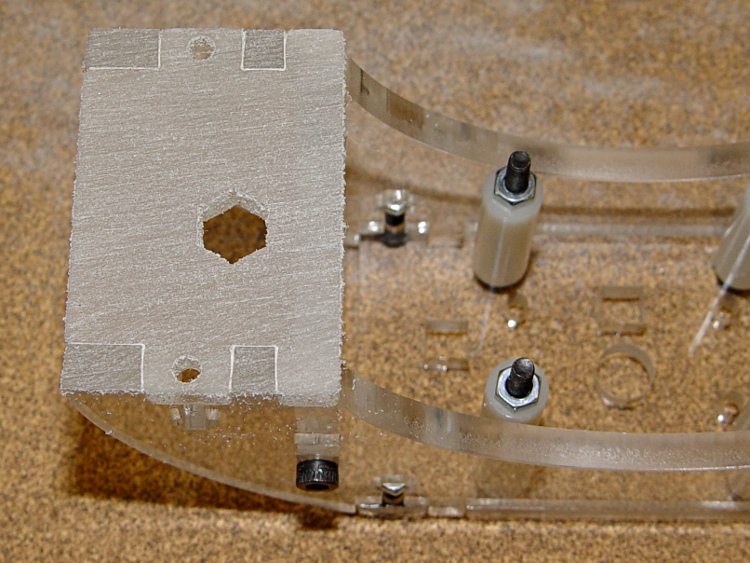
    The final step is to close off all the TOM’s openings, thus restricting air flow through the case. This has the happy side effect of warming the build area and reducing drafts, both quite important in a wintery 50-ish °F basement. Taking pictures of clear acrylic sheet is essentially impossible, but you can see the front piece there and the paper seals around the filament spool there. I make no apology for the masking tape; after everything’s working, I’ll formalize the arrangements.

    Incidentally, don’t get too secure with the front window, because the ABP pokes through the opening to disgorge finished parts. In fact, the front of the ABP whacks the window when the nozzle reaches the back of the ABP, so you don’t want a mechanical latch holding the window closed.

    I’m thinking a magnetic latch is in order.

    There’s enough leakage around the windows to keep the fan happy, although it sucks the last one closed. Those four square cable holes in the acrylic sheet between the upper and lower chambers provide the only air channels, so the exhaust fan probably doesn’t compete with the ATX supply’s cooling fan.

    While the filter doesn’t kill off all the stink, the TOM is a much better companion now…

  • Thing-O-Matic: Platform Light

    Platform light overview
    Platform light overview

    The inside of a Thing-O-Matic gets pretty dark, particularly with the Lazy Susan spool parked on top, so I added a spot light to the Z stage.

    The alternative seems to be LED strip lighting all over the inside, but my Parts Heap doesn’t have any of those yet and it did have a 10 mm white LED. The thing runs at 100 mA, so a 15 Ω 1/2 W resistor (to a +5V tap), a few snippets of heat-shrink tubing, and a blob of hot-melt glue did the trick.

    Some sculpture armature wire that’s been kicking around for years holds the LED (wrap it around, add hot-melt glue) and doesn’t mind the occasional bump. I crimped the wire in a solderless connector and grabbed it in one of the Extruder Frame screws. It’s allegedly fatigue-proof, but it looks a lot like aluminum.

    A bit more detail, with a Kapton-and-graph-paper belt (about which, more later) on the ABP:

    Platform light detail
    Platform light detail