Ed Nisley's Blog: Shop notes, electronics, firmware, machinery, 3D printing, laser cuttery, and curiosities. Contents: 100% human thinking, 0% AI slop.
Tag: Thing-O-Matic
Using and tweaking a Makerbot Thing-O-Matic 3D printer
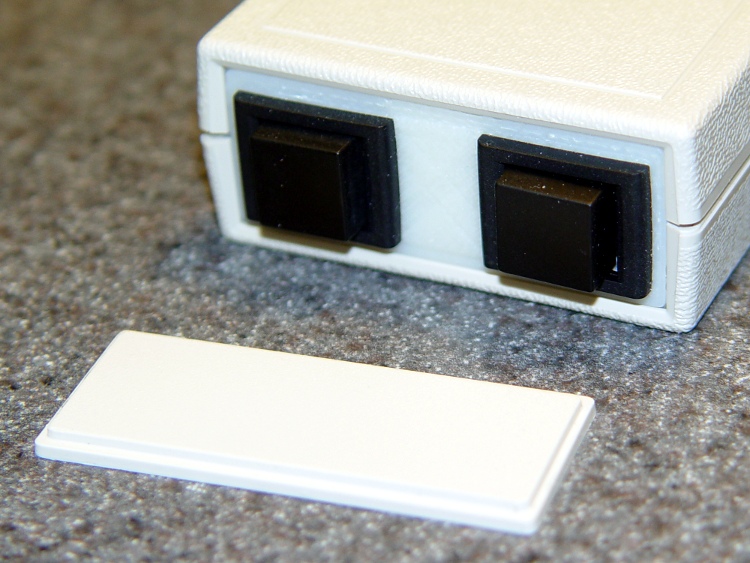
As part of the Thermal Lockout project, I planned to put a pair of big pushbutton switches on the end of a little Pactec box, thusly:
Pactec box – printed panel
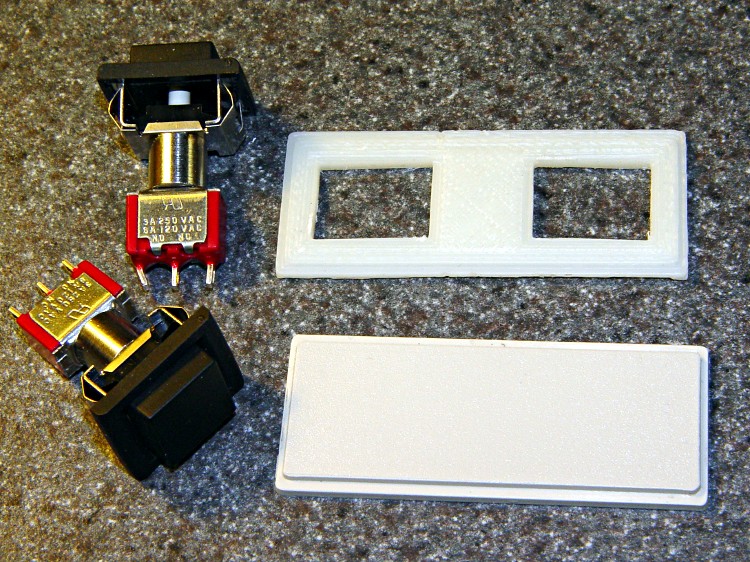
I was in the midst of figuring out how to clamp that tiny panel to the Sherline milling machine’s table and gnaw out those big holes, when I realized I could just print out a new panel with the holes already in place:
Pactec panels with switches
No muss, no fuss, no exciting chips… and no tedious corner filing, either.
The 3D model has the hole for an LED that I added later; the panel shown above acquired that hole during a brief conference with Mr Drill Press.
Thermal Cutout Box – switch plate model
In actual point of fact, I had to do a bit of edge filing for the switches, as the holes came out slightly undersized. The HoleWindage setting should take care of that for the next time around. The panel was a drop-in replacement for the original: all the outside dimensions & thicknesses were spot on.
The OpenSCAD source code:
// End panel for PacTec 61191-01 box
//    Panel 61580-01
// Ed Nisley - KE4ZNU - Feb 2011

Layer1Z = 1.50;
Layer2Z = 1.00;

HoleWindage = 0.55;                // approximately equal to extrusion width
Protrusion = 0.1;                // stick out over top and bottom

SwitchOffsetX = 15.0;

SwitchX = 16.0 + HoleWindage;
SwitchY = 12.0 + HoleWindage;
SwitchZ = Layer1Z + Layer2Z;

LedR = (5.0 + HoleWindage)/2;
LedZ = SwitchZ;

difference() {
 union() {
 translate([0,0,Layer1Z/2]) cube([55,22.5,Layer1Z],center=true);
 translate([0,0,(Layer1Z + Layer2Z)/2]) cube([52.6,19.5,Layer1Z + Layer2Z],center=true);
 }

 translate([SwitchOffsetX,0,SwitchZ/2])
 cube([SwitchX,SwitchY,SwitchZ + 2*Protrusion],center=true);

 translate([-SwitchOffsetX,0,SwitchZ/2])
 cube([SwitchX,SwitchY,SwitchZ + 2*Protrusion],center=true);

 translate([0,0,LedZ/2])
 cylinder(r=LedR,h=LedZ + 2*Protrusion,center=true,$fn=10);

}
Although that collet pusher works fine, the locking pin holder often teleported itself inside the vacuum cleaner. It recently reappeared on the far end of the main workbench, a good 15 feet away from the Sherline as the swarf flies. This, to misquote Churchill, is an impertinence up with which I shall not put.
Herewith, a replacement offering several advantages:
Won’t fit up the vacuum’s snout
Easy to grip
Perfect pin alignment
3D printing FTW!
It’s a flat block resting on the flat top of the pulley, with a nice arc matching the pusher’s OD. A small hole for the pin at exactly the right altitude makes the whole thing rock-solid stable: it slides firmly into position.
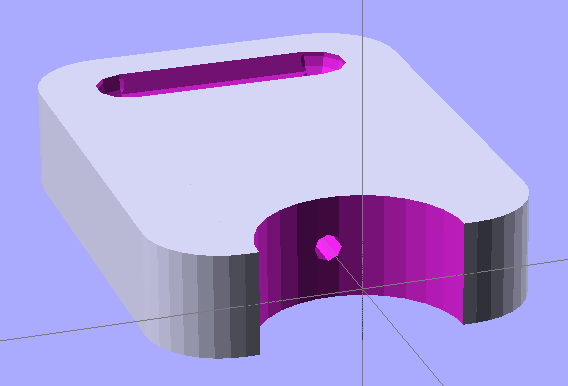
The 3D model looks like you’d expect:
Pin holder – OpenSCAD model
The finger grips were just for pretty, as you don’t need that much traction to extract the thing.
A similar view of the real object with the bottom surface up and some flash around the edges:
Locking pin holder – spindle end view
The as-printed block put the pin about 0.2 mm above the spindle hole, so I rubbed it on Mr Belt Sander (with the power off) until it fit. I printed the block on the aluminum plate platform; the Z height home setting evidently needs a tweak. However, the hole was exactly the correct distance from the top surface: flipping the block over fit perfectly.
The Arduino Mega 2650 board used in the Thing-O-Matic gets its power from the +12 V ATX supply plugged into the TOM Motherboard. It will also automagically switch to +5 V from the USB connection when the +12 V external power Goes Away.
Come to find out that the Foxconn Atom I’m using doesn’t shut off the power to the USB ports when it’s “turned off”. That keeps the Arduino alive and, by a quirk of the circuitry, backfeeds +5 V into the +12 V supply, which makes its way back to the ATX power supply and keeps the fan running. Slowly, but it’s ticking over in there.
Rather than keep unplugging the USB cable, I added a diode in series with the Motherboard +12 V trace going to the Arduino connector:
USB backfeed prevention diode
The orange stuff is nail polish rejected by my Shop Assistant, which covers a slit gouged in the +12 V trace. The diode bridges the gouge and passes current only into the Arduino.
Any diode will do, as the next step in the +12 V supply chain is that poor overworked Arduino regulator responsible for shaving it down to +5 V. I used a good old 1N4001 and it’s perfectly happy.
[Update: the Arduino will remain powered up overnight, even with everything else turned off. When you turn the Thing-O-Matic on the next morning, pop the Reset button to get the Arduino’s attention.]
Extruding at a rather low 200 °C with that pair of 25 W cartridge heaters in the 14 °C Basement Laboratory Machine Shop Wing, the heaters exhibit fairly consistent timing:
47-49 seconds OFF
59-66 seconds ON
So, in round numbers, a 50 W heater has a 56% duty cycle with a 111 second period, with the temperature varying ±2 °C around the setpoint. The head has a fairly substantial ceramic wool insulation blanket, not the stock ceramic tape wrap, so your results will be different. One side of the build chamber is open to the ambient air, so it’s not as warm in there as usual.
The average dissipation of 28 W is half of the original MK5 head’s 58.8 W dissipation, which agrees reasonably well with what other folks have reported for the duty cycle of stock MK5 heads. More insulation is better, but a substantial fraction now escapes up the Thermal Riser tube, so doubling the blanket thickness might not be worth the bulk.
A single 40 W heater would run at 70% duty cycle. The only downside of lower power is a longer delay from power-on to extruding; a lower stuck-on overheat temperature seems like a Better Thing.
I’m deliberately using a relatively low extrusion temperature to explore the lower bounds of what’s practical. I think another 10 °C would improve the thread’s stickiness; right now some spots seem not so well glued together..
The advantage of an aluminum build plate is that it’s flat, but it must also be parallel to the XY axis movements: the nozzle should have a constant altitude across the entire surface of the plate. There’s a tool for measuring that: a dial test indicator.
Measuring build plate alignment
I still don’t have solid way to mount the DTI to the Z axis stage, but the bar clamp works reasonably well. The DIT has a full-scale range of about 30 mils = 0.76 mm, with half on either size of the zero center point. Obviously the probe isn’t at right angles to the DTI body, but it’s close enough for differences of a few mils.
The G-Code routine (see below) positions the Z stage in the middle of the platform and prompts you to mount the DTI and set the reading to 0.0. That requires a bit of delicate fiddling and anything within a few mils should be fine. Don’t adjust the leadscrew by hand, because all this depends on repeatable positioning.
With that in place, the G-Code will raise the DTI, move the stage, lower the DTI, pause for five seconds while you note the reading, then repeat. For my DTI, the readings are in mils = 0.001 inch and, while I could record half-mil values, it’s not worth the effort.
You’ll get nine numbers showing the height across the plate, spaced 20 mm in X and 25 mm in Y:
0
3
6
2
2
2
1
-2
-4
Subtract the minimum number from all the rest to remove the height offset and get everything referenced to zero:
Minimum
-4
4
7
10
6
6
6
5
2
0
Looks like the plate isn’t quite a planar surface (it’s bent!) and it tilts upward to the right rear, but the total difference amounts to 10 mils = 0.010 inch = 0.25 mm. I think that’s smaller than the variation caused by jitter and vibration and general creakiness in the X and Y stages. The repeatability seems to be within two or three mils, which is probably the limit of the hardware.
Bottom line: good enough for now!
The flat aluminum plate reveals a definite front-to-back bow in the heater plate. Clamping the two tightly together would fix that and improve heat transfer, but then the aluminum plate wouldn’t be easily removable when it’s hot.
Put this G-Code routine (call it Flatness.gcode) in the ReplicatorG scripts/calibration directory and you’ll be able to run it from the menu:
(Measure surface flatness)
(MakerBot Thing-O-Matic with ABP and aluminum plate)
(Tweaked for TOM 286)
(Ed Nisley - KE4ZNU - Feb 2011)
(-- The usual setup --)
G21		(set units to mm)
G90		(set positioning to absolute)
(-- Home axes --)
G162 Z F1500	(home Z to get nozzle out of danger zone)
G161 Y F4000	(retract Y to get X out of front opening)
G161 X F4000	(now safe to home X)
(-- Set coordinate zeros --)
G92 X-53.0 Y-58.0
(G92 Z115.3)	(set Z for ABP with belt)
G92 Z112.8	(set Z for ABP with aluminum sheet platform)
(-- Get height gauge set up --)
G0 X-10 Y10 Z25	(center gauge probe on platform)
M1	(Attach gauge, set to 0.0 mm)
G92 X0 Y0 Z0.0
G0 Z2.0		(traverse height)
(-- Begin probing --)
G1 Z0.0		(denter)
G4 P5000
G0 Z2.0
G0 X-40.0	(left center)
G1 Z0.0
G4 P5000
G0 Z2.0
G0 Y-50.0	(left front)
G1 Z0.0
G4 P5000
G0 Z2.0
G0 X0.0		(mid front)
G1 Z0.0
G4 P5000
G0 Z2.0
G0 X40.0	(right front)
G1 Z0.0
G4 P5000
G0 Z2.0
G0 Y0.0		(right center)
G1 Z0.0
G4 P5000
G0 Z2.0
G0 Y50.0	(right rear)
G1 Z0.0
G4 P5000
G0 Z2.0
G0 X0.0		(mid rear)
G1 Z0.0
G4 P5000
G0 Z2.0
G0 X-40.0	(left rear)
G1 Z0.0
G4 P5000
G0 Z2.0
G0 X0.0	Y0.0	(center again)
G1 Z0.0
G4 P5000
(G0 Z5)
This is a variation of Thing 6384: an aluminum plate sitting atop the Automated Build Platform’s bare heat spreader, minus the belt. HIs truly ingenious idea was to cover the plate with a thin layer of ABS to ensure adhesion: an ABS filament bonds very well to ABS!
Aluminum build plate in action
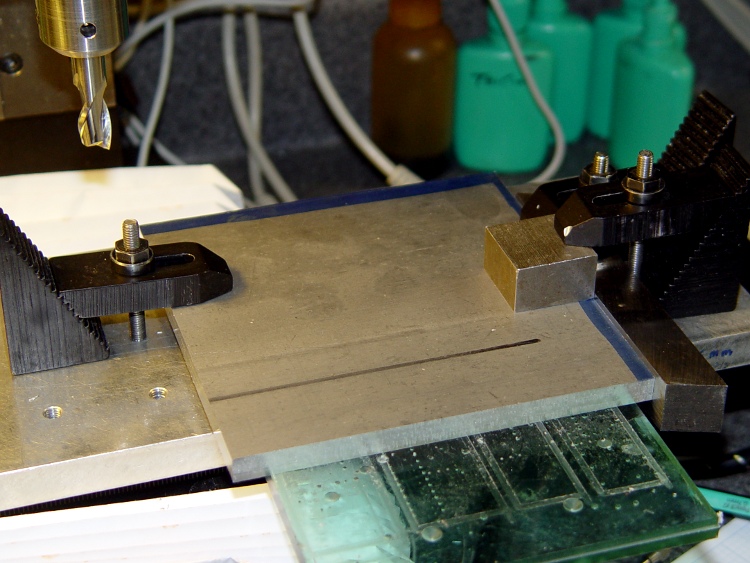
I started with a big sheet of 3/32 inch aluminum, a bit thinner than the 1/8 inch sheet he used, which is what I had in the Parts Heap. Bandsawed three chunks to rough shape, squared up the edges on the Sherline with manual CNC:
Squaring the sheets
That was complicated by the Sherline’s cramped work envelope. The 5/8 inch lathe bit on the right sits at exactly right angles to the X axis and serves as the reference plane. To make it happen:
Stack the three plates, clamp to table aligned against lathe bit
Whack off the far edge
Put clean edge against lathe bit
Whack off another edge
Measure / scribe 120 mm from each new edge (thus the blue stripes)
Align & cut
That actually worked quite well, although you’d think the angular error would build up as I rotated the plates. I checked and tweaked the angle after the first cut and it was all good.
Tight hole clearance
Then drill six clearance holes for the socket head cap screws holding the heater plate to the ABP; a #1 drill gave a few mils clearance, which is all it needs. The holes are 4 mm in from the edges of the 120 mm square, with the two middle ones at, yes, 60 mm.
However, there’s not much meat between the edge of the plate and the holes: call it 1.1 mm. If you do this, using 122 mm plates would produce less scary-close results. That’s why I like manual CNC for this stuff: no need to lay it out, tap in the numbers and it just Works.
My APB heater has a static drain connected to the heat spreader, so I milled a 2 mm recess around the right-hand screws to clear the lugs, wires, and Wire Glue blob. The silicone wiper gets its own cutout, which I made a snug fit so that the rubber would push the plate against the screw heads and hold it in place.
Milled recesses
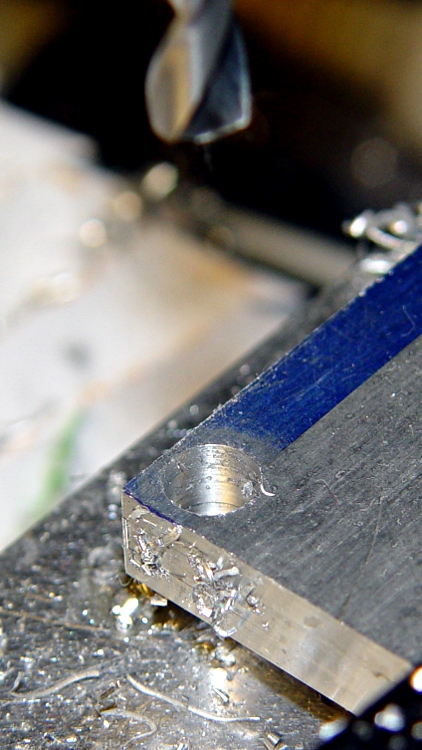
I machined recesses on only one plate, so I could incorporate any changes in the other two. The initial setup was atop a scrap plastic sheet which, as it turned out, wasn’t particularly flat. The edges of that not-quite-complete hole on the left were nasty-sharp.
Thin-shaved plate edge
Then clean off the ink with xylene, scrub the plate with a 220-grit sanding sponge, and it looks really nice. Impossible to photograph a uniform gray surface, though: the autofocus goes nuts.
While all that was going on, I’d dumped some MEK into a polyethylene jar along with a handful of calibration cubes and similar debris. I used MEK, rather than acetone, because it’s somewhat less aggressively flammable while still being a good solvent for ABS. Right now, the gunk has the consistency of thin honey, which may be too thick to spread easily; I’m still figuring this out. I apply the gunk with a folded coffee filter: scrape the puddle around to cover the whole plate, then let it dry. This is best done outdoors, except that right now it’s well below freezing out there.
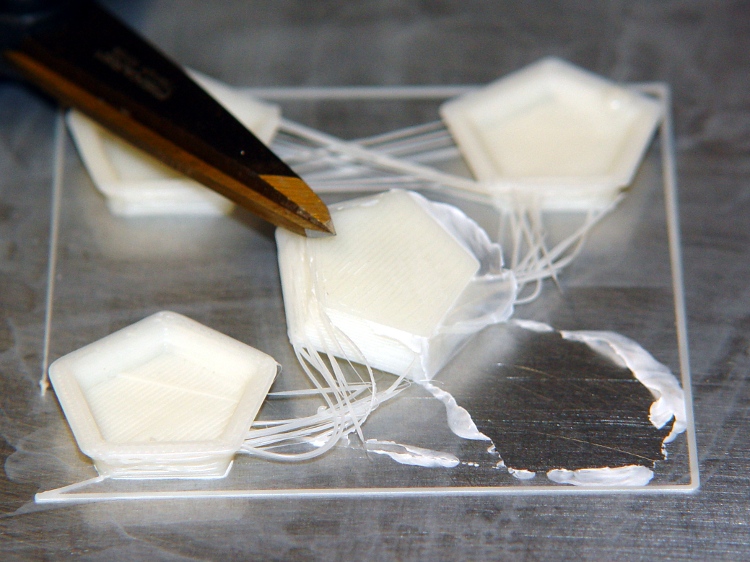
Here’s what the film looks like under the start of a quartet of dodecahedrons I ran off to see if they stuck properly:
ABS coating on aluminum build plate
The bottom surface looks like it was machined: dead flat,nice edges, good thread definition. The parts stick like they were glued to the surface, with no tendency to pull up at the corners.
The Outline thread shows some adhesion trouble for the first 10 mm or so. After that, it’s nailed right to the ABS film. That’s why I use Outline, at least until I figure out a better way to start the thread.
After I finish the next two plates, I’ll have a somewhat quick-change build platform: pull the hot plate off (holding it with pliers!) and slap a new one on. Not as convenient as the ABP, but much better for building precision parts like gears and extruder motor mounts.
The Automatic Build Platform rollers have a small gap in the middle where pegs on the platform support the shaft. The belt must be sufficiently taut that it’s flat across the entire length & width of the platform, which means it’s so tight that it collapses into the gap and forms wrinkles in the most critical area.
Prior to installing an aluminum plate build surface, I wondered if adding a support in the gap would reduce the wrinkling, so I cooked up a small OpenSCAD script to print these things out:
ABP Roller Support
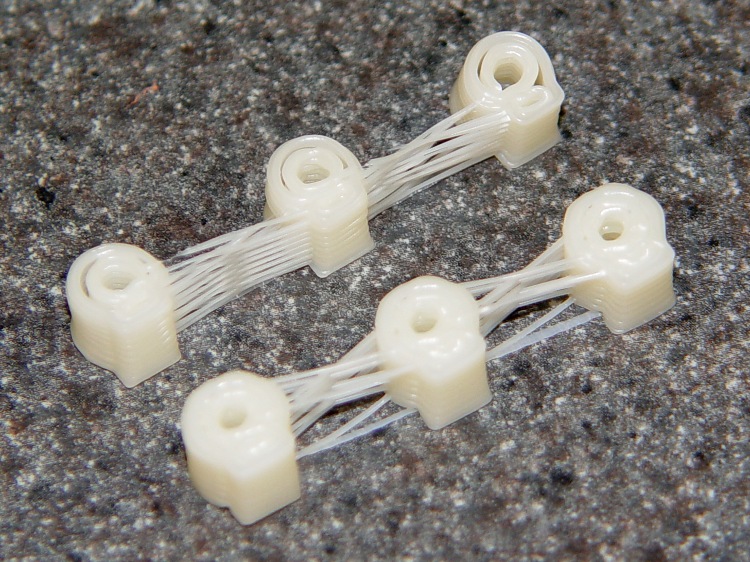
They’re at about the finest resolution the printer can produce; getting the fill between the walls seems iffy at best. The top set has obvious gaps that come from having walls too close together.
I finally printed them at 0.4 mm thickness and a width of 0.5 mm (w/t = 1.2) and that produced the lower set with adequate fill:
ABP roller center supports
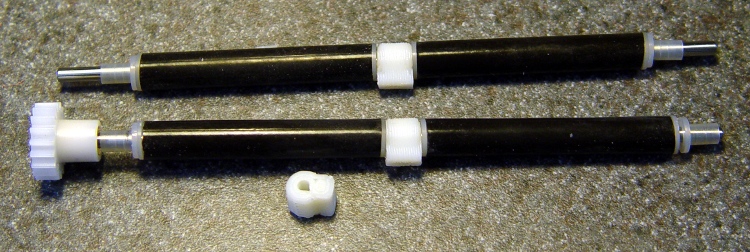
Unsurprisingly, the holes are too small, but that’s easily fixed with a drill just slightly over 1/8 inch. The length of the stem also required a bit of fine-tuning; you can always make it shorter with a file:
Supports on rollers
Some preliminary testing says that the motionless supports might produce too much friction on the belt, but that was with a paper backing. Running slick tape around the middle of the belt’s inside surface might help, plus it would add a bit of stiffening. Adding some ridges to reduce the surface area in contact with the belt would probably just score the belt.
I’ve been experimenting with Kapton-on-paper belts, which remain much flatter than the endless belt, but are much more sensitive to the gaps. More fiddling is in order, after I get some one-off parts built on the aluminum plates.
The OpenSCAD script:
// ABP Central Shaft Spacers
// Ed Nisley - KE4ZNU - Feb 2011

//--- Extrusion dimensions
//		Must be tall and skinny to get fill around the hole

ExtThickness = 0.50;		// extrusion thickness
WTRatio = 1.20;				// width-over-thickness

//--- Spacer dimensions

ShaftDia = 3.175;			// metal rod = hard 1/8 inch = 0.125 inch
ShaftRad = ShaftDia/2;

RollerDia = 8.0;			// approximate OD of in-situ rubber rollers
RollerRad = RollerDia/2;

OverAllLen = 7.6;			// length along shaft = hard 0.300 inch

TaperLen = 2 * ExtThickness;	// make it a few layers thick

Faces = 10;					// polygonal shape for outside cylinders

//--- APB Interface

PlatformZ = 5.0;			// thickness of ABP support under heater
PlatformGap = 2.0;			// distance from roller to APB

//--- nophead's polygonal hole correction
//		http://hydraraptor.blogspot.com/2011/02/polyholes.html
//		Adapted to center the resulting cylinder

module polyhole(h, d, c) {
    n = max(round(2 * d),3);
    cylinder(h = h, r = (d / 2) / cos (180 / n), $fn = n, center=c);
}

//--- Odds & ends

FinagleLen = 1.0;			// enough to make holes obvious

//-----------------------
// The Spacer!

difference() {
	union() {
		translate([0, 0, OverAllLen/2-TaperLen/2])
			cylinder(r1=RollerRad, r2=RollerRad-TaperLen, h=TaperLen,
					  center=true, $fn=Faces);
		cylinder(r=RollerRad, h=OverAllLen-2*TaperLen,
				  center=true, $fn=Faces);
		translate([0, 0, -(OverAllLen/2-TaperLen/2)])
			cylinder(r1=RollerRad-TaperLen, r2=RollerRad, h=TaperLen,
					  center=true, $fn=Faces);
		translate([(RollerRad+PlatformGap)/2, 0, 0])
			cube(size=[RollerRad+PlatformGap, PlatformZ, OverAllLen],
				  center=true);
	}
	polyhole(OverAllLen+2*FinagleLen, ShaftDia, true);
}







 The Smell of Molten Projects in the Morning