The Smell of Molten Projects in the Morning

Ed Nisley's Blog: Shop notes, electronics, firmware, machinery, 3D printing, laser cuttery, and curiosities. Contents: 100% human thinking, 0% AI slop.

Tag: Thing-O-Matic

Using and tweaking a Makerbot Thing-O-Matic 3D printer

  • Dishwasher Rack Protectors

    After a decade of stacking the plates in the dishwasher the same way every time, the flexible coating over the steel rods has worn through:

    Dishwasher rack abrasion
    Dishwasher rack abrasion

    We can’t stack them the other way, because the rotor spray rattles them unmercifully, and a fix is in order. Apparently, one can purchase touchup paint for this very purpose, but what’s the fun in that? Besides, I’d expect it to wear through even faster than the original coating, if only because adhesion is never as good as you’d expect from reading the label.

    So this little dingus fits around a vertical pin and rests atop the horizontal rod, with the edge of the plate nestled into the joint between the two cylinders:

    Dishwasher rack protector - solid model
    Dishwasher rack protector – solid model

    Being very small, they build best in large groups:

    Dishwasher rack protectors - on build platform
    Dishwasher rack protectors – on build platform

    The horizontal half-cylinders require internal support, shown here adjacent to the protector for easy viewing:

    Dishwasher rack protector - support model
    Dishwasher rack protector – support model

    Those fins just barely clear the interior of the horizontal cylinder, so the two parts don’t bond together very well (that’s the ideal condition, of course). The flat plate glues the support fins firmly to the build platform, which is easier to see on these somewhat shorter prototypes with a layer or two of orange filament on their bottoms:
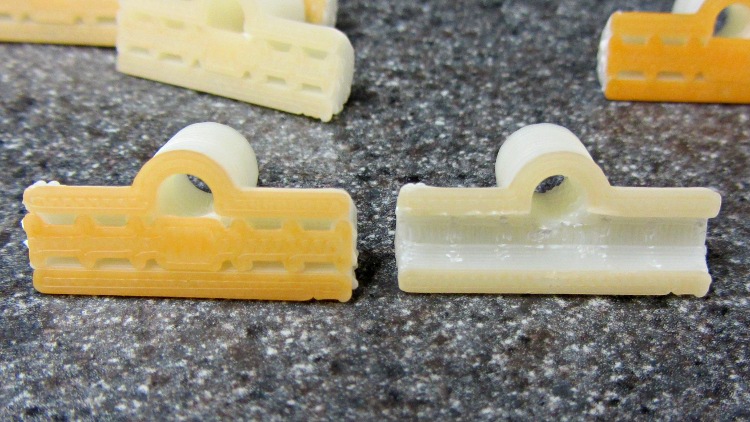
    Dishwasher rack protectors - support
    Dishwasher rack protectors – support

    The support chops out neatly with a repurposed nail set punch:

    Dishwasher rack protector - removing support
    Dishwasher rack protector – removing support

    Actually, I stood each one vertically on an aluminum chunk, held the punch in place with finger pressure, and whacked it with a small brass hammer. The OpenSCAD code now adds a small tab each end to help align the punch for the first whack.

    The rod (vertical) hole came out just about exactly the right size (admittedly, with a 0.4 mm HoleFinagle adjustment), but required a pass with a drill in a pin vise to clear out the Reversal Zittage. The result slides easily over undamaged pins, but some pins had rust at either the top or bottom that required a bit of cleanup. This is a trial fit:
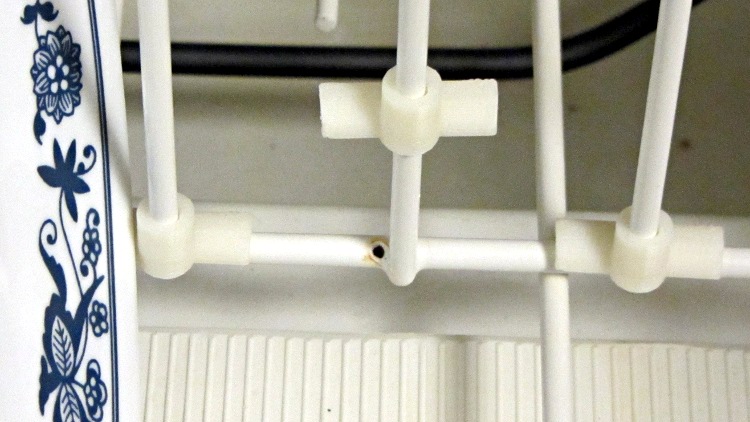
    Dishwasher rack protectors - trial fit
    Dishwasher rack protectors – trial fit

    I put a blob of acrylic caulk on the abraded spots to (attempt to) seal them from further damage, then squished the protectors in place. The dishwasher demonstrated that it’s perfectly capable of blasting an unglued protector (without a plate) up and off the pin, ingesting it into the trash grinder, chewing it up, and spitting the pieces down the drain. Lost a couple of prototypes before I figured that out, too.

    Ya learn something new every day…

    The OpenSCAD source code:

    // Dishwasher rack protector
    // Ed Nisley KE4ZNU - Jan 2012
    
    Layout = "Show";                    // Show Build Support
    
    Support = true;                     // true to add support inside rod half-cylinder
    
    include </home/ed/Thing-O-Matic/lib/visibone_colors.scad>
    
    //-------
    //- Extrusion parameters must match reality!
    //  Print with +0 shells
    //  Infill = 1.0, line, perpendicular to Bar axis on first bridge layer
    //  Multiply = at least four copies to prevent excessive slowdown
    
    ThreadThick = 0.25;
    ThreadWidth = 2.0 * ThreadThick;
    
    HoleFinagle = 0.4;
    HoleFudge = 1.00;
    
    function HoleAdjust(Diameter) = HoleFudge*Diameter + HoleFinagle;
    
    Protrusion = 0.1;           // make holes end cleanly
    
    function IntegerMultiple(Size,Unit) = Unit * ceil(Size / Unit);
    function IntegerMultipleMin(Size,Unit) = Unit * floor(Size / Unit);
    
    //-------
    // Dimensions
    
    PinDia = 4.0 + 0.5;                 // upright pin diameter + clearance
    PinRadius = PinDia/2;
    
    PinSpace = 35.0;                    // pin spacing along bar
    
    PinOC = 3.4;                        // bar center to pin center
    
    PinTubeLength = 15.0;               // length of upright tube along pin
    
    BarDia = 4.7 + 0.2;                 // horizontal bar diameter + clearance
    BarRadius = BarDia/2;
    
    BarTubeLength = PinSpace - 5.0;     // length of horizontal half tube along bar
    
    TubeWall = 4*ThreadWidth;           // wall thickness -- allow for fill motion
    
    TubeSides = 4 * 4;                  // default side count for tubes (in quadrants)
    $fn = TubeSides;
    
    SupportClear = 0.85;                // support structure clearance fraction
    
    //-------
    
    module PolyCyl(Dia,Height,ForceSides=0) {           // based on nophead's polyholes
      Sides = (ForceSides != 0) ? ForceSides : (ceil(Dia) + 2);
      FixDia = Dia / cos(180/Sides);
      cylinder(r=HoleAdjust(FixDia)/2,h=Height,$fn=Sides);
    }
    
    module ShowPegGrid(Space = 10.0,Size = 1.0) {
    
      Range = floor(50 / Space);
      for (x=[-Range:Range])
        for (y=[-Range:Range])
          translate([x*Space,y*Space,Size/2])
            %cube(Size,center=true);
    }
    
    //--------
    // Support under bar tube shells
    
    module SupportStructure() {
    
      color("cyan")
      difference() {
        union() {
          for (Index=[-4:4])
            translate([Index*(BarTubeLength/8.5),0,0])
              rotate([0,90,0])
                rotate(180/TubeSides)
                  cylinder(r=SupportClear*BarRadius,h=2*ThreadWidth,center=true);
    
          rotate([0,90,0])
            rotate(180/TubeSides)
              cylinder(r=SupportClear*BarRadius,h=10*ThreadWidth,center=true);
    
          translate([0,0,ThreadThick])
            cube([(BarTubeLength + 4*ThreadWidth),BarRadius,2*ThreadThick],center=true);
        }
    
        translate([0,0,-(BarRadius + Protrusion)/2])
          cube([(BarTubeLength + 2*Protrusion),
              BarDia,
              (BarRadius + Protrusion)],center=true);
    
      }
    
    }
    
    //-------
    // Put it together
    
    module Protector() {
    
      difference() {
        union() {
          translate([0,PinOC,0])
            rotate(180/TubeSides)
              cylinder(r=(PinDia + 2*TubeWall)/2,h=PinTubeLength);
          translate([-BarTubeLength/2,0,0])
            rotate([0,90,0])
              rotate(180/TubeSides)
                cylinder(r=(BarDia + 2*TubeWall)/2,h=BarTubeLength);
        }
    
        translate([0,PinOC,-Protrusion])
          rotate(180/TubeSides)
            PolyCyl(PinDia,(PinTubeLength + 2*Protrusion),TubeSides);
    
        translate([-BarTubeLength/2,0,0])
          rotate([0,90,0])
            rotate(180/TubeSides)
              translate([0,0,-Protrusion])
                cylinder(r=BarRadius,h=(BarTubeLength + 2*Protrusion));
    
        translate([0,0,-(BarRadius + TubeWall + Protrusion)/2])
          cube([(BarTubeLength + 2*Protrusion),
              BarTubeLength,
              (BarRadius + TubeWall + Protrusion)],center=true);
      }
    
    }
    
    //-------
    // Build it!
    
    ShowPegGrid();
    
    if (Layout == "Support")
      SupportStructure();
    
    if (Layout == "Show") {
      Protector();
      translate([0,-10,0])
        SupportStructure();
    }
    
    if (Layout == "Build")
      rotate(90) {
        if (Support)
          SupportStructure();
        Protector();
      }
    
  • Thing-O-Matic: HBP Rebuild

    The basic problem with the heater on the Heated Build Platform is that the SMD pads must both make electrical contact to the Molex-style connector and withstand mechanical stress from the dangling wires & cables as the platform moves along the X and Y axes. Rather than replace the entire heater, I attached pigtail leads to the PCB, anchored those leads to the wood platform under the heater, and routed the cables through the deck under the Y axis stage a bit differently.

    However, attaching pigtail leads to the PCB poses a problem, because ordinary electronic hookup wire has thermoplastic insulation that melts or deforms at temperatures well under my usual 110 °C platform heat setting; shorting the heater wires would be a Very Bad Thing.

    Some concerted rummaging in the Big Box o’ Multiconductor Cable turned up a hank of Teflon-insulated shielded two-wire cable that, as nearly as I can tell, has pure silver conductors and shield braid: the ends were tarnished like silver and there’s nary a trace of copper in the fresh cuts. It must be military surplus and, based on a vague recollection, was most likely cough salvaged by my father, who worked as an avionics tech at Olmstead AFB in the mid-60s. Ya gotta have stuff, right?

    [Update: Alas, it’s not pure silver, as shown in the comments.]

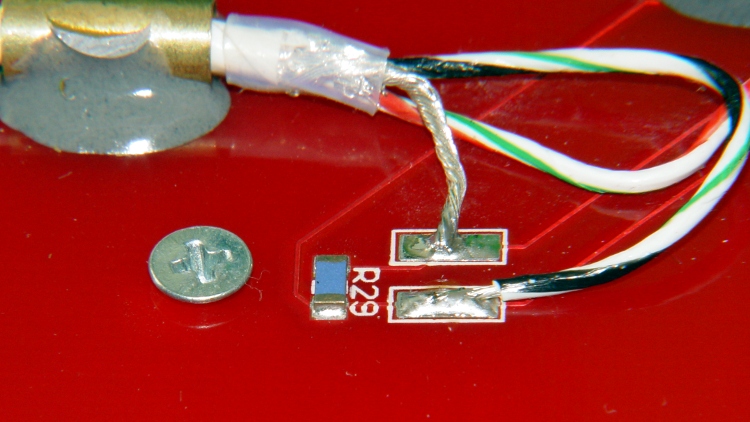
    The general idea is to scuff up the shiny PCB surface enough to anchor blobs of JB Industro Weld epoxy that surround brass tubes holding the cables. A pair of tubes secure each cable and provide strain relief; the cable is free to move, but not by very much. The thermistor cable has a long arch that will, I hope, keep the cable at the platform temperature and reduce its cooling effect on the thermistor:

    Thermistor rewiring - heat cure
    Thermistor rewiring – heat cure

    The alligator clips connect to a bench power supply that delivered 4 V @ 2 A = 8 W that heated the PCB to about 40 °C in the rather chilly Basement Laboratory and encouraged the epoxy to cure in less time than forever.

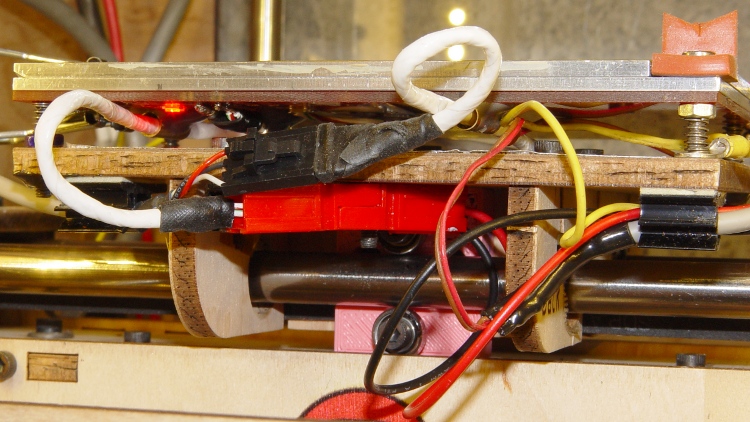
    The final result looked like this, with Anderson Powerpoles now attached to the heater cable:

    Rewired HBP
    Rewired HBP

    The 24 AWG conductors in the cable may seem scanty for 6 A of heater current, but, hey, they’re silver.

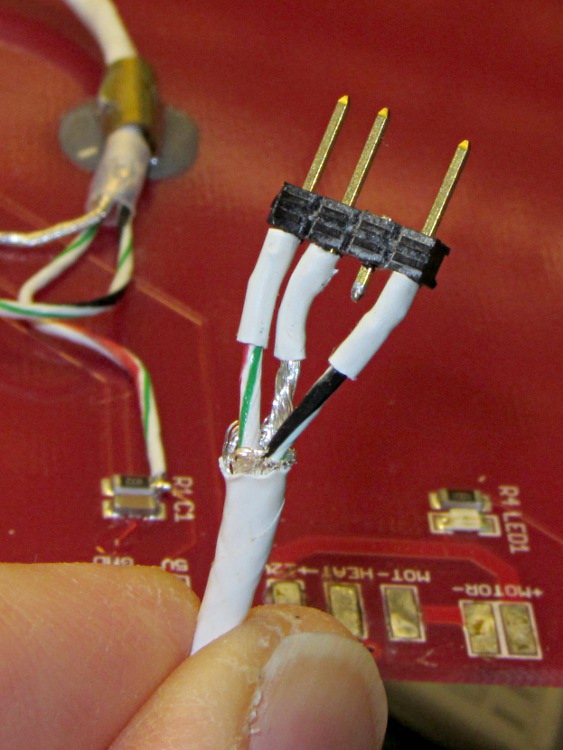
    The three-pin connector on the end of the thermistor cable is a pure kludge, built from a 4-pin header to match the CD-ROM audio pinout on the new cable from the Extruder Controller. I kept the default pinout on this end to provide some protection against plugging it in backwards:

    Kludged HBP thermistor connector
    Kludged HBP thermistor connector

    With all that in hand, I screwed the PCB to the aluminum sub-plate, bolted it to the plywood platform, and stuck the cables onto the platform with adhesive clamps:

    Rewired HBP - front
    Rewired HBP – front

    Reaming out the hole between the red and black Powerpole shells provided just enough room for an M3 screw to anchor them to the HBP: they won’t flop around under acceleration.

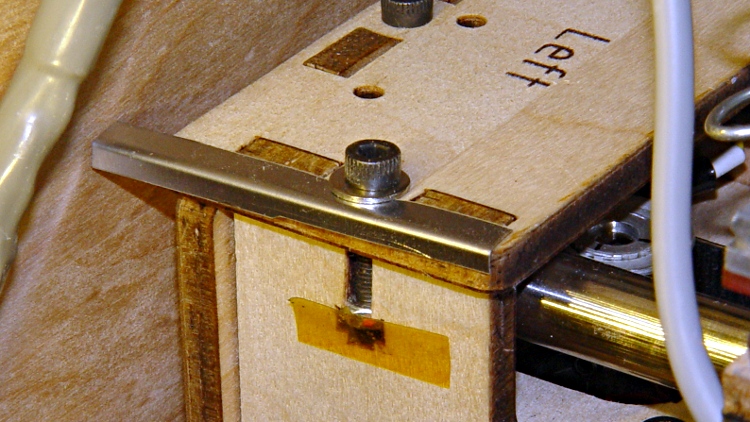
    The thermistor cable exits to the left, the rest to the right, and I’m unhappy with the overall routing. I added a small bumper (made from bent steel shim stock) to keep the thermistor cable out of the gap between the Y axis stage and the left side wall:

    Y Axis gap filler
    Y Axis gap filler

    So, yes, it works, but it sure ain’t elegant.

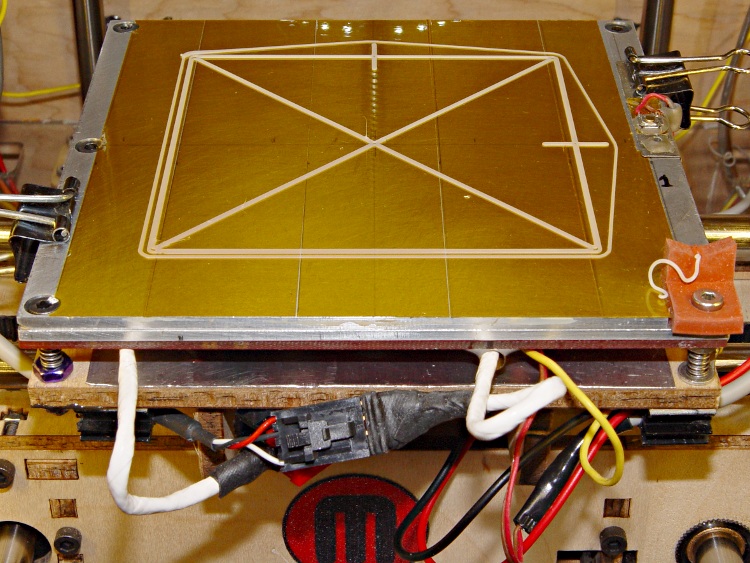
    The first object was the revised platform level test pattern:

    Rewired HBP with level test pattern
    Rewired HBP with level test pattern

    The platform is holding level within ±0.05 mm across build plates 1 and 2, somewhat better than before. On the other paw, the whole thing doesn’t have many hours on it…

  • Thing-O-Matic: HBP Heat Shield

    With the heater off for repair, I added a strip of self-adhesive stainless steel tape to the top of the plywood platform, directly under the heater. This should reduce the wood temperature and maybe, just maybe, reduce the thermal expansion that shifts the X axis location of the Z-minimum platform height switch.

    HBP heat shield
    HBP heat shield

    It’s stainless steel because that’s what was in the Tape Lookaside Buffer; a hunk of aluminum tape, even a pair of 2 inch / 50 mm strips would work just fine.

    Not shown here is the M3 screw through the front-center hole (invisible under the tape) that will eventually anchor the new heater connector.

  • Thing-O-Matic: Heated Build Platform Center Screw

    While I was rebuilding the HPB heater wiring, I drilled / countersunk / tapped a 4-40 hole in the middle of the aluminum sub-plate for a screw to secure the middle of the heater PCB:

    HBP center attachement screw - top
    HBP center attachement screw – top

    Remember: this plate is firmly secured to the plywood build platform with three leveling screws over springs. Another aluminum plate, with Kapton tape as the build surface, sits on top, providing an absolutely flat build platform. If you’re using a single plate, you could backfill the hole with a dab of JB Industro Weld epoxy atop a lightly greased screw, then file the top flush with the plate.

    A flat-head screw harvested from a chunk of electronic junk came from the Drawer o’ Short 4-40 Screws and fit perfectly:

    HBP center attachment screw - bottom
    HBP center attachment screw – bottom

    Mirabile dictu, the screw was short enough that it didn’t require any trimming to stay below the top surface.

    Securing the center of the PCB to the aluminum plate cuts the heater’s free span in half: the PCB originally had screws only along the left and right edges. Its thermal expansion visibly bowed it away from the plate and I hope this will reduce that problem. Of course, now the PCB’s expansion has nowhere to go and those thermal stresses will probably begin chewing up the mounting holes.

    While I was at it, I removed the MBI “heat spreader” tape from the PCB. I’d been reluctant to do that, for fear of peeling the traces right off the board, but the surface was in fine shape. Whew!

    More on the wiring and epoxy blobbed brass tube later…

  • Platform Level Test Pattern

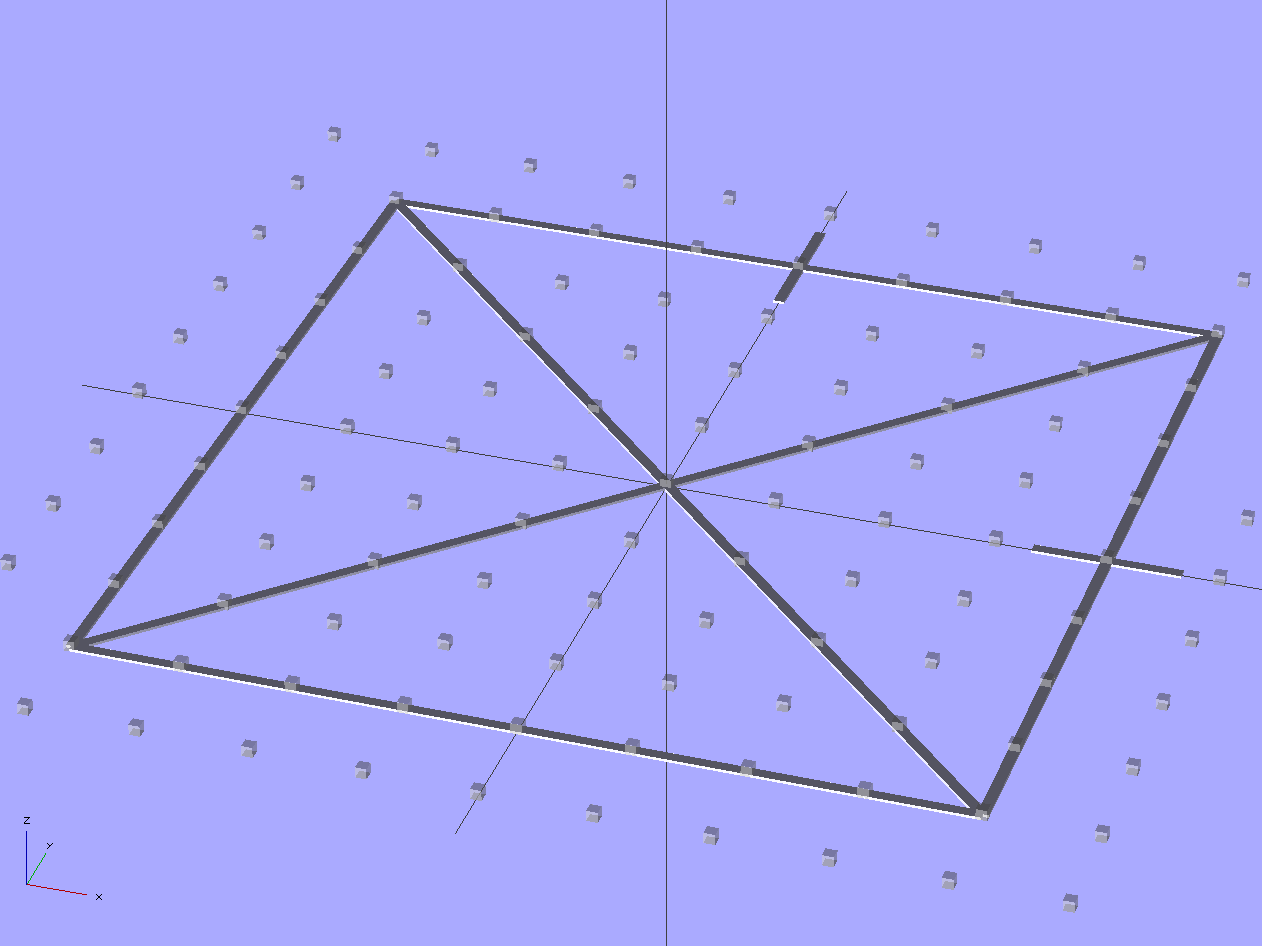
    Unlike that pattern, this OpenSCAD program produces an STL file that gets sliced in the usual manner, so that the end result shows exactly how the first layer of all other objects gets laid down.

    Thread Thickness Test - solid model
    Thread Thickness Test – solid model

    It’s two threads wide and one thread thick: customize the OpenSCAD code to match the settings in Skeinforge (or Slic3r or whatever you’re using) to make it build properly.

    The two tabs mark the +X and +Y directions. The bottom surface will be wonderfully shiny from the build plate, so the symmetry along the diagonal shouldn’t pose a problem.

    Should the thickness vary more-or-less linearly along any of the bars, then you know which way to level the platform. If it varies non-uniformly, then either the build plate isn’t flat or the printer has other problems.

    The actual width depends on the actual thickness, of course: a too-low nozzle will create a too-wide pattern regardless of the extrusion settings. The thickness should be uniform across the entire pattern, so you can still adjust the platform leveling screws.

    If you’re using a Z-minimum platform height sensor, now’s the time to adjust the switch touch-off height to make the thread thickness come out right.

    When the thread thickness comes out right, then the width should match the extrusion settings: the bottom layer will be exactly like all the others. That’s the ideal situation, anyway.

    A thickness snap gauge comes in handy for this sort of thing.

    The OpenSCAD source code:

    // Platform Level test pattern
    // Ed Nisley KE4ZNU - Dec 2011
    
    //-------
    //- Extrusion parameters must match reality!
    
    ThreadThick = 0.25;
    ThreadWidth = 2.0 * ThreadThick;
    
    //-------
    // Dimensions
    
    BoxSize = 80;
    
    //-------
    
    module ShowPegGrid(Space = 10.0,Size = 1.0) {
    
      Range = floor(50 / Space);
      for (x=[-Range:Range])
        for (y=[-Range:Range])
          translate([x*Space,y*Space,Size/2])
            %cube(Size,center=true);
    }
    
    //-------
    
    ShowPegGrid();
    
    for (Index=[0:3])
      rotate(Index*90)
        translate([0,BoxSize/2,ThreadThick/2])
          cube([BoxSize,2*ThreadWidth,ThreadThick],center=true);
    
    for (Index=[-1,1])
      rotate(Index*45)
        translate([0,0,ThreadThick/2])
          cube([sqrt(2)*BoxSize,2*ThreadWidth,ThreadThick],center=true);
    
    translate([BoxSize/2,0,ThreadThick/2])
      cube([BoxSize/6,2*ThreadWidth,ThreadThick],center=true);
    
    translate([0,BoxSize/2,ThreadThick/2])
      rotate(90)
        cube([BoxSize/6,2*ThreadWidth,ThreadThick],center=true);
    
  • Thing-O-Matic: Improved EC Thermistor Connector Orientation

    Given that the SMD pads fell off the HBP circuit board and I must replace the connector, I figured I may as well also replace the remarkably stiff MBI thermistor cable with a much more flexible CD-ROM audio cable. Although the EC end of the MBI cable looks like a standard CD-ROM audio connector, it’s been rewired. No problem: this is not an audio application and I’m going to do exactly the same thing.

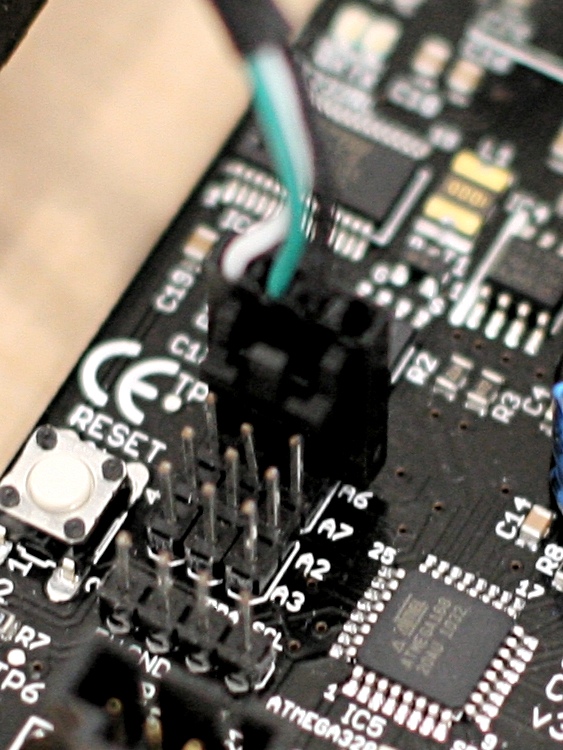
    The Extruder Controller, however, doesn’t have a matching connector and the recommended attachment involves simply jamming the connector onto the pin header, per this detail cropped from that photo in the MBI assembly instructions:

    MBI EC HBP Thermistor Connector Alignment - Detail
    MBI EC HBP Thermistor Connector Alignment – Detail

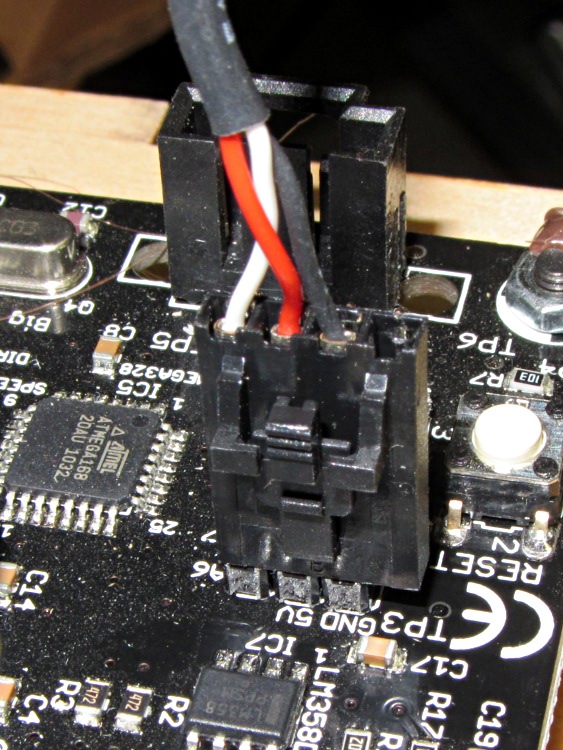
    Here’s a better closeup of my EC, taken from the other side:

    MBI Extruder Controller - HBP thermistor connector
    MBI Extruder Controller – HBP thermistor connector

    The header block breaks out the Arduino’s Analog Input pins, with A6 in the front of that photo. From left to right, the pins under the HBP connector are A6 / +5 V / Gnd. Unfortunately, the connector wiring and alignment puts the thermistor signal on the cable shield, with the Gnd and +5 V wires safely tucked inside. This is, shall we say, suboptimal.

    The Gnd connection provides a low-impedance connection to the least-noisy part of the circuit, so putting it on the shield tends to prevent the relatively high-impedance signals within from picking up noise. This isn’t always successful, for a number of reasons, but it’s a Good Idea.

    Although probably doesn’t make much difference (it’d just add a bit of noise to the HBP temperature signal), but if I’m going to be rewiring it anyway, the cable shield will be at ground potential with the signal  wire inside. Here’s my cable & connector, rearranged to make that so:

    EC HBP thermistor connector - revised
    EC HBP thermistor connector – revised

    The analog audio connector on the back of old-school CD-ROM drives, back before digital audio output from the drives actually worked, had four pins:

    • Left (white) and Right (red) audio channels on the outer pair
    • Ground (black) on at least one of the central pair

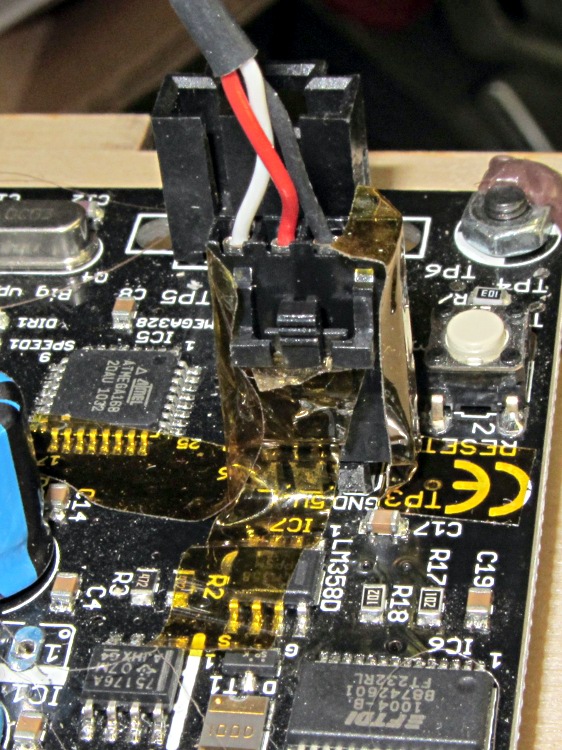
    So the red wire will be in the far right-hand socket of the connector shell; depress its locking tab, slide it out of the shell, poke it into the socket between the other two wires, push to click, and you’re set. Conveniently, this puts the +5 V supply on the red wire, which is sorta-kinda standard. Your cable colors may vary; pay attention to the actual wiring and ignore the color code!

    Tape the connector in place (with the empty socket now toward the board edge) to prevent the tangle of wires in the Thing-O-Matic’s electronics bay from dislodging it at an inopportune moment:

    EC HBP thermistor connector - secured
    EC HBP thermistor connector – secured

    Admittedly, that arrangement still tucks the +5V wire right next to the signal wire inside the shield, but it’s a step in the right direction.

    You could flip the MBI cable around, too, as long as you also rearranged the pins at the HBP end to match.

  • Thing-O-Matic: HBP Connector Failure

    This has been a long time coming, as the connector shell over that pin connecting the MOSFET to the heater has been getting crispier despite my attention, cleaning, and occasional DeoxIT application.

    Burned-out HBP connector
    Burned-out HBP connector

    Notice that the burned pin now stands at a slight angle to the others. The PCB pad has no additional copper traces on that side to conduct the heat away from the failing connection, so the joint got hot enough to put the solder into its semi-liquid state, whereupon the springy connector rammed it upwards through the softened plastic shell. If the PCB fab shop used 60-40 lead solder, that’s around 188 °C. Silver solder would reach 220-ish °C. If the solder was eutectic, it would turn liquid and just drip off.

    What doesn’t show: the SMD pads that pulled free from the PCB surface, fortunately only under the rightmost three pins leading to the thermistor. Repairing the pads and connector makes no sense, so I think I’ll go with pigtail leads anchored to the plywood, with offboard connectors to reduce the strain on those pads. Powerpoles will be bulky, but maybe pigtails long enough to get them onto the case might work.

    As a general rule, soldering wires or connectors to SMD pads with no mechanical support is a Bad Idea and applying repeated mechanical stress to those connectors is a Very Bad Idea. Doing all that on a PCB running well over 100 °C with current right up near the connector’s absolute maximum, well…