Ed Nisley's Blog: Shop notes, electronics, firmware, machinery, 3D printing, laser cuttery, and curiosities. Contents: 100% human thinking, 0% AI slop.
The drain in our black bathroom(*) stopped working: the pop-up drain seal didn’t pop up.
I finally wedged myself under the sink, with my feet in the shower stall, and removed the operating rod. Turns out that we replaced the countertop and sink (nine years ago; nothing lasts) and the drain used plastic pipe.
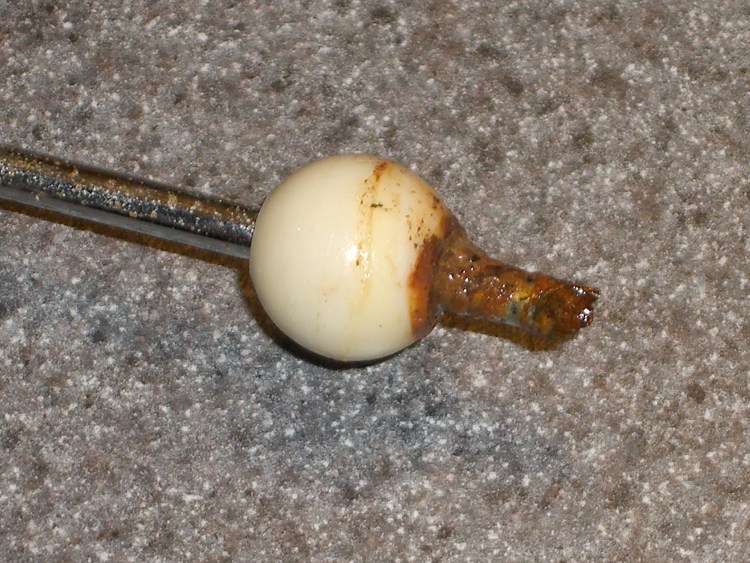
Except, of course, for the operating rod that sticks out into the drain. That’s chrome-plated steel, evidently with a few plating imperfections, and the end had simply rotted away. I suppose there’s a small chunk of steel decomposing in the trap.
How much would it have cost to use stainless steel in this corrosion-prone application? Or good old brass (“contains an ingredient known to the State of California to cause cancer or birth defects”)?
After a brief moment of consideration, with my feet still in the shower, I pushed the rod through the bearing ball so the other end stuck out by about the right amount and replaced it in the drain.
Swapped Rod
Yeah, there’s an icky rusted end hanging out there in mid-air, but the next person under that sink will understand exactly what’s going on…
(*) It’s the size of a large closet with wraparound black ceramic tile, a white tile shower stall, and a wall-sized mirror over the sink. We painted the walls and ceiling white, installed an ersatz gray granite counter top (it’s laminate, not anything spendy) with a shiny white sink, and it’s all good. The original half-century-old grout is in fine shape: some things really do last!
After putting Mary’s newly covered seat on her Tour Easy, I replaced the tire liner in the front wheel; the previous tube had gone flat, as mentioned there, due to erosion from the end of the liner.
Here’s what the taped liner looked like: smashed as flat as you’d expect from 100 psi applied evenly over the surface. The tube had a rectangular imprint on it, with what looked like minute abrasions, around the outline of the tape. Nothing major, but it shouldn’t ought to look that way.
Taped tire liner
I rolled that liner up, popped it in the Bike Tire Stuff drawer and replaced it with a Slime liner. This picture shows the ends of the two liners: the brown one (bottom) is about 90 mils thick in the center, the Slime liner (top, fluorescent green) is 60-ish.
Tire liner comparison
As nearly as I can tell, I’ve never had an abrasion flat with a Slime liner, while various other brands have caused troubles.
I broke the edges of the Slime liner with a bit of sandpaper, just to see what that’ll do. Most likely, bad things, seeing as how I’ve never done that before…
Our KitchenAid mixer gets plenty of use turning out bread dough, but it tends not to get moved around a lot, because it’s an awkward and top-heavy bit of gear. Mary moved it recently and discovered oil puddles underneath. The scene put me in mind of my parent’s 1957 Studebaker President: it had a bad rear main seal and the oil leaked out just slightly slower than we could pour it in.
Anyhow, it seems our mixer isn’t the only one to have a slight incontinence problem, as a casual search on the obvious keywords will reveal.
Rear housing view
I usually leave the mixer angled up, which caused the oil to drain to the rear of the housing, where it followed the main support strut downward into the stand. From there, it spread out and dripped off several local minima, forming perhaps four puddles. Most folks leave it horizontal, whereupon the oil evidently drips out of the lower cover into the bowl.
The rear view of the guts shows the oil oozing out both sides along the bottom of the joint between the housing and the end bell.
A rag and some denatured alcohol cleaned things up pretty well, but I do wonder what’s going on with KitchenAid… I’m not looking forward to replacing the piece-of-crap plastic bevel gear that evidently strips out after a while.
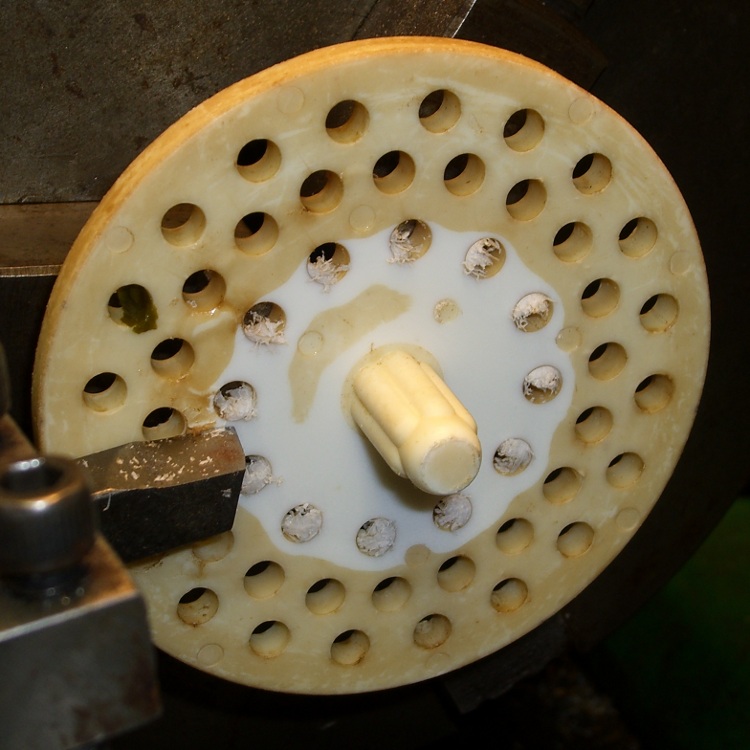
We have a (formerly) white plastic strainer in the kitchen sink that has acquired a brown biofilm layer. Bleach is moderately effective, but the surface is just ooky.
Green tea is suspected, but the evidence is not, at least according to me, conclusive. More research is in order.
Took the evidence to the Basement Laboratory’s Machine Shop WIng and skim-cut both faces, cleaned up the rim, drilled out the holes, countersunk the holes to get rid of the chaff, and it’s all good. The surface is probably too rough, but we’ll see what happens.
I figure I can do that maybe twice more before I must make a new one; looks like a perfect match for CNC, doesn’t it?
I use a blender to mix up the pancake batter every few days. Over the last week or so, the rotary switch Pulse position wasn’t returning to Off all by itself. After having replaced the impeller bearings, I couldn’t just ditch the mumble thing without at least trying to fix it…
A search for replacement parts reveals that Farberware kitchen appliances are disposable crap: they’re so cheap nobody stocks repair parts. IIRC, this blender was maybe ten or twenty bucks after rebate, which gets you through the shipping charge for the repair part. I would love to believe that paying more for kitchen appliances actually bought better quality.
Switch wire connections
As you’d expect, the four silicone rubber feet pop off to reveal machine screws that hold the plastic base to the metal body. This picture shows the wire connections to the switch:
L = brown
1 = orange
2 = no connection
3 = red
I couldn’t pull the switch knob off the shaft, so I dismantled enough of the motor mount to ease it to one side, apply a right-angle screwdriver to the switch body screws, and loosen the switch. That gave me enough room to jam a screwdriver between the switch and the mounting bracket to pry the knob off. It’s a plastic-on-plastic friction fit.
After the fact, it turns out that two screws behind the knob secure the mounting bracket to the bezel. Remove those screws, the bracket comes off, and it’s trivially easy to remove the switch screws.
The wires attach through those horrible spring-loaded push-and-pray connections: jam the wires in, pull back, and it’s supposed to be a gas-tight joint forever. I don’t believe a word of it. Remove the wires by poking a small screwdriver into the opening and forcing the brass tab away from the wire. Yuch!
Opening switch with slitting saw
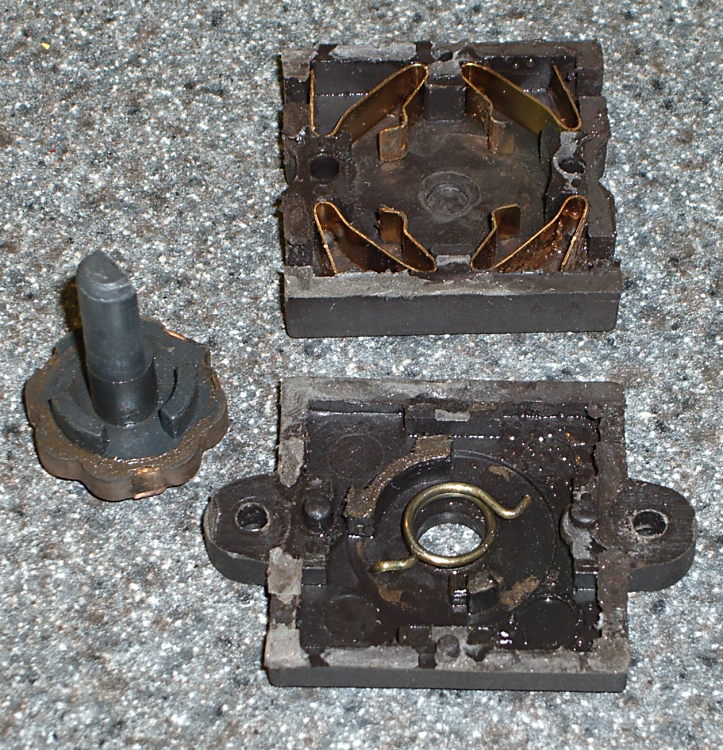
The switch body parts are, of course, bonded firmly together: no user serviceable parts inside. I deployed a slitting saw on the Sherline mill, grabbed the switch in the vise, and sliced 2.5 mm deep along the line between the two body parts.
The switch is some sort of engineering plastic, so I ran the saw at about 2000 rpm, cut at 100 mm/min, and dribbled water on the blade to keep it cool. You can see the grayish-brown residue under the switch.
The thing came apart easily enough after that…
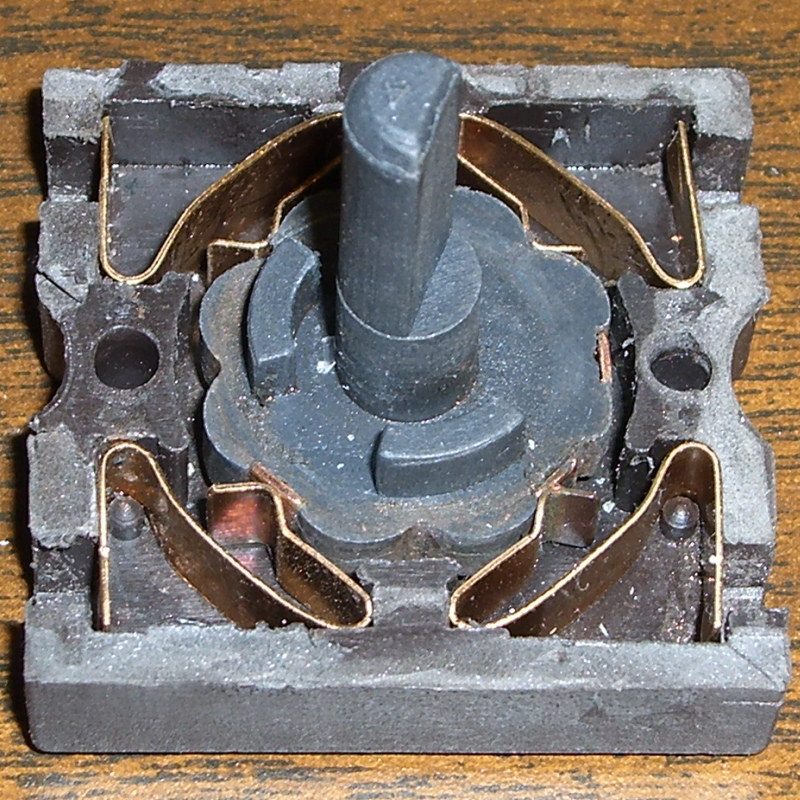
Switch Guts
These pics show the switch components. Note how the spring fits in the body and the four cunningly folded brass strips that simultaneously attach the wires, make the switch contacts, and spring-load the rotary detents.
I took the liberty of bending the strips to restore the clamping force on the wires; poking the tabs with a screwdriver tends to bend them a bit.
So it goes.
There wasn’t anything obviously wrong inside, but after a bit of puzzling, I discovered the problem residing in the coil spring that returns the switch to Off…
Cracked spring
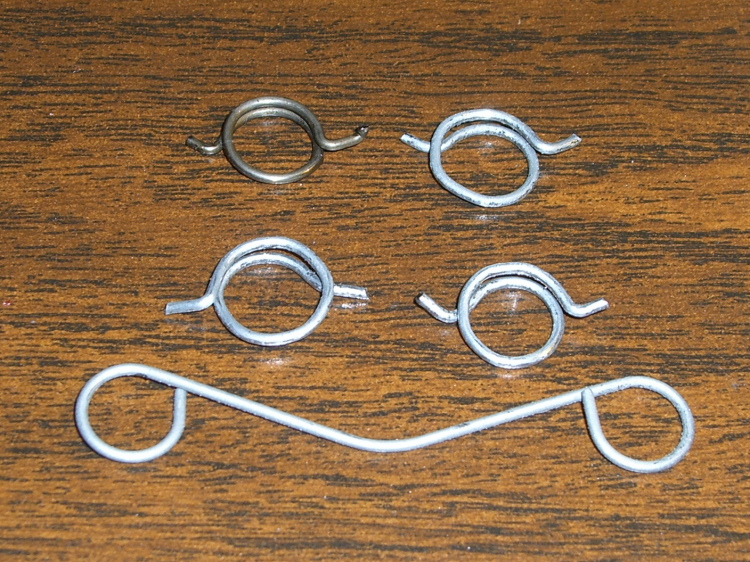
The spring wire is 1 mm diameter. A bit of rummaging in Small Spring Box Number Two disgorged a bag of spring-clip thingies with the proper wire size and just about the right coil diameter, too.
The right way to make a spring is to start with straight music wire, anneal it, make a mandrel, bend up a spring, then heat-treat the spring to make it just the right hardness and toughness for the job.
Spring iterations
I deployed my wire-bending pliers, made a few trial runs (well, OK, they weren’t trial runs when I started…), and got close enough by the third attempt (lower right).
Yup, cold-bending spring steel. It is to shudder, huh?
I bent the wire just off straight and worked my way around the coil about 0.5 mm per bend to produce a rather lumpy coil spring. This is definitely the wrong way to go, because the wire’s much too hard for that treatment: it wants to stay straight and doesn’t like those right-angle bends to form the end tabs. I think this will work well enough for long enough, though.
The spring’s chirality turns out to be important; the coil wants to tighten around the shaft when the knob’s in the Pulse position. The spring-clip thing has two ends; only one produces the correct result, which is perfectly obvious in retrospect.
Spring on switch rotor
The spring fits on the rotor like this, but with a whole lot more preload tension than you’d expect. The end result was a somewhat smaller coil diameter than I started with; I shrank the coil, re-bent a new tab on one end, chopped off about 4 mm of wire, and it was all good.
I also backed off the ramp on the notches that engage the brass contacts in the Pulse position so the switch wasn’t so prone to hang up. That was what motivated me to fix the thing: one morning I manged to leave the switch in Pulse because it didn’t quite snap back to Off, took the lid off the bowl, and the blender started up again. Fortunately, the batter is too thick to jump out of the bowl, but it was a near thing.
Here are the four switch positions and their contacts, in order from Pulse (most counterclockwise) to Speed 2 (most clockwise). You could, I suppose, conjure up a replacement switch if you puzzled out the connections; all the rotor tabs are connected together.
Switch contacts – PulseSwitch contacts – Off
Notice that, although switch contact 2 is unused, it is connected when the switch is in the Off position.
The back of the switch body takes pressure on the switch knob, as well as engaging the end of the rotor to hold it in the middle of the body. I wasn’t comfortable just gluing the body together again, because I suspect none of my adhesives will actually bond to the plastic.
So I chopped off a length of aluminum U-channel, poked two holes it in, shortened a pair of salvaged screws, and made a clamp for the switch body’s back. The body has three locating pins, so the two parts aren’t shifting with respect to each other, and the clamp holds the back firmly in position.
Repaired switch with back clamp
Reassembly is in reverse order, paying a bit of attention to securing the wires in those crappy push-and-pray contacts and keeping everything away from the cooling fan as the bottom snaps into place.
Done!
The economics of this sort of repair make absolutely no sense at all, but I hate throwing stuff away just because some cheap part failed. In this case, I’d be happy to replace the switch… let me know where you can find one with the requisite contacts and spring arrangement!
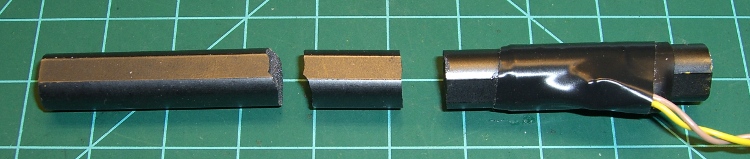
Ferrite inductor cores are notoriously fragile: they do not withstand much abuse at all. Given the amount of fiddling I’ve been doing with the Totally Featureless Clock, it was inevitable that I’d manage to drop the antenna…
Broken ferrite bar antenna
Gluing it back together with cyanoacrylate demonstrated that some things just never work the same. The antenna depends on a continuous flux path through the winding and even the minute gap introduced by the adhesive is enough to ruin the antenna.
What they say about hearts and wheels is also true of ferrite bar antennas:
Mary popped a CD into the boom box, poked the Go button, and the display read “No Disc”… which was odd, as the larger player in the living room had gotten halfway through it with no trouble.
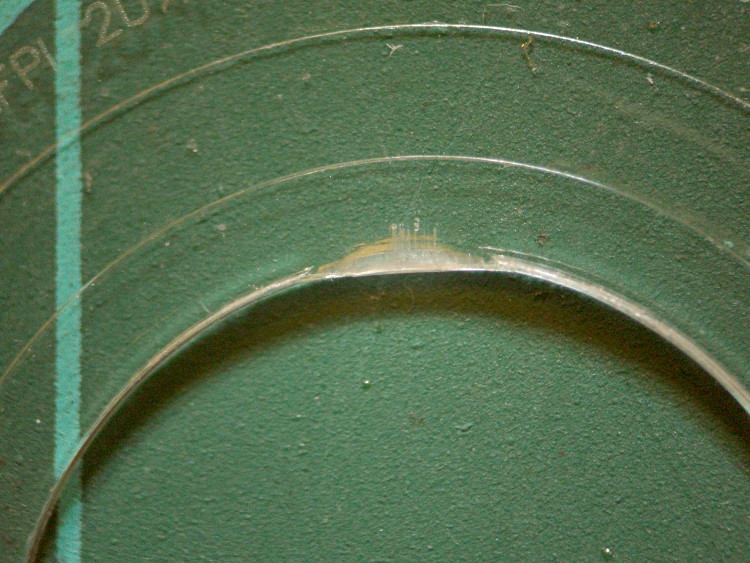
A bit of diagnostic winnowing revealed a ding on one side of the CD’s hole, as though it had been mashed by a heavy object. These CDs (it’s 13 of 16 in an audio book) aren’t new, but they’ve been reasonably well treated by all parties. It looks like it might have been crunched in a player, which you’d think would be impossible.
The disc seemed to seat firmly on the player’s hub, so I suspect the ding put the CD far enough off-center to defeat the player’s track acquisition and following algorithm.
A long time ago I wrote exactly that firmware for a prototype video disk player: find a one-micron track with a one-micron beam while the track wobbulates a few hundred microns as the disk spins at 3600 rpm. After that, mapping the track eccentricity and following it around the disk was a simple matter of software…
In this case, a bit of razor-knife surgery removed the plastic intruding into the hole and set everything to rights.









 The Smell of Molten Projects in the Morning