Ed Nisley's Blog: Shop notes, electronics, firmware, machinery, 3D printing, laser cuttery, and curiosities. Contents: 100% human thinking, 0% AI slop.
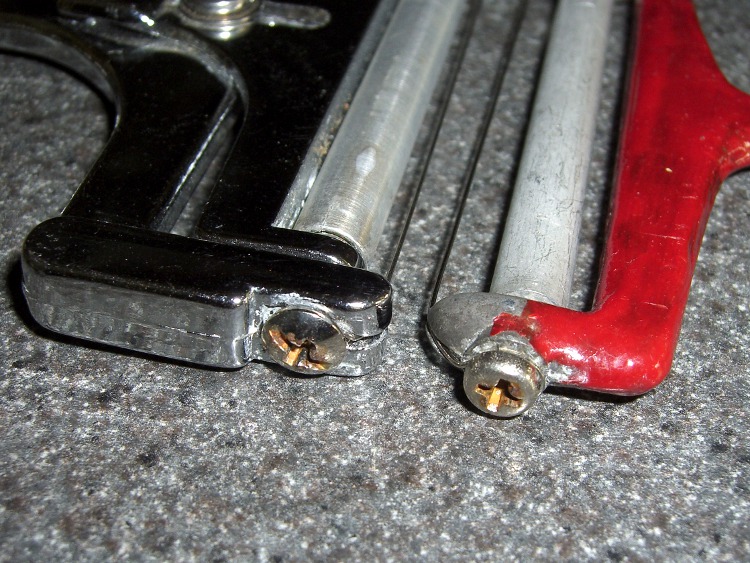
My ladies favor hard cheeses that are murder on cheese slicers. I just replaced the wires on a pair of favorite slicers, using 0.020 inch stainless wire. That’s thicker than the 14-mil wire they came with, so I’m hoping it’ll last longer.
Being thicker, it’s also harder to push through the cheese, so it’s subject to more force and might break sooner. Ah, tradeoffs…
What I really want are monomolecular wires that can cut through anything…
I’ve suggested using a knife on the Romano and Gruyere, reserving the slicers for Cheddar and other sissy cheeses…
Oh, the red stuff on the right-hand slicer is Liquid Electrical Tape. The handle is raw aluminum and leaves smudges all over the place. I’m assuming the layer doesn’t have much lead content, but who knows?
We acquired a McCulloch chainsaw from a friend in “Used to worked fine” condition. I hate small internal combustion engines, two-strokers in particular, but sometimes ya can’t look a gift horse in the orifice.
Anyhow, the only real repair needed was a new bolt for the anti-kickback clutch handle. For unknown reasons, McCulloch uses a non-standard head that, fortunately, can be carved out of a stock bolt.
Reshaped bolt in place
I got the two parallel sides a bit closer together than was required; if I were to do it again I would squish some modeling clay into the recess, make some measurements, and get it right the first time. I’m certain the original was much fancier, but this will suffice.
Nylock nut on trimmed bolt
Trim the bolt to fit and a nylock nut on the outside should hold it in place forever more.
The repair was prompted by a late winter storm that dropped a huge branch from our neighbor’s tree next to the house. We’d splurged on underground utilities when we upgraded the service entry to 200 A and this is exactly why…
[Update: A great and completely off-topic discussion about schematic & PCB programs showed up in the comments. I’ve extracted those into a separate post so folks can actually find the discussion with a sane set of search keywords…]
The classic failure mode for a Palm Zire 71 is to stop charging. This might happen when the lithium-ion battery craps out and needs replacing, but the flex circuit between the cradle connector and the main board seem to go bad around that time, too. That’s what eventually killed my first Zire, so after I stuffed a new battery in the second, I tried fixing the first.
Here’s the flex circuit in its natural habitat (photo from the second Zire).
Flex Circuit and Components
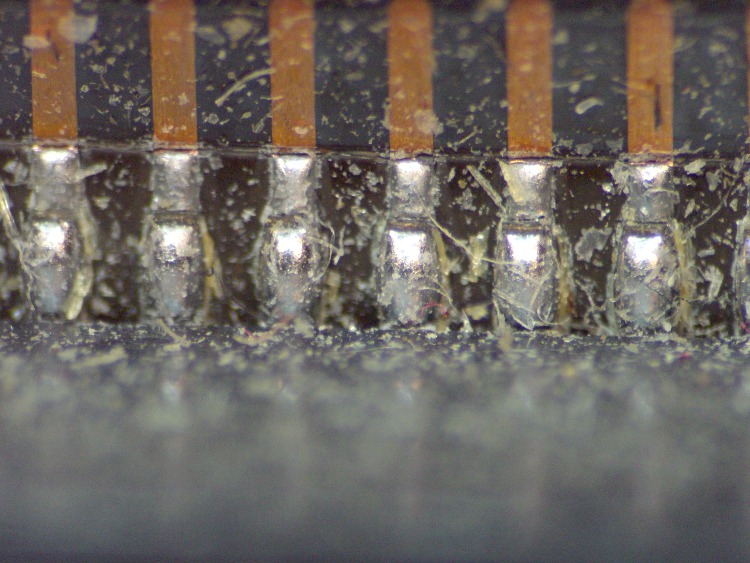
Here’s a picture looking down along the inside edge of the connector at the the flex circuit in the photo above. Notice the cracks at the junction of the soldered terminals and the copper flex traces. Click the pic for more detail…
Cracked Flex Traces
I suspect some of those cracks came from my ham-fisted repairs over the years of owning the thing, but the fact of the matter is that many other owners who didn’t take their Zire apart have much the same charging / USB problems. I think the connector moves slightly when it’s jammed into the charging cradle and that’s enough to fracture those joints over the course of a few years.
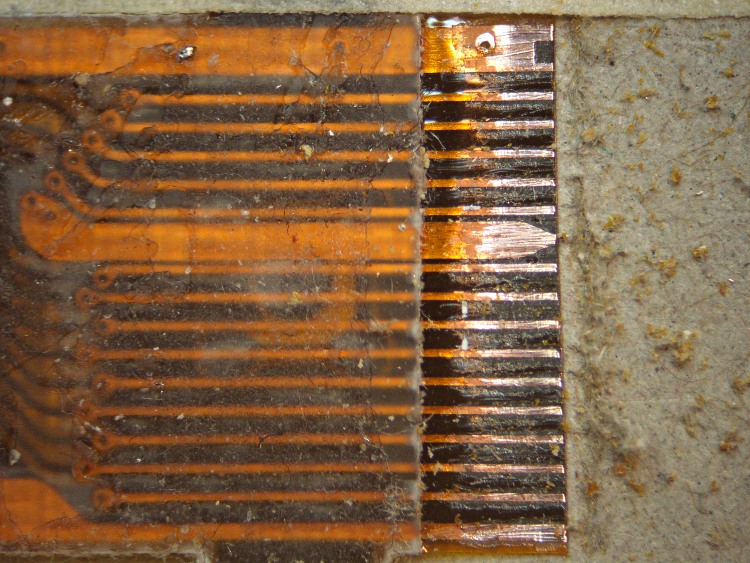
Anyhow, cutting the flex just beyond the connector pins and scraping off the insulating layer with a sharp razor knife reveals the traces.
Flex Traces Exposed
This end of the flex circuit has two additional ground traces bracketing the 16 traces leading to the exposed connector pins. As a result, the connector body is firmly grounded. The fat trace on the top is a paired ground conductor. The fat trace in the middle is another ground.
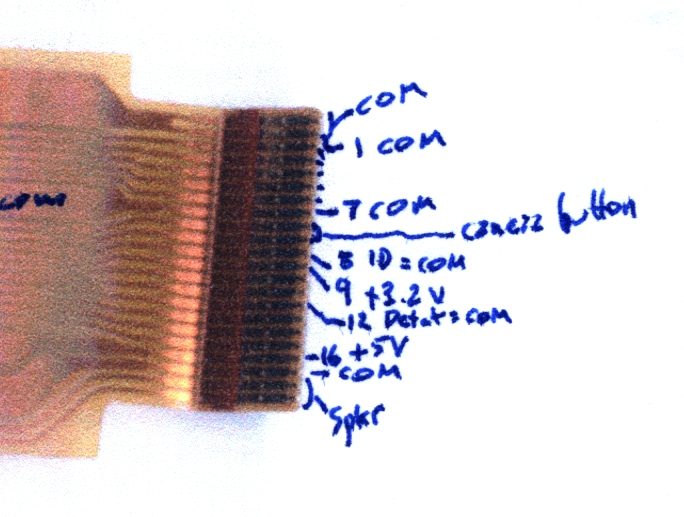
Here are some of the connections at the other end of the circuit, where it plugs into the Zire PCB. Note that the shutter button traces wind up in the midst of all the traces with numbers corresponding to the external connector pinout found there. The speaker traces lie outside the ground at the bottom edge of the picture above.
Flex connector pinout at main PCB
With that in hand, I untwisted a hunk of stranded hookup wire to get some fine copper wires and soldered them to the flex circuit traces. Note that the two outermost traces are soldered directly to the metal shell around the alignment / latch holes. The red stuff at the very end of the flex circuit is orange nail polish that will, in theory, keep the new wires from shorting to the copper shield layer in the flex. The silvery shape at the lower middle is the shutter button.
New Leads in Place
The wires turned out to be just slightly too long; were I to do it again, I’d pay more attention to getting the edge of the flex exactly where it was when I cut it off.
A layer of Kapton tape insulates and stabilizes the wires. A layer of copper foil tape atop the Kapton gets soldered to the connector shell for static dissipation, but I’m not convinced it was necessary. This view is from the other side of the flex, with more nail polish along the edge to glue things down.
Flex with Nail Polish on Kapton
A layer of Kapton on that side pretty well finished it off; I took some pains to press the two adhesive layers together around each of the wires.
Solder the speaker back in place and reinstall in reverse order, folding the new wires gently into position. That’s when I found out they were a few millimeters too long. I left ’em be.
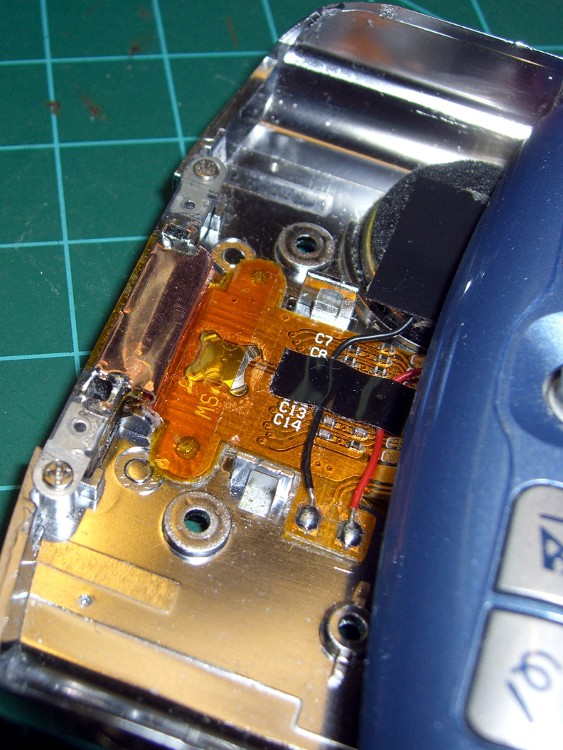
Here’s the final result, minus the shutter button and bezel.
Repaired Flex in Place
From this point, all the bits fit back together the way they used to.
While all this was going on, I won a pair of Zire 71s on eBay, plus a wireless keyboard (which solves a problem I don’t have), plus a known-bad Z22 (dead digitizer), plus a bunch of other odds and ends, for a whopping $25 delivered. I was so hot to get the pair that I even upped my bid to $45… there were no other bidders.
Now I have a cold backup for the hot backup for my PDA!
Amazingly enough, the (presumably OEM) batteries in the new-to-me Zires charged up and work fine, so I need not meddle with them for a year or two.
So I bought 530 bucks worth of new tires for the van; it’s ten years old with 66k on the clock. Picked the most suitable ones:
Near the top of the Consumer Reports list
Best constellation of features for our use
Available at the local tire shop
CR is essentially the only place that does actual across-the-board tests; you can disagree with their methodology, but it’s pretty much the only game in town.
I wound up at the local tire shop after bouncing off one of the online sources. In this case, tire + shipping + installation costs more online; the local shop was one of the online source’s installers.
So I went direct. They’re aboveboard: the balance + installation charge is the same no matter where the tires come from.
Had a 10:00 appointment and it took 90 minutes to get out of the shop. Not impressed.
The tire pressure monitor light came on halfway home. Well, OK, maybe it’s noticed the tires are bigger? But it’s a differential rotation counter, sooo… that’s not the problem.
Checked the pressure after letting the tires cool off for a few hours.
37 – Left rear
32 – Right rear
40 – Left front
34 – Right front
The pressure monitor was definitely doing its job!
Adjusted them all to 36 psi (hard, but we’ll see how it rides), reset the monitor, and it’s all good.
Factory trained and certified mechanics, my obscene-gerund deleted-noun.
Oh, and the lug nuts were evidently tightened by Andre the Giant… gotta break those suckers free before we do much more driving!
All eight cells were within 3 mV of each other, so I sorted them by voltage and picked two from the middle of the lineup. Shorting them together in parallel produced a few microamps of current, so they’re as well matched as seems reasonable.
Rather than attempt to solvent-bond the case back together, I wrapped a layer of Kapton tape around the whole thing. The case doesn’t have quite enough meat to bond, anyway, because the width of the slitting saw turned that much plastic into dust.
A bunch of cutouts along the bottom edge key it into the charger, so I cut out the tape over those sections. Despite what it looks like, the small metal tab between the two terminals (on the top) is not covered in tape; that’s the snazzy InfoLithium contact that tells the camera that this is a valid battery.
The camera reported the pack had about 15 minutes of life remaining, which makes sense given that the cells spent quite a while in transit. I ran it down to empty, put it in the charger, and it seems to be perfectly happy. I’ll do a capacity test after a round or two of picture-taking.
I doubt the tape will prove to be a permanent fix, but as far as the camera is concerned, that slick Kapton makes it go in and out like anything…
Went to roll the bike out of the garage and the rear tire was dead flat. You don’t even need to look at the tire, you just instantly know something’s wrong: the bike feels funny with a flat tire.
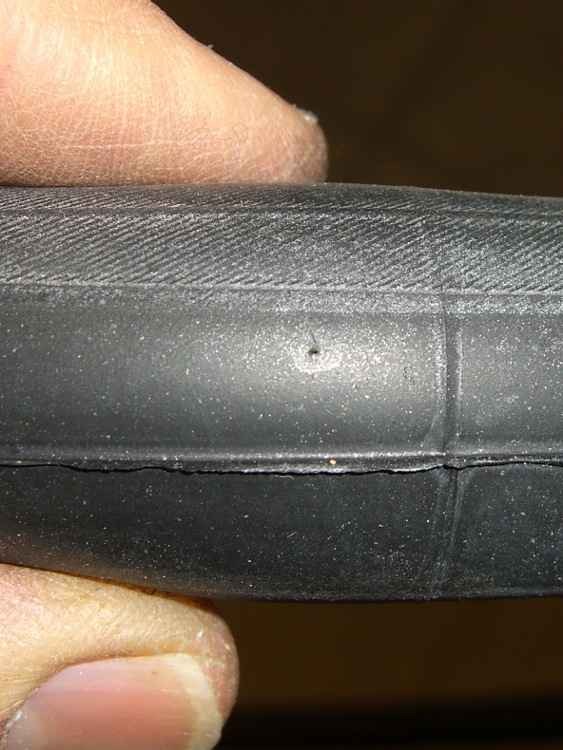
The picture shows the problem: a pinhole in the tube. Nothing penetrated the tire, nothing went wrong with the tire liner (you can see this was a few mm from the edge, so it’s not an abrasion flat), there are no problems anywhere. Just a tiny hole in the tube.
As nearly as I can tell, the tube simply failed at that point, without any external aggravation.
Popped in another tube and it’s all good, but … I guess it’s time to buy some new tubes: the new one came from a box dated May 90.
Finding a flat in the garage is much much better than finding a flat on the road.
So Mary was going to apply the long-disused Sears Craftsman electric hedge trimmer to the decorative grasses she’d planted on either side of the (equally disused) front entry, but when I deployed the thing it didn’t run. A quick walk through the debugging tree: GFI green, extension cord OK, so it must be the trimmer.
Off to the Basement Laboratory Repair Wing…
Two tricks to getting it apart, after removing all the obvious screws:
The handle comes out of the sockets after great persuasion
Remove two of the three hex-head-with-lockwasher screws on the bottom and the case pops apart. The third screw holds the motor plate into that half of the case.
The switch is, of course, not intended to be repairable, but that’s something of a motivator around here. It uses those awful poke-and-pray spring clamps, which you could, in principle, release with a small screwdriver, but I cut the wires on the motor side of the switch, leaving plenty of room to graft connectors onto them.
Next time, I’ll be able to release the wires more easily.
Congealed grease on switch contacts
A rivet holds the switch together, but attacking it with a drill removed enough of the head that I could whack the rest of the body out with a drift punch. A 2-56 machine screw fits neatly into the hole and there’s enough clearance on both sides for the screw head and a nut; hack the screw to length with a Dremel abrasive cutoff wheel.
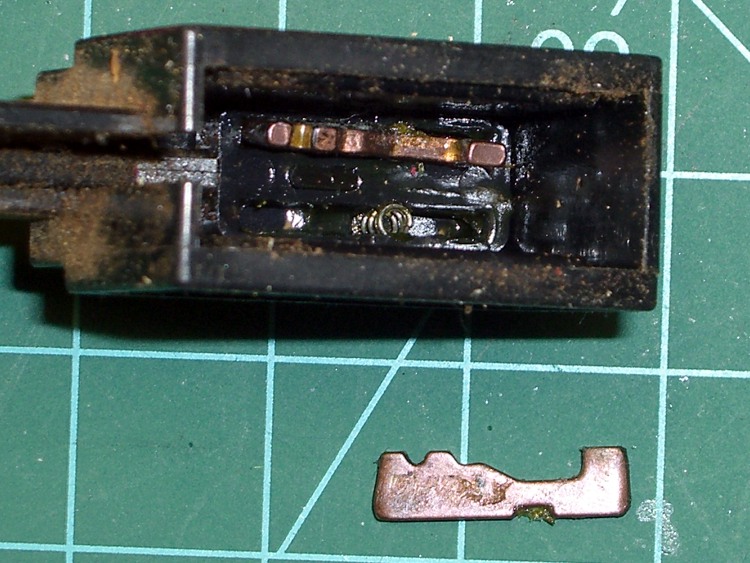
Notice that the switch trigger button visible from outside the case acts on a push rod that slides the movable contacts (in the top part in the picture) back-and-forth atop the copper contacts (with the wires). A pair of springs loads the movable contacts against the copper strips.
The problem turned out to be, as expected, congealed grease inside the switch. The black gunk on the right halves of the copper contacts was essentially solid; you can see that it formed a nice insulating layer. I cleaned that out, polished up the moving contacts, reassembled it, and … the switch still didn’t work.
At least I discovered that with an ohmmeter, before reassembling the entire trimmer!
Switch contact slider
The movable switch contacts have a small ramp, just about in the middle, that rides up on the black hump between the copper strips when the trigger button is released. That mechanically breaks the connection, but also allowed the grease to congeal in the air gap. The grease also formed a lump that prevented the movable contacts from pressing firmly against the copper strips, despite the springs.
I gnawed out that crud with a small screwdriver, dabbed on more contact oxidation prevention grease, buttoned it up again, and now the switch works perfectly again.
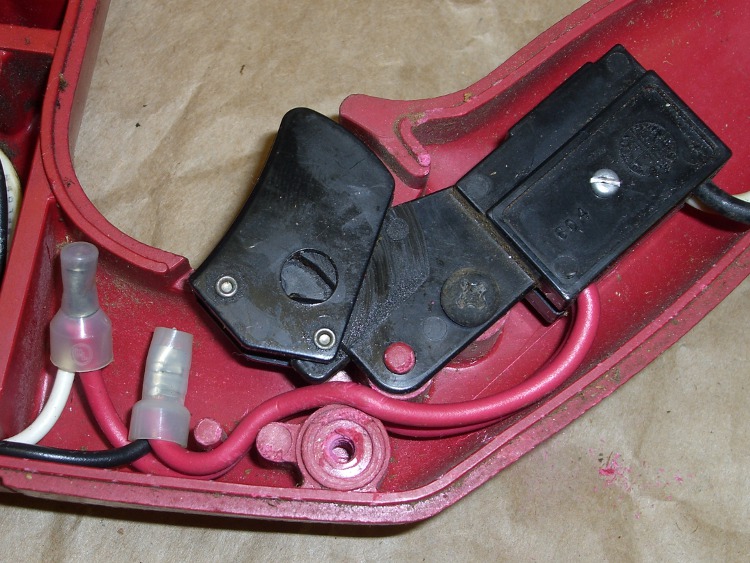
New switch wires
I spliced in somewhat longer lengths of hookup wire with butt-splice connectors I’ve had for years and it’s all good.
The post with the screw hole just below the wires matches another in the opposite half of the case; the post actually fits inside the ring you see here, so it doesn’t crunch the wire. However, the wire must be pushed in far enough to avoid interfering with the switch action rod.







 The Smell of Molten Projects in the Morning