Ed Nisley's Blog: Shop notes, electronics, firmware, machinery, 3D printing, laser cuttery, and curiosities. Contents: 100% human thinking, 0% AI slop.
I dropped that lens cap and the sheet-metal disk popped out; evidently the acrylic caulk doesn’t really count as an adhesive. Cleaned out the residue, ran a thin layer of urethane adhesive around the rim, and applied some clamps:
Re-clamping the cover
Cleaned out the inevitable urethane bubbles that emerge from even the most minute opening and it’s all good.
So the Epson R380’s magenta printhead has clogged and cleaning it doesn’t have any effect. I figured I’d pop the printhead out, rinse off the crud, and see if that improved the situation. Turns out, you can’t get there from here…
The first step is removing the printer side panels, which involves sliding a steel strip into the not-really-vent slots along the side to release the catches as described there. This picture shows what’s going on inside:
R380 side panel locking tab release
You must hit that slot in the catch with the strip, so the strip must be no wider than 15 mm = 5/8 inch and tapering the end would certainly help. After I removed the panels, I broke those latch tabs off; the panel has locating tabs that align the edges, so the latch tabs just keep you out.
In any rational printer, accessing the printhead for cleaning would be trivially easy. Epson has a different attitude: KEEP OUT!
My original idea was to release the rod upon which the ink tank carrier slides, then pull the whole thing out, but it turns out the rod is also a shaft that transmits rotary motion from one side of the printer to the other, plus a mechanism to raise and lower the printhead over the cleaning station (and, perhaps, the DVD carrier that I’ve never used). A vast assortment of gears, clips, encoder wheels, and doodads affixed to each end convinced me not to go that route right now.
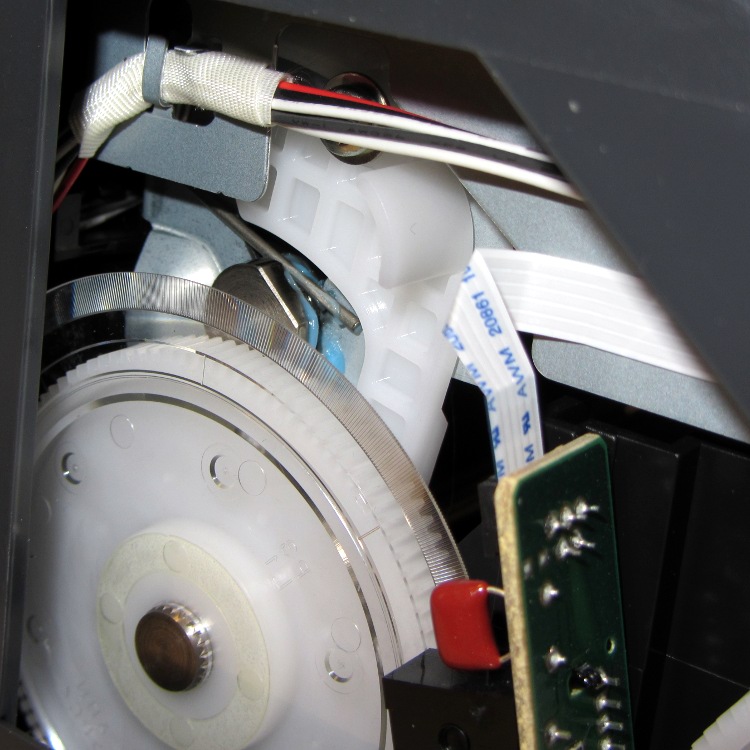
The left side includes an impossibly delicate rotary encoder disk blocking the end of the shaft:
R380 left side mechanism
Prying the spring out of the shaft notch allows it to slide to the right until another spring clip slams up against the inside of the frame on the right side. That clip may be pry-able, but it’s carefully arranged so as to be maximally inconvenient to reach.
R380 right side interior
The ring holding the gear in place must be removable, somehow or another, even without an obvious hole or tab:
R380 right side mechanism
With that encoder wheel blocking the left end of the rod, I gave up.
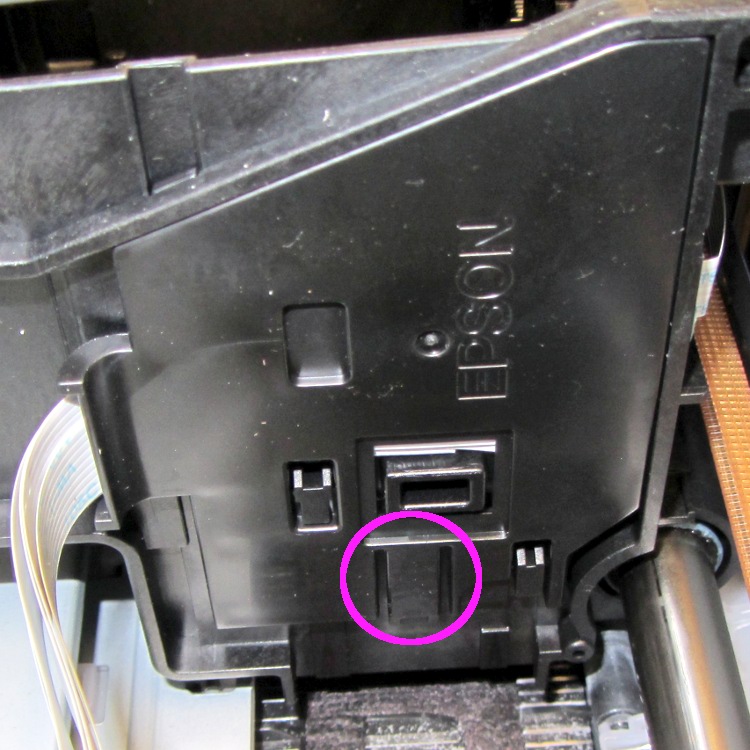
Then I tried to dismantle enough of the ink tank carrier to release the printhead. The first step removed the tank carrier’s two side panels, both of which use pull-out clips to prevent them from sliding. A view of the removed panels shows the tabs:
R380 Ink Tank Carrier side panels latches
The outside panel requires jamming a small screwdriver behind that tab at an awkward angle, then the panel slides downward:
R380 Ink Tank Carrier – right side cover
You can release the inside panel with a fingernail near the top of the (unmarked, but obvious) tab outlined in white on the far right side, then slide upward:
R380 Ink Tank carrier – interior
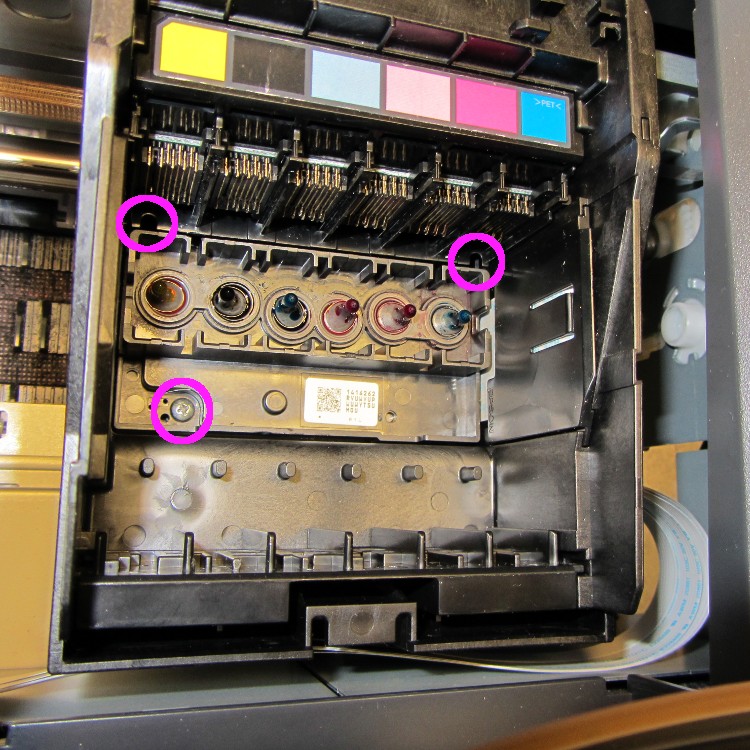
The magenta circles mark three screws that secure the printhead plate to the carrier, but it won’t do you any good. The two rear screws require a narrow-shaft Philips #1 driver and you cannot get the screws out through the holes; I managed to get them back in place, but don’t loosen them until you figure out how to remove the assembly holding the electrical contacts for the ink tanks.
That assembly, marked by the six color panels, slides vertically into the rear wall of the carrier and seems to have a latch on the rear wall of the tank carrier. Of course, you can’t access the latch without dismantling the damn printer.
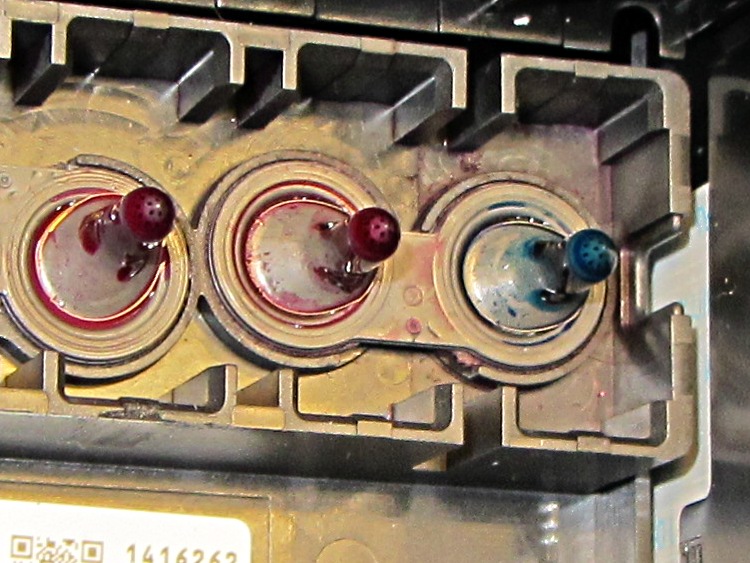
So I put everything back together again and the printer works no worse than it did before. I’m considering connecting a syringe with length of tubing to the magenta inlet port, then forcing a toxic mix of water, alcohol, and detergent through the printhead:
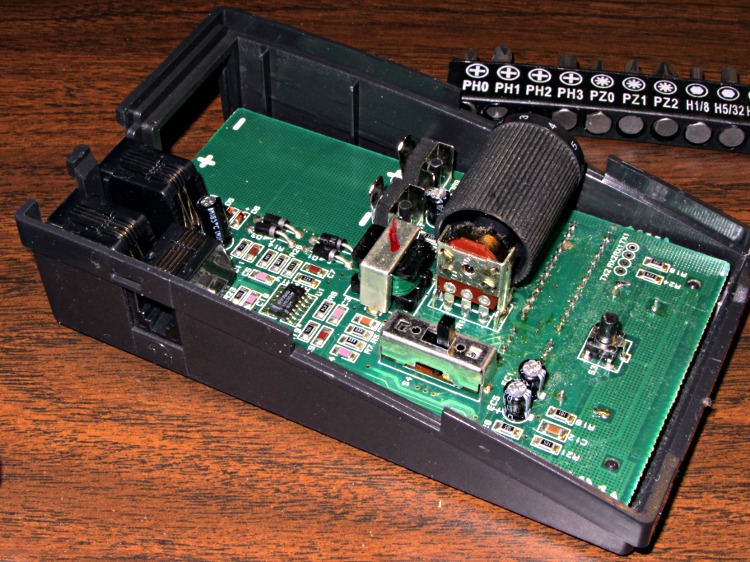
The headset / phone switch in my ancient HelloDirect phone headset became increasingly intermittent and finally stopped switching at all, so I tore the thing apart. It has two snap latches on each side in addition to the single screw in the bottom:
HelloDirect headset interface – top interior
The 4PDT switch just to this side of the volume drum can’t be taken off the board without unsoldering all 12 terminals and two case anchors, so I just eased some DeOxit Red into the openings and vigorously exercised it. That seems to have done the trick.
I cleaned out a bunch of fuzz and a spider husk while the hood was up…
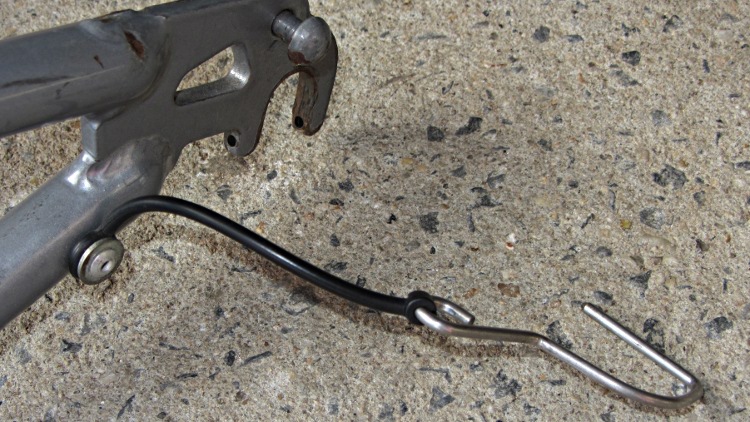
My old BOB Yak trailer mounts to the bike axle with stainless steel grenade pins, which works fine. After all these years, alas, the rubber straps securing the pins to the frame have rotted away. The original straps are nicely molded affairs:
BOB Yak – original pin strap
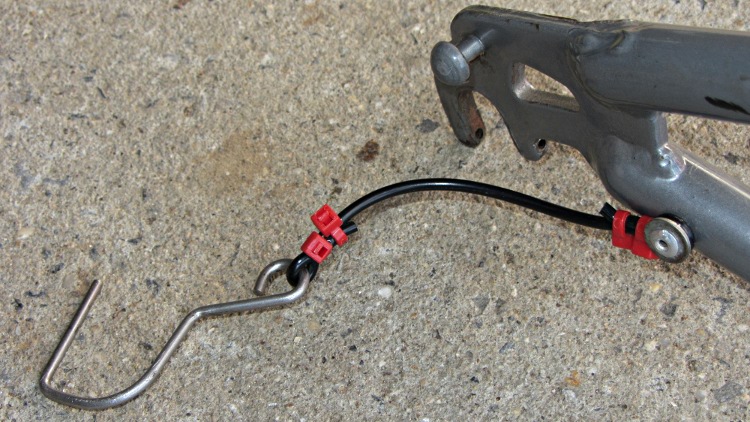
I snipped a large O-ring, deployed four small cable ties, and this ought to last for another decade:
BOB Yak – new pin strap
The strap in the first picture hadn’t quite broken, but the rubber was cracked and ready to snap. So I made a preemptive strike…
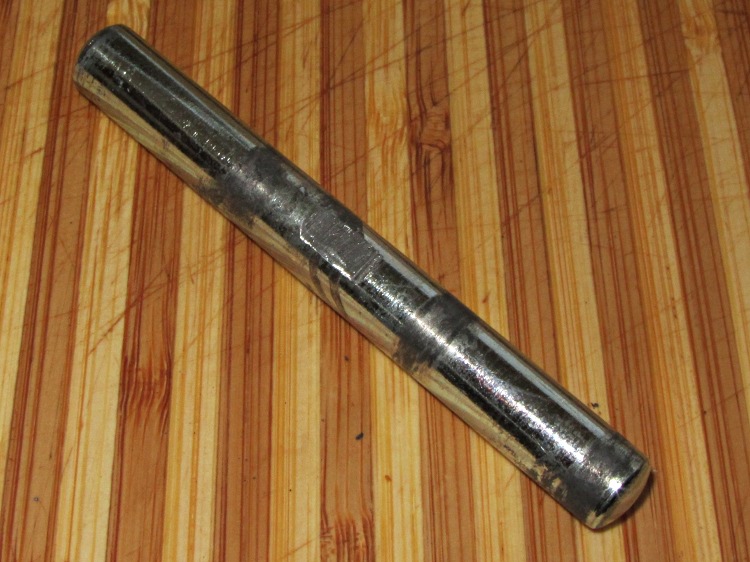
The shaft that tilts the mixer head has started walking sideways out of its hole, which is not to be tolerated. Looking up inside the base column shows a locking screw that’s worked loose:
KitchenAid mixer – pivot shaft and locking screw
I took the thing apart and filed a flat on the shaft:
KitchenAid mixer pivot shaft – added flat
And then a dab of Loctite on the screw will prevent that from happening again:
KitchenAid mixer pivot locking screw
It’s still piddling oil on the countertop. If you have one of these things, always store it with the head tilted upward. That makes the oil run down the column onto the counter, rather than through the planetary gears into the mixing bowl…
The third hand grabbers I have all put bare alligator clip ferrules in the adjustable sockets with a thumbscrew to secure them. Over time, that thumbscrew crunches the ferrule and makes the clip hard to adjust. This has become enough of an annoyance that I rummaged around in the brass tubing cutoffs to find some that fit into the ferrules:
Alligator clip with brass tube insert
Given the sorry state of the ferrules, they required quite a bit of squeezing and shaping until that tube fit inside, but after that they rounded up nicely.
I suppose I should solder the tubes in place, but …
This Watts 9D-M3 Backflow Preventer Valve feeds water into our furnace, provides an overpressure relief, and prevents heating loop water from re-entering the potable water supply.
Watts 9D-M3 Backflow Preventer Valve
The vertical pipe leads downward near the floor, underneath which sits the small plastic bucket I provided to catch the occasional drip. Recently we had an all-hands scramble to soak up a pool of water spreading across the floor from the overflowing bucket, across the aisle, and below the shafts-and-rods-and-tubes-and-pipes storage rack. Evidently the occasional drip became a steady drip while we weren’t watching; not a catastrophic flood, but far more water than we want on the floor.
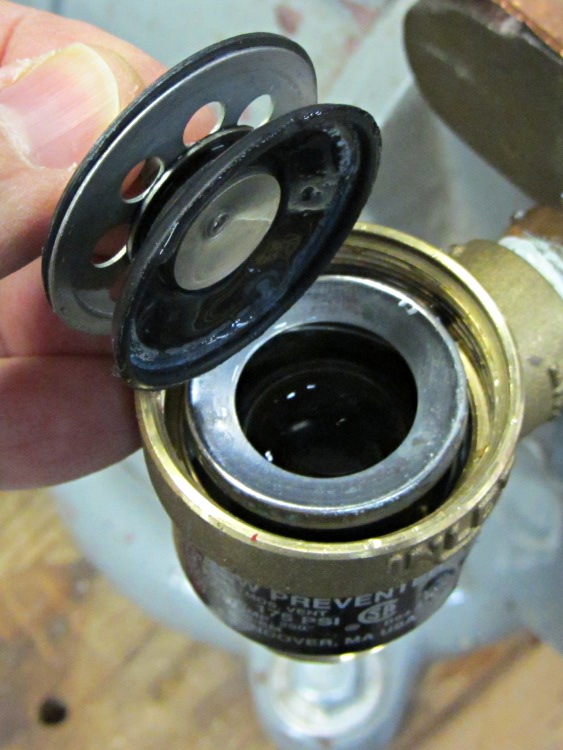
This is the inlet valve, which is basically a flapper. You can’t see the fine cracks around the central mount, but they’re all over the inner half of the ring.
Watts 9D-M3 – Inlet valve
And this is the outlet valve, which has pretty much disintegrated. Note the outer rim peeled back under my thumb:
Watts 9D-M3 – Outlet valve
A complete new valve is $40, in stock and ready for pickup at Lowe’s, but all I really needed was the failed rubber flapper valves, which they don’t carry. A few minutes of searching reveals the Watts 0886011 Repair Kit, which has all of the interior parts.
Pop Quiz: How much does the repair kit cost?
Answer: Starts at $38 plus shipping and goes up from there. Cheap aftermarket kits run $20 and up, but they’re all out of stock.
Now that, party people, is the sort of thing that ticks me right off.
Perhaps the local HVAC / plumbing supply stores have such kits in stock? To quote: “They may exist, but we don’t have them.”
I don’t see any way to homebrew new flapper valves, so it’s off to Lowe’s we go…
It would seem to me that these things shouldn’t fail after a mere decade of service. I thought that about the CdS flame sensor that crapped out in the middle of a sub-zero January cold snap while I was at Cabin Fever some years ago, too.








 The Smell of Molten Projects in the Morning