Ed Nisley's Blog: Shop notes, electronics, firmware, machinery, 3D printing, laser cuttery, and curiosities. Contents: 100% human thinking, 0% AI slop.
This sort of thing arrives quite often, looking very official with all its Control Numbers, three-color printing, good production values, and suchlike:
Subscription Billing Service – front
Generally, Subscription Billing Service offers subscriptions / renewals to magazines I’d never subscribe to. As it turns out, we actually subscribe to Science News and their subscription reminder arrived a few days later, which gave me the opportunity to fish the SBS form out of the recycling bin and compare prices. Turns out that the SBS “one of the lowest available rates we can offer” deal is just about exactly twice what you’d pay directly to Science News.
Huh. What a surprise.
The Fine Print on the back of the SBS form shows how they get away with this nonsense, at least given an unending supply of new suckers to exploit. You have seven days to “cancel” and you’ll pay $20 for the privilege of not having a middleman double the price:
Subscription Billing Service – back
I do wonder how they can act as an “agent” without having a “direct relationship with the publishers”. Just one of those little mysteries of the universe, somewhat like how dark matter can be everywhere and nowhere at once.
It’s a perfectly legitimate business, I suppose, but that doesn’t mean they’re not scum…
As if that, that, and that weren’t enough, Ubuntu 12.04 suffers from random crashes that occur without doing anything more challenging than turning the damned thing on and signing in to a user account.
That problem report dates back to mid-December of 2011 and investigation has been ongoing, with notes like:
Yet Canonical decided to ship 12.04 anyway, with no fix in sight.
I think disabling suspend mode reduces the number of random crashes, but it still seems to be about one a day. Resuming from suspend mode definitely messes up the network connection more often than not, so we just won’t suspend it again.
This was a test installation on the Lenovo Q150, a bone-stock consumer PC, to see if I should upgrade the creaky 10.10 setup on my desktop box. Given the weird collection of hardware on my box (left- and right-hand trackballs, tablet, dual monitors with one rotated to portrait mode, etc), I’d hoped a “Long Term Support” version of Ubuntu / Xubuntu / whatever would be stable enough for use right out of the chute. Given the pervasive nature of the problems with 12.04, it’ll be at least a few more months before the code settles down and starts flying right.
That’s not encouraging for what was supposed to be a well-tested release, with more attention paid to stability than fancy features.
Having installed Ubuntu 12.04 on that Lenovo box, which has an nVidia graphics chip, we find there’s an error somewhere inside the current 295.40 (and perhaps previous versions) of the proprietary nVidia driver that causes random video lockups which generally require rebooting that sucker. Of course, the default Unity desktop requires that driver for 3D operations like compositing, because the Free Software drivers don’t / can’t do 3D in hardware.
How is it that a (nominally) Open Source / Free Software OS requires proprietary drivers just to present the UI? Oh, right, 3D is glitzy and that’s what matters most in these degenerate days.
Anyhow.
The least-likely-to-fail solution seems to be disabling the nVidia driver, which enables the Nouveau driver, which does 2D just fine, which lets Unity stumble along. Reverting to 295.33 seems to work for some folks, but I have other things to do…
So an email made its way through all the spam filtering:
From: USPS Service <us@usps.com>
Reply-To: USPS Service <us@usps.com>
To: (me)
Subject: Failure to deliver
Notification,
Your parcel can’t be delivered by courier service.
Status:The size of parcel is exceeded.
LOCATION OF YOUR ITEM:Riverside
STATUS OF YOUR ITEM: not delivered
SERVICE: One-day Shipping
:U954571533NU
INSURANCE: Yes
Label is enclosed to the letter.
Print a label and show it at your post office.
Information in brief:
If the parcel isn’t received within 30 working days our company will have the right to claim compensation from you for it’s keeping in the amount of $12.70 for each day of keeping of it.
You can find the information about the procedure and conditions of parcels keeping in the nearest office.
Thank you for your attention.
USPS Customer.
It had, of course, an attachment: Zip archive attachment (Label_Parcel_USPS_ID.45-123-14.zip)
Not having sent a package using “one-day shipping” (which the USPS would call Express Mail), this seemed odd, as did the somewhat stilted phrasing.
We all know how this is going to work out, but let’s do the exercise anyway.
Save the ZIP attachment in /tmp, then …
Apply ClamAV: run freshclam to update the virus signatures and fire clamscan at the ZIP file:
/tmp/Label_Parcel_USPS_ID.45-123-14.zip: OK

----------- SCAN SUMMARY -----------
Known viruses: 1201128
Engine version: 0.97.3
Scanned directories: 0
Scanned files: 1
Infected files: 0
Data scanned: 0.04 MB
Data read: 0.02 MB (ratio 2.00:1)
Time: 7.549 sec (0 m 7 s)
Huh. Well, then, it must be safe, right? (The alert reader will note that my version of clamav is one click back from the latest & greatest. Maybe that would make a difference. Probably not.)
Obviously, this blob of slime arrived still warm from the oven: even though the Big Name AV checkers have up-to-date signatures, they detect nothing wrong and would happily let me run a Trojan installer. That’s what malware protection buys you these days.
To a good first approximation, whatever virus scanner you’re using won’t save your bacon, either; the advice to keep the signatures up-to-date is necessary, but not sufficient. Of course, you know enough to not autorun random files on your Windows box, but this attack works often enough to justify sending messages to everybody in the world. Repeatedly.
I recently had a discussion with someone who wanted a system secured against email and web malware. She also insisted that it had to run Windows and share files with other Windows machines. I declined to bid on the job…
So here’s the Rest of the Story, reconstructed from my notes…
Having already torn the thing apart and discovered that the repair would include both the drum+spider assembly (not available separately, which may actually make sense given high-speed spin balancing) and the front half of the plastic tub, I priced them at RepairClinic and Sears Parts Direct. In round numbers, this adventure would cost $300-400 just for the parts, a bit less than half the cost of the washer.
As I recall, the Sears price for the drum was roughly twice that for RepairClinic, while the tub was about the same. I suspect Sears deliberately inflates the drum price to make sure nobody actually buys the thing and to pad out the tech’s time to replace it.
The warranty in the front of the Owner’s Manual seemed promising:
Sears Kenmore HE3 Washer Warranty
So I called the Sears Parts & Warranty line, walked the menu tree, explained the situation, asked for a new drum, and was told that they must dispatch a tech to diagnose the problem. Despite the warranty, there would be a labor fee and an additional fee to process the parts order. There was no way to determine those fees before dispatching the tech.
I pointed out that I’d already dismantled the washer, knew exactly what the problem was, and just needed the replacement drum as described in the warranty. I was put on hold to “process my request”, eventually being transferred to a “tech specialist department for further assistance”.
The “tech specialist” was willing to spend as much time as required to convince me that the Lifetime Warranty had expired, based on a deliberate misreading of the terms. As far as they were concerned, the sentence “After the first year, you will be charged for labor” meant that the warranty had expired on a five-year-old washer and that the drum was no longer covered. They would not, under any circumstances, send me the drum. Yes, I asked for a supervisor and, no, I doubt that she really was one; handing the call to the next cubicle is standard call-center subterfuge to placate irate customers.
I eventually decided that this was not a language-barrier issue, but a carefully planned & executed part of their standard script: letting their Indian-subcontinent call center take the heat works wonderfully well for the purpose of getting rid of warranty claims.
So I looked up the phone number of the “interim CEO/President” (I assume he’s long gone by now) at Sears Holding Corporation and gave him a call. Of course, I didn’t expect to actually reach the CEO, but I figured I’d shake the dice a bit to see if a better combination came up.
It turns out that they expect this sort of behavior and immediately connected me to their “Executive Customer Service” department, which was described as “the highest they can go”. So I told my tale, asked her to ship me a drum, and was told that wasn’t possible. What she could do, as a “one time offer”, was to “waive the labor fee” when they dispatched the tech.
I asked if there were any other fees. She refused to answer that question. I asked if there was a charge to order the parts. She refused to answer that question. It being a Friday, I asked when the tech could arrive; she said that they would attempt to schedule it for Monday, but Tuesday was more likely. I asked if he’d arrive with the drum. She said the tech would assess the problem and order the necessary parts, requiring a second appointment later in the week.
I told her that it was obvious Sears had no intention of honoring their warranty. She repeated that this was a one-time offer. We did not part on good terms.
So I ordered the drum & tub from RepairClinic, two huge boxes arrived on Tuesday, I installed everything, buttoned up the machinery, and the washer has worked fine ever since.
Every time I looked at that big drum, I got mad all over again. I never mustered the enthusiasm to take the spider off the back for a post-mortem, which is why there’s no Part 2 after that post. Eventually I hauled the carcasses to the town’s disposal site and bid them good riddance.
Obviously, Sears won: they got rid of me without spending a dime on the warranty. It cost them maybe two hours of phone time, but I doubt the pleasant voice in the “Executive Customer Service” department makes much more than minimum wage and Indian-subcontinent personnel are basically free compared to that.
I’m doing a bunch of appliance repair right now and wonder just how much we’d be spending if we had to go through the Official Channels for repairs. I’m definitely earning my keep… and having much more fun than being jerked around by that corporate structure.
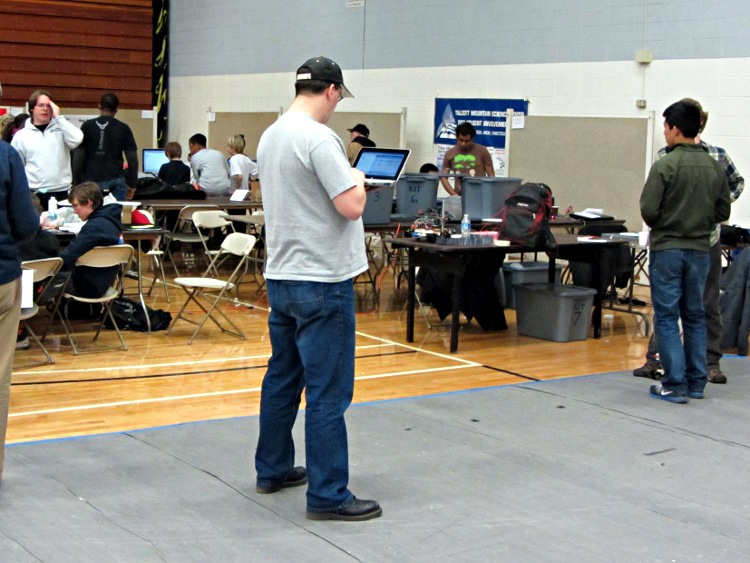
The main aisle at the Trinity contest is a busy place, but that didn’t seem to matter. This guy came ambling along, tapping on the keyboard, walking slower and slower, until he just dropped to a dead stop(*) in the middle of the lane:
Distracted Walking
Everyone gave him plenty of clearance until he eventually rejoined consensus reality and moved on…
(*) There’s a song about that, but you’re gonna have to find it yourself.
That circuit works pretty well for APRS tracking, I’d say, based on a 23 mile out-and-back ride over the Walkway:
KE4ZNU – Wouxun KG-UV3D – first ride
Had I gone further westward along Rt 299, however, the track would end: the bluffs on the east side of the Wallkill River Valley block much of the RF and Illinois Mountain (just to the west of Poughkeepsie) finishes the job. Evidently, nobody runs an APRS iGate or digipeater anywhere within sight of New Paltz…
FWIW, the Walkway’s hand-scrawled notice boards now entreat “Bicyclists: ride SLOW and YIELD to pedestrians.” OK, fair enough, but how about equal time: “WALKERS: keep RIGHT, remove earbuds, and PAY ATTENTION”. It’s amazing how four people can block nearly the entire width of a 25 foot path, then look startled after not hearing a bicycle bell that’s been dinging steadily for 15 seconds…




 The Smell of Molten Projects in the Morning