The Smell of Molten Projects in the Morning

Ed Nisley's Blog: Shop notes, electronics, firmware, machinery, 3D printing, laser cuttery, and curiosities. Contents: 100% human thinking, 0% AI slop.

Tag: Rants

And kvetching, too

  • Conficker vs. Library: The Rest of the Story

    Well, here’s how the story of picking up Conficker at the library played out:

    Yes, thank you so much! Everything you said was true. Apparently someone’s USB drive was infected and infected many computers here. We are very appreciative for your technological detective work. The head of IT was very incredulous because everything is deep frozen after it is shut down. But it was all true and I am very grateful

    The part about “many computers here” seems worrisome; they’re apparently not running any defensive software at all.

    ‘Nuff said…

  • Why Friends Don’t Let Friends Run Windows: Conficker

    Mary gave a gardening presentation at the local library, popping a 4 GB USB memory stick with the presentation into a library computer connected to the display projector. Back home, she deleted the presentations and was about to add more files, when she noticed something interesting:

    drwx------  4 ed   ed    4096 Dec 31  1969 ./
    drwxr-x---+ 3 root root  4096 Jan 31 19:21 ../
    -r--r--r--  1 ed   ed   59288 Mar 21  2009 autorun.inf
    drwx------  3 ed   ed    4096 Jan 30 19:31 RECYCLER/
    drwx------  4 ed   ed    4096 Jan 31 19:10 .Trash-1001/
    

    Ubuntu 12.10 automagically mounts FAT filesystems with the current user as owner and group. The .Trash-1001 directory is the Linux trash heap, but where did all that other stuff come from? The autorun.inf definitely looks Window-y, doesn’t it?

    Perforce, the library runs Windows, but that shouldn’t add files to a USB memory stick that just was plugged in and used for a read-only presentation, should it?

    Huh. You know where this is going…

    Let’s hand autorun.inf to VirusTotal for a second opinion. The first three results from their long list confirm my suspicion:

    Antivirus Result Update
    Agnitum INF.Conficker.F 20130131
    AhnLab-V3 Win32/Conficker.worm 20130131
    AntiVir Worm/Kido.IH.40 20130131

    The executable file containing the actual payload is, of course, buried in a subdirectory that might look more innocent on a Windows box:
    /RECYCLER/S-5-3-42-2819952290-8240758988-879315005-3665/

    It sports a randomized name to evade a really stupid malware detector:
    jwgkvsq.vmx

    Here’s what VirusTotal reports from some heavy hitters in the AV field:

    Kaspersky Net-Worm.Win32.Kido.ih 20130131
    Kingsoft Worm.Kido.ih.(kcloud) 20130131
    Malwarebytes Worm.Conficker 20130131
    McAfee W32/Conficker.worm 20130201
    McAfee-GW-Edition W32/Conficker.worm 20130131
    Microsoft Worm:Win32/Conficker.B 20130131

    The Wikipedia article gives the details. I suppose that PC got it from somebody else’s USB stick, but the library really should be running some defensive software; Conficker dates back to 2008, so it’s not new news these days.

    That kind of Windows Genuine Advantage makes up for all the hassles of running Linux, right there. Mary reported the problem to the library; we’ll never know the rest of the story.

    [Update: We got an update!]

  • Xubuntu 12.10 vs. Dual Monitors: Regression

    It used to be that using two monitors with two separate X sessions in Linux actually worked. Then they improved things so it stopped working out of the box, but you could force it to work with a bit of effort. Further improvements made the workarounds more difficult. Now, with Xubuntu 12.10, it seems impossible.

    This. Is. Not. Progress.

    Experimenting will require considerable restarting of the X server, which nowadays requires, by default, rebooting the box. In the Bad Old Days, you could hit Ctrl-Alt-Backspace to restart the X server (and, en passant, blow away all unsaved data in your session). My suggestions about re-enabling it no longer work and, worse, the suggestions there about:

    • Pressing Right-Alt + Sysreq + K
    • Enabling DontZap

    do not work, either. I’m no longer surprised by any of this.

    Fortunately, as suggested at the same spot, this works:

    • Create if missing: ~/.xprofile
    • Add: setxkbmap -option terminate:ctrl_alt_bksp
    • Make it executable: chmod u+x .xprofile

    But it’s per-user, so it works only while you’re logged in, which means you can’t restart X from the login screen. This is marginally OK.

    So. We begin.

    This box (an off-lease Dell Optiplex 780, Core 2 Duo E8400 3.0 GHz) now has a Jaton GeForce GT430 nVidia video card with two DVI outputs.

    In order to get decent performance, you must use the nVidia proprietary driver. Installing the nvidia-current package pulls in, as of this writing, 304. The nVidia driver now ignores the rotate option and the randrrotation option in xorg.conf. Adding the {Rotation=Left} meta-option to the portrait monitor or enabling Xinerama kills xrandr.

    Not having xrandr used to not be fatal, but now OpenSCAD (among others) requires xrandr to be both present and active. Any solution that doesn’t allow xrandr isn’t feasible.

    Despite notes suggesting that nVidia’s TwinView kills xrandr, it doesn’t (perversely, Xinerama should allow it and doesn’t; perhaps I misunderstand what’s going on). Add another line to .xprofile:
    xrandr --output DVI-I-3 --rotate left
    You discover which output to use by parsing the output of xrandr without any parameters:

    $ xrandr
    Screen 0: minimum 8 x 8, current 2650 x 1680, maximum 16384 x 16384
    DVI-I-0 disconnected (normal left inverted right x axis y axis)
    DVI-I-1 disconnected (normal left inverted right x axis y axis)
    DVI-I-2 connected 1600x1200+0+0 (normal left inverted right x axis y axis) 367mm x 275mm
       1600x1200      60.0*+
       1280x1024      75.0     60.0
       1152x864       75.0
       1024x768       75.0     60.0
       800x600        75.0     60.3
       640x480        75.0     59.9
    DVI-I-3 connected 1050x1680+1600+0 left (normal left inverted right x axis y axis) 434mm x 270mm
       1680x1050      59.9*+
       1280x1024      75.0     60.0
       1152x864       75.0
       1024x768       75.0     60.0
       800x600        75.0     60.3
       640x480        75.0     59.9
    HDMI-0 disconnected (normal left inverted right x axis y axis)
    

    Why DVI-I-0 and DVI-I-1 are disconnected is not explained. There is an HDMI jack that I’m not using, so that one does make sense. The output shows the portrait monitor on DVI-I-3 as rotated.

    This is a single X session, so the two monitors show sections of a larger workspace. The cursor moves freely across the junction, it doesn’t vanish below the landscape montitor, and windows maximize properly to fill the single monitor they start in.

    This is not what I want, because I cannot independently flip the workspaces on the two monitors. It’s possible to force one of the windows on the portrait monitor to “always on top”, but that means I have only one program accessible on that monitor, which isn’t usually the case.

    This. Is. Not. Progress.

    But it seems to be as good as it gets these days…

  • XFCE Window Manager Recovery

    The XFCE window manager, at least in its Xubuntu incarnation, seems surprisingly fragile. Every now and again, it won’t start up: all the auto-starting application windows pile atop each other on a single workspace, with no title bar or window decorations, with no way to move them around or change focus. In some cases, the mouse will be active and the keyboard will be dead. This is Not Good.

    Rebooting that sucker isn’t productive, as the failure seems to occur most often after a normal system update that, inexplicably, clobbers the window manager’s state information. After that, the window manager will wake up dead every time.

    The usual recovery technique involves activating a terminal window and entering xfwm4 --replace to forcibly restart the XFCE window manager, clear the state, and ensure it’s the default. That is remarkably difficult with a nonfunctional keyboard and can’t be accomplished remotely without access to the jammed user’s X session.

    What has worked is to SSH in from another PC and delete the XFCE caches for the affected user:

    cd ~/.cache
    rm -rf xfce4
    rm -rf sessions
    

    You can blow away the entire .cache subdirectory if you prefer.

    That this should not be necessary goes without saying. Remember that XFCE is currently the least-awful Linux Desktop Environment; all the rest have even greater complexity and much larger problems.

  • Credit Union vs. Credit Karma vs. Account Security: FAIL

    You know how you’re supposed to not click on email links these days, even when they’re from “trustworthy” sources, because you might be a spear-phishing target? Well, here’s a true story about how our Credit Union handles the situation.

    The backstory: I recently signed up for a service that provides an estimate of my credit score, which it does by asking the usual Big Three credit reporting agencies for my records on, presumably, a monthly basis. I’m not happy with that arrangement, but I wanted to see how well it worked and figured I’d cancel after a month or two. Based on these exchanges with their support staff, it’s time to cancel…

    After I received the expected email from them, I discovered that the only way to reach the service was through an embedded link. I try to avoid doing that sort of thing, so I went directly to (what I assumed was) their website and tried to log in. That didn’t work, so I fired off a support message…

    From me to CreditKarma:

    Having signed up for your service through the Hudson Valley Federal Credit Union, it seems that I cannot sign on directly to your site using the email address and password I provided during the HVFCU signup.

    That means the only way to sign on to my account requires clicking on the link provided in your monthly email, which redirects me through the HVFCU website.

    Is that correct?

    If so, how can I distinguish your email from a well-designed spear phishing attack that requires me to divulge two banking userids and passwords?

    Thanks…

    Their reply, which neatly avoids answering the questions:

    Sorry for the confusion. Your HVFCU Credit Karma account is different from any account you may have created with www.CreditKarma.com. To log into your HVFCU Credit Karma account, you’ll first need to log into your online banking account and then log in through there.

    But that’s not how it works:

    OK, so I must go through the HVFCU website to reach you. That process seems to require cookies set by the redirection included in the email link, because simply signing on to the HVFCU website and clicking the appropriate link does not redirect to your website unless I have already followed the email link.

    So, allow me to ask the key questions again:

    The only way to sign on to my account requires clicking on the link provided in your monthly email, which redirects me through the HVFCU website.

    Is that correct?

    If so, how can I distinguish your email from a well-designed spear phishing attack that requires me to divulge two banking userids and passwords?

    Please answer those questions, as I need to know how this works.

    Thanks…

    There’s been no answer after a week, so I think I’ve reached the end of their tech support.

    Then I posed much the same question to the Credit Union:

    Having recently signed up for the CreditKarma score monitoring service, I’m flabbergasted by the total lack of security awareness.

    The only way to access the CreditKarma report is through the link in the monthly email. Clicking that link requires signing in to my HVFCU account, then to the CreditKarma account.

    Without that clicking on that link, selecting the “Credit Score” menu item in the HVFCU site does nothing.

    Without clicking on that link, the CreditKarma.com website does not recognize my email address.

    How, exactly, can I distinguish that monthly email from a well-crafted spear phishing attack that will collect the userid and password for both of my accounts?

    Is there an alternate procedure for accessing my CreditKarma account that does not require depending on a lengthy link contained in an email message?

    Thanks…

    Their reply seems slightly more informative, but note that they ignore the “must click the link” evidence I report and also avoid answering the hard questions:

    I regret to hear of the difficulties you are experiencing with Credit Karma. If you would like to access the site directly, you should type: https://hvfcu.creditkarma.com.  The https: indicates that the connection will be secured.  “creditkarma.com” lets you know that you are connecting to Credit Karma’s web site.  hvfcu. is the subdomain created by Credit Karma for HVFCU members. Your account will not work at http://www.creditkarma.com because the subdomain created for HVFCU is separate from their public site.

    Additionally, you may also log on to Internet Banking, then click on the “My Credit Score” link near the top right of the page, and you may now log in.  If you chose this option, ensure that all pop up blocker settings are adjusted since you will be required to access a separate web page. Clicking on the link in the monthly emails will direct you to the same place.  We understand that you may not be comfortable clicking on a link or may be using a system or mobile device that doesn’t allow you to view the link, which would make it difficult to determine if a message was legitimate or fraudulent.  In these cases, we recommend that you set a shortcut or favorite for https://hvfcu.creditkarma.com or else sign in to Internet Banking first, then click on the “My Credit Score” link.

    So I tried again:

    > Your account will not work at http://www.creditkarma.com because the subdomain created for HVFCU is separate from their public site.

    Indeed, it doesn’t. When I asked them about that, their reply was, shall we say, unhelpful; they really want me to click on the link and didn’t even mention the HVFCU subdomain. I did tell them that I had an HVFCU account, so they weren’t completely ignorant of the situation.

    They have not responded to my question about determining whether an email allegedly from them is a phishing attack, either.

    > Additionally, you may also log on to Internet Banking, then click on the “My Credit Score” link near the top right of the page, and you may now log in.

    As I reported, that doesn’t work unless you’ve previously clicked on the email link to set whatever tracking cookies they use. I’ve tried it immediately after clearing cookies and cache: it doesn’t work. Clicking on the link to bounce off their website sets everything up properly and then the HVFCU menu item works.

    Try that and see how it works for you. I’d like to know whether it’s a peculiarity of Firefox and Chrome.

    > We understand that you may not be comfortable clicking on a link

    As the HVFCU page on phishing says: “Links within the email take you to a fake website that usually looks authentic because it uses graphics from the institution’s real website.” So, basically, I must regard all clickable links in all emails as suspect.

    Given that the URL is total gibberish, with the both the HVFCU and Credit Karma URLs buried within tracking numbers, there’s no possibility of manually extracting and typing the address.

    So, as I asked originally, please tell me exactly how I can tell that an email purporting to be from Credit Karma isn’t a very well-done phishing attack?

    We both know there’s no way to do so, so why do you and Credit Karma rely on email links for such a vital function? You’re training your customers to click on emailed links, which is a terrible security practice for a bank.

    Have you documented the direct sign-on process anywhere your customers can find it? I couldn’t, but maybe I’m not looking in the right place. Why not put those instructions in each email, rather than using clickable links?

    Thanks…

    Another week has passed, so I suspect they’re not going to answer those questions, either.

    Am I the only person who thinks it’s bad practice for a bank to require you to click on emailed links?

  • HP3970 Scanjet Lid Hinge Repair

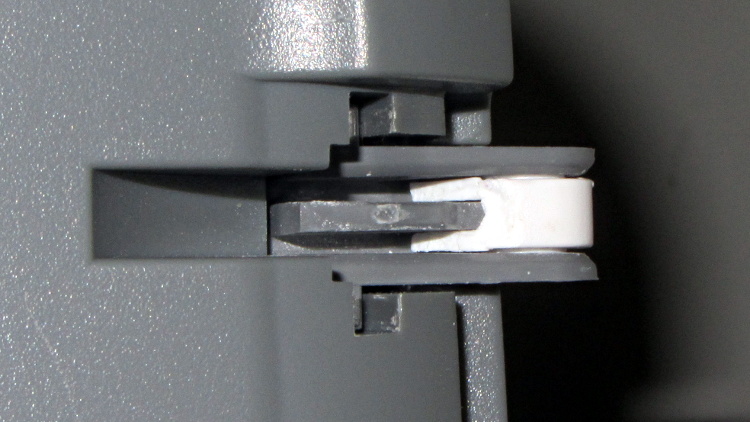
    When the second hinge on my father-in-law’s scanner broke, he asked if I could fix it:

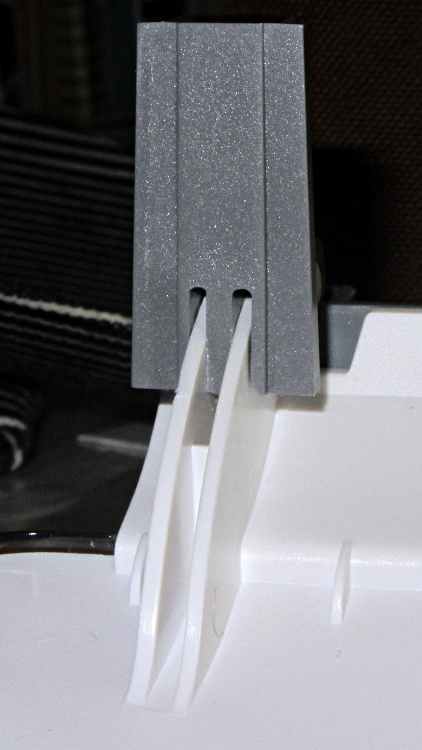
    HP3970 Scanjet Lid - broken hinge
    HP3970 Scanjet Lid – broken hinge

    It’s a flatbed scanner, so the lid is nearly 18 inches long and weighs 2.2 pounds with the slide / negative backlight illuminator. The stress raiser notches, located exactly where the cracks started, look like a perfect example of how not to do these things.

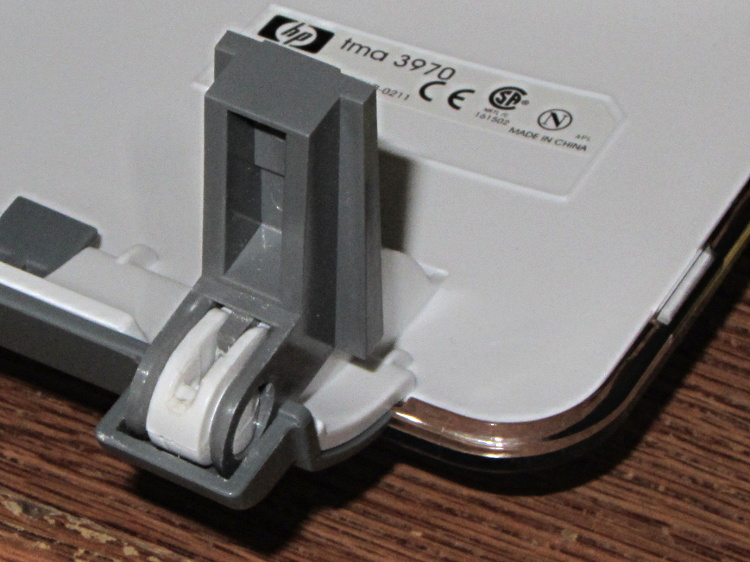
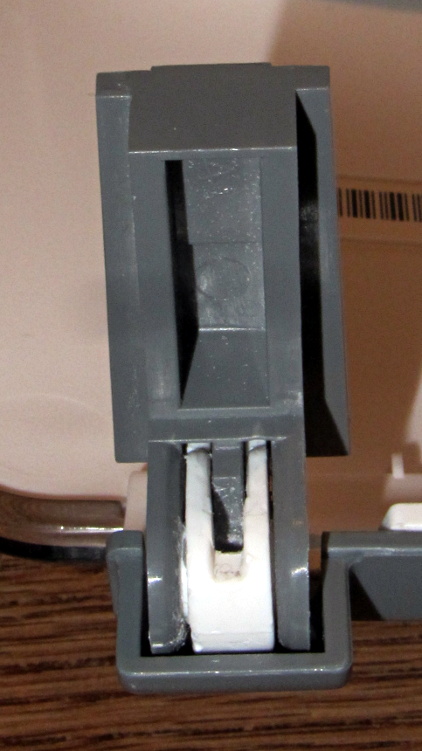
    I solvent-glued the hinges back together, with a square brass tube applying clamping force to the joint overnight, but this certainly won’t last for long:

    HP3970 Scanjet Lid - crude repair
    HP3970 Scanjet Lid – crude repair

    HP used to have some really smart engineers, but this looks like it was done by a Newkid (I was one, once, so I know the type) after a solid modeling and simulation session convinced him that those two thin plastic webs had enough strength for the job.

    No. They. Do. Not.

    Of course, HP provides no Official Way to repair that failure, as the hinges emerge seamlessly from the injection-molded plastic lid frame: you must scrap the scanner and buy a new one, because the lid would cost more than a new scanner. Equally of course, the fact that they don’t have a Windows driver beyond XP makes replacement a foregone conclusion.

    It runs under Xubuntu 12.04, mostly, which is what I set him up with after the XP PC got compromised.

  • Kindle Fire Security: Burn Them. Burn Them All.

    My Kindle Fire automagically updates itself whenever Amazon decides it should. Sometimes an update produces a notice that an app (why don’t we call them “programs” these days?) needs more permissions, but the process generally goes unremarked.

    This one wasn’t subtle at all:

    Kindle Fire - File Expert Trojan warning
    Kindle Fire – File Expert Trojan warning

    I had just fired up File Expert, which immediately dimmed the screen and presented a dialog box with only two unpalatable choices. Here’s a closeup:

    Kindle Fire - File Expert Trojan warning - detail
    Kindle Fire – File Expert Trojan warning – detail

    Well, what would you do?

    Needless to say, I didn’t press the Download Now button; it probably wouldn’t have worked anyway, because I turned off the Allow Installation of Applications from Unknown Sources option a long time ago. Pressing Exit bails out of the program app and returns to the Home screen.

    Some questions immediately spring to mind:

    • If the app has been compromised, exactly how did it regain control and complain about the situation?
    • If this is truly a compromised app, why wouldn’t the Trojan just download malware without asking?
    • How did this pass the ahem QC and auditing that allegedly justifies having a sole-source Amazon App Store? After all, I can load random crap from the Interweb onto a PC all by myself.
    • How does one validate the origin of those random security questions that regularly appear on various computer screens? Why wouldn’t malware just pop up a random dialog box asking for the password, any password, and gleefully use whatever you type?

    This appears to be a false positive, as explained there. I assume that any malware worth its salt would also kill off any built-in integrity checking, but what do I know? It’s gone missing from the storefront, probably cast forth into the outer darkness away from the light of Kindle Fires…