The Smell of Molten Projects in the Morning

Ed Nisley's Blog: Shop notes, electronics, firmware, machinery, 3D printing, laser cuttery, and curiosities. Contents: 100% human thinking, 0% AI slop.

Tag: MK4

Prusa Mk 4 3D printer with MMU3 feeder

  • PolyDryer Humidity vs. Spool Fill

    PolyDryer Humidity vs. Spool Fill

    The Basement Shop has 50±5% relative humidity, with the top held down by a hulking dehumidifier (plus a box fan stirring the air) and the bottom supported by being a basement. As a result, the 3D printer filament stabilized at about 50% RH, which seemed to work well enough for PETG.

    Adding TPU to the stable called for better humidity control, so I set up a bunch of PolyMaker PolyDryer boxes with Auto-rewind spindles.

    After a few weeks, though, I didn’t expect this:

    PolyDryer humidity vs spool fill
    PolyDryer humidity vs spool fill

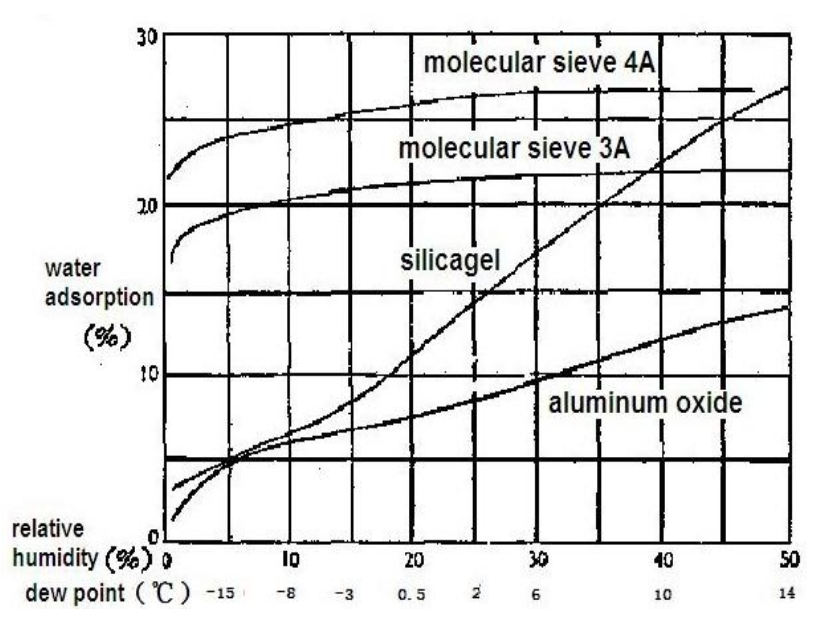
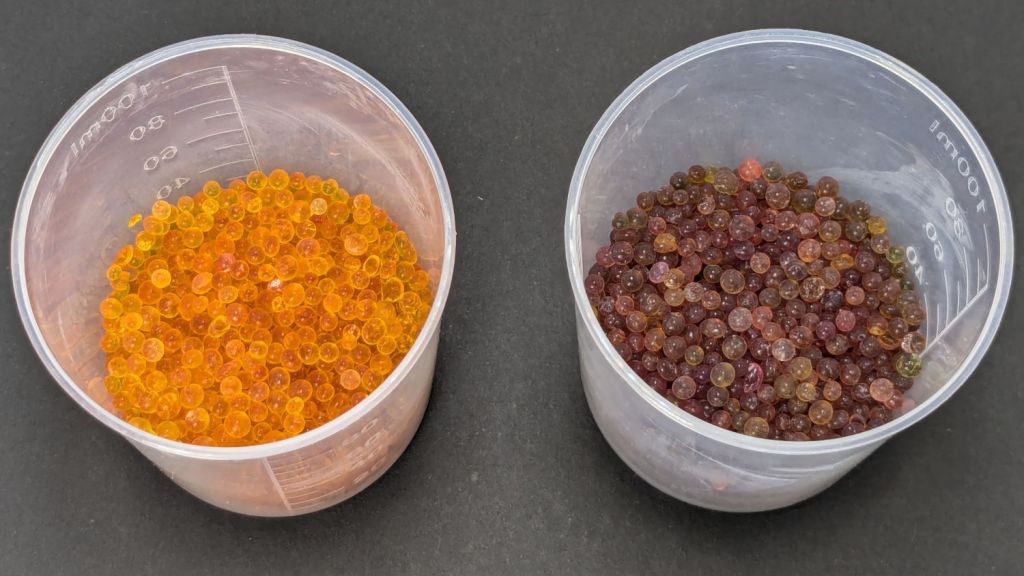
    That’s activated alumina desiccant, mostly because it’s reputed to have more capacity and a lower ultimate humidity than silica gel, but it likely doesn’t make much difference.

    In addition to 25 g of desiccant in the PolyDryer meter case, I dropped five teabags holding 10 g each in the bottom of the box for more capacity. I measure the desiccant by putting 75.0 g into a cup, putting 25.0 g in the PolyDryer meter box (aided by a Polydryer Desiccant Funnel), 10.0 g into four teabags, and whatever’s left into the fifth teabag, thus eliminating rounding errors in the smaller quantities.

    The stabilized humidity inside the boxes seems to depend on the amount of filament on the spool:

    • Nearly full → 25% to 30% RH
    • Half full → 20%-ish RH
    • Nearly empty → 10% to 15% RH

    I think the humidity level comes from the filament outgassing water vapor through its (limited) surface area on the outer layer around the spool. The difference between that rate and the desiccant’s ability to remove water vapor from the (unmoving) air in the box sets the stable humidity: more surface area → more water vapor → higher humidity.

    After the filament eventually dries out, the humidity should decrease, but diffusion is a slow process. More likely, the humidity will remain stable as the printer pulls filament from the outer layer and exposes the somewhat wetter plastic within.

    The heater and fan inside the PolyDryer base unit circulates hot air through the box around the spool, but depends on the desiccant to remove water vapor. Running the base unit for 6 or 12 hours makes little difference in the stabilized humidity, so I think the desiccant is doing the best it can as the filament outgasses more water vapor.

    Using Air Exchanger vents seems to make no difference, likely because the desiccant must then pull more water vapor out of the incoming 50% RH basement air. A psychrometric chart says 50% RH air at 60 °F becomes 10% RH air at 120 °F, but moisture in the filament wrapped around the spool can’t escape any faster.

    So, for example, a full spool of TPU starting at 25% RH:

    PolyDryer humidity - TPU start
    PolyDryer humidity – TPU start

    Six hours of drying pulls it down to 22%:

    PolyDryer humidity - TPU finish
    PolyDryer humidity – TPU finish

    After sitting overnight it’s back at 25%:

    PolyDryer humidity - TPU after 14 hr
    PolyDryer humidity – TPU after 14 hr

    Admittedly, that was with the vents in place, but the closed box started at 25% RH after sitting around for a week or so following a similar drying cycle.

    The desiccant had absorbed 4 g of water since I put it in, so it hasn’t been entirely idle.

    Which suggests 75 g of activated alumina desiccant is workin’ hard and doin’ swell in there, with the filament acting as an essentially infinite reservoir of water vapor.

    I haven’t noticed any particular difference in PETG print quality and the TPU hasn’t gotten enough mileage to notice much trouble, but reducing the MMU3 buffer clutter was totally worth the effort.

  • HQ Sixteen: Nose Ring Lights

    HQ Sixteen: Nose Ring Lights

    We don’t know what the proper term might be for this part of the machine, but it looks sorta like a nose and the lights form most of a ring around it, so I’m going with “Nose Ring Lights”:

    HQ Sixteen Nose Ring lights - front view
    HQ Sixteen Nose Ring lights – front view

    The general idea is to put more light on the quilt than the Chin Light, which looked pretty good until the COB LED strip started flickering as the LEDs failed.

    Handi-Quilter sells a ring light for machines manufactured a decade later than ours, but it uses a built-in USB jack this machine lacks.

    One of two (apparently) unused M4 holes on the left side of the machine frame suggested a mounting point for a 3D printed bracket:

    HQ Sixteen Nose Ring Lights - solid model
    HQ Sixteen Nose Ring Lights – solid model

    The ramp matches the 3° (-ish) mold draft of the machine frame, which I initially ignored by angling the tab, but a tilted frame looked awful; it’s now aligned with local horizontal..

    A few iterations got all the pieces & holes in their proper places:

    HQ Sixteen Nose Ring lights - iterations
    HQ Sixteen Nose Ring lights – iterations

    The smaller (rampless) bracket has three LED strips, but a quick test showed more light would be better:

    HQ Sixteen Nose Ring lights - bottom view
    HQ Sixteen Nose Ring lights – bottom view

    The lack of a transparent-ish cover is obviously unsuitable for a commercial product, but the key design goal is to not interfere with spreading as much light as possible across as much of the quilt as possible. The black JB Weld Plastic Bonder blobs keep the 24 VDC supply out of harm’s way, which is as good as it needs to be for now.

    The bracket has three sides, because the right side of the machine has all the thread guide hardware. Putting anything over there seemed likely to interfere with either thread movement or fingers making adjustments.

    Fortunately, the wider bracket doesn’t stick out too far beyond the machine frame and the doubled LED strips create a much smoother light pool:

    HQ Sixteen Nose Ring lights - left front view
    HQ Sixteen Nose Ring lights – left front view

    Yes, the quilt is focused and the LED frame is blurred.

    The larger light-emitting area reduces the shadow under the left rod (supporting the ruler foot) enough to be unobjectionable.

    A 0.2 mm layer thickness transforms the smooth ramp into stair steps:

    HQ Sixteen Nose Ring Lights - PrusaSlicer
    HQ Sixteen Nose Ring Lights – PrusaSlicer

    They’re inconspicuous after the bracket is installed.

    The Chin Light ran on 12 V and these strips require 24 V, so the OpenSCAD code creates a pair of endcaps for the new supply, which is of course completely different than the old supply. Setting that up must await quilt completion.

    The OpenSCAD source code as a GitHub Gist:

    // HQ Sixteen Nose Ring Lights
    // Ed Nisley – KE4ZNU
    // 2025-05-23
    include <BOSL2/std.scad>
    Layout = "Show"; // [Show,Build,NosePlan,PowerCap]
    // Number of side-by-side LED strips
    Strips = 2;
    /* [Hidden] */
    HoleWindage = 0.2;
    Protrusion = 0.1;
    NumSides = 3*3*4;
    $fn=NumSides;
    ID = 0;
    OD = 1;
    LENGTH = 2;
    Gap = 5.0;
    WallThick = 5.0; // default thickness for things
    NoseRadius = 6.0; // corner roundoff
    NoseOA = [44.0,36.5]; // overall nose size
    NoseAngles = [87,87]; // front & rear inward angles wrt left side
    NoseCenters = [ // centers of circles defining the nose corners
    [NoseRadius, NoseOA.y/2 – NoseRadius],
    [NoseRadius,-(NoseOA.y/2 – NoseRadius)],
    [NoseOA.x – NoseRadius, NoseOA.y/2 – NoseRadius – (NoseOA.x – 2*NoseRadius)*tan(90 – NoseAngles[0])],
    [NoseOA.x – NoseRadius,-(NoseOA.y/2 – NoseRadius – (NoseOA.x – 2*NoseRadius)*tan(90 – NoseAngles[1]))],
    ];
    LEDMargin = 1.0;
    LEDStrip = [41.5 + LEDMargin,8.0 + LEDMargin,1.8 + 0.2]; // 24 V COB LED strip unit + windage
    LEDBaseOA = [LEDStrip.x + Strips*LEDStrip.y,NoseOA.y + 2*Strips*LEDStrip.y,WallThick]; // LED mount
    DraftAngle = 3.0; // angle of frame wrt horizontal at right end of nose
    DraftWedge = [NoseOA.x,NoseOA.y + 2*LEDStrip.y,NoseOA.x*tan(DraftAngle)];
    HoleOffset = [-10.0,5.5,DraftWedge.z + 10.0]; // from left front corner of nose
    HolePosition = HoleOffset + [0,-NoseOA.y/2,WallThick]; // absolute coordinates from origin
    Screw = [4.0 + HoleWindage,9.0,2.0]; // LENGTH=button head
    Bracket = [WallThick,Screw[OD] + 4.0,HoleOffset.z + Screw[OD/2] + 2.0 + WallThick];
    Supply = [46.0,30.0,21.0]; // 24 VDC power supply
    SupplyScrewOffset = 5.0; // … M4 screw hole from end of supply case
    CapWall = 3.0;
    CapRadius = CapWall – 1.0;
    CapInset = 1.0;
    CapOA = [20.0,Supply.y + 2*CapWall,Supply.z + CapWall]; // x & y to cover existing holes
    //———-
    // Define Shapes
    //—– 2D outline of nose piece just under frame casting
    module NosePlan() {
    hull()
    for (p = NoseCenters)
    translate(p) circle(r=NoseRadius);
    }
    //—– LED mounting plate
    module Mount() {
    union() {
    difference() {
    union() {
    right(LEDBaseOA.x/2 – Strips*LEDStrip.y)
    cuboid(LEDBaseOA,rounding=WallThick/2,except=BOTTOM,anchor=BOTTOM);
    up(LEDBaseOA.z) left(-HoleOffset.x/2)
    yrot(DraftAngle)
    cuboid(DraftWedge,rounding=WallThick/2,edges="Z",anchor=LEFT+BOTTOM);
    }
    down(Protrusion)
    linear_extrude(LEDBaseOA.z + DraftWedge.z + Protrusion)
    NosePlan();
    if (Strips > 1)
    translate([HolePosition.x – Bracket.x/2,HolePosition.y – Bracket.y,-Protrusion])
    cyl(LEDBaseOA.z + 2*Protrusion,d=4.0,anchor=BOTTOM);
    }
    difference() {
    union() {
    translate([HolePosition.x,HolePosition.y,(Bracket.x/2)*sin(DraftAngle)])
    left(Bracket.x)
    cuboid(Bracket,rounding=WallThick/2,edges=LEFT,anchor=BOTTOM+LEFT);
    translate([HolePosition.x – Bracket.x/2,HolePosition.y,0]) // rounding filler
    cuboid([LEDStrip.y,Bracket.y,WallThick],anchor=BOTTOM+LEFT);
    }
    translate(HolePosition)
    xrot(180/6) xcyl(l=NoseOA.x,d=Screw[ID],$fn=6);
    }
    }
    }
    //—– Endcap for power supply
    module EndCap() {
    difference() {
    cuboid(CapOA,rounding=CapRadius,except=BOTTOM,anchor=LEFT+BOTTOM);
    right(CapOA.x – CapWall) down(Protrusion)
    cuboid(Supply + [0,0,Protrusion],anchor=RIGHT+BOTTOM);
    right(CapInset + SupplyScrewOffset)
    zcyl(l=2*CapOA.z,d=Screw[ID],$fn=6,anchor=BOTTOM);
    }
    }
    //———-
    // Build things
    if (Layout == "NosePlan") {
    NosePlan();
    }
    if (Layout == "PowerCap") {
    EndCap();
    }
    if (Layout == "Show") {
    Mount();
    ctr = 80;
    ofs = Supply.x/2 – CapInset;
    left(ctr – ofs)
    EndCap();
    left(ctr + ofs)
    xflip()
    EndCap();
    color("Silver",0.6)
    left (ctr)
    cuboid(Supply,anchor=BOTTOM);
    }
    if (Layout == "Build") {
    Mount();
    back((LEDBaseOA.y + CapOA.y)/2 + Gap) right(Gap) up(CapOA.z) zflip()
    EndCap();
    back((LEDBaseOA.y + CapOA.y)/2 + Gap) left(Gap) zrot(180) up(CapOA.z) zflip()
    EndCap();
    }

  • Sears Humidifier: Lid Hinge Re-repair

    Sears Humidifier: Lid Hinge Re-repair

    The longsuffering Sears Humidifier that Came With The House once again has functioning hinges:

    Sears Humidifier - lid hinge gluing setup
    Sears Humidifier – lid hinge gluing setup

    That’s the gluing “fixture” with enough steel piled on the lid to keep it from moving and machinist vises pushing / holding the hinge fragments in place.

    I used the same technique as before, with duct tape aligning the loose pieces and JB Plastic Bonder sticking them together:

    Sears Humidifier - right hinge outboard
    Sears Humidifier – right hinge outboard

    The other side of that hinge shows the broken section at the end of the molded void:

    Sears Humidifier - right hinge inboard
    Sears Humidifier – right hinge inboard

    The other hinge has a 3D printed replacement end:

    Sears Humidifier - left hinge inboard
    Sears Humidifier – left hinge inboard

    The other side shows there’s not much of the original hinge left:

    Sears Humidifier - left hinge outboard
    Sears Humidifier – left hinge outboard

    I very carefully installed the lid on the newly cleaned humidifier in the Basement Shop, where it flips up and down like anything.

    At the start of this year’s humidification season, I will very carefully carry the lid up the basement stairs to the Sewing Room and we’ll see how long it survives in actual use.

  • 3D Printer Filament Spool Washers

    3D Printer Filament Spool Washers

    The auto-rewind spindles for PolyDryer boxes fit a variety of spools, but recessed hubs like this require a pair of washers to center the spindles:

    Filament spool washers - recessed hub
    Filament spool washers – recessed hub

    They’re laser-cut, although you could print them easily enough:

    Filament spool washers - recessed hub - installed
    Filament spool washers – recessed hub – installed

    The size for that particular spool:

    • OD = 80 mm
    • Flange side ID = 51 mm
    • Nut side ID = 43
    • Thickness = ¼ inch, near enough

    Other spools required a 3 mm shim on the flange side to sit centered in the PolyDryer boxes. Those are basically identical what you see above, with a 72 mm OD matching the flange.

    The PETG-CF filament arrived on cardboard spools, which are apparently the new hotness:

    Filament spool washers - printed
    Filament spool washers – printed

    The 56 mm spool ID requires adapters on both sides, with the flange side getting a 4 mm shim:

    Filament spool washers - printed shim - flange side
    Filament spool washers – printed shim – flange side

    That skootches the spool over against the 1 mm shim on the nut side:

    Filament spool washers - printed - nut side
    Filament spool washers – printed – nut side

    It would be possible to modify the auto-rewind spindle diameters to suit, if you were a dab hand with Fusion360, but the variety of hubs around here tells me a set of cheap adapters & shims makes more sense.

    You should not assume anything will fit the spools you have, no matter how much they resemble what you see above.

    The OpenSCAD source code as a GitHub Gist:

    // Polymaker PolyDryer auto-rewind spool washers
    // Ed Nisley – KE4ZNU
    // 2025-05-20
    include <BOSL2/std.scad>
    Layout = "Show"; // [Show,Build]
    /* [Hidden] */
    HoleWindage = 0.2;
    Protrusion = 0.1;
    NumSides = 3*3*4;
    $fn=NumSides;
    ID = 0;
    OD = 1;
    LENGTH = 2;
    Gap = 5.0; // Build separation
    SpoolWidth = 20.0; // Show separation
    FlangeOD = 72.0; // auto-rewind spindle
    FlangeHubOD = 50.5 + 1.0;
    NutOD = 77.0;
    NutHubOD = 42.0 + 1.0;
    //———-
    // Define Shapes
    module EryOneCF(Side = "Flange") {
    SpoolID = 56.0 – 1.0;
    SpoolSideThick = 3.0;
    if (Side == "Flange")
    tube(4.0,od=FlangeOD,id=FlangeHubOD,anchor=BOTTOM) // flange side
    position(TOP)
    tube(SpoolSideThick,od=SpoolID,id=FlangeHubOD,anchor=BOTTOM);
    if (Side == "Nut")
    tube(1.0,od=NutOD,id=43.0,anchor=BOTTOM) // nut side
    position(TOP)
    tube(SpoolSideThick,od=SpoolID,id=NutHubOD,anchor=BOTTOM);
    }
    //———-
    // Build things
    if (Layout == "Show") {
    left(SpoolWidth/2) yrot(90) EryOneCF("Flange");
    right(SpoolWidth/2) yrot(-90) EryOneCF("Nut");
    }
    if (Layout == "Build") {
    left((FlangeOD + Gap)/2) EryOneCF("Flange");
    right((NutOD + Gap)/2) EryOneCF("Nut");
    }
  • 3D Printed 20×102mm Cartridge

    3D Printed 20×102mm Cartridge

    Having accumulated a box of empty 12 gram CO₂ capsules and having already done Too Many bomb fins:

    20x102mm cartridges
    20x102mm cartridges

    The capsule is obviously the wrong shape, too short, and only 19 mm diameter, but it’s the thought that counts.

    Apply the contour gauge to a genuine slightly battered 20×102mm cartridge:

    20x102mm cartridge tracing
    20x102mm cartridge tracing

    Scan the sketch, import into Inkscape, rotate the image to correct the case taper angle vs. the page, lay lines & curves around the perimeter, align half of it at the page origin to work with OpenSCAD, export as SVG:

    Cartridge - 20x102mm outline - Inkscape layout
    Cartridge – 20x102mm outline – Inkscape layout

    Import into OpenSCAD, let rotate_extrude do the heavy lifting, and remove some pieces:

    Cartridge Case - build view solid model
    Cartridge Case – build view solid model

    The little disk represents a fired primer you’d print separately in a different color and glue into the pocket shown in this cutaway view:

    Cartridge Case - cutaway solid model
    Cartridge Case – cutaway solid model

    The interior void could hold sand for additional heft, as the whole thing is obviously nose-heavy; that’s certainly in the nature of fine tuning. Obviously, we are not dealing with anything that could go bang.

    It builds just like you’d expect:

    20x102mm cartridge - printing
    20x102mm cartridge – printing

    Dab some adhesive on the capsule tip, ditto for the primer, stick them in place, and it’s all good.

    I like the gray PETG-CF version:

    20x102mm cartridges - blue gray PETG-CF
    20x102mm cartridges – blue gray PETG-CF

    Maybe not such a good idea in this day & age. Print responsibly, as they say.

    Update

    Print a sabot to fit a CO₂ capsule into a genuine steel cartridge.

    The solid model:

    Cartridge Case - sabot solid model
    Cartridge Case – sabot solid model

    The OpenSCAD making it happen:

    module Sabot() {
    tube(SabotOA[LENGTH],id=SabotOA[ID],od=SabotOA[OD],anchor=BOTTOM)
        position(BOTTOM)
          tube(SabotOA[LENGTH]/2,id=SabotOA[ID],od=CartridgeOA[ID],anchor=BOTTOM);
    }
    

    The result:

    20x102mm cartridges
    20x102mm cartridges

    The OpenSCAD source code (minus the sabot) and outline as a GitHub Gist:

    Loading
    Sorry, something went wrong. Reload?
    Sorry, we cannot display this file.
    Sorry, this file is invalid so it cannot be displayed.
    // 20x102mm cartridge
    // Ed Nisley – KE4ZNU
    // 2025-05-18
    include <BOSL2/std.scad>
    Layout = "Show"; // [Show,Build]
    Powder = true; // build internal void
    /* [Hidden] */
    ID = 0;
    OD = 1;
    LENGTH = 2;
    HoleWindage = 0.2;
    Protrusion = 0.1;
    NumSides = 3*3*4;
    $fn = NumSides;
    CartridgeOA = [21.0,29.5,101.4]; // must match SVG pretty closely
    PrimerOA = [2.0,8.0,2.0];
    CapsuleTip = [7.5,7.5,5.0];
    Capsule = [7.5,18.8 + HoleWindage,83];
    SeatingDepth = 25.0;
    Void = [CartridgeOA[ID]- 4.0,CartridgeOA[OD]- 4.0,CartridgeOA[LENGTH] – SeatingDepth – 4*PrimerOA[LENGTH]];
    //———-
    // Define shapes
    module Cartridge() {
    difference() {
    rotate_extrude()
    import("Cartridge – 20x102mm outline.svg",layer="Cartridge Aligned Half");
    up(PrimerOA[LENGTH])
    cyl(PrimerOA[LENGTH] + Protrusion,d=PrimerOA[OD],anchor=TOP);
    up(CartridgeOA[LENGTH] + CapsuleTip[LENGTH])
    cyl(SeatingDepth,d=Capsule[OD],anchor=TOP);
    up(CartridgeOA[LENGTH] – SeatingDepth)
    cyl(Void[LENGTH],d=CapsuleTip[OD],anchor=BOTTOM);
    if (Powder) {
    up(Void[LENGTH]/2)
    cyl(Void[LENGTH],d=CapsuleTip[OD],anchor=BOTTOM);
    up(2*PrimerOA[LENGTH])
    cyl(Void[LENGTH],d=Void[OD],rounding=Void[OD]/2,anchor=BOTTOM);
    down(Protrusion)
    cyl(Void[LENGTH],d=PrimerOA[ID],anchor=BOTTOM);
    }
    }
    }
    module Primer() {
    difference() {
    cyl(PrimerOA[LENGTH] – Protrusion,d=PrimerOA[OD] – HoleWindage,anchor=BOTTOM);
    up(PrimerOA[LENGTH])
    spheroid(d=PrimerOA[ID]);
    }
    }
    //———-
    // Build things
    if (Layout == "Show")
    //render()
    difference() {
    Cartridge();
    cuboid(3*CartridgeOA[LENGTH],anchor=LEFT+BACK);
    }
    if (Layout == "Build") {
    Cartridge();
    right(CartridgeOA[OD])
    Primer();
    }

  • Cusinart Smart Stick Blender Motor Coupler

    Cusinart Smart Stick Blender Motor Coupler

    When our stick blender (Cusinart CSB-77, with an instruction manual dated 2011) failed, I dropped fifteen bucks on the shortest one we could find, which turned out to be inconveniently long for the shorter member of the user community. The old one recently emerged from the depths of the bench for triage; the failure was in the coupler between the motor and the blade shaft, but required complete disassembly before trying to repair it.

    Pry out two obvious plastic plugs, remove two screws holding the top of the handle together, pull the handle apart, and reveal a PCB with a discrete diode bridge and an open-frame switch:

    Stick blender coupler - PCB
    Stick blender coupler – PCB

    Fortunately, the wire colors matched my preconception. Unsolder the wires to get that side of the handle off.

    Un-bend the tab holding the metal shell to the plastic frame and pull it off, whereupon the frame halves unsnap to release the motor:

    Stick blender coupler - shell removed
    Stick blender coupler – shell removed

    The white nylon (?) coupler on the motor shaft pries off the splined motor shaft:

    Stick blender coupler - motor shaft splines
    Stick blender coupler – motor shaft splines

    That black ring inside the coupler should be on the blade shaft:

    Stick blender coupler - blade shaft
    Stick blender coupler – blade shaft

    It apparently got jammed in the coupler when the shaft’s drive dogs / splines (barely visible down inside) ripped up the coupler. I don’t know if that was a sudden failure or the end result of gradually accumulating damage, but the inside of the coupler was badly chewed up.

    Dismantling the blade unit requires prying three plastic clips back, one at a time, while pushing upward on the intricate black plastic fitting around the shaft:

    Stick blender coupler - blade housing clips
    Stick blender coupler – blade housing clips

    That let me ease a drop of oil down the shaft to what looks and feels like a plastic sleeve bearing near the blade end of the housing; oil should not be needed on a plastic bearing, but it definitely improved the bearing’s attitude. The snap ring securing the shaft is far enough away to prevent me from even trying to remove it, because I know there is no way I can reinstall it:

    Stick blender coupler - blade shaft snap ring
    Stick blender coupler – blade shaft snap ring

    Some Xacto knife action removed the shredded plastic to reveal the remains of four slots for the blade shaft’s two drive dogs / splines:

    Stick blender coupler - OEM coupler end view
    Stick blender coupler – OEM coupler end view

    Measuring All. The. Things. produced a reasonable solid model of the slots:

    Stick Blender drive coupler - splines - solid model
    Stick Blender drive coupler – splines – solid model

    Removing those from a model of the coupler defined the shape:

    Stick Blender drive coupler - PrusaSlicer
    Stick Blender drive coupler – PrusaSlicer

    As usual, having one in hand let me check the fit and, after a few tweaks, the next one was Just Right™.

    The other end of the coupler is a simple cylinder sized for a firm press fit on the motor shaft splines:

    Stick blender coupler - new coupler detail
    Stick blender coupler – new coupler detail

    My coupler is chunkier than the OEM coupler, because there was enough room in there and PETG-CF, being weaker than nylon, needs all the help it can get:

    Stick blender coupler - new coupler installed
    Stick blender coupler – new coupler installed

    It’s one of the few things I’ve printed with 100% infill. If when that plastic fails, I’ll try something else.

    Put the little rubber ring on the blade shaft and reassemble everything in reverse order:

    Stick blender coupler - mating ends
    Stick blender coupler – mating ends

    The blender works as well as it ever did, while the halves couple and uncouple the way they should, so we’ll declare victory and keep the new blender as a backup.

    The OpenSCAD source code as a GitHub Gist:

    // Stick Blender drive coupler
    // Ed Nisley – KE4ZNU
    // 2025-05-16
    include <BOSL2/std.scad>
    Layout = "Show"; // [Show,Build,Splines]
    /* [Hidden] */
    HoleWindage = 0.2;
    Protrusion = 0.1;
    NumSides = 3*3*4;
    ID = 0;
    OD = 1;
    LENGTH = 2;
    ShellOA = [5.0,14.0,28.0]; // ID=motor shaft
    MixerSocket = [6.6,0,17.2]; // passes rubber retainer
    Retainer = [3.0,6.5,5.5]; // ID=mixer shaft,OD=rubber ring
    RetainerRebate = [Retainer[ID],3.9,1.5]; // … fits under shaft lip
    DriveSocket = [6.7,8.8,12.0]; // OD=notch OD
    DriveNotch = [(DriveSocket[OD] – DriveSocket[ID])/2,1.5,DriveSocket[LENGTH]]; // … drive notch shape on +X
    DriveChamfer = -DriveNotch.y;
    $fn = NumSides;
    //———-
    // Define Shapes
    module Splines() {
    render()
    for (a = [0:90:270])
    zrot(a)
    right(DriveSocket[ID]/2 – Protrusion)
    cuboid(DriveNotch + [Protrusion,0,0],chamfer=DriveChamfer,edges=[TOP+FWD,TOP+BACK],anchor=LEFT+BOTTOM);
    }
    module Coupler() {
    difference() {
    tube(ShellOA[LENGTH],id=ShellOA[ID],od=ShellOA[OD],anchor=BOTTOM);
    up(ShellOA[LENGTH] – MixerSocket[LENGTH])
    cyl(Retainer[LENGTH],d=Retainer[OD],anchor=BOTTOM);
    up(ShellOA[LENGTH] + Protrusion)
    cyl(DriveSocket[LENGTH] + Protrusion,d=DriveSocket[ID],anchor=TOP);
    up(ShellOA[LENGTH] – DriveNotch[LENGTH] + Protrusion)
    Splines();
    }
    }
    //———-
    // Build things
    if (Layout == "Splines")
    Splines();
    if (Layout == "Show")
    Coupler();
    if (Layout == "Build")
    Coupler();

  • Humidifier Float Clip Replacement

    Humidifier Float Clip Replacement

    This being the end of the humidifcation season, I tried to set the longsuffering Sears Humidifier’s water level float to dry the thing out. After a few days, it became obvious that wasn’t working and I eventually found the clip intended to hold the float at the top of its travel had broken:

    Humidifier float clips - on float
    Humidifier float clips – on float

    Building the retina-burn orange replacement started with a scan of the original:

    Humidifier float clip
    Humidifier float clip

    The black segment at the bottom is a shadow due to the scanner’s light bar being offset from the imaging sensor.

    Using GIMP, duplicate the remaining part of the latch, flip it left-to-right, then align it at the proper position:

    Humidifier float clip - repaired
    Humidifier float clip – repaired

    The latch is the only tricky part and the ID of the ring is easy to locate, so (still in GIMP):

    • Trace the edge of the whole shape
    • Using Quick Mask mode, remove all but the latch
    • Convert the selection to a path
    • Export it as an SVG file

    Then import it into OpenSCAD and eyeballometrically translate the shape to put the ring ID at the origin:

      color("Red")
        translate([-23.6,-42.6])
          import("Humidifier float clip - cabinet latch.svg");


    Which looks like this:

    Float clip - 2D latch
    Float clip – 2D latch

    Then glom a perfect ring onto it:

    Float clip - 2D model parts
    Float clip – 2D model parts

    Extrude half an inch upward:

    Float clip - extruded model
    Float clip – extruded model

    And It Just Works™:

    Humidifier float clip - installed
    Humidifier float clip – installed

    There being no obvious affordance to get the ring over the two bumps in the float, I applied Channellock pliers to the float while easing the ring into place.

    Re-rebuilding the hinges sits behind a few other things going on around here …