Ed Nisley's Blog: Shop notes, electronics, firmware, machinery, 3D printing, laser cuttery, and curiosities. Contents: 100% human thinking, 0% AI slop.
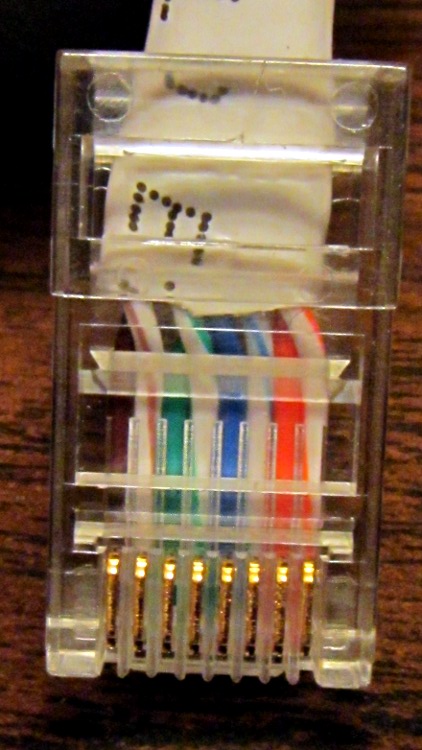
Yeah, the blue-stripe and green-stripe wires should be interchanged. Turns out the Link indicators on both ends lit up just fine, but no bits made it across the wire. Took quite a while to figure that one out, alas.
Turns out I was moving that router upstairs to get a better signal for folks out in the driveway and snaking the cable through the only suitable (i.e., existing) hole in the floor required cutting the molded-in-place connector off, then crimping a new one on. Both you and I know those wires must cross, but in the excitement of pushing all those wires into the connector, well … so it goes.
A useful explanation, including crossover and POE cable arrangements, lives there.
I did wrap silicone tape around the cable and connector butt for strain relief.
Memo to Self: just verifying the colors on the existing cable sometimes isn’t good enough!
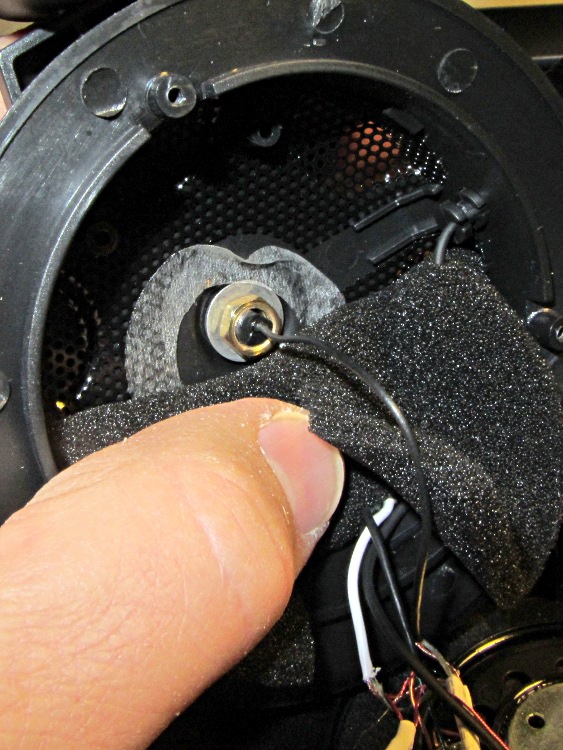
I picked up a Lenovo headset on sale and over the course of a few weeks the mic boom pivot worked itself loose, until I finally dismantled the left ear cup to see what was inside. Come to find out that the mic boom has a molded threaded section held into the cup with a simple nut and no locking mechanism at all:
Lenovo headset – OEM mic boom pivot nut
I think the metal washer was intended as a low-friction pivot atop the compliant silicone (?) washer underneath, but the net effect was that the nut unscrewed a little bit more every time the mic boom moved. By the time I got in there, the nut was completely off the threads.
The original nut left a thread or two showing, so I found a thicker replacement nut with a better grip. The obvious solution involves a dab of Loctite to jam the nut in position, but we all know that some plastics, most notably acrylic, react badly to threadlocker and tend to disintegrate. Although I considered just epoxying the nut in place, that seems so, well, permanent.
So I dutifully tested a dab of Loctite on an inconspicuous spot inside the ear cup, got no reaction at all, put a drop on the boom pivot threads, and reassembled everything:
Lenovo headset – replacement mic boom pivot nut
Alas, by the time I got back upstairs and hung the mic on the rack, the boom fell completely out of the earcup! Back in the Basement Laboratory, I dismantled the thing again and confronted this mess:
Lenovo headset- Acrylic plastic vs. threadlock
Huh. The ear cup isn’t made of the same plastic as the mic boom: one shrugs off threadlock, the other disintegrates.
That’s obvious in retrospect, eh?
The only threads that aren’t ruined lie completely within the ear cup frame, with just a stub sticking up around the wire. So I cleaned things up and did what I should have done originally: put a dab of epoxy inside the nut to bind the pivot firmly in place. A snippet of unshrunk heatshrink tubing around the wire provides a bit of strain relief:
Lenovo headset – boom pivot nut with epoxy
There’s no longer any space for the compliant washer in that stack, so we’ll see how long this lasts. The next repair will certainly venture far inside non-economical territory. I like the headphones, though.
Memo to Self: Check in an inconspicuous spot on the same material.
One of the battery packs I’d re-rebuilt failed in short order, which I wrote off to a bad cell and tossed it on the heap. Having recently found a small stack of Round Tuits, I’ve been cleaning off the bench and took the pack apart again. Turns out I blundered the solder joint between the positive cell terminal and the protective circuit board: the strap in the foreground joining those two points didn’t make a good connection to the cells.
That’s an awkward joint at best, because the protective circuit doesn’t come willingly out of the housing and you (well, I) must solder it without scorching the cells, the plastic case, or the PCB. It can be done, but it’s not easy.
Charged it up and it’s back in the A/B/C pack rotation again.
Memo to Self: Tough to find good repairmen these days, eh?
The plastic handle for the rear hatch snapped as I opened it to load some groceries. I slapped some tape over the opening to keep the loose parts from falling out on the way home: if you lose the parts, you’ve lost the game.
It turns out that the hatch doesn’t have an interior handle:
Sienna van hatch – interior
So we unloaded the groceries through the side doors, crawling over the middle seats. We don’t use the van all that much, but this was the height of the Vassar Farms garden setup season and we needed the back end for fenceposts, deer fencing, and suchlike.
Searching with the obvious keywords shows that this is a common problem for Toyota Sienna vans, many people experience it just a few years after buying a new van, it’s an extremely expensive dealer repair ($75-ish for the handle and $300-ish for labor half a decade ago), and that the Genuine Toyota replacement handle is made of the same plastic and tends to break the same way in short order. I ordered a metal handle from the usual eBay supplier for $20 and it should arrive shortly.
But an expedient repair is in order…
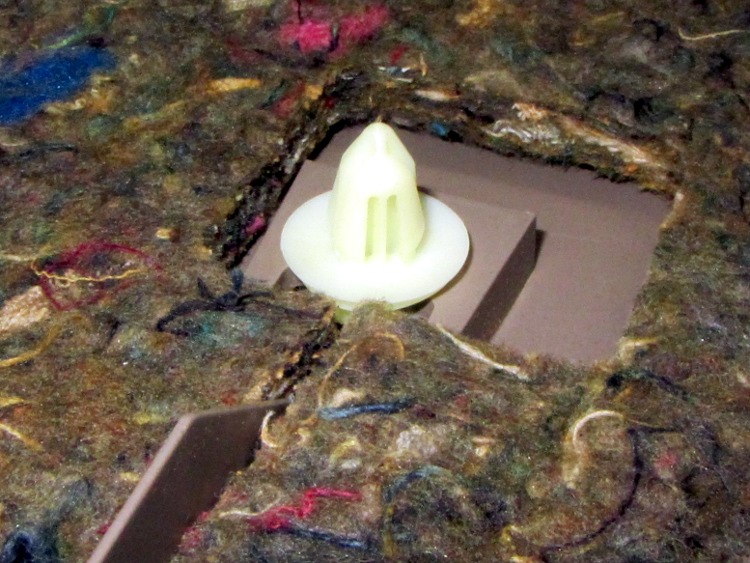
Pull the trim plates off the grab handle and dangling strap, apply a 10 mm socket to the three bolts thus exposed, work fingers under the cover near the latch near the center bottom, pull hard, and work your fingers around the cover as the dozen-or-so expanding button rivet fasterer thingies pop free with alarming sounds:
Sienna hatch – trim fasteners
The handle / latch handle assembly fits neatly between the exterior bodywork and the interior hatch frame, where it’s barely visible. The claw-like doodad sticking up from the left should pull down on the metal (!) lever just above it, which pivots on a pin and pulls upward on a cable (the round button visible near the top of the assembly) that actually does the unlatching:
broken latch
Remove the three nuts (one visible in that picture), squeeze the expanding plastic snap with pliers, and push it through the hole. Then you can loosen the bezel holding the handle assembly and the two license plate lamps:
Sienna hatch – bezel released
Disconnect the lamp cable connector, push the sealing button through the hole with a screwdriver, and then you can pull the entire bezel off the hatch. That exposes the problem:
Sienna hatch – latch parts
You can’t quite see the two screws that secure the handle assembly to the bezel, but they’re just inboard of the two bolts that hold it to the hatch. Undo those, remove the Jesus Clip from the long rod, slide it out, and extract the handle. That claw-like doodad snapped off the plastic handle:
Sienna hatch – handle
Of course, it’s an engineering plastic that shrugs off ordinary solvent glue, which you wouldn’t trust for a permanent repair anyway. The general ideal is to reposition the broken part, epoxy it in place, drill a hole through it and the handle, run a long 4-40 screw through the mess, and butter it up with more epoxy.
The first step is to put the two pieces in the right alignment and secure them well enough to permit drilling. Other folks swear by cyanoacrylates, but for a job like this I invoke the mantra The Bigger the Blob, the Better the Job. Believe it or not, the broken part stands on its own amid the epoxy around its base:
Sienna hatch – handle epoxy
Unfortunately, it tilted slightly, but not enough to matter, as the epoxy cured. I couldn’t figure out how to both hold it in position and hold it in exact alignment on the handle; maybe positioning a few clamps around it would have been better. In any event, the result was close enough.
Grab the handle in the drill press, align the claw vertically, face it with an end mill to let a twist drill start properly, and drill right down the middle:
Sienna hatch – handle drilling
Flip it over, use the same drill to align the bore, and mill a counterbore for the screw head:
Sienna hatch – handle counterboring
That may not be strictly necessary, but there’s not much clearance between the handle and the rest of the frippery in the assembly. Reduce the diameter of the screw head to fit the counterbore, do the same for the nut that’ll go on the other end:
Sienna hatch – nut shaping
Butter up the counterbore with epoxy, slide the screw in place, secure with the nut, and butter up that end, too. Reassemble everything and you can see how far off-center the claw is:
Sienna hatch – latch rebuilt
You can just barely make out the epoxy blob covering the nut below the claw, but it still engages the metal lever that will pull the cable:
Sienna hatch – latch assembly
Reassemble everything in reverse order and it works fine. I left the interior trim cover off, pending installing the metal replacement handle, and discovered that the brake lights spill plenty of light inside the van after dark.
Memo to Self: The fixtures are the hardest part of any adhesive repair. Get those right and the rest is easy!
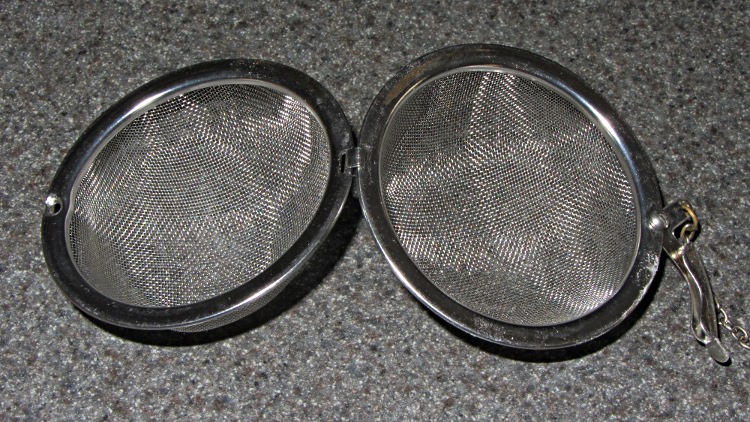
That tea ball (OK, infuser) hasn’t killed me yet, but it was looking rather grody despite a more-or-less monthly run through the dishwasher. So when Mary made up a bleach solution to sterilize her plant starting pots, I tossed it into the bottom of the pan for half an hour:
Bleached tea ball
Zowie! All the organic schmutz vanished, leaving it as good-looking as new.
It was such a small potato that it didn’t need a nail and, somehow, didn’t get punctured before going into the oven. When it came out, the first touch of the fork detonated the thing:
Exploded Potato
Memo to self: always puncture potatoes before baking!
Although reading PDF documents on the shining screen works fine for some topics, I’d much rather curl up with a printed version for the first read-through. Adobe Reader’s print-as-booklet option does all the heavy lifting required to print a PDF document four pages to a single Letter-size sheet of paper, after which I do a little slicing & binding to get a nice comb-bound book.
So I printed out the entire EAGLE 6 manual (found in /wherever/eagle-6.1.0/doc/), which led to the discovery that page 86 is missing (at least in the 1st edition version). That screws up the pagination from page 87 onward: odd-numbered pages move to the left side of the binding, even-numbered pages to the right, and the blank space reserved for the gutter / binding appears on the outside margins. Fortunately, it’s still readable.
To avoid that problem, do this:
Print Range → Pages → [1-85,301,86-334]
That selects the first set of contiguous pages, jams a copy of a “This page has been left free intentionally” page from the back of the manual in place of the missing page 86, and then selects the rest of the book.
Print the front sides, flip the stack over, print the back sides (with the same page range), and bind as usual.
FWIW, this is much better than having the printer mis-feed about 3/4 of the way through the back sides, which it has done in the past while printing a big book. I now run off about 20 sheets at a time, with only that many pieces of paper in the feeder, just to make sure it doesn’t ruin the entire job.
One could, I suppose, use pdftk to shuffle the PDF into a complete file which would Just Work, but that seems like more trouble than it’s worth. Ditto for expecting CadSoft to re-create the PDF.
Memo to Self: Check the last page. If the logical page doesn’t match what’s shown on the PDF page, then something’s wrong.





 The Smell of Molten Projects in the Morning